by David Rice
Prevents conflicts between concurrent business transactions by detecting a conflict and rolling back the transaction.
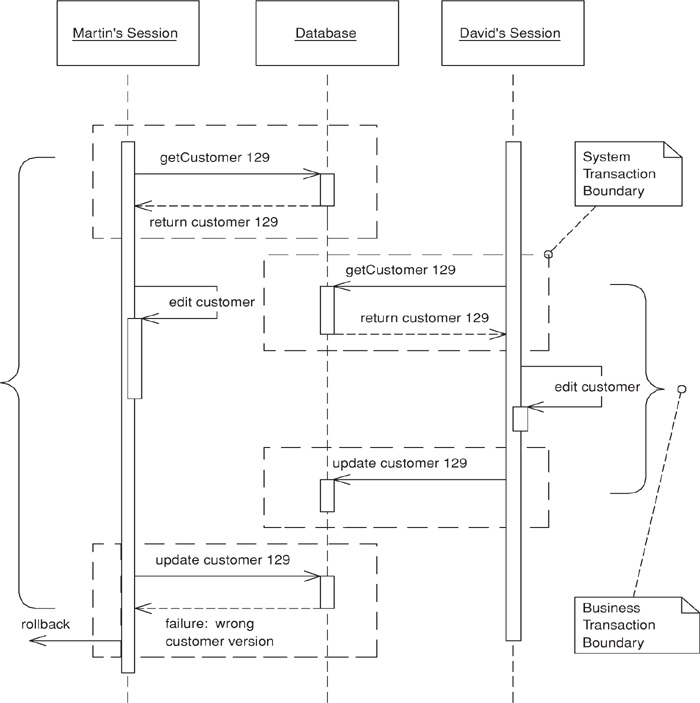
Often a business transaction executes across a series of system transactions. Once outside the confines of a single system transaction, we can’t depend on our database manager alone to ensure that the business transaction will leave the record data in a consistent state. Data integrity is at risk once two sessions begin to work on the same records and lost updates are quite possible. Also, with one session editing data that another is reading an inconsistent read becomes likely.
Optimistic Offline Lock solves this problem by validating that the changes about to be committed by one session don’t conflict with the changes of another session. A successful pre-commit validation is, in a sense, obtaining a lock indicating it’s okay to go ahead with the changes to the record data. So long as the validation and the updates occur within a single system transaction the business transaction will display consistency.
Whereas Pessimistic Offline Lock (426) assumes that the chance of session conflict is high and therefore limits the system’s concurrency, Optimistic Offline Lock assumes that the chance of conflict is low. The expectation that session conflict isn’t likely allows multiple users to work with the same data at the same time.
An Optimistic Offline Lock is obtained by validating that, in the time since a session loaded a record, another session hasn’t altered it. It can be acquired at any time but is valid only during the system transaction in which it is obtained. Thus, in order that a business transaction not corrupt record data it must acquire an Optimistic Offline Lock for each member of its change set during the system transaction in which it applies changes to the database.
The most common implementation is to associate a version number with each record in your system. When a record is loaded that number is maintained by the session along with all other session state. Getting the Optimistic Offline Lock is a matter of comparing the version stored in your session data to the current version in the record data. Once the verification succeeds, all changes, including an increment of the version, can be committed. The version increment is what prevents inconsistent record data, as a session with an old version can’t acquire the lock.
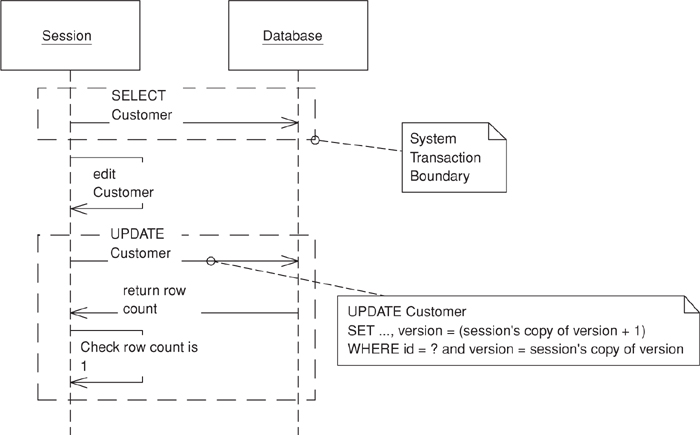
With an RDBMS data store the verification is a matter of adding the version number to the criteria of any SQL statements used to update or delete a record. A single SQL statement can both acquire the lock and update the record data. The final step is for the business transaction to inspect the row count returned by the SQL execution. A row count of 1 indicates success; 0 indicates that the record has been changed or deleted. With a row count of 0 the business transaction must rollback the system transaction to prevent any changes from entering the record data. At this point the business transaction must either abort or attempt to resolve the conflict and retry.
In addition to a version number for each record, storing information as to who last modified a record and when can be quite useful when managing concurrency conflicts. When informing a user of a failed update due to a concurrency violation a proper application will tell when the record was altered and by whom. It’s a bad idea to use the modification timestamp rather than a version count for your optimistic checks because system clocks are simply too unreliable, especially if you’re coordinating across multiple servers.
In an alternative implementation the where clause in the update includes every field in the row. The advantage here is that you can use the where clause without using some form of version field, which can be handy if you can’t add a version field by altering the database tables. The problem is that this complicates the UPDATE statement with a potentially large where clause, which may also be a performance impact depending on how clever the database is about using the primary key index.
Figure 16.1. UPDATE optimistic check.
Often implementing Optimistic Offline Lock is left at including the version in UPDATE and DELETE statements, but this fails to address the problem of an inconsistent read. Think of a billing system that creates charges and calculates appropriate sales tax. A session creates the charge and then looks up the customer’s address to calculate the tax on it, but during the charge generation session a separate customer maintenance session edits the customer’s address. As tax rates depend on location, the rate calculated by the charge generation session might be invalid, but since the charge generation session didn’t make any changes to the address the conflict won’t be detected.
There’s no reason why Optimistic Offline Lock can’t be used to detect an inconsistent read. In the example above the charge generation session needs to recognize that its correctness depends on the value of the customer’s address. It therefore should perform a version check on the address as well, perhaps by adding the address to the change set or maintaining a separate list of items to be version-checked. The latter requires a bit more work to set up, but results in code that more clearly states its intent. If you’re checking for a consistent read simply by rereading the version rather than an artificial update, be especially aware of your system transaction isolation level. The version reread will only work with repeatable read or stronger isolation. Anything weaker requires an increment of the version.
A version check might be overkill for certain inconsistent read problems. Often a transaction depends only on the presence of a record or maybe the value of only one of its fields. In such a case you might improve your system’s liveliness by checking conditions rather than the version, as fewer concurrent updates will result in the failure of competing business transactions. The better you understand your concurrency issues, the better you can manage them in your code.
The Coarse-Grained Lock (438) can help with certain inconsistent read conundrums by treating a group of objects as a single lockable item. Another option is to simply execute all of the steps of the problematic business transaction within a long-running transaction. The ease of implementation might prove worth the resource hit of using a few long transactions here and there.
Detection of an inconsistent read gets a bit difficult when your transaction is dependent on the results of a dynamic query rather than the reading of specific records. It’s possible for you to save the initial results and compare them to the results of the same query at commit time as a means of obtaining an Optimistic Offline Lock.
As with all locking schemes, Optimistic Offline Lock by itself doesn’t provide adequate solutions to some of the trickier concurrency and temporal issues in a business application. I can’t stress enough that in a business application concurrency management is as much a domain issue as it is a technical one. Is the customer address scenario above really a conflict? It might be okay that I calculated the sales tax with an older version of the customer, but which version should I actually be using? This is a business issue. Or consider a collection. What if two sessions simultaneously add items to a collection? The typical Optimistic Offline Lock scheme won’t prevent this even though it might very well be a violation of business rules.
There’s one system using Optimistic Offline Locks that we all should be familiar with: source code management (SCM). When an SCM system detects a conflict between programmers it usually can figure out the correct merge and retry the commit. A quality merge strategy makes Optimistic Offline Lock very powerful not only because the system’s concurrency is quite high but because users rarely have to redo any work. Of course, the big difference between an SCM system and an enterprise business application is that the SCM must implement only one type of merge while the business system might implement hundreds. Some might be of such complexity that they’re not worth the cost of coding. Others might be of such value to the business that the merge should be coded by all means. Despite rarely being done, the merging of business objects is possible. In fact, merging business data is a pattern unto its own. I’ll leave it at that rather than butcher the topic, but do understand the power that merging adds to Optimistic Offline Lock.
Optimistic Offline Lock only lets us know during the last system transaction if a business transaction will commit. But it’s occasionally useful to know earlier if a conflict has occurred. For this you can provide a checkCurrent method that checks if anyone else has updated the data. It can’t guarantee that you won’t get a conflict, but it may be worthwhile to stop a complicated process if you can tell in advance that it won’t commit. Use this checkCurrent at any time that failing early may be useful, but remember that it never guarantees that you won’t fail at commit time.
Optimistic concurrency management is appropriate when the chance of conflict between any two business transactions is low. If conflicts are likely it’s not user friendly to announce one only when the user has finished his work and is ready to commit. Eventually he’ll assume the failure of business transactions and stop using the system. Pessimistic Offline Lock (426) is more appropriate when the chance of conflict is high or the expense of a conflict is unacceptable.
As optimistic locking is much easier to implement and not prone to the same defects and runtime errors as a Pessimistic Offline Lock (426), consider using it as the default approach to business transaction conflict management in any system you build. The pessimistic version works well as a complement to its optimistic counterpart, so rather than asking when to use an optimistic approach to conflict avoidance, ask when the optimistic approach alone isn’t good enough. The correct approach to concurrency management will maximize concurrent access to data while minimizing conflicts.
The shortest example of Optimistic Offline Lock would involve only a database table with a version column and UPDATE and DELETE statements that use that version as part of their update criteria. Of course, you’ll be building more sophisticated applications so I present an implementation using a Domain Model (116) and Data Mappers (165). This will reveal more of the issues that commonly arise when implementing Optimistic Offline Lock.
One of the first things to do is to make sure that your domain Layer Supertype (475) is capable of storing any information required to implement Optimistic Offline Lock—namely, modification and version data.
class DomainObject...
private Timestamp modified;
private String modifiedBy;
private int version;
Our data is stored in a relational database, so each table must also store version and modification data. Here’s the schema for a customer table as well as the standard CRUD SQL necessary to support the Optimistic Offline Lock:
table customer...
create table customer(id bigint primary key, name varchar, createdby varchar,
created datetime, modifiedby varchar, modified datetime, version int)
SQL customer CRUD...
INSERT INTO customer VALUES (?, ?, ?, ?, ?, ?, ?)
SELECT * FROM customer WHERE id = ?
UPDATE customer SET name = ?, modifiedBy = ?, modified = ?, version = ?
WHERE id = ? and version = ?
DELETE FROM customer WHERE id = ? and version = ?
Once you have more than a few tables and domain objects, you’ll want to introduce a Layer Supertype (475) for your Data Mappers (165) that handles the tedious, repetitive segments of O/R mapping. This not only saves a lot of work when writing Data Mappers (165) but also allows the use of an Implicit Lock (449) to prevent a developer from subverting a locking strategy by forgetting to code a bit of locking mechanics.
The first piece to move into your abstract mapper is SQL construction. This requires that you provide mappers with a bit of metadata about your tables. An alternative to having your mapper build SQL at runtime is to code-generate it. However, I’ll leave the construction of SQL statements as an exercise for the reader. In the abstract mapper below you’ll see that I’ve made a number of assumptions about the column names and positions for our modification data. This becomes less feasible with legacy data. The abstract mapper will likely require a bit of column metadata to be supplied by each concrete mapper.
Once the abstract mapper has SQL statements it can manage the CRUD operations. Here’s how a find executes:
class AbstractMapper...
public AbstractMapper(String table, String[] columns) {
this.table = table;
this.columns = columns;
buildStatements();
}
public DomainObject find(Long id) {
DomainObject obj = AppSessionManager.getSession().getIdentityMap().get(id);
if (obj == null) {
Connection conn = null;
PreparedStatement stmt = null;
ResultSet rs = null;
try {
conn = ConnectionManager.INSTANCE.getConnection();
stmt = conn.prepareStatement(loadSQL);
stmt.setLong(1, id.longValue());
rs = stmt.executeQuery();
if (rs.next()) {
obj = load(id, rs);
String modifiedBy = rs.getString(columns.length + 2);
Timestamp modified = rs.getTimestamp(columns.length + 3);
int version = rs.getInt(columns.length + 4);
obj.setSystemFields(modified, modifiedBy, version);
AppSessionManager.getSession().getIdentityMap().put(obj);
} else {
throw new SystemException(table + " " + id + " does not exist");
}
} catch (SQLException sqlEx) {
throw new SystemException("unexpected error finding " + table + " " + id);
} finally {
cleanupDBResources(rs, conn, stmt);
}
}
return obj;
}
protected abstract DomainObject load(Long id, ResultSet rs) throws SQLException;
There are a few items of note here. First, the mapper checks an Identity Map (195) to make sure that the object isn’t loaded already. Not using an Identity Map (195) could result in different versions of an object being loaded at different times in a business transaction, leading to undefined behavior in your application as well as make a mess of any version checks. Once a result set is obtained the mapper defers to an abstract load method that each concrete mapper must implement to extract its fields and return an activated object. The mapper calls setSystemFields() to set the version and modification data on the abstract domain object. While a constructor might seem the more appropriate means of passing this data, doing so would push part of the version storage responsibility down to each concrete mapper and domain object and thus weaken the Implicit Lock (449).
Here’s what a concrete load() method looks like:
class CustomerMapper extends AbstractMapper...
protected DomainObject load(Long id, ResultSet rs) throws SQLException {
String name = rs.getString(2);
return Customer.activate(id, name, addresses);
}
The abstract mapper will similarly manage execution of update and delete operations. The job here is to check that the database operation returns a row count of 1. If no rows have been updated, the optimistic lock can’t be obtained and the mapper must then throw a concurrency exception. Here is the delete operation:
class AbstractMapper...
public void delete(DomainObject object) {
AppSessionManager.getSession().getIdentityMap().remove(object.getId());
Connection conn = null;
PreparedStatement stmt = null;
try {
conn = ConnectionManager.INSTANCE.getConnection();
stmt = conn.prepareStatement(deleteSQL);
stmt.setLong(1, object.getId().longValue());
int rowCount = stmt.executeUpdate();
if (rowCount == 0) {
throwConcurrencyException(object);
}
} catch (SQLException e) {
throw new SystemException("unexpected error deleting");
} finally {
cleanupDBResources(conn, stmt);
}
}
protected void throwConcurrencyException(DomainObject object) throws SQLException {
Connection conn = null;
PreparedStatement stmt = null;
ResultSet rs = null;
try {
conn = ConnectionManager.INSTANCE.getConnection();
stmt = conn.prepareStatement(checkVersionSQL);
stmt.setInt(1, (int) object.getId().longValue());
rs = stmt.executeQuery();
if (rs.next()) {
int version = rs.getInt(1);
String modifiedBy = rs.getString(2);
Timestamp modified = rs.getTimestamp(3);
if (version > object.getVersion()) {
String when = DateFormat.getDateTimeInstance().format(modified);
throw new ConcurrencyException(table + " " + object.getId() +
" modified by " + modifiedBy + " at " + when);
} else {
throw new SystemException("unexpected error checking timestamp");
}
} else {
throw new ConcurrencyException(table + " " + object.getId() +
" has been deleted");
}
} finally {
cleanupDBResources(rs, conn, stmt);
}
}
The SQL used to check the version in a concurrency exception also needs to be known by the abstract mapper. Your mapper should construct it when it constructs the CRUD SQL. It will look something like this:
checkVersionSQL...
SELECT version, modifiedBy, modified FROM customer WHERE id = ?
This code doesn’t give much of a feel for the various pieces executing across multiple system transactions within a single business transaction. The most important thing to remember is that acquisition of Optimistic Offline Locks must occur within the same system transaction that holds the commit of your changes in order to maintain record data consistency. With the check bundled into UPDATE and DELETE statements this won’t be a problem.
Take a look at the use of a version object in the Coarse-Grained Lock (438) sample code. While Coarse-Grained Lock (438) can solve some inconsistent read problems, a simple nonshared version object can help detect inconsistent reads because it’s a convenient place to add optimistic check behavior such as increment() or checkVersionIsLatest(). Here’s a Unit of Work (184) where we add consistent read checks to our commit process via the more drastic measure of incrementing the version because we don’t know the isolation level:
class UnitOfWork...
private List reads = new ArrayList();
public void registerRead(DomainObject object) {
reads.add(object);
}
public void commit() {
try {
checkConsistentReads();
insertNew();
deleteRemoved();
updateDirty();
} catch (ConcurrencyException e) {
rollbackSystemTransaction();
throw e;
}
}
public void checkConsistentReads() {
for (Iterator iterator = reads.iterator(); iterator.hasNext();) {
DomainObject dependent = (DomainObject) iterator.next();
dependent.getVersion().increment();
}
}
Notice that the Unit of Work (184) rolls back the system transaction when it detects a concurrency violation. Most likely you would decide to roll back for any exception during the commit. Do not forget this step! As an alternative to version objects, you can add version checks to your mapper interface.
Prevents conflicts between concurrent business transactions by allowing only one business transaction at a time to access data.
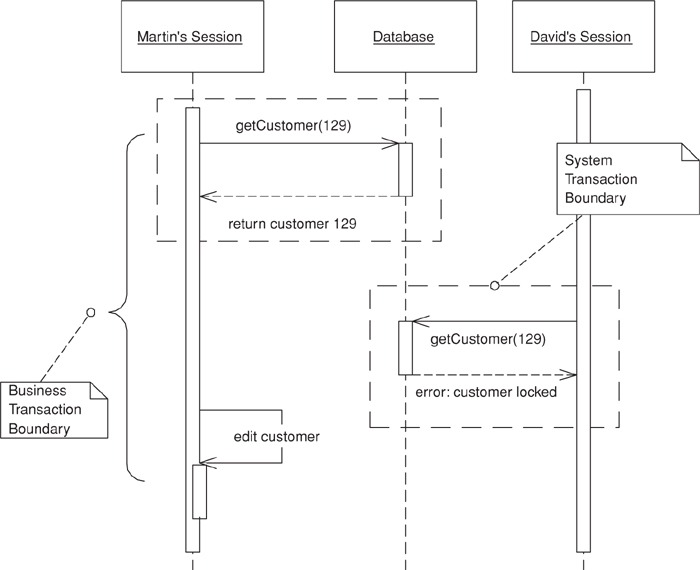
Since offline concurrency involves manipulating data for a business transaction that spans multiple requests, the simplest approach would seem to be having a system transaction open for the whole business transaction. Sadly, however, this doesn’t always work well because transaction systems aren’t geared to work with long transactions. For that reason you have to use multiple system transactions, at which point you’re left to your own devices to manage concurrent access to your data.
The first approach to try is Optimistic Offline Lock (416). However, that pattern has its problems. If several people access the same data within a business transaction, one of them will commit easily but the others will conflict and fail. Since the conflict is only detected at the end of the business transaction, the victims will do all the transaction work only to find at the last minute that the whole thing will fail and their time will have been wasted. If this happens a lot on lengthy business transactions the system will soon become very unpopular.
Pessimistic Offline Lock prevents conflicts by avoiding them altogether. It forces a business transaction to acquire a lock on a piece of data before it starts to use it, so that, most of the time, once you begin a business transaction you can be pretty sure you’ll complete it without being bounced by concurrency control.
You implement Pessimistic Offline Lock in three phases: determining what type of locks you need, building a lock manager, and defining procedures for a business transaction to use locks. Additionally, if you’re using Pessimistic Offline Lock as a complement to Optimistic Offline Lock (416) you need to determine which record types to lock.
As for lock types, the first option is an exclusive write lock, which require only that a business transaction acquire a lock in order to edit session data. This avoids conflict by not allowing two business transactions to make changes to the same record simultaneously. What this locking scheme ignores is the reading of data, so if it’s not critical that a view session have the most recent data this strategy will suffice.
If it becomes critical that a business transaction must always have the most recent data, regardless of its intention to edit, use the exclusive read lock. This requires that a business transaction acquire a lock simply to load the record. Clearly such a strategy has the potential to severely restrict a system’s concurrency. For most enterprise systems the exclusive write lock will afford much more concurrent record access than this lock will.
A third strategy combines the two lock types to provide the restrictive locking of the exclusive read lock as well as the increased concurrency of the exclusive write lock. Called the read/write lock, it’s a bit more complicated than the first two. The relationship of the read and write locks is the key to getting the best of both worlds:
• Read and write locks are mutually exclusive. A record can’t be write-locked if any other business transaction owns a read lock on it; it can’t be read-locked if any other business transaction owns a write lock on it.
• Concurrent read locks are acceptable. The existence of a single read lock prevents any business transaction from editing the record, so there’s no harm in allowing any number of sessions as readers once one has been allowed to read.
Allowing multiple read locks is what increases system concurrency. The downside of this scheme is that it’s a bit nasty to implement and presents more of a challenge for domain experts to wrap their heads around when they’re modeling the system.
In choosing the correct lock type think about maximizing system concurrency, meeting business needs, and minimizing code complexity. Also keep in mind that the locking strategy must be understood by domain modelers and analysts. Locking is not just a technical problem; the wrong lock type, simply locking every record, or locking the wrong types of records can result an ineffective Pessimistic Offline Lock strategy. An ineffective Pessimistic Offline Lock strategy is one that doesn’t prevent conflict at the onset of the business transaction or that degrades the concurrency of your multi-user system such that it seems more like single-user system. The wrong locking strategy can’t be saved by a proper technical implementation. In fact, it’s not a bad idea to include Pessimistic Offline Lock in your domain model.
Once you’ve decided upon your lock type, define your lock manager. The lock manager’s job is to grant or deny any request by a business transaction to acquire or release a lock. To do its job it needs to know what’s being locked as well as the intended owner of the lock—the business transaction. It’s quite possible that your concept of a business transaction isn’t some thing that can be uniquely identified, which makes it a bit difficult to pass a business transaction to the lock manager. In this case consider your concept of a session, as you’re more likely to have a session object at your disposal. The terms “session” and “business transaction” are fairly interchangeable. As long as business transactions execute serially within a session the session will be fine as a Pessimistic Offline Lock owner. The code example should shed some light on this idea.
The lock manager shouldn’t consist of much more than a table that maps locks to owners. A simple one might wrap an in-memory hash table, or it might be a database table. Whatever, you must have one and only one lock table, so if it’s in memory be sure to use a singleton [Gang of Four]. If your application server is clustered, an in-memory lock table won’t work unless it’s pinned to a single server instance. The database-based lock manager is probably more appropriate once you’re in a clustered application server environment.
The lock, whether implemented as an object or as SQL against a database table, should remain private to the lock manager. Business transactions should interact only with the lock manager, never with a lock object.
Now it’s time to define the protocol according to which a business transaction must use the lock manager. This protocol has to include what to lock and when, when to release a lock, and how to act when a lock can’t be acquired.
What to lock depends upon when to lock, so let’s look at when first. Generally, the business transaction should acquire a lock before loading the data, as there’s not much point in acquiring a lock without a guarantee that you’ll have the latest version of the locked item. Since we’re acquiring locks within a system transaction, however, there are circumstances where the order of the lock and load won’t matter. Depending on your lock type, if you’re using serializable or repeatable read transactions, the order in which you load objects and acquire locks might not matter. An option is to perform an optimistic check on an item after you acquire the Pessimistic Offline Lock. You should be very sure that you have the latest version of an object after you’ve locked it, which usually translates to acquiring the lock before loading the data.
Now, what are we locking? It seems that we’re locking objects or records or just about anything, but what we usually lock is actually the ID, or primary key, that we use to find those objects. This allows us to obtain the lock before we load them. Locking the object works fine so long as it doesn’t force you to break the rule about an object’s being current after you acquire its lock.
The simplest rule for releasing locks is to do it when the business transaction completes. Releasing a lock prior to completion might be allowable, depending on your lock type and your intention to use that object again within the transaction. Still, unless you have a very specific reason to release early, such as a particularly nasty system liveliness issue, stick to doing it upon completion of the business transaction.
The easiest course of action for a business transaction that can’t acquire a lock is to abort. The user should find this acceptable since Pessimistic Offline Lock should result in failure rather early in the transaction. The developer and designer can certainly help the situation by not waiting until late in the transaction to acquire a particularly contentious lock. If at all possible acquire all of your locks before the user begins work.
For any given item that you intend to lock, access to the lock table must by serialized. With an in-memory lock table it’s easiest to serialize access to the entire lock manager with whatever constructs your programming language provides. If you need concurrency greater than this affords, be aware you are entering complex territory.
If the lock table is stored in a database the first rule, of course, is to interact with it within a system transaction. Take full advantage of the serialization capabilities that a database provides. With the exclusive read and exclusive write locks serialization is a simple matter of having the database enforce a uniqueness constraint on the column storing the lockable item’s ID. Storing read/write locks in a database makes things a bit more difficult since the logic requires reads of the lock table in addition to inserts and so it becomes imperative to avoid inconsistent reads. A system transaction with an isolation level of serializable provides ultimate safety as it guarantees no inconsistent reads. Using serializable transactions throughout our system might get us into performance trouble, but a separate serializable system transaction for lock acquisition and a less strict isolation level for other work might ease this problem. Another option is to investigate whether a stored procedure might help with lock management. Concurrency management can be tough, so don’t be afraid to defer to your database at key moments.
The serial nature of lock management screams performance bottleneck. A big consideration here is lock granularity, as the fewer locks required the less of a bottleneck you’ll have. A Coarse-Grained Lock (438) can address lock table contention.
With a system transaction pessimistic locking scheme, such as “SELECT FOR UPDATE...” or entity EJBs, deadlock is a distinct possibility because these locking mechanisms will wait until a lock becomes available. Think of deadlock this way. Two users need resources A and B. If one gets the lock on A and the other gets the lock on B, both transactions might sit and wait forever for the other lock. Given that we’re spanning multiple system transactions, waiting for a lock doesn’t make much sense, especially since a business transaction might take 20 minutes. Nobody wants to wait for those locks. And this is good because coding for a wait involves timeouts and quickly gets complicated. Simply have your lock manager throw an exception as soon as a lock is unavailable. This removes the burden of coping with deadlock.
A final requirement is managing lock timeouts for lost sessions. If a client machine crashes in the middle of a transaction that lost transaction is unable to complete and release any owned locks. This is a big deal for a Web application where sessions are regularly abandoned by users. Ideally you’ll have a timeout mechanism managed by your application server rather than make your application handle timeouts. Web application servers provide an HTTP session for this. Timeouts can be implemented by registering a utility object that releases all locks when the HTTP session becomes invalid. Another option is to associate a timestamp with each lock and consider invalid any lock older than a certain age.
Pessimistic Offline Lock is appropriate when the chance of conflict between concurrent sessions is high. A user should never have to throw away work. Locking is also appropriate when the cost of a conflict is too high regardless of its likelihood. Locking every entity in a system will almost surely create tremendous data contention problems, so remember that Pessimistic Offline Lock is very complementary to Optimistic Offline Lock (416) and only use Pessimistic Offline Lock where it’s truly required.
If you have to use Pessimistic Offline Lock, you should also consider a long transaction. Long transactions are never a good thing, but in some situations they may be no more damaging than Pessimistic Offline Lock and much easier to program. Do some load testing before you choose.
Don’t use these techniques if your business transactions fit within a single system transaction. Many system transaction pessimistic locking techniques ship with the application and database servers you’re already using, among them the “SELECT FOR UPDATE” SQL statement for database locking and the entity EJB for application server locking. Why worry about timeouts, lock visibility, and such, when there’s no need to? Understanding these locking types can certainly add a lot of value to your implementation of Pessimistic Offline Lock. Understand, though, that the inverse isn’t true! What you read here won’t prepare you to write a database manager or transaction monitor. All the offline locking techniques presented in this book depend on your system having a real transaction monitor of its own.
In this example we’ll first build a lock manager for exclusive read locks—remember that you need these locks to read or edit an object. Then we’ll demonstrate how the lock manager might be used for a business transaction that spans multiple system transactions.
The first step is to define our lock manager interface.
interface ExclusiveReadLockManager...
public static final ExclusiveReadLockManager INSTANCE =
(ExclusiveReadLockManager) Plugins.getPlugin(ExclusiveReadLockManager.class);
public void acquireLock(Long lockable, String owner) throws ConcurrencyException;
public void releaseLock(Long lockable, String owner);
public void relaseAllLocks(String owner);
Notice that we’re identifying lockable with a long and owner with a string. Lockable is a long because each table in our database uses a long primary key that’s unique across the entire system and so serves as a nice lockable ID (which must be unique across all types handled by the lock table). The owner ID is a string because the example will be a Web application, and the HTTP session ID makes a good lock owner within it.
We’ll write a lock manager that interacts directly with a lock table in our database rather than with a lock object. Note that this is our own table called lock, like any other application table, and not part of the database’s internal locking mechanism. Acquiring a lock is a matter of successfully inserting a row into the lock table. Releasing it is a matter of deleting that row. Here’s the schema for the lock table and part of the lock manager implementation:
table lock...
create table lock(lockableid bigint primary key, ownerid bigint)
class ExclusiveReadLockManagerDBImpl implements ExclusiveReadLockManager...
private static final String INSERT_SQL =
"insert into lock values(?, ?)";
private static final String DELETE_SINGLE_SQL =
"delete from lock where lockableid = ? and ownerid = ?";
private static final String DELETE_ALL_SQL =
"delete from lock where ownerid = ?";
private static final String CHECK_SQL =
"select lockableid from lock where lockableid = ? and ownerid = ?";
public void acquireLock(Long lockable, String owner) throws ConcurrencyException {
if (!hasLock(lockable, owner)) {
Connection conn = null;
PreparedStatement pstmt = null;
try {
conn = ConnectionManager.INSTANCE.getConnection();
pstmt = conn.prepareStatement(INSERT_SQL);
pstmt.setLong(1, lockable.longValue());
pstmt.setString(2, owner);
pstmt.executeUpdate();
} catch (SQLException sqlEx) {
throw new ConcurrencyException("unable to lock " + lockable);
} finally {
closeDBResources(conn, pstmt);
}
}
}
public void releaseLock(Long lockable, String owner) {
Connection conn = null;
PreparedStatement pstmt = null;
try {
conn = ConnectionManager.INSTANCE.getConnection();
pstmt = conn.prepareStatement(DELETE_SINGLE_SQL);
pstmt.setLong(1, lockable.longValue());
pstmt.setString(2, owner);
pstmt.executeUpdate();
} catch (SQLException sqlEx) {
throw new SystemException("unexpected error releasing lock on " + lockable);
} finally {
closeDBResources(conn, pstmt);
}
}
Not shown in the lock manager are the public releaseAllLocks() and the private hasLock() methods. releaseAllLocks() does exactly as its name implies and releases all locks for an owner. hasLock() queries the database to check if an owner already owns a lock. It’s not uncommon for session code to attempt to acquire a lock it already owns. This means that acquireLock() must first check that the owner doesn’t already have the lock before attempting to insert the lock row. As the lock table is usually a point of resource contention, these repetitive reads can degrade application performance. It may be necessary for you to cache owned locks at the session level for the ownership checks. Be careful doing this.
Now let’s put together a simple Web application to maintain customer records. First we’ll set up a bit of infrastructure to facilitate business transaction processing. Some concept of a user session will be required by the layers beneath the Web tier, so we won’t be able to rely solely on the HTTP session. Let’s refer to this new session as the application session to distinguish it from the HTTP session. Application sessions will store their ID, a user name, and an Identity Map (195) to cache objects loaded or created during the business transaction. They’ll be associated with the currently executing thread in order that they be found.
class AppSession...
private String user;
private String id;
private IdentityMap imap;
public AppSession(String user, String id, IdentityMap imap) {
this.user = user;
this.imap = imap;
this.id = id;
}
class AppSessionManager...
private static ThreadLocal current = new ThreadLocal();
public static AppSession getSession() {
return (AppSession) current.get();
}
public static void setSession(AppSession session) {
current.set(session);
}
We’re going to use a Front Controller (344) to handle requests, so we’ll need to define a command. The first thing each command must do is indicate its intention to either start a new business transaction or continue one that already exists. This is a matter of setting up a new application session or finding the current one. Here we have an abstract command that provides convenience methods for establishing business transaction context.
interface Command...
public void init(HttpServletRequest req, HttpServletResponse rsp);
public void process() throws Exception;
abstract class BusinessTransactionCommand implements Command...
public void init(HttpServletRequest req, HttpServletResponse rsp) {
this.req = req;
this.rsp = rsp;
}
protected void startNewBusinessTransaction() {
HttpSession httpSession = getReq().getSession(true);
AppSession appSession = (AppSession) httpSession.getAttribute(APP_SESSION);
if (appSession != null) {
ExclusiveReadLockManager.INSTANCE.relaseAllLocks(appSession.getId());
}
appSession = new AppSession(getReq().getRemoteUser(),
httpSession.getId(), new IdentityMap());
AppSessionManager.setSession(appSession);
httpSession.setAttribute(APP_SESSION, appSession);
httpSession.setAttribute(LOCK_REMOVER,
new LockRemover(appSession.getId()));
}
protected void continueBusinessTransaction() {
HttpSession httpSession = getReq().getSession();
AppSession appSession = (AppSession) httpSession.getAttribute(APP_SESSION);
AppSessionManager.setSession(appSession);
}
protected HttpServletRequest getReq() {
return req;
}
protected HttpServletResponse getRsp() {
return rsp;
}
Notice that when we establish a new application session we remove locks for any existing one. We also add a listener to the HTTP session’s binding events that will remove any locks owned by an application session when the corresponding HTTP session expires.
class LockRemover implements HttpSessionBindingListener...
private String sessionId;
public LockRemover(String sessionId) {
this.sessionId = sessionId;
}
public void valueUnbound(HttpSessionBindingEvent event) {
try {
beginSystemTransaction();
ExclusiveReadLockManager.INSTANCE.relaseAllLocks(this.sessionId);
commitSystemTransaction();
} catch (Exception e) {
handleSeriousError(e);
}
}
Our commands contain both standard business logic and lock management, and each command must execute within the bounds of a single system transaction. To ensure this we can decorate [Gang of Four] it with a transactional command object. Be sure that all locking and standard domain business for a single request occur within a single system transaction. The methods that define system transaction boundaries depend on your deployment context. It’s mandatory to roll back the system transaction when a concurrency exception, and any other exception in this case, is detected, as that will prevent any changes from entering the permanent record data when a conflict occurs.
class TransactionalComamnd implements Command...
public TransactionalCommand(Command impl) {
this.impl = impl;
}
public void process() throws Exception {
beginSystemTransaction();
try {
impl.process();
commitSystemTransaction();
} catch (Exception e) {
rollbackSystemTransaction();
throw e;
}
}
Now it’s a matter of writing the controller servlet and concrete commands. The controller servlet has the responsibility of wrapping each command with transaction control. The concrete commands are required to establish business transaction context, execute domain logic, and acquire and release locks where appropriate.
class ControllerServlet extends HttpServlet...
protected void doGet(HttpServletRequest req, HttpServletResponse rsp)
throws ServletException, IOException {
try {
String cmdName = req.getParameter("command");
Command cmd = getCommand(cmdName);
cmd.init(req, rsp);
cmd.process();
} catch (Exception e) {
writeException(e, rsp.getWriter());
}
}
private Command getCommand(String name) {
try {
String className = (String) commands.get(name);
Command cmd = (Command) Class.forName(className).newInstance();
return new TransactionalCommand(cmd);
} catch (Exception e) {
e.printStackTrace();
throw new SystemException("unable to create command object for " + name);
}
}
class EditCustomerCommand implements Command...
public void process() throws Exception {
startNewBusinessTransaction();
Long customerId = new Long(getReq().getParameter("customer_id"));
ExclusiveReadLockManager.INSTANCE.acquireLock(
customerId, AppSessionManager.getSession().getId());
Mapper customerMapper = MapperRegistry.INSTANCE.getMapper(Customer.class);
Customer customer = (Customer) customerMapper.find(customerId);
getReq().getSession().setAttribute("customer", customer);
forward("/editCustomer.jsp");
}
class SaveCustomerCommand implements Command...
public void process() throws Exception {
continueBusinessTransaction();
Customer customer = (Customer) getReq().getSession().getAttribute("customer");
String name = getReq().getParameter("customerName");
customer.setName(name);
Mapper customerMapper = MapperRegistry.INSTANCE.getMapper(Customer.class);
customerMapper.update(customer);
ExclusiveReadLockManager.INSTANCE.releaseLock(customer.getId(),
AppSessionManager.getSession().getId());
forward("/customerSaved.jsp");
}
The commands just shown will prevent any two sessions from working with the same customer at the same time. Any other command in the application that works with a customer object must be sure either to acquire the lock or to work only with a customer locked by a previous command in the same business transaction. Given that we have a hasLock() check in the lock manager we could simply acquire the lock in every command. This might be bad for performance, but it would certainly guarantee that we have a lock. Implicit Lock (449) discusses other foolproof approaches to locking mechanics.
The amount of framework code might seem a bit out of proportion to the amount of domain code. Indeed, Pessimistic Offline Lock requires at a minimum choreographing an application session, a business transaction, a lock manager, and a system transaction, which is clearly a challenge. This example serves more as an inspiration than as an architecture template, as it lacks robustness in many areas.
Locks a set of related objects with a single lock.
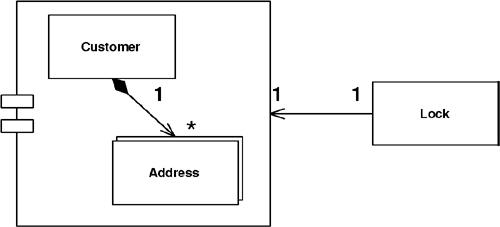
Objects can often be edited as a group. Perhaps you have a customer and its set of addresses. If so, when using the application it makes sense to lock all of these items if you want to lock any one of them. Having a separate lock for individual objects presents a number of challenges. First, anyone manipulating them has to write code that can find them all in order to lock them. This is easy enough for a customer and its addresses, but it gets tricky as you get more locking groups. And what if the groups get complicated? Where is this behavior when your framework is managing lock acquisition? If your locking strategy requires that an object be loaded in order to be locked, such as with Optimistic Offline Lock (416), locking a large group affects performance. And with Pessimistic Offline Lock (426) a large lock set is a management headache and increases lock table contention.
A Coarse-Grained Lock is a single lock that covers many objects. It not only simplifies the locking action itself but also frees you from having to load all the members of a group in order to lock them.
The first step in implementing Coarse-Grained Lock is to create a single point of contention for locking a group of objects. This makes only one lock necessary for locking the entire set. Then you provide the shortest path possible to finding that single lock point in order to minimize the group members that must be identified and possibly loaded into memory in the process of obtaining that lock.
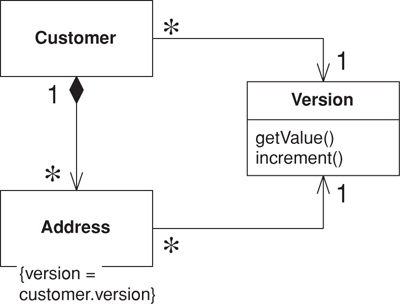
With Optimistic Offline Lock (416), having each item in a group share a version (see Figure 16.2) creates the single point of contention, which means sharing the same version, not an equal version. Incrementing this version will lock the entire group with a shared lock. Set up your model to point every member of the group at the shared version and you have certainly minimized the path to the point of contention.
Figure 16.2. Sharing a version.
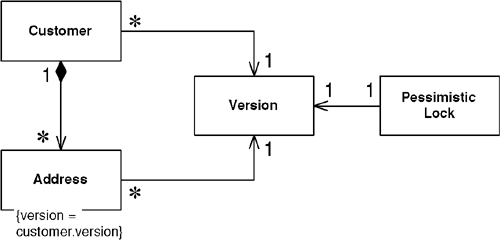
A shared Pessimistic Offline Lock (426) requires that each member of the group share some sort of lockable token, on which it must then be acquired. As Pessimistic Offline Lock (426) is often used as a complement to Optimistic Offline Lock (416), a shared version object makes an excellent candidate for the lockable token role (Figure 16.3).
Figure 16.3. Locking a shared version.
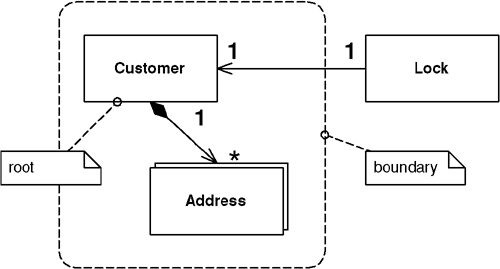
Eric Evans and David Siegel [Evans] define an aggregate as a cluster of associated objects that we treat as a unit for data changes. Each aggregate has a root that provides the only access point to members of the set and a boundary that defines what’s included in the set. The aggregate’s characteristics call for a Coarse-Grained Lock, since working with any of its members requires locking all of them. Locking an aggregate yields an alternative to a shared lock that I call a root lock (see Figure 16.4). By definition locking the root locks all members of the aggregate. The root lock gives us a single point of contention.
Figure 16.4. Locking the root.
Using a root lock as a Coarse-Grained Lock makes it necessary to implement navigation to the root in your object graph. This allows a locking mechanism, when asked to lock any object in the aggregate, to navigate to the root and lock it instead. This navigation can be accomplished in a couple of ways. You can maintain a direct navigation to the root for each object in the aggregate, or you can use a sequence of intermediate relationships. For example, in a hierarchy the obvious root is the top level parent, to which you can link the descendents directly. Alternatively, you can give each node a link to its immediate parent and navigate that structure to reach the root. In a large graph the latter strategy might cause performance problems as each parent must be loaded in order to determine whether it has a parent of its own. Be sure to use a Lazy Load (200) when loading the objects that make up the path to your root. This not only prevents objects from being loaded before they’re needed but prevents an infinite mapping loop when you map a bidirectional relationship. Be wary of the fact that Lazy Loads (200) for a single aggregate can occur across multiple system transactions and so you may end up with an aggregate built from inconsistent parts. Of course, that’s not good.
Note that a shared lock also works for aggregate locking as locking any object in the aggregate will simultaneously lock the root.
The shared lock and root lock implementations of Coarse-Grained Lock both have their trade-offs. When using a relational database the shared lock carries the burden that almost all of your selects will require a join to the version table. But loading objects while navigating to the root can be a performance hit as well. The root lock and Pessimistic Offline Lock (426) perhaps make an odd combination. By the time you navigate to the root and lock it you may need to reload a few objects to guarantee their freshness. And, as always, building a system against a legacy data store will place numerous constraints on your implementation choice. Locking implementations abound, and the subtleties are even more numerous. Be sure to arrive at an implementation that suits your needs.
The most obvious reason to use a Coarse-Grained Lock is to satisfy business requirements. This is the case when locking an aggregate. Consider a lease object that owns a collection of assets. It probably doesn’t make business sense for one user to edit the lease and another user to simultaneously edit an asset. Locking either the asset or the lease ought to result in the lease and all of its assets being locked.
A very positive outcome of using Coarse-Grained Locks is that acquiring and releasing lock is cheaper. This is certainly a legitimate motivation for using them. The shared lock can be used beyond the concept of the [Evans] aggregate, but be careful when working from nonfunctional requirements such as performance. Beware of creating unnatural object relationships in order to facilitate Coarse-Grained Lock.
For this example we have a domain model with Layer Supertype (475), a relational database as our persistent store, and Data Mappers (165).
The first thing to do is create a version class and table. To keep things simple we’ll create a rather versatile version class that will not only store its value but will also have a static finder method. Note that we’re using an identity map to cache versions for a session. If objects share a version it’s critical that they all point to the exact same instance of it. As the version class is a part of our domain model it’s probably poor form to put database code in there, so I’ll leave separating version database code into the mapper layer as an exercise for you.
table version...
create table version(id bigint primary key, value bigint,
modifiedBy varchar, modified datetime)
class Version...
private Long id;
private long value;
private String modifiedBy;
private Timestamp modified;
private boolean locked;
private boolean isNew;
private static final String UPDATE_SQL =
"UPDATE version SET VALUE = ?, modifiedBy = ?, modified = ? " +
"WHERE id = ? and value = ?";
private static final String DELETE_SQL =
"DELETE FROM version WHERE id = ? and value = ?";
private static final String INSERT_SQL =
"INSERT INTO version VALUES (?, ?, ?, ?)";
private static final String LOAD_SQL =
"SELECT id, value, modifiedBy, modified FROM version WHERE id = ?";
public static Version find(Long id) {
Version version = AppSessionManager.getSession().getIdentityMap().getVersion(id);
if (version == null) {
version = load(id);
}
return version;
}
private static Version load(Long id) {
ResultSet rs = null;
Connection conn = null;
PreparedStatement pstmt = null;
Version version = null;
try {
conn = ConnectionManager.INSTANCE.getConnection();
pstmt = conn.prepareStatement(LOAD_SQL);
pstmt.setLong(1, id.longValue());
rs = pstmt.executeQuery();
if (rs.next()) {
long value = rs.getLong(2);
String modifiedBy = rs.getString(3);
Timestamp modified = rs.getTimestamp(4);
version = new Version(id, value, modifiedBy, modified);
AppSessionManager.getSession().getIdentityMap().putVersion(version);
} else {
throw new ConcurrencyException("version " + id + " not found.");
}
} catch (SQLException sqlEx) {
throw new SystemException("unexpected sql error loading version", sqlEx);
} finally {
cleanupDBResources(rs, conn, pstmt);
}
return version;
}
The version also knows how to create itself. The database insert is separated from the creation to allow deferment of insertion until at least one owner is inserted into the database. Each of our domain Data Mappers (165) can safely call insert on the version when inserting the corresponding domain object. The version tracks whether it’s new to make sure it will only be inserted once.
class Version...
public static Version create() {
Version version = new Version(IdGenerator.INSTANCE.nextId(), 0,
AppSessionManager.getSession().getUser(), now());
version.isNew = true;
return version;
}
public void insert() {
if (isNew()) {
Connection conn = null;
PreparedStatement pstmt = null;
try {
conn = ConnectionManager.INSTANCE.getConnection();
pstmt = conn.prepareStatement(INSERT_SQL);
pstmt.setLong(1, this.getId().longValue());
pstmt.setLong(2, this.getValue());
pstmt.setString(3, this.getModifiedBy());
pstmt.setTimestamp(4, this.getModified());
pstmt.executeUpdate();
AppSessionManager.getSession().getIdentityMap().putVersion(this);
isNew = false;
} catch (SQLException sqlEx) {
throw new SystemException("unexpected sql error inserting version", sqlEx);
} finally {
cleanupDBResources(conn, pstmt);
}
}
}
Next, we have an increment() method that increases the value of the version in the corresponding database row. It’s likely that multiple objects in a change set will share the same version, so the version first makes sure it’s not already locked before incrementing itself. After calling the database, the increment() method must check that the version row was indeed updated. If it returns a row count of zero, it has detected a concurrency violation and throws an exception.
class Version...
public void increment() throws ConcurrencyException {
if (!isLocked()) {
Connection conn = null;
PreparedStatement pstmt = null;
try {
conn = ConnectionManager.INSTANCE.getConnection();
pstmt = conn.prepareStatement(UPDATE_SQL);
pstmt.setLong(1, value + 1);
pstmt.setString(2, getModifiedBy());
pstmt.setTimestamp(3, getModified());
pstmt.setLong(4, id.longValue());
pstmt.setLong(5, value);
int rowCount = pstmt.executeUpdate();
if (rowCount == 0) {
throwConcurrencyException();
}
value++;
locked = true;
} catch (SQLException sqlEx) {
throw new SystemException("unexpected sql error incrementing version", sqlEx);
} finally {
cleanupDBResources(conn, pstmt);
}
}
}
private void throwConcurrencyException() {
Version currentVersion = load(this.getId());
throw new ConcurrencyException(
"version modified by " + currentVersion.modifiedBy + " at " +
DateFormat.getDateTimeInstance().format(currentVersion.getModified()));
}
With the code here be sure to invoke increment only in the system transaction in which you commit the business transaction. The isLocked flag makes it so that incrementing in earlier transactions will result in false lock acquisition during the commit transaction. This isn’t a problem because the whole point of an optimistic lock is that you only get the lock when you commit.
When you use this pattern you may want to see if your data is still current with the database in an earlier system transaction. You can do this by adding a checkCurrent method to the version class that simply checks if an Optimistic Offline Lock (416) is available without updating.
Not shown is a delete method that executes the SQL to remove the version from the database. If the returned row count is zero, a concurrency exception is thrown. This is because the Optimistic Offline Lock (416) probably wasn’t obtained when deleting the last of the objects using this version. That should never happen. The real trick is knowing when it’s okay to delete a shared version. If you’re sharing a version across an aggregate, simply delete it after you delete the aggregate root. Other scenarios make things much more problematic. One possibility is for the version object to keep a reference count of its owners and delete itself when the count reaches zero. Be warned that this could make for a version object that’s rather sophisticated. Once your version gets complicated you might consider making it a full-blown domain object. This makes good sense, but, of course, it will be a special domain object without a version.
Now let’s look at how we use the shared version. The domain Layer Supertype (475) contains a version object rather than a simple count. Each Data Mapper (165) can set the version when loading the domain object.
class DomainObject...
private Long id;;
private Timestamp modified;
private String modifiedBy;
private Version version;
public void setSystemFields(Version version, Timestamp modified, String modifiedBy) {
this.version = version;
this.modified = modified;
this.modifiedBy = modifiedBy;
}
For creation, let’s look at an aggregate consisting of a customer root and its addresses. The customer’s create method will create the shared version. Customer will have an addAddress() method that creates an address, passing along the customer’s version. Our abstract database mapper will insert the version before it inserts corresponding domain objects. Remember that the version will ensure that it’s only inserted once.
class Customer extends DomainObject...
public static Customer create(String name) {
return new Customer(IdGenerator.INSTANCE.nextId(), Version.create(),
name, new ArrayList());
}
class Customer extends DomainObject...
public Address addAddress(String line1, String city, String state) {
Address address = Address.create(this, getVersion(), line1, city, state);
addresses.add(address);
return address;
}
class Address extends DomainObject...
public static Address create(Customer customer, Version version,
String line1, String city, String state) {
return new Address(IdGenerator.INSTANCE.nextId(), version, customer,
line1, city, state);
}
class AbstractMapper...
public void insert(DomainObject object) {
object.getVersion().insert();
Increment should be called on a version by the Data Mapper (165) before it updates or deletes an object.
class AbstractMapper...
public void update(DomainObject object) {
object.getVersion().increment();
class AbstractMapper...
public void delete(DomainObject object) {
object.getVersion().increment();
As this is an aggregate, we delete the addresses when we delete the customer. This allows us to delete the version immediately after that.
class CustomerMapper extends AbstractMapper...
public void delete(DomainObject object) {
Customer cust = (Customer) object;
for (Iterator iterator = cust.getAddresses().iterator(); iterator.hasNext();) {
Address add = (Address) iterator.next();
MapperRegistry.getMapper(Address.class).delete(add);
}
super.delete(object);
cust.getVersion().delete();
}
We need some sort of lockable token that we can associate with all objects in the related set. As discussed above we’ll use Pessimistic Offline Lock (426) as a complement to Optimistic Offline Lock (416) so we can use as the lockable token the shared version. We’ll use all of the same code to arrive at a shared version.
The only issue is that some of our data must be loaded in order to get the version. If we acquire the Pessimistic Offline Lock (426) after loading its data, how do we know that the data is current? Something we can easily do is increment the version within the system transaction where we obtained the Pessimistic Offline Lock (426). Once that system transaction commits, our pessimistic lock is valid and we know that we have the latest copy of any data sharing that version, regardless of where we loaded within the system transaction.
class LoadCustomerCommand...
try {
Customer customer = (Customer) MapperRegistry.getMapper(Customer.class).find(id);
ExclusiveReadLockManager.INSTANCE.acquireLock
(customer.getId(), AppSessionManager.getSession().getId());
customer.getVersion().increment();
TransactionManager.INSTANCE.commit();
} catch (Exception e) {
TransactionManager.INSTANCE.rollback();
throw e;
}
You can see that the version increment might be something that you would want to build into your lock manager. At least you want to decorate [Gang of Four] your lock manager with code that increments the version. Your production code will, of course, require more robust exception handling and transaction control than the example shows.
This example makes most of the same assumptions as the previous examples, including a domain Layer Supertype (475) and Data Mappers (165). There’s a version object, but in this case it won’t be shared. It simply provides a convenient increment() method to more easily allow acquisition of the Optimistic Offline Lock (416) outside of the Data Mapper (165). We’re also using a Unit of Work (184) to track our change set.
Our aggregate contains parent-child relationships, so we’ll use child-to-parent navigation to find the root. We’ll need to accommodate this in our domain and data models.
class DomainObject...
private Long id;
private DomainObject parent;
public DomainObject(Long id, DomainObject parent) {
this.id = id;
this.parent = parent;
}
Once we have our owners we can acquire our root locks before we commit the Unit of Work.
class UnitOfWork...
public void commit() throws SQLException {
for (Iterator iterator = _modifiedObjects.iterator(); iterator.hasNext();) {
DomainObject object = (DomainObject) iterator.next();
for (DomainObject owner = object; owner != null; owner = owner.getParent()) {
owner.getVersion().increment();
}
}
for (Iterator iterator = _modifiedObjects.iterator(); iterator.hasNext();) {
DomainObject object = (DomainObject) iterator.next();
Mapper mapper = MapperRegistry.getMapper(object.getClass());
mapper.update(object);
}
}
Allows framework or layer supertype code to acquire offline locks.
The key to any locking scheme is that there are no gaps in its use. Forgetting to write a single line of code that acquires a lock can render an entire offline locking scheme useless. Failing to retrieve a read lock where other transactions use write locks means you might not get up-to-date session data; failing to use a version count properly can result in unknowingly writing over someone’s changes. Generally, if an item might be locked anywhere it must be locked everywhere. Ignoring its application’s locking strategy allows a business transaction to create inconsistent data. Not releasing locks won’t corrupt your record data, but it will eventually bring productivity to a halt. Because offline concurrency management is difficult to test, such errors might go undetected by all of your test suites.
One solution is to not allow developers to make such a mistake. Locking tasks that cannot be overlooked should be handled not explicitly by developers but implicitly by the application. The fact that most enterprise applications make use of some combination of framework, Layer Supertypes (475), and code generation provides us with ample opportunity to facilitate Implicit Lock.
Implementing Implicit Lock is a matter of factoring your code such that any locking mechanics that absolutely cannot be skipped can be carried out by your application framework. For lack of a better word we’ll use “framework” to mean a combination of Layer Supertypes (475), framework classes, and any other “plumbing” code. Code generation tools are another avenue to enforce proper locking. I realize this is by no means a ground-breaking idea. You’re very likely to head down this path once you’ve coded the same locking mechanics a few times over in your application. Still, I’ve seen it done poorly often enough that it merits a quick look.
The first step is to assemble a list of what tasks are mandatory for a business transaction to work within your locking strategy. For Optimistic Offline Lock (416) that list will contain items such as storing a version count for each record, including the version in update SQL criteria, and storing an incremented version when changing the record. The Pessimistic Offline Lock (426) list will include items along the lines of acquiring any lock necessary to load a piece of data—typically the exclusive read lock or the read portion of the read/write lock—and releasing all locks when the business transaction or session completes.
Note that the Pessimistic Offline Lock (426) list doesn’t include acquiring any lock necessary only for editing a piece of data—that is, exclusive write lock and the write portion of the read/write lock. Yes, these are mandatory if your business transaction wants to edit the data, but implicitly acquiring them presents, should the locks be unavailable, a couple of difficulties. First, the only points where we might implicitly acquire a write lock, such as the registration of a dirty object within a Unit of Work (184), offer us no promise should the locks be unavailable, that the transaction will abort as soon as the user begins to work. The application can’t figure out on its own when is a good time to acquire these locks. A transaction not failing rapidly conflicts with an intent of Pessimistic Offline Lock (426)—that a user not have to perform work twice.
Second, and just as important, is that these lock types most greatly limit system concurrency. Avoiding Implicit Lock here helps us think about how we impact concurrency by forcing the issue out of the technical arena and into the business domain. Still we have to make sure that locks necessary for writing are acquired before changes are committed. What your framework can do is ensure that a write lock has already been obtained before committing any changes. Not having acquired the lock by commit time is a programmer error and the code should at least throw an assertion failure. I advise skipping the assertion and throwing a concurrency exception here, as you really don’t want any such errors in your production system when assertions are turned off.
A word of caution about using the Implicit Lock. While it allows developers to ignore much of the locking mechanics it doesn’t allow them to ignore consequences. For example, if developers are using Implicit Lock with a pessimistic locking scheme that waits for locks, they still need to think about deadlock possibilities. The danger with Implicit Lock is that business transactions can fail in unexpected ways once developers stop thinking about locking.
Making locking work is a matter of determining the best way to get your framework to implicitly carry out the locking mechanics. See Optimistic Offline Lock (416) for samples of implicit handling of that lock type. The possibilities for a quality Implicit Lock implementation are far too numerous to demonstrate them all here.
Implicit Lock should be used in all but the simplest of applications that have no concept of framework. The risk of a single forgotten lock is too great.
Let’s consider a system that uses an exclusive read lock. Our architecture contains a Domain Model (116), and we’re using Data Mappers (165) to mediate between our domain objects and our relational database. With the exclusive read lock the framework must acquire a lock on a domain object before allowing a business transaction to do anything with it.
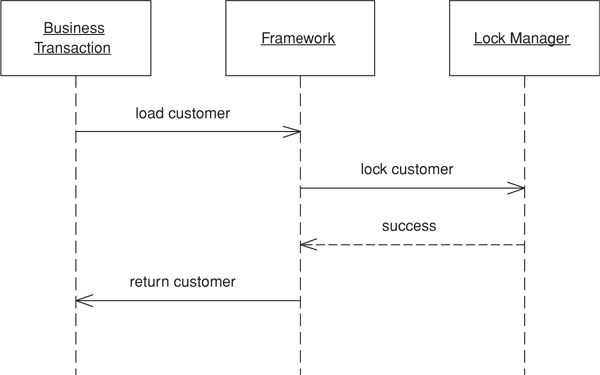
Any domain object used in a business transaction is located via the find() method on a mapper. This is true whether the business transaction uses the mapper directly by invoking find() or indirectly by navigating the object graph. Now it’s possible for us to decorate [Gang of Four] our mappers with required locking functionality. We’ll write a locking mapper that acquires a lock before attempting to find an object.
interface Mapper...
public DomainObject find(Long id);
public void insert(DomainObject obj);
public void update(DomainObject obj);
public void delete(DomainObject obj);
class LockingMapper implements Mapper...
private Mapper impl;
public LockingMapper(Mapper impl) {
this.impl = impl;
}
public DomainObject find(Long id) {
ExclusiveReadLockManager.INSTANCE.acquireLock(
id, AppSessionManager.getSession().getId());
return impl.find(id);
}
public void insert(DomainObject obj) {
impl.insert(obj);
}
public void update(DomainObject obj) {
impl.update(obj);
}
public void delete(DomainObject obj) {
impl.delete(obj);
}
Because it’s quite common to look up an object more than once in a session, for the above code to work the lock manager must first check that the session doesn’t already have a lock before it obtains one. If we were using an exclusive write lock rather than the exclusive read lock we’d write a mapper decorator that checked for previous lock acquisition on update and delete rather than actually acquiring a lock.
One of the nice things about decorators is that the object being wrapped doesn’t even know that it’s functionality is being enhanced. Here we can wrap the mappers in our registry:
LockingMapperRegistry implements MappingRegistry...
private Map mappers = new HashMap();
public void registerMapper(Class cls, Mapper mapper) {
mappers.put(cls, new LockingMapper(mapper));
}
public Mapper getMapper(Class cls) {
return (Mapper) mappers.get(cls);
}
When the business transaction gets its hands on a mapper it thinks that it’s about to invoke a standard update method, but what really happens is shown in Figure 16.5.
Figure 16.5. Locking mapper.