Provides a coarse-grained facade on fine-grained objects to improve efficiency over a network.
In an object-oriented model, you do best with small objects that have small methods. This gives you lots of opportunity for control and substitution of behavior, and to use good intention revealing naming to make an application easier to understand. One of the consequences of such fine-grained behavior is that there’s usually a great deal of interaction between objects, and that interaction usually requires lots of method invocations.
Within a single address space fine-grained interaction works well, but this happy state does not exist when you make calls between processes. Remote calls are much more expensive because there’s a lot more to do: Data may have to be marshaled, security may need to be checked, packets may need to be routed through switches. If the two processes are running on machines on opposite sides of the globe, the speed of light may be a factor. The brutal truth is that any inter-process call is orders of magnitude more expensive than an in-process call—even if both processes are on the same machine. Such a performance effect cannot be ignored, even for believers in lazy optimization.
As a result any object that’s intended to be used as a remote objects needs a coarse-grained interface that minimizes the number of calls needed to get something done. Not only does this affect your method calls, it also affects your objects. Rather than ask for an order and its order lines individually, you need to access and update the order and order lines in a single call. This affects your entire object structure. You give up the clear intention and fine-grained control you get with small objects and small methods. Programming becomes more difficult and your productivity slows.
A Remote Facade is a coarse-grained facade [Gang of Four] over a web of fine-grained objects. None of the fine-grained objects have a remote interface, and the Remote Facade contains no domain logic. All the Remote Facade does is translate coarse-grained methods onto the underlying fine-grained objects.
Remote Facade tackles the distribution problem with the standard OO approach of separating distinct responsibilities into different objects; and as a result it has become the standard pattern for this problem. I recognize that fine-grained objects are the right answer for complex logic, so I ensure that any complex logic is placed in fine-grained objects that are designed to collaborate within a single process. To allow efficient remote access to them, I make a separate facade object that acts as a remote interface. As the name implies, the facade is merely a thin skin that switches from a coarse-grained to a fine-grained interface.
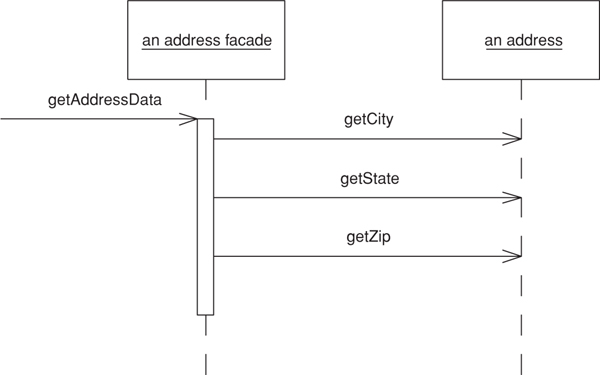
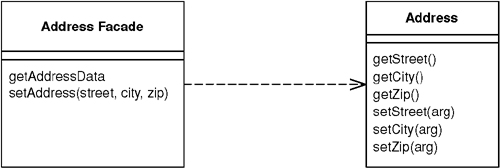
In a simple case, like an address object, a Remote Facade replaces all the getting and setting methods of the regular address object with one getter and one setter, often referred to as bulk accessors. When a client calls a bulk setter, the address facade reads the data from the setting method and calls the individual accessors on the real address object (see Figure 15.1) and does nothing more. This way all the logic of validation and computation stays on the address object where it can be factored cleanly and can be used by other fine-grained objects.
Figure 15.1. One call to a facade causes several calls from the facade to the domain object
In a more complex case a single Remote Facade may act as a remote gateway for many fine-grained objects. For example, an order facade may be used to get and update information for an order, all its order lines, and maybe some customer data as well.
In transferring information in bulk like this, you need it to be in a form that can easily move over the wire. If your fine-grained classes are present on both sides of the connection and they’re serializable, you can transfer them directly by making a copy. In this case a getAddressData method creates a copy of the original address object. The setAddressData receives an address object and uses it to update the actual address object’s data. (This assumes that the original address object needs to preserve its identity and thus can’t be simply replaced with the new address.)
Often you can’t do this, however. You may not want to duplicate your domain classes on multiple processes, or it may be difficult to serialize a segment of a domain model due to its complicated relationship structure. The client may not want the whole model but just a simplified subset of it. In these cases it makes sense to use a Data Transfer Object (401) as the basis of the transfer.
In the sketch I’ve shown a Remote Facade that corresponds to a single domain object. This isn’t uncommon and it’s easy to understand, but it isn’t the most usual case. A single Remote Facade would have a number of methods, each designed to pass on information from several objects. Thus, getAddressData and setAddressData would be methods defined on a class like CustomerService, which would also have methods along the lines of getPurchasingHistory and updateCreditData.
Granularity is one of the most tricky issues with Remote Facade. Some people like to make fairly small Remote Facades, such as one per use case. I prefer a coarser grained structure with much fewer Remote Facades. For even a moderate-sized application I might have just one and even for a large application I may have only half a dozen. This means that each Remote Facade has a lot of methods, but since these methods are small I don’t see this as a problem.
You design a Remote Facade based on the needs of a particular client’s usage—most commonly the need to view and update information through a user interface. In this case you might have a single Remote Facade for a family of screens, for each of which one bulk accessor method loads and saves the data. Pressing buttons on a screen, say to change an order’s status, invokes command methods on the facade. Quite often you’ll have different methods on the Remote Facade that do pretty much the same thing on the underlying objects. This is common and reasonable. The facade is designed to make life simpler for external users, not for the internal system, so if the client process thinks of it as a different command, it is a different command, even if it all goes to the same internal command.
Remote Facade can be stateful or stateless. A stateless Remote Facade can be pooled, which can improve resource usage and efficiency, especially in a B2C situation. However, if the interaction involves state across a session, then it needs to store session state somewhere using Client Session State (456) or Database Session State (462), or an implementation of Server Session State (458). As stateful a Remote Facade can hold on to its own state, which makes for an easy implementation of Server Session State (458), but this may lead to performance issues when you have thousands of simultaneous users.
As well as providing a coarse-grained interface, several other responsibilities can be added to a Remote Facade. For example, its methods are a natural point at which to apply security. An access control list can say which users can invoke calls on which methods. The Remote Facade methods also are a natural point at which to apply transactional control. A Remote Facade method can start a transaction, do all the internal work, and then commit the transaction at the end. Each call makes a good transaction because you don’t want a transaction open when return goes back to the client, since transactions aren’t built to be efficient for such long running cases.
One of the biggest mistakes I see in a Remote Facade is putting domain logic in it. Repeat after me three times; “Remote Facade has no domain logic.” Any facade should be a thin skin that has only minimal responsibilities. If you need domain logic for workflow or coordination either put it in your fine-grained objects or create a separate nonremotable Transaction Script (110) to contain it. You should be able to run the entire application locally without using the Remote Facades or having to duplicate any code.
Over the last couple of years the Session Facade [Alur et al.] pattern has been appearing in the J2EE community. In my earlier drafts I considered Remote Facade to be the same pattern as Session Facade and used the Session Facade name. In practice, however, there’s a crucial difference. Remote Facade is all about having a thin remote skin—hence my diatribe against domain logic in it. In contrast, most descriptions of Session Facade involve putting logic in it, usually of a workflow kind. A large part of this is due to the common approach of using J2EE session beans to wrap entity beans. Any coordination of entity beans has to be done by another object since they can’t be re-entrant.
As a result, I see a Session Facade as putting several Transaction Scripts (110) in a remote interface. That’s a reasonable approach, but it isn’t the same thing as a Remote Facade. Indeed, I would argue that, since the Session Facade contains domain logic, it shouldn’t be called a facade at all!
A concept familiar to facades is a Service Layer (133). The main difference is that a service layer doesn’t have to be remote and thus doesn’t need to have only fine-grained methods. In simplifying the Domain Model (116), you often end up with coarser-grained methods, but that’s for clarity, not for network efficiency. Furthermore, there’s no need for a service layer to use Data Transfer Objects (401). Usually it can happily return real domain objects to the client.
If a Domain Model (116) is going to be used both within a process and remotely, you can have a Service Layer (133) and layer a separate Remote Facade on top of it. If the process is only used remotely, it’s probably easier to fold the Service Layer (133) into the Remote Facade, providing the Service Layer (133) has no application logic. If there’s any application logic in it, then I would make the Remote Facade a separate object.
Use Remote Facade whenever you need remote access to a fine-grained object model. You gain the advantages of a coarse-grained interface while still keeping the advantage of fine-grained objects, giving you the best of both worlds.
The most common use of this pattern is between a presentation and a Domain Model (116), where the two may run on different processes. You’ll get this between a swing UI and server domain model or with a servlet and a server object model if the application and Web servers are different processes.
Most often you run into this with different processes on different machines, but it turns out that the cost of an inter-process call on the same box is sufficiently large that you need a coarse-grained interface for any inter-process communication regardless of where the processes live.
If all your access is within a single process, you don’t need this kind of conversion. Thus, I wouldn’t use this pattern to communicate between a client Domain Model (116) and its presentation or between a CGI script and Domain Model (116) running in one Web server. You don’t see Remote Facade used with a Transaction Script (110) as a rule, since a Transaction Script (110) is inherently coarser grained.
Remote Facades imply a synchronous—that is, a remote procedure call—style of distribution. Often you can greatly improve the responsiveness of an application by going with asynchronous, message-based remote communication. Indeed, an asynchronous approach has many compelling advantages. Sadly, discussion of asynchronous patterns is outside the scope of this book.
If you’re working with the Enterprise Java platform, a good choice for a distributed facade is a session bean because its a remote object and may be stateful or stateless. In this example I’ll run a bunch of POJOs (plain old Java objects) inside an EJB container and access them remotely through a session bean that’s designed as a Remote Facade. Session beans aren’t particularly complicated, so everything should make sense even if you haven’t done any work with them before.
I feel the need for a couple of side notes here. First, I’ve been surprised by how many people seem to believe that you can’t run plain objects inside an EJB container in Java. I hear the question, “Are the domain objects entity beans?” The answer is, they can be but they don’t have to be. Simple Java objects work just fine, as in this example.
My second side note is just to point out that this isn’t the only way to use session beans. They can also be used to host Transaction Scripts (110).
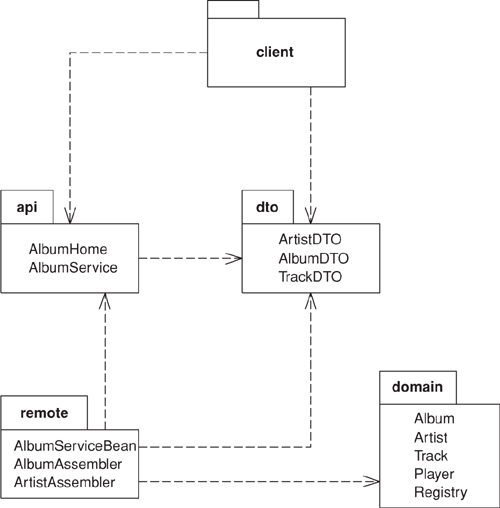
In this example I’ll look at remote interfaces for accessing information about music albums. The Domain Model (116) consists of fine-grained objects that represent an artist, and album, and tracks. Surrounding this are several other packages that provide the data sources for the application (see Figure 15.2).
Figure 15.2. Packages the remote interfaces.
In the figure, the dto package contains Data Transfer Objects (401) that help move data over the wire to the client. They have simple accessor behavior and also the ability to serialize themselves in binary or XML textual formats. In the remote package are assembler objects that move data between the domain objects and the Data Transfer Objects (401). If you’re interested in how this works see the Data Transfer Object (401) discussion.
To explain the facade I’ll assume that I can move data into and out of Data Transfer Objects (401) and concentrate on the remote interfaces. A single logical Java session bean has three actual classes. Two of them make up the remote API (and in fact are Java interfaces); the other is the class that implements the API. The two interfaces are the AlbumService itself and the home object, AlbumHome. The home object is used by the naming service to get access to the distributed facade, but that’s an EJB detail that I’ll skip over here. Our interest is in the Remote Facade itself; AlbumService. Its interface is declared in the API package to be used by the client and is just a list of methods.
class AlbumService...
String play(String id) throws RemoteException;
String getAlbumXml(String id) throws RemoteException;
AlbumDTO getAlbum(String id) throws RemoteException;
void createAlbum(String id, String xml) throws RemoteException;
void createAlbum(String id, AlbumDTO dto) throws RemoteException;
void updateAlbum(String id, String xml) throws RemoteException;
void updateAlbum(String id, AlbumDTO dto) throws RemoteException;
void addArtistNamed(String id, String name) throws RemoteException;
void addArtist(String id, String xml) throws RemoteException;
void addArtist(String id, ArtistDTO dto) throws RemoteException;
ArtistDTO getArtist(String id) throws RemoteException;
Notice that even in this short example I see methods for two different classes in the Domain Model (116): artist and album. I also see minor variations on the same method. Methods have variants that use either the Data Transfer Object (401) or an XML string to move data into the remote service. This allows the client to choose which form to use depending on the nature of the client and of the connection. As you can see, for even a small application this can lead to many methods on AlbumService.
Fortunately, the methods themselves are very simple. Here are the ones for manipulating albums:
class AlbumServiceBean...
public AlbumDTO getAlbum(String id) throws RemoteException {
return new AlbumAssembler().writeDTO(Registry.findAlbum(id));
}
public String getAlbumXml(String id) throws RemoteException {
AlbumDTO dto = new AlbumAssembler().writeDTO(Registry.findAlbum(id));
return dto.toXmlString();
}
public void createAlbum(String id, AlbumDTO dto) throws RemoteException {
new AlbumAssembler().createAlbum(id, dto);
}
public void createAlbum(String id, String xml) throws RemoteException {
AlbumDTO dto = AlbumDTO.readXmlString(xml);
new AlbumAssembler().createAlbum(id, dto);
}
public void updateAlbum(String id, AlbumDTO dto) throws RemoteException {
new AlbumAssembler().updateAlbum(id, dto);
}
public void updateAlbum(String id, String xml) throws RemoteException {
AlbumDTO dto = AlbumDTO.readXmlString(xml);
new AlbumAssembler().updateAlbum(id, dto);
}
As you can see, each method really does nothing more than delegate to another object, so it’s only a line or two in length. This snippet illustrates nicely what a distributed facade should look like: a long list of very short methods with very little logic in them. The facade then is nothing more than a packaging mechanism, which is as it should be.
We’ll just finish with a few words on testing. It’s very useful to be able to do as much testing as possible in a single process. In this case I can write tests for the session bean implementation directly: these can be run without deploying to the EJB container.
class XmlTester...
private AlbumDTO kob;
private AlbumDTO newkob;
private AlbumServiceBean facade = new AlbumServiceBean();
protected void setUp() throws Exception {
facade.initializeForTesting();
kob = facade.getAlbum("kob");
Writer buffer = new StringWriter();
kob.toXmlString(buffer);
newkob = AlbumDTO.readXmlString(new StringReader(buffer.toString()));
}
public void testArtist() {
assertEquals(kob.getArtist(), newkob.getArtist());
}
That was one of the JUnit tests to be run in memory. It showed how I can create an instance of the session bean outside the container and run tests on it, allowing a faster testing turnaround.
I was talking over this book with Mike Hendrickson, my editor at Addison-Wesley. Ever alert to the latest buzzwords, he asked me if I had anything about Web services in it. I’m actually loathe to rush to every fashion—after all, given the languid pace of book publishing any “latest fashion” that I write about will seem quaint by the time you read about it. Still, it’s a good example of how core patterns so often keep their value even with the latest technological flip-flops.
At its heart a Web service is nothing more than an interface for remote usage (with a slow string-parsing step thrown in for good measure). As such the basic advice of Remote Facade holds: Build your functionality in a fine-grained manner and then layer a Remote Facade over the fine-grained model in order to handle Web services.
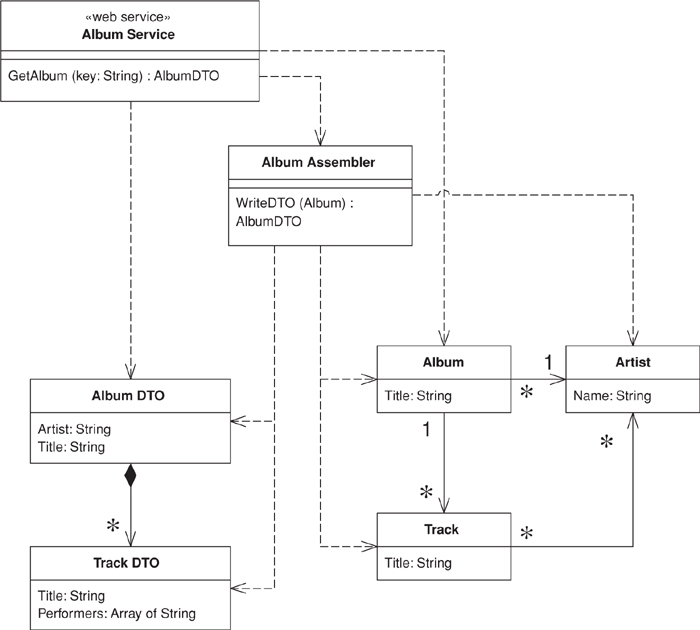
For the example, I’ll use the same basic problem I described previously, but concentrate just on the request for information about a single album. Figure 15.3 shows the various classes that take part. They fall into the familiar groups: album service, the Remote Facade; two Data Transfer Objects (401); three objects in a Domain Model (116); and an assembler to pull data from the Domain Model (116) into the Data Transfer Objects (401).
Figure 15.3. Classes for the album Web service.
The Domain Model (116) is absurdly simple; indeed, for this kind of problem you’re better off using a Table Data Gateway (144) to create the Data Transfer Objects (401) directly. However, that would rather spoil the example of a Remote Facade layered over a domain model.
class Album...
public String Title;
public Artist Artist;
public IList Tracks {
get {return ArrayList.ReadOnly(tracksData);}
}
public void AddTrack (Track arg) {
tracksData.Add(arg);
}
public void RemoveTrack (Track arg) {
tracksData.Remove(arg);
}
private IList tracksData = new ArrayList();
class Artist...
public String Name;
class Track...
public String Title;
public IList Performers {
get {return ArrayList.ReadOnly(performersData);}
}
public void AddPerformer (Artist arg) {
performersData.Add(arg);
}
public void RemovePerformer (Artist arg) {
performersData.Remove(arg);
}
private IList performersData = new ArrayList();
I use Data Transfer Objects (401) for passing the data over the wire. These are just data holders that flatten the structure for the purposes of the Web service.
class AlbumDTO...
public String Title;
public String Artist;
public TrackDTO[] Tracks;
class TrackDTO...
public String Title;
public String[] Performers;
Since this is .NET, I don’t need to write any code to serialize and restore into XML. The .NET framework comes with the appropriate serializer class to do the job.
This is a Web service, so I also need to declare the structure of the Data Transfer Objects (401) in WSDL. The Visual Studio tools will generate the WSDL for me, and I’m a lazy kind of guy, so I’ll let it do that. Here’s the XML Schema definition that corresponds to the Data Transfer Objects (401):
<s:complexType name="AlbumDTO">
<s:sequence>
<s:element minOccurs="1" maxOccurs="1" name="Title" nillable="true" type="s:string" />
<s:element minOccurs="1" maxOccurs="1" name="Artist" nillable="true" type="s:string" />
<s:element minOccurs="1" maxOccurs="1" name="Tracks"
nillable="true" type="s0:ArrayOfTrackDTO" />
</s:sequence>
</s:complexType>
<s:complexType name="ArrayOfTrackDTO">
<s:sequence>
<s:element minOccurs="0" maxOccurs="unbounded" name="TrackDTO"
nillable="true" type="s0:TrackDTO" />
</s:sequence>
</s:complexType>
<s:complexType name="TrackDTO">
<s:sequence>
<s:element minOccurs="1" maxOccurs="1" name="Title" nillable="true" type="s:string" />
<s:element minOccurs="1" maxOccurs="1" name="Performers"
nillable="true" type="s0:ArrayOfString" />
</s:sequence>
</s:complexType>
<s:complexType name="ArrayOfString">
<s:sequence>
<s:element minOccurs="0" maxOccurs="unbounded" name="string"
nillable="true" type="s:string" />
</s:sequence>
</s:complexType>
Being XML, it’s a particularly verbose data structure definition, but it does the job.
To get the data from the Domain Model (116) to the Data Transfer Object (401) I need an assembler.
class AlbumAssembler...
public AlbumDTO WriteDTO (Album subject) {
AlbumDTO result = new AlbumDTO();
result.Artist = subject.Artist.Name;
result.Title = subject.Title;
ArrayList trackList = new ArrayList();
foreach (Track t in subject.Tracks)
trackList.Add (WriteTrack(t));
result.Tracks = (TrackDTO[]) trackList.ToArray(typeof(TrackDTO));
return result;
}
public TrackDTO WriteTrack (Track subject) {
TrackDTO result = new TrackDTO();
result.Title = subject.Title;
result.Performers = new String[subject.Performers.Count];
ArrayList performerList = new ArrayList();
foreach (Artist a in subject.Performers)
performerList.Add (a.Name);
result.Performers = (String[]) performerList.ToArray(typeof (String));
return result;
}
The last piece we need is the service definition itself. This comes first from the C# class.
class AlbumService...
[ WebMethod ]
public AlbumDTO GetAlbum(String key) {
Album result = new AlbumFinder()[key];
if (result == null)
throw new SoapException ("unable to find album with key: " +
key, SoapException.ClientFaultCode);
else return new AlbumAssembler().WriteDTO(result);
}
Of course, this isn’t the real interface definition—that comes from the WSDL file. Here are the relevant bits:
<portType name="AlbumServiceSoap">
<operation name="GetAlbum">
<input message="s0:GetAlbumSoapIn" />
<output message="s0:GetAlbumSoapOut" />
</operation>
</portType>
<message name="GetAlbumSoapIn">
<part name="parameters" element="s0:GetAlbum" />
</message>
<message name="GetAlbumSoapOut">
<part name="parameters" element="s0:GetAlbumResponse" />
</message>
<s:element name="GetAlbum">
<s:complexType>
<s:sequence>
<s:element minOccurs="1" maxOccurs="1" name="key" nillable="true" type="s:string" />
</s:sequence>
</s:complexType>
</s:element>
<s:element name="GetAlbumResponse">
<s:complexType>
<s:sequence>
<s:element minOccurs="1" maxOccurs="1" name="GetAlbumResult"
nillable="true" type="s0:AlbumDTO" />
</s:sequence>
</s:complexType>
</s:element>
As expected, WSDL is rather more garrulous than your average politician, but unlike so many of them, it does get the job done. I can now invoke the service by sending a SOAP message of the form
<?xml version="1.0" encoding="utf-8"?>
<soap:Envelope xmlns:xsi="http://www.w3.org/2001/XMLSchema-instance"
xmlns:xsd="http://www.w3.org/2001/XMLSchema"
xmlns:soap="http://schemas.xmlsoap.org/soap/envelope/">
<soap:Body>
<GetAlbum xmlns="http://martinfowler.com">
<key>aKeyString</key>
</GetAlbum>
</soap:Body>
</soap:Envelope>
The important thing to remember about this example isn’t the cool gyrations with SOAP and .NET but the fundamental layering approach. Design an application without distribution, then layer the distribution ability on top of it with Remote Facades and Data Transfer Objects (401).
An object that carries data between processes in order to reduce the number of method calls.
When you’re working with a remote interface, such as Remote Facade (388), each call to it is expensive. As a result you need to reduce the number of calls, and that means that you need to transfer more data with each call. One way to do this is to use lots of parameters. However, this is often awkward to program—indeed, it’s often impossible with languages such as Java that return only a single value.
The solution is to create a Data Transfer Object that can hold all the data for the call. It needs to be serializable to go across the connection. Usually an assembler is used on the server side to transfer data between the DTO and any domain objects.
Many people in the Sun community use the term “Value Object” for this pattern. I use it to mean something else. See the discussion on page 487.
In many ways, a Data Transfer Object is one of those objects our mothers told us never to write. It’s often little more than a bunch of fields and the getters and setters for them. The value of this usually hateful beast is that it allows you to move several pieces of information over a network in a single call—a trick that’s essential for distributed systems.
Whenever a remote object needs some data, it asks for a suitable Data Transfer Object. The Data Transfer Object will usually carries much more data than what the remote object requested, but it should carry all the data the remote object will need for a while. Due to the latency costs of remote calls, its better to err on the side of sending too much data than have to make multiple calls.
A single Data Transfer Object usually contains more than just a single server object. It aggregates data from all the server objects that the remote object is likely to want data from. Thus, if a remote object requests data about an order object, the returned Data Transfer Object will contain data from the order, the customer, the line items, the products on the line items, the delivery information—all sorts of stuff.
You can’t usually transfer objects from a Domain Model (116). This is because the objects are usually connected in a complex web that’s difficult, if not impossible, to serialize. Also you usually don’t want the domain object classes on the client, which is tantamount to copying the whole Domain Model (116) there. Instead you have to transfer a simplified form of the data from the domain objects.
The fields in a Data Transfer Object are fairly simple, being primitives, simple classes like strings and dates, or other Data Transfer Objects. Any structure between data transfer objects should be a simple graph structure—normally a hierarchy—as opposed to the more complicated graph structures that you see in a Domain Model (116). Keep these simple attributes because they have to be serializable and they need to be understood by both sides of the wire. As a result the Data Transfer Object classes and any classes they reference must be present on both sides.
It makes sense to design the Data Transfer Object around the needs of a particular client. That’s why you often see them corresponding to Web pages or GUI screens. You may also see multiple Data Transfer Objects for an order, depending on the particular screen. Of course, if different presentations require similar data, then it makes sense to use a single Data Transfer Object to handle them all.
A related question to consider is using a single Data Transfer Object for a whole interaction versus different ones for each request. Different Data Transfer Objects make it easier to see what data is transferred in each call, but leads to a lot of Data Transfer Objects. One is less work to write, but makes it harder to see how each call transfers information. I’m inclined to use just one if there’s a lot of commonality over the data, but I don’t hesitate to use different Data Transfer Objects if a particular request suggests it. It’s one of those things you can’t make a blanket rule about, so I might use one Data Transfer Object for most of the interaction and use different ones for a couple of requests and responses.
A similar question is whether to have a single Data Transfer Object for both request and response or separate ones for each. Again, there’s no blanket rule. If the data in each case is pretty similar, use one. If they’re very different, I use two.
Some people like to make Data Transfer Objects immutable. In this scheme you receive one Data Transfer Object from the client and create and send back a different one, even if it’s the same class. Other people alter the request Data Transfer Object. I don’t have any strong opinions either way, but on the whole I prefer a mutable Data Transfer Object because it’s easier to put the data in gradually, even if you make a new object for the response. Some arguments in favor of immutable Data Transfer Object have to do with the naming confusion with Value Object (486).
A common form for Data Transfer Object is that of a Record Set (508), that is, a set of tabular records—exactly what you get back from a SQL query. Indeed, a Record Set (508) is the Data Transfer Object for a SQL database. Architectures often use it throughout the design. A domain model can generate a Record Set (508) of data to transfer to a client, which the client treats as if it was coming directly from SQL. This is useful if the client has tools that bind to Record Set (508) structures. The Record Set (508) can be entirely created by the domain logic, but more likely it’s generated from a SQL query and modified by the domain logic before it’s passed on to the presentation. This style lends itself to Table Module (125).
Another form of Data Transfer Object is as a generic collection data structure. I’ve seen arrays used for this, but I discourage that because the array indices obscure the code. The best collection is a dictionary because you can use meaningful strings as keys. The problem is that you lose the advantage of an explicit interface and strong typing. A dictionary can be worth using for ad hoc cases when you don’t have a generator at hand, as it’s easier to manipulate one than to write an explicit object by hand. However, with a generator I think you’re better off with an explicit interface, especially when you consider that it is being used as communication protocol between different components.
Other than simple getters and setters, the Data Transfer Object is also usually responsible for serializing itself into some format that will go over the wire. Which format depends on what’s on either side of the connection, what can run over the connection itself, and how easy the serialization is. A number of platforms provide built in serialization for simple objects. For example, Java has a built-in binary serialization and .NET has built-in binary and XML serializations. If there’s a built-in serialization, it usually works right out of the box because Data Transfer Objects are simple structures that don’t deal with the complexities you run into with objects in a domain model. As a result I always use the automatic mechanism if I can.
If you don’t have an automatic mechanism, you can usually create one yourself. I’ve seen several code generators that take a simple record descriptions and generate appropriate classes to hold the data, provide accessors, and read and write the data serializations. The important thing is to make the generator only as complicated as you actually need it to be, and don’t try to put in features you only think you’ll need. It can be a good idea to write the first classes by hand and then use them to help you write the generator.
You can also use reflective programming to handle the serialization. That way you only have to write the serialization and deserialization routines once and put them in a superclass. There may be a performance cost to this; you’ll have to measure it to find out if the cost is significant.
You have to choose a mechanism that both ends of the connection will work with. If you control both ends, you pick the easiest one; if you don’t, you may be able to provide a connector at the end you don’t own. Then you can use a simple Data Transfer Object on both sides of the connection and use the connector to adapt to the foreign component.
One of the most common issues you face with Data Transfer Object is whether to use a text or a binary serialization form. Text serializations are easy to read to learn what’s being communicated. XML is popular because you can easily get tools to create and parse XML documents. The big disadvantages with text are that it needs more bandwidth to send the same data (something particularly true of XML) and there’s often a performance penalty, which can be quite significant.
An important factor for serialization is the synchronization of the Data Transfer Object on each side of the wire. In theory, whenever the server changes the definition of the Data Transfer Object, the client updates as well but in practice this may not happen. Accessing a server with an out-of-date client always leads to problems, but the serialization mechanism can make the problems more or less painful. With a pure binary serialization of a Data Transfer Object the result will be that its communication is entirely lost, since any change to its structure usually causes an error on deserialization. Even an innocuous change, such as adding an optional field, will have this effect. As a result direct binary serialization can introduce a lot of fragility into the communication lines.
Other serialization schemes can avoid this. One is XML serialization, which can usually be written in a way that makes the classes more tolerant of changes. Another is a more tolerant binary approach, such as serializing the data using a dictionary. Although I don’t like using a dictionary as the Data Transfer Object, it can be a useful way of doing a binary serialization of the data, since that introduces some tolerance into the synchronization.
A Data Transfer Object doesn’t know about how to connect with domain objects. This is because it should be deployed on both sides of the connection. For that reason I don’t want the Data Transfer Object to be dependent on the domain object. Nor do I want the domain objects to be dependent of the Data Transfer Object since the Data Transfer Object structure will change when I alter interface formats. As a general rule, I want to keep the domain model independent of the external interfaces.
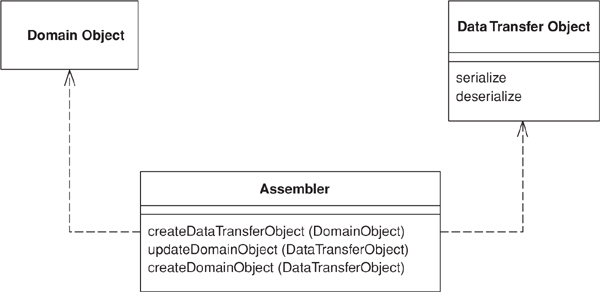
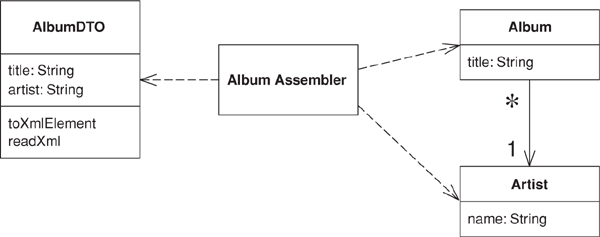
As a result I like to make a separate assembler object responsible for creating a Data Transfer Object from the domain model and updating the model from it (Figure 15.4). The assembler is an example of a Mapper (473) in that it maps between the Data Transfer Object and the domain objects.
Figure 15.4. An assembler object can keep the domain model and the data transfer objects independent of each other.
I may also have multiple assemblers share the same Data Transfer Object. A common case for this is different update semantics in different scenarios using the same data. Another reason to separate the assembler is that the Data Transfer Object can easily be generated automatically from a simple data description. Generating the assembler is more difficult and indeed often impossible.
Use a Data Transfer Object whenever you need to transfer multiple items of data between two processes in a single method call.
There are some alternatives to Data Transfer Object, although I’m not a fan of them. One is to not use an object at all but simply to use a setting method with many arguments or a getting method with several pass-by reference arguments. The problem is that many languages, such as Java, allow only one object as a return value, so, although this can be used for updates, it can’t be used for retrieving information without playing games with callbacks.
Another alternative is to use a some form of string representation directly, without an object acting as the interface to it. Here the problem is that everything else is coupled to the string representation. It’s good to hide the precise representation behind an explicit interface; that way, if you want to change the string or replace it with a binary structure, you don’t have to change anything else.
In particular, it’s worth creating a Data Transfer Object when you want to communicate between components using XML. The XML DOM is a pain in the neck to manipulate, and it’s much better to use a Data Transfer Object that encapsulates it, especially since the Data Transfer Object is so easy to generate.
Another common purpose for a Data Transfer Object is to act as a common source of data for various components in different layers. Each component makes some changes to the Data Transfer Object and then passes it on to the next layer. The use of Record Set (508) in COM and .NET is a good example of this, where each layer knows how to manipulate record set based data, whether it comes directly from a SQL database or has been modified by other layers. .NET expands on this by providing a built-in mechanism to serialize record sets into XML.
Although this book focuses on synchronous systems, there’s an interesting asynchronous use for Data Transfer Object. This is where you want to use an interface both synchronously and asynchronously. Return a Data Transfer Object as usual for the synchronous case; for the asynchronous case create a Lazy Load (200) of the Data Transfer Object and return that. Connect the Lazy Load (200) to wherever the results from the asynchronous call should appear. The user of the Data Transfer Object will block only when it tries to access the results of the call.
[Alur et al.] discuss this pattern under the name Value Object, which I said earlier is equivalent to my Data Transfer Object; my Value Object (486) is a different pattern entirely. This is a name collision; many people have used “Value Object” in the sense that I use it. As far as I can tell, its use to mean what I call Data Transfer Object occurs only within the J2EE community. As a result, I’ve followed the more general usage.
The Value Object Assembler [Alur et al.] is a discussion of the assembler. I chose not to make it a separate pattern, although I use the “assembler” name rather than a name based on Mapper (473).
[Marinescu] discusses Data Transfer Object and several implementation variants. [Riehle et al.] discuss flexible ways to serialize, including switching between different forms of serialization.
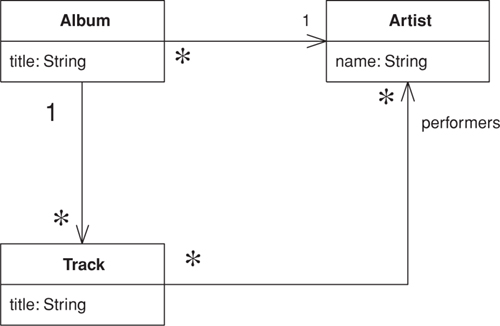
For this example I’ll use the domain model in Figure 15.5. The data I want to transfer is the data about these linked objects, and the structure for the data transfer objects is the one in Figure 15.6.
Figure 15.5. A class diagram of artists and albums.
Figure 15.6. A class diagram of data transfer objects.
The data transfer objects simplify this structure a good bit. The relevant data from the artist class is collapsed into the album DTO, and the performers for a track are represented as an array of strings. This is typical of the collapsing of structure you see for a data transfer object. There are two data transfer objects present, one for the album and one for each track. In this case I don’t need one for the artist, as all the data is present on one of the other two. I only have the track as a transfer object because there are several tracks in the album and each one can contain more than one data item.
Here’s the code to write a Data Transfer Object from the domain model. The assembler is called by whatever object is handling the remote interface, such as a Remote Facade (388).
class AlbumAssembler...
public AlbumDTO writeDTO(Album subject) {
AlbumDTO result = new AlbumDTO();
result.setTitle(subject.getTitle());
result.setArtist(subject.getArtist().getName());
writeTracks(result, subject);
return result;
}
private void writeTracks(AlbumDTO result, Album subject) {
List newTracks = new ArrayList();
Iterator it = subject.getTracks().iterator();
while (it.hasNext()) {
TrackDTO newDTO = new TrackDTO();
Track thisTrack = (Track) it.next();
newDTO.setTitle(thisTrack.getTitle());
writePerformers(newDTO, thisTrack);
newTracks.add(newDTO);
}
result.setTracks((TrackDTO[]) newTracks.toArray(new TrackDTO[0]));
}
private void writePerformers(TrackDTO dto, Track subject) {
List result = new ArrayList();
Iterator it = subject.getPerformers().iterator();
while (it.hasNext()) {
Artist each = (Artist) it.next();
result.add(each.getName());
}
dto.setPerformers((String[]) result.toArray(new String[0]));
}
Updating the model from the Data Transfer Object is usually more involved. For this example there’s a difference between creating a new album and updating an existing one. Here’s the creation code:
class AlbumAssembler...
public void createAlbum(String id, AlbumDTO source) {
Artist artist = Registry.findArtistNamed(source.getArtist());
if (artist == null)
throw new RuntimeException("No artist named " + source.getArtist());
Album album = new Album(source.getTitle(), artist);
createTracks(source.getTracks(), album);
Registry.addAlbum(id, album);
}
private void createTracks(TrackDTO[] tracks, Album album) {
for (int i = 0; i < tracks.length; i++) {
Track newTrack = new Track(tracks[i].getTitle());
album.addTrack(newTrack);
createPerformers(newTrack, tracks[i].getPerformers());
}
}
private void createPerformers(Track newTrack, String[] performerArray) {
for (int i = 0; i < performerArray.length; i++) {
Artist performer = Registry.findArtistNamed(performerArray[i]);
if (performer == null)
throw new RuntimeException("No artist named " + performerArray[i]);
newTrack.addPerformer(performer);
}
}
Reading the DTO involves quite a few decisions. Noticeable here is how to deal with the artist names as they come in. My requirements are that artists should already be in a Registry (480) when I create the album, so if I can’t find an artist this is an error. A different create method might decide to create artists when they’re mentioned in the Data Transfer Object.
For this example I have a different method for updating an existing album.
class AlbumAssembler...
public void updateAlbum(String id, AlbumDTO source) {
Album current = Registry.findAlbum(id);
if (current == null)
throw new RuntimeException("Album does not exist: " + source.getTitle());
if (source.getTitle() != current.getTitle()) current.setTitle(source.getTitle());
if (source.getArtist() != current.getArtist().getName()) {
Artist artist = Registry.findArtistNamed(source.getArtist());
if (artist == null)
throw new RuntimeException("No artist named " + source.getArtist());
current.setArtist(artist);
}
updateTracks(source, current);
}
private void updateTracks(AlbumDTO source, Album current) {
for (int i = 0; i < source.getTracks().length; i++) {
current.getTrack(i).setTitle(source.getTrackDTO(i).getTitle());
current.getTrack(i).clearPerformers();
createPerformers(current.getTrack(i), source.getTrackDTO(i).getPerformers());
}
}
As for updates you can decide to either update the existing domain object or destroy it and replace it with a new one. The question here is whether you have other objects referring to the object you want to update. In this code I’m updating the album since I have other objects referring to it and its tracks. However, for the title and performers of a track I just replace the objects that are there.
Another question concerns an artist changing. Is this changing the name of the existing artist or changing the artist the album is linked to? Again, these questions have to be settled on a case-by-use case basis, and I’m handling it by linking to a new artist.
In this example I’ve used native binary serialization, which means I have to be careful that the Data Transfer Object classes on both sides of the wire are kept in sync. If I make a change to the data structure of the server Data Transfer Object and don’t change the client, I’ll get errors in the transfer. I can make the transfer more tolerant by using a map as my serialization.
class TrackDTO...
public Map writeMap() {
Map result = new HashMap();
result.put("title", title);
result.put("performers", performers);
return result;
}
public static TrackDTO readMap(Map arg) {
TrackDTO result = new TrackDTO();
result.title = (String) arg.get("title");
result.performers = (String[]) arg.get("performers");
return result;
}
Now, if I add a field to the server and use the old client, although the new field won’t be picked up by the client, the rest of the data will transfer correctly.
Of course, writing the serialization and deserialization routines like this is tedious. I can avoid much of this tedium by using a reflective routine such as this on the Layer Supertype (475):
class DataTransferObject...
public Map writeMapReflect() {
Map result = null;
try {
Field[] fields = this.getClass().getDeclaredFields();
result = new HashMap();
for (int i = 0; i < fields.length; i++)
result.put(fields[i].getName(), fields[i].get(this));
} catch (Exception e) {throw new ApplicationException (e);
}
return result;
}
public static TrackDTO readMapReflect(Map arg) {
TrackDTO result = new TrackDTO();
try {
Field[] fields = result.getClass().getDeclaredFields();
for (int i = 0; i < fields.length; i++)
fields[i].set(result, arg.get(fields[i].getName()));
} catch (Exception e) {throw new ApplicationException (e);
}
return result;
}
Such a routine will handle most cases pretty well (although you’ll have to add extra code to handle primitives).
As I write this, Java’s XML handling is very much in flux and APIs, still volatile, are generally getting better. By the time you read it this section may be out of date or completely irrelevant, but the basic concept of converting to XML is pretty much the same.
First I get the data structure for the Data Transfer Object; then I need to decide how to serialize it. In Java you get free binary serialization simply by using a marker interface. This works completely automatically for a Data Transfer Object so it’s my first choice. However, text-based serialization is often necessary. For this example then, I’ll use XML.
For this example, I’m using JDOM since that makes working with XML much easier than using the W3C standard interfaces. I write methods to read and write an XML element to represent each Data Transfer Object class.
class AlbumDTO...
Element toXmlElement() {
Element root = new Element("album");
root.setAttribute("title", title);
root.setAttribute("artist", artist);
for (int i = 0; i < tracks.length; i++)
root.addContent(tracks[i].toXmlElement());
return root;
}
static AlbumDTO readXml(Element source) {
AlbumDTO result = new AlbumDTO();
result.setTitle(source.getAttributeValue("title"));
result.setArtist(source.getAttributeValue("artist"));
List trackList = new ArrayList();
Iterator it = source.getChildren("track").iterator();
while (it.hasNext())
trackList.add(TrackDTO.readXml((Element) it.next()));
result.setTracks((TrackDTO[]) trackList.toArray(new TrackDTO[0]));
return result;
}
class TrackDTO...
Element toXmlElement() {
Element result = new Element("track");
result.setAttribute("title", title);
for (int i = 0; i < performers.length; i++) {
Element performerElement = new Element("performer");
performerElement.setAttribute("name", performers[i]);
result.addContent(performerElement);
}
return result;
}
static TrackDTO readXml(Element arg) {
TrackDTO result = new TrackDTO();
result.setTitle(arg.getAttributeValue("title"));
Iterator it = arg.getChildren("performer").iterator();
List buffer = new ArrayList();
while (it.hasNext()) {
Element eachElement = (Element) it.next();
buffer.add(eachElement.getAttributeValue("name"));
}
result.setPerformers((String[]) buffer.toArray(new String[0]));
return result;
}
Of course, these methods only create the elements in the XML DOM. To perform the serialization I need to read and write text. Since the track is transferred only in the context of the album, I just need to write this album code.
class AlbumDTO...
public void toXmlString(Writer output) {
Element root = toXmlElement();
Document doc = new Document(root);
XMLOutputter writer = new XMLOutputter();
try {
writer.output(doc, output);
}catch (IOException e) {
e.printStackTrace();
}
}
public static AlbumDTO readXmlString(Reader input) {
try {
SAXBuilder builder = new SAXBuilder();
Document doc = builder.build(input);
Element root = doc.getRootElement();
AlbumDTO result = readXml(root);
return result;
}catch (Exception e) {
e.printStackTrace();
throw new RuntimeException();
}
}
Although it isn’t rocket science, I’ll be glad when JAXB makes this kind of stuff unnecessary.