Layering is one of the most common techniques that software designers use to break apart a complicated software system. You see it in machine architectures, where layers descend from a programming language with operating system calls into device drivers and CPU instruction sets, and into logic gates inside chips. Networking has FTP layered on top of TCP, which is on top of IP, which is on top of ethernet.
When thinking of a system in terms of layers, you imagine the principal subsystems in the software arranged in some form of layer cake, where each layer rests on a lower layer. In this scheme the higher layer uses various services defined by the lower layer, but the lower layer is unaware of the higher layer. Furthermore, each layer usually hides its lower layers from the layers above, so layer 4 uses the services of layer 3, which uses the services of layer 2, but layer 4 is unaware of layer 2. (Not all layering architectures are opaque like this, but most are—or rather most are mostly opaque.)
Breaking down a system into layers has a number of important benefits.
• You can understand a single layer as a coherent whole without knowing much about the other layers. You can understand how to build an FTP service on top of TCP without knowing the details of how ethernet works.
• You can substitute layers with alternative implementations of the same basic services. An FTP service can run without change over ethernet, PPP, or whatever a cable company uses.
• You minimize dependencies between layers. If the cable company changes its physical transmission system, providing they make IP work, we don’t have to alter our FTP service.
• Layers make good places for standardization. TCP and IP are standards because they define how their layers should operate.
• Once you have a layer built, you can use it for many higher-level services. Thus, TCP/IP is used by FTP, telnet, SSH, and HTTP. Otherwise, all of these higher-level protocols would have to write their own lower-level protocols.
Layering is an important technique, but there are downsides.
• Layers encapsulate some, but not all, things well. As a result you sometimes get cascading changes. The classic example of this in a layered enterprise application is adding a field that needs to display on the UI, must be in the database, and thus must be added to every layer in between.
• Extra layers can harm performance. At every layer things typically need to be transformed from one representation to another. However, the encapsulation of an underlying function often gives you efficiency gains that more than compensate. A layer that controls transactions can be optimized and will then make everything faster.
But the hardest part of a layered architecture is deciding what layers to have and what the responsibility of each layer should be.
Although I’m too young to have done any work in the early days of batch systems, I don’t sense that people thought much of layers in those days. You wrote a program that manipulated some form of files (ISAM, VSAM, etc.), and that was your application. No layers need apply.
The notion of layers became more apparent in the ’90s with the rise of client–server systems. These were two-layer systems: The client held the user interface and other application code, and the server was usually a relational database. Common client tools were VB, Powerbuilder, and Delphi. These made it particularly easy to build data-intensive applications, as they had UI widgets that were aware of SQL. Thus you could build a screen by dragging controls onto a design area and then using property sheets to connect the controls to the database.
If the application was all about the display and simple update of relational data, then these client–server systems worked very well. The problem came with domain logic: business rules, validations, calculations, and the like. Usually people would write these on the client, but this was awkward and usually done by embedding the logic directly into the UI screens. As the domain logic got more complex, this code became very difficult to work with. Furthermore, embedding logic in screens made it easy to duplicate code, which meant that simple changes resulted in hunting down similar code in many screens.
An alternative was to put the domain logic in the database as stored procedures. However, stored procedures gave limited structuring mechanisms, which again led to awkward code. Also, many people liked relational databases because SQL was a standard that would allow them to change their database vendor. Despite the fact that few people actually did this, many liked having the option to change vendors without too high a porting cost. Because they are all proprietary, stored procedures removed that option.
At the same time that client–server was gaining popularity, the object-oriented world was rising. The object community had an answer to the problem of domain logic: Move to a three-layer system. In this approach you have a presentation layer for your UI, a domain layer for your domain logic, and a data source. This way you could move all of that intricate domain logic out of the UI and put it into a layer where you could structure it properly with objects.
Despite this, the object bandwagon made little headway. The truth was that many systems were simple, or at least started that way. And although the three-layer approach had many benefits, the tooling for client–server was compelling if your problem was simple. The client–server tools also were difficult, or even impossible, to use in a three-layer configuration.
I think the seismic shock here was the rise of the Web. Suddenly people wanted to deploy client–server applications with a Web browser. However, if all your business logic was buried in a rich client, then all your business logic needed to be redone to have a Web interface. A well-designed three-layer system could just add a new presentation layer and be done with it. Furthermore, with Java we saw an unashamedly object-oriented language hit the mainstream. The tools that appeared to build Web pages were much less tied to SQL and thus more amenable to a third layer.
When people discuss layering, there’s often some confusion over the terms layer and tier. Often the two are used as synonyms, but most people see tier as implying a physical separation. Client–server systems are often described as two-tier systems, and the separation is physical: The client is a desktop and the server is a server. I use layer to stress that you don’t have to run the layers on different machines. A distinct layer of domain logic often runs on either a desktop or the database server. In this situation you have two nodes but three distinct layers. With a local database I can run all three layers on a single laptop, but there will still be three distinct layers.
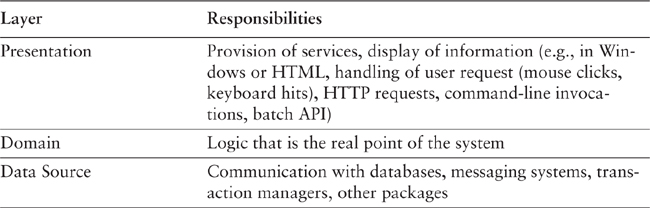
For this book I’m centering my discussion around an architecture of three primary layers: presentation, domain, and data source. (I’m following the names used in [Brown et al.]). Table 1.1 summarizes these layers.
Table 1.1. Three Principal Layers
Presentation logic is about how to handle the interaction between the user and the software. This can be as simple as a command-line or text-based menu system, but these days it’s more likely to be a rich-client graphics UI or an HTML-based browser UI. (In this book I use rich client to mean a Windows/Swing/fat-client UI, as opposed to an HTML browser.) The primary responsibilities of the presentation layer are to display information to the user and to interpret commands from the user into actions upon the domain and data source.
Data source logic is about communicating with other systems that carry out tasks on behalf of the application. These can be transaction monitors, other applications, messaging systems, and so forth. For most enterprise applications the biggest piece of data source logic is a database that is primarily responsible for storing persistent data.
The remaining piece is the domain logic, also referred to as business logic. This is the work that this application needs to do for the domain you’re working with. It involves calculations based on inputs and stored data, validation of any data that comes in from the presentation, and figuring out exactly what data source logic to dispatch, depending on commands received from the presentation.
Sometimes the layers are arranged so that the domain layer completely hides the data source from the presentation. More often, however, the presentation accesses the data store directly. While this is less pure, it tends to work better in practice. The presentation may interpret a command from the user, use the data source to pull the relevant data out of the database, and then let the domain logic manipulate that data before presenting it on the glass.
A single application can often have multiple packages of each of these three subject areas. An application designed to be manipulated not only by end users through a rich-client interface but also through a command line would have two presentations: one for the rich-client interface and one for the command line. Multiple data source components may be present for different databases, but would be particularly common for communication with existing packages. Even the domain may be broken into distinct areas relatively separate from each other. Certain data source packages may only be used by certain domain packages.
So far I’ve talked about a user. This naturally raises the question of what happens when there is no human being driving the software. This could be something new and fashionable like a Web service or something mundane and useful like a batch process. In the latter case the user is the client program. At this point it becomes apparent that there is a lot of similarity between the presentation and data source layers in that they both are about connection to the outside world. This is the logic behind Alistair Cockburn’s Hexagonal Architecture pattern [wiki], which visualizes any system as a core surrounded by interfaces to external systems. In Hexagonal Architecture everything external is fundamentally an outside interface, and thus it’s a symmetrical view rather than my asymmetric layering scheme.
I find this asymmetry useful, however, because I think there is a good distinction to be made between an interface that you provide as a service to others and your use of someone else’s service. Driving down to the core, this is the real distinction I make between presentation and data source. Presentation is an external interface for a service your system offers to someone else, whether it be a complex human or a simple remote program. Data source is the interface to things that are providing a service to you. I find it beneficial to think about these differently because the difference in clients alters the way you think about the service.
Although we can identify the three common responsibility layers of presentation, domain, and data source for every enterprise application, how you separate them depends on how complex the application is. A simple script to pull data from a database and display it in a Web page may all be one procedure. I would still endeavor to separate the three layers, but in that case I might do it only by placing the behavior of each layer in separate subroutines. As the system gets more complex, I would break the three layers into separate classes. As complexity increased I would divide the classes into separate packages. My general advice is to choose the most appropriate form of separation for your problem but make sure you do some kind of separation—at least at the subroutine level.
Together with the separation, there’s also a steady rule about dependencies: The domain and data source should never be dependent on the presentation. That is, there should be no subroutine call from the domain or data source code into the presentation code. This rule makes it easier to substitute different presentations on the same foundation and makes it easier to modify the presentation without serious ramifications deeper down. The relationship between the domain and the data source is more complex and depends upon the architectural patterns used for the data source.
One of the hardest parts of working with domain logic seems to be that people often find it difficult to recognize what is domain logic and what is other forms of logic. An informal test I like is to imagine adding a radically different layer to an application, such as a command-line interface to a Web application. If there’s any functionality you have to duplicate in order to do this, that’s a sign of where domain logic has leaked into the presentation. Similarly, do you have to duplicate logic to replace a relational database with an XML file?
A good example of this is a system I was told about that contained a list of products in which all the products that sold over 10 percent more than they did the previous month were colored in red. To do this the developers placed logic in the presentation layer that compared this month’s sales to last month’s sales and if the difference was more than 10 percent, they set the color to red.
The trouble is that that’s putting domain logic into the presentation. To properly separate the layers you need a method in the domain layer to indicate if a product has improving sales. This method does the comparison between the two months and returns a Boolean value. The presentation layer then simply calls this Boolean method and, if true, highlights the product in red. That way the process is broken into its two parts: deciding whether there is something highlightable and choosing how to highlight.
I’m uneasy with being overly dogmatic about this. When reviewing this book, Alan Knight commented that he was “torn between whether just putting that into the UI is the first step on a slippery slope to hell or a perfectly reasonable thing to do that only a dogmatic purist would object to.” The reason we are uneasy is because it’s both!
For most of this book I will be talking about logical layers—that is, dividing a system into separate pieces to reduce the coupling between different parts of a system. Separation between layers is useful even if the layers are all running on one physical machine. However, there are places where the physical structure of a system makes a difference.
For most IS applications the decision is whether to run processing on a client, on a desktop machine, or on a server.
Often the simplest case is to run everything on servers. An HTML front end that uses a Web browser is a good way to do this. The great advantage of running on the server is that everything is easy to upgrade and fix because it’s in a limited amount of places. You don’t have to worry about deployment to many desktops and keeping them all in sync with the server. You don’t have to worry about compatibilities with other desktop software.
The general argument in favor of running on a client turns on responsiveness or disconnected operation. Any logic that runs on the server needs a server roundtrip to respond to anything the user does. If the user wants to fiddle with things and see immediate feedback, that roundtrip gets in the way. It also needs a network connection to run. The network may like to be everywhere, but as I type this it isn’t at 31,000 feet. It may be everywhere soon, but there are people who want to do work now without waiting for wireless coverage to reach Dead End Creek. Disconnected operation brings particular challenges, and I’m afraid I decided to put those out of the scope of this book.
With those general forces in place, we can look at the options layer by layer. The data source pretty much always runs only on servers. The exception is where you might duplicate server functionality onto a suitably powerful client, usually when you want disconnected operation. In this case changes to the data source on the disconnected client need to be synchronized with the server. As I mentioned earlier, I decided to leave those issues to another day—or another author.
The decision of where to run the presentation depends mostly on what kind of user interface you want. Running a rich client pretty much means running the presentation on the client. Running a Web interface pretty much means running on the server. There are exceptions—for one, remote operation of client software (such as X servers in the Unix world) running a Web server on the desktop—but these exceptions are rare.
If you’re building a B2C system, you have no choice. Any Tom, Dick, or Harriet can be connecting to your servers and you don’t want to turn anyone away because they insist on doing their online shopping with a TRS-80. In this case you do all processing on the server and offer up HTML for the browser to deal with. Your limitation with the HTML option is that every bit of decision making needs a roundtrip from the client to the server, and that can hurt responsiveness. You can reduce some of the lag with browser scripting and downloadable applets, but they reduce your browser compatibility and tend to add other headaches. The more pure HTML you can go, the easier life is.
That ease of life is appealing even if every one of your desktops is lovingly hand-built by your IS department. Keeping clients up to date and avoiding compatibility errors with other software are problems even simple rich-client systems have.
The primary reason that people want a rich-client presentation is that some tasks are complicated for users to do and, to have a usable application, they’ll need more than what a Web GUI can give. Increasingly, however, people are getting used to ways to make Web front ends more usable, and that reduces the need for a rich client presentation. As I write this I’m very much in favor of the Web presentation if you can and the rich client if you must.
This leaves us with the domain logic. You can run business logic all on the server or all on the client, or you can split it. Again, all on the server is the best choice for ease of maintenance. The demand to move it to the client is for either responsiveness or disconnected use.
If you have to run some logic on the client, you can consider running all of it there—at least that way it’s all in one place. Usually this goes hand in hand with a rich client—running a Web server on a client machine isn’t going to help responsiveness much, although it can be a way to deal with disconnected operation. In this case you can still keep your domain logic in separate modules from the presentation, with either a Transaction Script (110) or a Domain Model (116). The problem with putting all the domain logic on the client is that you have more to upgrade and maintain.
Splitting across both the desktop and the server sounds like the worst of both worlds because you don’t know where any piece of logic may be. The main reason to do it is that you have only a small amount of domain logic that needs to run on the client. The trick then is to isolate this piece of logic in a self-contained module that isn’t dependent on any other part of the system. That way you can run that module on the client or the server. This will require a good bit of annoying jiggery-pokery, but it’s a good way of doing the job.
Once you’ve chosen your processing nodes, you should try to keep all of a node’s code in a single process, either on one node or copied on several nodes in a cluster. Don’t try to separate the layers into discrete processes unless you absolutely have to. Doing that will both degrade performance and add complexity, as you have to add things like Remote Facades (388) and Data Transfer Objects (401).
It’s important to remember that many of these things are what Jens Coldewey refers to as complexity boosters—distribution, explicit multithreading, paradigm chasms (such as object/relational), multiplatform development, and extreme performance requirements (such as more than 100 transactions per second). All of these carry a high cost. Certainly there are times when you have to do it, but never forget that each one carries a charge both in development and in on-going maintenance.