This can be one of the most frustrating things in legacy systems. You need to make a change, and you think, “Oh, that’s all.” Then you discover that you have to make the same change over and over again because there are about a dozen places with similar code in your system. You might get the sense that if you reengineered or restructured your system, you might not have this problem, but who has time for that? So you are left with another sore point in the system, something that adds up to general yuckiness.
If you know about refactoring, you’re in a better position. You know that removing duplication doesn’t have to be a grand effort such as in reengineering or re-architecting. It’s something that you can do in small chunks as you do your work. Over time, the system will get better as long as people aren’t introducing duplication behind your back. If they are, you can take steps with them short of physical violence, but that is another issue. The key question is, is it worth it? What do we get when we zealously squeeze duplication out of an area of code? The results are surprising. Let’s take a look at an example.
We have a little Java-based networking system, and we have to send commands to a server. The two commands that we have are called AddEmployeeCmd and LogonCommand. When we need to issue a command, we instantiate it and pass an output stream to its write method.
Here are the listings for both command classes. Do you see any duplication here?
import java.io.OutputStream;
public class AddEmployeeCmd {
String name;
String address;
String city;
String state;
String yearlySalary;
private static final byte[] header = {(byte)0xde, (byte)0xad};
private static final byte[] commandChar = {0x02};
private static final byte[] footer = {(byte)0xbe, (byte)0xef};
private static final int SIZE_LENGTH = 1;
private static final int CMD_BYTE_LENGTH = 1;
private int getSize() {
return header.length +
SIZE_LENGTH +
CMD_BYTE_LENGTH +
footer.length +
name.getBytes().length + 1 +
address.getBytes().length + 1 +
city.getBytes().length + 1 +
state.getBytes().length + 1 +
yearlySalary.getBytes().length + 1;
}
public AddEmployeeCmd(String name, String address,
String city, String state,
int yearlySalary) {
this.name = name;
this.address = address;
this.city = city;
this.state = state;
this.yearlySalary = Integer.toString(yearlySalary);
}
public void write(OutputStream outputStream)
throws Exception {
outputStream.write(header);
outputStream.write(getSize());
outputStream.write(commandChar);
outputStream.write(name.getBytes());
outputStream.write(0x00);
outputStream.write(address.getBytes());
outputStream.write(0x00);
outputStream.write(city.getBytes());
outputStream.write(0x00);
outputStream.write(state.getBytes());
outputStream.write(0x00);
outputStream.write(yearlySalary.getBytes());
outputStream.write(0x00);
outputStream.write(footer);
}
}
import java.io.OutputStream;
public class LoginCommand {
private String userName;
private String passwd;
private static final byte[] header
= {(byte)0xde, (byte)0xad};
private static final byte[] commandChar = {0x01};
private static final byte[] footer
= {(byte)0xbe, (byte)0xef};
private static final int SIZE_LENGTH = 1;
private static final int CMD_BYTE_LENGTH = 1;
public LoginCommand(String userName, String passwd) {
this.userName = userName;
this.passwd = passwd;
}
private int getSize() {
return header.length + SIZE_LENGTH + CMD_BYTE_LENGTH +
footer.length + userName.getBytes().length + 1 +
passwd.getBytes().length + 1;
}
public void write(OutputStream outputStream)
throws Exception {
outputStream.write(header);
outputStream.write(getSize());
outputStream.write(commandChar);
outputStream.write(userName.getBytes());
outputStream.write(0x00);
outputStream.write(passwd.getBytes());
outputStream.write(0x00);
outputStream.write(footer);
}
}
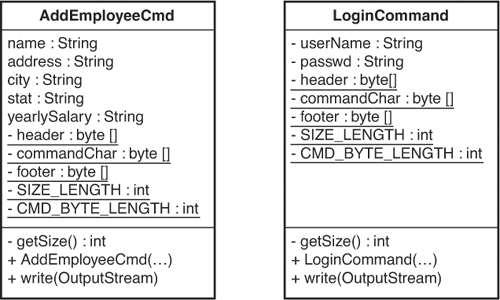
Figure 21.1 shows the classes in UML.
Figure 21.1 AddEmployeeCmd and LoginCommand.
It looks like there is a lot of duplication, but so what? The amount of code is pretty small. We could refactor it, cutting out duplication, and make it smaller, but is that going to make our lives easier? Maybe yes, maybe no; it’s hard to tell just by looking at it.
Let’s try to identify pieces of duplication and remove it, and see where we end up. Then we can decide whether the duplication removal was really helpful.
The first thing that we need is a set of tests that we’ll run after each refactoring. We’ll cut them out of the description here for brevity, but remember that they are there.
My first reaction when I am confronted by duplication is to step back and get a sense of the full scope of it. When I do that, I start thinking about what kind of classes I’ll end up with and what the extracted bits of duplication will look like. Then I realize that I’m really over-thinking it. Removing small pieces of duplication helps, and it makes it easier to see larger areas of duplication later. For instance, in the write method of LoginCommand, we have this code:
outputStream.write(userName.getBytes());
outputStream.write(0x00);
outputStream.write(passwd.getBytes());
outputStream.write(0x00);
When we write out a string, we also write a terminating null character (0x00). We can extract the duplication like this. Create a method named writeField that accepts a string and an output stream. The method then writes the string to the stream and finishes up by writing a null.
void writeField(OutputStream outputStream, String field) {
outputStream.write(field.getBytes());
outputStream.write(0x00);
}
When we have that method, we can replace each pair of string/null writes, running our tests periodically to make sure we haven’t broken anything. Here is the write method of LoginCommand after the change:
public void write(OutputStream outputStream)
throws Exception {
outputStream.write(header);
outputStream.write(getSize());
outputStream.write(commandChar);
writeField(outputstream, username);
writeField(outputStream, passwd);
outputStream.write(footer);
}
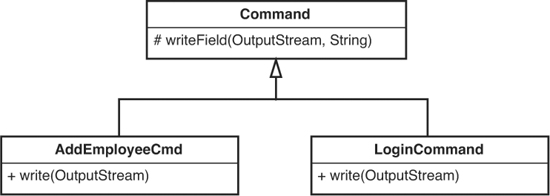
That takes care of the problem for the LoginCommand class, but it doesn’t do a thing for us in the AddEmployeeCmd class. AddEmployeeCmd has similar repeating sequences of string/null writes in its write method also. Because both classes are commands, we can introduce a superclass for them called Command. When we have it, we can pull writeField up into the superclass so that it can be used in both commands (see Figure 21.2).
Figure 21.2 Command hierarchy.
We can go back over to AddEmployeeCmd now and replace its string/null writes with calls to writeField. When we’re done, the write method for AddEmployeeCmd looks like this:
public void write(OutputStream outputStream)
throws Exception {
outputStream.write(header);
outputStream.write(getSize());
outputStream.write(commandChar);
writeField(outputStream, name);
writeField(outputStream, address);
writeField(outputStream, city);
writeField(outputStream, state);
writeField(outputStream, yearlySalary);
outputStream.write(footer);
}
The write for LoginCommand looks like this:
public void write(OutputStream outputStream)
throws Exception {
outputStream.write(header);
outputStream.write(getSize());
outputStream.write(commandChar);
writeField(outputstream, userName);
writeField(outputStream, passwd);
outputStream.write(footer);
}
The code is a little cleaner, but we’re not done yet. The write methods for AddEmployeeCmd and LoginCommand have the same form: write the header, the size, and the command char; then write a bunch of fields; and, finally, write the footer. If we can extract the difference, writing the fields, we end up with a LoginCommand write method that looks like this:
public void write(OutputStream outputStream)
throws Exception {
outputStream.write(header);
outputStream.write(getSize());
outputStream.write(commandChar);
writeBody(outputstream);
outputStream.write(footer);
}
Here is the extracted writeBody:
private void writeBody(OutputStream outputStream)
throws Exception {
writeField(outputstream, userName);
writeField(outputStream, passwd);
}
The write method for AddEmployeeCmd looks exactly the same, but its writeBody looks like this:
private void writeBody(OutputStream outputStream) throws Exception {
writeField(outputStream, name);
writeField(outputStream, address);
writeField(outputStream, city);
writeField(outputStream, state);
writeField(outputStream, yearlySalary);
}
The write methods for both classes look exactly the same. Can we move the write method up into the Command class? Not yet. Even though both writes look the same, they use data from their classes: header, footer, and commandChar. If we are going to try to make a single write method, it would have to call methods from the subclasses to get that data. Let’s take a look at the variables in AddEmployeeCmd and LoginCommand:
public class AddEmployeeCmd extends Command {
String name;
String address;
String city;
String state;
String yearlySalary;
private static final byte[] header
= {(byte)0xde, (byte)0xad};
private static final byte[] commandChar = {0x02};
private static final byte[] footer
= {(byte)0xbe, (byte)0xef};
private static final int SIZE_LENGTH = 1;
private static final int CMD_BYTE_LENGTH = 1;
...
}
public class LoginCommand extends Command {
private String userName;
private String passwd;
private static final byte[] header
= {(byte)0xde, (byte)0xad};
private static final byte[] commandChar = {0x01};
private static final byte[] footer
= {(byte)0xbe, (byte)0xef};
private static final int SIZE_LENGTH = 1;
private static final int CMD_BYTE_LENGTH = 1;
...
}
Both classes have a lot of common data. We can pull header, footer, SIZE_LENGTH, and CMD_BYTE_LENGTH up to the Command class because they all have the same values. I’m going to make them protected temporarily so that we can recompile and test:
public class Command {
protected static final byte[] header
= {(byte)0xde, (byte)0xad};
protected static final byte[] footer
= {(byte)0xbe, (byte)0xef};
protected static final int SIZE_LENGTH = 1;
protected static final int CMD_BYTE_LENGTH = 1;
...
}
Now we’re left with the commandChar variable in both subclasses. It has a different value for each of them. One simple way of handling this is to introduce an abstract getter on the Command class:
public class Command {
protected static final byte[] header
= {(byte)0xde, (byte)0xad};
protected static final byte[] footer
= {(byte)0xbe, (byte)0xef};
protected static final int SIZE_LENGTH = 1;
protected static final int CMD_BYTE_LENGTH = 1;
protected abstract char [] getCommandChar();
...
}
Now we can replace the commandChar variables on each subclass with a getCommandChar override:
public class AddEmployeeCmd extends Command {
protected char [] getCommandChar() {
return new char [] { 0x02};
}
...
}
public class LoginCommand extends Command {
protected char [] getCommandChar() {
return new char [] { 0x01};
}
...
}
Okay, now, it is safe to pull up the write method. Once we do, we end up with a Command class that looks like this:
public class Command {
protected static final byte[] header
= {(byte)0xde, (byte)0xad};
protected static final byte[] footer
= {(byte)0xbe, (byte)0xef};
protected static final int SIZE_LENGTH = 1;
protected static final int CMD_BYTE_LENGTH = 1;
protected abstract char [] getCommandChar();
protected abstract void writeBody(OutputStream outputStream);
protected void writeField(OutputStream outputStream,
String field) {
outputStream.write(field.getBytes());
outputStream.write(0x00);
}
public void write(OutputStream outputStream)
throws Exception {
outputStream.write(header);
outputStream.write(getSize());
outputStream.write(commandChar);
writeBody(outputstream);
outputStream.write(footer);
}
}
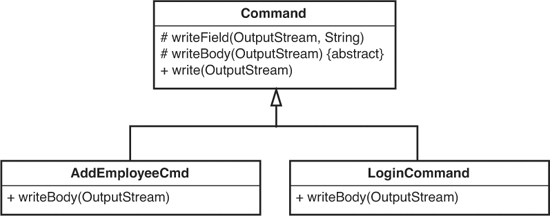
Notice that we had to introduce an abstract method for writeBody and put it up in Command also (see Figure 21.3).
Figure 21.3 Pulling up writeField.
After we’ve moved up the write method, the only things that remain in each of the subclasses are the getSize methods, the getCommandChar method, and the constructors. Here’s the LoginCommand class again:
public class LoginCommand extends Command {
private String userName;
private String passwd;
public LoginCommand(String userName, String passwd) {
this.userName = userName;
this.passwd = passwd;
}
protected char [] getCommandChar() {
return new char [] { 0x01};
}
protected int getSize() {
return header.length + SIZE_LENGTH + CMD_BYTE_LENGTH +
footer.length + userName.getBytes().length + 1 +
passwd.getBytes().length + 1;
}
}
That is a pretty slim class. AddEmployeeCmd looks pretty similar. It has a getSize method and a getCommandChar method, and not much else. Let’s look at the getSize methods a little more closely:
Here is the one for LoginCommand:
protected int getSize() {
return header.length + SIZE_LENGTH +
CMD_BYTE_LENGTH + footer.length +
userName.getBytes().length + 1 +
passwd.getBytes().length + 1;
}
And here is the one for AddEmployeeCmd:
private int getSize() {
return header.length + SIZE_LENGTH +
CMD_BYTE_LENGTH + footer.length +
name.getBytes().length + 1 +
address.getBytes().length + 1 +
city.getBytes().length + 1 +
state.getBytes().length + 1 +
yearlySalary.getBytes().length + 1;
}
What is the same and what is different? It looks like they both add the header, the size length, the command byte length, and the footer length. Then they add the sizes of each of their fields. What if we extract what is computed differently: the size of the fields? We call the resulting method getBodySize().
private int getSize() {
return header.length + SIZE_LENGTH
+ CMD_BYTE_LENGTH + footer.length + getBodySize();
}
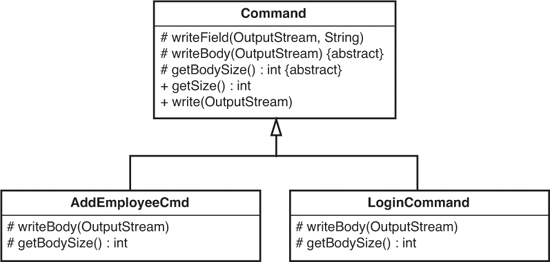
If we do that, we end up with the same code in each method. We add up the size of all of the bookkeeping data, and then we add the size of the body, which is the total of the sizes of all of the fields. After we do this, we can move getSize up into the Command class and have different implementations for getBodySize in each subclass (see Figure 21.4).
Figure 21.4 Pulling up getSize.
Let’s look at where we are now. We have this implementation of getBody in AddEmployeeCmd:
protected int getBodySize() {
return name.getBytes().length + 1 +
address.getBytes().length + 1 +
city.getBytes().length + 1 +
state.getBytes().length + 1 +
yearlySalary.getBytes().length + 1;
}
We’ve ignored some rather blatant duplication here. It is kind of small, but let’s be zealous and remove it completely:
protected int getFieldSize(String field) {
return field.getBytes().length + 1;
}
protected int getBodySize() {
return getFieldSize(name) +
getFieldSize(address) +
getFieldSize(city) +
getFieldSize(state) +
getFieldSize(yearlySalary);
}
If we move the getFieldSize method up to the Command class, we can use it in the getBodySize method of LoginCommand also:
protected int getBodySize() {
return getFieldSize(name) + getFieldSize(password);
}
Is there more duplication here at all? Actually, there is, but just a little. Both LoginCommand and AddEmployeeCmd accept a list of parameters, get their sizes, and write them out. Except for the commandChar variable, that accounts for all of the remaining differences between the two classes: What if we remove the duplication by generalizing it a little? If we declare a list in the base class, we can add to it in each subclass constructor like this:
class LoginCommand extends Command
{
...
public AddEmployeeCmd(String name, String password) {
fields.add(name);
fields.add(password);
}
...
}
When we add to the fields list in each subclass, we can use the same code to get the body size:
int getBodySize() {
int result = 0;
for(Iterator it = fields.iterator(); it.hasNext(); ) {
String field = (String)it.next();
result += getFieldSize(field);
}
return result;
}
Likewise, the writeBody method can look like this:
void writeBody(Outputstream outputstream) {
for(Iterator it = fields.iterator(); it.hasNext(); ) {
String field = (String)it.next();
writeField(outputStream, field);
}
}
We can pull up those methods to the superclass. When we’ve done that, we’ve truly removed all of the duplication. Here is what the Command class looks like. To make things more sensible, we’ve made all the methods that are no longer accessed in subclasses private:
public class Command {
private static final byte[] header
= {(byte)0xde, (byte)0xad};
private static final byte[] footer
= {(byte)0xbe, (byte)0xef};
private static final int SIZE_LENGTH = 1;
private static final int CMD_BYTE_LENGTH = 1;
protected List fields = new ArrayList();
protected abstract char [] getCommandChar();
private void writeBody(Outputstream outputstream) {
for(Iterator it = fields.iterator(); it.hasNext(); ) {
String field = (String)it.next();
writeField(outputStream, field);
}
}
private int getFieldSize(String field) {
return field.getBytes().length + 1;
}
private int getBodySize() {
int result = 0;
for(Iterator it = fields.iterator(); it.hasNext(); ) {
String field = (String)it.next();
result += getFieldSize(field);
}
return result;
}
private int getSize() {
return header.length + SIZE_LENGTH
+ CMD_BYTE_LENGTH + footer.length
+ getBodySize();
}
private void writeField(OutputStream outputStream,
String field) {
outputStream.write(field.getBytes());
outputStream.write(0x00);
}
public void write(OutputStream outputStream)
throws Exception {
outputStream.write(header);
outputStream.write(getSize());
outputStream.write(commandChar);
writeBody(outputstream);
outputStream.write(footer);
}
}
The LoginCommand and AddEmployeeCmd classes are now incredibly thin:
public class LoginCommand extends Command {
public LoginCommand(String userName, String passwd) {
fields.add(username);
fields.add(passwd);
}
protected char [] getCommandChar() {
return new char [] { 0x01};
}
}
public class AddEmployeeCmd extends Command {
public AddEmployeeCmd(String name, String address,
String city, String state,
int yearlySalary) {
fields.add(name);
fields.add(address);
fields.add(city);
fields.add(state);
fields.add(Integer.toString(yearlySalary));
}
protected char [] getCommandChar() {
return new char [] { 0x02 };
}
}
Figure 21.5 is a UML diagram that shows where we end up.
Figure 21.5 Command hierarchy with duplication pulled up.
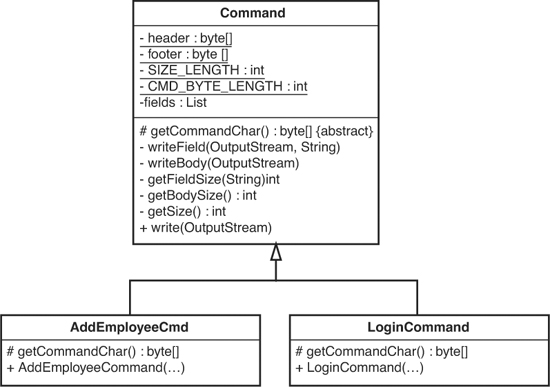
Okay, so where are we now? We’ve removed so much duplication that we have just shells of classes. All of the functionality is in the Command class. In fact, it makes sense to wonder whether we really need separate classes for these two commands at all. What are the alternatives?
We could get rid of the subclasses and add a static method to the Command class that allows us to send a command:
List arguments = new ArrayList();
arguments.add("Mike");
arguments.add("asdsad");
Command.send(stream, 0x01, arguments);
But that would be a lot of work for clients. One thing is for sure: We do have to send two different command chars, and we don’t want the user to have to keep track of them.
Instead, we could add a different static method for each command that we want to send:
Command.SendAddEmployee(stream,
"Mike", "122 Elm St", "Miami", "FL", 10000);
Command.SendLogin(stream, "Mike", "asdsad");
But that would force all of our client code to change. Right now, there are many places in our code where we construct AddEmployeeCmd and LoginCommand objects.
Maybe we are better off leaving the classes the way that they are now. Sure, the subclasses are pretty tiny, but does that really hurt anything? Not really.
Are we done? No, there is one little thing that we need do to now, something we should’ve done earlier. We can rename AddEmployeeCmd to AddEmployeeCommand. That would make the names of the two subclasses consistent. We’re less likely to be wrong when we use names consistently.
So, we’ve removed all of this duplication. Has it made things better or worse? Let’s play out a couple of scenarios. What happens when we need to add a new command? Well, we can just subclass Command and create it. Let’s compare that to what we would have to do in the original design. We could create a new command and then cut/copy and paste code from another command, changing all of the variables. But if we do that, we are introducing more duplication and making things worse. Beyond that, it is error prone. We could mess up the use of the variables and get it wrong. No, it would definitely take a little longer to do it before we removed duplication.
Do we lose any flexibility because of what we’ve done? What if we had to send commands that are made of something other than strings? We’ve already solved that problem, in a way. The AddEmployeeCommand class already accepts an integer, and we convert it to a string to send it as a command. We can do the same thing with any other type. We have to convert it to a string somehow to send it. We can do it in the constructor of any new subclass.
What if we have a command with a different format? Suppose that we need a new command type that can nest other commands in its body. We can do that easily by subclassing Command and overriding its writeBody method:
public class AggregateCommand extends Command
{
private List commands = new ArrayList();
protected char [] getCommandChar() {
return new char [] { 0x03 };
}
public void appendCommand(Command newCommand) {
commands.add(newCommand);
}
protected void writeBody(OutputStream out) {
out.write(commands.getSize());
for(Iterator it = commands.iterator(); it.hasNext(); ) {
Command innerCommand = (Command)it.next();
innerCommand.write(out);
}
}
}
Everything else just works.
Imagine doing this if we hadn’t removed the duplication.
This last example highlights something very important. When you remove duplication across classes, you end up with very small focused methods. Each of them does something that no other method does, and that gives us an incredible advantage: orthogonality.
Orthogonality is a fancy word for independence. If you want to change existing behavior in your code and there is exactly one place you have to go to make that change, you’ve got orthogonality. It is as if your application is a big box with knobs surrounding the outside. If there is only one knob per behavior for your system, changes are easy to make. When you have rampant duplication, you have more than one knob for each behavior. Think about writing fields. In the original design, if we had to use a 0x01 terminator for fields rather than a 0x00 terminator, we would have had to go through the code and make that change in many places. Imagine if someone asked us to write out two 0x00 terminators for each field. That would be pretty bad, too: no single-purpose knobs. But in the code we’ve refactored, we can edit or override writeField if we want to change how fields are written, and we can override writeBody when we need to handle special cases such as command aggregation. When behavior is localized in single methods, it’s easy to replace it or add to it.
In this example, we’ve been doing many things—moving methods and variables from class to class, breaking down methods—but most of it has been mechanical. We’ve just paid attention to duplication and removed it. The only creative thing that we’ve really done is come up with names for the new methods. The original code didn’t have the concept of a field or a command body, but in a way, the concept was there in the code. For instance, some variables were being treated differently, and we called them fields. At the end of the process, we ended up with a much neater orthogonal design, but it didn’t feel like we were designing. It was more like we were noticing what was there and moving the code closer to its essence, what it really was.
One of the startling things that you discover when you start removing duplication zealously is that designs emerge. You don’t have to plan most of the knobs in your application; they just happen. It isn’t perfect. For instance, it would be nice if this method on Command:
public void write(OutputStream outputStream)
throws Exception {
outputStream.write(header);
outputStream.write(getSize());
outputStream.write(commandChar);
writeBody(outputstream);
outputStream.write(footer);
}
public void write(OutputStream outputStream)
throws Exception {
writeHeader(outputStream);
writeBody(outputstream);
writeFooter(outputStream);
}
Now we have a knob for writing headers and another for writing footers. We can add knobs as we need to, but it’s nice when they happen naturally.
Duplication removal is a powerful way of distilling a design. It not only makes a design more flexible, but it also makes change faster and easier.