We need to make some changes, and we need to write characterization tests (186) to pin down the behavior that is already there. Where should we write them? The simplest answer is to write tests for each method that we change. But is that enough? It can be if the code is simple and easy to understand, but in legacy code, often all bets are off. A change in one place can affect behavior someplace else; unless we have a test in place, we might never know about it.
When I need to make changes in particularly tangled legacy code, I often spend time trying to figure out where I should write my tests. This involves thinking about the change I am going to make, seeing what it will affect, seeing what the affected things will affect, and so on. This type of reasoning is nothing new; people have been doing it since the dawn of the computer age.
Programmers sit down and reason about their programs for many reasons. The funny thing is, we don’t talk about it much. We just assume that everyone knows how to do it and that doing it is “just part of being a programmer.” Unfortunately, that doesn’t help us much when we are confronted with terribly tangled code that goes far beyond our ability to reason easily about it. We know that we should refactor it to make it more understandable, but then there is that issue of testing again. If we don’t have tests, how do we know that we are refactoring correctly?
I wrote the techniques in this chapter to bridge the gap. Often we do have to reason about effects in non-trivial ways to find the best places to test.
In the industry, we don’t talk about this often, but for every functional change in software, there is some associated chain of effects. For instance, if I change the 3 to 4 in the following C# code, it changes the result of the method when it is called. It could also change the results of methods that call that method, and so on, all the way back to some system boundary. Despite this, many parts of the code won’t have different behavior. They won’t produce different results because they don’t call getBalancePoint() directly or indirectly.
int getBalancePoint() {
const int SCALE_FACTOR = 3;
int result = startingLoad + (LOAD_FACTOR * residual * SCALE_FACTOR);
foreach(Load load in loads) {
result += load.getPointWeight() * SCALE_FACTOR;
}
return result;
}
The best way to get a sense of what effect reasoning is like is to look at an example. Here is a Java class that is part of an application that manipulates C++ code. It sounds pretty domain intensive, doesn’t it? But domain knowledge doesn’t matter when we reason about effects.
Let’s try a little exercise. Make a list of all of the things that can be changed after a CppClass object is created that would affect results returned by any of its methods.
public class CppClass {
private String name;
private List declarations;
public CppClass(String name, List declarations) {
this.name = name;
this.declarations = declarations;
}
public int getDeclarationCount() {
return declarations.size();
}
public String getName() {
return name;
}
public Declaration getDeclaration(int index) {
return ((Declaration)declarations.get(index));
}
public String getInterface(String interfaceName, int [] indices) {
String result = "class " + interfaceName + " {\npublic:\n";
for (int n = 0; n < indices.length; n++) {
Declaration virtualFunction
= (Declaration)(declarations.get(indices[n]));
result += "\t" + virtualFunction.asAbstract() + "\n";
}
result += "};\n";
return result;
}
}
Your list should look something like this:
1. Someone could add additional elements to the declarations list after passing it to the constructor. Because the list is held by reference, changes made to it can alter the results of getInterface, getDeclaration, and getDeclarationCount.
2. Someone can alter one of the objects held in the declarations list or replace one of its elements, affecting the same methods.
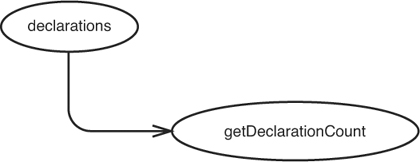
We make a sketch that shows that changes in declarations have an effect on getDeclarationCount() (see Figure 11.1).
Figure 11.1 declarations impacts getDeclarationCount.
This sketch shows that if declarations changes in some way—for instance, if its size grows—getDeclarationCount() can return a different value.
We can make a sketch for getDeclaration(int index) also (see Figure 11.2).
Figure 11.2 declarations and the objects it holds impact getDeclarationCount.
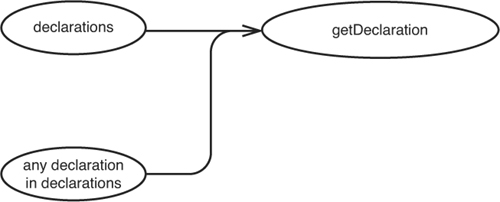
The return values of calls to getDeclaration(int index) can change if something causes declarations to change or if the declarations within it change.
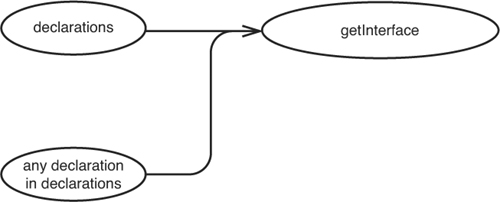
Figure 11.3 shows that similar things impact the getInterface method also.
Figure 11.3 Things that affect getInterface.
We can bundle all of these sketches together into a larger sketch (see Figure 11.4).
Figure 11.4 Combined effect sketch.
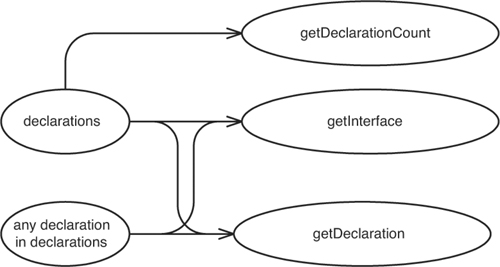
There isn’t much syntax in these diagrams. I just call them effect sketches. The key is to have a separate bubble for each variable that can be affected and each method whose return value can change. Sometimes the variables are on the same object, and sometimes they are on different objects. It doesn’t matter: We just make a bubble for the things that will change and draw an arrow to everything whose value can change at runtime because of them.
Let’s widen our picture of the system that the previous class comes from and look at a bigger effect picture. CppClass objects are created in a class named ClassReader. In fact, we’ve been able to determine that they are created only in ClassReader.
public class ClassReader {
private boolean inPublicSection = false;
private CppClass parsedClass;
private List declarations = new ArrayList();
private Reader reader;
public ClassReader(Reader reader) {
this.reader = reader;
}
public void parse() throws Exception {
TokenReader source = new TokenReader(reader);
Token classToken = source.readToken();
Token className = source.readToken();
Token lbrace = source.readToken();
matchBody(source);
Token rbrace = source.readToken();
Token semicolon = source.readToken();
if (classToken.getType() == Token.CLASS
&& className.getType() == Token.IDENT
&& lbrace.getType() == Token.LBRACE
&& rbrace.getType() == Token.RBRACE
&& semicolon.getType() == Token.SEMIC) {
parsedClass = new CppClass(className.getText(),
declarations);
}
}
...
}
Remember what we learned about CppClass? Do we know that the list of declarations won’t ever change after a CppClass is created? The view that we have of CppClass doesn’t really tell us. We need to figure out how the declarations list gets populated. If we look at more of the class, we can see that declarations are added in only one place in CppClass, a method named matchVirtualDeclaration that is called by matchBody in parse.
private void matchVirtualDeclaration(TokenReader source)
throws IOException {
if (!source.peekToken().getType() == Token.VIRTUAL)
return;
List declarationTokens = new ArrayList();
declarationTokens.add(source.readToken());
while(source.peekToken().getType() != Token.SEMIC) {
declarationTokens.add(source.readToken());
}
declarationTokens.add(source.readToken());
if (inPublicSection)
declarations.add(new Declaration(declarationTokens));
}
It looks like all of the changes that happen to this list happen before the CppClass object is created. Because we add new declarations to the list and don’t hold on to any references to them, the declarations aren’t going to change, either.
Let’s think about the things held by the declarations list. The readToken method of TokenReader returns token objects that just hold a string and an integer that never changes. I’m not showing it here, but a quick look at the Declaration class shows that nothing else can change its state after it is created, so we can feel pretty comfortable saying that when a CppClass object is created, its declaration list and the list’s contents aren’t going to change.
How does this knowledge help us? If we were getting unexpected values from CppClass, we would know that we have to look at only a couple things. Generally, we can start to really look back at the places where the sub-objects of CppClass are created to figure out what is going on. We can also make the code clearer by starting to mark some of the references in CppClass constant using Java’s final keyword.
In programs that aren’t written very well, we often find it very difficult to figure out why the results we are looking at are what they are. When we are at that point, we have a debugging problem and we have to reason backward from the problem to its source. When we are working with legacy code, we often have to ask a different question: If we make a particular change, how could it possibly affect the rest of the results of the program?
This involves reasoning forward from points of change. When you get a good handle on this sort of reasoning, you have the beginnings of a technique for finding good places to write tests.
In the previous example, we tried to deduce the set of objects that affect values at a particular point in code. When we are writing characterization tests (186), we invert this process. We look at a set of objects and try to figure out what will change downstream if they stop working. Here is an example. The following class is part of an in-memory file system. We don’t have any tests for it, but we want to make some changes.
public class InMemoryDirectory {
private List elements = new ArrayList();
public void addElement(Element newElement) {
elements.add(newElement);
}
public void generateIndex() {
Element index = new Element("index");
for (Iterator it = elements.iterator(); it.hasNext(); ) {
Element current = (Element)it.next();
index.addText(current.getName() + "\n");
}
addElement(index);
}
public int getElementCount() {
return elements.size();
}
public Element getElement(String name) {
for (Iterator it = elements.iterator(); it.hasNext(); ) {
Element current = (Element)it.next();
if (current.getName().equals(name)) {
return current;
}
}
return null;
}
}
InMemoryDirectory is a little Java class. We can create an InMemoryDirectory object, add elements into it, generate an index, and then access the elements. Elements are objects that contain text, just like files. When we generate an index, we create an element named index and append the names of all of the other elements to its text.
One odd feature of InMemoryDirectory is that we can’t call generateIndex twice without gumming things up. If we call generateIndex twice, we end up with two index elements (the second one created actually lists the first one as an element of the directory).
Fortunately, our application uses InMemoryDirectory in a very constrained way. It creates directories, fills them with elements, calls generateIndex, and then passes the directory around so that other parts of the application can access its elements. It all works fine right now, but we need to make a change. We need to modify the software to allow people to add elements at any time during the directory’s lifetime.
Ideally, we’d like to have index creation and maintenance happen as a side effect of adding elements. The first time someone adds an element, the index element should be created and it should contain the name of the element that was added. The second time, that same index element should be updated with the name of the element that is added. It’ll be easy enough to write tests for the new behavior and the code that satisfies them, but we don’t have any tests for the current behavior. How do we figure out where to put them?
In this example, the answer is clear enough: We need a series of tests that call addElement in various ways, generate an index, and then get the various elements to see if they are correct. How do we know that these are the right methods to use? In this case, the problem is simple. The tests are just a description of how we expect to use the directory. We could probably write them without even looking at the directory code because we have a good idea of what the directory is supposed to do. Unfortunately, figuring out where to test isn’t always that simple. I could have used a big complicated class in this example, one that is kind of like the ones that are often lurking in legacy systems, but you would have gotten bored and closed the book. So let’s pretend that this is a tough one and take a look at how we can figure out what to test by looking at the code. The same kind of reasoning applies to thornier problems.
In this example, the first thing that we need to do is figure out where we are going to make our changes. We need to remove functionality from generateIndex and add functionality to addElement. When we’ve identified those as the points of change, we can start to sketch effects.
Let’s start with generateIndex. What calls it? No other methods in the class do. The method is called only by clients. Do we modify anything in generateIndex? We do create a new element and add it to the directory, so generateIndex can have an effect on the elements collection in the class (see Figure 11.5).
Figure 11.5 generateIndex affects elements.

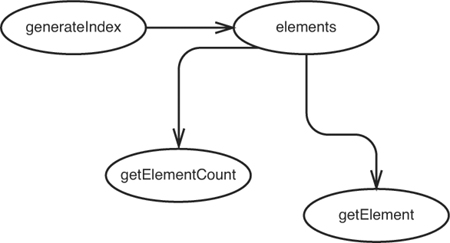
Now we can take a look at the elements collection and see what it can affect. Where else is it used? It looks like it is used in getElementCount and getElement. The elements collection is used in addElement also, but we don’t need to count that because addElement behaves the same way, regardless of what we do to the elements collection: No user of addElements can be impacted by anything we do to the elements collection (see Figure 11.6).
Figure 11.6 Further effects of changes in generateIndex.
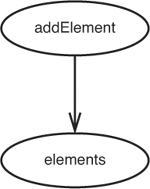
Are we done? No, our change points were the generateIndex method and the addElement method, so we need to look at how addElement affects surrounding software also. It looks like addElement affects the elements collection (see Figure 11.7).
Figure 11.7 addElement affects elements.
We can look to see what elements affects, but we’ve done that already because generateIndex affects elements.
The whole sketch appears in Figure 11.8.
Figure 11.8 Effect sketch of the InMemoryDirectory class.
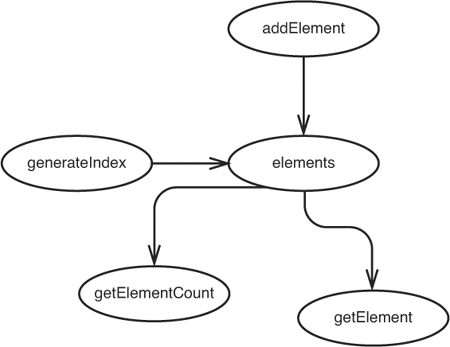
The only way that users of the InMemoryDirectory class can sense effects is through the getElementCount and getElement methods. If we can write tests at those methods, it appears that we should be able to cover all of the effects of our change.
But is there any chance we’ve missed anything? What about superclasses and subclasses? If any data in InMemoryDirectory is public, protected, or package-scoped, a method in a subclass could modify it in ways that we won’t know about. In this example, the instance variables in InMemoryDirectory are private, so we don’t have to worry about that.
Are we done? Well, there is one thing that we’ve glossed over completely. We’re using the Element class in the directory, but it isn’t part of our effect sketch. Let’s look at it more closely.
When we call generateIndex, we create an Element and repeatedly call addText on it. Let’s look at the code for Element:
public class Element {
private String name;
private String text = "";
public Element(String name) {
this.name = name;
}
public String getName() {
return name;
}
public void addText(String newText) {
text += newText;
}
public String getText() {
return text;
}
}
Fortunately, it is very simple. Let’s create a bubble for a new element that generateIndex creates (see Figure 11.9).
Figure 11.9 Effects through the Element class.
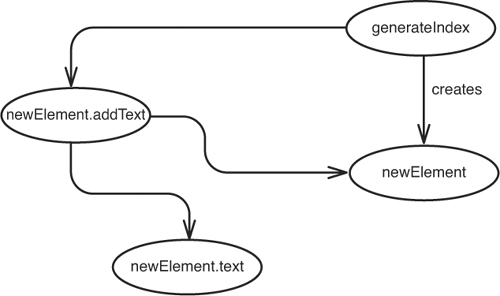
When we have a new element and it is filled with text, generateIndex adds it to the collection, so the new element affects the collection (see Figure 11.10).
Figure 11.10 generateIndex affecting the elements collection.
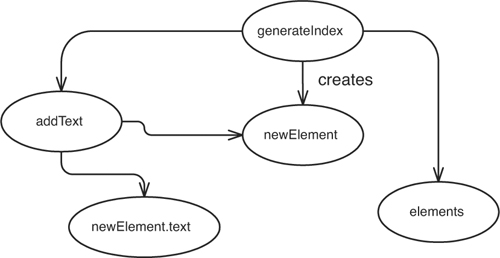
We know from our previous work that the addText method affects the elements collection, which, in turn, affects the return values of getElement and getElementCount. If we want to see that the text is generated correctly, we can call getText on an element returned by getElement. Those are the only places that we have to write tests to detect the effects of our changes.
As I mentioned earlier, this is a rather small example, but it is very representative of the type of reasoning that we need to do when we assess the impact of changes in legacy code. We need to find places to test, and the first step is figuring out where change can be detected: what the effects of the change are. When we know where we can detect effects, we can pick and choose among them when we write our tests.
Some ways that effects propagate are easier to notice than others. In the InMemoryDirectory example in the last section, we ended up finding methods that returned values to the caller. Even though I start by tracing effects from change points, places where I am making a change, I usually notice methods with return values first. Unless their return values aren’t being used, they propagate effects to code that calls them.
Effects can also propagate in silent, sneaky ways. If we have an object that accepts some object as a parameter, it can modify its state, and the change is reflected back into the rest of the application.
The sneakiest way that a piece of code can affect other code is through global or static data. Here is an example:
public class Element {
private String name;
private String text = "";
public Element(String name) {
this.name = name;
}
public String getName() {
return name;
}
public void addText(String newText) {
text += newText;
View.getCurrentDisplay().addText(newText);
}
public String getText() {
return text;
}
}
This class is nearly the same as the Element class that we used in the InMemoryDirectory example. In fact, only one line of code is different: the second line in addText. Looking at the signatures of the methods on Element isn’t going to help us find the effect that elements have on views. Information hiding is great, unless it is information that we need to know.
Here is a heuristic that I use when looking for effects:
1. Identify a method that will change.
2. If the method has a return value, look at its callers.
3. See if the method modifies any values. If it does, look at the methods that use those values, and the methods that use those methods.
4. Make sure you look for superclasses and subclasses that might be users of these instance variables and methods also.
5. Look at parameters to the methods. See if they or any objects that their methods return are used by the code that you want to change.
6. Look for global variables and static data that is modified in any of the methods you’ve identified.
The most important tool that we have in our arsenal is knowledge of our programming language. In every language, there are little “firewalls,” things that prevent effect propagation. If we know what they are, we know that we don’t have to look past them.
Let’s suppose that we are about to change the representation in the following coordinate class. We want to move toward using a vector to hold on to the x and y values because we want to generalize the Coordinate class so that it can represent three- and four-dimensional coordinates. In the following Java code, we don’t have to look beyond the class to understand the effect of that change:
public class Coordinate {
private double x = 0;
private double y = 0;
public Coordinate() {}
public Coordinate(double x, double y) {
this.x = x; this.y = x;
}
public double distance(Coordinate other) {
return Math.sqrt(
Math.pow(other.x - x, 2.0) + Math.pow(other.y - y, 2.0));
}
}
Here is some code that we do have to look beyond:
public class Coordinate {
double x = 0;
double y = 0;
public Coordinate() {}
public Coordinate(double x, double y) {
this.x = x; this.y = x;
}
public double distance(Coordinate other) {
return Math.sqrt(
Math.pow(other.x - x, 2.0) + Math.pow(other.y - y, 2.0));
}
}
See the difference? It’s subtle. In the first version of the class, the x and y variables were private. In the second, they had package scope. In the first version, if we do anything that changes the x and y variables, it impacts clients only through the distance function, regardless of whether clients use Coordinate or a subclass of Coordinate. In the second version, clients in the package could be accessing the variables directly. We should look for that or try making them private to make sure that they aren’t. Subclasses of Coordinate can use the instance variables, too, so we have to look at them and see if they are being used in methods of any subclasses.
Knowing our language is important because the subtle rules can often trip us up. Let’s take a look at a C++ example:
class PolarCoordinate : public Coordinate {
public:
PolarCoordinate();
double getRho() const;
double getTheta() const;
};
In C++, when the keyword const comes after a method declaration, the method can’t modify the instance variables of the object. Or can it? Suppose that the superclass of PolarCoordinate looks like this:
class Coordinate {
protected:
mutable double first, second;
};
In C++, when the keyword mutable is used in a declaration, it means that those variables can be modified in const methods. Admittedly, this use of mutable is particularly odd, but when it comes to figuring out what can and can’t change in a program that we don’t know well, we have to look for effects regardless of how odd they might be. Taking const to mean const in C++ without really checking can be dangerous. The same holds true for other language constructs that can be circumvented.
Try to analyze effects in code whenever you get a chance. Sometimes you will notice that as you get very familiar with a code base, you feel that you don’t have to look for certain things. When you feel that way, you’ve found some “basic goodness” in your code base. In the best code, there aren’t many “gotchas.” Some “rules” embodied in the code base, whether they are explicitly stated or not, prevent you from having to be paranoid as you look for possible effects. The best way to find these rules is to think of a way that a piece of software could have an effect on another, a way that you’ve never seen in the code base. Then say to yourself, “But, no, that would be stupid.” When your code base has a lot of rules like that, it is far easier to deal with. In bad code, people don’t know what the “rules” are, or the “rules” are littered with exceptions.
The “rules” for a code base aren’t necessarily grand statements of programming style, things such as “Never use protected variables.” Instead, they are often contextual things. In the CppClass example at the beginning of chapter, we did a little exercise in which we tried to figure out what would affect users of a CppClass object after we created it. Here is an excerpt of that code:
public class CppClass {
private String name;
private List declarations;
public CppClass(String name, List declarations) {
this.name = name;
this.declarations = declarations;
}
...
}
We listed the fact that someone could modify the declarations list after passing it to the constructor. This is an ideal candidate for a “but that would be stupid” rule. If we know when we start to look at the CppClass that we have been given a list that won’t change, our reasoning is much easier.
In general, programming gets easier as we narrow effects in a program. We need to know less to understand a piece of code. At the extreme, we end up with functional programming in languages such as Scheme and Haskell. Programs can actually be very easy to understand in those languages, but those languages aren’t in widespread use. Regardless, in OO languages, restricting effects can make testing much easier, and there aren’t any hurdles to doing it.
This book is about making legacy code easier to work with, so there is a sort of “spilt milk” quality to a lot of the examples. However, I wanted to take the opportunity to show you something very useful that you can see through effect sketches. This could affect how you write code as you move forward.
Remember the effect sketch for the CppClass class? (See Figure 11.11.)
Figure 11.11 Effect sketch for CppClass.
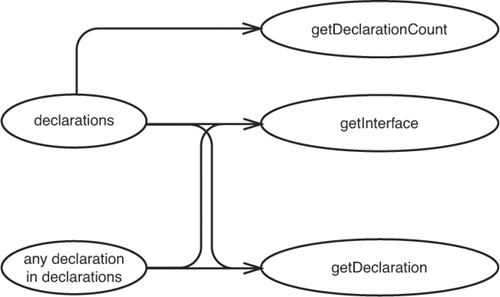
It looks like there is a little fan-out. Two pieces of data, a declaration and the declarations collection, have effects on several different methods. We can pick and choose which ones we want to use for our tests. The best one to use is getInterface because it exercises declarations a bit more. Some things we can sense through the getInterface method that we can’t as easily through getDeclaration and getDeclarationCount. I wouldn’t mind writing only tests for getInterface if I was characterizing CppClass, but it would be a shame that getDeclaration and getDeclarationCount wouldn’t be covered. But what if getInterface looked like this?
public String getInterface(String interfaceName, int [] indices) {
String result = "class " + interfaceName + " {\npublic:\n";
for (int n = 0; n < indices.length; n++) {
Declaration virtualFunction = getDeclaration(indices[n]);
result += "\t" + virtualFunction.asAbstract() + "\n";
}
result += "};\n";
return result;
}
The difference here is subtle; the code now uses getDeclaration internally. So our sketch changes from Figure 11.12 to Figure 11.13.
Figure 11.12 Effect sketch for CppClass.
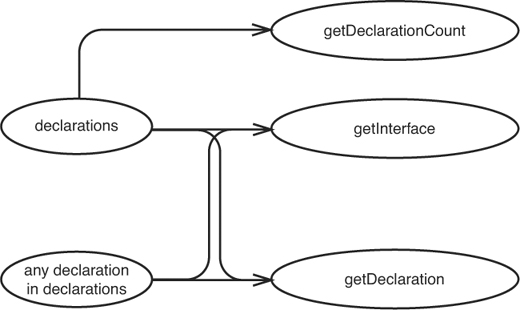
Figure 11.13 Effect sketch for Changed CppClass.
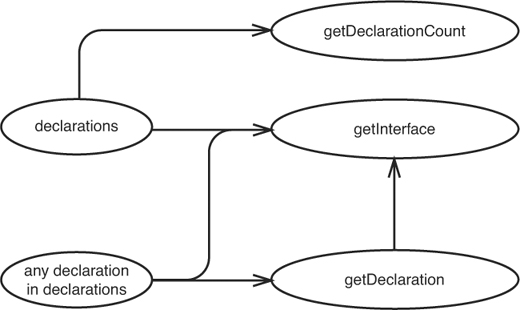
It’s just a small change, but it’s a pretty significant one. The getInterface method now uses getDeclaration internally. We end up exercising getDeclaration whenever we test getInterface.
When we remove tiny pieces of duplication, we often end up getting effect sketches with a smaller set of endpoints. This often translates into easier testing decisions.
When we need to find out where to write our tests, it’s important to know what can be affected by the changes we are making. We have to reason about effects. We can do this sort of reasoning informally or in a more rigorous way with little sketches, but it pays to practice it. In particularly tangled code, it is one of the only skills we can depend upon in the process of getting tests in place.