18.14 Chapter Summary
In this chapter, we barely scratched the surface of many important topics beyond your server. We learned about search engine components along with PageRank algorithm, all related to search engine optimization (SEO), the skillset (and industry) focused on optimizing your site to improve your rank in search results. Social media services as an avenue for traffic was then explored, with a focus on the Open Graph Language that allows you to control how sites like Facebook display your post. We then described the characteristics of a web-based CMS, using WordPress as our example, since so many websites are powered using such plug and play tools. Finally, monetization tools and concepts were covered, bringing together some final fundamental concepts that every web developer needs to be aware of. With those ideas still in mind, you can now close the book on the fundamentals of web development and apply what you’ve learned through hands-on practice.
18.14.1 Key Terms
comment spamming
18.14.2 Review Questions
What is the difference between a scraper and a crawler?
What type of information do search engines index about your site?
What is a sitemap?
How can you control what appears in search engine results about your site?
What are some characteristics of search engine–friendly URLs?
How are meta tags used to control web crawlers?
What is the simplified PageRank formula?
Why is duplicating content found elsewhere a bad idea?
What’s the difference between one-way and reciprocal contacts?
What key features do all social networks have?
What is the easiest way to integrate social networks into your sites?
What is XFBML, and where is it used?
What features do all document management systems have?
What does a WYSIWYG editor provide to the end user?
What is the role of user management in a web content management system?
What are the advantages and drawbacks of a multisite WordPress installation?
Why would a company want to focus more on impressions rather than on clicks?
How do Cost per Click advertising agreements work?
How did people search the WWW before Google?
What is the difference between a scraper and a crawler?
What type of information is indexed about your site?
What is a sitemap? How can a web page be represented a multidimensional vector for comparison purposes?
How can you control what appears in search engine results about your site?
What are some characteristics of search engine–friendly URLs?
How are meta tags used to control web crawlers?
What is the simplified PageRank formula?
How do spammers hijack search results to send traffic to their websites?
Why is duplicating content found elsewhere a bad idea?
18.14.3 Hands-On Practice
Although these projects can be done in isolation from the www, there is a great deal to be learned by exposing your sites to search engines and social media. Ideally, you would have your own project on your own domain (which we described in Chapter 17) to fully benefit from the three provided projects.
Project 1: Optimize the Art Store Site for Search Engines
Difficulty Level: Easy
Overview
This project takes an existing page and integrates white-hat SEO techniques to try and improve your rank. Without a real site on a live domain, the impact of SEO cannot be measured, so if you have a live site of your own, feel free to use it.
Instructions
Examine ch18-proj1.html in the browser. You will be modifying this file.
Begin your SEO by focusing on the <title> tag. Each page should have a unique title that reflects its content. For instance, your PHP code should be able to build a title string using an Artwork’s title.
If you have not already, ensure all your images have alternate and title text that is generated based on the information about the image. This way, search engines will associate that text with the image, and thus your website.
Check the links in the navigation section of the page to make sure they all use descriptive anchor text.
Determine how many links you have going out to other domains. Try to reduce this number if possible.
Have you adopted “directory style” URLs? If not, consider migrating from query strings to directories using Apache redirect directives.
Create meta tags for keywords and description for all your pages.
Finally, revisit your content to ensure it is descriptive enough and has enough keywords to be properly indexed.
Guidance and Testing
Visit your home page with JavaScript turned off to see what the crawler will see.
If you own the domain, submit your site to search engines and sign up for webmaster tools to track your traffic.
Check your logs to see if more referrals are coming from search engines after your changes (it may take a few months for changes to be reflected in the index).
Project 2: Integrate with Social Widgets
Difficulty Level: Intermediate
Overview
Using our Art Store as an example, we will integrate social media widgets from the three social networks into each artwork detail page.
Instructions
Open your Art Store project, and find the code that outputs the HTML for the Art Store detail project.
Prepare for integrating the social widgets by identifying variables you can use in your widgets. Consider the artwork title, link, artist, and price. Add these elements to the page as Open Graph semantic tags.
Add the ability to Like a particular artwork, right next to its title. Hint: Look at the social widgets. Hint: This will require the creation of an appID.
Finally, add the Tweet This widget.
Guidance and Testing
In your browser, the updated art detail pages should look similar to that in Figure 18.49, with the social widgets located below the title of the artwork.
Figure 18.49 Portion of the Art Store with Facebook Like, and Tweet This widgets

Visit multiple artwork pages on the site, and like, and tweet each of them. Then visit your home feeds in each of the social networks to confirm that your activity has been noted as a wall post.
Project 3: Convert Your Project to WordPress
Difficulty Level: Intermediate
Overview
This project has you convert one of your existing sites into WordPress. We have chosen the Share Your Travel Photos site, but you could convert any of the three projects.
Instructions
Download and install the latest version of WordPress.
Create a child theme from the Twenty Sixteen theme (or another) included with the installation.
Update the CSS styles to look more like your original site as illustrated in Figure 18.50.
Figure 18.50 Illustration of eventual end goal of Project 18.1
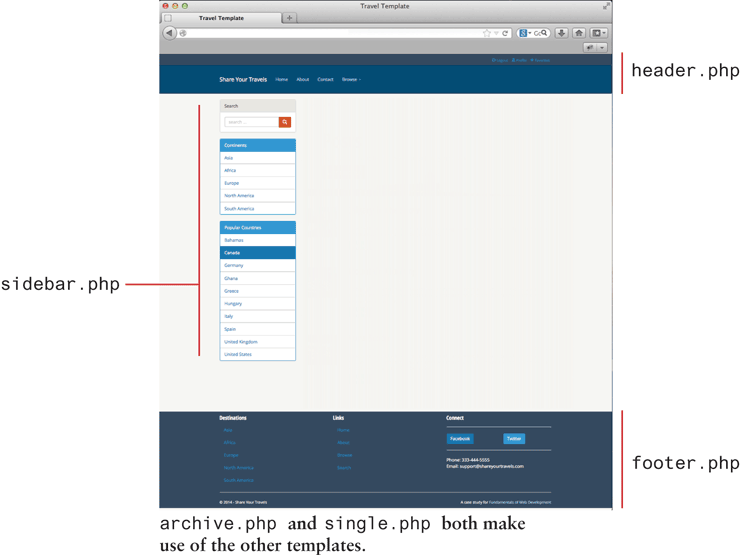
Create your own template files in your theme to define your own HTML markup that uses HTML5 semantic elements, as you did back in Chapter 3. You should start with header.php, footer.php, and sidebar.php, since they are included in every page.
Now copy template files single.php and archive.php from the parent theme and begin changing their output in the WordPress loop to closely match that of the earlier defined site from Chapter 4. These templates will format HTML output for a single post and multiple posts respectively. Both template files single.php and archive.php will use the header.php, footer.php, and sidebar.php templates defined in the last step.
Guidance and Testing
Test the page in the browser. Verify that the WordPress site looks like the design we’ve been working with.
18.14.4 References
1. OXFORD ENGLISH DICTIONARY 2ND EDITION edited by Simpson and Weiner (1989). Definition of “google.” By permission of Oxford University Press. [Online]. http:/
/ oxforddictionaries.com/ definition/ english/ google. 2. M. Koster, “ALIWEB—Archie-Like indexing in the WEB,” Computer Networksand ISDN Systems,Vol. 27, No. 2, November 1994.
3. M. Koster, “Robots Exclusion.” [Online]. http:/
/ www.robotstxt.org/ . 4. L. Page, S. Brin, R. Motwani, T. Winograd, “The PageRank Citation Ranking: Bringing Order to the Web,” Technical Report, Stanford University, 1998.
5. Google, “Search Engine Optimization Starter Guide.” [Online]. http:/
/ static.googleusercontent.com/ external_content/ untrusted_dlcp/ www.google.com/ en/ / webmasters/ docs/ search-engine-optimization-starter-guide.pdf. 6. sitemaps.org, “Sitemap Schemas.” [Online]. http:/
/ www.sitemaps.org/ schemas/ sitemap/ 0.9/ . 7. D. Segal, “Search Optimization and Its Dirty Little Secrets.” [Online]. http:/
/ www.nytimes.com/ 2011/ 02/ 13/ business/ 13search.html?pagewanted=all&_r=0. 8. S. Milgram, “The small world problem,” Psychology Today, Vol. 2, No. 1, pp. 60–67, 1967.
9. The open graph protocol, “Open Graph Protocol.” [Online]. http:/
/ ogp.me/ . 10. Facebook, “Getting Started with the Facebook SDK for PHP.” [Online]. https://developers.facebook.com/docs/php/gettingstarted/.
11. Twitter, “Twitter Libraries.” [Online]. https://dev.twitter.com/docs/twitterlibraries.
13. Code Fury. [Online]. http:/
/ codefury.net/ projects/ wpSearch/ . 14. WordPress. [Online]. http:/
/ codex.wordpress.org/ Installing_WordPress. 15. WordPress. [Online]. http:/
/ codex.wordpress.org/ Using_Themes. 16. WordPress. [Online]. http:/
/ codex.wordpress.org/ Template_Hierarchy. 17. L. Constantin, “Drive-by download attack on Facebook used malicious ads.” [Online]. http:/
/ www.computerworld.com/ s/ article/ 9220557/ Drive_by_download_attack_on_Facebook_used_malicious_ads.