18.7 Social Network Integration
Building a social media presence is designed to be easy for the nontechnical person, and the tools for getting started are generally self-evident and straightforward. This section briefly describes some strategies to get your social media presence started so you can take on more advanced projects later. All the networks require you to have a presence before you can create a custom app, for example.
18.7.1 Basic Social Media Presence
The ability to have a presence on the WWW is not trivial (as the 18 chapters in this book can attest), especially for people with no skill or desire to learn about web technologies. Social media provides exactly that opportunity and lowers the barriers to entry for people who would never want to maintain an HTML page.
Home Pages
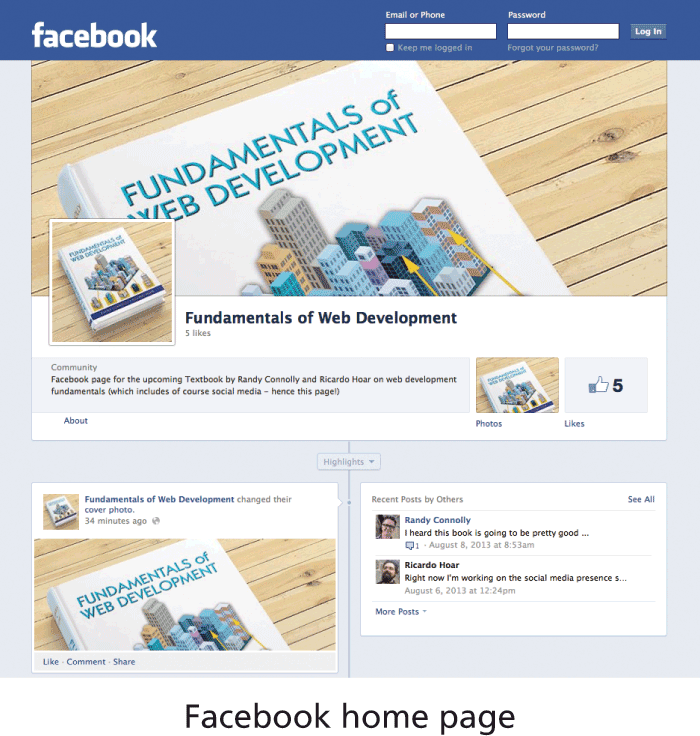
Almost every person, company, hobby, or group wants or needs a home page somewhere on the web, and a social network presence provides a presence that is easy to set up and manage, even for nontechnical people. All social networks provide at least one page, say your profile page, while others allow you to create multiple pages, all within their platform. For this book, we created a Facebook page in under 5 minutes as shown in Figure 18.13.
Figure 18.13 Screenshot of Facebook pages for this textbook
Links and Logos
Your page comes with a URL, which is normally professional enough looking that you could use it as your primary web page on the WWW. The next step is to link to these pages from your existing site, and perhaps elsewhere, such as your email footer and business cards, often using logos from the social network itself. Whether it be Google, Twitter, Facebook, LinkedIn, or another, creating a link to your presence is a straightforward way to associate with a social network.
URL Shortening
In social networks like Twitter, shorter URLs are preferable to long URLs, since they leave more room for other content.
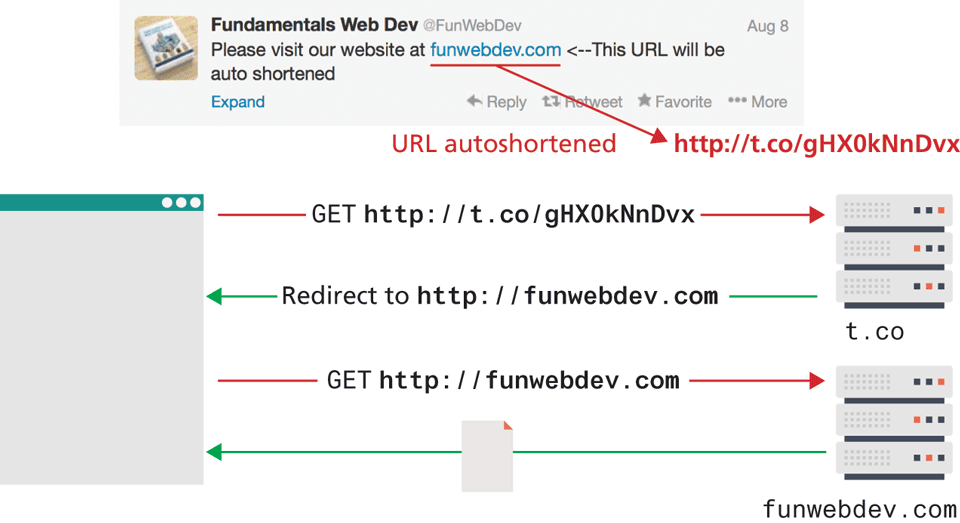
To address this potential challenge, Twitter includes a built-in URL shortening service with your account so that URLs are automatically shortened when you post. Popular ones from the other major players include t.co, goo.gl, bit.ly and ow.ly.
These services add a crucial step in between clicks and the ultimate destination, your URL. As illustrated in Figure 18.14, they provide an opportunity for the third party to collect statistical click data and may prevent the links from working if the host ever goes down. Malicious URL-shortening services can also sell the URLs to other parties, turning potential traffic for you into traffic for another company (often a few weeks after you create the link so that it works as expected for a while).
Figure 18.14 Illustration of a URL shortening service
Beyond the basic social media presence anyone might have, the major social networks have long been trying to expand their reach beyond their own web portals onto regular websites in the form of easy-to-use plugins, which anyone can deploy. You will next learn a little about Twitter and Facebook plugins in the following sections. These plugins (sometimes called widgets) allow you to integrate functionality from the social network directly into your site by simply adding some JavaScript code to your pages. The advantage of approaching these widgets as a web developer is that we can delve deeper into controlling and customizing these third-party tools than the non-developer.
18.7.2 Facebook’s Social Plugins
Facebook’s social plugins include a wide range of things you’ve probably seen before including the Like button, an activity feed, and comments. For any of the plugins, you will have to choose between HTML5, the Facebook Markup Language (XFBML), or an <iframe> implementation. You will also have to learn a little about the Open Graph API, which defines a semantic markup you can use on your pages to make them more Facebook-friendly (it’s also used by Google).
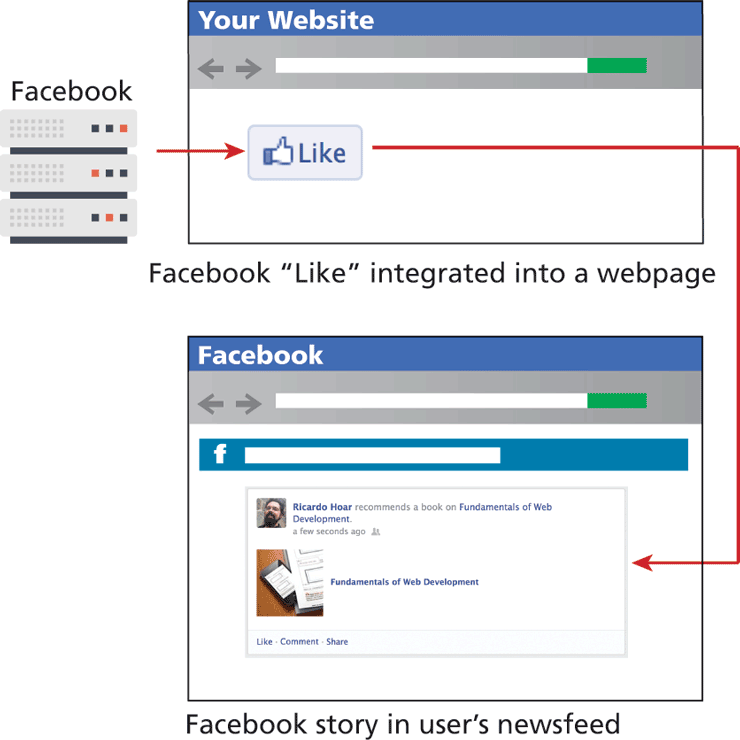
We will describe how to add a plugin to your page, and how the use of that plugin results in newsfeed stories on a person’s Facebook profile as shown in Figure 18.15.
Figure 18.15 Relationship between a plugin on your page and the resulting Facebook newsfeed items
Register and Plugin
To include the Facebook libraries in your website in the long term, you will have to first register as a developer and get an application ID. Going back to Chapter 18 on security, you might recall how public and private keys are used for authentication and validation. Using your APP_ID, you can then include Facebook’s JavaScript libraries from Listing 18.7 in your webpage. Notice that it creates a FB object that allows your JavaScript code to interact with Facebook plugins. The loading of the plugin is asynchronous, so your users will not have to wait for a response from Facebook before loading your page.
Listing 18.7 Including Facebook JS API
<script>
  window.fbAsyncInit = function() {
   FB.init({
    appId        :'your-app-id',
    autoLogAppEvents: true,
    xfbml        :true,
    version      :'v7.0'
  });
 };
</script>
<script async defer crossorigin="anonymous"
src="https://connect.facebook.net/en_US/sdk.js"></script>
The details of getting an application ID are straightforward. Log in to Facebook and check out https://developers.facebook.com/ to get started.
Like Button
With the Facebook classes loaded in JavaScript, you can take advantage of it to automatically parse your HTML page for certain tags, and replace them with common plugins. The Like button, being the most widely used, can be included simply by defining a <div> element with the class fb-like, and some other custom attributes as shown in Listing 18.8.
Listing 18.8 HTML5 markup to insert a Like button on your page
<div class="fb-like"
   data-href="http://funwebdev.com"
   data-width="450"
   data-layout="standard"
   data-action="like"
   data-size="small"
   data-share="true">
</div>
When the page loads and the FB object parses the page, it will see the DOM object with class fb-like and use JavaScript to embed the familiar Like button as shown in Figure 18.16.
Figure 18.16 Screenshot of the Facebook Like social plugin

 Note
Note
Facebook used to have a markup language called FBML that was deprecated in 2012. XFBML was somewhat related, and continues to be supported. Unlike open standards, Facebook and other social networks change how their APIs work at a moment’s notice without any regard for standards such as the ones we have with HTTP or SMTP. Facebook has introduced several breaking changes over the years where code became invalid and stopped working. Google on the other hand will just abandon unpopular projects.
XFBML
Although the HTML5 version of the Facebook Like widget works fine, Facebook limits customization of various aspects to its own eXtended Facebook Markup Language (XFBML) version of the widget.
XFBML is the primary way to create Facebook social plugins, since in the authors’ experience it is better supported than the more accessible HTML5. Sometimes XFBML’s extra functionality is essential when doing more complex things than a Like button or comment box.
The beauty of social network integration is how by liking a page (by clicking the button) a story will then appear in a user’s newsfeed inside the Facebook site talking about the page that they just liked. Newsfeeds are filled with posts by a person’s friends, meaning a like from one person will generate a story that appears both on that person’s home page and the newsfeeds of their friends.
While the Like button works either way, how it appears in your newsfeed will depend on the scraping that was done by Facebook. In our case, the newsfeed item doesn’t look great with a LinkedIn logo being the image for the page, and the details are unclear (shown in Figure 18.17).
Figure 18.17 Screenshot of story on a Facebook newsfeed, generated in response to clicking Like

To control what Facebook uses when displaying items in your newsfeed, you must use Open Graph semantic tags to create Open Graph Objects in your HTML pages, which is covered in a later section.
Follow Button
To illustrate how easy subsequent social plugins are to create, consider adding the Follow Me button, which allows a Facebook user to follow a Facebook page, by simply adding the XFBML code shown in Listing 18.9 into your webpage.
Listing 18.9 Facebook Follow Me button social plugin
<fb:follow
     href="https://www.facebook.com/fundamentalsOfWebDevelopment"
     width="450"
     show_faces="true">
</fb:follow>
Comment Stream
Comments are an important aspect of a modern website. It’s interesting that many media companies have adopted Facebook comments over in-house systems to try and eliminate anonymous commenters. The code for the social widget takes only one parameter, the page being commented on, as illustrated in Listing 18.10.
Listing 18.10 Comment social widget
<fb:comments
     href="http://funwebdev.com" width="470">
</fb:comments>
18.7.3 Open Graph
Open Graph (OG) is an API originally developed by Facebook, which is designed to add semantic information about content as well as provide a way for plugin developers to post into Facebook as registered users. A complete specification is available,9 although by now with the various markup languages you’ve seen, it should be easy to understand.
Open Graph makes use of actors, apps, actions, and objects, as illustrated in Figure 18.18.
Figure 18.18 Illustration of Open Graph’s actors, apps, actions, and objects
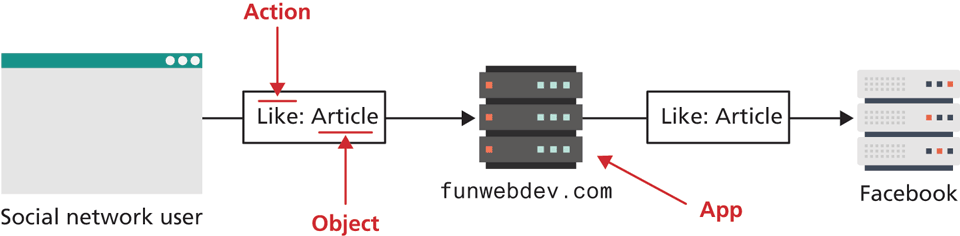
The actor is the user logged in to Facebook, perhaps clicking on your Like button.
The app is preregistered by the developer with Facebook. Upon registration, Facebook will generate a unique secret and public key for use in your code, which can then be reflected inside Facebook as part of the newsfeed item.
The actions in Open Graph are the things users can do, for example, post a message, like a page, or comment on an article.
Objects are the most accessible and important part of the Open Graph API. Objects are webpages, but they have additional semantic markup to give insight into what the webpage is about. By putting the Open Graph markup in the head of your page, you can control how the Like appears in people’s newsfeed.
You can test your URL by visiting the Facebook Sharing debugger:
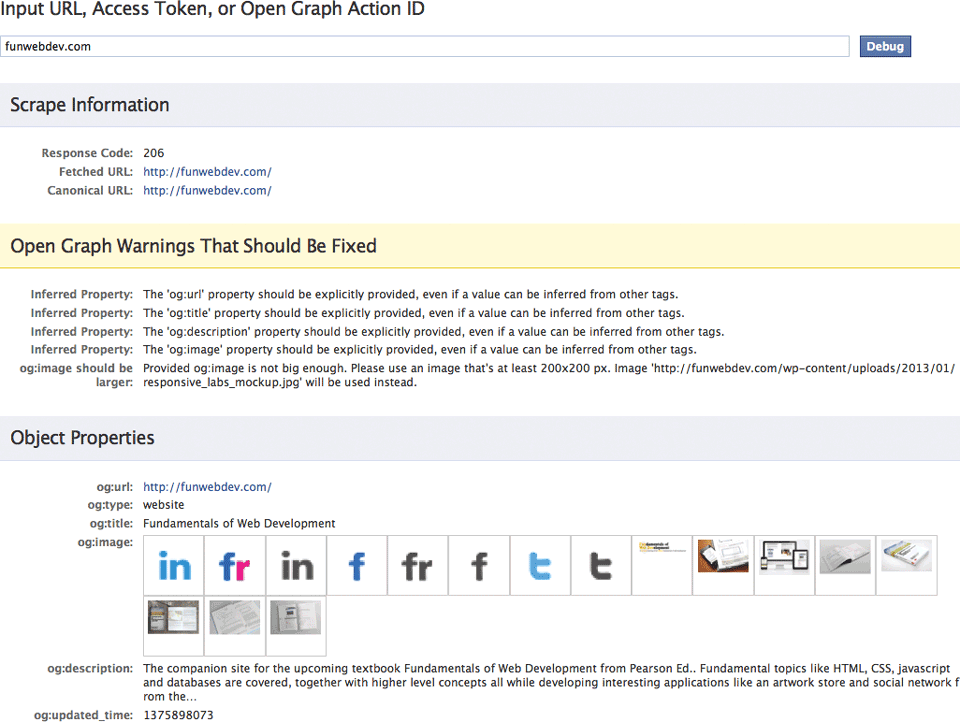
https://developers.facebook.com/tools/debug/The output, shown in Figure 18.19, provides some concrete feedback about how to improve your newsfeed, using Open Graph meta tags.
Figure 18.19 Output of the Facebook Open Graph Debugger and best guesses it will make
Open Graph Meta Tags
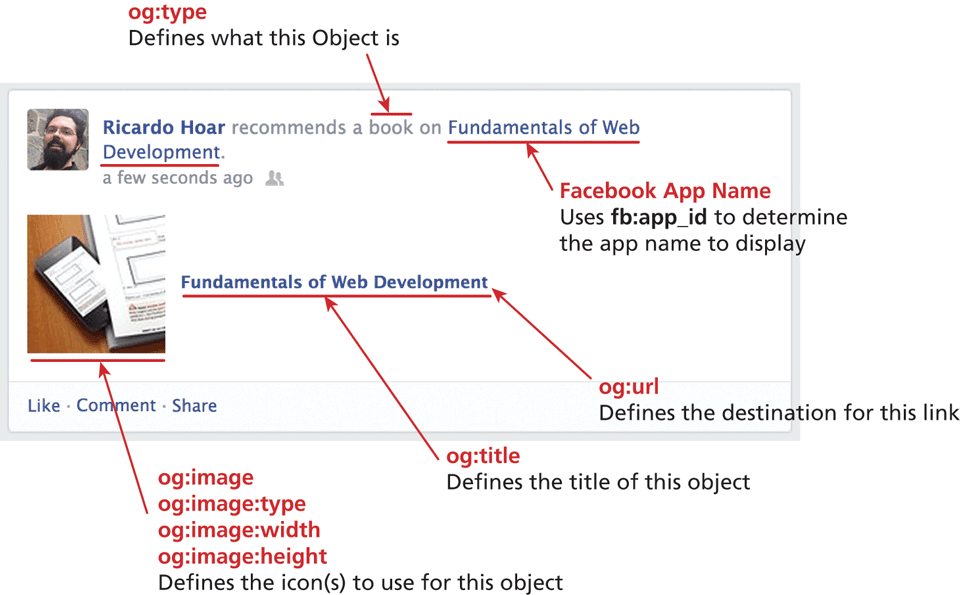
To use Open Graph markup, you must first add the prefix modifier to your <head> tag as shown in Listing 18.11. After that, <meta> tags about the application, title, and image can be used to set the values of items in the improved newsfeed item shown in Figure 18.20.
Figure 18.20 Annotated relationship between some Open Graph tags and the story that appears in the Facebook newsfeed in response to liking a page
Listing 18.11 Open Graph Markup to add semantic information to your page
<head prefix="og: http://ogp.me/ns#">
<meta property="og:locale" content="en_US">
<meta property="og:url" content="http://funwebdev.com/">
<meta property="og:title" content="Fundamentals of Web Development">
<meta property="og:site_name" content="Fun Web Dev">
<meta property="
og:description" content="Randy Connolly and Ricardo
                Hoar are working on a book">
<meta property="
og:image" content="http://funwebdev.com/wp-
                content/uploads/2013/01/logo.png">
<meta property="og:image:type" content="image/png">
<meta property="og:image:width" content="424">
<meta property="og:image:height" content="130">
<meta property="og:type" content="book">
</head>
Note
The details of exactly what will appear where depends on many things, including the OS you are using, the browser, and the latest changes to Facebook’s interpretation of these Open Graph items. The authors can attest that from time to time, things that worked correctly one day might change the next, as Facebook updates how the Open Graph data is used in the newsfeed.
18.7.4 Twitter’s Widgets
Twitter has always taken a more minimalist approach to its offerings compared to the other social networks. Its simplicity is part of why it is so widely adopted.
Like Facebook, Twitter follows the same pattern of including a JavaScript library and then using tags to embed simple social widgets. However, Twitter has a different approach to embedding social widgets into a page. They prefer most users paste code from a box, rather than try to explain how to create widgets. The code to get started with widgets is thus purposefully compressed and hard to read, but it asynchronously loads the library in Listing 18.12, similar to Facebook’s asynchronous load.
Listing 18.12 Obfuscated Twitter code to load the Twitter widget JavaScript libraries
<script>
!function(d,s,id){var
js,fjs=d.getElementsByTagName(s)[0],p=/^http:/.test(d.location)?
  'http':'https';if(!d.getElementById(id)){js=d.createElement(s);js.
  id=id;js.src=p+'://platform.twitter.com/widgets.js';fjs.parentNode.
  insertBefore(js,fjs);}}(document, 'script', 'twitter-wjs');
</script>
Once this code is loaded, you can readily create several common Twitter widgets including the Follow Me button, Tweet This button, embedded timelines, and more.
Tweet This Button
The most common Twitter action you tend to see is people tweeting about an article or video by embedding the URL into the tweet. The Tweet This button does exactly that, and it is the easiest of all the widgets to add with nothing to change when embedded from page to page. The button in Figure 18.21 requires the markup in Listing 18.13.
Figure 18.21 The Tweet button

Listing 18.13 Tweet This button markup to create a tweet with hashtag web
<a href="https://twitter.com/share"
   class="twitter-share-button"
   data-hashtags="web">
Tweet</a>
Follow Me Button
The Follow Me button (shown in Figure 18.22) is just as straightforward. Simply create an <a> tag with the Twitter URL of the account to follow as the href attribute, and use the class twitter-follow-button as illustrated in Listing 18.14. Having people follow you means that they will see your posts in their stream and can exchange personal messages. The more followers you have, the wider your potential reach.
Figure 18.22 Twitter Follow button

Listing 18.14 Markup to define a Follow button for Twitter
<a href="https://twitter.com/FunWebDev"
   class="twitter-follow-button"
   data-show-count="false">Follow @FunWebDev
</a>
Twitter Timeline
The most recognizable thing in Twitter is the display of the last few tweets by a particular person, often used in the sidebar of your site as shown in the preview pane in Figure 18.23.
Figure 18.23 Screenshot of the Twitter Widget code generator
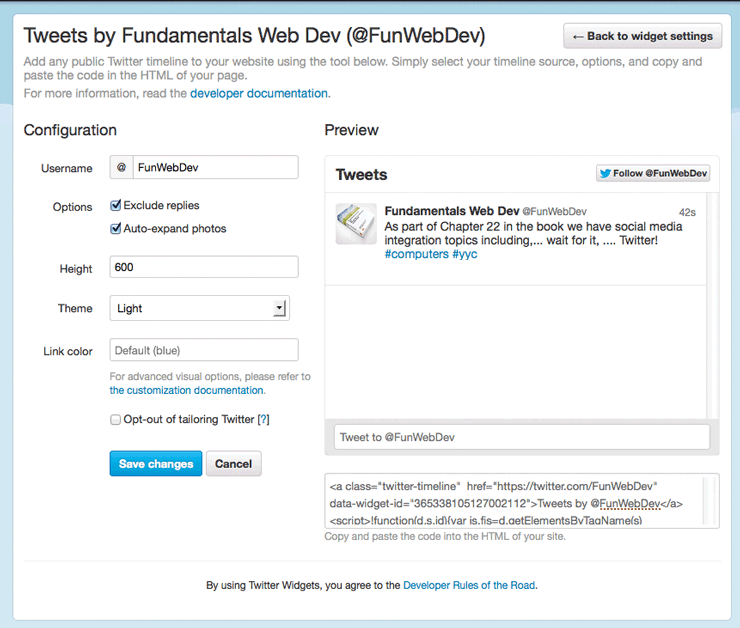
The code, shown in Listing 18.15, uses not only the user’s Twitter URL, but an additional field that cannot simply be guessed: the data-widget-id field. Twitter generates this field only when requested by a user through the web interface (Settings > Apps) as shown in Figure 18.23. That means you cannot simply create timeline feeds for anyone whose ID you know, unless they agree to go through the process of defining this widget on your behalf.
Listing 18.15 Markup to embed a Twitter Timeline in your site
<a class="twitter-timeline"
   href="https://twitter.com/FunWebDev"
   data-widget-id="365338105127002112">
Tweets by @FunWebDev</a>
18.7.5 Advanced Social Network Integration
Most modern social network’s social widgets or plugins use the same software pattern, namely, you load some JavaScript from their servers onto your page and insert some specific DOM elements into your HTML to be parsed. For the vast majority of websites these basic tools are more than enough. However, with few customization options, it is hard to build complex social interactions with only simple likes, follows, and shares.
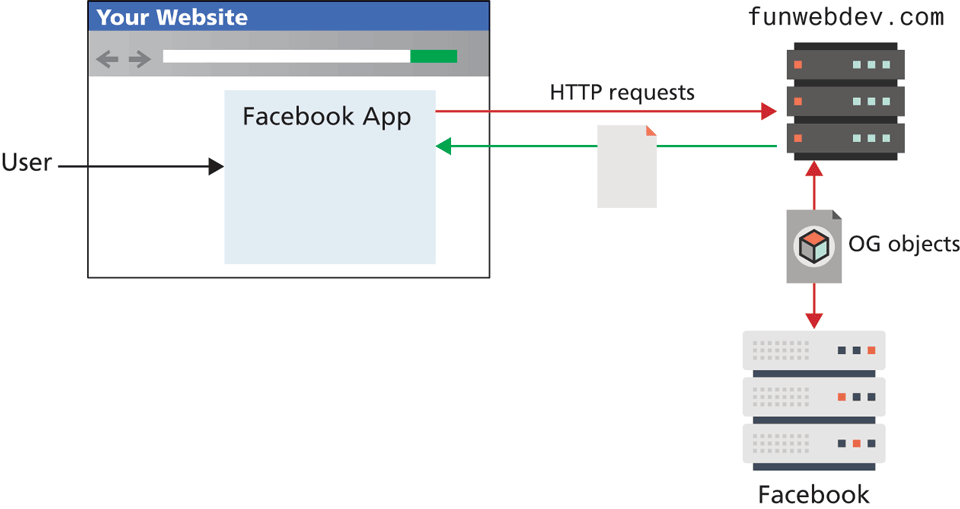
If your web application actually offers some sort of service aside from blog posts and static pages, you might want to consider integrating more completely with social networks. To do this, you will have to make use of server-side APIs (written in PHP and other languages), which allow your server to act as an agent on behalf of users logged in through your site as shown in Figure 18.24. Facebook apps (and games), as well as Twitter mashups, are a great way to extend the reach of your innovative web apps more quickly by building on an existing platform. These APIs take developers beyond the browser with mobile libraries for iOS and Android platforms, in addition to web apps.
Figure 18.24 Illustration of an integrated Facebook web game
Describing the use of these proprietary APIs requires its own full chapter. Facebook10 and Twitter11 all publish a wide variety of APIs and support materials to help get you started. With all the fundamental concepts under your belt, building a custom integrated app is certainly a plausible next step.