18.5 Search Engine Optimization
Search engine optimization (SEO) is the process a webmaster undertakes to make a website more appealing to search engines, and by doing so, increases its ranking in search results for terms the webmaster is interested in targeting.
For many businesses, the optimization of their website is more important than the site itself. Sites that appear high in a search engine’s rankings are more likely to attract new potential customers, and therefore contribute to the core business of the site owner.
The world of SEO has become very competitive and perhaps even downright dirty. Anyone who owns a website will eventually get spam for merchants selling their SEO services. These SEO services can be impactful and valid, but they can just as easily be snake-oil salesmen selling a panacea, since they know how important search engine results are to businesses. The actual algorithms used by Google and others change from time to time and are trade secrets. No one can guarantee a #1 ranking for a term, since no one knows what techniques Google is using, and what techniques can get you banned.
Google, being the most popular search engine, has devised some guidelines for webmasters who are considering search engine optimization; these guidelines try to downplay the need for it.6 An entire area of research into SEO has risen up and these techniques can be broken down into two major categories: white-hat SEO that tries to honestly and ethically improve your site for search engines, and black-hat SEO that tries to game the results in your favor.
White-hat techniques for improving your website’s ranking in search results seem obvious and intuitive once you learn about them. The techniques are not particularly challenging for technically minded people, yet many websites do not apply these simple principles. You will learn about how title, meta tags, URLs, site design, anchor text, images, and content all contribute toward a better ranking in the search engines.
18.5.1 Title
The <title> tag in the <head> portion of your page is the single most important tag to optimize for search engines. The content of the <title> tag is how your site is identified in search engine results as shown in Figure 18.7. Some recommendations regarding the title are to make it unique on each page of your site and include enough keywords to make it relevant in search engine results. Often titles use delimiting characters such as | or – to separate components of a title, allowing uniqueness and keywords. Although one should not overemphasize keywords, one should definitely include them when reasonable.
Figure 18.7 Sample search engine output

18.5.2 Meta Tags
Meta tags were introduced back in Chapter 3, where we used them to define a page’s charset. It turns out that <meta> tags are far more powerful and can be used to define meta information, robots directives, HTTP redirects, and more.
Early search engines made significant use of meta tags, since indexing meta tags was less data-intensive than trying to index entire pages. The keywords meta tag allowed a site to summarize its own keywords, which search engines could then use in their primitive indexes. If everyone honestly maintained their meta tags to reflect the content of their pages, it would make life easy for search engines. Unfortunately, since the tags are not visible to users, the content of the meta tags might not reflect the actual content of the pages. Keywords are mostly ignored nowadays, since search engines build their own indexes for your site, but other meta tags are still widely used, and used by search engines.
Http-Equiv
Tags that use the http-equiv attribute can perform HTTP-like operations like redirects and set headers. The http-equiv attribute was intended to simulate and override HTTP headers already sent with the request. For example, to indicate that a page should not be cached, one could use the following:
<meta http-equiv="cache-control" content="NO-CACHE">The refresh value allows the page to trigger a refresh after a certain amount of time, although the W3C discourages its use. The following code indicates that this page should redirect to http://funwebdev.com/destination.html after five seconds.
<meta http-equiv="refresh" content="5;URL=http://funwebdev.com/destination.html">This style of redirect is discouraged because of the maintenance headaches and the jarring experience it can give users, who lose control of their browsers in five seconds when the page redirects them.
While http-equiv can refresh the browser and set headers, other meta tags like description and robots interact directly with search engines.
Description
Meta tags in which the name attribute is description have a corresponding content attribute, which contains a human-readable summary of your site. For the website accompanying this book, the description tag is:
<meta name="description" content="The companion site for the textbook Fundamentals of Web Development from Pearson. Fundamental topics like HTML, CSS, JavaScript and" />Search engines may use this description when displaying your sites in results, usually below your title as shown in Figure 18.7.
Alternatively, some search engines will use web directories to get the brief description, or generate one automatically based on your content. Google uses several inputs including the Open Directory Project (dmoz.org). To override the descriptions in these open directories and use your own, you must make use of another meta tag name: robots.
Robots
We can control some behavior of search engines through meta tags with the name attribute set to robots. The content for such tags are a comma-separated list of INDEX, NOINDEX, FOLLOW, NOFOLLOW. Additional nonstandard tags include NOODP and NOYDP, which relate to the web directories mentioned earlier. With NOODP, we are telling the search engine not to use the description from the Open Directory Project (if it exists), and with NOYDIR it’s basically the same except we are saying don’t use Yahoo! Directory. A single tag to tell all search engines to override these Directory descriptions would be
<meta name="robots" content="NOODP,NOYDIR" />Tags with a value of INDEX tell the search engine to index this page. Its complement, NOINDEX, advises the search robot to not index this page. Similarly we have the FOLLOW and NOFOLLOW values, which tell the search engine whether to scan your page for links and include them in calculating PageRank. Given the importance of backlinks, you can see how telling a search engine not to count your links is an important tool in your SEO toolkit. Be advised, however, that these directives may or may not be followed.
Listing 18.4 shows several meta tags for our Travel Photo Website project. We include a description and tell robots to index the site, but not to count any outbound links toward PageRank algorithms.
Listing 18.4 Meta-tag examples for a photo-sharing site
<meta name="description" content="Share your vacation photos with friends!" />
<meta name="robots" content="INDEX, NOFOLLOW" />
18.5.3 URLs
Uniform Resource Locators (URLs) have been used throughout this book. As you well know, they identify resources on the WWW and consist of several components including the scheme, domain, path, query, and fragment. Search engines must by definition download and save URLs since they identify the link to the resource. Since they are already used, they may also be indexed to try and gather additional information about your pages. URLs, as you know, can take a variety of forms, some of which are better for SEO purposes.
Bad SEO URLs
As discussed back in Chapter 15, some URLs work just fine for programs but cannot be read by humans easily. A URL that identifies a product in a car parts website, for example, might look like the following and work just fine:
/products/index.php?productID=71829The index.php script will no doubt query the database for product with ID 71829 returning results. The user, if they followed a link to reach this page, will see the product they expected, but it is difficult to know what product we are seeing without a reference. A better URL would somehow tell us something about the categorization of the product and the product itself.
Descriptive Path Components
In the former example, we are selling car parts, but even car parts can be sorted into categories. If product 71829 is an air filter, for example, then a URL that would help us identify that this is a product in a category would be
/products/AirFilters/index.php?productID=71829With words in the path, search engines have additional relevant material to index your site with. If you do have descriptive paths, then best practice also dictates that truncating a URL (where you remove the end part up to a folder path) should access a page that describes that folder. Accessing /products/AirFilters/ should be a page summarizing all the air filters we have for sale.
Descriptive File Names or Folders
As we improve our URL, consider the file path and query string /index.php?productID=71829. Although it obviously works from a programmer’s perspective, it’s intimidating to the nondeveloper. A better URL might simply look like the following since the site’s hierarchy is reflected in the URL and query strings are removed.
/products/AirFilters/71829/A step further would be to add the name of the filter in the URL in place of the product’s internal ID. /products/AirFilters/BudgetBrandX100/ is great because it’s readable by a human and creates more words to be indexed by search engines.
Apache Redirection
In the above examples we discussed changing URLs to make them better for search engines. What was not discussed was the mechanism for achieving those better URLs. A brute-force approach would see us constantly creating folders and pages to support new products. Maintenance would be a headache, and we would never be finished! Every time the database added a product, we’d have to update all our links and folder structures to support that new product.
Instead, using Apache’s mod_rewrite directives, first introduced in Chapter 17, we can leave our site’s code as is, and rewrite URLs so that SEO-friendly URLs are translated into internal URLs that our program can run. Converting /products/AirFilters/71829/ to /products/index.php?productID=71829 can be done with the directives from Listing 18.5. We simply check that the URL does not refer to an existing file or directory, then use the trailing part of the path to identify a product ID.
Listing 18.5 Apache rewrite directives to map path components to GET query values
RewriteEngine on
RewriteCond %{REQUEST_FILENAME} !-f
RewriteCond %{REQUEST_FILENAME} !-d
RewriteRule ^(.*)./(.*)$ /products/index.php?productID=$2 [pt]
18.5.4 Site Design
The design and layout of your site has a huge impact on your visibility to search engines. To start with, any sites that rely heavily on JavaScript or Flash for their content and navigation will suffer from poor indexing. This is because crawlers do not interpret scripts; they simply download and scrape HTML. If your content is not made available to non-JavaScript browsers, the site will be almost invisible to search engines. If you apply fail-safe techniques to your site, this should not be an issue. Other aspects of site design that can impact your site’s visibility include its internal link structure and navigation.
Website Structure
HTML5 introduces the <nav> tag, which identifies the primary navigation of your site. If your site includes a hierarchical menu, you should nest it inside of <nav> tags to demonstrate semantically that these links exist to navigate your site. More impactful is to consider the overall linkages inside of your website. Search engines can perform a sort of PageRank analysis of our site structure and determine which pages are more important. Pages that are important are ones that contain many links, while less important pages will only have one or two links. Links in a website can be categorized as: navigation, recurring, and ad hoc.
Navigation links, as we have shown, are the primary means of navigating a site. While there may be secondary menus, there is normally a single menu that can be identified for navigation. Normally these links are identical from page to page, and represent the hierarchy of a site. Since many pages contain the same navigation links, the pages linked are deemed to be important.
Recurring links are those that appear in a number of places but are not primary navigation. These include secondary navigation schemes like breadcrumbs or widgets, as well as recurring links in the header or footer of a webpage. These links can have a large impact on which pages are considered important.
 Pro Tip
You will notice a default WordPress installation will say “Proudly hosted by WordPress” in the footer and link to wordpress.org. These links are valuable advertising opportunity.
A link from a single page on a domain has value, but a link from every page on the domain (through the footer) is much more valuable. Many consulting companies try to keep a link on their client’s pages linking back to them. These small “hosted by XXX” links drive PageRank back to the consultant’s site and might be something worth thinking about with your clients.
Ad hoc links are links found in articles and content in general. These links are created as a one-time link and have a minimal impact on their own. That being said, there can be patterns if you make reference to certain pages more than others, all of which influence the site structure.
When performing SEO, we should consider what pages are more important, and ensure that we are emphasizing those URLs in recurring and ad hoc links. An extra ad hoc link can add additional weight to a page, just as a recurring link in the footer would add a great deal of weight.
18.5.5 Sitemaps
A formal framework that captures website structure is known as a sitemap. These sitemaps were introduced by Google in 2005 and were quickly adopted by Yahoo and Microsoft. Using XML, sitemaps define a URL set for the root item, then as many URL items as desired for the site. Each URL can define the location, date updated, as well as information about the priority and change frequency.7 Sitemaps are normally stored off the root of your domain.
A basic sitemap capturing just the home page appears in Listing 18.6. The <loc> element field stores the full URL location, while the <lastmod> element contains the file’s last updated date in YYYY-MM-DD format. The <changefreq> element allows us to state how often, on average, the content at this URL is updated. We can choose from: always, hourly, daily, weekly, monthly, yearly, and never. Search engines can use this as a hint when deciding which URLs to crawl next, although there is no way to force them to do so. Finally, the <priority> element tells the search engine how important we feel this URL is with values ranging from 0 to 1, with 1 being most important.
Listing 18.6 Single page sitemap
<?xml version="1.0" encoding="utf-8"?>
<urlset xmlns="http://www.sitemaps.org/schemas/sitemap/0.9">
   <url>
      <loc>http://funwebdev.com/</loc>
      <lastmod>2013-09-29</lastmod>
      <changefreq>weekly</changefreq>
      <priority>1.0</priority>
   </url>
</urlset>
You may be thinking “sitemaps sound great, but I have hundreds of pages on my site: it will take a long time to build this thing.” Thankfully there are tools to generate sitemaps based on the structure of your site. Google’s sitemap generator bases your initial map on your server logs, while other commercial tools parse your entire site. WordPress has plug-ins to generate maps, as do most content management systems.
18.5.6 Anchor Text
One of the things that is definitely indexed along with backlinks is the anchor text of the link. Anchor text is the text inside of <a> </a> tags, which is what the user sees as a hyperlink. In the early web, many links said click here, to direct the user toward what action to perform. These days, that use of the anchor text is not encouraged, since it says little about what will be at that URL, and users know by now to click on links.
The anchor text of a backlink is important since it says something about how that website regards your URL. Two links to your homepage are not the same if one’s anchor text is “best company on the WWW” and the other “worst company on the WWW.”
For this reason your hyperlinks should contain, as often as possible, anchor text that describes the link. Links to a page of services and rates shouldn’t say “Click here to read more,” it should read “Services and Rates,” since the latter has keywords associated with the page, while the former is too generic.
When participating in link exchanges with other websites, having them use good anchor text is especially important. If a backlink to your site does not use some meaningful keywords, the link will not help your ranking for those keywords.
18.5.7 Images
Many search engines now have a separate site to search for images. The basic premise is the same, except instead of HTML pages, the crawlers download images.
Unlike an HTML page, with obvious text content, it is much more difficult to index an image that exists as binary data. There are, however, some elements of images that are readily indexed including the filename, the alt text, and any anchor text referencing it.
The filename is the first element we can optimize, since like URLs in general it can be parsed for words. Rather than name an image of a rose 1.png, we should call it rose.png. Now a crawler will identify the image with the word rose, which will help your image appear in searches for rose images.
It may be possible that you don’t want your site’s images to appear in image search results. However, any optimization techniques that will increase your image’s ranking will likely have an impact on your site in general, especially if your site sells roses!
The judicious use of the alt attribute in the <img> tag is another place where some textual description of the image can help your ranking. The words in this description are not only used by those with images disabled and those with visual impairments, they also tell the search engines something more about this image, which can impact the ranking for those terms.
Finally, the anchor text, like the text in URLs, has a huge impact. If you have a link to the image somewhere on our site, you should use descriptive anchor text such as “full size image of a red rose,” rather than generic text “full size.”
18.5.8 Content
It seems odd that content is listed as an SEO technique, when content is what you are trying to make available in the first place. When we refer to content in the SEO context, we are talking about the freshness of content on the whole. To increase the visibility of your pages in search results, you should definitely refresh your content as often as possible. This is because search engines tend to prefer pages that are updated regularly over those who are static.
To achieve refreshing content easily, there are several techniques available that do not require actually writing new content! One of the benefits of Web 2.0 is that websites became more dynamic and interactive with two-way mechanisms for communication rather than only one way. If your website can offer tools that allow users to comment or otherwise write content on your site, you should consider allowing it. These comments are then indexed by search engines on subsequent passes, making the content as a whole look “fresh.”
Entire industries have risen up out of the idea of having users generate content, while the sites themselves are simply mechanisms to share and post that content. Facebook, Twitter, MySpace, Slashdot, Reddit, Pinterest, and others all build on the user-submitted content model that ensures their sites are always fresh.
 Note
Note
Although allowing user-submitted content can benefit the freshness of your web pages, be careful not to allow spammers to hijack your site to post links and spam to sell their products. Most content management systems have built-in validation mechanisms (such as CAPTCHA) to validate that comments are legitimate. You must be sure the comments do not take away from the primary theme of the site.
18.5.9 Black-Hat SEO
Black-hat SEO techniques are popular because at one time, they worked to increase a page’s rank. In practice, these techniques are constantly evolving as people try to exploit weaknesses in the secret algorithms. Remember, even meta tags were at one time used to exploit search engine results. To be a black-hat technique is not to be an immoral technique; it simply means that Google and other search engines may punish or ban your site from their results, thereby defeating the entire reason for SEO in the first place.
We advise you not to use black-hat optimization techniques for sites under your control. However, you should be aware of the techniques so that you can inform a client about why you cannot do certain things, and be knowledgeable about what optimizations you are applying to your sites.
Content spamming, as you will see, is any technique that uses the content of a website to try and manipulate search engine results. Link Spam is the technique of inserting links in a nonorganic way in order to increase PageRank. Some techniques used in content spamming include keyword stuffing, hidden content, paid links, and doorway pages, while link spam techniques include link farms, pyramids, and comment spam.
Keyword Stuffing
Keyword stuffing is a technique whereby you purposely add keywords into the site in a most unnatural way with the intention of increasing the affiliation between certain key terms and your URL.
Since there is no upper limit on how many times you can stuff a keyword, some people in the past have gone overboard. As keywords are added throughout a web page, the content becomes diluted with them.
Keyword stuffing can occur in the body of a page, in the navigation, in the URL, in the title, in meta tags, and even in the anchor text. There must be a balance between using enough keywords to show up for search terms and going too far. Ideally, we should include keywords in their most natural place and try to emphasize them once or twice for emphasis.
Keyword stuffing was once an effective technique, but search engines have taken countermeasures to punish the practice.
Hidden Content
Once people saw that keyword stuffing was effective, they took measures to stuff as many words as possible into their web pages. Soon pages featured more words unrelated to their topic than actual content worth reading. They often used keywords that were popular and trending in the hopes of hijacking some of that traffic. This caused problems for the actual humans reading these sites, since so much content was useless to them. In response, the webmasters, rather than remove the unwieldy content, chose to move it to the bottom of their pages and go further by hiding it using some simple CSS tricks. By making blocks of useless keywords the same color as the background, sites could effectively hide content from users (although you could see the words if you highlighted the “blank space”). While immensely effective in early search engine days, this technique was detected and punished so that using it today will likely result in complete banishment from Google’s indexes.
Paid Links
Many clients fail to see the problem with this next category of banned techniques, since it seems to be supported throughout the web. Buying paid links is frowned upon by many search engines, since their intent is to discover good content by relying on referrals (in the form of backlinks). Allowing people to buy links circumvents the spirit of backlinks, which search engines originally interpreted as references, like in the publishing world. Citations, like those that appear in this book, are one measure of the quality of a published work. Allowing citations to be purchased would be frowned upon for similar reasons of circumventing their intent as honest, organic references to relevant materials.
Purchased advertisements on a site are not considered paid links so long as they are well identified as such and are not hidden in the body of a page. Many link affiliated programs do not impact PageRank because the advertisements are shown using JavaScript.
Doorway Pages
Doorway pages are pages written to be indexed by search engines and included in search results. Doorway pages are automatically generated pages crammed full of keywords, and effectively useless to real users of your site. These doorway pages, however, link to a home page, which you are trying to boost in the search results. Automatically writing content, just to be indexed and then redirected to a real page is a technique designed to game results, with no benefit to humans.
Google publicly outed J.C. Penney and BMW for using doorway pages in 2006. The punishment handed down by Google was a “corrective action” (although the dreaded blacklisting—complete removal from search index—was a possibility). The risk of being banned is real, and unlike J.C. Penney or BMW, small webmasters will likely not be able to convince Google to remove the blacklisting.
Hidden Links
Hidden links are a link spam technique similar to hidden content. With hidden links, websites hide the color of the link to match the background, hoping that real users will not see them. Search engines, it is hoped, will follow the links, thus manipulating the search engine without impacting the human reader.
In practice these hidden links are somewhat visible, although spammers are able to hide them with additional CSS properties. Once a hidden link has been detected by Google, it could result in a banishment from the search results altogether. Any link worth having should be valuable to the human readers and thus not be hidden.
Comment Spam
On most modern Web 2.0 sites, there is an ability to post comments or new threads with content, including backlinks. Although many engines like WordPress automatically mark all links with nofollow (thus neutralizing their PageRank impact), many other sites still allow unfiltered comments.
When you first launch a new website, going out to relevant blogs and posting a link is not a bad idea. After all you want people who read those blogs to potentially follow a link to your interesting site.
Since adding actual comments takes time, many spammers have automated the process and have bots that scour the web for comment sections, leaving poorly auto-written spam with backlinks to their sites. These automatically generated comments (comment spam) are bad since they are low quality and associate your site with spam. If you have a comment section on your site, be sure to similarly secure it from such bots, or risk being flagged as a source of comment spam.
Link Farms
The next techniques, link farms and link pyramids, often utilize paid links to manipulate PageRank. There are more impactful, cost-effective ways to get more ranks to increase the ranking of your site, but using a network of affiliate sites is regarded as a black-hat practice.
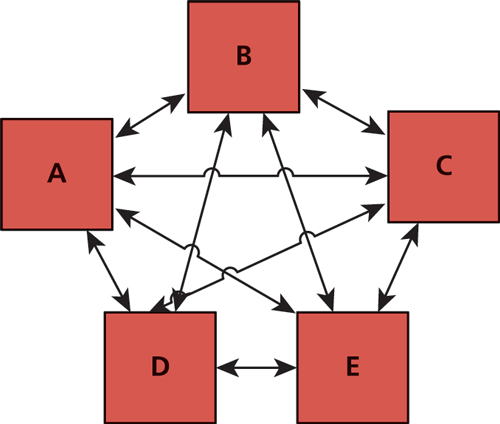
A link farm is a set of websites that all interlink each other as shown in Figure 18.8. The intent of these farms is to share any incoming PageRank to any one site with all the sites that are members of the link farm. Link farms can seem appealing to new websites since they redistribute PageRank from existing sites to new sites that have none. However, they are seen to distribute ranking in an artificial way, which goes against the spirit of having links that are meaningful and organic. Spam websites often participate in link farms to benefit from the redistribution of rank, so participation in such farms is discouraged.
Figure 18.8 A five-site link farm with rank equally distributed
Link Pyramids
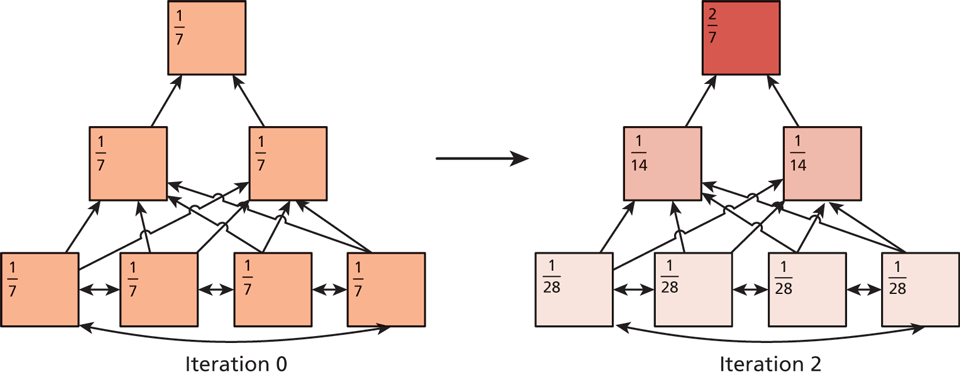
Link pyramids are similar to link farms in that there is a great deal of interlinking happening to sites in the pyramid. Unlike a link farm, a pyramid has the intention of promoting one or two sites. This is achieved by creating layers in the pyramid, and having sites in the same layer link to one another, and then pages in the layer above. At the top of the pyramid are the one or two sites that are the primary beneficiaries of the scheme.
This technique definitely works as illustrated in Figure 18.9 where the PageRank of the pyramid after two iterations shows a concentration at the top. As appealing as this is, search engines try to detect these pyramids and downplay or negate their influence.
Figure 18.9 PageRank distribution in a link pyramid after two iterations
To execute this strategy, many domains and pages must be under the site’s control, and those pages are probably filled with bad content, all of which goes against the spirit of making useful content on the WWW. If the page at the top of a search is not really the best page for those terms, then there is room for other search engines to come in and do a better job. This is why Google and others endeavor to combat these black-hat techniques.
Google Bombing
Google bombing is the technique of using anchor text in links throughout the web to encourage the search engine to associate the anchor text with the destination website. It can be done to promote a business, although it is often used for humorous effect to lampoon public figures. In 2006, webmasters began linking the anchor text “miserable failure” to the home page of then president George W. Bush. Soon, when anyone typed “miserable failure” into Google, the home page of the White House came up as the first result. Although Google addressed some of these Google bombs, searches on other engines still return the gamed results.
Cloaking
Cloaking refers to the process of identifying crawler requests and serving them content different from regular users. The user-agent header is the primary means of identifying crawler agents, which means a simple script can redirect users if googlebot is the user-agent to a page, normally stuffed with keywords.
A legitimate use of cloaking is redirecting users based on characteristics of their OS or browser (redirecting to a mobile site is a common application). Serving extra and fake content to requests with a known bot user-agent header can get you banned. Google occasionally crawls using a “regular” user-agent and compares output from both crawls to help identify cloaked pages.
Duplicate Content
Having seen how easily a scraper and a crawler can be written, it’s no wonder that a great deal of content is downloaded and mirrored on short-lived sites, in contravention of copyright, and ethical standards. Stealing content to build a fake site can work, and is often used in conjunction with automated link farms or pyramids. Search engines are starting to check and punish sites that have substantially duplicated content.
Interestingly, it may be difficult to prove who authored content first, since the first page crawled may not be the originator of the material. To attribute content to yourself use the rel=author attribute.
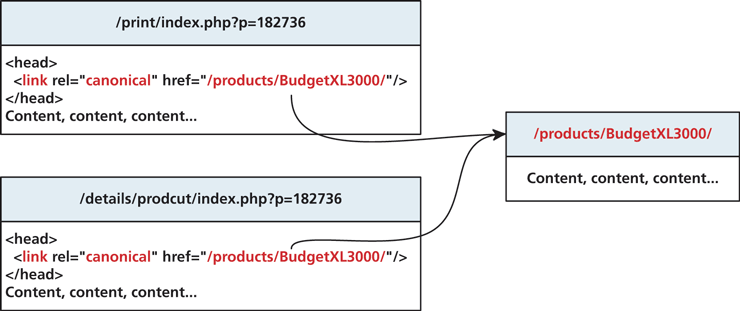
Other ways that search engines can detect duplicate content is when you have several versions of a page, for example, a display and print version. Since the content is nearly identical, you could be punished for having duplicate pages. To prevent being penalized and make search engines more aware of potentially duplicate content, you can use the canonical tag in the head section of duplicate pages to affiliate them with a single canonical version to be indexed. An illustration of this concept is shown in Figure 18.10.
Figure 18.10 Illustration of canonical URLs and relationships