17.4 Virtualization
One of the many changes in the field of web development since we finished the manuscript for the first edition of this textbook in 2013 has been the popular adoption of different virtualization technologies. Broadly speaking, two forms of virtualization have become important in the web context: server virtualization and cloud virtualization. Virtualization has decreased the costs involved in hosting a website as well as increased the ability for site owners to adjust to changes in demand.
17.4.1 Server Virtualization
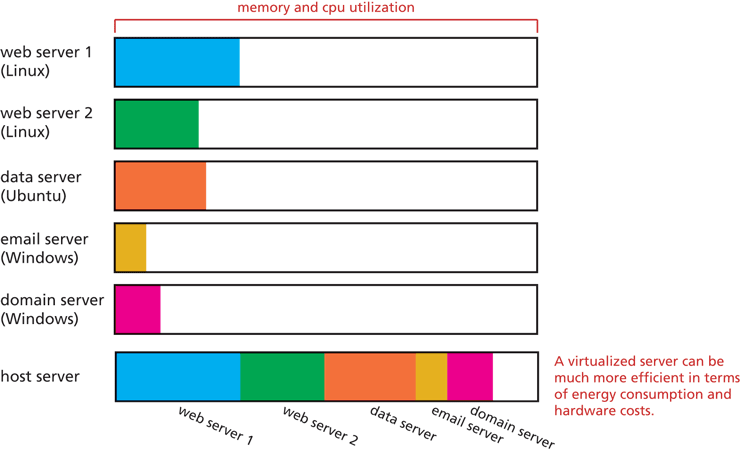
We have mentioned various times in this book that real-world websites are often served from multiple computer server farms. Furthermore, there are often different types of servers (web servers, data servers, email servers, etc.) with redundancy needed for each. Even for a web application with modest request loads (for instance, most intranet applications used only within an organization), it doesn’t take long before there is real server sprawl, that is, too many underutilized servers devouring too much energy and too much support time.
Server virtualization technologies help ameliorate this problem. Using special virtualization software, server virtualization allows an administrator to turn a single computer into multiple computers, thereby saving on hardware and energy consumption (see Figure 17.12).
Figure 17.12 Multiple servers versus a virtualized server
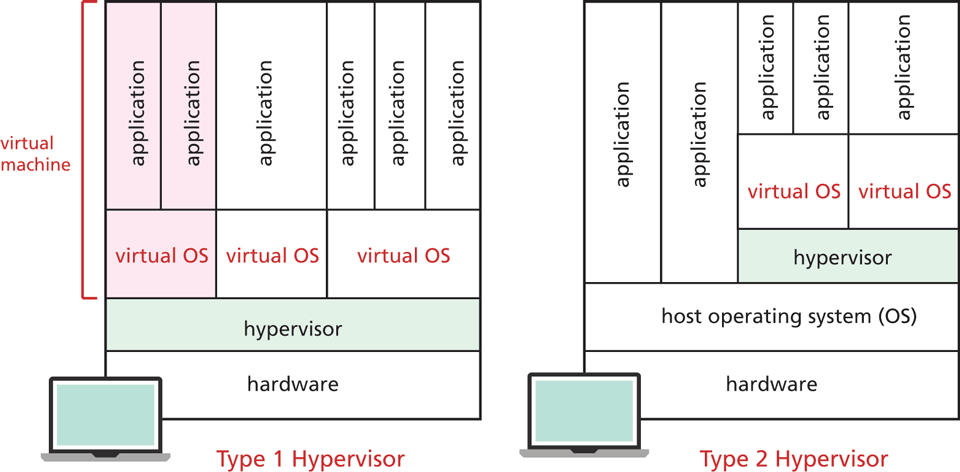
The special software that makes virtual servers possible is generally referred to as a hypervisor. A hypervisor emulates different hardware and/or operating system configurations thereby allowing a single computer to host multiple virtual machines. There are two types of hypervisor, both with imaginative names: Type 1 hypervisors and, you guessed it, Type 2 hypervisors.
In a Type 1 hypervisor, there is no local operating system on the host server; that is, the hypervisor software is loaded directly into the firmware of the server machine. There are Type 1 hypervisors available from IBM, Microsoft, and VMware; the open source KVM is also popular. In a Type 2 hypervisor, the hypervisor is just another piece of software that runs on top of some host operating system. Two of the most popular Type 2 hypervisors are VMware Fusion and the open-source VirtualBox from Oracle.
Type 1 hypervisors are generally faster because the emulation layer runs just above the hardware layer of the machine and there isn’t an extra host operating system layer; Type 2 hypervisors are more flexible because the host machine can run other software besides the hypervisor on the host operating system. Figure 17.13 illustrates the differences between the two types.
Figure 17.13 Type 1 and Type 2 hypervisors compared
Even if you are just a developer, you still may find yourself making use of server virtualization. Type 2 hypervisors make it easier for DevOps minded teams to have the same development environments, allowing them to do continuous integration.
Some developers enjoy the process of selecting, installing, configuring, and updating a development environment; others, such as one of the writers of this book, do not.
The beauty of virtualization is that those who do not like configuring servers can easily download and install a fully configured server set up by a more administration minded teammate. That server can also form the basis of the final production server, ensuring consistency of server infrastructure throughout the process.
For instance, the popular open-source Vagrant tool works with a Type 2 hypervisor and provides a command-line interface for sharing and provisioning (that is, configuring) virtual development machines. Users working on their local computer with their preferred tools can develop using the same system specs as other developers, all coordinated by Vagrant managing virtual boxes (see Figure 17.14).
Figure 17.14 Vagrant
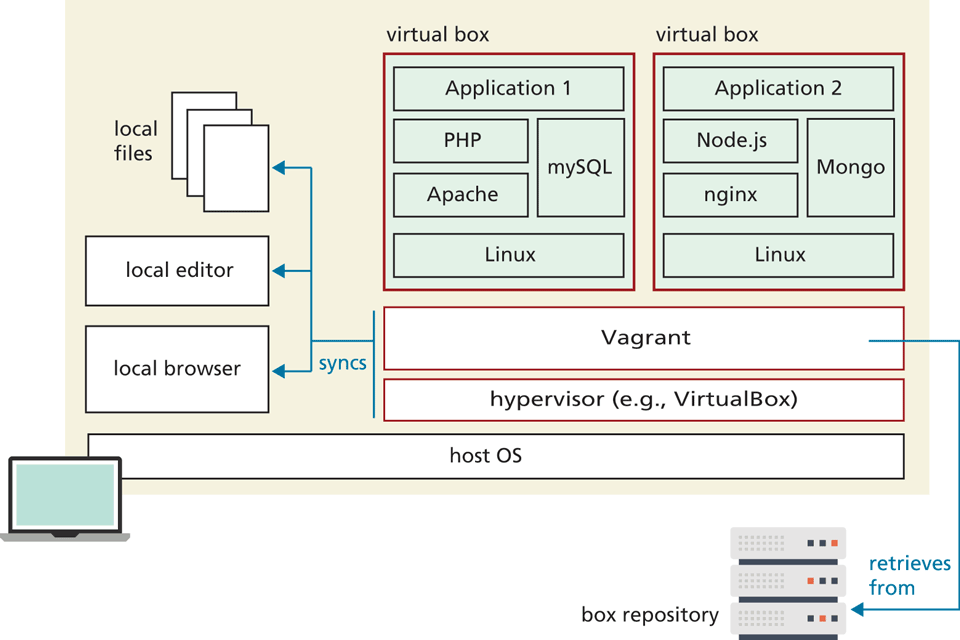
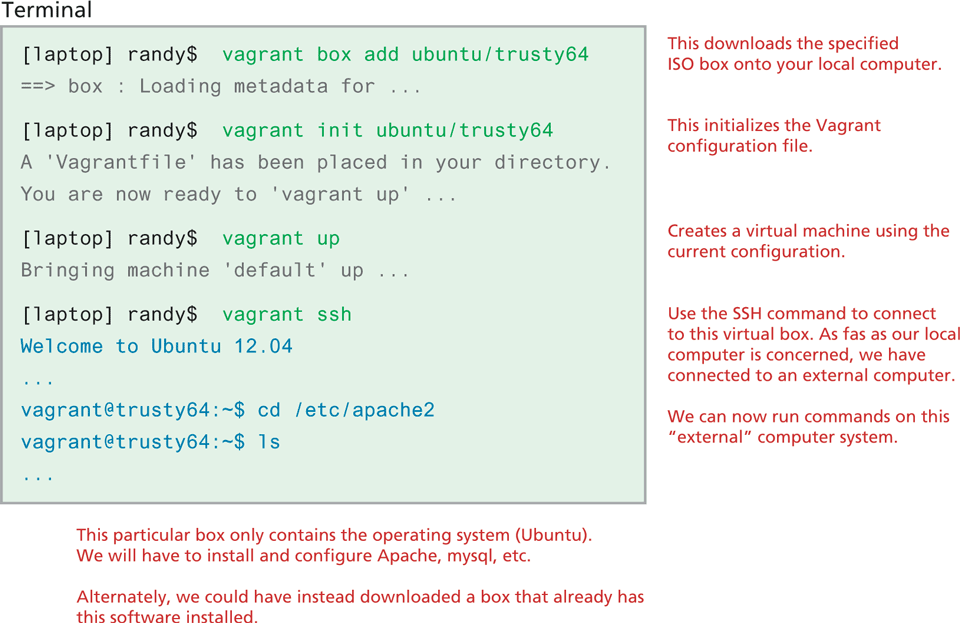
A team might create a Vagrant “box” that has the operating system, web server, database management system, programming languages, and other software installed and configured. This box can then be shared with the rest of the team, thereby ensuring consistency and also saving the other developers from having to worry about the hassles of administration and configuration. For students, it is a great sandbox for learning DevOps and for experimenting with more advanced topics, such as load balancers and automated failover systems. The growing popularity of Vagrant has spawned a rich ecosystem of boxes available on github and www.vagrantup.com. The ecosystem of machine management tools is fast growing with many viable alternatives to Vagrant including Ansible, Puppet, Chef, and more. The management tools selected for support by your host provider will often dictate which toolset you use. Figure 17.15 illustrates how a user might work with Vagrant.
Figure 17.15 Working with Vagrant
Containers
If you examine Figures 17.13 and 17.14, you will see that there are some potential inefficiencies with the Type 2 hypervisor approach. It is quite common for web developers to work only within the LAMP stack. In such cases, having multiple identical operating systems running in multiple virtual machines is an unnecessary duplication. A lighter-weight alternative to hypervisors is to make use of something called containers instead. A container allows a single machine with a single operating system to run multiple similar server instances. Containers are thus a type of virtualization that is managed by the Linux operating system; each container acts as if it is its own unique Linux system but shares the same operating system kernel, thereby being a small, faster alternative to the hypervisor approach (see Figure 17.16).
Figure 17.16 Container-based virtualization
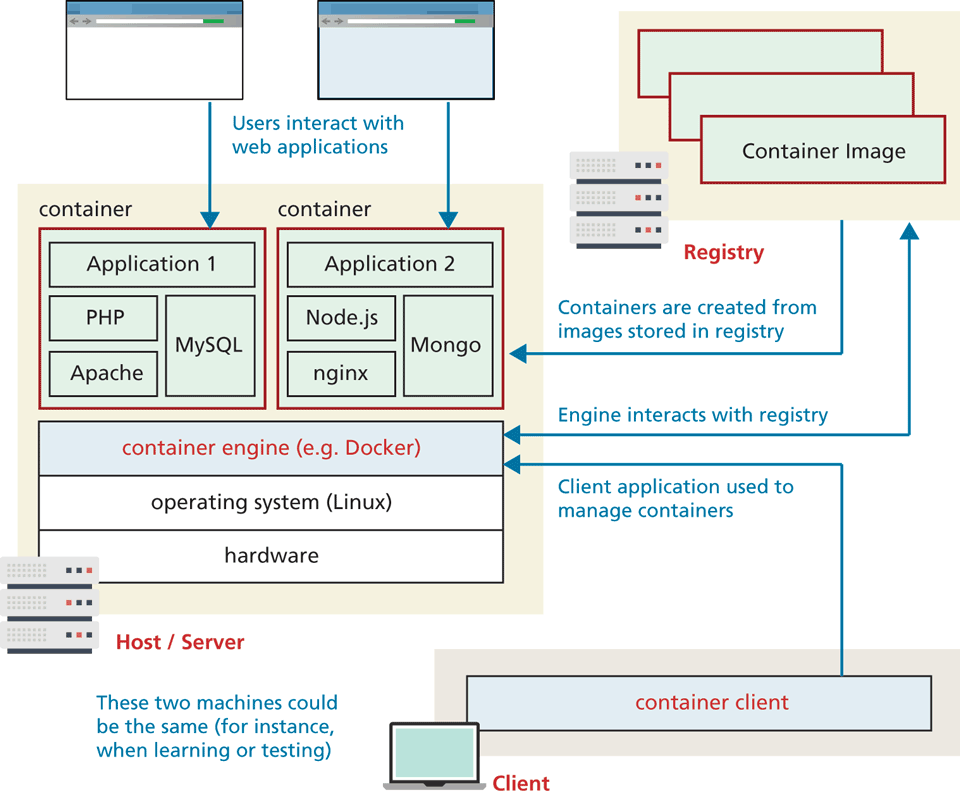
The open-source Docker project has become a very popular method for deploying applications within these containers. A Docker container is a “snapshot” of the operating system, applications, and files needed to run a web application. It is optimized for transportability and can be moved as a unit between different run-time environments, whether it is a local development machine, or a machine in the data center, or virtually in the cloud. The Docker software client and remote registry also provides a mechanism for discovering and sharing containers.
Containers are a cost-effective measure for web hosting companies to better utilize their (shared) resources. For this reason, there is a rapid development of tools (open and closed) and interfaces surrounding the Docker and LXD technologies.
Alternative container management tools tools like Kubernetes achieve the same outcome as Docker, while proprietary tools from cloud hosts (such as Amazon Elastic Container Service) achieve the same end with their own tools. The tools available on your host will likely dictate which container tools you become familiar with. What’s certain is that virtualization is here to stay. It’s being used on almost all shared hosting systems.
17.4.2 Cloud Virtualization
The latest trend in virtualization has been the migration of one’s own virtualized servers out to other server infrastructure that belongs to another organization. Cloud virtualization (sometimes referred to as just cloud computing) builds on virtualization technology and spreads it horizontally to multiple computers. That is, it delivers the same shared computing resources but through virtualization and turns it into an on-demand service that can adjust to demand seamlessly.
The key promise of cloud virtualization is that it enables the on-demand/rapid provisioning of virtual servers with relatively minimal configuration effort. Companies thus do not need to invest up front in server infrastructure. Instead, they can make use of the pay-as-you-use-it model typical of most cloud service companies. This ends up being especially useful for start-up companies that are cash poor. Smaller companies can experiment more quickly and more easily without having to worry about purchasing and provisioning their server infrastructure.
As well, companies purchasing real server infrastructure have to purchase for estimated peak loads (in fact, the rule of thumb is to have server capacity able to handle 15% above estimated peak loads). This is almost always a difficult predictive task. Over predict the loads by too much and there will be wasted computer resources (which means wasted money). Under predict the loads, and the site won’t be responsive enough for the users. Cloud computing promises instead something usually referred to as elastic capacity/computing, meaning that server capability can scale with demand.
Cloud computing has spread widely, and there are a variety of different service models available, which are usually characterized as one of the following.
Infrastructure as a Service (IaaS). This is what is being generally referred to with the term cloud computing. An IaaS company sells access to their computing infrastructure usually as virtualized servers or as containers. An IaaS company provides virtualized computing: it can be used for both web and nonweb reasons.
Platform as a Service (PaaS). This builds on IaaS in that a PaaS company provides access to a broad platform or environment for developers that can scale (grow or shrink) based on demand. This type of cloud computing has become especially important in the web context.
Software as a Service (SaaS). This builds on PaaS and moves commonly needed (web and nonweb) enterprise software systems, such as email, enterprise resource planning, and customer relationship management systems onto a cloud-based infrastructure.
In this book, we are interested in Platform as a Service since that is the cloud service model that is focused on the needs of web developers. While there are many PaaS providers, this area is dominated by the big three: Amazon Web Services (AWS), Microsoft Azure, and Google Cloud Platform.
Amazon Web Services is the oldest and most established of these PaaS providers. Many of the largest and most successful websites from the past decade make use of AWS. For instance, Netflix, Reddit, Spotify, DropBox, Airbnb, Pinterest, and even Apple iCloud, all make use of Amazon Web Services. The scale and scope of AWS is very large, and we could easily spend an entire chapter on it. It provides IaaS (e.g., storage and database services and virtualized servers and containers), PaaS, and SaaS.