17.3 Web Server Hosting Options
The deployment of your website is crucial since your users will be interacting with a server (host) first and foremost. If your hosting is poor, then no matter the quality of your code, users will consider your site to be at best slow and unresponsive, and at worst unavailable. The solution is not always to buy the best possible hosting (unless money is no object), but rather to choose the hosting option that provides good service for good value. Understanding the different types of hosting available to you will help you decide on a class of service that meets your needs. While all of these solutions will result in a functioning site, each category of hosting has its benefits and problems.
The three broad categories of web hosting are shared hosting, collocated hosting, and dedicated hosting. Within each of these categories, there are subcategories, which all together provide you with more than enough choices to make a selection that works for your situation. This textbook does not assume that the reader is using a particular style of hosting, but explains some advanced hosting configuration that requires root access, which is provided in all hosting environments except simple shared hosting.
17.3.1 Shared Hosting
Shared hosting is renting space for your site on a server that will host many sites on the same machine as illustrated in Figure 17.10.
Figure 17.10 Simple shared hosting, with users having their own home folder
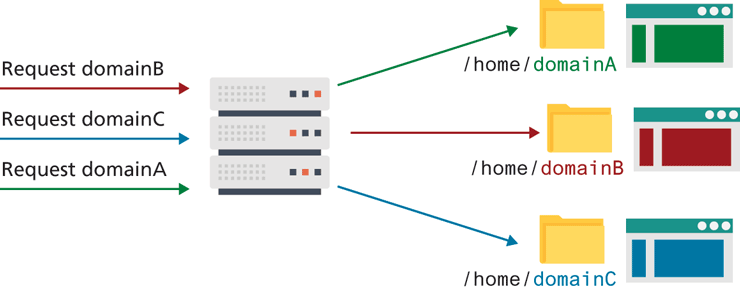
Shared hosting is normally the least expensive, least functional, and most common type of hosting solution, especially for small websites. This class of hosting is divided into two categories: simple shared hosting and virtualized shared hosting.
Simple Shared Hosting
Simple shared hosting is a hosting environment in which clients receive access to a folder on a web server but cannot increase their privileges to configure any part of the operating system, web server, or database. Like a university server where you are given an account and a home folder, it is easy to get started, since the hard parts are taken care of for you. There is no need to configure Apache, PHP, or the underlying OS. In fact, you can’t change system-wide preferences even if you wanted to, since that would impact all the other users!
Simple shared hosting is very much analogous to a condominium in that resources (like the building, electricity, heat, swimming pool, cable, and power) are shared between all tenants at a lower cost than a single-family home could achieve. The condo management team takes care of cutting the grass, cleaning the common areas, and security so that clients don’t have to. However, there are sometimes restrictions on what you can do (can’t paint door red, hang laundry on patio), and many choices are made for you (like the cable provider, color of the building, and condo fees).
A shared host, like the condo, also pools resources (like CPU, RAM, bandwidth, and hard-disk space) and shares them between the tenants. It manages many aspects of the server (such as security and software updating), and restricts what tenants can do on the machine (in the name of collective good). Just like in a condo, a bad neighbor can have a severe impact on your experience since they can monopolize resources and encourage more restrictive rules to prevent their bad behavior (which also restricts you).
The disadvantages of simple shared hosting are many. Lack of control, poor performance, and security threats make shared hosting a bad idea for a serious website.
Lack of control is not a problem for a static HTML site or a default WordPress installation. However, if you want to install software on the server, most shared hosts do not permit it. That means unless the software is already installed, you must ask politely and hope they say yes (they normally say no). This inability to install software can also manifest as a missing service such as no SSH access (remote command-line access) to the server or no git (version control) client. Moreover, you cannot use a particular version of some software, but rather must use what is installed for everybody. The choices that are good enough for the majority can often be too constraining for a custom website. Lack of control can also limit what’s possible to do with your site. For example, if you use a shared IP address, then you cannot create a reverse DNS entry to validate that the IP address is really yours, since it actually belongs to hundreds or thousands of sites that are being hosted on the same server.
Poor performance is a more common problem with shared hosts. Although a good web server can easily support dozens or maybe a few hundred sites that are not too busy, some shared hosts serve thousands of sites from a single machine in the hopes of making a larger profit. Sometimes an intense script running in another domain on the server can impact the availability of CPU, RAM, and bandwidth for your site.
Security threats are not uniform across all hosts. The vulnerabilities of one host may not be present on another, but scanning your host for vulnerabilities could be considered a threat and may even be illegal. If security is a concern, simple shared hosting should be avoided.
 Note
Note
Many domain registrars promote ultra-cheap hosting packages to people who are registering domains. Moreover, anyone with a web server and some know-how can set up a simple shared hosting company. For this reason many people may feel that web hosting should cost as little as $1.00 a month. The truth is more complicated, and a knowledgeable web developer should be able to articulate the challenge of balancing needs against cost to budget-conscious clients.
Virtualized Shared Hosting
Virtualized shared hosting is a variation on the shared hosting scheme, where instead of being given a username and a home directory on a shared server, you are given a virtual server, with root access as shown in Figure 17.11.
Figure 17.11 Virtualized shared host, where each user has a virtual server of their own

When a single physical machine is partitioned so that several operating systems can run on it simultaneously, we call each operating system a virtual server, which can be configured and controlled as the super-user (root).
Virtualized hosting mitigates many of the disadvantages of simple shared hosting while maintaining a relatively low cost. Although there are still some restrictions, there are far fewer of them. Since the server is virtual, you are usually given the freedom to install and configure every aspect of it. Virtualization is also the means by which cloud hosting providers provide scalable hosting packages, and how modern DevOps workflows work. (For more detail on server virtualization, look ahead to section 17.3.)
The authors recommend this configuration over simple shared hosting for most web developers for its relatively low cost, its ability to easily host more domains for free, and its additional flexibility and security.
17.3.2 Dedicated Hosting
Dedicated hosting is when a physical server is rented to you in its entirety inside the data center. You may recall from Chapter 1 that data centers are normally geographically located to take advantage of nearby Internet exchange points and benefit from redundant connections. The advantage over shared hosting is that you are given a complete physical machine to control, removing the possible inequity that can arise when you share the CPU and RAM with other users. Additional advantages include the ability to choose any operating system.
Hardware is normally standardized by the hosting center (with a few options to choose from), and the host takes care of any hardware issues. A burnt-out hard drive or motherboard, for example, is immediately replaced, rather than left to you to fix. Although the cost is higher than shared hosting, it allows you to pay for the costs of server hardware over the duration of your contract rather than pay for server hardware all up front.
The disadvantage of dedicated hosting is the lack of control over the hardware, and a restriction on accessing the hardware. While the server hardware configurations are good for most situations, they might not be suitable for your particular needs, in which case you might consider collocated hosting.
17.3.3 Collocated Hosting
Collocated hosting is almost like dedicated hosting, except rather than rent a machine, you outright purchase, build, and manage the machine yourself. The data center then takes care of the tricky things like electricity, Internet connections, fire suppression systems, climate control, and security. In collocated hosting, someone from your company has physical access to the shared data center, even though most maintenance is done remotely.
Collated hosting is normally reserved for larger companies and companies that want to maintain complete control over their data.
In-house Hosting
The obvious alternative to collocated hosting is to manage the web server yourself, entirely in-house. This provides some of the advantages in terms of control but has major disadvantages since you must in essence manage your own data center, which introduces all types of requirements that you may not have yet considered, and that are difficult to justify without economies of scale that data centers enjoy.
Although hosting a site from your basement or attic may seem appealing at first, you should be aware that the quality of home Internet connections is lower than the connections used by data centers, meaning your site may be less responsive, despite the computing power of a dedicated server.
Ideally, an in-house data center is housed in a secure, climate-controlled environment, with redundant power and network connectivity as well as fire detection and suppression systems. In practice, though, many small companies’ in-house data centers are just closets with an air conditioner, unsecured, and without any redundancies. The savings of hosting everything in-house can easily evaporate the moment there is an outage of power, Internet connectivity, or both.
All that being said, many companies do use a low-cost, in-house hosting environment for development, preproduction, and sandbox environments. Just be aware that those systems are not as critical as a production server, and therefore have a lower need for the redundancy provided by a data center.
17.3.4 Cloud Hosting
Cloud hosting is the most popular trend in shared hosting services. Cloud hosting leverages a distributed network of computers (cloud), which, in theory, can adapt more quickly in response to user needs than a configuration with a single physical server. The advantages are scalability, where more computing and data storage can be accessed as needed and less computing power can be paid for during slow periods. The inherent redundancy of a distributed solution also means less downtime, since failures in one node (server) are immediately distributed to functioning machines. Since cloud hosting is so closely tied to virtualization technologies, we will discuss cloud hosting in more detail in the next section on virtualization.