17.2 Domain Name Administration
Domain names are a crucial component of web development that must be managed correctly in order to ensure people arrive at your website when the enter the URL in their browser.
How to take ownership of a domain and then associate it with your preferred method of hosting is all facilitated through the domain name system (DNS) first covered back in Chapter 2. DNS lets people use domain names rather than IP addresses, making URLs more intuitive and easy to remember. Despite its ubiquity in Internet communication, the details of the DNS system only seem important when you start to administer your own websites.
The authors suggest going back over the DNS system and registrar description back in Chapter 2. The details about managing a domain name for your site require that you understand the parties involved in a DNS resolution request as shown in Figure 17.1.
17.2.1 Registering a Domain Name
Registrars are companies that register domain names, on your behalf (the registrant), under the oversight of ICANN. You only lease the right to use the name exclusively for a period and must renew periodically (the maximum lease is for 10 years). Some popular registrars include GoDaddy, TuCows, and Network Solutions, where you can expect to pay from $10.00 per year per domain name.
WHOIS
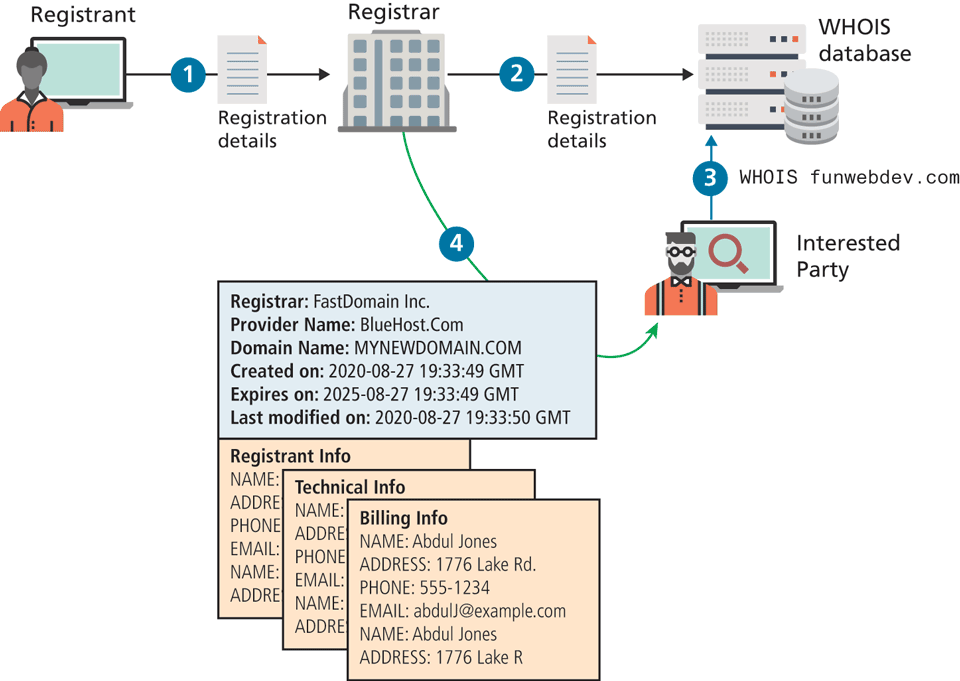
The registrars are authorized to make changes to the ownership of the domains with the root name servers, and must collect and maintain your information in a database of WHOIS records that includes three levels of contact (registrant, technical, and billing), who are often the same person. Anyone can try and find out who owns a domain by running the WHOIS command and reading the output. Since your registration agreement requires you to provide accurate information to WHOIS (especially the email addresses), not doing so is grounds for nullifying your lease. Figure 17.5 illustrates the kind of information available to anyone with access to a command line.
Figure 17.5 Illustration of the registrant information available to anyone in the WHOIS system
Private Registration
The information in the WHOIS system is accessible by anyone, and indeed, putting your email in there will ensure your name begins to appear on spam lists you never imagined. Not only that, but disclosing your personal information can be a risk to your own personal security since contact details include address and phone number.
To mitigate those risks, many registrars provide private registration services, which broker a deal with a private company as an intermediary to register the domain on your behalf as shown in Figure 17.6. These third-party companies use their own contact information in the WHOIS system with the registrar, keeping your contact information hidden from stalkers, spammers, and other threats.
Figure 17.6 Illustration of a private registration through a third party
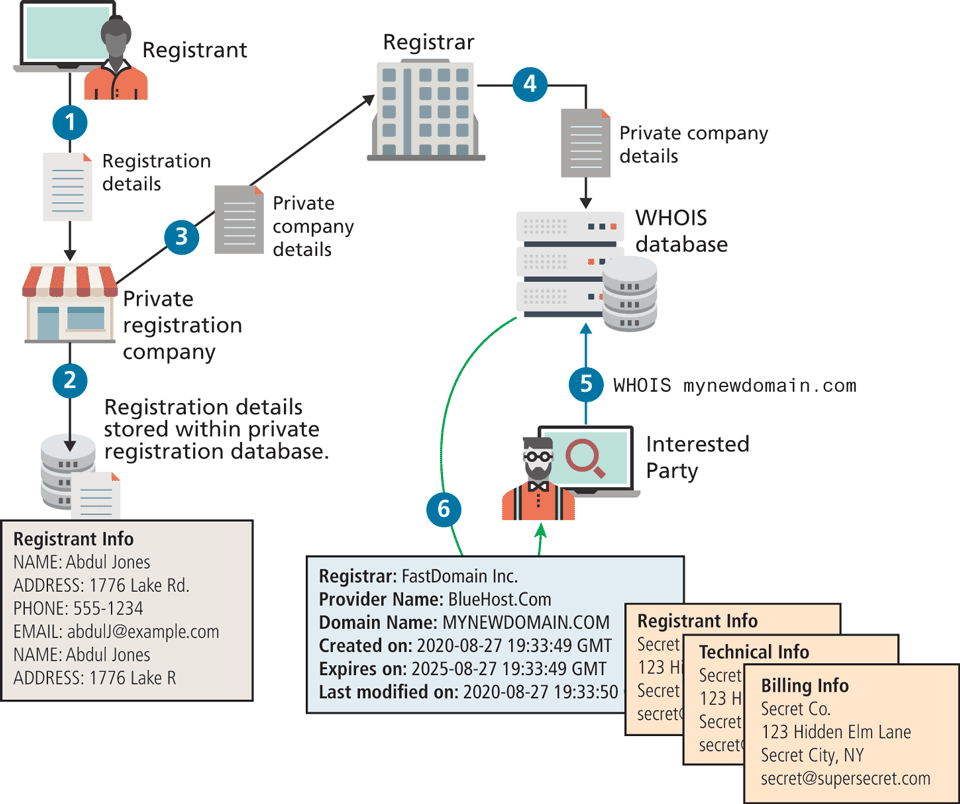
A private registration company keeps your real contact information on their own servers because they must know who to contact if the need arises. There are many reasons for wanting private registration. You should know that these private registrants will turn your information over to authorities upon request, so their use is just for keeping regular people from finding out who owns the domain.
17.2.2 Updating the Name Servers
After purchase, the most important thing you do with your registrar is control the name servers associated with the domain name. Although many registrars will try to bundle additional services (hosting, email, website design) with your purchase, it is important to note that you do not need any of it right away. Registrars will typically point your domain at their own temporary landing pages by default until you are ready.
When you finally do purchase hosting (described in the next section), you will simply associate your new host's name servers with your domain on the registrar’s name servers. This is almost always done through a web interface, but not always. Although it is possible to maintain your own name servers (BIND is the most popular open-source tool), it is not recommended unless you have a site with volumes of traffic that necessitate a dedicated DNS server.
When you update your name server, the registrar, on your behalf, updates your name server records on the top-level domain (TLD) name servers, thereby starting the process of updating your domain name for anyone who types it.
Checking Name Servers
Updating records in DNS may require at least 48 hours to ensure that the changes have propagated throughout the system. With so long to wait, you must be able to confirm that the changes are correct before that 48-hour window, since any mistakes may take an additional 48 hours to correct. Thankfully, Linux has some helpful command-line tools to facilitate name server queries such as nslookup and dig.
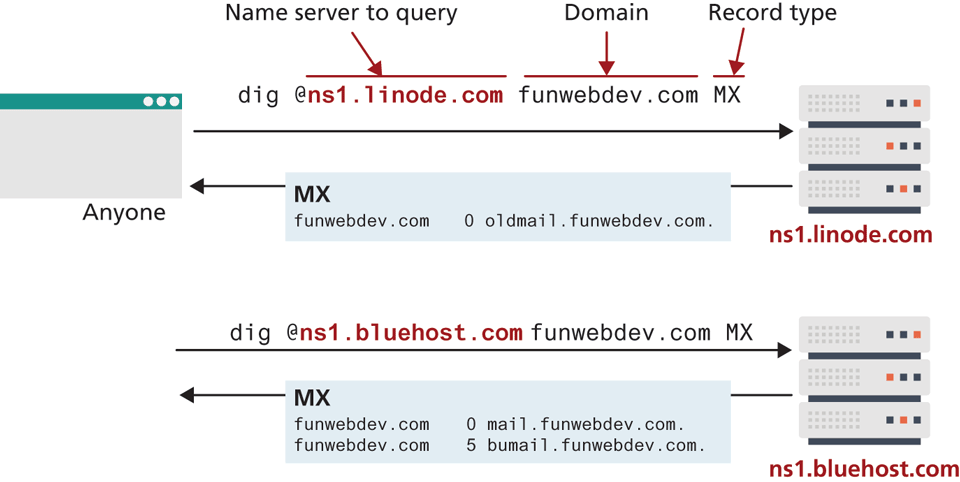
After updating your name servers with the registrar, it’s a good practice to “dig” on your TLD servers to confirm that the changes have been made. Dig is a command that lets you ask a particular name server about records of a particular type for any domain. Figure 17.7 illustrates a couple of usages of the dig command where different name servers have different values for a recently updated email record.
Figure 17.7 Annotated usage of the dig command
17.2.3 DNS Record Types
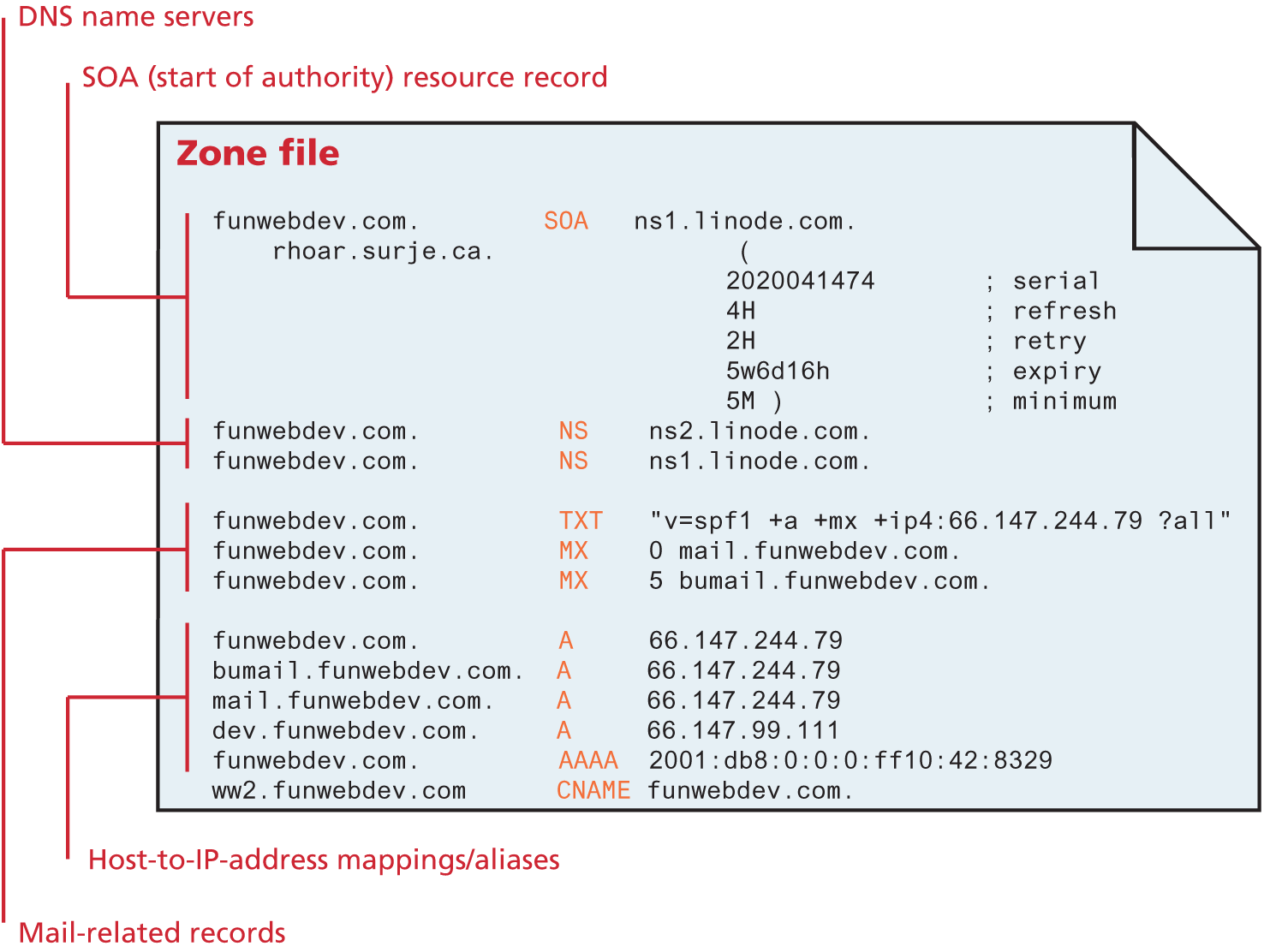
Recall that the name server holds all the records that map a domain name to an IP address for your website. In practice, all of a domain’s records are stored in a single file called the DNS zone file. This text file contains mappings between domain names and IP addresses. These records relate to email, HTTP, and more. Typically the DNS zone file is administered through a web interface on your host that lets you set one record at a time. Although you will rarely manipulate a zone file directly, you should know about the six primary types of records (A/AAA, CName, MX, NS, SOA, and TXT/SPF), illustrated in Figure 17.8.
Figure 17.8 Illustration of a zone file with A, AAAA, CName, MX, SOA, and SPF DNS records
Mapping Records
A records and AAAA records are identical except A records use IPv4 addresses and AAAA records use IPv6. Both of them simply associate a hostname with an IP address. These are the most common entires and are used whenever a user requests a domain through a browser.
Canonical Name (CName) records allow you to point multiple subdomains to an existing A record. This allows you to update all your domains at once by changing the one A record. However, it doubles the number of queries required to get resolution for your domain, making A records the preferred technique.
Mail Records
Interestingly, email is also partially controlled by DNS entries, so web administrators should be aware of these entries. Mail Exchange (MX) records provide the location of the SMTP servers to receive email for this domain. Just like the A records, they resolve to an IP address, but unlike the HTTP protocol, SMTP allows redundant mail servers for load distribution or backup purposes. To support multiple destinations for one domain, MX records not only require an IP address but also a ranking. When trying to deliver mail, the lowest-numbered servers are tried first, and only if they are down, will the higher ones be used. All email hosting services will describe how to configure your name servers to point to their servers in detail.
Authoritative Records
Name server (NS) records tell everyone what name servers to use for this domain. Like CName records they point to hostnames and not IP addresses. There can be (and should be) multiple name servers listed for redundancy.
Start of Authority (SOA) record contains information about how long this record is valid (called time to live [TTL]), together with a serial number that gets incremented with each update to help synchronize DNS.
Validation Records
TXT records and Sender Policy Framework (SPF) records are used to reduce email spam by providing another mechanism to validate your mail servers for the domain. If you omit this record, then any server can send email as your domain, which allows flexibility, but also abuse.
SPF records appear as both SPF and TXT records. The value is a string, enclosed in double quotes (" "). Since it originated as a TXT entry (i.e., an open-ended string DNS record), the later SPF field still uses the string syntax for reverse compatibility. The string starts with v=spf1 (the version) and uses space-separated selectors with modifiers to define which machines should be allowed to send email as this domain.
The selectors are all (any host), A (any IP with A record), IP4/IP6 (address range), MX (mx record exists), and PTR. Modifiers are + (allow), – (deny), and ? (neutral). You can write SPF records that allow or deny specific machines, address ranges, and more as illustrated in Figure 17.9.
Figure 17.9 Annotated SPF string for funwebdev.com
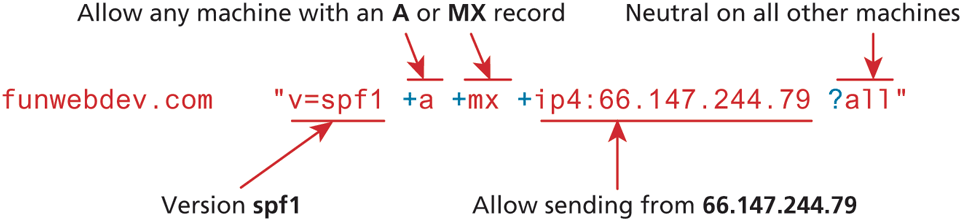
For a complete specification, check out7 where there are also tools to validate your SPF records. With email, it’s always the receiving server that decides whether to use SPF to help block spam, so these techniques will not stop all masquerade emails (as described in Chapter 18).
17.2.4 Reverse DNS
You know how DNS works to resolve an IP address given a domain name. Reverse DNS is the reverse process, whereby you get a domain name from an IP address. As another technique to validate your email servers, it should be implemented to reduce spam using your domain name.
The thinking behind reverse DNS is that the dynamic IP addresses assigned to Internet users have reverse DNS records associated with the ISP and not any domain name. Since most computers compromised by a virus use this type of dynamic IP, spam filters can assume mail is spam if the reverse DNS doesn’t match the from: header’s domain.
The details of reverse DNS are that a pointer (PTR) record is created with a value taking the IP address prepended in reverse order to the domain in-addr.arpa so the IP address 66.147.244.79 becomes the PTR entry.
funwebdev.com PTR 79.244.147.66.in-addr.apraNow, when a mail server wants to determine if a received email is spam or not, they recreate the in-addr.apra hostname from the IP and resolve it like any other DNS request based on the domain it claims to be from.
In our example the root name servers can see that the domain 147.66.in-addr .arpa is within the 66.147.*.* subnet, and refer the lookup to the regional Internet authority responsible for that subnet. They in turn will know which Internet service provider, government, or corporation has that subnet and pass the request on to them. Finally, those corporate DNS servers must either delegate to your name servers, or include the reverse DNS on your behalf on their servers for the reverse IP lookup to resolve as desired.