17.1 DevOps: Development and Operations
So far you have been working with some sort of simple local web server to run your PHP, Node, or React content. Tools like XAMPP (or your institutions’ provided servers) are great for learning because they hide the details about the server and let the student focus on programming. However, those same server details become incredibly important when we start discussing the deployment of live websites in the real world.
Historically, the operation of a server would be done by a team of system administrators completely separate from the developers. With web development, it first became apparent that isolating hosting from development was not productive, and that knowledge about the operation of the server is essential for developers, whether working alone or in large teams. This chapter will therefore show the web developer some key operational ideas to help them develop competence with a webserver, while also looking deeper at how development and operations roles are converging.
So commonplace is combining the Development and Operations roles and responsibilities, that it has a common name: DevOps. More than just combining two roles together, DevOps is a philosophy that has inspired many new ideas and strategies, all drawing on the benefit of having blurred lines between development and production.
17.1.1 Continuous Integration, Delivery, and Deployment
In a traditional software development environment, a developer will work on a feature and then periodically integrate their update to the main branch (using git, svn or other version control method) for others to scrutinize and build upon. In the web development world, integration is especially challenging due to the added complexity of how code runs on the webserver. Since developers might use non-standard development platforms, and those platforms might not be identical to the production environment, extra care is needed to ensure libraries, file locations and other small distinctions integrate correctly. While the solution to this integration problem might seem clear (standardize everyone on identical platforms), that solution did not become feasible until recently, through virtualization and containers. With developers now working in standardized environments, the ability to integrate more frequently becomes possible and desirable.
Continuous Integration (CI) aspires to shorten development cycles by making each developer integrate their changes against a central code repository as often as possible, up to several times a day.1 This agile development philosophy comes from Xtreme Programming, and was intentionally designed to change software engineering culture by empowering developers to develop, test, and integrate quickly, without oversight from some “other”. This simple expectation materially impacts the culture and expectations of a software team in a myriad of ways. First, it requires that each developer is continuously testing their code and developing tests. Second, it requires identical environments for web development and production in order to eliminate daily issues from having different systems. This usually requires infrastructure as code (see below) to manage the software stacks used by the project. Some have also argued that CI encourages the development of a microservice architecture (see below), a paradigm that that uses small, loosely connected modules that are less interdependent on one another.
The rapid pace of continuous integration requires the automation (not avoidance) of processes such as acceptance tests that formerly might have been more periodic and manual. Open-source tools like Jenkins (https:/
One big benefit of continuous integration is that there’s always a “latest build” due to the expectation of developers to commit their changes frequently. This means there’s always a latest version of the software that can go from development to production, and the speed of deployment is limited only by the differences between the development and production platform, since acceptance tests have continually been passed. The term Continuous Delivery (CD) refers to this practice of automating the release process. It allows developers to be part of the deployment process, thereby encouraging faster updates for the users.
The logical continuation of Continuous Delivery is Continuous Deployment, in which changes in the source code that passes the tests within a continuous integration cycle is automatically deployed to production without the intervention or approval of the developer. This differs from CD in that CD makes a set of CI changes deployable, but doesn’t necessarily deploy them to production. Continuous deployment demands that developers are working on systems that are identical to production, something that’s only become economically possible for most people with virtualization and cloud providers.
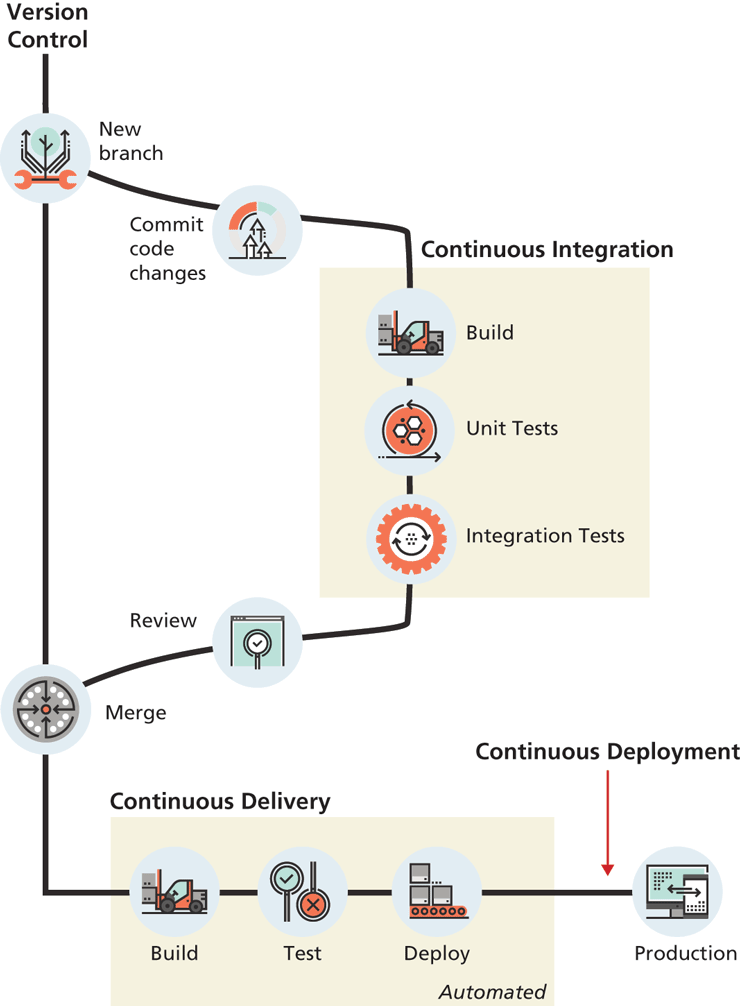
Figure 17.1 illustrates the overall processes involved in CI and CD. Notice that CI and CD are both dependent upon version control systems; most CI/CD tools work especially well with git.
Figure 17.1 Continuous integration and deployment
17.1.2 Testing
Testing is core to DevOps, as can be seen from its place throughout the development cycle in Figure 17.1. Testing is something every developer has done (even informally) and is a substantial topic within software engineering. This book does not go into depth on testing, so we refer the reader to many excellent books on the topic such as Agile Testing,2 Continuous Delivery,3 How Google Tests Software,4 and Test-Driven Development by Example.5
Testing is especially difficult for web developers because of the complexities involved in the client server model where third-party software (browsers and webservers) are used as part of the client’s interaction with the application. Web developers must consider how users on different browsers, different OSs, different screen sizes, and varying network speeds are able to interact with their application. Imagine manually testing one webpage on Firefox, Chrome, and Edge on Windows, then testing that page on Chrome, Firefox, and Safari on Mac, then Firefox and Chrome on Linux, and then testing on a range of mobile platforms! Just moving from chair to chair, opening those platforms, and possibly rebooting from one OS to another would be frustrating, never mind the monotony of clicking the same links and recording the result dozens of times for each test. Thankfully, powerful tools have been developed to not only test your application across a variety of browsers, but to automate those tests so that they can run every time you make a change.
There are, generally speaking, two types of testing in regards to web applications: functional and non-functional testing. Functional testing is testing the system’s functional requirements and is familiar to programmers because we have to test if our applications work as expected, even if only in an ad-hoc way. One important type of functional test for DevOps is a unit test, which is a small program written to test one feature (unit) of the application.
Unit tests ensure the expected output of a module is achieved, and are normally automated so that every new code change is tested against the original test, ensuring new features don’t break old code. Unit tests typically access low level functions/variables directly, so you can test numeric functionality without having to worry about javascript, cookies, and browser rendering. Tools like PHPUnit for PHP, Mocha for Node.js or the React Testing Library all implement the same idea: Define an initial state, determine the function (unit) to test, and define the expected output.
Integration tests are another important functional test which is typically run after unit testing, and which tests whether the smaller units tested via unit testing work together as expected. This type of testing is especially important in team development, where one group of developers might create a module that needs to work with another module created by a different team. Integration testing can test whether these separate modules work together as expected.
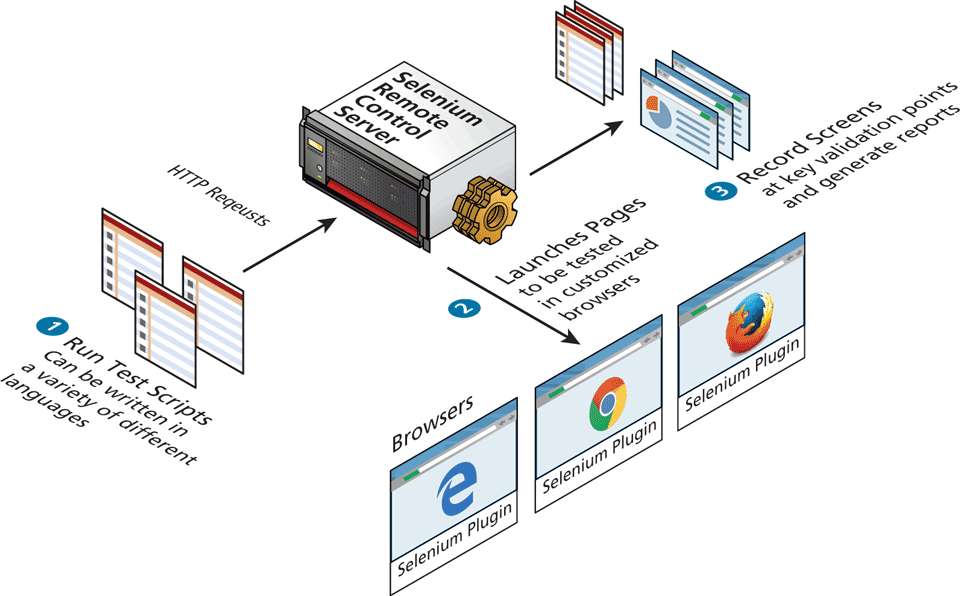
If you want to test how your application interfaces with a browser, you will need to explore test automation tools such as Telerik TestStudio, HP Unified Functional testing, TestComplete, or the opensource Selenium. These tools allow you to program a browser to mimic clicks and scrolls as if it were being driven by a user. They allow you to test how browser features like page rendering and state management impact your application. You can check, for example, if an HTML page contains certain text after a sequence of clicks, or if a layout element appears within a defined area or in a certain colour. Figure 17.2 illustrates the basic workflow and architecture of how testing works with the popular Selenium system.
Figure 17.2 Workflow and architecture of the Selenium testing system
Non-functional testing refers to a broad category of tests that do not cover the functionality of the application, but instead evaluate quality characteristics such as usability, security, and performance. Security threats are much more acute with web applications and typically require a completely different testing approach known as penetration testing. Performance and load testing are non-functional tests in which a web application is given different demand (request) levels to evaluate a system’s performance under normal and peak. These tests normally occur during the delivery phase (rather than integration) because they depend so much on the interplay between components. These tests normally make use of testing frameworks like Selenium (described above), so that the web server latency, browser rendering, and timing issues can all be tested across a wide range of platforms.
As you can imagine, you might eventually have hundreds or thousands of small functional and non-functional tests, each validating a very small feature. In order to manage this complexity, tests are normally managed in version control, just like the application. This also facilitates integrating tests continuously into the main application development workflow (as shown in Figure 17.1) so that every time a new change is integrated, it must pass all tests before being accepted. The detailed manner in which tests are integrated into version control systems and automatically executed is interesting but beyond the scope of this book. Since testing is core to the DevOps methodology, we strongly encourage interested readers to explore these ideas and tools in greater depth to build your DevOps competencies.
17.1.3 Infrastructure as Code
The complexity of configuring even one piece of software like Apache can be seen in the later section of this chapter where we delve deeply into that webserver. The challenge of getting all the developers in a team (who might have different computers and technical abilities) to develop using the exact same environment is hard. When one considers the database servers, mailhosts, and all the other systems that may be required in a production environment, the challenge of having every developer on identical systems becomes clear.
Thankfully, from the operations side of DevOps comes the answer. Powerful systems (including Ansible and Vagrant) abstract system requirements into text files which can then be checked in and out of versioning systems just like code, earning them the name Infrastructure as Code (IoC). These systems mean that developers can now check out a fully configured environment with ease and be completely synchronized with their team. However, it turns out managing infrastructure as text-based descriptions is a powerful concept that also helps system administrators in setting up redundant distributed systems with advanced deployment features, such as load balancing and DDOS handling.
17.1.4 Microservice architecture
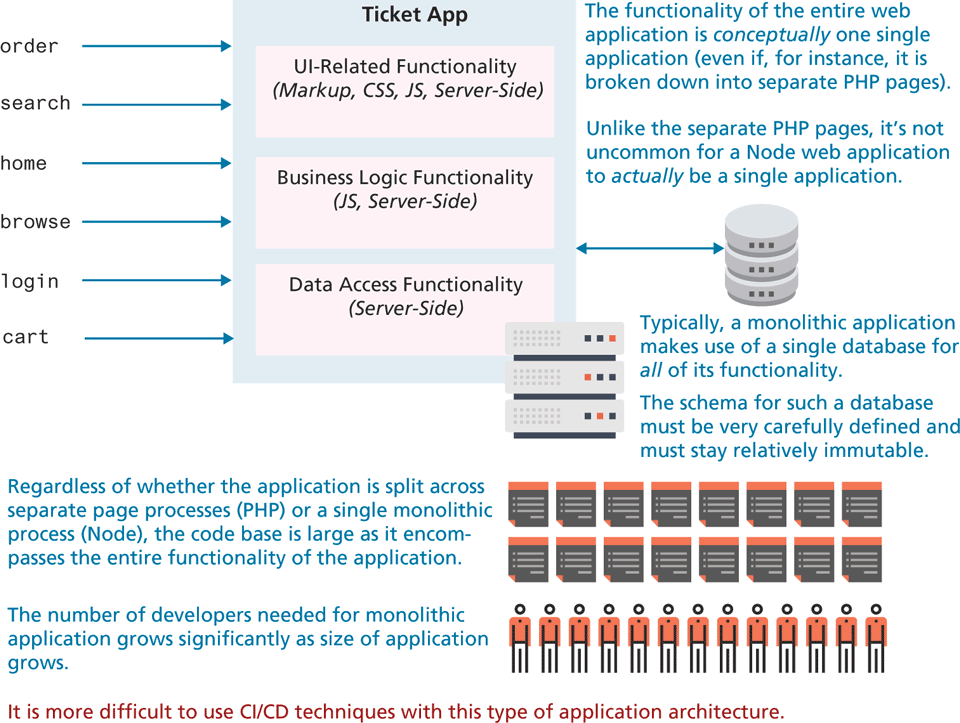
For most of this book, we have tended to think about (and code) our sample web applications as one big application. Whether we were using PHP or Node, the different functionality of our applications were likely to be part of a single conceptual web application. As shown in Figure 17.3, such an application is sometimes referred to as a monolithic architecture, in that the code base—encompassing, HTML, CSS, JavaScript, and whatever server-side language files are being used—encompasses the entire functionality of the application. Such an application architecture, with dozens if not hundreds of dependencies, is difficult to understand (a large code base can’t likely be comprehended by a single developer), test (large code bases with many dependencies will have too many test cases to be practical), maintain (making a change to functionality A might break something in functionality B), and expand (difficult to add new functionality without making changes to existing functionality). Indeed, the CI/CD and IoC approaches mentioned earlier can be especially difficult to implement with such a large code base.
Figure 17.3 Monolithic architecture
For this reason, the alternative microservice architecture—which disaggregates the single monolith into a system comprising many small, well-defined modules, scripts or programs—has become more and more popular. The advantages of a microservice architecture is that it encourages distributed, non-centralized code bases and teams. Web applications are particularly well suited to being written in a microservice manner with communication facilitated through internal REST APIs or database mechanisms.
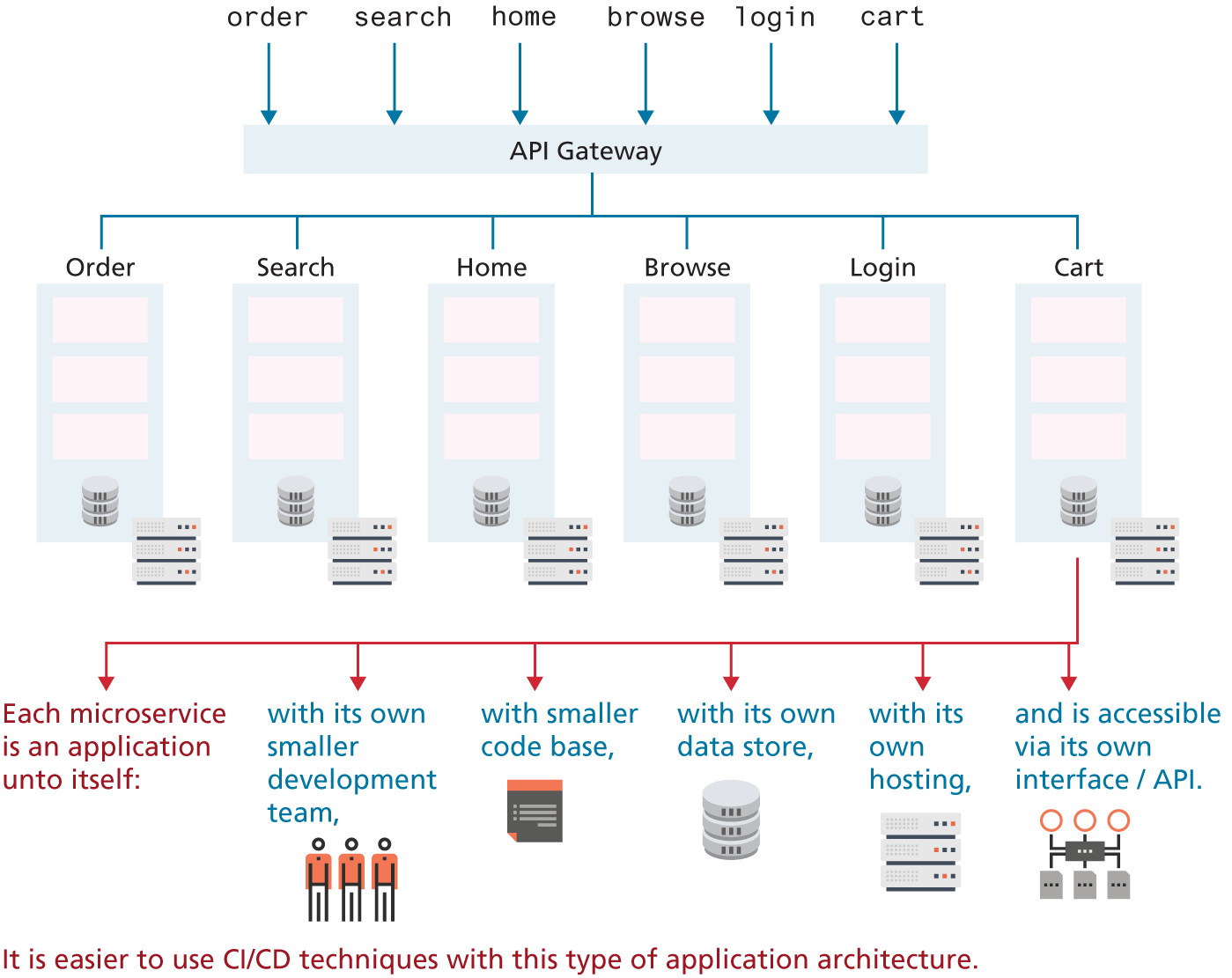
Consider the contrast of micro- and monoservice architectures in Figures 17.3 and 17.4 for a web-based concert ticketing system. In the microservice version of the application, the code base (markup, CSS, JavaScript, and server-side) for handling any given functionality is decoupled from each other. This potentially provides efficiencies when it comes to hosting, data storage, and programming team size. It is also easier to adopt CI/CD techniques with a microservice architecture, since there is less functionality and fewer dependencies (and thus easier to construct automated tests). It also lends itself more readily to being distributed across multiple servers since each module is already independent of the others.
Figure 17.4 Microservice architecture
Later in this chapter, we cover the NginX web server in a deep dive. It should be noted that NginX supports a microservice architecture due to its own design which processes static http requests at high speed. Indeed, many of the efficiency arguments made for NginX apply to microservice architecture in general. Similarly, later in this chapter we will examine container-based approaches to hosting, such as Docker and Kubernetes. Microservice architectures are especially well adapted to the container-based approach to hosting.
However, a microservice architecture can be complicated when it comes to collaboration between services. For any given microservice (say, browse and search in Figure 17.4), there is likely to be shared functionality and shared data. This is typically implemented by decoupling the shared functionality or data from the two services and placing it into its own service that is used by the browse service and the search service. This need for shared functionality will likely result in a microservice architecture with a lot more than six services (as in Figure 17.4). For instance, Netflix has over 500 microservices and Spotify over 800!6