16.6 Common Threat Vectors
A badly-developed web application can open up many attack vectors. No matter the security in place, there are often backdoors and poorly secured resources which are accidentally left accessible to the public. This section describes some common attacks and some countermeasures you can apply to mitigate their impact.
16.6.1 Brute-Force Attacks
Perhaps the most common security threat is the unsophisticated brute-force attack. In this attack, an intruder simply tries repeatedly guessing a password. For instance, an automated script might try looping through words in the dictionary or use combinations of words, numbers, and symbols. If no protective measure is in place, such a script can usually work within minutes. Since a site’s server logs will disclose when such an attack is happening, automated intrusion blocking may provide protection by blocking the IP address of the script. But since it is possible to hide the IP address of the brute force script via open proxy servers, such IP blocking is often not sufficient.
For this reason it is important to throttle login attempts. One approach is to lock a user account after some set number of incorrect guesses. Another approach is to simply add a time delay between login attempts. For instance, the first two or three login attempts might have no delays, but login attempts four through seven have a delay of 5 seconds, while any attempts after the seventh are delayed 10 minutes with a sliding exponential scale after the tenth attempt. Such a system will make brute-force attacks impractical in that they might take years instead of minutes to discover the password.
Another approach to dealing with brute force attacks is making use of a CAPTCHA. These systems present some type of test that is easy for humans to pass but difficult for automated scripts to pass. Some CAPTCHAS ask the user to identify a distorted word or number in an image; others ask the user to solve a simple math problem. Adding one of these to your forms typically involves interacting with a CAPTCHAS service using JavaScript. One of the most popular is the reCAPTCHA service provided by Google (https:/
16.6.2 SQL Injection
SQL injection is the attack technique of entering SQL commands into user input fields in order to make the database execute a malicious query. This vulnerability is an especially common one because it targets the programmatic construction of SQL queries, which, as we have seen, is an especially common feature of most database-driven websites.
Consider a vulnerable application illustrated in Figure 16.28.
Figure 16.28 Illustration of a SQL injection attack (right) and intended usage (left)
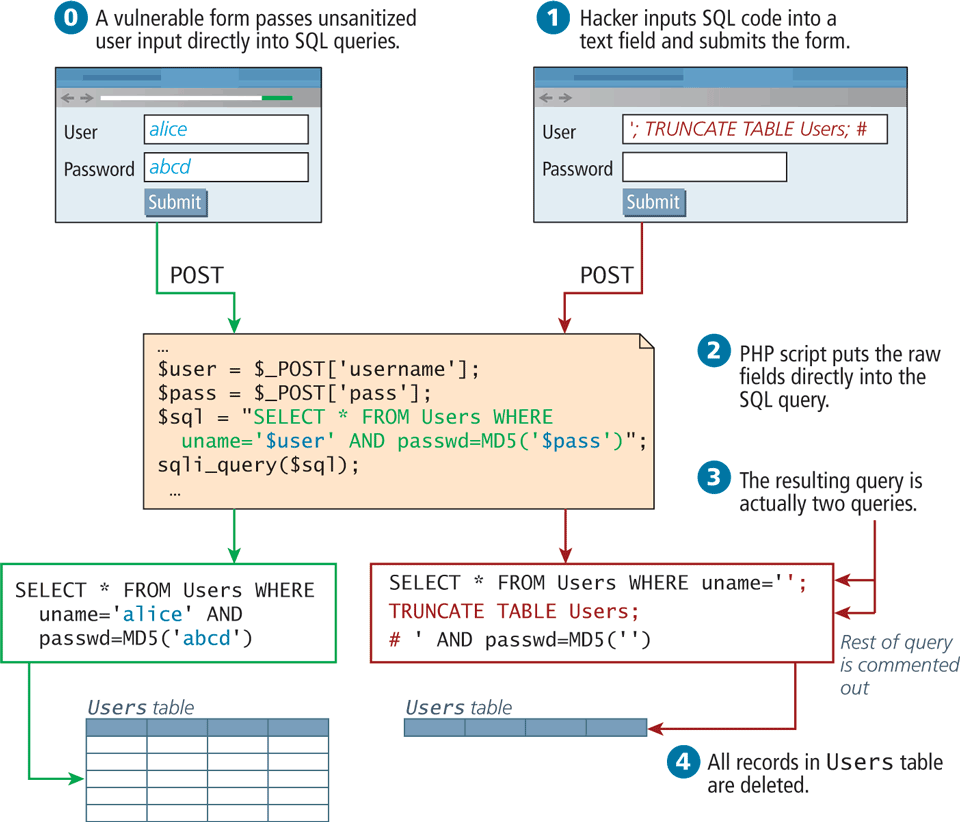
In this web page’s intended-usage scenario (which does work), a username and a password are passed directly to a SQL query, which will either return a result (valid login) or nothing (invalid). The problem is that by passing the user input directly to the SQL query, the application is open to SQL injection. To illustrate, in Figure 16.28  the attacker inputs text that resembles a SQL query in the username field of the web form. The malicious attacker is not trying to log in, but rather, trying to insert rogue SQL statements to be executed. Once submitted to the server, the user input actually results in two distinct queries being executed:
1.	SELECT * FROM Users WHERE uname='';
2.	TRUNCATE TABLE Users;
The second one (TRUNCATE) removes all the records from the Users table, effectively wiping out all the user records, making the site inaccessible to all registered users!
Try to imagine what kind of damage hackers could do with this technique, since they are only limited by the SQL language, the permissions of the database user, and their ability to decipher the table names and structure. While we’ve illustrated an attack to break a website (availability attack), it could just as easily steal data (confidentiality attack) or insert bad data (integrity attack), making it a truly versatile technique.
There are two ways to protect against such attacks: sanitize user input, and apply the least privileges possible for the application’s database user.
Sanitize Input
To sanitize user input (remember, query strings are also a type of user input) before using it in a SQL query, you can apply sanitization functions and bind the variables in the query using parameters or prepared statements. For examples and more detail please refer back to Chapter 14.
From a security perspective, you should never trust a user input enough to use it directly in a query, no matter how many HTML5 or JavaScript prevalidation techniques you use. Remember that at the end of the day, your server responds to HTTP requests, and a hacker could easily circumvent your JavaScript and HTML5 prevalidation and post directly to your server.
Least Possible Privileges
Despite the sanitization of user input, there is always a risk that users could somehow execute a SQL query they are not entitled to. A properly secured system only assigns users and applications the privileges they need to complete their work, but no more.
For instance, in a typical web application, one could define three types of database user for that web application: one with read-only privileges, one with write privileges, and finally an administrator with the ability to add, drop, and truncate tables. The read-only user is used with all queries by nonauthenticated users. The other two users are used for authenticated users and privileged users, respectively.
In such a situation, the SQL injection example would not have worked, even if the query executed since the read-only account does not have the TRUNCATE privilege.
16.6.3 Cross-Site Scripting (XSS)
Cross-site scripting (XSS) refers to a type of attack in which a malicious script (JavaScript) is embedded into an otherwise trustworthy website. These scripts can cause a wide range of damage and can do just about anything you as developers could do writing a script on your own page.
In the original formulation for these type of attacks, a malicious user would get a script onto a page and that script would then send data to a malicious party, hosted at another domain (hence the cross, in XSS). That problem has been partially addressed by modern browsers, which restricts script requests to the same domain. However, with at least 80 XSS attack vectors to get around those restrictions, it remains a serious problem.20 There are two main categories of XSS vulnerability: Reflected XSS and Stored XSS. They both apply similar techniques, but are distinct attack vectors.
Reflected XSS
Reflected XSS (also known as nonpersistent XSS) are attacks that send malicious content to the server, so that in the server response, the malicious content is embedded.
For the sake of simplicity, consider a login page that outputs a welcome message to the user, based on a GET parameter. For the URL index.php?User=eve, the page might output Welcome eve! as shown in in Figure 16.29.
Figure 16.29 Illustration of a Reflection XSS attack
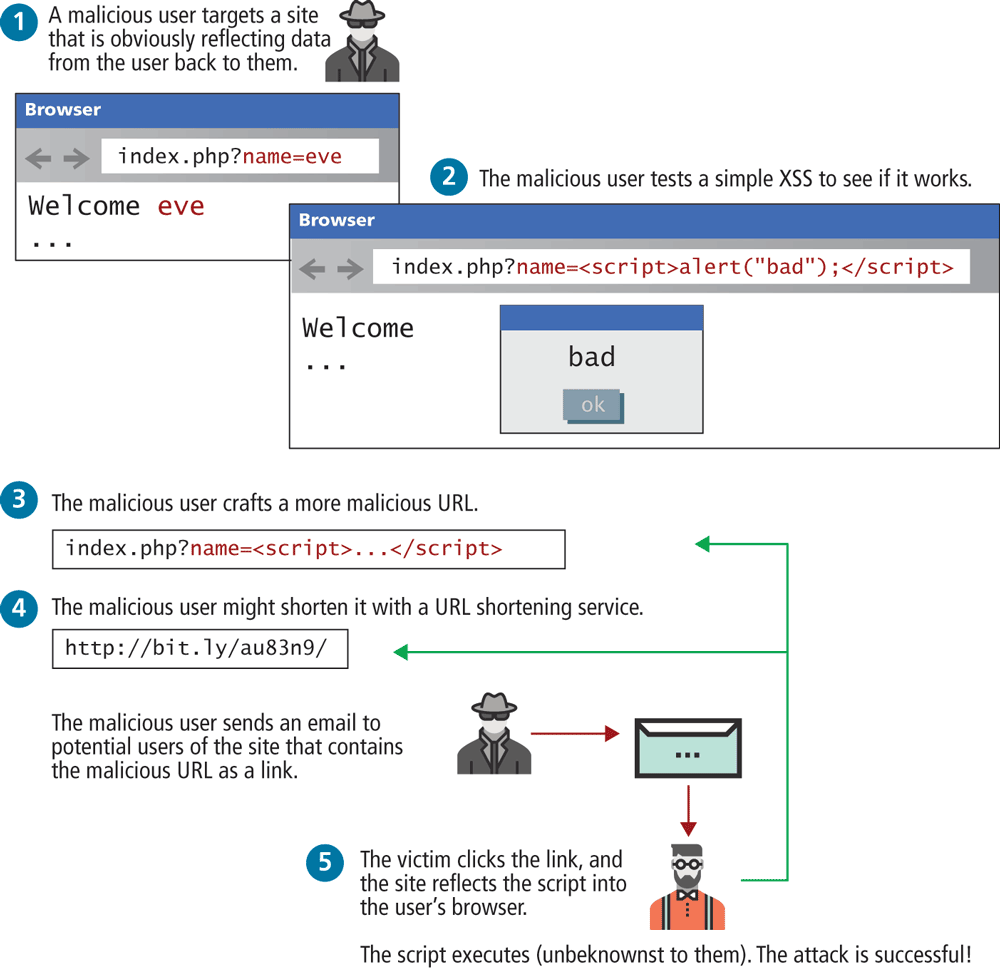
A malicious user could try to put JavaScript into the page by typing the URL:
index.php?User=<script>alert("bad");<script>What is the goal behind such an attack? The malicious user is trying to discover if the site is vulnerable, so they can craft a more complex script to do more damage. For instance, the attacker could send known users of the site an email including a link containing the JavaScript payload, so that users that click the link will be exposed to a version of the site with the XSS script embedded inside as illustrated in  in Figure 16.29. Since the domain is correct, they may even be logged in automatically, and start transmitting personal data (including, for instance, cookie data) to the malicious party.
Stored XSS
Stored XSS (also known as persistent XSS) is even more dangerous, because the attack can impact every user that visits the site. After the attack is installed, it is transmitted to clients as part of the response to their HTTP requests. These attacks are embedded into the content of a website (i.e., in the site’s database) and can persist forever or until detected!
To illustrate the problem, consider a blogging site, where users can add comments to existing blog posts. A malicious user could enter a comment that includes malicious JavaScript, as shown in Figure 16.30. Since comments are saved to the database, the script now may be potentially displayed to other users that view this comment. This could happen by using a PHP echo to output the content, but it also might happen in JavaScript by setting the an element’s innerHtml property to this content. The next time another logged-in user views this comment their session cookie will be transmitted to the malicious site as an innocent-looking image request. The malicious user can now use that secret session value in their server logs and gain access to the site as though they were an administrator simply by using that cookie with a browser plug-in that allows cookie modification.
Figure 16.30 Illustration of a stored XSS attack in action
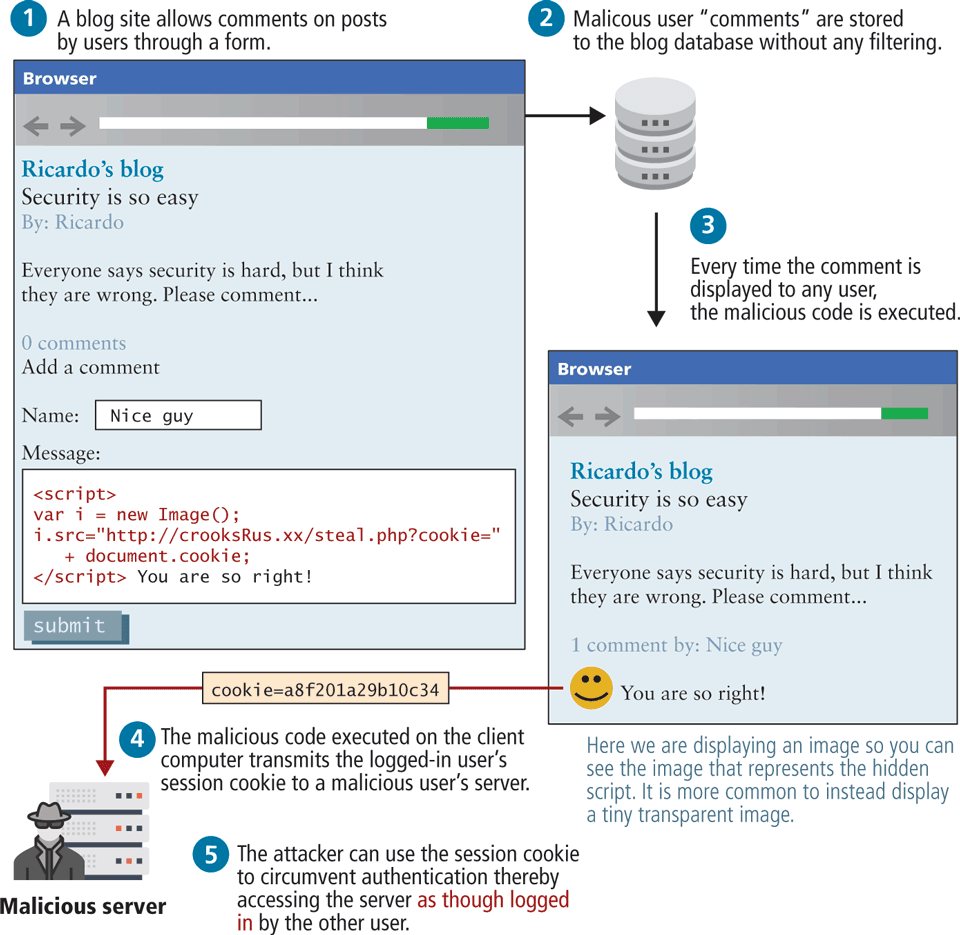
As you can see, XSS relies extensively on unsanitized user inputs to operate; preventing XSS attacks, therefore, requires even more user input sanitization, just as SQL injection defenses did. It is important to remember that query string parameters, URLs, and cookie values are also forms of user input.
 Note
Note
Remember that you should never trust raw user data. User data include: form data, query string parameters, URLs, and cookie values. If your databases and APIs include user-generated data, you shouldn’t trust the data in them either!
Filtering User Input
Obviously, sanitizing user input is crucial to preventing XSS attacks, but as you will see, filtering out dangerous characters is a tricky matter. It’s rather easy to write PHP sanitization scripts to strip out dangerous HTML tags like <script>. For example, the PHP function strip_tags() removes all the HTML tags from the passed-in string. Although passing the user input through such a function prevents the simple script attack, attackers have gone far beyond using HTML script tags, and commonly employ subtle tactics including embedded attributes and character encoding.
Embedded attributes use the attribute of a tag, rather than a
<script>block, for instance:<a onmouseover="alert(document.cookie)">some link text</a>Hexadecimal/HTML encoding embeds an escaped set of characters such as:
%3C%73%63%72%69%70%74%3E%61%6C%65%72%74%28%22%68%65%6C%6C%6F%22%29%3B%3C%2F%73%63%72%69%70%74%3Einstead of
<script>alert("hello");</script>.
This technique actually has many forms, including hexadecimal codes, HTML entities, and UTF-8 codes.
Given that there are at least 80 subtle variations of these types of filter evasions, most developers rely on third-party filters to remove dangerous scripts rather than develop their own from scratch. Most significant frameworks such as React or EJS provide built-in sanitization when outputting content. A library such as the open-source HTMLPurifier from http:/strip_tags() with the more advanced purifier, as follows:
$user= $_POST['uname'];
$purifier = new HTMLPurifier();
$clean_user = $purifier->purify($user);
Escape Dangerous Content
Even if malicious content makes its way into your database, there are still techniques to prevent an attack from being successful. Escaping content is a great way to make sure that user content is never executed, even if a malicious script was uploaded. This technique relies on the fact that browsers don’t execute escaped content as JavaScript, but rather interpret it as text. Ironically, it uses one of the techniques the hackers employ to get past filters.
You may recall that HTML escape codes allow characters to be encoded as a code, preceded by &, and ending with a semicolon (e.g., < can be encoded as <). That means even if the malicious script did get stored, you would escape it before sending it out to users, so they would receive the following:
<script>alert("hello");</script>The browsers seeing the encoded characters would translate them back for display, but will not execute the script! Instead your code would appear on the page as text. The Enterprise Security API (ESAPI), maintained by the Open Web Application Security Project, is a library that can be used in PHP, ASP, JAVA, and many other server languages to escape dangerous content in HTML, CSS, and JavaScript22 for more than just HTML codes.
The trick is not to escape everything, or your own scripts will be disabled! Only escape output that originated as user input since that could be a potential XSS attack vector (normally, that’s the content pulled from the database). Combined with user input filtering, you should be well prepared for the most common, well-known XSS attacks.
XSS is a rapidly changing area, with HTML5 implementations providing even more potential attack vectors. What works today will not work forever, meaning this threat is an ongoing one.
 Pro Tip
Content Security Policy (CSP) is a living and evolving recommendation to the W3C that provides an additional layer of security (and control) to browsers, which can be controlled on a per site basis by server headers. CSP is also a great tool for debugging migration to HTTPS because it can override many browser safeguards that protect the average user from malicious sites.
Browsers can’t tell the difference between scripts that have downloaded from your origin (i.e., your server) and those downloaded from another origin. CSP allows us to tell the browser up front which sources they should trust. At its most basic, CSP lets a webmaster tell a browser which resources should be considered secure (or insecure). To include Content-Security-Policy headers in your own server, you simply add one line to your Apache configuration listing a CSP policy statement. Alternately, your Node or PHP application could set this header on an individual basis. An example statement to limit resources to only the current domain would be
Header set Content-Security-Policy default-src 'self';It is possible to also set CSP via the <meta> element. For instance, the following element indicates that the browser should only accept image content from cloudinary, fonts from Google fonts, styles from Google, but everything else from the same origin as this file:
<meta http-equiv="Content-Security-Policy" content="default-src 'self'; img-src https://res.cloudinary.com; font-src fonts.gstatic.com; style-src 'self' fonts.googleapis.com">More advanced configuration can allow resources from multiple sites (recall Cross-Origin Resource Sharing discussed back in Section 10.3.1) and filter resources by type. The living standard with more examples can be found at https:/
16.6.4 Cross-Site Request Forgery (CSRF)
Cross-Site Request Forgery (CSRF) is a type of attack that forces users to execute actions on a website in which they are authenticated. A CSRF attack may even cause a user to transfer funds or change passwords. As can be seen in Figure 16.31, most CSRF attacks rely on the use of authentication cookies as well as sites that have some type of state-changing behavior (in the diagram, the example is a change password form). The mechanism for making the state-changing behavior can be discovered by anyone who looks at the underlying source for any form. In this case, HTTPS is of no help since a CSRF attack works by getting a user to view the attack form (in Figure 16.31 this is the email) while still logged in. While this might seem unlikely, users multitask all the time, and many sites only expire authentication cookies after a fairly long time in order to not inconvenience users with frequent log-ins.
Figure 16.31 Cross-site request forgery attack
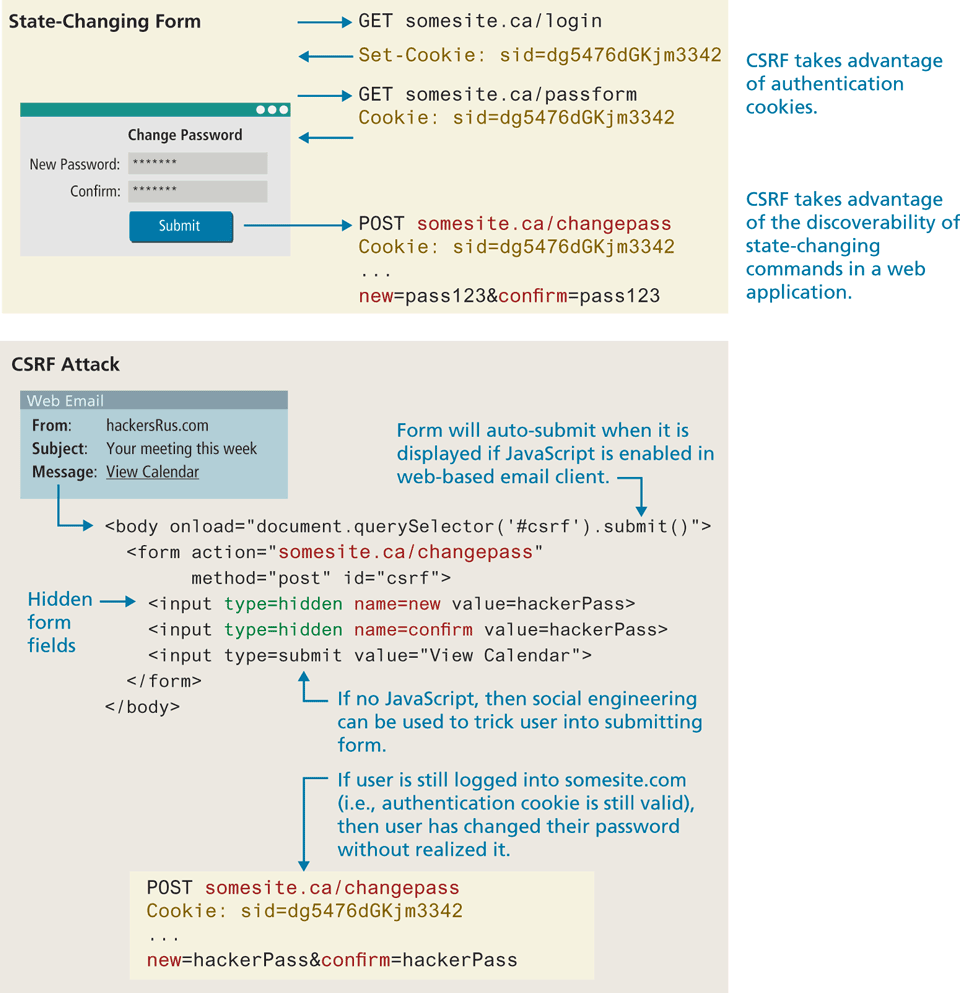
From an end-user perspective, one can try to protect oneself by explicitly logging out of an application when switching to another web application. For the developer, the standard protection for CSRF attacks unfortunately requires a fair bit of extra coding, so not all sites do so. Using JWT rather than authentication cookies might be one solution, but this typically requires essentially rewriting a site’s entire authentication approach. While this isn’t usually reasonable for existing sites, for brand new sites, this is a sensible approach. Regardless of whether one uses tokens or cookies, the most common way to prevent CSRF attacks is to add a one-time use CSRF token to any state-changing form via a hidden field:
<input type="hidden" name="csrf-token" value="lR4Xbi...wX4WFoz" />This value should be long, increment in an unpredictable way or contain a timestamp, and be generated with a static secret. Each time the server serves the form, it should generate a new CSRF token and include it in the form. If a hacker tries to create a CSRF exploit by including the hidden field they see when they examine the form’s HTML source, the exploit will fail because the server code will check and see that the increment value or timestamp in the attack form is incorrect.
16.6.5 Insecure Direct Object Reference
An insecure direct object reference is a fancy name for when some internal value or key of the application is exposed to the user, and attackers can then manipulate these internal keys to gain access to things they should not have access to.
One of the most common ways that data can be exposed is if a configuration file or other sensitive piece of data is left out in the open for anyone to download (i.e., for anyone who knows the URL). This could be an archive of the site’s PHP code or a password text file that is left on the web server in a location where it could potentially be downloaded or accessed.
Another common example is when a website uses a database key in the URLs that are visible to users. A malicious (or curious) user takes a valid URL they have access to and modifies it to try and access something they do not have access to. For instance, consider the situation in which a customer with an ID of 99 is able to see his or her profile page at the following URL: info.php?CustomerID=99. In such a site, other users should not be able to change the query string to a different value (say, 100) and get the page belonging to a different user (i.e., the one with ID 100). Unfortunately, unless security authorization is checked with each request for a resource, this type of negligent programming leaves your data exposed.
Another example of this security risk occurs due to a common technique for storing files on the server. For instance, if a user can determine that his or her uploaded photos are stored sequentially as /images/99/1.jpg, /images/99/2 .jpg, . . . , they might try to access images of other users by requesting /images/ 101/1.jpg.
One strategy for protecting your site against this threat is to obfuscate URLs to use hash values rather than sequential names. That is, rather than store images as 1.jpg, 2.jpg . . . use a one-way hash, so that each user’s images are stored with unique URLs like 9a76eb01c5de4362098.jpg. However, even obfuscation leaves the files at risk for someone with enough time to seek them by brute force.
If image security is truly important, then image requests should be routed through server scripts rather than link to images directly.
16.6.6 Denial of Service
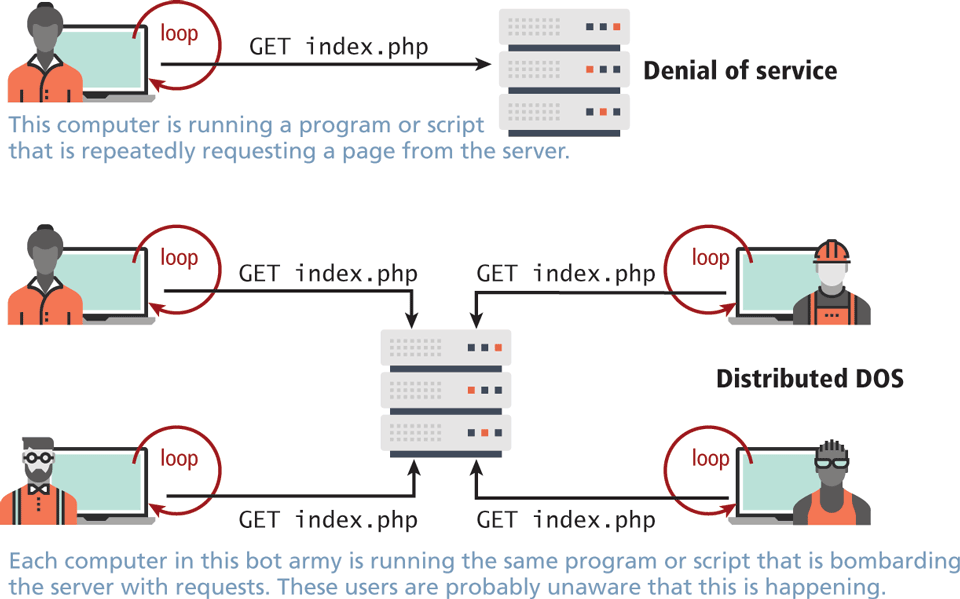
Denial of service attacks (DoS attacks) are attacks that aim to overload a server with illegitimate requests in order to prevent the site from responding to legitimate ones.
If the attack originates from a single server, then stopping it is as simple as blocking the IP address, either in the firewall or the Apache server. However, most denial of service attacks are distributed across many computers, as shown in Figure 16.32; IP blocking is not a usable countermeasure for these types of attacks.
Figure 16.32 Illustration of a Denial of Service (DoS) and a Distributed Denial of Service (DDoS) attack
Distributed DoS Attack (DDoS)
The challenge of DDoS is that the requests are coming in from multiple machines, often as part of a bot army of infected machines under the control of a single organization or user. Such a scenario is often indistinguishable from a surge of legitimate traffic from being featured on a popular blog like reddit or slashdot. Unlike a DoS attack, you cannot block the IP address of every machine making requests, since some of those requests are legitimate and it’s difficult to distinguish between them.
Interestingly, defense against this type of attack is similar to preparation for a huge surge of traffic, that is, caching dynamic pages whenever possible, and ensuring you have the bandwidth needed to respond. Unfortunately, these attacks are very difficult to counter, as illustrated by a recent attack on the spamhaus servers, which generated 300 Gbps worth of requests!23 Due to the complexity of identifying and defending against this attack, many cloud providers sell variations of a DDOS service as part of a hosting package so you don't have to (see Chapter 19).
16.6.7 Security Misconfiguration
The broad category of security misconfiguration captures the wide range of errors that can arise from an improperly configured server. There are more issues that fall into this category than the rest, but some common errors include out-of-date software, open mail relays, and user-coupled control.
Out-of-Date Software
Most softwares are regularly updated with new versions that add features and fix bugs. Sometimes these updates are not applied, either out of laziness/incompetence or because they conflict with other software that is running on the system that is not compatible with the new version.
From the OS and services, all the way to updates for your plug-ins in Wordpress, out-of-date software puts your system at risk by potentially leaving well-known (and fixed) vulnerabilities exposed.
The solution is straightforward: update your software as quickly as possible. The best practice is to have identical mirror images of the production system in a preproduction setting. Test all updates on that system before updating the live server.
Open Mail Relays
An open mail relay refers to any mail server that allows someone to route email through without authentication. While email protocols (SMTP, POP) are not technically web protocols, they offer many threats the web developer should be aware of. Open relays are troublesome since spammers can use your server to send their messages rather than use their own servers. This means that the spam messages are sent as if the originating IP address was your own web server! If that spam is flagged at a spam agency like spamhaus, your mail server’s IP address will be blacklisted, and then many mail providers will block legitimate email from you.
A proper closed email server configuration will allow sending from a locally trusted computer (like your web server) and authenticated external users. Even when properly configured from an SMTP (Simple Mail Transfer Protocol) perspective, there can still be a risk of spammers abusing your server if your forms are not correctly designed, since they can piggyback on the web server’s permission to route email and send their own messages.
Pro Tip
Even if your site is perfectly configured, people can still masquerade as you in emails. That is, they can still forge the From: header in an email and say it is from you (or from the President for that matter).
However, by closing your relays (and setting up advanced mail configuration) you greatly reduce the chance of forged email not being flagged as spam.
More Input Attacks
Although SQL injection is one type of unsanitized user input that could put your site at risk, there are other risks to allowing user input to control systems. Input coupled control refers to the potential vulnerability that occurs when the users, through their HTTP requests, transmit a variety of strings and data that are directly used by the server without sanitation. Two examples you will learn about are the virtual open mail relay and arbitrary program execution.
Virtual Open Mail Relay
Consider, for example, that most websites use an HTML form to allow users to contact the website administrator or other users. If the form allows users to select the recipient from a dropdown, then what is being transmitted is crucial since it could expose your mail server as a virtual open mail relay as illustrated in Figure 16.33.
Figure 16.33 Illustrated virtual open relay exploit
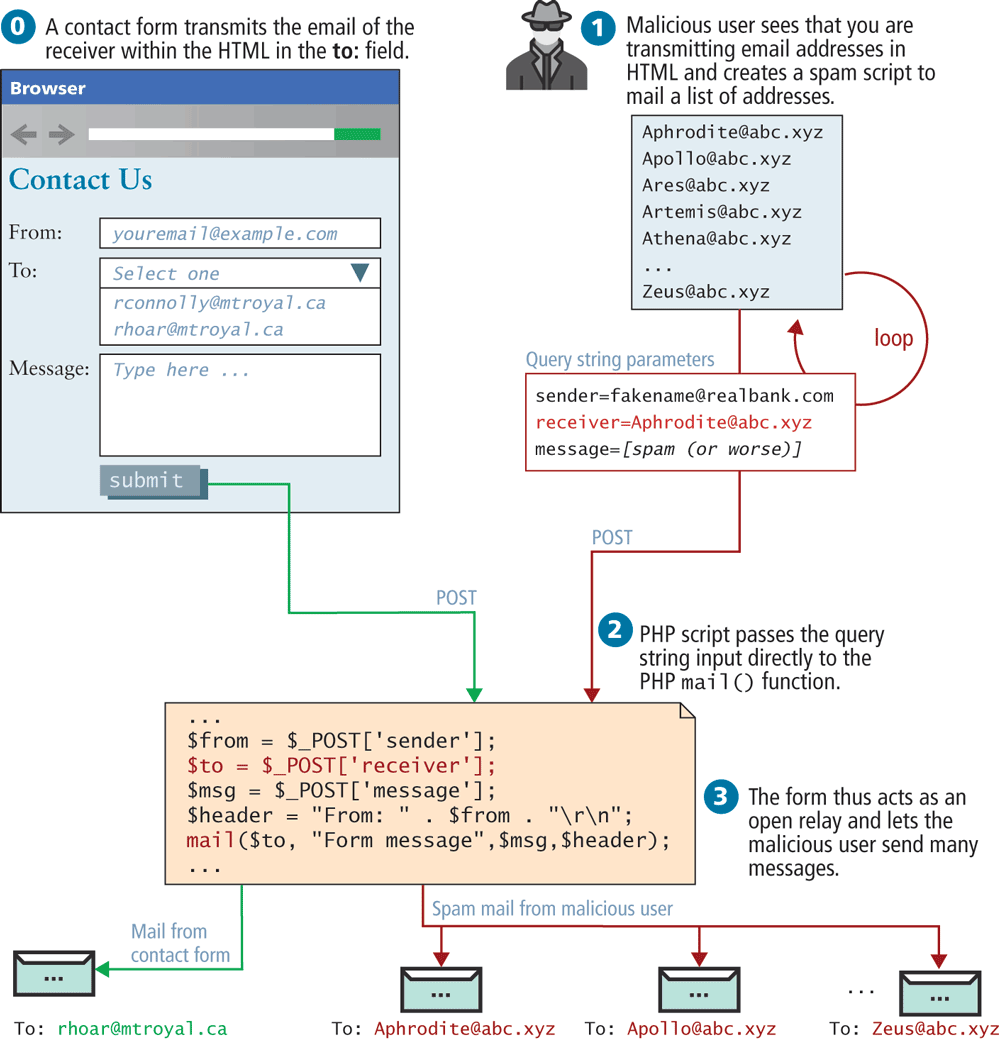
By transmitting the email address of the recipient, the contact form is at risk of abuse since an attacker could send to any email they want. Instead, you should transmit an integer that corresponds to an ID in the user table, thereby requiring the database lookup of a valid recipient.
Arbitrary Program Execution
Another potential attack with user-coupled control relates to running commands in Unix through a PHP script. Functions like exec(), system(), and passthru() allow the server to run a process as though they were a logged-in user.
Consider the script illustrated in Figure 16.34, which allows a user to input an IP address (or domain name) and then runs the ping command on the server using that input. Unfortunately, a malicious user could input data other than an IP address in an effort to break out of the ping command and execute another command. These attackers normally use | or > characters to execute the malicious program as part of a chain of commands. In this case, the attacker appends a directory listing command (ls), and as a result sees all the files on the server in that directory! With access to any command, the impact could be much worse. To prevent this major class of attack, be sure to sanitize input, with escapeshellarg() and be mindful of how user input is being passed to the shell.
Figure 16.34 Illustrated exploit of a command-line pass-through of user input
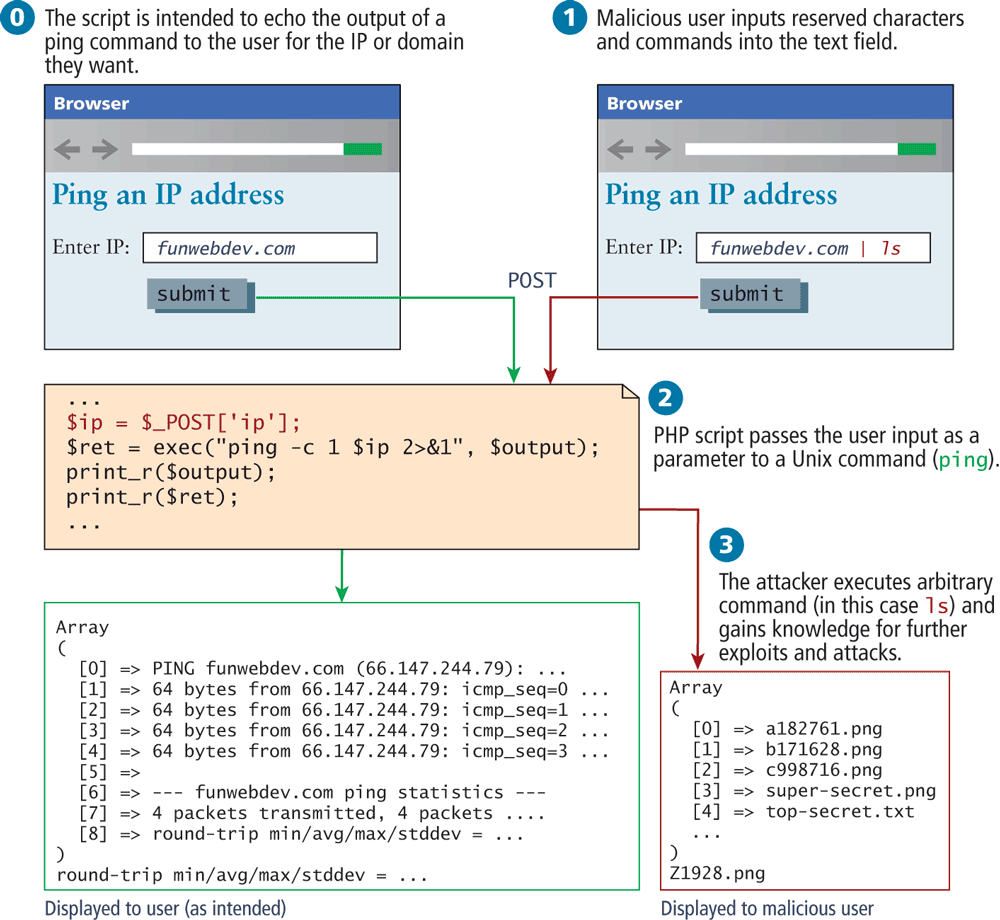
Applying least possible privileges will also help mitigate this attack. That is, if your web server is running as root, you are potentially allowing arbitrary commands to be run as root, versus running as the Apache user, which has fewer privileges.