16.5 Security Best Practices
With all our previous discussion of security thinking, cryptographic principles, and authentication in mind, it’s now time to discuss some practical things you can do to harden your system against attacks.
A system will be targeted either purposefully or by chance. The majority of attacks are opportunistic attacks where a scan of many systems identifies yours for vulnerabilities. Targeted attacks occur less often but are by their nature more difficult to block. Either way, there are some great techniques to make your system less of a target.
16.5.1 Credential Storage
With a good grasp of the authentication schemes and factors available to you, there is still the matter of what you should be storing in your database and server. It turns out even household names like Sony,13 Citigroup,14 and GE Money15 have had their systems breached and data stolen. If even globally active companies can be impacted, you must ask yourself: when (not if) you are breached, what data will the attacker have access to?
A developer who builds their own password authentication scheme may be blissfully unaware how their custom scheme could be compromised. The authors have often seen students create SQL table structures similar to that in Table 16.2 and code like that in Listing 16.1, where the username and password are both stored in the table. Anyone who can see the database can see all the passwords (in this case users ricardo and randy have both chosen the terrible password password).
Table 16.2 Plain Text Password Storage (very insecure)
| UserID (int) | Username (varchar) | Password (varchar) |
|---|---|---|
| 1 | ricardo |
password |
| 2 | randy |
password |
Listing 16.1 First approach to storing passwords (very insecure)
//Insert the user with the password
function insertUser($username,$password){
	$pdo = new PDO(DBCONN_STRING,DBUSERNAME,DBPASS);
	$sql = "INSERT INTO Users (Username,Password) VALUES('?,?')";
	$smt = $pdo->prepare($sql);
	$smt->execute(array($username,$password)); //execute the query
}

//Check if the credentials match a user in the system
function validateUser($username,$password){
  $pdo = new PDO(DBCONN_STRING,DBUSERNAME,DBPASS);
  $sql = "SELECT UserID FROM Users WHERE Username=? AND
          Password=?";
	$smt = $pdo->prepare($sql);
	$smt->execute(array(($username,$password)); //execute the query
	if($smt->rowCount())){
		return true;	//record found, return true.
	}

    return false;  //record not found matching credentials, return false
}
This is dangerous for two reasons. First, there is the confidentiality of the data. Having passwords in plain text means they are subject to disclosure. Second, there is the issue of internal tampering. Anyone inside the organization with access to the database can steal credentials and then authenticate as that user, thereby compromising the integrity of the system and the data.
Using a Hash Function
Instead of storing the password in plain text, a better approach is to store a hash of the data, so that the password is not discernable. One-way hash functions are algorithms that translate any piece of data into a string called the digest, as shown in Figure 16.23. You may have used hash functions before in the context of hash tables. Their one-way nature means that although we can get the digest from the data, there is no reverse function to get the data back. In addition to thwarting hackers, it also prevents malicious users from casually browsing user credentials in the database.
Figure 16.23 Hashing and digests
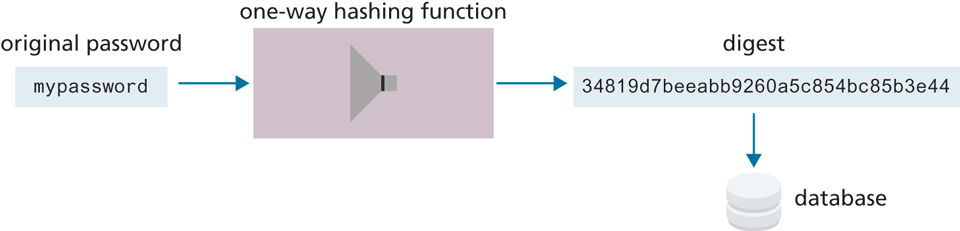
Cryptographic hash functions are one-way hashes that are cryptographically secure, in that it is virtually impossible to determine the data given the digest. Commonly used ones include the Secure Hash Algorithms (SHA)16 created by the US National Security Agency and MD5 developed by Ronald Rivest, a cryptographer from MIT.17 In our PHP code, we can access implementations of MD5 and SHA through the md5() or sha1() functions. MySQL also includes implementations.
Table 16.3 illustrates a revised table design that stores the digest, rather than the plain text password. To make this table work, consider the code in Listing 16.2, which updates the code from Listing 16.1 by adding a call to MD5 in the query. Calling MD5 can be done in either the SQL query or in PHP.
MD5("password"); // 5f4dcc3b5aa765d61d8327deb882cf99Table 16.3 Users Table with MD5 Hash Applied to Password Field
| UserID (int) | Username (varchar) | Password (varchar) |
|---|---|---|
| 1 | ricardo | 5f4dcc3b5aa765d61d8327deb882cf99 |
| 2 | randy | 5f4dcc3b5aa765d61d8327deb882cf99 |
Listing 16.2 Second approach to storing passwords (better but still insecure)
//Insert the user with the password being hashed by MD5 first.
function insertUser($username,$password){
 $pdo = new PDO(DBCONN_STRING,DBUSERNAME,DBPASS);
 $sql = "INSERT INTO Users(Username,Password) VALUES(?,?)";
 $smt = $pdo->prepare($sql);
 $smt->execute(array($username,md5($password))); //execute the query
}

//Check if the credentials match a user in the system with MD5 hash
function validateUser($username,$password){
 $pdo = new PDO(DBCONN_STRING,DBUSERNAME,DBPASS);
 $sql = "SELECT  UserID FROM Users WHERE  Username=? AND
        Password=?";

 $smt = $pdo->prepare($sql);
 $smt->execute(array($username,md5($password))); //execute the query
 if($smt->rowCount()){
   return true; //record found, return true.
 }
 return false; //record not found matching credentials, return false
}
Unfortunately, many hashing functions have two vulnerabilities:
rainbow table attacks
brute-force attacks
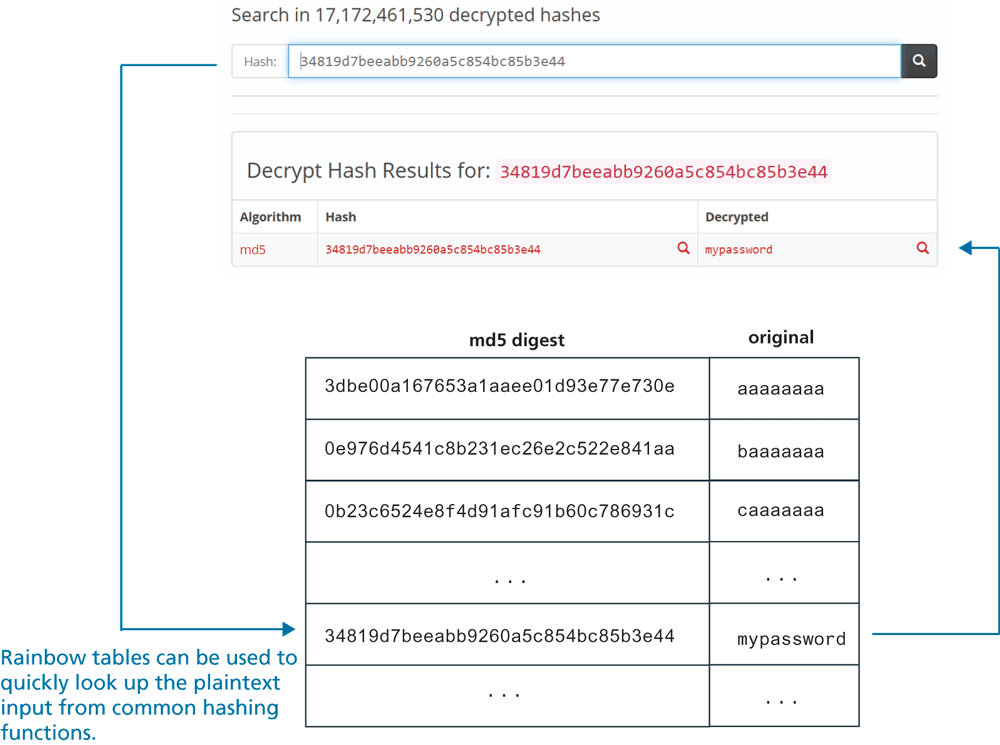
For instance, a simple Google search for the digest stored in Table 16.4 (i.e., 5f4dcc3b5aa765d61d8327deb882cf99) brings up dozens of results which tell you that that string is the MD5 digest for password. Indeed, there are many reverse-hashing lookup sites available which allow someone to look up the MD5 hashes for shorter password strings, as shown by Figure 16.24. These sites make use of a data structure known as a rainbow table, that would allow anyone who has access to the digest to quickly look up the original password. As a consequence, storing the MD5 digest (or a digest from most other hashing functions) of just the password is not recommended.
Table 16.4 Users Table with MD5 Hash Using a Unique Salt in the Password Field
| UserID (int) | Username (varchar) | Digest (varchar) | Salt |
|---|---|---|---|
| 1 | ricardo | edee24c1f2f1a1fda2375828fbeb6933 | 12345a |
| 2 | randy | ffc7764973435b9a2222a49d488c68e4 | 54321a |
Figure 16.24 Rainbow tables
 Note
Note
A common requirement in authentication systems is to support users who have forgotten their passwords. This is normally accomplished by mailing it to their email address with either a link to reset their password, or the password itself.
Any site that emails your password in plain text should make you question their data retention practices in general. The appropriate solution is a link to a unique URL where you can enter a new password. Since you do not need the user’s password to authenticate, there is no reason to store it. This protects your users should your site be breached.
Salting the Hash
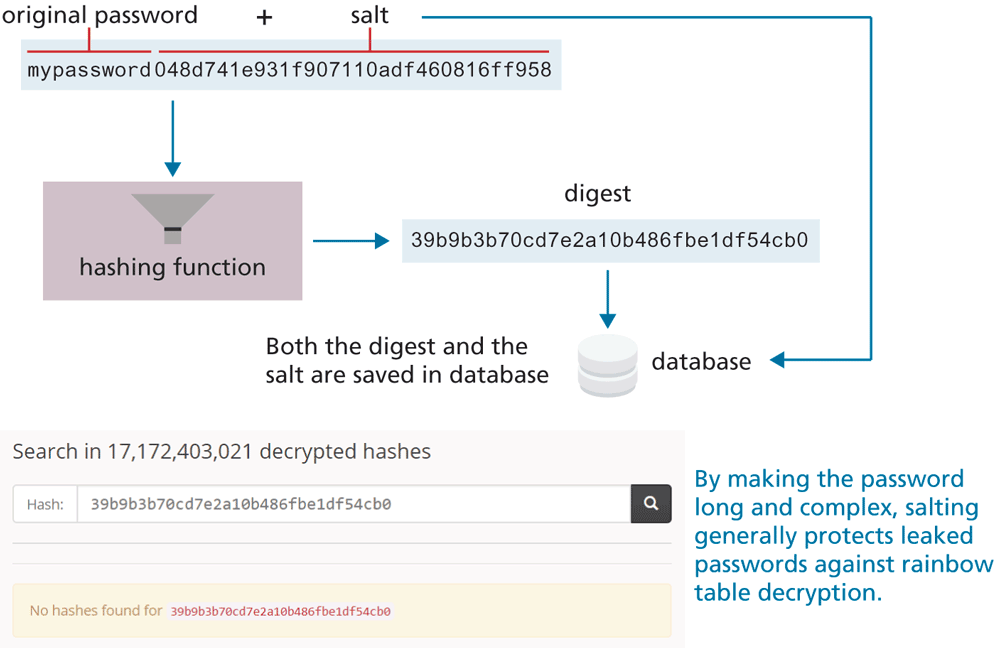
The solution to the rainbow table problem is to add some unique noise to each password, thereby lengthening the password before it is hashed. The technique of adding some noise to each password is called salting the password. The Unix system time can be used, or another pseudo-random string so that even if two users have the same password they have different digests, and are harder to decipher. Table 16.4 shows an example of how credentials could be stored, with passwords salted and encrypted with a one-way hash. Figure 16.25 illustrates how a sample salt can be added to a password before hashing, and how in this case the digest did not show up in any online rainbow tables.
Figure 16.25 Salting a password
Using a Slow Hash Function
While salting a password effectively deals with rainbow tables (especially if the salt is long enough, say 32 or 64 characters), hash functions are still vulnerable to brute-force attacks. In this case, a simple program iterates through every possible character combination, looking for a match between the leaked digest and the one created by a simple brute-force script similar to the following:
while (! found) {
   passwd = getNextPossiblePassword();
   digest = md5(passwd);
   if (digest == digestSearchingFor) found = true;
}
if (found) output("password=" + passwd);
Popular hashing functions such as MD5 or SHA became popular because they are very fast (often only a handful of ms). This means millions of digests can be calculated by such a script in only a few minutes. While a very long salt might require many days to be solved by brute-force approaches (and thus be impractical for an impatient hacker), with the increasing speed of CPUs and GPUs, this isn’t a long-term solution.
A better solution, believe it or not, is to use a slow hash function. The most common of these is bcrypt, which adds in its own salt, and has a customizable cost (slowness) factor that you can set between 1 and 20. For instance, a cost of 10 means the bcyrpt hashing function takes about 50 ms to create the digest, while a cost of 14 takes 1000 ms. Generally speaking, users expect a certain delay when registering or logging in, so adding an extra second or two to calculate the digest won’t degrade the user experience. But that slowness means a brute force attack would currently take many years (for ) to find the correct digest.
Listing 16.3 demonstrates how you can use bcrypt in PHP both to save the credential (registering a user) and to check a credential (logging in a user). Listing 16.4 shows how to check a credential with bcyrpt in Node using the bcrypt package.
Listing 16.3 Using bcrypt in PHP
/* perform registration based on form data passed to page */

// calculate the bcrypt digest using cost = 12
$digest = password_hash($_POST['pass'], PASSWORD_BCRYPT, ['cost' => 12]);

// save email and digest to table
$sql = "INSERT INTO Users(email,digest) VALUES(?,?)";
$statement = $pdo->prepare($sql);
$statement->execute(array($_POST['email'], $digest));

/* perform login based on form data passed to page */

// now retrieve digest field from database for email
$sql = "SELECT digest FROM Users WHERE email=?";
$statement = $pdo->prepare($sql);
$statement->execute(array($_POST['email']));
$retrievedDigest = $statement->fetchColumn();

// compare retrieved digest to just calculated digest
if (password_verify($_POST['pass'], $retrievedDigest)) {
   // we have a match, log the user in
   ...
}
Listing 16.4 Using bcrypt in Node
const bcrypt = require('bcrypt');

/* perform registration based on form data */
app.post('/register', (req, resp) => {
  // calculate bcrypt digest using cost = 12
  bcrypt.hash(req.body.passd, 12, (err, digest) => {
  // Store email+digest in DB
  const sql = "INSERT INTO Users(email,digest) VALUES(?,?)";
  db.run(sql, [req.body.email, digest], (err) => {...});
});

/* perform login based on form data */
app.post('/login', (req, resp) => {
  // retrieve digest for this email from DB
  const sql = "SELECT digest FROM Users WHERE email=?";
  db.get(sql, [req.body.email], (err, user) => {
    if (! err) {
    // now compare saved digest for digest for just-entered password
      const digestInTable = user.digest;
      const passwordInForm = req.body.passd;
      bcrypt.compare(passwordInForm, digestInTable, (err, result)=> {
        if (result) {
          // we have a match, log the user in
          ...
        }
      });
    }
  });
});
Note
The bcrypt hashing function salts the password before hashing as part of its algorithm. The salt is hidden from the user, but it is there nonetheless, thereby protecting bcrypt digests against rainbow table exploits.
16.5.2 Monitor Your Systems
You must see by now that breaches are inevitable. One of the best ways to mitigate damage is to detect an attack as quickly as possible, rather than let an attacker take their time in exploiting your system once inside. We can detect intrusion directly by watching login attempts, and indirectly by watching for suspicious behavior like a web server going down.
System Monitors
While you could periodically check your sites and servers manually to ensure they are up, it is essential to automate these tasks. There are tools that allow you to preconfigure a system to check in on all your sites and servers periodically. Nagios, for example, comes with a web interface as shown in Figure 16.27 that allows you to see the status and history of your devices, and sends out notifications by email per your preferences. There is even a marketplace to allow people to buy and sell plug-ins that extend the base functionality.
Figure 16.27 Screenshot of the Nagios web interface (green means OK)
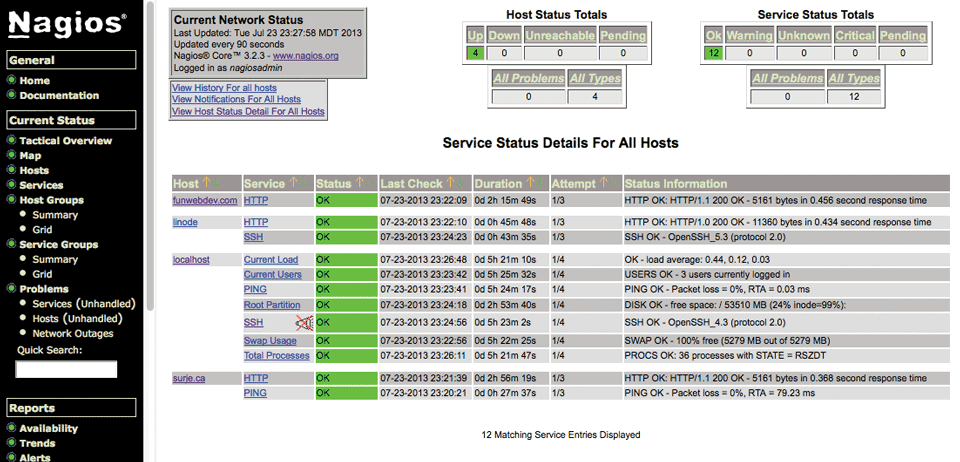
Nagios is great for seeing which services are up and running but cannot detect if a user has gained access to your system. For that, you must deploy intrusion detection software.
Access Monitors
As any experienced site administrator will attest, there are thousands of attempted login attempts being performed all day long, mostly from Eurasian IP addresses. They can be found by reading the log files often stored in /var/log/. Inside those files, attempted login attempts can be seen as in Listing 16.5.
Listing 16.5 Sample output from a secure log file showing a failed SSH login
Jul 23 23:35:04 funwebdev sshd[19595]: Invalid user randy from
    68.182.20.18
Jul 23 23:35:04 funwebdev sshd[19596]: Failed password for invalid
    user randy from 68.182.20.18 port 34741 ssh2
Inside of the /var/log directory there will be multiple files associated with multiple services. Often there is a mysql.log file for MySQL logging, access_log file for HTTP requests, error_log for HTTP errors, and secure for SSH connections. Reading these files is normally permitted only to the root user to ensure no one else can change the audit trail that is in the logs.
If you did identify an IP address you wanted to block (from SSH for example), you could add the address to etc/hosts.deny (or hosts.allow with a deny flag). Addresses in hosts.deny are immediately prevented from accessing your server. Unfortunately, hackers are attacking all day and night, making this an impossible activity to do manually. By the time you wake up, several million login attempts could have happened.
Automated Intrusion Blocking
Automating intrusion detection can be done in several ways. You could write your own PHP script that reads the log files and detects failed login attempts, then uses a history to determine the originating IP addresses to automatically add it to hosts.deny. This script could then be run every minute using a cron job (scheduled task) to ensure round-the-clock vigilance.
A better solution would be to use the well-tested and widely-used Python script blockhosts.py or other similar tools like fail2ban or blockhostz. These tools look for failed login attempts by both SSH and FTP and automatically update hosts.deny files as needed. You can configure how many failed attempts are allowed before an IP address is automatically blocked and create your own custom filters.18
16.5.3 Audit and Attack Thyself
Attacking the systems you own or are authorized to attack in order to find vulnerabilities is a great way to detect holes in your system and patch them before someone else does. It should be part of all the aspects of testing, including the deployment tests, but also unit testing done by developers. This way SQL injection, for example, is automatically performed with each unit test, and vulnerabilities are immediately found and fixed.
There are a number of companies that you can hire (and grant written permission) to test your servers and report on what they’ve found. If you prefer to perform your own analysis, you should be aware of some open-source attack tools such as w3af, which provide a framework to test your system including SQL injections, XSS, bad credentials, and more.19 Such a tool will automate many of the most common types of attack and provide a report of the vulnerabilities it has identified.
With a list of vulnerabilities, reflect on the risk assessment (not all risks are worth addressing) to determine which vulnerabilities are worth fixing.
Note
It should be noted that performing any sort of analysis on servers you do not have written permission to scan could land you a very large jail term, since accessing systems you are not allowed to is a violation of federal laws in the United States. Your intent does not matter; the act alone is criminal, and the authors discourage you from breaking the law and going against professional standards.