16.4 Hypertext Transfer Protocol Secure (HTTPS)
Now that you have a bit of understanding of the cryptography involved, the practical application of that knowledge is to apply encryption to your websites using the Hypertext Transfer Protocol Secure (HTTPS) protocol instead of the regular HTTP.
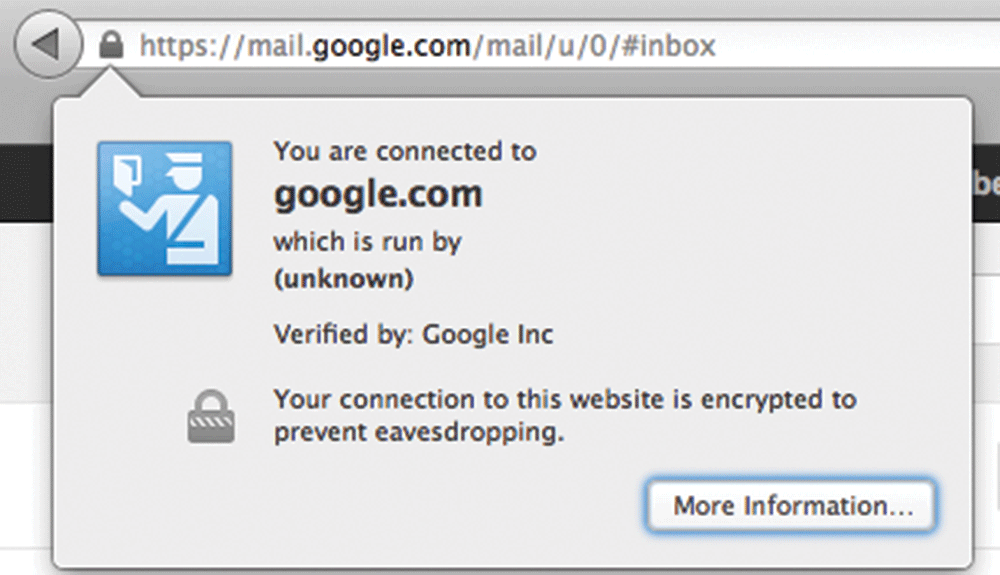
HTTPS is the HTTP protocol running on top of the Transport Layer Security (TLS). Because TLS version 1.0 is actually an improvement on Secure Sockets Layer (SSL) 3.0, we often refer to HTTPS as running on TLS/SSL for compatibility reasons. Both TLS and SSL run on a lower layer than the application layer (back in Chapter 2 we discussed Internet Protocol and layers), and thus their implementation is more related to networking than web development. It’s easy to see from a client’s perspective that a site is secured by the little padlock icons in the URL bar used by most modern browsers (as shown in Figure 16.16).
Figure 16.16 Screenshot from Google’s Gmail service, using HTTPS
An overview of their implementation provides the background needed to understand and apply secure encryption more thoughtfully. Once you see how the encryption works in the lower layers, everything else is just HTTP on top of that secure communication channel, meaning anything you have done with HTTP you can do with HTTPS.
16.4.1 SSL/TLS Handshake
The foundation for establishing a secure link happens during the initial handshake. This handshake must occur on an IP address level, so while you can host multiple secure sites on the same server, each domain must have its own IP address in order to perform the low-level handshaking as illustrated in Figure 16.17.
Figure 16.17 SSL/TLS handshake
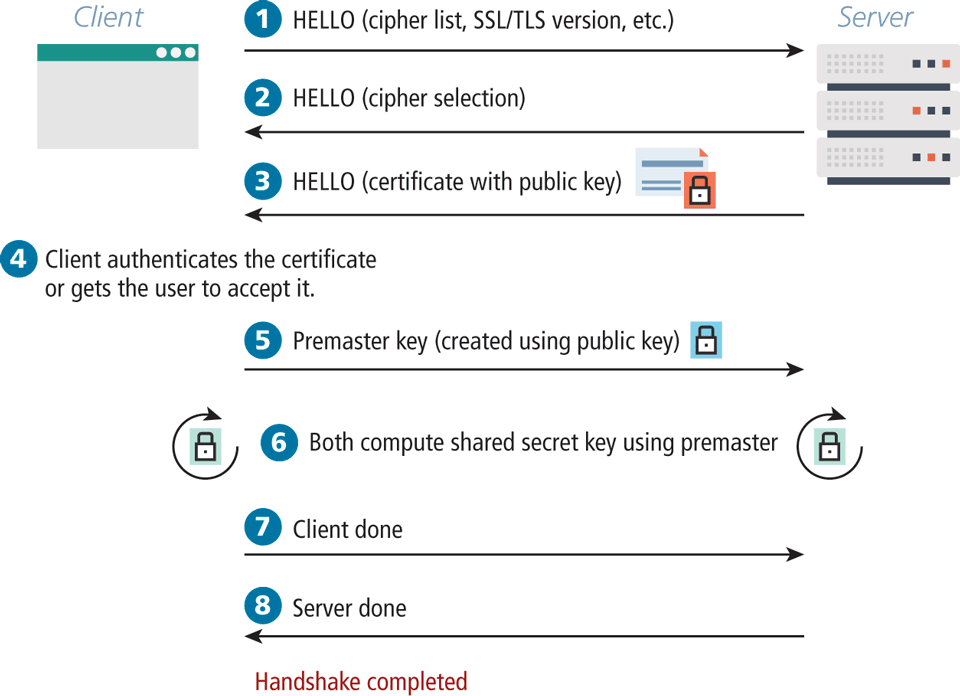
The client initiates the handshake by sending the time, the version number, and a list of cipher suites its browser supports to the server. The server, in response, sends back which of the client’s ciphers it wants to use as well as a certificate, which includes a public key. The client can then verify if the certificate is valid. For self-signed certificates, the browser may prompt the user to allow an exception.
The client then calculates the premaster key (encrypted with the public key received from the server) and sends it back to the server. Using the premaster key, both the client and server can compute a shared secret key. After a brief client message and server message declaring their readiness, all transmission can begin to be encrypted from here on out using the agreed-upon symmetric key.
16.4.2 Certificates and Authorities
The certificate that is transmitted during the handshake is actually an X.509 certificate, which contains many details including the algorithms used, the domain it was issued for, and some public key information. The complete X.509 specification can be found in the International Telecommunication Union’s directory of public key frameworks.12 A sample of what’s actually transmitted is shown in Figure 16.18.
Figure 16.18 The contents of a self-signed certificate for funwebdev.com
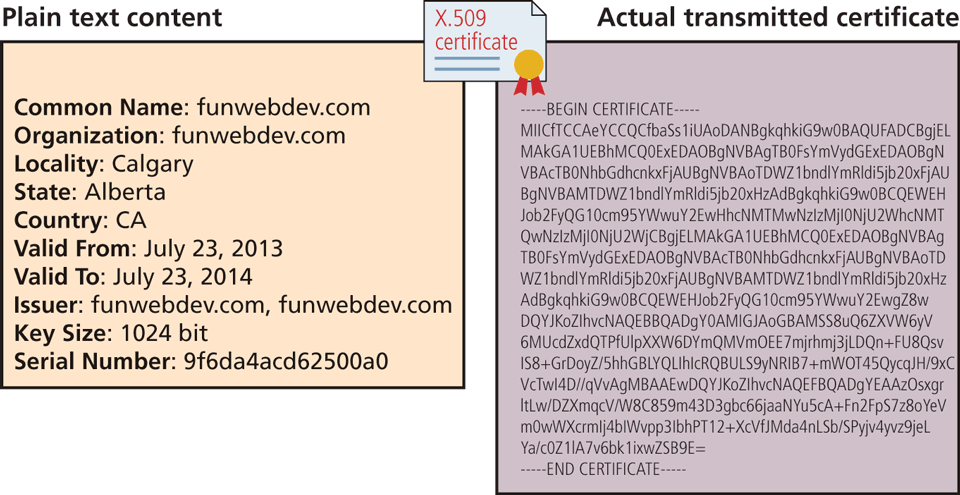
The certificate contains a signature mechanism, which can be used to validate that the domain is really who they claim to be. This signature relies on a third party to sign the certificate on behalf of the website so that if we trust the signing party, we can assume to trust the website. These certificates generally need to be purchased by the site owner.
A Certificate Authority (CA) allows users to place their trust in the certificate since a trusted, independent third party signs it. The CA’s primary role is to validate that the requestor of the certificate is who they claim to be, and issue and sign the certificate containing the public keys so that anyone seeing them can trust they are genuine.
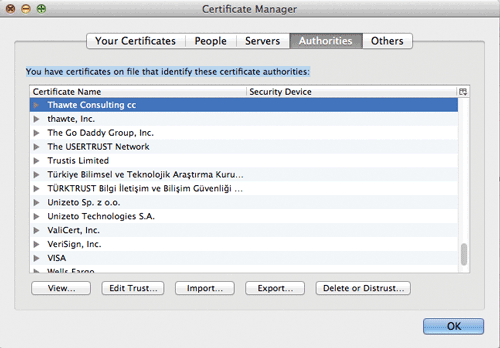
In browsers, there are many dozens of CAs trusted by default as illustrated in Figure 16.19. A certificate signed by any of them will prevent the warnings that appear for self-signed certificates and in fact increase the confidence that the server is who they claim to be.
Figure 16.19 The Firefox Certificate Authority Management interface
A signed certificate is essential for any website that processes payment, takes a booking, or otherwise expects the user to trust that the site is genuine.
Generally speaking, there are three types of SSL certificates that can be purchased:
As the names suggest, these certificates vary in terms of the comprehensiveness of the validation performed by the CA.
Domain-Validated (DV) Certificates
This is the most affordable option (anywhere from $20 to $100 per year). Most CAs will only verify the email listed in the whois registration database (see Chapter 2) via a confirmation link. As a consequence, the process of obtaining the certificate is very fast.
It should also be mentioned that a certificate is for a single domain, e.g., for www.funwebdev.com but not api.funwebdev.com. Many CAs also offer more expensive wildcard certificates or even multi-domain certificates (e.g., funwebdev.com and funwebdev.ca) that allow an organization to secure a wider range of domains they own.
Organization-Validated (OV) Certificates
With these certificates, the CA takes additional steps to verify the identity of the organization seeking the certificate. While it will perform the same domain verification as with domain-validated certificates, it also typically requests a variety of business documents, such as a government license, bank statement, or legal incorporation records. As a consequence, this type of certificate typically takes several days and is more expensive (sometimes several hundreds of dollars a year).
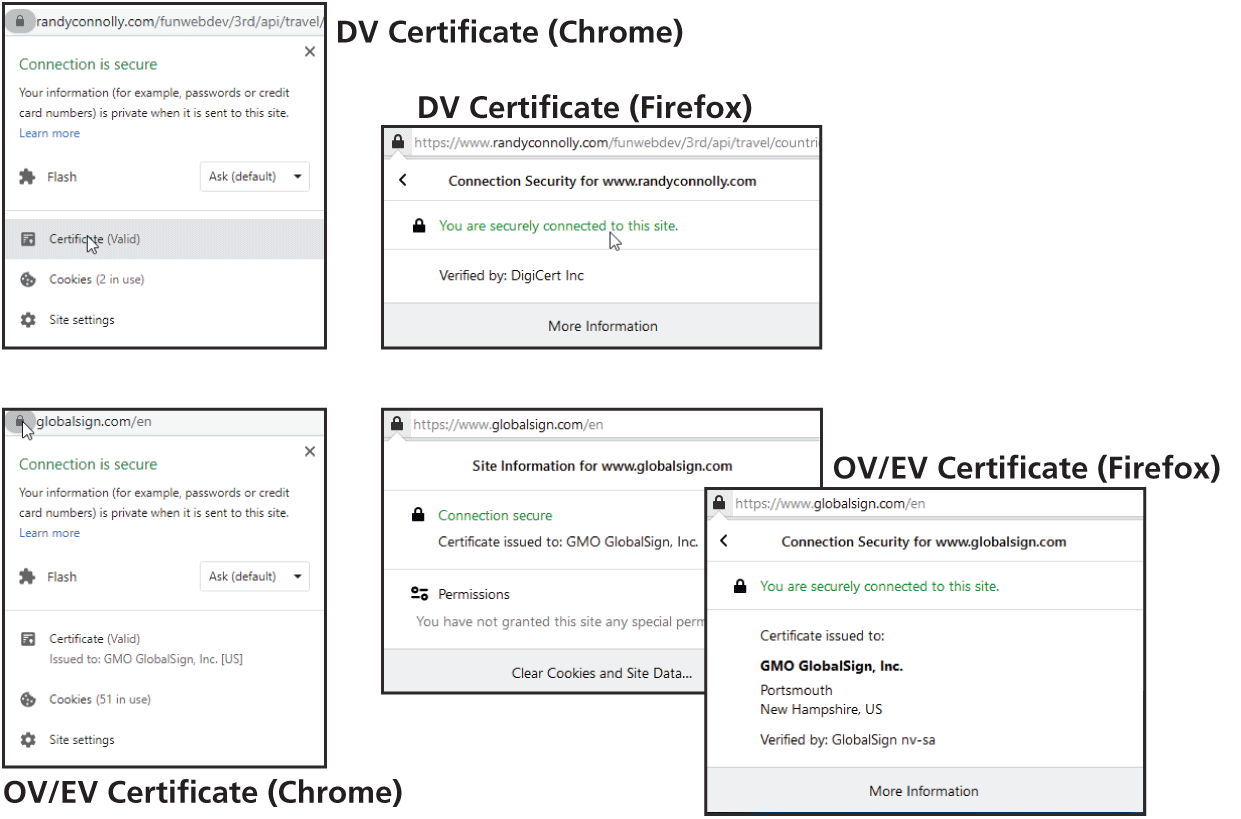
Why would one choose this type of certificate? It typically provides a much higher warranty amount, which is insurance for the end user against loss of money on a SSL-secured transaction. A more important reason for choosing this type of certificate is that they potentially enhance the user’s trust in the site. How? Some browsers display additional information about OV certificates, as shown in Figure 16.20 (though, based on this author’s student responses to this knowledge, many users seem to be unaware of this feature).
Figure 16.20 Certificates in the browser
Extended-Validation (EV) Certificates
These are similar to the organization-validated certificatess, but have even stricter requirements around the documentation that needs to be provided by the purchaser. As well, the purchaser needs to prove their ownership of the domain, which often requires the intervention of a lawyer. The rationale for choosing this option is similar to that of the OV: it’s to improve the trust of the end user.
 Pro Tip
Free certificates come in a variety of forms, and are growing in popularity.
Free certificates provided by Let’s Encrypt (https:/
A shared hosting platform might provide free access to a shared wildcard SSL certificate that covers everything on its domain. For instance, on Heroku, the author has multiple sites, including https://cryptic-wildwood-92625.herokuapp.com and https://guarded-sands-59956.herokuapp.com. These sites are sharing Heroku’s certificate (which wasn’t free for Heroku but is free for its users).
16.4.3 Migrating to HTTPS
Despite all the advantages of a secure site (including a modest boost from some search engines in ranking, and an increasing trend to serve all websites over HTTPS), there are many considerations to face when migrating or setting up a secure site.
Coordinating the migration of a website can be a complex endeavor involving multiple divisions of a company. In addition to marketing materials being updated in the physical world to use the new URL, there are some nontechnical issues that need to be addressed like the annual budget to purchase and renew a certificate from a certificate authority. In addition to these business considerations, there are also some technical considerations in migrating to HTTPS.
Mixed Content
One of the biggest headaches for web developers working on secure sites is the principle that a secure page requires all assets to be transmitted over HTTPS. Since many domains have secure and insecure areas, it’s not uncommon that assets such as images might be identical for HTTP and HTTPS versions of the site. When a page requested over HTTPS references an asset over HTTP, the browser sees that mixed content is being requested, triggering a range of warning messages.
Once a web developer configures the server to handle HTTPS and the site is running on that server, the site will be deemed secure, since all assets are retrieved using HTTPS. However, in order to fully address a transition from HTTP to HTTPS, developers have to consider every place a HTTP reference exists in their code. Hardcoded links (which are bad style—and now we see why) should be replaced with relative links that easily transform according to the protocol being used. These links might include the following:
Internal links within the site.
External links to frameworks delivered through a CDN.
Any links or references generated by server code that might include a hardcoded http.
Redirects from Old Site
Once you move your site over to HTTPS, there likely be links remaining from third-party sites to your former HTTP URLs and it’s important that that such links still work. A permanent redirection (301 code) header in HTTP tells the browser that the link has permanently moved and can be used to tell users and search engines that your site has migrated to HTTPS.
To enable such behavior for every possible resource, both Apache (via a .htaccess file) and Nginx server (via a redirects.conf file) provide mechanisms for redirecting HTTP requests for a resource to HTTPS requests. For instance, in Apache, the following two lines will send a 301 code and the new link location on https.
RewriteCond %{HTTPS} off
RewriteRule ^(.*)$ https://%{HTTP_HOST}%{REQUEST_URI} [L,R=301]
Preventing HTTP Access
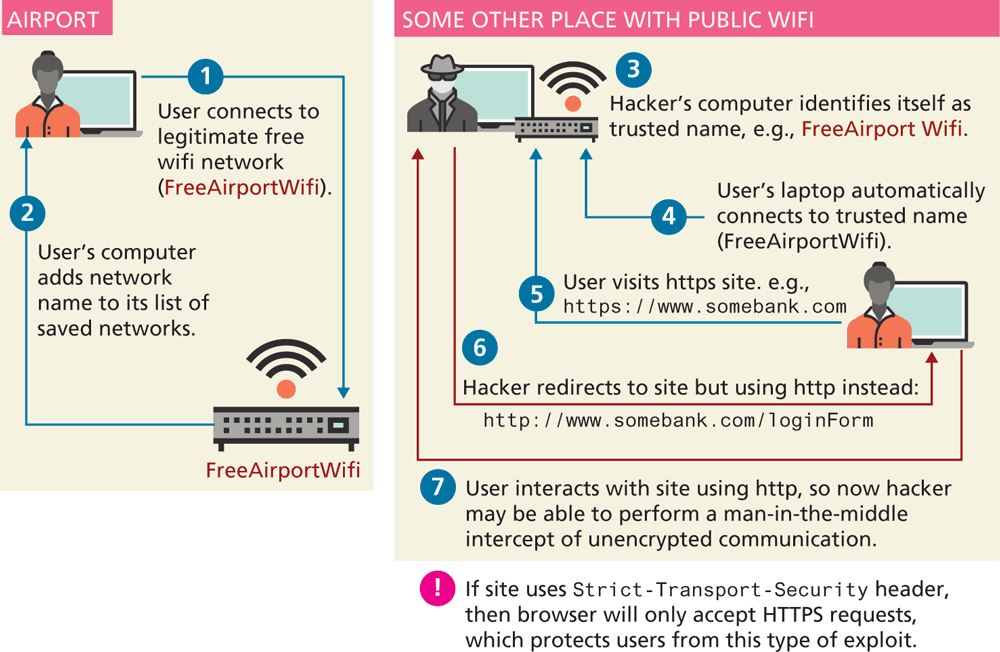
Once your site has added HTTPS capabilities, it often makes sense to prevent users from accessing your site resources using HTTP. The rationale for this is to protect users from man-in-the-middle hijacks. Imagine a user accessing your site in a public setting through WiFi. The user’s laptop “remembers” all WiFi names with which it has connected. Perhaps the user  frequently uses the WiFi at a popular coffee shop chain or just once has connected to FreeAirportWifi somewhere. The user could be in some other public locale using WiFi (not a coffee shop or airport), and that WiFi name could be provided by a hacker’s laptop in the vicinity that has created a WiFi point using the same name as the coffee chain or airport
  . The user’s laptop will likely automatically connect to the hacker’s WiFi
  because its name matches one the user has connected to in the past (for instance FreeAirportWifi). The hacker will then be able to redirect the user from HTTPS to HTTP
  , thereby having unencrypted access to the user’s experience. The user might perceive the change from HTTPS to HTTP, but he or she might not. As can be seen in Figure 16.22, this attack is a sophisticated varient of the man-in-the-middle attack, and is commonly referred to as a HTTPS downgrade attack.
Figure 16.22 HTTPS downgrade attack.
To protect users against such a scenario, site’s using HTTPS can add the Strict-Transport-Security HTTP header. This header instructs the browser to only accept HTTPS requests for the site. The first time your site is accessed using HTTPS and it returns the Strict-Transport-Security header, the browser will record this fact, so that any future attempts to load the site using HTTP will automatically use HTTPS instead.