16.1 Security Principles
It is often the case that a developer will only consider security towards the end of a project. Unfortunately, by that point, it is much too late. The correct time to address security is at the beginning of the project, and throughout the lifetime of the project. Errors in the hosting configuration, code design, policies, and implementation can perforate an application like holes in Swiss cheese. Filling these holes takes time, and the patched systems are often less elegant and manageable, if the holes get filled at all. Security theory and practice will guide you in that never-ending quest to defend your data and systems, which you will see, touches all aspects of software development.
The principal challenge with security is that threats exist in so many different forms. Not only is a malicious hacker on a tropical island a threat but so too is a sloppy programmer, a disgruntled manager, or a naive secretary. Moreover, threats are ever changing, and with each new counter measure, new threats emerge to supplant the old ones. Since websites are an application of networks and computer systems, you must draw from those fields to learn many foundational security ideas. Later, you will apply these ideas to harden your system against malicious users and defend against programming errors.
 Note
Note
The labs for this chapter have been split into two files: Lab16a and Lab16b. The 16a lab focuses more on infrastructural and practical aspects of security, while the 16b lab focuses on the application development side of security.
16.1.1 Information Security
There are many different areas of study that relate to security in computer networks. Information security is the holistic practice of protecting information from unauthorized users. Computer/IT security is just one aspect of this holistic thinking, which addresses the role computers and networks play. The other is information assurance, which ensures that data is not lost when issues do arise.
The CIA Triad
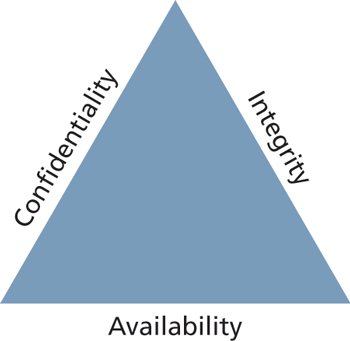
At the core of information security is the CIA triad: confidentiality, integrity, and availability, often depicted with a triangle showing their equality as in Figure 16.1.
Figure 16.1 The CIA triad: confidentiality, integrity, and availability
Confidentiality is the principle of maintaining privacy for the data you are storing, transmitting, and so forth. This is the concept most often thought of when security is brought up.
Integrity is the principle of ensuring that data is accurate and correct. This can include preventing unauthorized access and modification, but also includes disaster preparedness and recovery.
Availability is the principle of making information available to authorized people when needed. It is essential to making the other two elements relevant, since without it, it’s easy to have a confidential and integral system (a locked box). This can be extended to high-availability, where redundant systems must be in place to ensure high uptime.
Security Standards
In addition to the triad, there are ISO standards ISO/IEC 27002-270037 that speak directly (and thoroughly) about security techniques and are routinely adopted by governments and corporations the world over. These standards are very comprehensive, outlining the need for risk assessment and management, security policy, and business continuity to address the triad. This chapter touches on some of those key ideas that are most applicable to web development.
16.1.2 Risk Assessment and Management
The ability to assess risk is crucial to the web development world. Risk is a measure of how likely an attack is, and how costly the impact of the attack would be if successful. In a public setting like the WWW, any connected computer can attempt to attack your site, meaning there are potentially several million threats. Knowing which ones to worry about lets you achieve the most impact for your effort by focusing on them.
Actors, Impacts, Threats, and Vulnerabilities
Risk assessment uses the concepts of actors, impacts, threats, and vulnerabilities to determine where to invest in defensive countermeasures.
The term “actors” refers to the people who are attempting to access your system. They can be categorized as internal, external, and partners.
Internal actors are the people who work for the organization. They can be anywhere in the organization from the cashier to the IT staff, all the way to the CEO. Although they account for a small percentage of attacks, they are especially dangerous due to their internal knowledge of the systems.
External actors are the people outside of the organization. They have a wide range of intent and skill, and they are the most common source of attacks. It turns out that more than three quarters of external actors are affiliated with organized crime or nation states.1
Partner actors are affiliated with an organization that you partner or work with. If your partner is somehow compromised, there is a chance your data is at risk as well because quite often, partners are granted some access to each other’s systems (to place orders, for example).
The impact of an attack depends on what systems were infiltrated and what data was stolen or lost. The impact relates back to the CIA triad since impact could be the loss of availability, confidentiality, and/or integrity.
A loss of availability prevents users from accessing some or all of the systems. This might manifest as a denial of service attack, or a SQL injection attack (described later), where the payload removes the entire user database, preventing logins from registered users.
A loss of confidentiality includes the disclosure of confidential information to a (often malicious) third party. It can impact the human beings behind the usernames in a very real way, depending on what was stolen. This could manifest as a cross-site script attack where data is stolen right off your screen or a full-fledged database theft where credit cards and passwords are taken.
A loss of integrity changes your data or prevents you from having correct data. This might manifest as an attacker hijacking a user session, perhaps placing fake orders or changing a user’s home address.
A threat refers to a particular path that a hacker could use to exploit a vulnerability and gain unauthorized access to your system. Sometimes called attack vectors, threats need not be malicious. A flood destroying your data center is a threat just as much as malicious SQL injections, buffer overflows, denial of service, and cross-site scripting attacks.
Broadly, threats can be categorized using the STRIDE mnemonic, developed by Microsoft, which describes six areas of threat2:
Spoofing—The attacker uses someone else’s information to access the system.
Tampering—The attacker modifies some data in nonauthorized ways.
Repudiation—The attacker removes all trace of their attack so that they cannot be held accountable for other damages done.
Information disclosure—The attacker accesses data they should not be able to.
Denial of service—The attacker prevents real users from accessing the systems.
Elevation of privilege—The attacker increases their privileges on the system, thereby getting access to things they are not authorized to.
Vulnerabilities are the security holes in your system. This could be an un-sanitized user input or a bug in your web server software, for example. Once vulnerabilities are identified, they can be assessed for risk. Some vulnerabilities are not fixed because they are unlikely to be exploited, or because the consequences of an exploit are not critical.
Assessing Risk
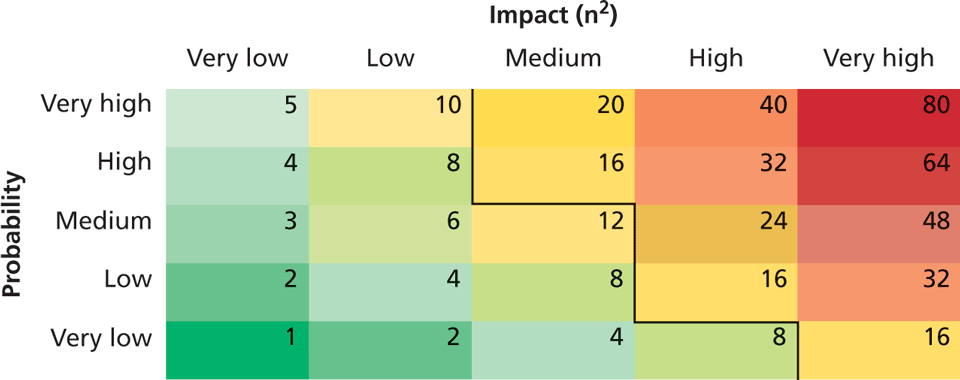
Many very thorough and sophisticated risk assessment techniques exist and can be learned about in the Risk Management Guide for Information Technology Systems published by National Institute of Standards & Technology (NIST).3 For our purposes, it will suffice to summarize that in risk assessment, you would begin by identifying the actors, vulnerabilities, and threats to your information systems. The probability of an attack, the skill of the actor, and the impact of a successful penetration are all factors in determining where to focus your security efforts.
Table 16.1 illustrates the relationship between the probability of an attack and its impact on an organization. The table weighs impact on the x scale and probability on the y scale. Using those weights, scores can be calculated (and colored). A threshold is then used to separate the threats that should be addressed from those you can ignore. In this example we use 16 as a threshold, being the lowest score for high-impact threats, although in practice it’s a range of design considerations that dictate where to draw the line.
Table 16.1 Example of an Impact/Probability Risk Assessment Table using 16 as the threshold
16.1.3 Security Policy
One often underestimated technique to deal with security is to clearly articulate policies to users of the system to ensure they understand their rights and obligations. These policies typically fall into three categories:
Usage policy defines what systems users are permitted to use, and under what situations. A company may, for example, prohibit social networking while at work, even though the IT policies may allow that traffic in. Usage policies are often designed to reduce risk by removing some attack vector from a particular class of system.
Authentication policy controls how users are granted access to the systems. These policies may specify where an access badge or biometric ID is needed and when a password will suffice. Often hated by users, these policies most often manifest as simple password policies, which can enforce length restrictions and character rules as well as expiration of passwords after a set period of time.
NotePassword expiration policies are contentious because more frequently changing passwords become harder to remember, especially with requirements for nonintuitive punctuation and capitalization. The probability of a user writing the password down on a sticky note increases as the passwords become harder to remember.
Ironically, draconian password policies introduce new attack vectors, nullifying the purpose of the policy at the first place. Where authentication is critical, two-factor authentication (described in Section 16.2) should be applied in place of micromanaged password policies that do not increase security.
Legal policies define a wide range of things including data retention and backup policies as well as accessibility requirements (like having all public communication well organized for the blind). These policies must be adhered to in order to keep the organization in compliance.
Good policies aim to modify the behavior of internal actors, but will not stop foolish or malicious behavior by employees. However, as one piece of a complete security plan, good policies are a low cost tool that can have a tangible impact.
16.1.4 Business Continuity
The unforeseen happens. Whether it’s the death of a high-level executive, or the failure of a hard drive, business must continue to operate in the face of challenges. The best way to be prepared for the unexpected is to plan while times are good and thinking is clear in the form of a business continuity plan/disaster recovery plan. These plans are normally very comprehensive and include matters far beyond IT. Some considerations that relate to IT security are as follows.
Admin Password Management
If a bus suddenly killed the only person who has the password to the database server, how would you get access? This type of question may seem morbid, but it is essential to have an answer to it. The solution to this question is not an easy one since you must balance having the passwords available if needed and having the passwords secret so as not to create vulnerability.
There must also be a high level of trust in the system administrator since they can easily change passwords without notifying anyone, and it may take a long time until someone notices. Administrators should not be the only ones with keys, as was the case in 2008 when City of San Francisco system administrator, Terry Childs, locked out his own employer from all the systems, preventing access to anyone but himself.4
Some companies include administrator passwords in their disaster recovery plans. Unfortunately, those plans are often circulated widely within an organization, and divulging the root passwords widely is a terrible practice.
A common plan is a locked envelope or safe that uses the analogy of a fire alarm—break the seal to get the passwords in an emergency. Unfortunately, a sealed envelope is easily opened and a locked safe can be opened by anyone with a key (single-factor authentication). To ensure secrecy, you should require two people to simultaneously request access to prevent one person alone from secretly getting the passwords in the box, although all of this depends on the size of the organization and the type of information being secured.
 Pro Tip
An unannounced disaster recovery exercise is a great way to spot-check that your administrator has not changed vital passwords without notifying management to update the lockbox (whether by malice or incompetence).
Backups and Redundancy
Backups are an essential element of business continuity and are easy to do for web applications so long as you are prepared to do them. What do you typically need to back up? The answer to this question can be determined by first deciding what is required to get a site up and running:
A server configured with Apache to run our PHP code with a database server installed on the same or another machine.
The PHP code for the domain.
The database dump with all tables and data.
The speed with which you want to recover from a web breach determines which of the above you should have on hand. For large e-commerce sites where downtime could mean significant financial loss, fast response is essential, so a live backup server with everything already mirrored is the best approach, although this can be a costly solution.
In less critical situations, simply having the database and code somewhere that is accessible remotely might suffice. Any downtime that occurs while the server is reconfigured may be acceptable, especially if no data is lost in the process. Whatever the speed, it’s important to try recovering from your backed-up data at least once before moving to production. Realizing you missed something during a rehearsal is far better than realizing it during a disaster.
Backups can be configured to happen as often as needed, with a wide range of options. You must balance backup frequency against the value of information that would be lost, so that critical information is backed up more frequently than less critical data.
Geographic Redundancy
The principle of a geographically redundant backup is to have backups in a different place than the primary systems in case of a disaster. Storing CD backups on top of a server does you no good if the server catches fire (and the CDs with it). Similarly, having a backup server in the same server rack as the primary system makes them prone to the same outages. When this idea is taken to a logical extreme, even a data center in the same city could be considered nonsecure, since a natural disaster or act of war could impact them both.
Thankfully, purchasing geographically remote server and storage space can be done relatively cheaply using a shared hosting environment. Look for hosts that tell you the geographic locations of their servers so that you can choose one that is geographically distinct from your primary systems.
Pro Tip
Many companies and governments have policies that require data be stored on servers located within the country. In these cases, geographic redundancy may be difficult to achieve. This is just one example of how conflicting needs complicate decision-making in real-world security environments.
Stage Mock Events
All the planning in the world will go to waste if no one knows the plan, or the plan has some fatal flaws. It’s essential to actually execute mock events to test out disaster recovery plans. When planning for a mock disaster scenario, it’s a perfect time to “kill” some key staff by sending them on vacation, allowing new staff to get up to speed during the pressure of a mock disaster. In addition to removing staff, consider removing key pieces of technology to simulate outages (take away phones, filter out Google, take away a hard drive). Problems that arise in the recovery of systems during a mock exercise provide insight into how to improve your planning for the next scenario, real or mock. It can also be a great way to cross-train staff and build camaraderie in your teams.
Auditing
Auditing is the process by which a third party is invited (or required) to check over your systems to see if you are complying with regulations. Auditing happens in the financial sector regularly, with a third-party auditor checking a company’s financial records to ensure everything is as it should be. Oftentimes, simply knowing an audit will be done provides incentive to implement proper practices.
The practice of logging, where each request for resources is stored in a secure log, provides auditors with a wealth of data to investigate. Chapter 18 provides some insight into good logging practices. Another common practice is to use databases to track when records are edited or deleted by storing the timestamp, the record, the change, and the user who was logged in.
16.1.5 Secure by Design
Secure by design is a software engineering principle that tries to make software better by acknowledging that there are malicious users out there and addressing it. By continually distrusting user input (and even internal values) throughout the design and implementation phases, you will produce more secure software than if you didn’t consider security at every stage. Some techniques that have developed to help keep your software secure include code reviews, pair programming, security testing, and security by default.
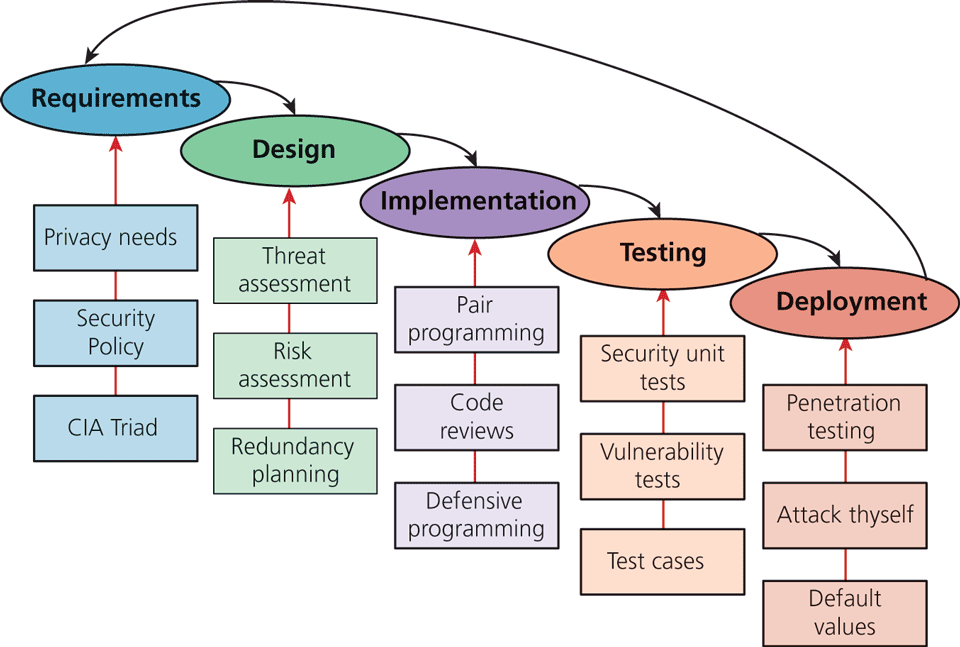
Figure 16.2 illustrates how security can be applied at every stage of the classic waterfall software development life cycle (SDLC). While not all of the illustrated inputs are covered in this textbook, it does cover many of the most impactful strategies for web development.
Figure 16.2 Some examples of security input into the SDLC
Code Reviews
In a code review system, programmers must have their code peer-reviewed before committing it to the repository. In addition to peer-review, new employees are often assigned a more senior programmer who uses the code review opportunities to point out inconsistencies with company style and practice.
Code reviews can be both formal and informal. The formal reviews are usually tied to a particular milestone or deadline whereas informal reviews are done on an ongoing basis, but with less rigor. In more robust code reviews, algorithms can be traced or tested to ensure correctness.
Unit Testing
Unit testing is the practice of writing small programs to test your software as you develop it. Usually the units in a unit test are a module or class, and the test can compare the expected behavior of the class against the actual output. If you break any existing functionality, a unit test will discover it right away, saving you future headache and bugs. Unit tests should be developed alongside the main web application and be run with code reviews or on a periodic basis. Many frameworks come with their own testing toolkits, which simplify and facilitate unit testing. When done properly, they test for boundary conditions and situations that can hide bugs, which could be a security hole.
Pair Programming
Pair programming is the technique where two programmers work together at the same time on one computer. One programmer drives the work and manipulates the mouse and keyboard while the other programmer can focus on catching mistakes and high-level thinking. After a set time interval, the roles are switched and work continues. In addition to having two minds to catch syntax errors and the like, the team must also agree on any implementation details, effectively turning the process into a continuous code review.
Security Testing
Security testing is the process of testing the system against scenarios that attempt to break the final system. It can also include penetration testing where the company attempts to break into their own systems to find vulnerabilities as if they were hackers. Whereas normal testing focuses on passing user requirements, security testing focuses on surviving one or more attacks that simulate what could be out in the wild.
Secure by Default
Systems are often created with default values that create security risks (like a blank password). Although users are encouraged somewhere in the user manual to change those settings, they are often ignored, as exemplified by the tales of ATM cash machines that were easily reprogrammed by using the default password.5 Secure by default aims to make the default settings of a software system secure, so that those type of breaches are less likely even if the end users are not very knowledgeable about security.
16.1.6 Social Engineering
Social engineering is the broad term given to describe the manipulation of attitudes and behaviors of a populace, often through government or industrial propaganda and/or coercion. In security circles, social engineering takes on the narrower meaning referring to the techniques used to manipulate people into doing something, normally by appealing to their baser instincts.
Social engineering is the human part of information security that increases the effectiveness of an attack. No one would click a link in an email that said click here to get a virus, but they might click a link to get your free vacation. A few popular techniques that apply social engineering are phishing scams and security theater.
Phishing scams, almost certainly not new to you, manifest famously as the Spanish Prisoner or Nigerian Prince Scams.6 In these techniques, a malicious user sends an email to everyone in an organization about how their password has expired, or their quota has been exceeded, or some other ruse to make them feel anxious and impel them to act by clicking a link and providing their login information. Of course the link directs them to a fake site that looks like the authentic site, except for the bogus URL, which only some people will recognize.
While good defenses, in the form of spam filters, will prevent many of these attacks, good policies will help too, with users trained not to click links in emails, preferring instead to always type the URL to log in. Some organizations go so far as to set up false phishing scams that target their own employees to see which ones will divulge information to such scams. Those employees are then retrained or terminated.
Security theater is when visible security measures are put in place without too much concern as to how effective they are at improving actual security. The visual nature of these theatrics is thought to dissuade potential attackers. This is often done in 404 pages where a stern warning might read:
Your IP address is XX.XX.XX.XX. This unauthorized access attempt has been logged. Any illegal activity will be reported to the authorities.
This message would be an example of security theater if this stern statement is a site’s only defense. When used alone, security theater is often ridiculed as not a serious technique, but as part of a more complete defense it can contribute a deterrent effect.
16.1.7 Authentication Factors
To achieve both confidentiality and integrity, the user accessing the system must be who they purport to be. Authentication is the process by which you decide that someone is who they say they are and therefore permitted to access the requested resources. Whether getting entrance to an airport, getting past the bouncer at the bar, or logging into your web application, then you have already experienced authentication in action.
Authentication factors are the things you can ask someone for in an effort to validate that they are who they claim to be. The three categories of authentication factors–knowledge, ownership, and inherence–are commonly thought of as the things you know, the things you have, and the things you are.
Knowledge factors are the things you know. They are the small pieces of knowledge that supposedly only belong to a single person such as a password, PIN, challenge question (what was your first dog’s name), or pattern (like on some mobile phones). These factors are vulnerable to someone finding out the information. They can also be easily shared.
Ownership factors are the things that you possess. A driving license, passport, cell phone, or key to a lock are all possessions that could be used to verify you are who you claim to be. Ownership factors are vulnerable to theft just like any other possession. Some ownership factors can be duplicated like a key, license, or passport while others are much harder to duplicate, such as a cell phone or dedicated authentication token.
Inherence factors are the things you are. This includes biometric data, such as your fingerprints, retinal pattern, and DNA sequence, but sometimes it includes things that are unique to you such as a signature, vocal pattern, or walking gait. These factors are much more difficult to forge, especially when they are combined into a holistic biometric scan.
Single versus Multifactor Authentication
Single-factor authentication is the weakest and most common category of authentication system where you ask for only one of the three factors. An implementation is as simple as knowing a password or possessing a magnetized key badge to gain access.
Single-factor authorization relies on the strength of passwords and on the users being responsive to threats such as people looking over their shoulder during password entry as well as phishing scams and other attacks. This is why banks do not allow you to use your birthday as your PIN and websites require passwords with special characters and numbers. When better authentication confidence is required, more than one authentication factor should be considered.
Multifactor authentication is where two distinct factors of authentication must pass before you are granted access. This dramatically improves security, with any attack now having to address two authentication factors, which will require at least two different attack vectors. Typically one of the two factors is a knowledge factor supplemented by an ownership factor like a card or pass. The inherent factors are still very costly to implement although they can provide better validation.
The way we all access an ATM machine is an example of two-factor authentication: you must have both the knowledge factor (PIN) and the ownership factor (card) to get access to your account.
So well accepted are the concepts of multifactor authentication that they are referenced by the US Department of Homeland Security as well as the credit card industry, which publishes standards that require two-factor authentication to gain access to networks where card-holder information is stored.7
Multifactor authentication is becoming prevalent in consumer products as well, where your cell phone is used as the ownership factor alongside your password as a knowledge factor.
Note
Many industries are starting to become aware of the risk that poor authentication has on their data. Unfortunately, some have attempted to implement enhanced authentication by having clients know the answers to multiple security questions in addition to a password. Since both factors are knowledge factors, this offers no material advantage to just a password, and may lead to a false sense of security.
To enhance authentication, one should use multiple factors rather than multiple instances of the same factor.