15.5 Caching
Caching is a vital way to improve the performance of web applications. As you learned back in Chapter 2, your browser uses caching to speed up the user experience by using locally stored versions of images and other files rather than rerequesting the files from the server. Similarly, in Chapter 10, you learned about the Web Storage API, which provides a JavaScript-accessible cache managed by the browser for the storage of data objects. While important, from a server-side perspective, a server-side developer only has limited control over browser caching (see Pro Tip).
 Pro Tip
In the HTTP protocol there are headers defined that relate exclusively to browser caching. These include the Expires, Cache-Control, and Last-Modified headers. In PHP and Node/Express, you can set any HTTP header explicitly using the header() function (PHP) or the set() function (Express).
Caching is just as important on the server-side. Why is this the case? What happens, for instance, when a PHP page is requested? Remember that every time a PHP page is requested, it must be fetched, parsed, and executed by the PHP engine, and the end result is HTML that is sent back to the requestor. For the typical PHP page, this might also involve numerous database queries and processing to build. If this page is being served thousands of times per second, the dynamic generation of that page may become unsustainable.
One way to address this problem is to cache the generated markup in server memory so that subsequent requests can be served from memory rather than from the execution of the page.
There are two basic strategies to the server-side caching of web applications. The first is page output caching, which saves the rendered output of a page (or part of a page) and reuses the output instead of reprocessing the page when a user requests the page again. The second is application data caching, which allows the developer to programmatically cache data.
15.5.1 Page Output Caching
In this type of caching, the contents of the rendered server page (or just parts of it) are written to disk for fast retrieval. This can be particularly helpful because it allows PHP or Node to send a page response to a client without going through the entire page processing life cycle again (see Figure 15.12). Page output caching is especially useful for pages whose content does not change frequently but which require significant processing to create.
Figure 15.12 Page output caching
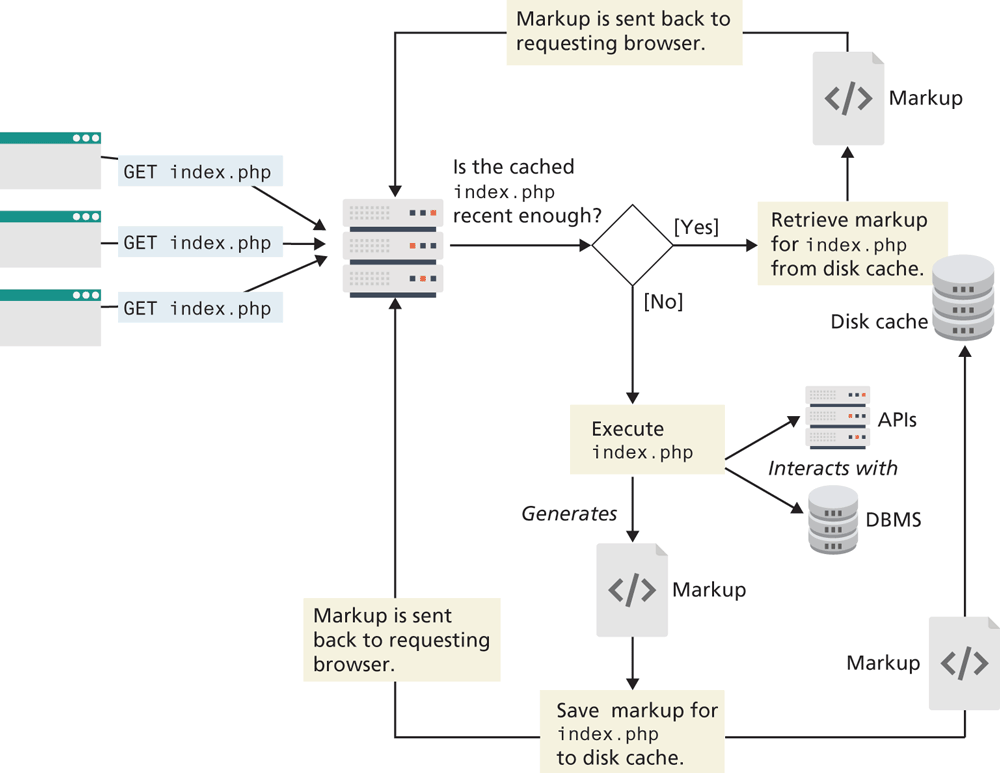
There are two models for page caching: full page caching and partial page caching. In full page caching, the entire contents of a page are cached. In partial page caching, only specific parts of a page are cached while the other parts are dynamically generated in the normal manner.
Page caching is not included in PHP or Node by default, which has allowed a marketplace for free and commercial third-party cache add-ons such as Alternative PHP Cache, Zend, or outputcache (Node) to flourish. However, one can easily create basic caching functionality simply by making use of the output buffering and time functions. The mod_cache module that comes with the Apache web server engine is the most common way websites implement page caching. This separates server tuning from your application code, simplifying development, and leaving cache control up to the web server rather than the application developer.
It should be stressed that it makes no sense to apply page output caching to every page or API route. However, performance improvements can be gained (i.e., reducing server loads) by caching the output of especially busy pages in which the content is the same for all users.
15.5.2 Application Data Caching
One of the biggest drawbacks with page output caching is that performance gains will only be had if the entire cached page is the same for numerous requests. However, many sites customize the content on each page for each user, so full or partial page caching may not always be possible.
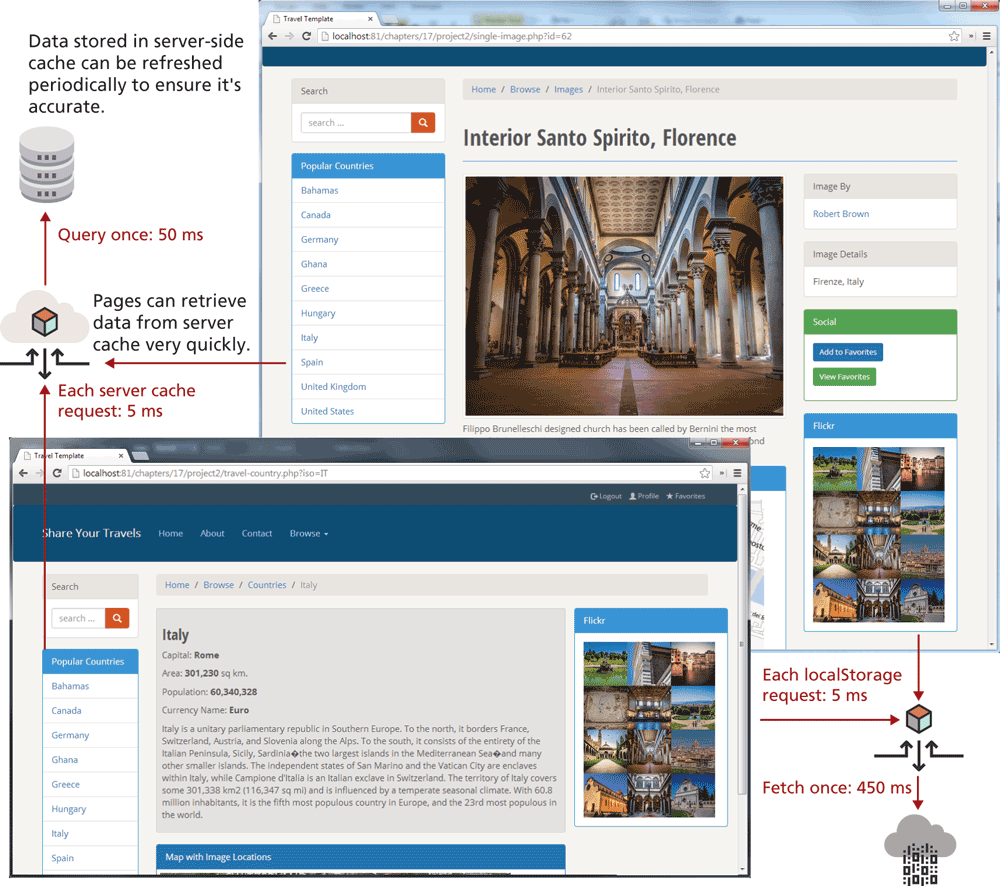
An alternate strategy is to use application data caching in which a page will programmatically place commonly used collections of data that require time-intensive queries from the database or web server into cache memory, and then other pages that also need that same data can use the cache version rather than reretrieve it from its original location. Figure 15.13 illustrates a typical use case that can be improved with caching, while Figure 15.14 illustrates how caching can improve the performance of this use case.
Figure 15.13 Use case for caching
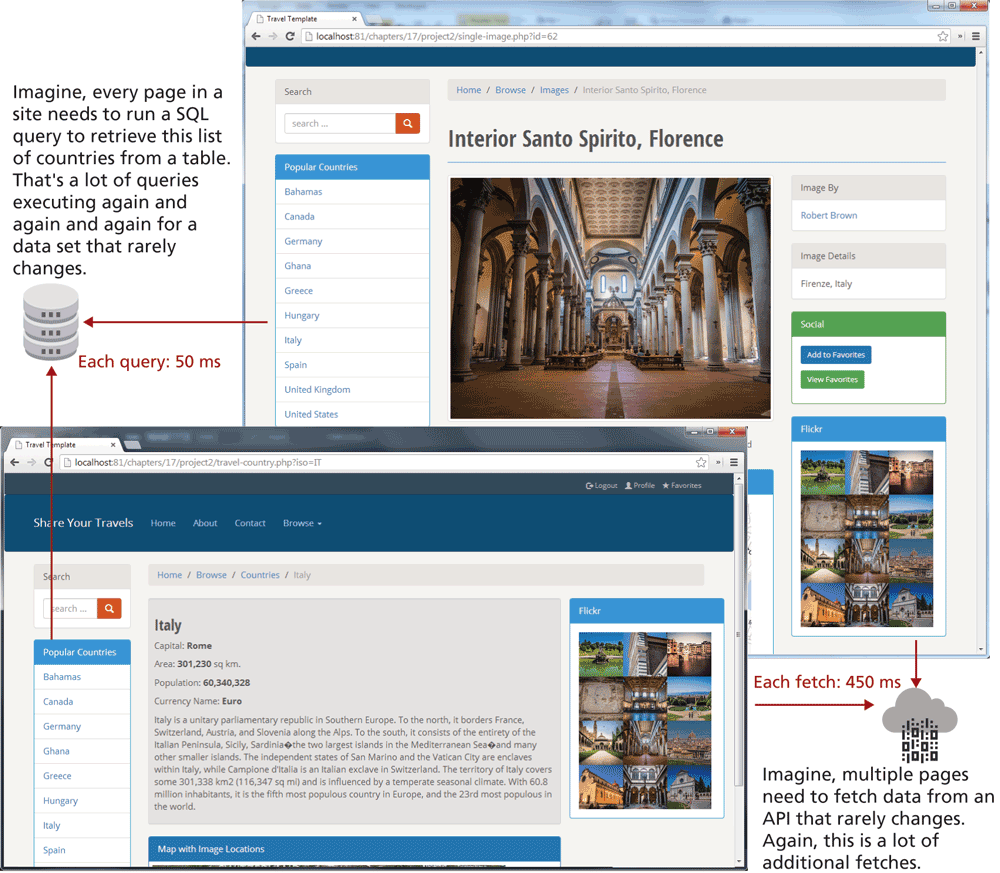
Figure 15.14 Caching in action
While the default installation of PHP does not come with an application caching ability, a widely available free PECL extension called memcache is widely used to provide this ability.3 Listing 15.10 illustrates a typical use of memcache.
Listing 15.10 Using memcache
<?php
// create connection to memory cache
$memcache = new Memcache;
$memcache->connect('localhost', 11211)
   or die ("Could not connect to memcache server");

$cacheKey = 'topCountries';
/* If cached data exists retrieve it, otherwise generate and cache it for next time */
$countries = $memcache->get($cacheKey);
if ( ! isset($countries) ) {
   // since every page displays list of top countries as links
   // we will cache the collection

   // first get collection from database
   $cgate = new CountryTableGateway($dbAdapter);
   $countries = $cgate->getMostPopular();
   // now store data in the cache (data will expire in 240 seconds)
   $memcache->set($cacheKey, $countries, false, 240)
       or die ("Failed to save cache data at the server");
}
// now use the country collection
displayCountryList($countries);
?>
It should be stressed that memcache should not be used to store large collections. The size of the memory cache is limited, and if too many things are placed in it, its performance advantages will be lost as items get paged in and out. Instead, it should be used for relatively small collections of data that are frequently accessed on multiple pages.
The technique for caching with Node is relatively similar. You would need to use a package such as memory-cache or node-cache. Listing 15.11 illustrates how an API might make use of such a cache.
Listing 15.11 Using node-cache
const NodeCache = require( "node-cache" );
const cache = new NodeCache();

app.get("/", (req, resp) => {
   // first see if countries are in cache
   let countriesData;
   if ( cache.has("countries") ) {
      countriesData = cache.get("countries);
   else {
      // get countries from database
      countriesData = provider.retrieveCountries(req, resp);
      // add it to cache
      cache.set("countries", countriesData);
   }
   resp.json( countriesData );
});
15.5.3 Redis as Caching Service
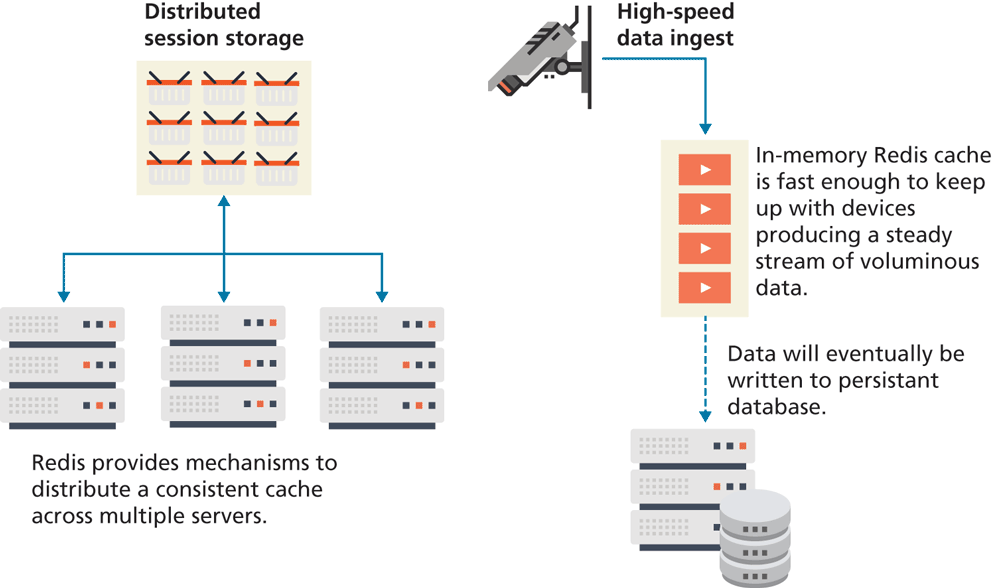
Redis is a popular in-memory key/value noSQL database that is frequently used for distributed caching. The key attribute in the above description is the fact that Redis is an in-memory database. This means its speed of search and retrieval is very fast. As a consequence, Redis is also used for a variety of other specialized tasks within web applications that rely on speed, such as message queuing, session storage, and data ingest. Figure 15.15 illustrates some of these scenarios.
Figure 15.15 Redis use cases
Redis can be installed and run on your local development machine. In production, Redis will typically be installed on a separate server, or a network of distributed servers. Redis services are also available in cloud form via, for instance, Redis Cloud.
Unlike the previous example using node-cache, saving more complex objects (for instance, an array of country objects) requires more complex coding (and which is beyond the scope of this chapter). What Redis provides you as a developer that node-cache doesn't, is the possibility of persistence and distribution.