15.4 Session State
All modern web development environments provide some type of session state mechanism. Session state is a server-based state mechanism that lets web applications store and retrieve objects of any type for each unique user session. Session state is dependent upon some type of session store, that is, some type of storage area for session information. In PHP, each browser session has its own session state stored as a serialized file on the server, which is deserialized and loaded into memory as needed for each request, as shown in Figure 15.8. For Node and Express, the default session state ability is in-memory only, but as you will learn later, it typically uses a database as a session store.
Figure 15.8 Session state
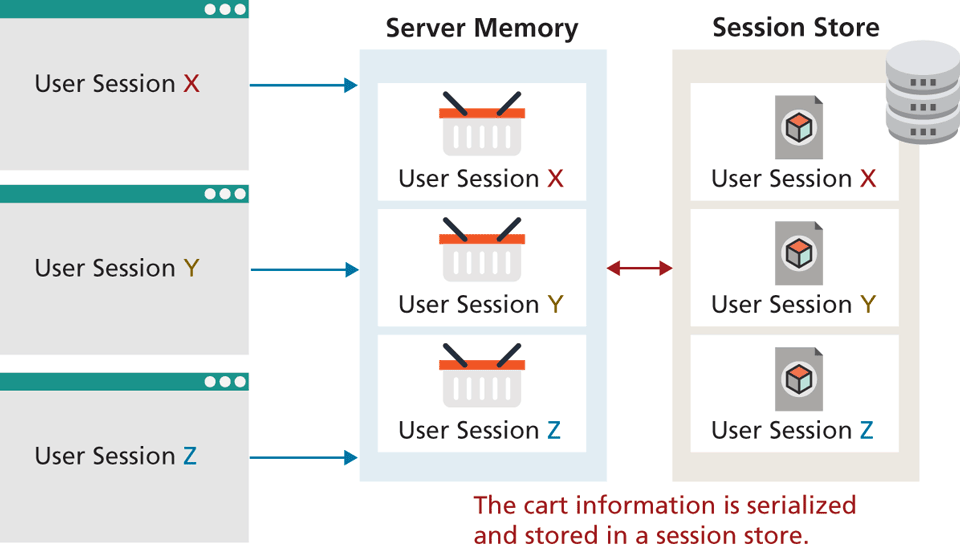
Because server storage is a finite resource, objects loaded into memory are released when the request completes, making room for other requests and their session objects. This means there can be more active sessions on disk than in memory at any one time.
Session state is ideal for storing more complex (but not too complex . . . more on that later) objects or data structures that are associated with a user session. The classic example is a shopping cart. While shopping carts could be implemented via cookies or query string parameters, it would be quite complex and cumbersome to do so.
15.4.1 How Does Session State Work?
Typically when our students learn about session state, their first reaction is to say “Why didn’t we learn this earlier? This solves all our problems!” Indeed because modern development environments such as ASP.NET and PHP make session state remarkably easy to work with, it is tempting to see session state as a one-stop solution to all web state needs. However, if we take a closer look at how session state works, we will see that session state has the same limitations and issues as the other state mechanisms examined in this chapter.
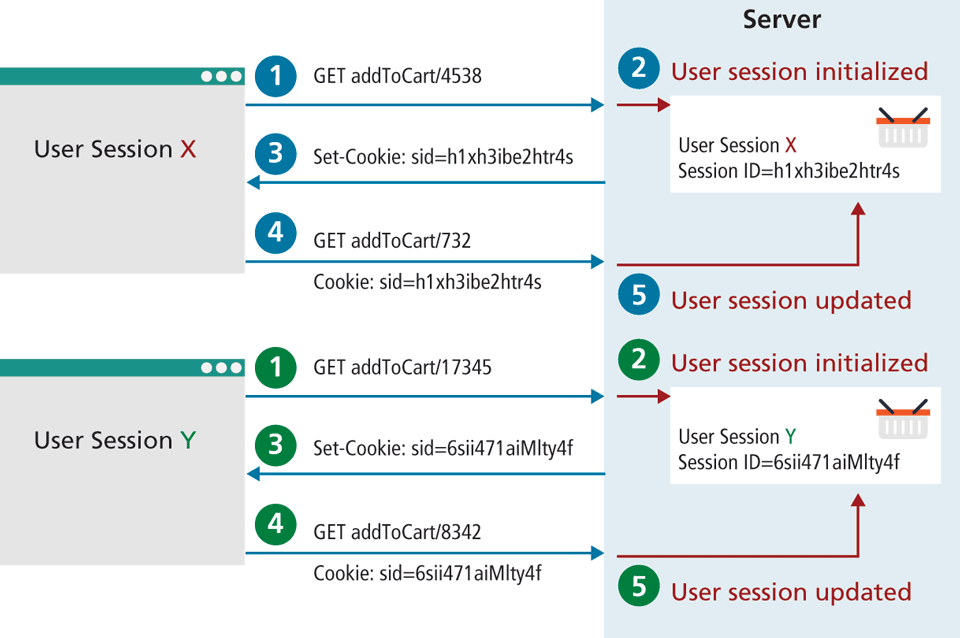
The first thing to know about session state is that it works within the same HTTP context as any web request. The server needs to be able to identify a given HTTP request with a specific user request. Since HTTP is stateless, some type of user/session identification system is needed. Sessions in PHP and Express are identified with a unique session ID. In PHP, this is a unique 32-byte string; in Express it is a 36-byte string. This session ID transmitted back and forth between the user and the server via a session cookie (see Section 15.3.1 above), as shown in Figure 15.9.
Figure 15.9 Session IDs
As we learned earlier in the section on cookies, users may disable cookie support in their browser; for that reason, PHP can be configured (in the php.ini file) to instead send the session ID within the URL path.
So what happens besides the generating or obtaining of a session ID after a new session is started? For a brand new session, PHP assigns an initially empty dictionary-style collection that can be used to hold any state values for this session. When the request processing is finished, the session state is saved to some type of state storage mechanism, called a session state provider (discussed in the next section). Finally, when a new request is received for an already existing session, the session’s dictionary collection is filled with the previously saved session data from the session state provider.
15.4.2 Session Storage and Configuration
You may have wondered why session stores are necessary. In the example shown in Figure 15.8, each user’s session information is kept in serialized files, one per session (in express-session, session information is by default not stored in files, but in memory). It is possible to configure many aspects of sessions including where the session files are saved. For a complete listing, refer to the session configuration options in php.ini.
The decision to save sessions to files rather than in memory addresses the issue of memory usage that can occur on shared hosts as well as persistence between restarts. Many sites run in commercial hosting environments that are also hosting many other sites. For instance, one of the book author’s personal sites (randyconnolly.com, which is hosted by discountasp.net) is, according to a Reverse IP Domain Check, on a server that was hosting 535 other sites when this chapter was being edited. Inexpensive web hosts may sometimes stuff hundreds or even thousands of sites on each machine. In such an environment, the server memory that is allotted per web application will be quite limited. And remember that for each application, server memory may be storing not only session information, but pages being executed, and caching information.
On a busy server hosting multiple sites, it is not uncommon for the Apache application process to be restarted on occasion. If the sessions were stored in memory, the sessions would all expire, but as they are stored into files, they can be instantly recovered as though nothing happened. This can be an issue in environments where sessions are stored in memory (like ASP.NET), or a custom session handler is involved. One downside to storing the sessions in files is a degradation in performance compared to memory storage.
Listing 15.6 Configuration in php.ini to use a shared location for sessions
[Session]
; Handler used to store/retrieve data.
session.save_handler = memcache
session.save_path = "tcp://sessionServer:11211"
15.4.3 Session State in PHP
In PHP, session state is available to the developer as a superglobal associative array, much like the $_GET, $_POST, and $_COOKIE arrays.2 It can be accessed via the $_SESSION variable, but unlike the other superglobals, you have to take additional steps in your own code in order to use the $_SESSION superglobal.
To use sessions in a script, you must call the session_start() function at the beginning of the script as shown in Listing 15.7. In this example, we differentiate a logged-in user from a guest by checking for the existence of the $_SESSION['user'] variable.
Listing 15.7 Accessing session state
<?php

session_start();

if ( isset($_SESSION['user']) ) {
   // User is logged in
}
else {
   // No one is logged in (guest)
}
?>
Session state is typically used for storing information that needs to be preserved across multiple requests by the same user. Since each user session has its own session state collection, it should not be used to store large amounts of information because this will consume very large amounts of server memory as the number of active sessions increase.
As well, since session information does eventually time out, one should always check if an item retrieved from session state still exists before using the retrieved object. If the session object does not yet exist (either because it is the first time the user has requested it or because the session has timed out), one might generate an error, redirect to another page, or create the required object using the lazy initialization approach as shown in Listing 15.8. In this example ShoppingCart is a user-defined class. Since PHP sessions are serialized into files, one must ensure that any classes stored into sessions can be serialized and deserialized, and that the class definitions are parsed before calling session_start().
Listing 15.8 Checking session existence
<?php
include_once("ShoppingCart.class.php");

session_start();

// always check for existence of session object before accessing it
if ( !isset($_SESSION["Cart"]) ) {
   // session variables can be strings, arrays, or objects, but
   //smaller is better
   $_SESSION["Cart"] = new ShoppingCart();
}
$cart = $_SESSION["Cart"];
?>15.4.4 Session State in Node
Sessions in Node and Express, like with cookies, require installing an additional package using npm. There are two commonly used session packages for Express: express-session and cookie-session. The cookie-session package is very lightweight. As the name suggests, this package uses cookies to store and transmit the serialized state information. That is, all the session information (not just the session id) is stored in cookies; no server memory is required. This package is thus only suitable for when saving relatively small blocks of data that can be easily serialized. The express-session package supports different session stores, whether they be memory, files, external caches, or databases. By default, express-session uses in-memory storage which is not scalable to multiple servers and thus intended only for debugging and developing. A production environment would need to use a session store that stores the data in a database or external cache.
Listing 15.9 demonstrates how the express-session package could implement a simple favorites list. When the addToFavorites route is requested, it initializes it if the array doesn't yet exist for this session; the passed product id is then pushed onto the array stored in session. A more complete version would likely only add a product to the favorites list if it doesn't already exist in it.
Listing 15.9 Using express-session
const session = require('express-session');
// configure session middleware
app.use(session({
  secret: process.env.SESSION_SECRET,
  saveUninitialized: true,
  resave: true,
  cookie: { secure: true, htttpOnly: true }
}));

app.get('/addToFavorites/:prodid', function(req, resp) {
   if (req.session.cart) {
       const favorites = req.session.favorites;
       favorites.push( req.params.prodid );
   } else {
       req.session.favorites = [ req.params.prodid ];
   }
   // send message or do something else
   ...
}
As already noted, the default express-session store mechanism is server memory, which isn't suitable for production environments. There are dozens of compatible session store packages that allow you to use a wide range of databases and cloud services for your session store. For instance, to configure MongoDB along with Mongoose as your session store, you can simply modify your session configuration as follows:
const mongoose = require('mongoose');
mongoose.connect(connectionOptions);

const MongoStore = require('connect-mongo')(session);

app.use(session({
    ...
    store: new MongoStore({ mongooseConnection: mongoose.connection })
}));