15.3 Cookies
There are few things in the world of web development so reviled and misunderstood as the HTTP cookie. Cookies are a client-side approach for persisting state information. They are name=value pairs that are saved within one or more text files that are managed by the browser. These pairs accompany both server requests and responses within the HTTP header. While cookies cannot contain viruses, third-party tracking cookies have been a source of concern for privacy advocates.
Cookies were intended to be a long-term state mechanism. They provide website authors with a mechanism for persisting user-related information that can be stored on the user’s computer and be managed by the user’s browser.
Cookies are not associated with a specific page but with the page’s domain, so the browser and server will exchange cookie information no matter what page the user requests from the site. The browser manages the cookies for the different domains so that one domain’s cookies are not transported to a different domain.
While cookies can be used for any state-related purpose, they are principally used as a way of maintaining continuity over time in a web application. One typical use of cookies in a website is to “remember” the visitor so that the server can customize the site for the user. Some sites will use cookies as part of their shopping cart implementation so that items added to the cart will remain there, even if the user leaves the site and then comes back later. Cookies are also frequently used to keep track of whether a user has logged into a site.
15.3.1 How Do Cookies Work?
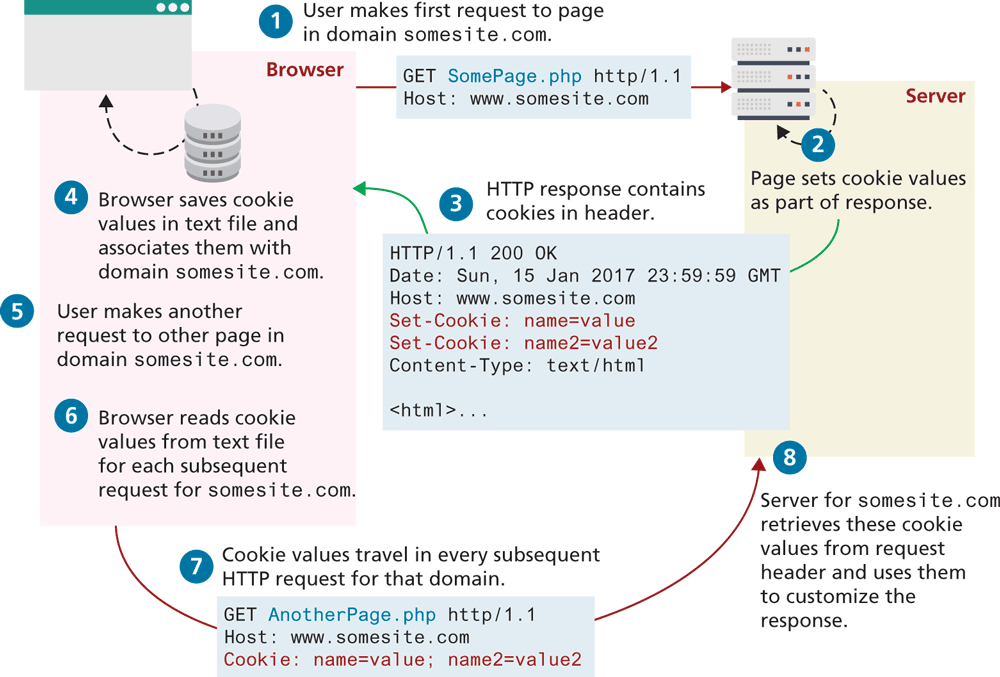
While cookie information is stored and retrieved by the browser, the information in a cookie travels within the HTTP header. Figure 15.7 illustrates how cookies work.
Figure 15.7 Cookies at work
There are limitations to the amount of information that can be stored in a cookie (around 4K) and to the number of cookies for a domain (for instance, Internet Explorer 6 limited a domain to 20 cookies).
Like their similarly named chocolate chip brethren beloved by children worldwide, HTTP cookies can also expire. That is, the browser will delete cookies that are beyond their expiry date (which is a configurable property of a cookie). If a cookie does not have an expiry date specified, the browser will delete it when the browser closes (or the next time it accesses the site). For this reason, some commentators will say that there are two types of cookies: session cookies and persistent cookies. A session cookie has no expiry stated and thus will be deleted (in theory) at the end of the user browsing session. Persistent cookies have an expiry date specified; they will persist in the browser’s cookie file until the expiry date occurs, after which they are deleted. Unfortunately, Chrome and Firefox can be configured to reopen tabs from last time upon restarting, which means session cookies might not be deleted on a given user's browser.
The most important limitation of cookies is that the browser may be configured to refuse them. As a consequence, sites that use cookies should not depend on their availability for critical features. Similarly, the user can also delete cookies or even tamper with the cookies, which may lead to some serious problems if not handled. Several years ago, there was an instructive case of a website selling stereos and televisions that used a cookie-based shopping cart. The site placed not only the product identifier but also the product price in the cart. Unfortunately, the site then used the price in the cookie in the checkout. Several curious shoppers edited the price in the cookie stored on their computers, and then purchased some big-screen televisions for only a few cents!
 Note
Note
Remember that a user’s browser may refuse to save cookies. Ideally your site should still work even in such a case.
15.3.2 Using Cookies in PHP
Like any other web development technology, PHP provides mechanisms for writing and reading cookies. Cookies in PHP are created using the setcookie() function and are retrieved using the $_COOKIES superglobal associative array, which works like the other superglobals covered in Chapter 12.
Listing 15.2 illustrates the writing of a persistent cookie in PHP. It is important to note that cookies must be written before any other page output.
Listing 15.2 Writing a cookie
<?php
   // add 1 day to the current time for expiry time
   $expiryTime = time()+60*60*24;

   // create a persistent cookie
   $name = "username";
   $value = "Ricardo";
   setcookie($name, $value, $expiryTime);
?>
The setcookie() function also supports several more parameters, which further customizes the new cookie. You can examine the online official PHP documentation for more information.1
Listing 15.3 illustrates the reading of cookie values. Notice that when we read a cookie, we must also check to ensure that the cookie exists. In PHP, if the cookie has expired (or never existed in the first place), then the client’s browser would not send anything, and so the $_COOKIE array would be blank.
Listing 15.3 Reading a cookie
<?php
// extract a single named cookie
if ( !isset($_COOKIE['username']) ) {
"this cookie doesn't exist";
}
else {
echo "The username retrieved from the cookie is:";
echo $_COOKIE['username'];
}
// loop through all cookies in request
foreach ($_COOKIE as $name => $value) {
echo "Cookie: $name = $value";
}
?> Pro Tip
Almost all browsers now support the HttpOnly flag/attribute on cookies. Using this flag can mitigate some of the security risks with cookies (e.g., cross-site scripting or XSS). This flag instructs the browser to not make this cookie available to JavaScript. Listing 15.4 illustrates how to set this attribute when using Node and Express. In PHP, you can set the cookie’s HttpOnly property to true when setting the cookie:
setcookie($name, $value, $expiry, null, null, null, true);15.3.3 Using Cookies in Node and Express
Cookie support in Node and Express has been moved into a separate package (cookie-parser) that needs to be installed using npm. Listing 15.4 demonstrates how a cookie can be read from a request and how a new cookie can be added to a response.
Listing 15.4 Using cookies in Node and Express
const express = require('express');
const app = express();

const cookieParser = require('cookie-parser');
app.use( cookieParser() );

app.get('/', (req, resp) => {
   // retrieve a single named cookie
   console.log( req.cookies.username );

   // loop through all cookies
   const entries = Object.entries(req.cookies);
   for (const [name, value] of entries) {
      console.log(`${name} = ${value}`)
   }

   // now write new cookie as part of response
   const opts = {
      maxAge: 24 * 60 * 60 * 1000,  // 1 day
      httpOnly: true
   }
   resp.cookie( 'theme', 'dark', opts );
   resp.send('content sent to browser');
});
The cookie-parser package adds some interesting capabilities to cookies in general. One of these is the ability to save JSON data as a cookie value. The other is the ability to read and write signed cookies. A signed cookie in this package is one whose value has been encoded using a cryptography hash function and a secret key. While this doesn’t safely encrypt the key value, it does verify if the client has tampered with a key value. Listing 15.5 illustrates how to use a read and write signed cookies.
Listing 15.5 Read and writing a signed cookie
const cookieParser = require('cookie-parser');
const secret = 'anything here';
app.use( cookieParser(secret) );

app.get('/', (req, resp) => {
   // retrieve a single signed cookie
   console.log( req.signedCookies.username );

   // write a signed cookie
   resp.cookie( 'theme', 'dark', {signed:true} );
});
15.3.4 Persistent Cookie Best Practices
As mentioned previously, depending on a user’s browser options, a session cookie might be just as permanent as a persistent cookie. As such, it is important to follow some best practices when working with cookies. So what kinds of things should a site store in a persistent cookie? Due to the limitations of cookies (both in terms of size and reliability), your site’s correct operation should not be dependent upon cookies. Nonetheless, the user’s experience might be improved with the judicious use of cookies. Indeed, almost all login systems are dependent upon IDs sent in session cookies. In the next section on Session State, both PHP and Express’s session state systems are dependent upon session cookies. For such uses (or for any uses in which sensitive information is being stored in cookies), cookies are typically sent with the HttpOnly, Secure, and SameSite attributes. The Secure attribute will prevent a cookie from being communicated via HTTP. While this protects the cookie from man-in-the-middle attacks, it doesn’t prevent someone from reading the cookie who has access to a user's computer. For instance, in a lab setting or on a public computer, a second person might be able to examine the browser cookies directly within the browser or file system and thus see cookie values from a previous user. For this reason, it is important that cookies containing sensitive information should have a short lifetime (i.e., the expiry should be set to as short a time period as makes sense). The SameSite attribute prevents a cookie from being generated in requests generated by different origins, which provides some protection from CSRF attacks (covered in Chapter 16).
Many sites provide a “Remember Me” checkbox on login forms, which relies on the use of a persistent cookie. This login cookie would contain the username but not the password. Instead, the login cookie would contain a random token; this random token would be stored along with the username in the site’s back-end database. Every time the user logs in, a new token would be generated and stored in the database and cookie.
Another common, nonessential use of cookies would be to use them to store user preferences. For instance, some sites allow the user to choose their preferred site color scheme or their country of origin or site language. In these cases, saving the user’s preferences in a cookie will make for a more contented user, but if the user’s browser does not accept cookies, then the site will still work just fine; at worst the user will simply have to reselect his or her preferences again.
Another common use of cookies is to track a user’s browsing behavior on a site. Some sites will store a pointer to the last requested page in a cookie; this information can be used by the site administrator as an analytic tool to help understand how users navigate through the site.
Pro Tip
All requests/responses to/from a domain will include all cookies for that domain. This includes not just requests/responses for web pages, but for static components as well, such as image files, CSS files, etc. For a site that makes use of many static components, cookie overhead will increase the network traffic load for the site unnecessarily. For this reason, most large websites that make use of cookies will host those static elements on a completely different domain that does not use cookies. For instance, ebay.com hosts its images on ebaystatic.com and amazon.com hosts its images on images-amazon.com.
Note
Cookies are limited to text strings. Nonetheless, it is possible to store more complex objects in cookies by using serialization, which refers to the process of converting a complex in-memory object into a string. Deserialization refers to the opposite process (turning a specialized string into an in-memory object). There are numerous serialization formats; JSON can be used as a serialization format.