15.2 Passing Information in HTTP
The starting point will be to examine the somewhat simpler problem of how does one web page pass information to another page? That is, what mechanisms are available within HTTP to pass information to the server in our requests? As we have already seen in Chapters 1, 5, 12, and 13, our ability to preserve state across requests is constrained by the basic request-response interaction of the HTTP protocol. In HTTP, we can pass information using:
URL
HTTP header
Cookies
15.2.1 Passing Information via the URL
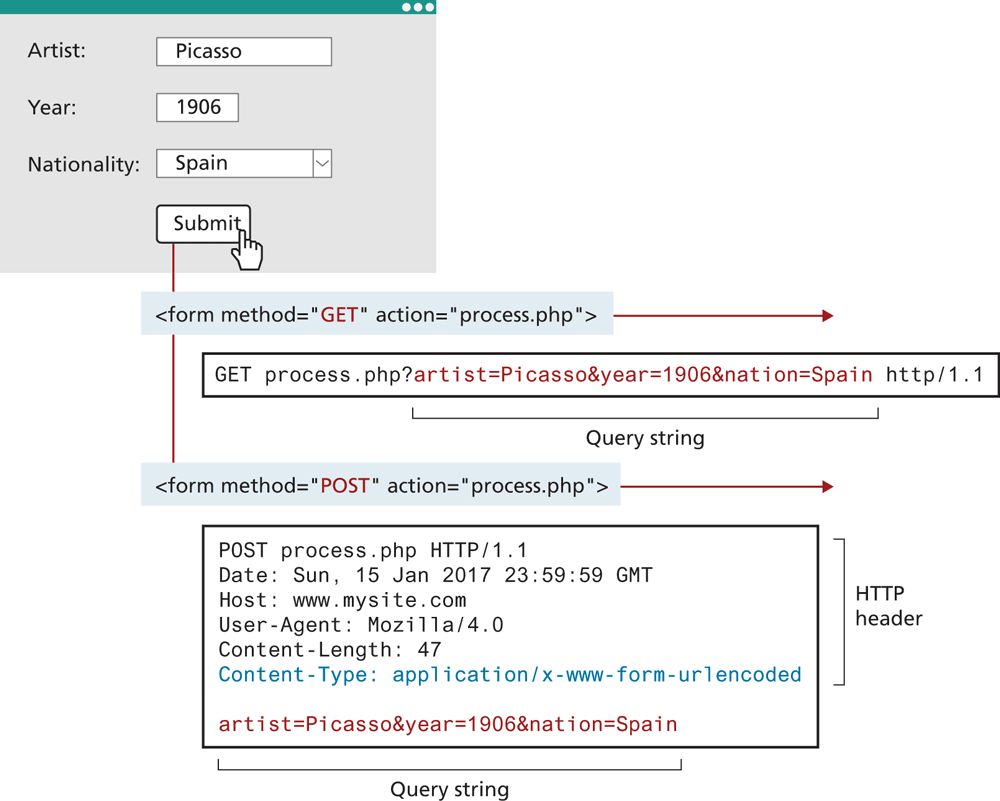
As you will recall from earlier chapters, a web page can pass query string information from the browser to the server using one of the two methods: a query string within the URL (GET) and a query string within the HTTP header (POST). Figure 15.5 reviews these two different approaches.
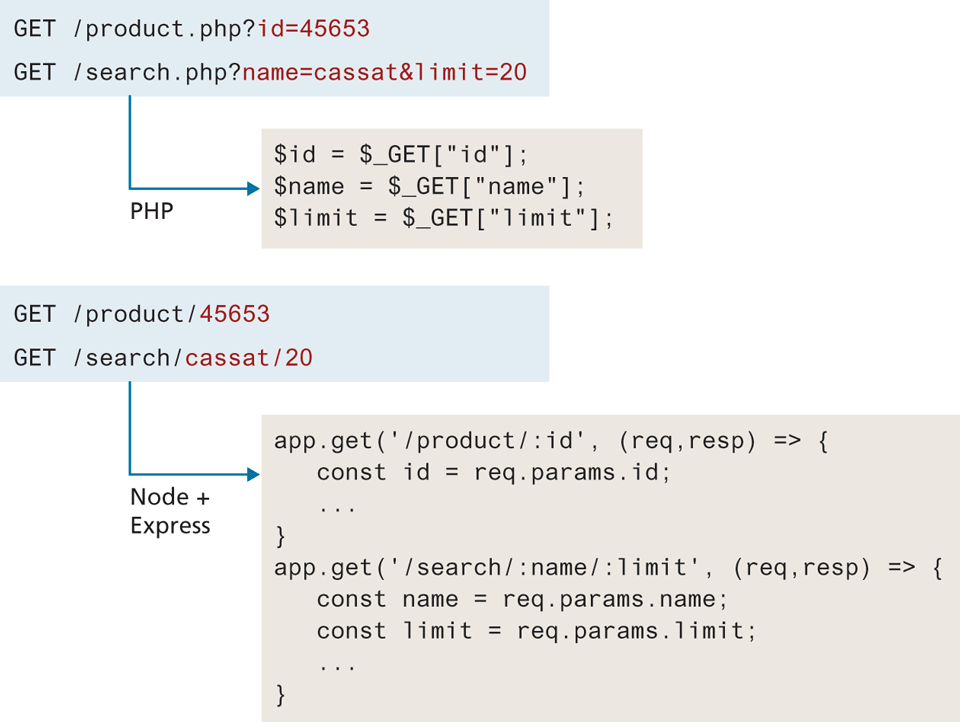
In Chapter 12 on PHP, you may recall you used the $_GET superglobal array to access any query string variables that were part of the page request. But in Chapter 13 on Node, you didn't work with query strings in the same way. Instead of name=value pairs, with Node and Express, the values were directly embedded within the URL itself. Figure 15.4 illustrates the two different ways data was passed to a request in Chapters 12 and 13.
Figure 15.4 Two approaches for passing data in a URL
 Note
Note
Remember as well that HTML links and forms using the GET method do the same thing: they make HTTP requests using the GET method.
15.2.2 Passing Information via HTTP Header
In Figure 15.5, you can see that the form data sent using the POST method is sent as a query string after the HTTP header. For the purposes of this section, you can think of this data being passed via the HTTP header. A key component of this form data passing is the Content-Type header being set to application/x-www-form-urlencoded. With regular HTML forms, this header is set for you by the browser. Other types of data can, however, be passed by the browser to the server by changing the Content-Type.
Figure 15.5 Recap of GET versus POST
 Pro Tip
It should be noted that PHP can also embed values in the URL in a similar manner as Node and Express using a process known as URL rewriting. It makes use of a mod_rewrite module in Apache along with a special .htaccess file. The mod_rewrite module uses a rule-based rewriting engine that utilizes regular expressions to change the URLs so that the requested URL can be mapped or redirected to another URL internally.
For instance, some pages make use of the multipart/form-data type, which sends each separate value as its own block. This type is typically used in a form that is sending (uploading) file data. This can be achieved in a regular HTML form by setting its enctype attribute:
<form action="..." method="POST" enctype="multipart/form-data">Another way that a browser can send data to the server is via JSON data (which also appears after the HTTP headers). In such a case, the Content-Type would have to be set to application/json. It should be noted that this requires JavaScript, as shown in Listing 15.1.
Listing 15.1 Posting JSON data via JavaScript fetch
async function postJSONData(url, data) {
   const opt = {
      method: 'POST',
      headers: {
        'Content-Type': 'application/json'
      },
      body: JSON.stringify(data)
   };

   const response = await fetch(url, opt);
   return await response.json();
}