14.7 Chapter Summary
In this chapter we have covered a wide breadth of database concepts that are essential to the modern web developer. From the principles of relational databases we learned about tables, fields, data types, primary and foreign keys, and more. You then saw how Structured Query Language (SQL) defines the complete set of interactions for those relational databases and how it is used to insert, update, and remove content, and how to use SQL commands within PHP. You also learned about NoSQL database systems, and how to use MongoDB within Node.
14.7.1 Key Terms
14.7.2 Review Questions
What problems do database management systems solve?
What is the syntax for a SQL
SELECTstatement?What does joining two tables accomplish?
What are composite keys?
Name two MySQL management applications. Compare and contrast them.
Discuss the trade-offs with using a database-independent API such as PDO in comparison to using the dedicated mysqli extension.
Why must you always sanitize user inputs before using them in your queries?
Describe the role of indexes in database operation.
Describe how relational databases differ from NoSQL databases. List some of the advantages and disadvantages of both relational and noSQL systems.
MongoDb differs from traditional relational database systems in important ways. Describe these differences and discuss the types of applications for which MongoDB is well suited, and not well suited.
Why is data replication and synchronization an important problem for web applications? Discuss the two key solutions used for this problem.
What are the key advantages and disadvantages of using a NoSQL database?
In the web context, what is the difference between local and distributed transactions? Briefly describe each type.
Why is it so important to use only one connection per page with PDO?
Describe the four types of NoSQL system.
14.7.3 Hands-On Practice
Project 1: Share Your Travel Photos
Difficulty Level: Intermediate
Overview
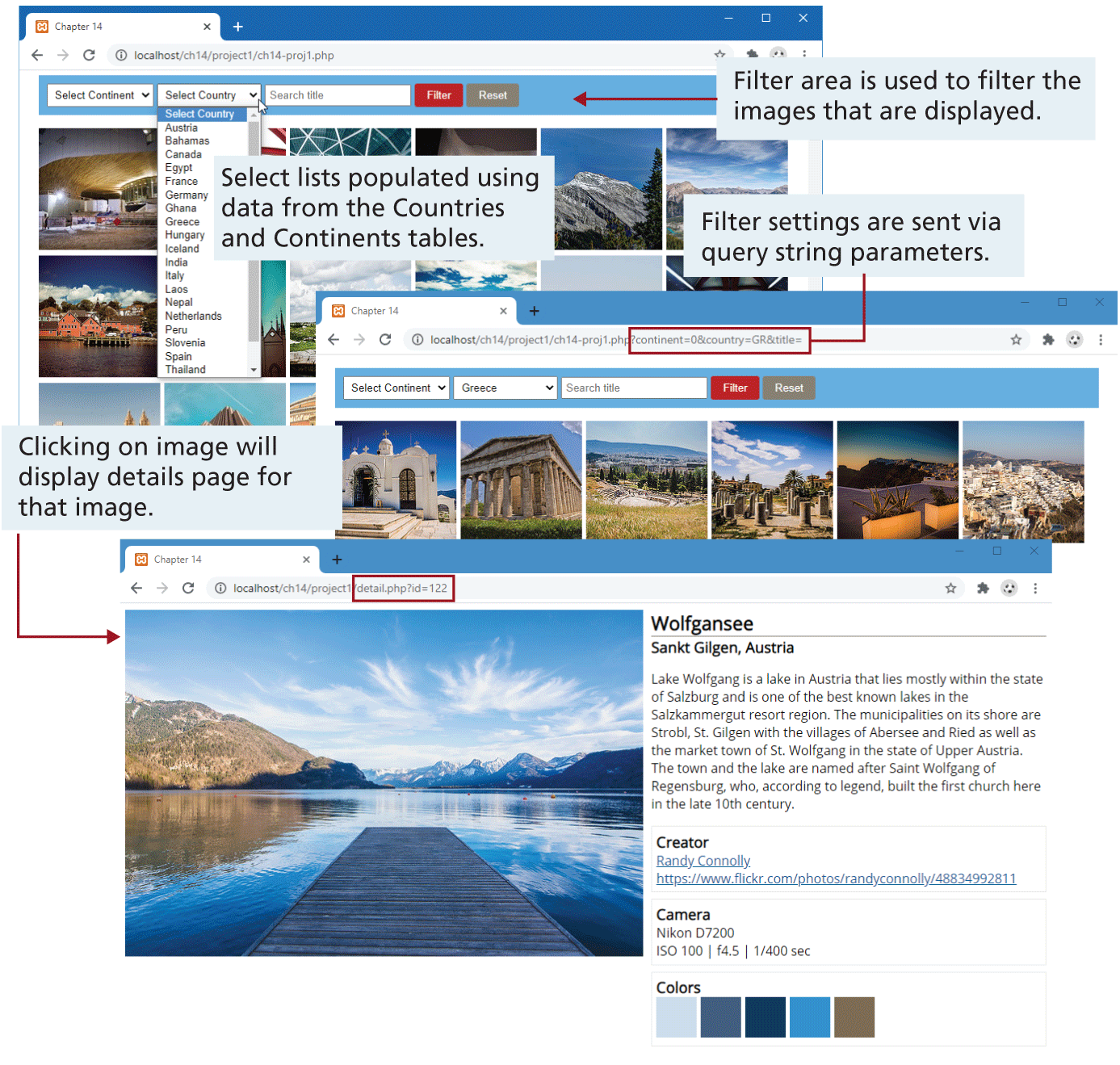
Demonstrate your ability to retrieve information from a database and display it. This will require a variety of SQL queries. The results when finished will look similar to that shown in Figure 14.37.
Figure 14.37 Completed Project 1
Instructions
You have been provided with a PHP page (ch14-proj1.php) along with various include files.
You will need to retrieve information from three tables:
continents,countries, andimagedetails.Display every image (the URL is supplied in the starting file) in the
imagedetailstable. ThePathfield contains the filename of the image. Each image should be a link to detail.php with theImageIDfield passed as a query string. The supplied detail.php page contains sample markup for a single photo. You will need to construct a SQL query that joins data from theimagedetailstable, thecountrytable, and thecitiestable. The camera and color information shown in Figure 14.37 are from theExifandColorsfields and contain json data. You can use thejson_decode()function to convert this json data into a PHP object.The filter section near the top of the page will be used to filter/reduce the number of images displayed in the image list. The user will be able to display only those images from a specific continent, country, or images whose Title field contains a search word after the user clicks the Filter button.
You will need to display every record from the
continentstables within the<select>list that appears in the filter section near the top of the page. Each<option>element should display theContinentNamefield; theContinentCodefield should be used for the option value.For the Countries
<select>list, you will display only those countries that have a matching record in theimagedetailstable. This will require anINNER JOINalong with aGROUP BY.When the user clicks the Filter button, the page should display only those images whose
CountryCodeISOorContinentCodeorTitlefields match the specified valued in the filter area. For the Title field, match any records whoseTitlefield contains whatever was entered into the search box (hint: use SQLLikealong with the wildcards character).
Guidance and Testing
Break this down into smaller steps. A good starting point would be to get your PHP page to read and display data from the
continentstable. Then do the same for thecountriesandimagedetailstables.The styling has been already provided for you. Examine the sample markup within the supplied
<template>elements.Get the list of images to display correctly, then implement the details page.
Finally, add in the filter functionality.
Project 2
Difficulty Level: Intermediate
Overview
Demonstrate your ability to use MongoDB in conjunction with Node.js.
Instructions
Create a new MongoDB database named
adoptionsfilled with the data in the adoptions.json file by entering the following command in the terminal window (you will have to first start the mongod server process in a separate terminal):mongoimport -db project3 --collection adoptions --file adoptions.json –jsonArrayTry running a few sample queries within the MongoDB shell. For instance, retrieve the adoption with AdoptionID = 14. Retrieve all adoptions whose UniversityID = 100724.
Create a Node API with the route [domain]/api/adoptions. This will return a JSON object containing all the adoptions sorted by adoption date.
Add the additional route [domain]/api/adoptions/:id. This will return a JSON object containing a single adoption whose AdoptionID matches the passed:id parameter.
Add the additional route ([domain]/api/adoptions/university/:id) that returns a JSON object containing multiple adoptions whose UniversityID matches the passed:id parameter.
Test
Create a simple JavaScript page that tests each of these routes using fetch. You may need to add the appropriate
Access-Control-Allow-Headersto your API if it is on a different domain than your test page.
Project 3
Difficulty Level: Intermediate
Overview
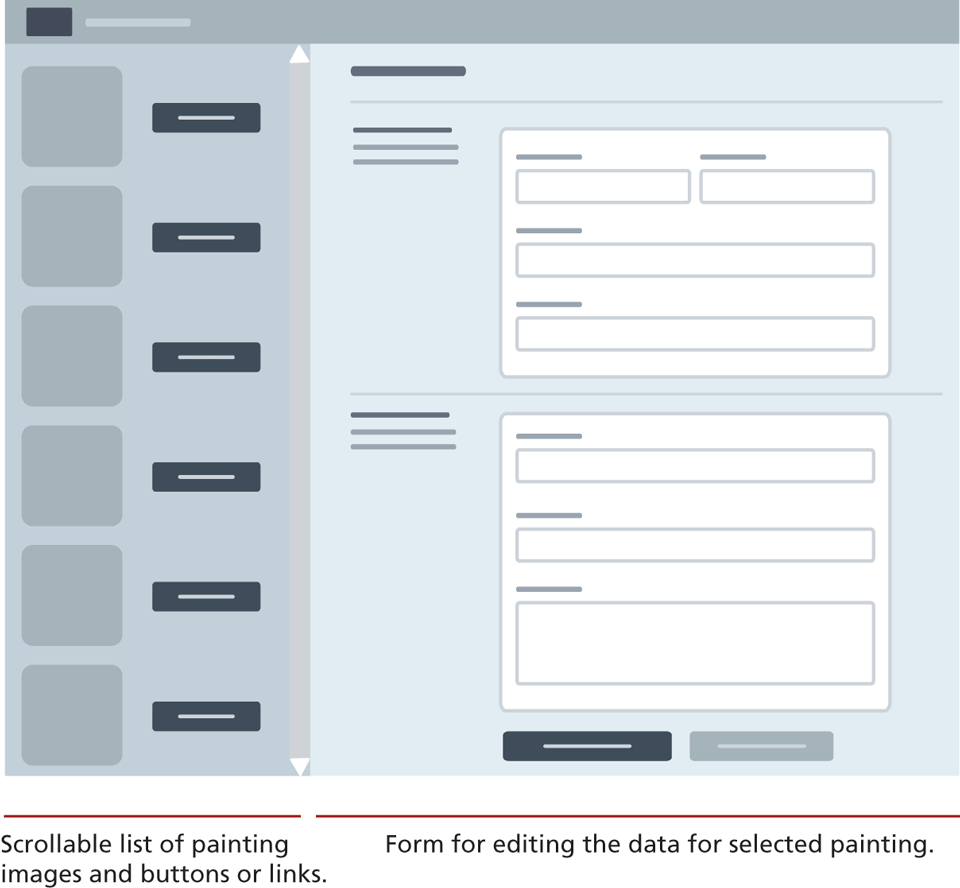
Demonstrate your ability to both select and modify data using either a PHP and SQL or Node and NoSQL. The result will look like Figure 14.38. You have been provided with an SQL import script if using MySQL, a sqlite file if using SQLite, and a JSON file if using MongoDB.
Figure 14.38 Completed Project 3
Instructions
Unlike the earlier end of chapter projects in this book, in this project you have only been provided with a wireframe sketch (such sketches are often all that is provided to a development team). You are free to implement whatever design you wish, as the focus here is on the functionality. Your page must display a list of paintings; when the user selects a painting, it will display a form that allows the user to edit the data.
If using PHP, display a list of painting images and links styled as buttons in the left-side area. This will require querying the painting table. For each link button, add a link back to the same page but with the painting id as a querystring. When a request is received with a querystring, then display a data-entry form in the right area each field in the form should be populated with the appropriate record data.
If using Node, then create a API that returns an array of all the paintings. Add JavaScript to the HTML file that fetches the API and then populates the left-side list with an image and a link styled as a button for each painting. Add click event handler for each link button, that displays the form in the right side each field in the form should be populated with the appropriate record data.
This table has many fields; you should break up the data-entry form into different sections to make it easier for the user. The form should have a button for saving the current form values and a button for resetting the form. Be sure to set the action attribute of the
<form>so that it runs a PHP or Node script that you will create. This script will use form data passed to it, and construct and execute an UPDATE query (if using SQL) or use thefindOneAndUpdate()method of the Mongoose model object.
Guidance and Testing
Break this problem down into smaller steps. Focus initially on step 2 (if using PHP) or step 3 (if using Node).
Verify the form has updated the painting data in the underlying data source.
14.7.4 References
1. phpMyAdmin. [Online]. https:/
/ www.phpmyadmin.net. 2. Oracle, “MySQL Workbench” [Online]. https://www.mysql.com/products/workbench/.
3. SqliteStudio. [Online]. https:/
/ sqlitestudio.pl/ . 4. MongoDB Atlas. [Online]. https:/
/ www.mongodb.com/ cloud/ atlas. 5. MongoDB Compass. [Online]. https:/
/ www.mongodb.com/ products/ compass. 6. MySQL, “Data Manipulation Statements.” [Online]. https:/
/ dev.mysql.com/ doc/ refman/ 8.0/ en/ sql-data-manipulation-statements.html. 7. MySQL, “MySQL Transactional and Locking Statements.” [Online]. https:/
/ dev.mysql.com/ doc/ refman/ 8.0/ en/ sql-transactional-statements.html. 8. Microsoft. Data Replication and Synchronization Guidance. https:/
/ msdn.microsoft.com/ en-us/ library/ dn589787.aspx.