14.6 Working with MongoDB in Node
While MongoDB can be used with PHP, it is much more commonly used with Node. While we certainly do not have the space to explore MongoDB in any detail, we will try to show some of its features and show why it has become a popular alternative to relational databases within the web development world.
14.6.1 MongoDB Features
MongoDB is an open-source, NoSQL, document-oriented database. Unlike working with a relational database system, for any given database in MongoDB, there is no schema to learn or define. Instead, you simply package your data as a JSON object, give it to MongoDB, and it stores this object or document as a binary JavaScript object (BSON). This native ability to work with JavaScript is one of MongoDB’s strengths and partly helps to explain its popularity with web developers.
Another important reason for MongoDB’s popularity is that it was built to handle very large data sets. How much data do you need to have before you can say you are working with big data (and thus be interested in a NoSQL option)? That’s a hard question to answer, and it should be noted that traditional relational database systems can also handle huge data sets. The main problem that relational databases systems have with huge data sets is that these systems enforce referential integrity through joins and support transactions. While these are often essential features of a database, when you are working with hundreds of millions of records, such relational features are too time intensive and too difficult to scale across multiple server machines.
MongoDB does not support transactions, which, as you learned back in Section 14.3.4, are an essential feature for data that requires rollback reliability, such as sales, accounting, and financial systems. But certain categories of data do not need transactional support. For instance, most commercial sites maintain records of every request and every click that every user makes on a site (this is often referred to as clickstream data). Such site analytic data is often fed into data mining software systems to improve marketing and sales, to better understand customers, and to improve other key business processes such as warehousing and logistic support. On a busy site, this is a staggeringly large amount of daily data. For such data, we do not need to worry if the odd record is spoiled or inaccurate because no one is harmed, and the analysis works based on the size of the data set rather than the individual accuracy of every single one of its millions of records. For such data, transactional support would slow everything down, so we do not mind if our database does not support it.
The large datasets that MongoDB can handle are often too large to be stored on a single computer. The lack of transactional support in MongoDB means that it can more easily be scaled out horizontally to clusters of commodity servers (i.e., our system can handle larger loads by running on multiple relatively inexpensive server machines). The ability to run on multiple servers is an especially important one, and we recommend you read the Dive Deeper section on data replication.
14.6.2 MongoDB Data Model
MongoDB is a document-based database system, and uses different terminology and ideas to describe the way it organizes its data. Table 14.2 provides a comparison of its terms in comparison to the typical RDMS.
Table 14.2 Approximate MongoDB equivalences to RDMS
| RDMS | MongoDB |
|---|---|
| Database | Database |
| Table | Collection |
| Row/Record | Document |
| Column/Field | Field |
| Join | Embedded/Nested Document |
| Key | Key |
Though Table 14.2 shows equivalences between a MongoDB collection and a RDMS table, there are important differences. Like other NoSQL databases (but unlike a RDMS), collections are schema-less, meaning that the individual documents within it can contain anything. Looking at Figure 14.29, you can see that there can be variance between documents within a collection. Indeed, this is one of the potential strengths of a NoSQL database: that it can work with unstructured or variable data.
Figure 14.29 Comparing relational databases to the MongoDB data model
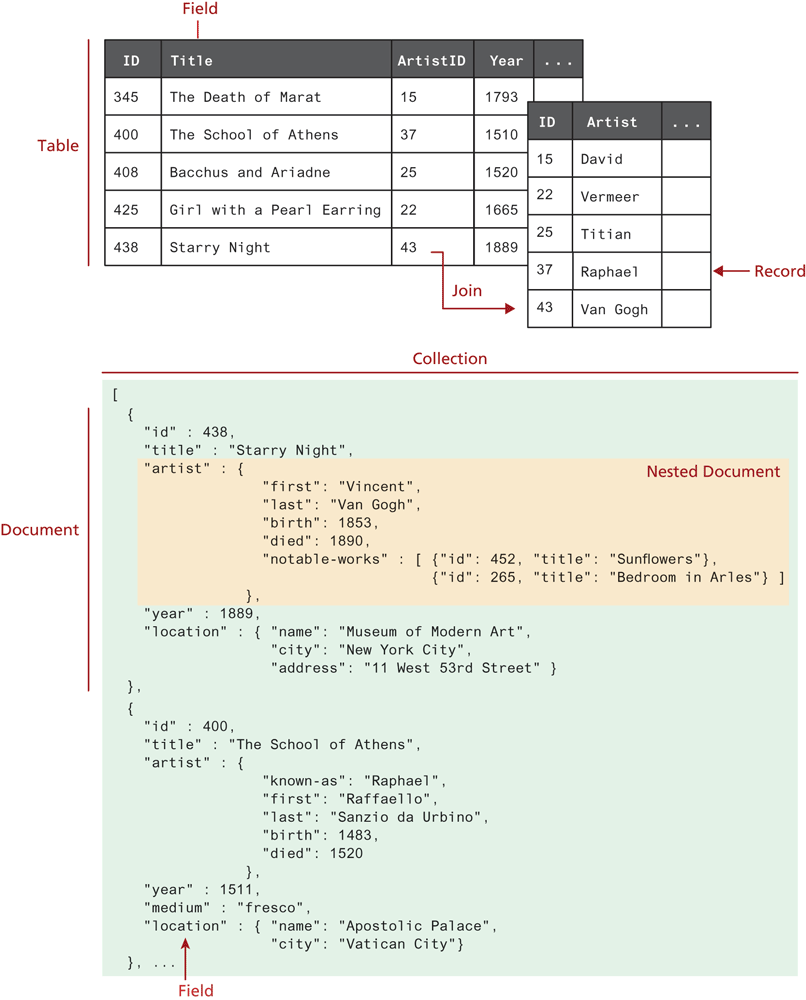
As can also be seen in Figure 14.29, a MongoDB document is simply a JavaScript object literal. Internally, it is stored in a binary format (BSON). The close connection between JavaScript and MongoDB continues with how one actually works with data.
14.6.3 Working with the MongoDB Shell
MongoDB is executed at the command line (via the mongod command) and runs as a daemon process (i.e., once started, it stays running until it is stopped). Once you start this process, you can then run queries. These queries can be generated, for instance, from a Node or PHP application. You can also run the mongo client program and run queries and commands via a command-line interface. This can be helpful when you are testing and learning MongoDB. Figure 14.30 illustrates some sample MongoDB queries.
Figure 14.30 Running the MongoDB Shell
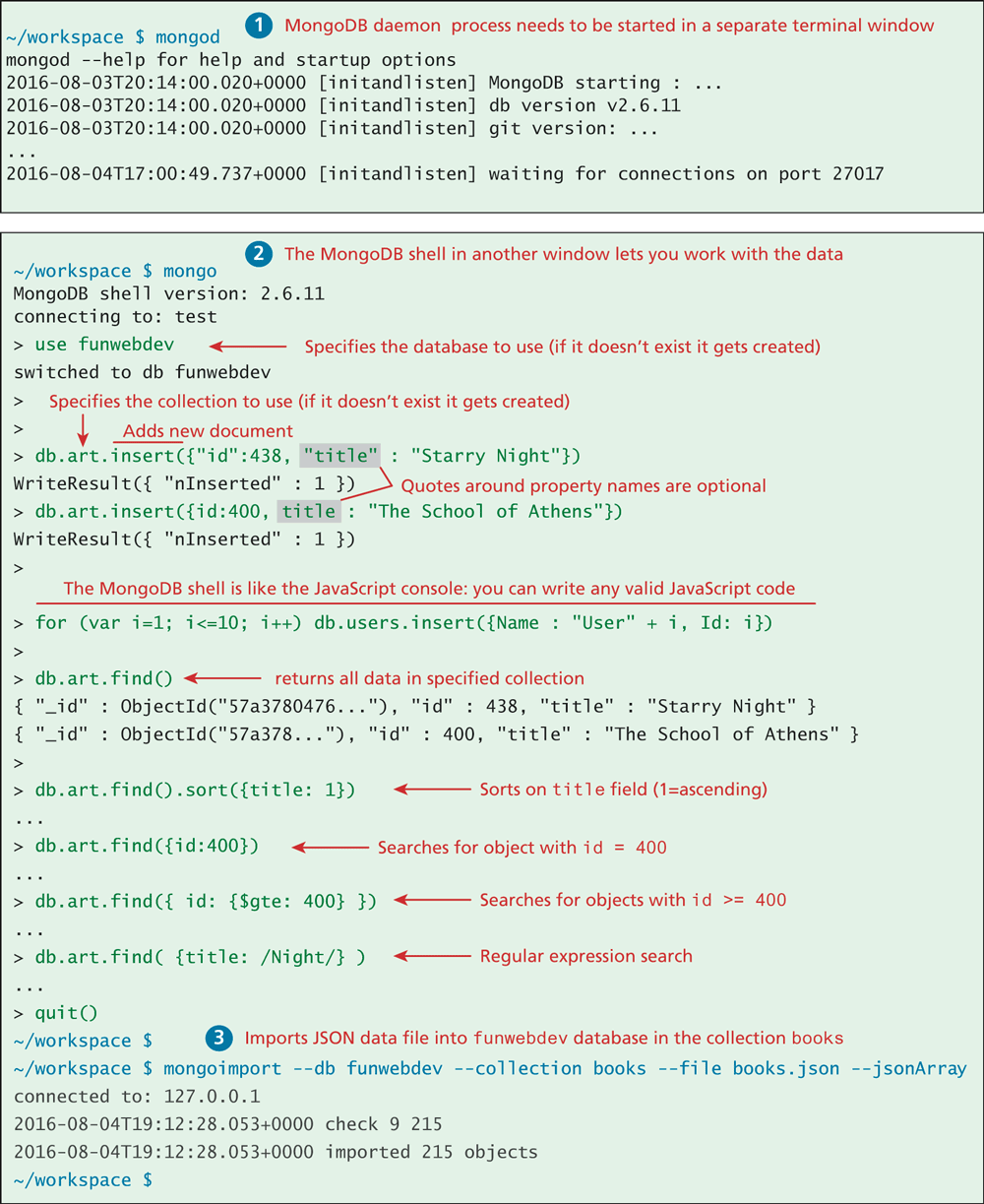
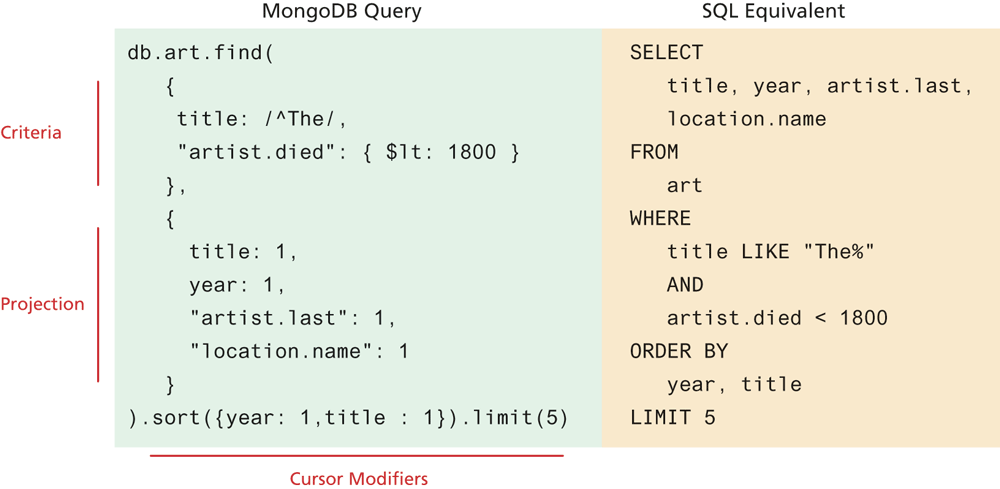
As you can see from Figure 14.30, the syntax for the MongoDB commands is the same as JavaScript. We do not have the space here to cover MongoDB queries and commands in any detail. Figure 14.31 provides a more in-depth look at a more complex find() method call along with the MongoDB terms for an equivalent SQL command.
Figure 14.31 Comparing a MongoDB query to an SQL query
14.6.4 Accessing MongoDB Data in Node.js
There are a number of API possibilities for accessing MongoDB data within a Node application. The official MongoDB driver for Node (https:/
Rather than providing a database API examination similar to what was done with PHP and PDO, we are going to take a different approach here. We are going to demonstrate the Mongoose ORM (http:/
Since Mongoose is a Node package, it needs to be installed using npm before you use it. Like with SQL databases, Mongoose requires you to make a connection first. Listing 14.23 demonstrates the code for connecting to a MongoDB database using Mongoose (and the dotenv package described in the nearby Dive Deeper).
Listing 14.23 Connecting to MongoDB using Mongoose
require('dotenv').config();
console.log(process.env.MONGO_URL);

const mongoose = require('mongoose');

mongoose.connect(process.env.MONGO_URL, {useNewUrlParser: true,            useUnifiedTopology: true});
const db = mongoose.connection;
db.on('error', console.error.bind(console, 'connection error:'));
db.once('open',  () => {
   console.log('connected to mongo');
});
Like with other ORMs, using Mongoose involves defining object schemas. Because we are going to be accessing MongoDB data, this is generally a straightforward process since the data is stored already as objects within MongoDB. Mapping a relational database to an object schema is typically a more complicated process. Listing 14.24 illustrates how to set up a model as a separate module in Node.
Listing 14.24 Creating a Mongoose model
const mongoose = require('mongoose');
// define a schema that maps to the structure of the data in MongoDB
const bookSchema = new mongoose.Schema({
   id: Number,
   isbn10: String,
   isbn13: String,
   title: String,
   year: Number,
   publisher: String,
   production: {
       status: String,
       binding: String,
       size: String,
       pages: Number,
       instock: String
   },
   category: {
     main: String,
     secondary: String
   }
 });
// now create model using this schema that maps to books collection in database
module.exports = mongoose.model('Book', bookSchema,'books');
 Note
Note
The name of the mongoose model, by default, must be a singular version of the plural of the collection name. In the example in Listing 14.25, the MongoDB collection name is “books”; thus the model name must be “book”.
Listing 14.25 Web service using MongoDB data and Mongoose ORM
// get our data model
const Book = require('./models/Book.js');

app.get('/api/books', (req,resp) => {
      // use mongoose to retrieve all books from Mongo
      Book.find({}, function(err, data) {
         if (err) {
            resp.json({ message: 'Unable to connect to books' });
         } else {
            // return JSON retrieved by Mongo as response
            resp.json(data);
         }
      });
   });

app.get('/api/books/:isbn', (req,resp) => {
      // use mongoose to retrieve all books from Mongo
      Book.find({isbn10: req.params.isbn}, function(err, data) {
         if (err) {
            resp.json({ message: 'Book not found' });
         } else {
            resp.json(data);
         }
      });
   });
Test Your Knowledge #2
In this Test Your Knowledge, you will import a JSON file into MongoDB and then create an API for it.
Import the file travel-images.json into a collection named images. If you are using the labs, the instructions for doing so are covered in Exercise 14b.4.
Create a new file in the models folder named Image.js. Using Listing 14.24 and 14.25 as your guide, define a model for the images collection; the file single-image.json can help you define the schema for this collection.
Create a new file named image-server.js which implements following routes:
retrieve all images (e.g. path /api/images/)
retrieve just a single image with a specific image id (e.g. path /api/images/1)
retrieve all images from a specific city (e.g., path /api/images/city/Calgary). To make the find() case insensitive, you can use a regular expression:
find({'location.city': new RegExp(city,'i')}, (err,data) => {...})retrieve all images from a specific country (e.g., path /api/images/country/canada)