14.4 Working with SQL in PHP
The previous sections have provided some background information on relational databases. Now it is time to actually learn how to access SQL databases. In this section you will be learning how to use PHP to do so. We could have used Node instead to access these same databases; we will use Node for working with NoSQL databases.
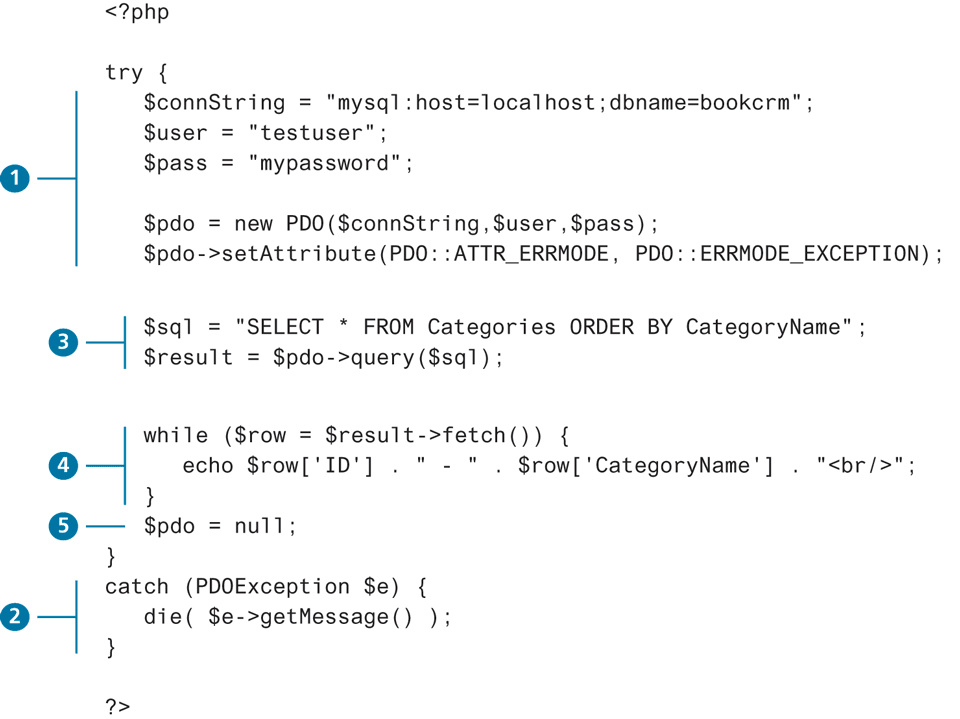
Back in Figure 14.3, you may have noticed that server-side programs make use of a database API to programmatically access a database. In the early years of PHP, developers tended to use the mysqli extension to work with MySQL. This API only allowed access to MySQL databases; initially this wasn't too much of a limitation since most PHP applications used MySQL. But as PHP became more popular, developers needed an API that could access other database systems. The API that could do so has been available since PHP 5.1 and is known as PDO. It is an abstraction layer (i.e., a set of classes that hide the implementation details for some set of functionality) that, with the appropriate drivers, can be used with any relational database, and not just MySQL. With PDO, the basic database connection algorithm is:
Connect to the database.
Handle connection errors.
Execute the SQL query.
Process the results.
Free resources and close connection.
Figure 14.21 illustrates these steps. The following sections will examine each of these steps in more detail.
Figure 14.21 Basic database connection algorithm
 Note
Note
Be cautious with online help in regard to working with PHP and databases. As mentioned earlier in the book in the context of JavaScript, search engine algorithms reward pages with numerous back links. As such, older answers on sites like StackOverflow may show up ahead of better, newer answers. For instance, when I searched in spring 2020 for "best way to connect to MySQL in PHP," the top result was a StackOverflow answer from 2010 that used only mysqli and not PDO.
14.4.1 Connecting to a Database
Before we can start running queries, our program needs to set up a connection to the relevant database. In the context of database programming, a connection is like a pipeline of sorts that allows communication between a DBMS and an application program. With MySQL databases, you have to supply the following information when making a database connection: the host or URL of the database server, the database name, and the database user name and password. With SQLite databases, you only need to supply the path to the file:
$pdo = new PDO('sqlite:./movies.db');Listings 14.3 and 14.4 illustrate how to make a connection to a database using the mysqli and PDO approaches. Notice that the PDO approach uses a connection string to specify the database details. A connection string is a standard way to specify database connection details: it is a case-sensitive string containing name=value pairs separated by semicolons.
Listing 14.3 Connecting to a database with mysqli (procedural)
// modify these variables for your installation
$host = "localhost";
$database = "bookcrm";
$user = "testuser";
$pass = "mypassword";

$connection = mysqli_connect($host, $user, $pass, $database);
Listing 14.4 Connecting to a database with PDO (object-oriented)
// modify these variables for your installation
$connectionString = "mysql:host=localhost;dbname=bookcrm";
// you may need to add this if db has UTF data
$connectionString .= ";charset=utf8mb4;";
$user = "testuser";
$pass = "mypassword";

$pdo = new PDO($connectionString, $user, $pass);
Note
Many of the code samples in this section make use of the SQL field wildcard (i.e., SELECT *). While this is convenient from the perspective of a textbook writer or a student first learning this material, it should be noted that in real-world code, you should explicitly specify the fieldnames instead of using the wildcard.
Why? It's more efficient to fetch only the data you needed instead of all of it. It also creates more maintainable code. You may find yourself at times needing to access field data by numeric index. If you use the wildcard, the retrieved field data will be in the same order as the underlying database table. By explicitly specifying the field names via the SELECT statement, you as developer have control over the field order.
 Pro Tip
Database systems maintain a limited number of connections and are relatively time intensive for the DBMS to create and initialize, so in general one should try to minimize the number of connections used in a page as well as the length of time a connection is being used.
Storing Connection Details
Looking at the code in Listings 14.3 and 14.4, you (hopefully) thought that from a design standpoint hard-coding the database connection details in your code is not ideal. Indeed, connection details almost always change as a site moves from development, to testing, to production, and if you have many pages, then remembering to change these details in all those pages each time the site moves is a recipe for bugs and errors.
Remembering the design precept “separate that which varies from that which stays the same,” we should move these connection details out of our connection code and place it in some central location so that when we do have to change any of them we only have to change one file.
One common solution is to store the connection details in defined constants that are stored within a file named config.inc.php (or something similar), as shown in Listing 14.5. Of course, we absolutely must ensure that users cannot access this file, so this file should be stored outside of the web root within some type of folder secured against user requests.
Listing 14.5 Defining connection details via constants in a separate file (config.inc.php)
<?php
define('DBHOST', 'localhost');
define('DBNAME', 'bookcrm');
define('DBUSER', 'testuser');
define('DBPASS', 'mypassword');
define('DBCONNSTRING',"mysql:host=". DBHOST. ";dbname=". DBNAME);
?>
Once this file is defined, we can simply use the require_once() function as shown in Listing 14.6.
Listing 14.6 Using the connection constants
require_once('protected/config.inc.php');
$pdo = new PDO(DBCONNSTRING,DBUSER,DBPASS);
Pro Tip
Even better from a security standpoint, would be to store the database details in an .env file, read it in at runtime, and then place the read-in values within the $_ENV superglobal array. Unfortunately, the developer will either have to write the .env reading code themselves, or make use of a third-party package, such as phpdotenv or dotenv. This will likely require using composer, which is PHP's equivalent to npm.
14.4.2 Handling Connection Errors
Unfortunately not every database connection always works. Sometimes errors occur when trying to create a connection for the first time; other times connection errors occur with normally trouble-free code because there is a problem with the database server. Whatever the reason, you always need to be able to handle potential connection errors in your code.
The approach in PDO for handling connection errors uses try...catch exception-handling blocks. Listing 14.7 illustrates this approach.
Listing 14.7 Handling connection errors with PDO
try {
   $pdo = new PDO(DBCONNSTRING,DBUSER,DBPASS);
   ...
}
catch (PDOException $e) {
   die(  $e->getMessage()  );
}
PDO Exception Modes
It should be noted that PDO has three different error-handling approaches/modes.
PDO::ERRMODE_SILENT. This is the default mode. PDO will simply set the error code for you, and this is the preferred approach once the site is in normal production use.
PDO::ERRMODE_WARNING. In addition to setting the error code, PDO will output a warning message. This setting is useful during debugging/testing, if you just want to see what problems occurred without interrupting the flow of the application.
PDO::ERRMODE_EXCEPTION. In addition to setting the error code, PDO will throw a
PDOExceptionand set its properties to reflect the error code and error information. This setting is especially useful during debugging, as it stops the script at the point of the error.
You can set the exception mode via the setAttribute() method of the PDO object, as shown in Listing 14.8.
Listing 14.8 Setting the PDO exception mode
try {
   $pdo = new PDO(DBCONNSTRING,DBUSER,DBPASS);
   // useful during initial development and debugging
   $pdo->setAttribute(PDO::ATTR_ERRMODE, PDO::ERRMODE_EXCEPTION);
   ...
}
Note
It is important to always catch the exception thrown from the PDO constructor. By default, PHP will terminate the script and then display the standard stack trace, which might reveal sensitive connection details, such as the user name and password.
14.4.3 Executing the Query
If the connection to the database is successfully created, then you are ready to construct and execute the query. This typically involves creating a string that contains the SQL statement and then calling one of the query functions/methods as shown in Listings 14.9 and 14.10. Remember that SQL is case insensitive, so the use of uppercase for the SQL reserved words is purely a coding convention to increase readability.
Listing 14.9 Executing a SELECT query
$sql = "SELECT * FROM Categories ORDER BY CategoryName";

// returns a PDOStatement object
$result = $pdo->query($sql);
Listing 14.10 Executing a DELETE query
$sql = "DELETE FROM artists WHERE LastName = 'Connolly'";

// returns number of rows that were deleted
$count = $pdo->exec($sql);
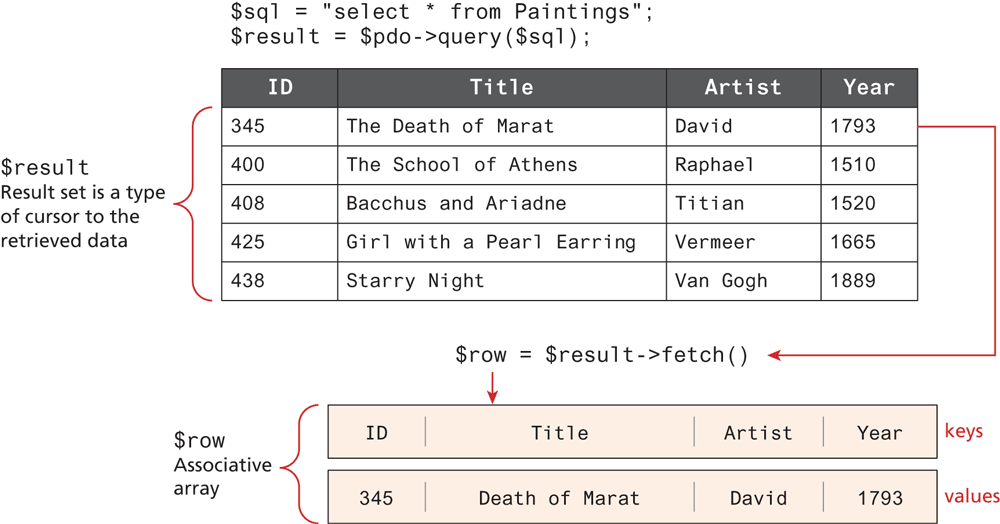
So what type of data is returned by these query functions? The exec() function in Listing 14.10 returns an integer indicating the number of affected records; it shouldn't be used for SELECT queries. The query() function in Listing 14.9 returns a result set, a type of cursor or pointer to the returned data. As the comment indicates, this result set is in the form of a PDOStatement object. In the next section you will see how you can examine and display this result set. If the query was unsuccessful (for instance, a query with a WHERE clause that was not matched by the table data), then the query function returns FALSE.
14.4.4 Processing the Query Results
If you are running a SELECT query, then you will want to do something with the retrieved result set, such as displaying it, or performing calculations on it, or searching for something in it. Listing 14.11 illustrates one technique for displaying content from a result set.
Listing 14.11 Looping through the result set
$sql = "SELECT * FROM Paintings ORDER BY Title";

// run the query
$result = $pdo->query($sql);

// fetch a record from result set into an associative array
while ($row = $result->fetch()) {
   // the keys match the field names from the table
   echo $row['ID']. " - ". $row['Title'];
   echo "<br/>";
}
Notice that some type of fetch function must be called to move the data from the database result set to a regular PHP array. Once in the array, then you can use any PHP array manipulation technique. Figure 14.22 illustrates the process of fetching from the result set.
Figure 14.22 Fetching from a result set
Note
Even though SQL is case-insensitive, PHP is not. The associative array key references must match exactly the case of the field names in the table. Thus in the example in Listing 14.11, the reference $row['Id'] would generate an error since the field is defined as “ID” in the table.
The PDO query() method returns an object of type PDOStatement. Interestingly, PDOStatement objects behave just like an array when passed into a foreach loop. That means the following loop would be equivalent to that shown in Listing 14.11:
foreach ($result as $row) {
  echo $row['Title']. "<br/>";
}
Looking at this foreach loop code, you would be tempted to think the query() method returned an array. But it in fact returns a forward-only cursor—that is, a pointer to the next record—and not an array. This can be seen if you tried two foreach loops in a row on the same $result variable: the first loop would display all the returned data, while the second loop would display nothing since the $result cursor would be at the end of the data after the first loop.
It is possible to fetch all the remaining rows in the result set into an array using the fetchAll() method, as shown in Listing 14.12.
Listing 14.12 Fetching into an array
$data = $result->fetchAll();
echo '<h2>First loop</h2>';
foreach ($data as $row){
    echo $row['Title']. "<br>";
}
echo '<h2>Second loop</h2>';
foreach($data as $row){
    echo $row['Title']. "<br>";
}
Because server memory is always a finite and constrained resource, fetchAll() should only be used for small blocks of data.
Interestingly, by default the fetch() method returns an array indexed by both the column name and the column number. This means in the loop code in Listing 14.11, you could also access the title column data using $row[1].
This duplicated array data is undesirable, however, when you are encoding it as a JSON string (for instance, when you are creating a PHP-based API). You can eliminate the numerically indexed duplicates by adding the following optional parameter:
$row = $result->fetch(PDO::FETCH_ASSOC);Fetching into an Object
As an alternative to fetching into an array, you can fetch directly into a custom object and then use properties to access the field data. For instance, let us imagine we have the following (very simplified) class:
class Book {
    public $ID;
    public $Title;
    public $CopyrightYear;
    public $Description;
 }
We can then have PHP populate an object of type Book as shown in Listing 14.13.
Listing 14.13 Populating an object from a result set (PDO)
$sql = "SELECT * FROM Books";
$result = $pdo->query($sql);

// fetch a record into an object of type Book
while (  $b = $result->fetchObject('Book')  ) {
    // the property names match the field names from the table
    echo 'ID: '.  $b->ID  . '<br/>';
    echo 'Title: '.  $b->Title  . '<br/>';
    echo 'Year: '.  $b->CopyrightYear  . '<br/>';
    echo 'Description: '.  $b->Description  . '<br/>';
    echo '<hr>';
}
While convenient, this approach does have a key limitation: the property names must match exactly (including the case) the field names in the table(s) in the query. A more flexible object-oriented approach would be to have the Book object populate its own properties from the record data passed in the object constructor, as shown in Listing 14.14. Notice that using this approach means the class property names do not have to mirror the field names.
Listing 14.14 Letting an object populate itself from a result set
class Book {
    public $id;
    public $title;
    public $year;
    public $description;

    function __construct($record)
    {
       $this->id = $record['ID'];
       $this->title = $record['Title'];
       $this->year = $record['CopyrightYear'];
       $this->description = $record['Description'];
    }
}
...
// in some other page or class
$sql = "SELECT * FROM Books";
$result = $pdo->query($sql);

// fetch a record normally
while ( $row = $result->fetch() ) {
    $b = new Book($row);
    echo 'ID: '.  $b->id  . '<br/>';
    echo 'Title: '.  $b->title  . '<br/>';
    echo 'Year: '.  $b->year  . '<br/>';
    echo 'Description: '.  $b->description  . '<br/>';
    echo '<h>';
}
It should be noted that this is a very simplified example. Rather than pass the Book object the associative array returned from the fetch(), the Book might instead invoke some type of database helper class, thereby removing all the database code from the PHP page. This is a much-preferred option as it greatly simplifies the markup.
14.4.5 Freeing Resources and Closing Connection
When you are finished retrieving and displaying your requested data, you should release the memory used by any result sets and then close the connection so that the database system can allocate it to another process. Listing 14.15 illustrates the code for closing the connection.
Listing 14.15 Closing the connection
try {
   $pdo = new PDO(DBCONNSTRING,DBUSER,DBPASS);
   ...
   // closes connection and frees the resources used by the PDO object
   $pdo = null;
}
Many programmers do not explicitly code this step since it will happen anyway behind the scenes when the PHP script has finished executing. Nonetheless, it makes sense to get into the habit of explicitly closing the connection immediately after your script no longer needs it. Waiting until the entire page script has finished might not be wise since over time functionality might get added to the page, which lengthens its execution time. For instance, imagine a page that displays information from a database and which doesn’t explicitly close the connection but relies on the implicit connection closing once the script finishes execution. Then at some point in the future, new functionality gets added; this new functionality displays information obtained from a third-party web service. This externality has a time cost, which means the page takes longer to finish executing. That connection is now wasting finite server resources (that could be helping other requests), since the database processing is finished, but the page script has not finished executing due to the delay incurred by this external service. For this reason, it is a good practice to explicitly close your connections.
14.4.6 Working with Parameters
Recall that we typically use SQL in PHP to retrieve data from a database and then echo it out in a page’s markup. Figure 14.1 illustrated how the same page design can be used to display different data records. But how does a PHP page “know” which data record to display? In PHP, this is usually accomplished via query string parameters, as shown in Figure 14.23.
Figure 14.23 Integrating user input data into a query
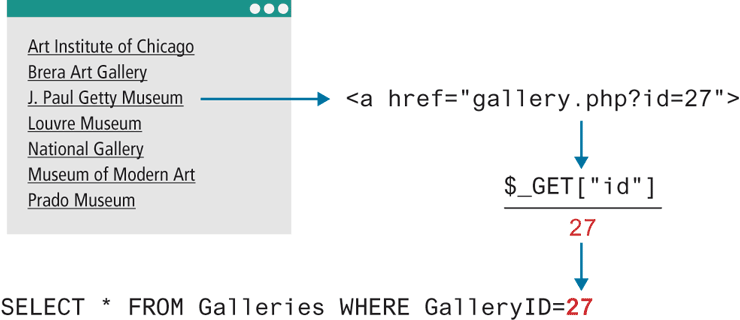
So how would you accomplish this in PHP? Listing 14.16 illustrates a straightforward solution.
Listing 14.16 Integrating user input into a query (first attempt)
$pdo = new PDO(DBCONNSTRING,DBUSER,DBPASS);
$sql = "SELECT * FROM Galleries WHERE GalleryID=". $_GET["id"];
$result = $pdo->query($sql);
While this does work, it opens our site to one of the most common web security vulnerabilities, the SQL injection attack. In this attack, a devious (or curious) user decides to enter a SQL statement into a form’s text box (or indeed directly into any query string). As you will see later in Chapter 16 on Security, the SQL injection attack is quite common and can be incredibly dangerous to a site’s database.
Sanitizing User Data
The SQL injection class of attack can be protected against in a number of ways, the simplest of which is to sanitize user data before using it in a query. Sanitization uses capabilities built into database systems to remove any special characters from a desired piece of text. In MySQL, user inputs can be partly sanitized using the quote() method. However, these methods are only partially reliable; it is recommended that you use prepared statements instead.
Pro Tip
Never trust user input. Never trust user input. We perhaps should write this a few dozen more times, that's how important it is for you to remember this maxim.
What's user input? It includes not just form data, but also query string data in URLs, cookies, and HTTP request headers.
Prepared Statements
To fully protect the site against SQL injection attacks, you should go beyond basic user-input sanitization. The most important (and best) technique is to use prepared statements. A prepared statement is actually a way to improve performance for queries that need to be executed multiple times. When MySQL creates a prepared statement, it does something akin to a compiler in that it optimizes it so that it has superior performance for multiple requests. It also integrates sanitization into each user input automatically, thereby protecting us from SQL injection.
Listing 14.17 illustrates two ways of explicitly binding values to parameters using PDO. At first glance it looks more complicated. The most important thing to notice is that there are two different ways to construct a parameterized SQL string. The first method uses a question mark as a placeholder that will be filled later when we bind the actual data into the placeholder.
Listing 14.17 Using a prepared statement
// retrieve parameter value from query string
$id = $_GET['id'];

/* method 1 – notice the ? parameter */
$sql = "SELECT Title, CopyrightYear FROM Books WHERE ID = ?";
$statement = $pdo->prepare($sql);
$statement->bindValue(1, $id); // bind to the 1st ? parameter
$statement->execute();

/* method 2 */
$sql = "SELECT Title, CopyrightYear FROM Books WHERE ID = :id";
$statement = $pdo->prepare($sql);
$statement->bindValue(':id', $id);
$statement->execute();
The second approach to binding values uses a named parameter which assigns labels in prepared SQL statements which are then explicitly bound to variables in PHP. The advantage of the named parameter will be more apparent once we look at an example that has many parameters, such as the INSERT query in Listing 14.18. If you look carefully, there is actually a mistake/bug in Listing 14.18. Can you find it?
Listing 14.18 Using named parameters
/* technique 1 - question mark placeholders, explicit binding */
$sql = "INSERT INTO books (ISBN10, Title, CopyrightYear, ImprintId,
        ProductionStatusId, TrimSize, Description) VALUES (?,?,?,?,?,?,?)";
$statement = $pdo->prepare($sql);
$statement->bindValue(1, $_POST['isbn']);
$statement->bindValue(2, $_POST['title']);
$statement->bindValue(3, $_POST['year']);
$statement->bindValue(4, $_POST['imprint']);
$statement->bindValue(4, $_POST['status']);
$statement->bindValue(6, $_POST['size']);
$statement->bindValue(7, $_POST['desc']);
$statement->execute();

/* technique 2 - named parameters */
$sql = "INSERT INTO books (ISBN10, Title, CopyrightYear, ImprintId,
        ProductionStatusId, TrimSize, Description) VALUES (:isbn, :title,:year,:imprint,:status,:size,:desc) ";
$statement = $pdo->prepare($sql);
$statement->bindValue(':isbn', $_POST['isbn']);
$statement->bindValue(':title', $_POST['title']);
$statement->bindValue(':year', $_POST['year']);
$statement->bindValue(':imprint', $_POST['imprint']);
$statement->bindValue(':status', $_POST['status']);
$statement->bindValue(':size', $_POST['size']);
$statement->bindValue(':desc', $_POST['desc']);
$statement->execute();
Did you find the bug? The problem is in the following lines:
$statement->bindValue(4, $_POST['imprint']);
$statement->bindValue(4, $_POST['status']);
$statement->bindValue(6, $_POST['size']);
As I was writing the code (or perhaps copying and pasting) I forgot to change the parameter index number for status. This type of problem is especially common if at some future point the query has to be modified by changing or removing a parameter. The person making this change will have to count the question marks to see if the parameter is, for instance, the seventh or eighth or ninth parameter—clearly not an ideal approach. For this reason, the named parameter technique with explicit binding is generally preferred.
It is also possible to pass in parameter values within an array to the execute() method and cut out the calls to bindValue() altogether, as shown in Listing 14.19.
Listing 14.19 Alternative to bindValue()
$year1=1800;
$year2=1900;
$sql = "SELECT * FROM Paintings WHERE YearOfWork > ? and YearOfWork < ?";
$statement = $pdo->prepare($sql);
$statement->execute( array($year1,$year2) );

// alternate to the above
$sql = "SELECT * FROM Paintings WHERE YearOfWork>:y1 and YearOfWork<:y2";
$statement = $pdo->prepare($sql);
$statement->execute( array("y1"=>$year1,"y2"=>$year2) );
14.4.7 Using Transactions
While transactions are unnecessary when retrieving data, they should be used for most scenarios involving any database writes. As mentioned back in Section 14.3.4, transactions in PHP can be done via SQL commands or via the database API. Since the earlier section covered the SQL commands for transactions, let’s look at the techniques using our two APIs. Listing 14.20 demonstrates how to make use of transactions.
Listing 14.20 Using transactions (PDO)
$pdo = new PDO($connString,$user,$pass);
// turn on exceptions so that exception is thrown if error occurs
$pdo->setAttribute(PDO::ATTR_ERRMODE, PDO::ERRMODE_EXCEPTION);
...
try {
    // begin a transaction
    $pdo->beginTransaction();
    // a set of queries: if one fails, an exception will be thrown
    $pdo->exec("INSERT INTO Categories (CategoryName) VALUES
                ('Philosophy')");
    $pdo->exec("INSERT INTO Categories (CategoryName) VALUES ('Art')");
    // if we arrive here, it means that no exception was thrown
    // which means no query has failed, so we can commit the
    // transaction
    $pdo->commit();
} catch (Exception $e) {
    // we must rollback the transaction since an error occurred
    // with insert
    $pdo->rollback();
}
14.4.8 Designing Data Access
When you are first learning web development or any type of programming, one’s focus is generally quite short term. “I just want to get this to work!” is the common cry of all new programmers. That is, we tend to think that the initial coding phase of a project is the most important or the most time-consuming. But, in fact, it’s long been recognized among experienced developers that it is the maintenance and revisions phase that ends up being the costliest in terms of time spent on any software project. For web projects, this is likely even more true, given the relative common frequency with which web projects have their visual design and functionalities updated.
The idea behind proper software design is that by spending more time and effort in the initial coding phase, the resulting code base will be easier to maintain and revise in the future. Perhaps the most important of these software design goals is to reduce the number of dependencies to externalities in your code (also known as reducing coupling). Why is this so important? The goal of reducing dependencies is to shield as much of your code base from things that might change in the future. Database details such as connection strings and table and field names are examples of externalities. These details tend to change over the life of a web application. Initially, the database for our website might be a SQLite database on our development machine; later it might change to a MySQL database on a data server, and even later, to a relational cloud service. Ideally, with each change in our database infrastructure, we would have to change very little in our code base. But in the type of database coding we have used in this section, this would not be the case. By using PDO code containing SQL and connection details in each PHP page, every time we change our database infrastructure, we would have to change every PHP page, which is far from ideal from a software design perspective.
What can we do to make our database code more maintainable? One simple step might be to extract all PDO code into separate functions or classes and use those instead. For instance, Listing 14.21 shows a simple class that encapsulates the ability to create a connection and run a query. Other features such as transaction support could also be added to this class.
Listing 14.21 Encapsulating database access via a helper class
class DatabaseHelper {

    public static function createConnection($values=array()) {
        $connString = $values[0];
        $user = $values[1];
        $password = $values[2];

        $pdo = new PDO($connString,$user,$password);
        $pdo->setAttribute(PDO::ATTR_ERRMODE, PDO::ERRMODE_EXCEPTION);
        $pdo->setAttribute(PDO::ATTR_DEFAULT_FETCH_MODE, PDO::FETCH_ASSOC);
        return $pdo;
    }
    public static function runQuery($pdo, $sql, $parameters=array())     {
        // Ensure parameters are in an array
        if (!is_array($parameters)) {
            $parameters = array($parameters);
        }
        $statement = null;
        if (count($parameters) > 0) {
            // Use a prepared statement if parameters
            $statement = $pdo->prepare($sql);
            $executedOk = $statement->execute($parameters);
            if (! $executedOk) {
                throw new PDOException;
            }
        } else {
            // Execute a normal query
            $statement = $pdo->query($sql);
            if (!$statement) {
                throw new PDOException;
            }
        }
        return $statement;
    }
}
You might wonder why creating the connection happens separately in DatabaseHelper and is not part of the runQuery() method. Recall that database connections are a very limited resource and are very slow to create. Any given PHP page should thus only create one connection, and then use that single connection for all of its database access.
Note
It is vital that you only create a connection once on any PHP page. Not only are connections a scarce resource (often only 64–128 are available) that may need to be shared by hundreds of threads/requests, but also creating a connection in the absence of connection pooling is very slow.
Remember that every time you execute the code new PDO(), you are creating a connection. Every year, my students hand in assignments in which they create a new PDO object for every database table they are accessing. In some of my assignments, a given PHP page might be displaying data from, say five tables, so instead of sharing the one connection (i.e., the one PDO object), they are creating five connections. Because they are the only user, these students do not fully experience how their solution would not scale at all to increases in load. They may however notice that their page is still slow to load, even with just a single user, because of the multiple connections. If your database-driven PHP pages are slow, make sure you are not creating multiple connections!
The following code illustrates two example uses of this class.
try {
  $conn = DatabaseHelper::createConnectionInfo(array(DBCONNECTION,
            DBUSER, DBPASS));
  $sql = "SELECT * FROM Paintings ";
  $paintings = DatabaseHelper::runQuery($conn, $sql, null);
  foreach ($paintings as $p) {
     echo $p["Title"];
  }
  $sql = "SELECT * FROM Artists WHERE Nationality=?";
  $artists = DatabaseHelper::runQuery($conn, $sql, Array("France"));
}
While an improvement, we still have a database dependency in this code with the SQL statements and field names. You could eliminate the SQL from this code by encapsulating the code needed for accessing a given table into its own class, as shown in Listing 14.22. Such a class is often called a table gateway or data access class.
Listing 14.22 Sample gateway class for painting table
class PaintingDB {
   private static $baseSQL = "SELECT * FROM Paintings ";
   public function __construct($connection) {
      $this->pdo = $connection;
   }
   public function getAll() {
      $sql = self::$baseSQL;
      $statement = DatabaseHelper::runQuery($this->pdo, $sql, null);
      return $statement->fetchAll();
   }
   public function findById($id) {
      $sql = self::$baseSQL . " WHERE PaintingID=?";
      $statement = DatabaseHelper::runQuery($this->pdo, $sql, Array($id));
      return $statement->fetch();
   }
   public function getAllForArtist($artistID) {
      $sql = self::$baseSQL . " WHERE Paintings.ArtistID=?";
      $statement = DatabaseHelper::runQuery($this->pdo, $sql, Array($artistID));
      return $statement->fetchAll();
   }
   public function getAllForGallery($galleryID) {
      $sql = self::$baseSQL . " WHERE Paintings.GalleryID=?";
      $statement = DatabaseHelper::runQuery($this->pdo, $sql,       Array($galleryID));
      return $statement->fetchAll();
   }
   // add methods for updating, inserting, and deleting records if needed
}
The code to use this gateway class might look like the following:
// we could alternately put try...catch in the gateway methods
try {
  $gate = new PaintingDB($conn);
  $paintings = $gate->getAll();
  foreach ($paintings as $p) { ... }
}
Now all the PDO and SQL have been removed from our PHP pages. If we need to make changes to the SQL, we will only need to change the gateway classes.