14.3 SQL
Although non-SQL options are discussed later in this chapter, relational databases almost universally use Structured Query Language or, as it is more commonly called, SQL (pronounced sequel) as the mechanism for storing and manipulating data. While each DBMS typically adds its own extensions to SQL, the basic syntax for retrieving and modifying data is standardized and similar. This book focuses on core concepts and provides examples of some of the more common SQL commands.
14.3.1 Database Design
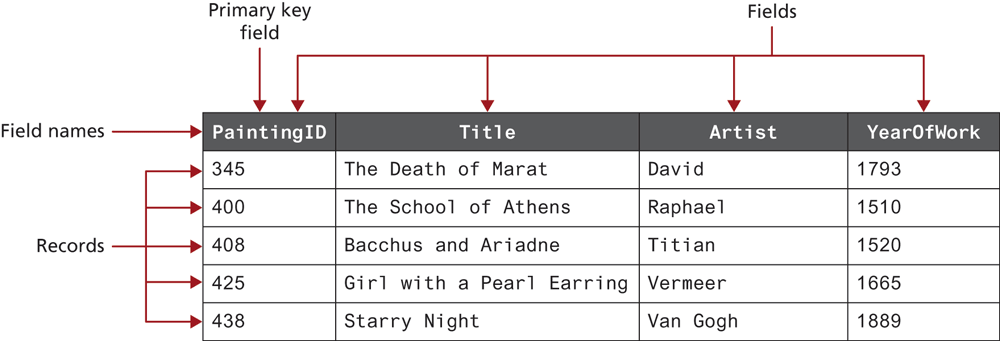
In a relational database, a database is composed of one or more tables. A table is the principal unit of storage in a database. Each table in a database is generally modeled after some type of real-world entity, such as a customer or a product (though as we will see, some tables do not correspond to real-world entities but are used to relate entities together). A table is a two-dimensional container for data that consists of records (rows); each record has the same number of columns. These columns are called fields, which contain the actual data. Each table will have a primary key—a field (or sometimes combination of fields) that is used to uniquely identify each record in a table. Figure 14.9 illustrates these different terms.
Figure 14.9 A database table
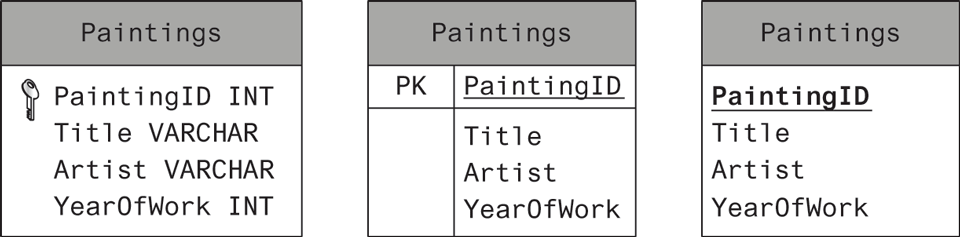
As we discuss database tables and their design, it will be helpful to have a more condensed way to visually represent a table than that shown in Figure 14.9. When we wish to understand what’s in a table, we don’t actually need to see the record data; it is enough to see the field names, and perhaps their data types. Figure 14.10 illustrates several different ways to visually represent the table shown in Figure 14.9. Notice that the table name appears at the top of the table box in all three examples. They differ in how they represent the primary key. The first example also includes the data type of the field, which will be covered shortly.
Figure 14.10 Diagramming a table
One of the strengths of a database in comparison to more open and flexible file formats such as spreadsheets or text files is that a database can enforce rules about what can be stored. This provides data integrity (accuracy and consistency of data) and can reduce the amount of data duplication, which are two of the most important advantages of using databases. This is partly achieved through the use of data types that are akin to those in a statically typed programming language. A list of several common data types is provided in Table 14.1.
Table 14.1 Common Database Table Data Types
| Type | Description |
|---|---|
BIT |
Represents a single bit for Boolean values. Also called BOOLEAN or BOOL. |
BLOB |
Represents a binary large object (which could, for example, be used to store an image). |
CHAR(n) |
A fixed number of characters (n = the number of characters) that are padded with spaces to fill the field. |
DATE |
Represents a date. There are also TIME and DATETIME data types. |
FLOAT |
Represents a decimal number. There are also DOUBLE and DECIMAL data types. |
INT |
Represents a whole number. There is also a SMALLINT data type. |
VARCHAR(n) |
A variable number of characters (n = the maximum number of characters) with no space padding. |
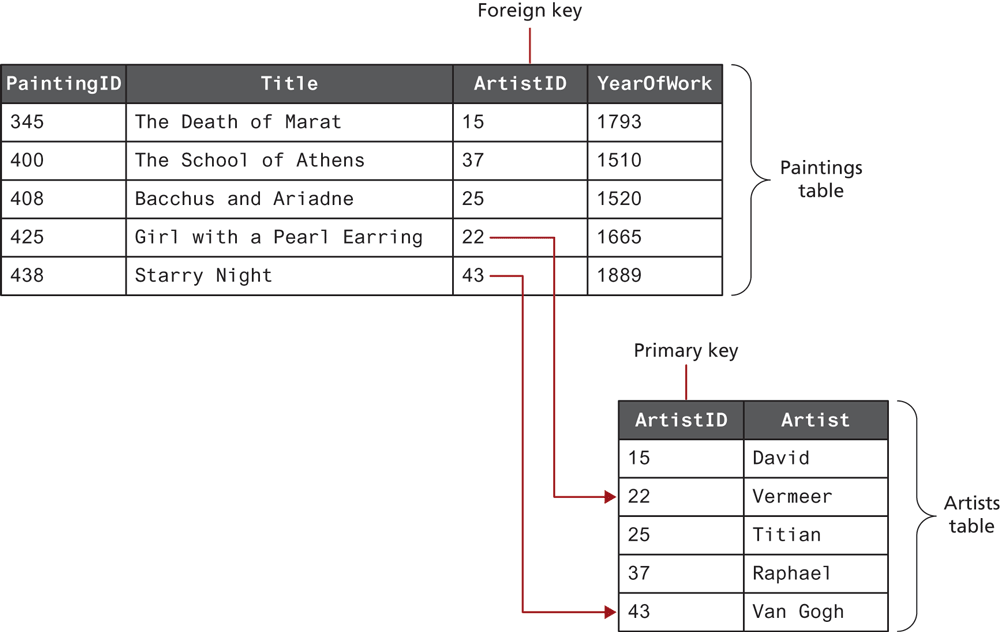
One of the most important ways that data integrity is achieved in a database is by separating information about different things into different tables. Two tables can be related together via a foreign key, which is a field in one table that is the same as the primary key of another table, as shown in Figure 14.11.
Figure 14.11 Foreign keys link tables
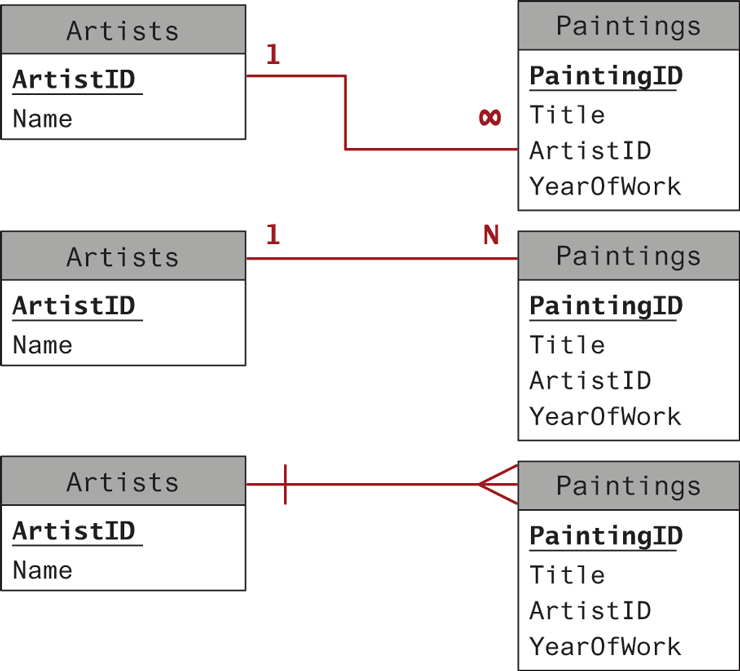
Tables that are linked via foreign keys are said to have a relationship. Most often, two related tables will be in a one-to-many relationship. In this relationship, a single record in Table A (e.g., the paintings table) can have one or more matching records in Table B (e.g., artists table), but a record in Table B has only one matching record in Table A. This is the most common and important type of relationship. Figure 14.12 illustrates some of the different ways of visually representing a one-to-many relationship.
Figure 14.12 Diagramming a one-to-many relationship
 Pro Tip
Database normalization is the advanced technique of designing database tables so that data is entirely connected though foreign keys (rather than duplicate data fields). Although this book does not cover formal theory, consider that as we build relationships in our tables we want to eliminate duplication, and use references whenever possible to increase the consistency of data.
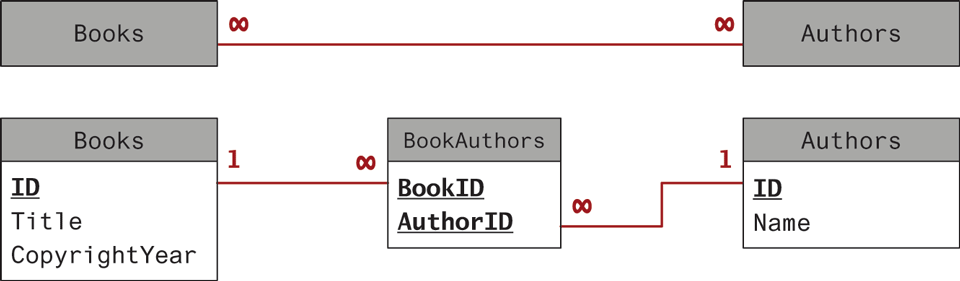
There are two other table relationships: the one-to-one relationship and the many-to-many relationship. One-to-one relationships are encountered less often and are typically used for performance or security reasons. Many-to-many relationships are, on the other hand, quite common. For instance, a single book may be written by multiple authors; a single author may write multiple books. Many-to-many relationships are usually implemented by using an intermediate table with two one-to-many relationships, as shown in Figure 14.13. Note that in this example, the two foreign keys in the intermediate table are combined to create a composite key. Alternatively, the intermediate table could contain a separate primary key field.
Figure 14.13 Implementing a many-to-many relationship
Database design is a substantial topic, one that is very much beyond the scope of this book. Indeed in most university computing programs, there are typically one or even two courses devoted to database design, implementation, and integration. To learn more about database design, you are advised to explore a book devoted to the topic, such as Database Design for Mere Mortals: A Hands-On Guide to Relational Database Design or Modern Database Management, both published by Pearson Education.
 Note
Note
Although the examples in the rest of this section use the convention of capitalizing SQL reserved words, it is just a convention to improve readability. SQL itself is not case sensitive.
14.3.2 SELECT Statement
The SELECT statement is by far the most common SQL statement. It is used to retrieve data from the database. The term query is sometimes used as a synonym for running a SELECT statement (though “query” is used by others for any type of SQL statement). The result of a SELECT statement is a block of data typically called a result set. Figure 14.14 illustrates the syntax of the SELECT statement along with some example queries.
Figure 14.14 SQL SELECT from a single table
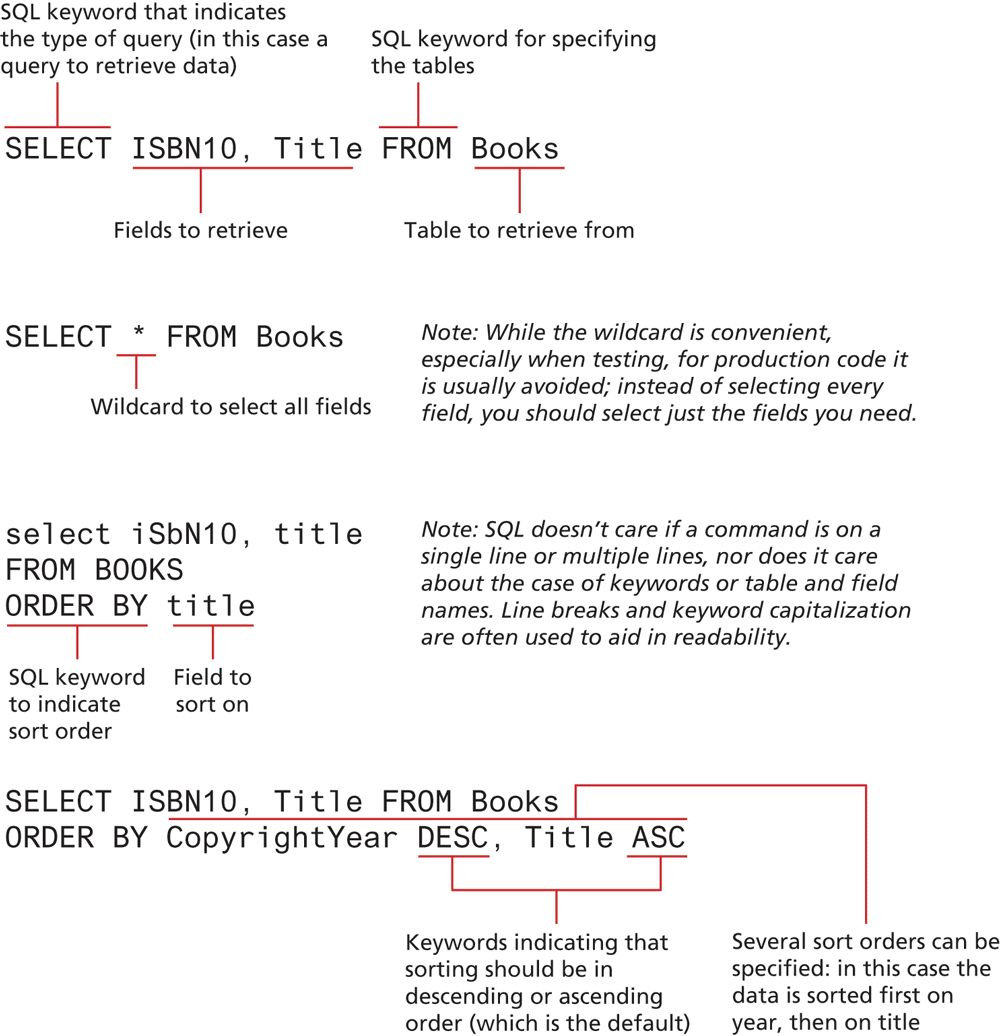
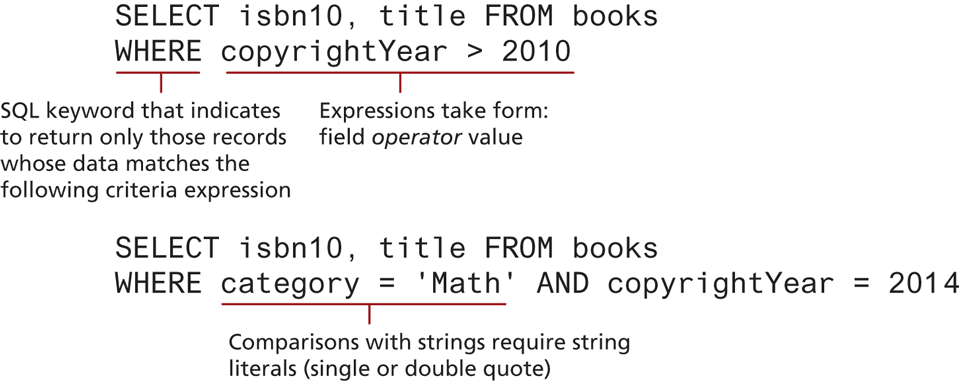
The examples in Figure 14.14 return all the records in the specified table. Often we are not interested in retrieving all the records in a table but only a subset of the records. This is accomplished via the WHERE clause, which can be added to any SELECT statement (or indeed to any of the SQL statements covered in Section 14.2.2 below). That is, the WHERE keyword is used to supply a comparison expression that the data must match in order for a record to be included in the result set. Figure 14.15 illustrates some example uses of the WHERE keyword.
Figure 14.15 Using the WHERE clause
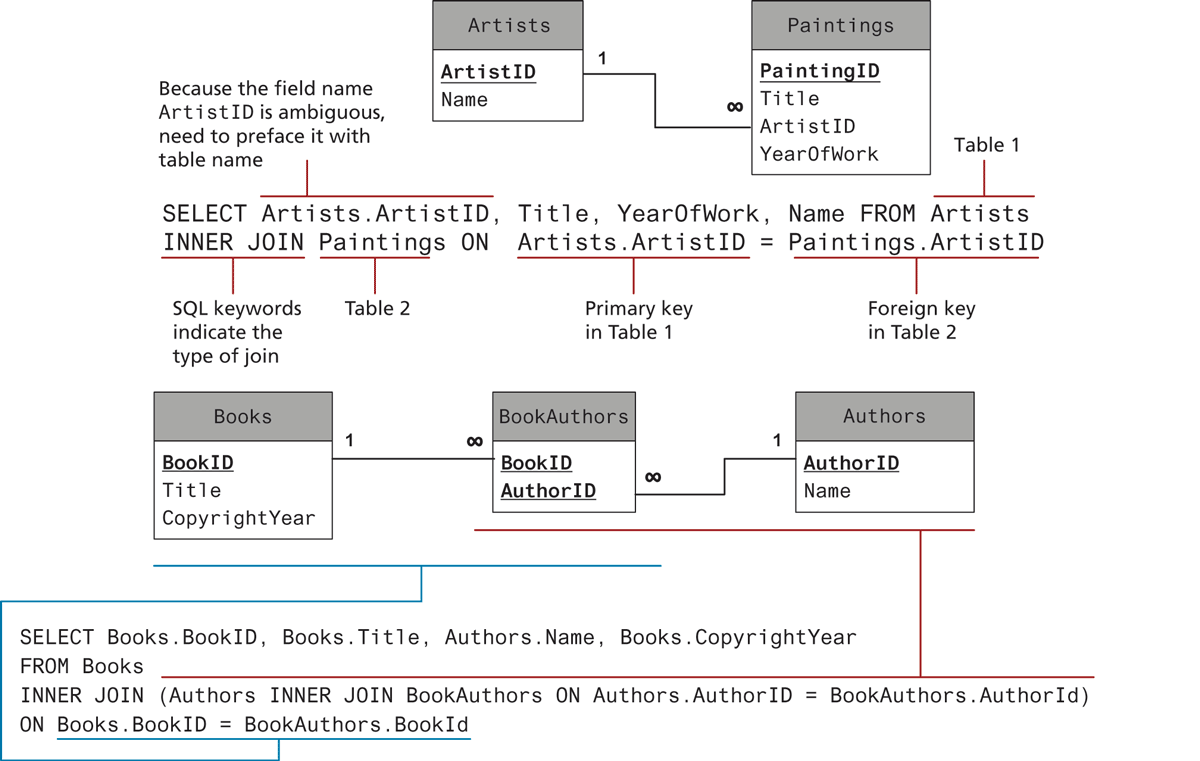
The examples in Figures 14.14 and 14.15 retrieve data from a single table. Retrieving data from multiple tables is more complex and requires the use of a join. While there are a number of different types of join, each with different result sets, the most common type of join (and the one we will be using in this book) is the inner join. When two tables are joined via an inner join, records are returned if there is matching data (typically from a primary key in one table and a foreign key in the other) in both tables. Figure 14.16 illustrates the use of the INNER JOIN keywords to retrieve data from multiple tables.
Figure 14.16 SQL SELECT from multiple tables using an INNER JOIN
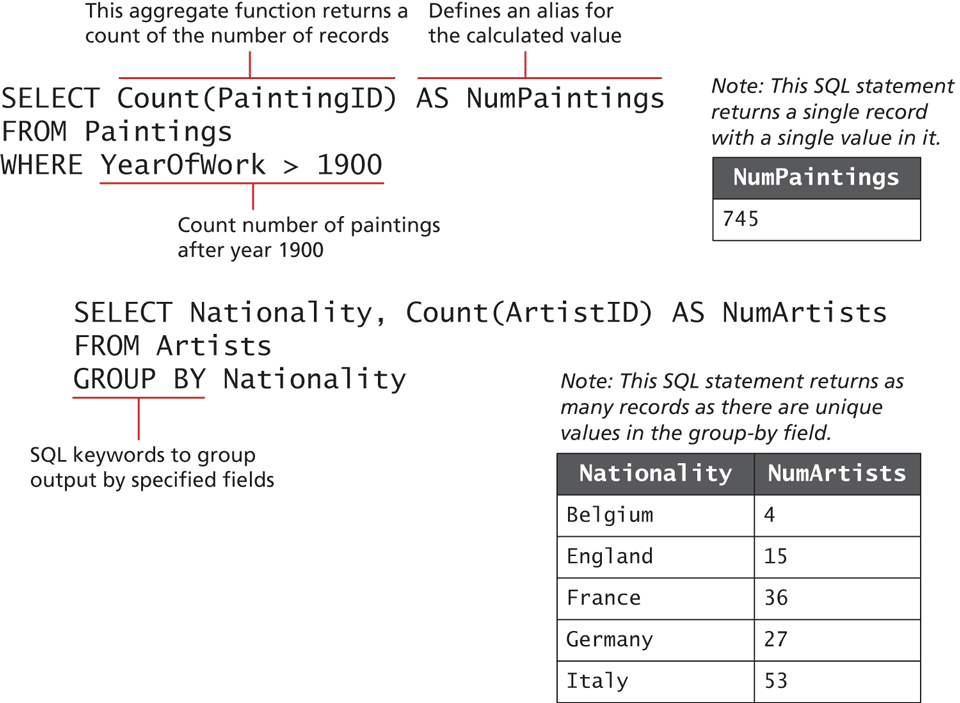
Finally, you may find occasions when you don’t want every record in your table but instead want to perform some type of calculation on multiple records and then return the results. This requires using one or more aggregate functions such as SUM() or COUNT(); these are often used in conjunction with the GROUP BY keywords. Figure 14.17 illustrates some examples of aggregate functions and a GROUP BY query.
Figure 14.17 Using GROUP BY with aggregate functions
14.3.3 INSERT, UPDATE, and DELETE Statements
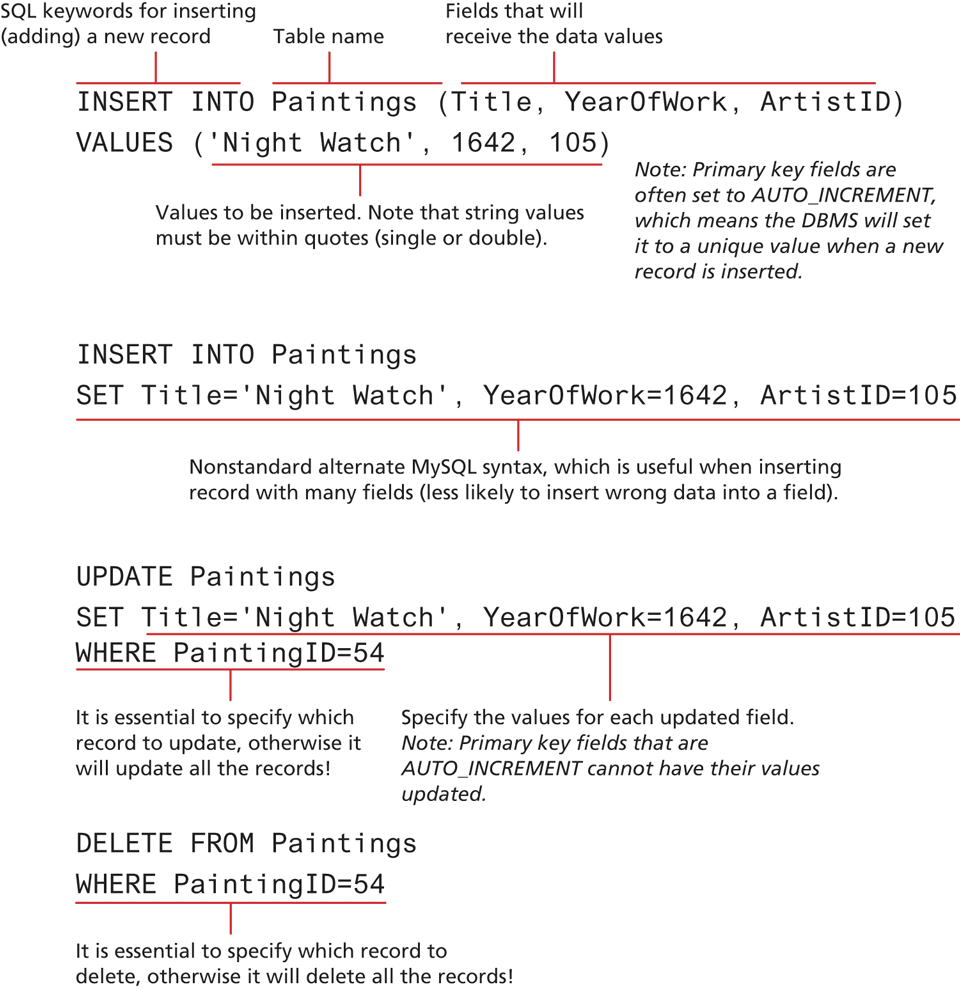
The INSERT, UPDATE, and DELETE statements are used to add new records, update existing records, and delete existing records. Figure 14.18 illustrates the syntax and some examples of these statements. A complete documentation of data manipulation queries in MySQL is published online.6
Figure 14.18 SQL INSERT, UPDATE, and DELETE
14.3.4 Transactions
Anytime one of your PHP pages makes changes to the database via an UPDATE, INSERT, or DELETE statement, you also need to be concerned with the possibility of failure. While this is a very important topic, it is an advanced one, and if you are relatively inexperienced with databases, you may want to skip over this section.
Perhaps the best way to understand the need for transactions is to do so via an example. For instance, let us imagine how a purchase would work in a web storefront. Eventually the customer will need to pay for his or her purchase. Presumably, this occurs as the last step in the checkout process after the user has verified the shipping address, entered a credit card, and selected a shipping option. But what actually happens after the user clicks the final Pay for Order button? For simplicity’s sake, let us imagine that the following steps need to happen:
Note
One of the more common needs when inserting a record whose primary key is an AUTO_INCREMENT value is to immediately retrieve that DBMS-generated value. For instance, imagine a form that allows the user to add a new record to a table and then lets the user continue editing that new record (so that it can be updated). In such a case, after inserting, we will need to pass the just-generated primary key value in a query string for subsequent requests.
Each DBMS has its own technique for retrieving this information. In MySQL, you can do this via the LAST_INSERT_ID() database function used within a SELECT query:
SELECT LAST_INSERT_ID()You can also do this task via the DBMS API (covered in Section 14.3). With the mysqli extension, there is the mysqli_insert_id() function and in PDO there is the lastInsertID() method.
Write order records to the website database.
Check credit card service to see if payment is accepted.
If payment is accepted, send message to legacy ordering system.
Remove purchased item from warehouse inventory table and add it to the order shipped table.
Send message to shipping provider.
At any step in this process, errors could occur. For instance, the DBMS system could crash after writing the first order record but before the second order record could be written. Similarly, the credit card service could be unresponsive, the credit card payment declined, or the legacy ordering system or inventory system or shipping provider system could be down. A transaction refers to a sequence of steps that are treated as a single unit, and provide a way to gracefully handle errors and keep your data properly consistent when errors do occur.
Some transactions can be handled by the DBMS. We might call those local transactions since typically we have total control over their operation. Local transaction support in the DBMS can handle the problem of an error in step one of the above example process. However, other transactions involve multiple hosts, several of which we may have no control over; those are typically called distributed transactions. In the above order processing example, a distributed transaction is involved because an order requires not only local database writes, but also the involvement of an external credit card processor, an external legacy ordering system, and an external shipping system. Because there are multiple external resources involved, distributed transactions are much more complicated than local transactions.
Local Transactions
MySQL (and other enterprise quality DBMSs) supports local transactions through SQL statements or through API calls. The SQL for transactions use the START TRANSACTION, COMMIT, and ROLLBACK commands.7 For instance, the SQL to update multiple records with transaction support would look like that shown in Listing 14.2.
Listing 14.2 SQL commands for transaction processing
/* By starting the transaction, all database modifications within the transaction will only be permanently saved in the database if they all work   */

START TRANSACTION

INSERT INTO orders . . .
INSERT INTO orderDetails . . .
UPDATE inventory . . .

/* if we have made it here everything has worked so commit changes */
COMMIT

/* if we replace COMMIT with ROLLBACK then the three database changes would be "undone" (useful for error handling) */
Note
Not all MySQL database engines support transactions and rollbacks. Older MySQL databases using MyISAM or ISAM do not support transactions.
Distributed Transactions
As mentioned earlier, distributed transactions are much more complicated than local transactions since they involve multiple systems. Rather than provide a complete explanation here, we will mention in general the basic approach needed for distributed transactions.
Distributed transactions ensure that all these systems work together as a single conceptual unit irrespective of where they reside. Distributed transactions often contain more than one local transaction. Because multiple systems using different operating systems and programming languages could very well be involved, some type of agreement needs to be in place for these heterogeneous systems to work together. One of these agreements is the XA standard by The Open Group for distributed transaction processing (DTP). This standard describes the interface between something called the global transaction manager and something called the local resource manager. The interaction between them is illustrated in Figure 14.19.
Figure 14.19 Distributed transaction processing
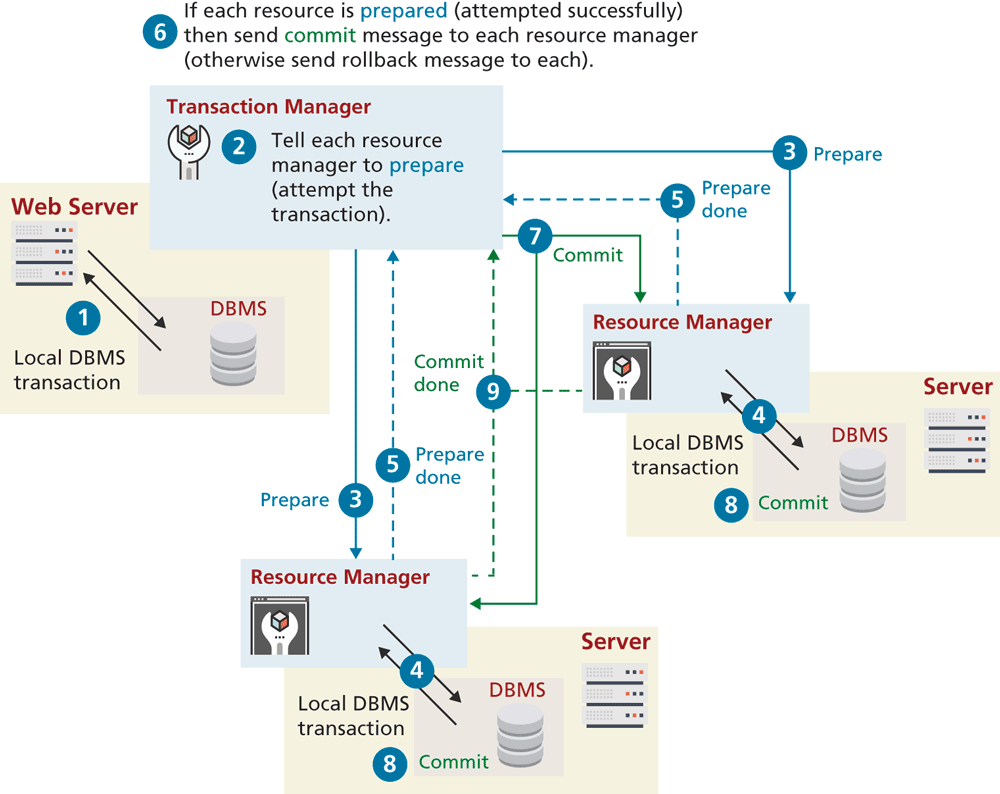
All transactions that participate in distributed transactions are coordinated by the transaction manager. The transaction manager doesn’t deal with the resources (such as a database) directly during the execution of transaction. That work is delegated to local resource managers. This process is sometimes said to involve a two-phase commit because in the first-phase commit, each resource has to signal to the transaction manager that its requested step has worked; once all the steps have signaled success, then the transaction manager will send the command for the second phase commit to make it permanent. There is also three-phase commit protocol.
14.3.5 Data Definition Statements
All of the SQL examples that you will use in this book are examples of the data manipulation language features of SQL, that is, SELECT, UPDATE, INSERT, and DELETE. There is also a Data Definition Language (DDL) in SQL, which is used for creating tables, modifying the structure of a table, deleting tables, and creating and deleting databases. While the book’s examples do not use these database administration statements within PHP, you may find yourself using them indirectly within something like the phpMyAdmin management tool.
14.3.6 Database Indexes and Efficiency
One of the key benefits of databases is that the data they store can be accessed by queries. This allows us to search a database for a particular pattern and have a resulting set of matching elements returned quickly. In large sets of data, searching for a particular record can take a long time.
Consider the worst-case scenario for searching where we compare our query against every single record. If there are n elements, we say it takes O(n) time to do a search (we would say “Order of n”). In comparison, a balanced binary tree data structure can be searched in O(log2 n) time. This is important, because when we look at large datasets the difference between n and log n can be significant. For instance, in a database with 1,000,000 records, searching sequentially could take 1,000,000 operations in the worst case, whereas in a binary tree the worst case is [log_21,000,000] which is 20! It is possible to achieve O(1) search speed—that is, one operation to find the result—with a hash table data structure. Although fast to search, they are memory intensive, complicated, and generally less popular than B-trees (which are different than binary trees): a combination of balanced n-ary trees, optimized to make use of sequential blocks of disk access.
No matter which data structure is used, the application of that structure to ensure results are quickly accessible is called an index. A database table can contain one or more indexes. They use one of the aforementioned data structures to store an index for a particular field in a table. Every node in the index has just that field, with a pointer to the full record (on disk) as illustrated in Figure 14.20. This means we can store an entire index in memory, although the entire table may be too large to load all at once.
Figure 14.20 Visualization of a database index for our Books table
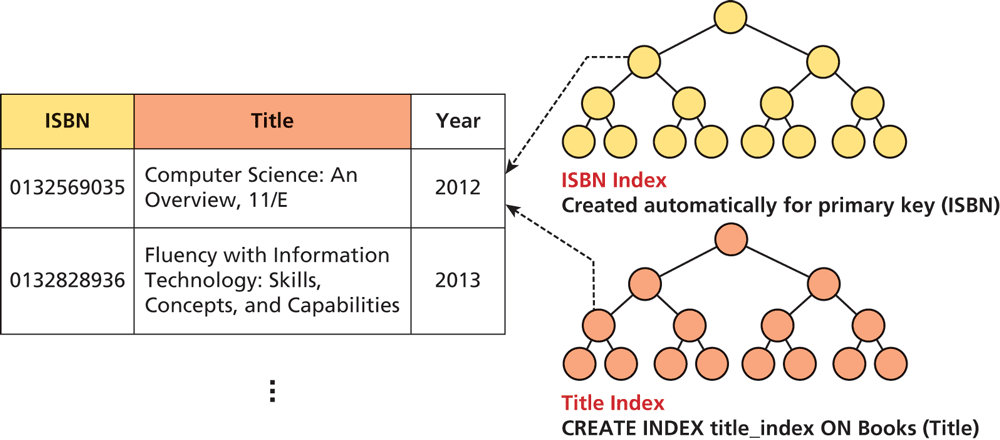
Indexes are created automatically for primary keys in our tables, but you may define indexes for any field, or combination of fields, in a table. The creation and management of indexes is one of the key mechanisms by which fast websites distinguish themselves from slow ones. An index, represented by a sorted binary tree in memory, allows searches to happen more quickly than they could without one. Note that the height of the tree is the ceiling of log2(n) where n is the number of elements.
These indexes are largely invisible to the developer, except in speeding up the performance of search queries. Thankfully, we can benefit from the design that went into creating efficient data structures without knowing too much about them.
Most database management tools allow for easy creation of indexes through the GUI without the use of SQL commands. Nonetheless, if you are interested in creating indexes from scratch, consider that the syntax is quite simple. Figure 14.20 shows a data definition SQL query that defines an index on the Title column of our Books table in addition to the primary key index.