13.7 Serverless Approaches
This chapter and the previous chapter have introduced two of the most popular server-side technologies used in web development. Compared with the various front-end technologies from earlier in the book, PHP and Node have required more work on the deployment side of things. That is, to run PHP and Node, you likely have needed to install additional software and configure your personal development machine into a localhost web server (or upload your code to a real web server). This need for backend setup and configuration will continue in the next chapter, which will require installing and setting up database systems as well.
Learning how to setup and configure software is an essential skill for IT personal, but some individuals enjoy it more or are better at it than others. The author writing this chapter doesn’t really enjoy it nor is he good at it, but at times he needs to tell his students or his readers how to do it. What about for development teams creating real web sites? For most of the history of the web, such teams have needed personnel with expertise in setting up and configuring server software such as Apache and IIS, as well as personnel who could install, configure, and optimize both server development environments such as PHP and Node as well as database management systems such as MySQL and MongoDB. Continuous security vulnerabilities in all of these software suites often require additional individuals trained in web security who can install patches, tweak configuration settings, and run security tests.
For development teams working for well-established or prosperous companies, hiring such talent is just part of doing business in the web space. But for start-ups and small development teams, it is usually difficult, and sometimes even impossible, to find the personnel with these skill sets.
For this reason, alternatives to the traditional back-end infrastructures, which began to become more readily available in the last half of the 2010s, have become increasingly popular. These approaches are often collectively referred to as serverless computing.
13.7.1 What Is Serverless?
Serverless computing is a way of deploying and running web applications that make use of third-party services and cloud platforms that replace the need to install, configure, and update back-end environments. The term serverless is a bit of misnomer in that servers certainly are being used; it is serverless in that you or your team no longer worries about your server infrastructure, since your servers have become a series of commodity services that you typically interact with via web APIs or external API libraries.
Figure 13.13 provides an analogous illustration (which is inspired by Slobodan Stojanović and Aleksandar Simović)2 comparing washing machines to web servers. The figure shows a university residence with a single washer and dryer. During the summer, the few occupants of the house have no trouble finding opportunities to use the machines, perhaps because they wear the same clothes day-in-a-day-out or don’t have that many clothes, or because there are not many students living there. The occupants will also need to learn how to use the machines, and know how to choose the appropriate speed and temperature settings for different clothes.
Figure 13.13 Serverless computing analogy
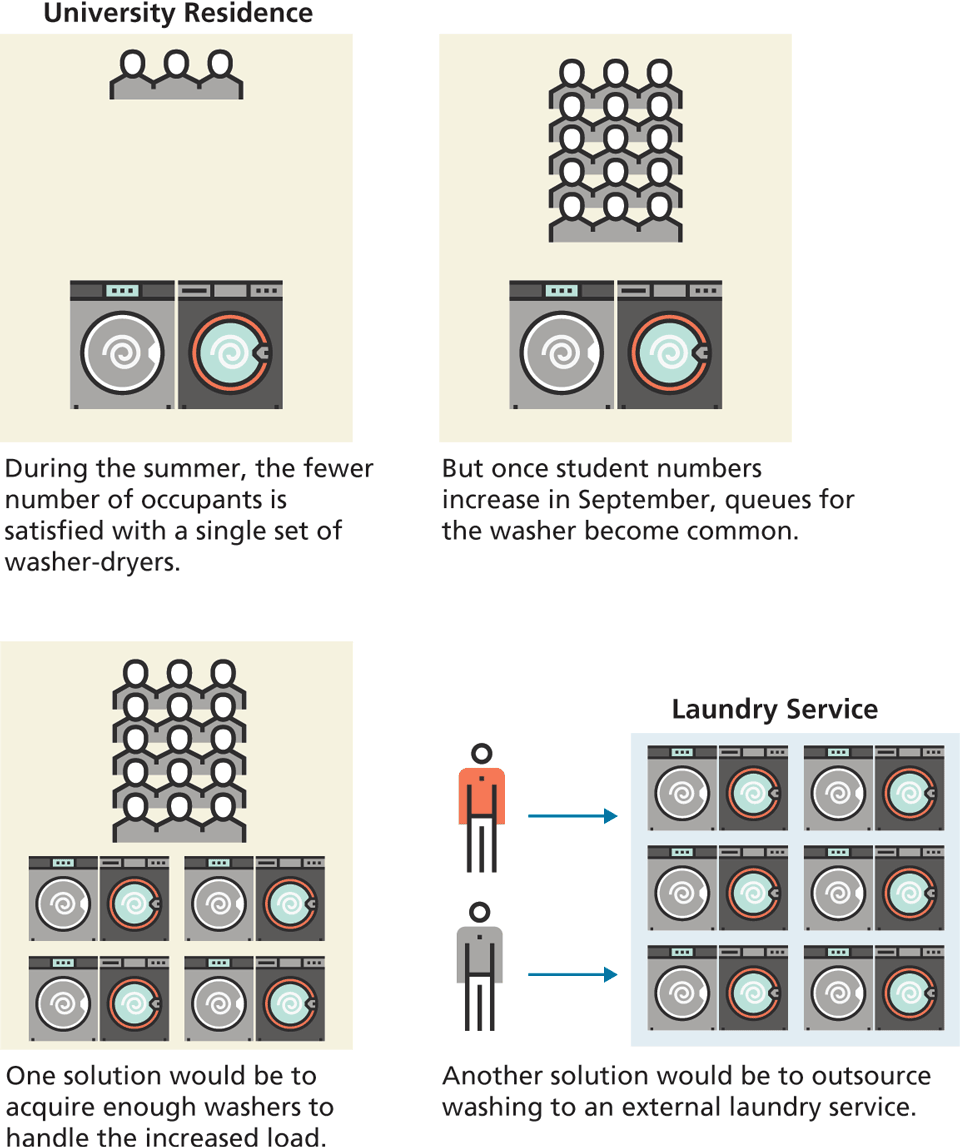
But as more people move into the residence in September, the demand for the washer and dryer increases dramatically, so that there are now wait times and queues to use them. The occupants now have a choice to make: either live with the delays or buy/rent more washers and dryers. If the wait times are intolerable, then the latter strategy will have to be applied. But care will be needed to ensure the correct number of additional washer and dryers are acquired. If too few, then delays will continue and the users will remain unhappy; too many, then money will be wasted.
An alternative to provisioning washing machines for the residence would be to let the occupants use a laundry service. Because the laundry service specializes in laundry, they will know how to use its machines appropriately for different types of clothes, and will better be able to gauge how many machines it needs based on the historical demand load of its customers. If the laundry service does very well financially, then it is likely that over time, more laundry services will pop up to supply the demand, which should lower prices over time.
Finally, from the residence’s perspective, it is now “washer-less” in that it no longer has washing machines. There are still washing machines being used and clothes being washed, but not in the residence.
Web servers are analogous to washing machines, except they are a lot more complicated to configure and use, as well as more expensive to kit out and support. As noted by Jason Lengstorf of Netlify, the serverless approach “is not eliminating complexity, it’s making that complexity someone else’s responsibility.”3 That is, serverless computing is about outsourcing complexity.
13.7.2 Benefits of Serverless Computing
There are numerous potential advantages to the serverless approach.
As indicated in the introduction, the main benefit of serverless is that it reduces complexity. There is no need to configure and support server software on your own.
By eliminating the need to provision servers, the serverless approach often results in lower costs.
Serverless doesn’t eliminate servers: it just outsources them to services that can specialize in their support. As such, it generally provides better reliability, scalability, and security.
13.7.3 Serverless Technologies
While serverless web computing outsources servers, they still are being used ... somewhere. The question then becomes, how does your application make use of these outsourced servers? There are a variety of answers to this question.
Databases-as-a-Service
In the next chapter, you will be using both SQL and noSQL databases. Configuring database management systems appropriately can be a very specialized skillset, so an early step toward serverless computing was Database-as-a-Service (DBaaS). For instance, instead of installing MySQL or Oracle, a development team could make use of Amazon Relational Database Service on AWS, Google Cloud SQL, or Oracle Database Cloud service. Instead of installing MongoDB or some other noSQL database, they could make use of MongoDB Atlas, AWS DynamoDB, or Google Firebase.
Platform-as-a-Service
Early approaches to this serverless model were often labelled as Platform-as-a-Service (PaaS), in which development teams rented what they needed from a cloud service that typically provided not just virtual servers and storage, but also the operating system, database management system, and the necessary application stack (for instance, Node) in a developer-friendly manner. Heroku, AWS Elastic Beanstalk, Google App Engine, and Netlify are popular examples of this approach.
Some of these services can be especially appealing to student developers. With Heroku or Netlify, for instance, you install a CLI tool that integrates with Git and Github. Deploying the application to these services is usually just a matter of creating a Git remote and then using the git push command.
Functions-as-a-Service
While the Database-as-a-Service and Platform-as-a-Service models remove the need to install and configure server software, you might still be writing PHP or Node code with them. That is, neither DBaaS nor PaaS is truly serverless. When developers talk about serverless computing, they generally are referring to an architecture in which they are not writing the usual PHP or Node processing code. Instead, they are referring to an architecture often known as Functions-as-a-Service (FaaS). This architecture makes use of the more recent ability of Cloud platforms such as AWS Lambda, Azure Functions, or Google Cloud Functions to deploy individual functions as full API endpoints. That is, each bit of backend functionality your site might need—for instance, running a database query, uploading a user image to a cloud storage bucket, or processing a payment—can be run as an independent function that is executed on the cloud platform in response to some event. This event can be triggered by an HTTP request (that is, an API request) or by some type of event trigger within the cloud environment.
One of the key selling features of the cloud function approach is its attractive pricing. Instead of paying by the hour as with cloud infrastructure, with FaaS, you pay only for the number of executions requests and for their duration. At the time of writing, within the Free Tier of AWS (which lasts for a year), AWS Lambda (the most popular of these services) gives you one million requests per month along with 400,000 GB-seconds of compute time per month for free. Even outside the time-constrained Free Tier, the pricing is very low: $0.20 per 1M requests.
How do they work in practice? Cloud function services support several languages, though the most common is Node-based JavaScript. You write the cloud functions using a text editor and then upload them to the service. You can then use some type of cloud-based API Gateway, which does the work to call these functions. Your web application can then be conceptually serverless. For instance, it can be just browser JavaScript, CSS, and HTML. When the application needs a bit of specialized server functionality, it uses the cloud-based API Gateway to invoke one of your cloud functions. Figure 13.14 illustrates several scenarios.
Figure 13.14 Functions-as-a-Service
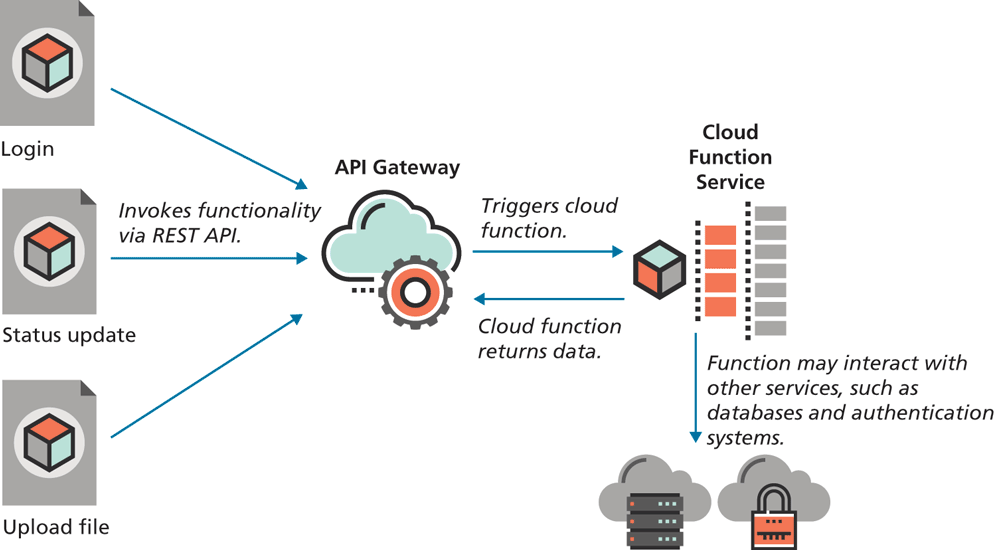
The advantage of this fully serverless model is that in terms of deployment, your site now only consists of static assets, that is, JavaScript, CSS, and HTML files. This greatly simplifies deployment, since one only needs to upload the static assets to a CDN (Content Delivery Network). The growth of interest in the so-called JAM Stack (JavaScript, APIs, Markup) is one manifestation of this new serverless model. Over time, it is likely that more and more of the server-side of web development will involve consuming commodities that are “rented” from third-party services.