13.6 View Engines
So far you have learned how to use Node to serve files, return JSON data, and to implement a chat server. These are all typical uses of Node that demonstrates its unique capabilities. It is also possible to use Node in a way similar to PHP: that is, to use JavaScript in Node to generate HTML using a view engine.
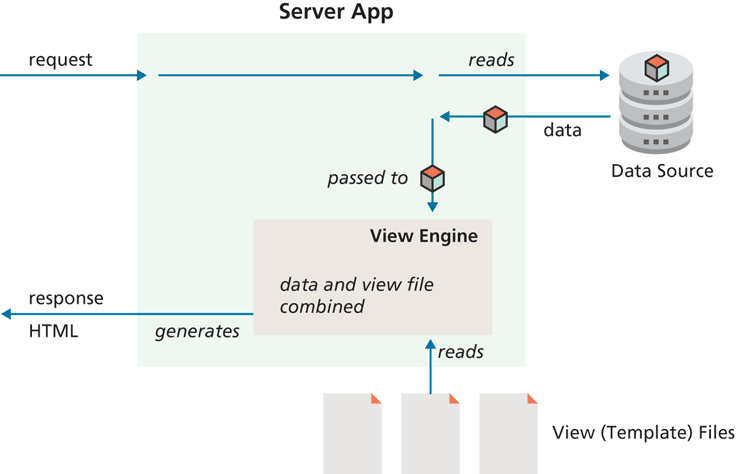
The way a view engine works in Node is illustrated in Figure 13.12. A view engine allows a developer to create views using some specialized format that contains presentation information plus JavaScript files that are somewhat analogous to PHP files in that they are usually a blend of markup and JavaScript code; these files are called templates or views.
Figure 13.12 View Engines and Node
Two of the most popular view engines with Node are Pug and Embedded JavaScript (EJS). With Pug, you specify your presentation in .pug files. These do not use HTML, but its own special syntax that is “converted” into HTML by the Pug view engine at run-time.
Another popular alternative to Pug is EJS, which uses regular HTML with JS embedded within <% %> tags. An EJS view has a similar feel to PHP in that you can mix markup and programming code (except the programming language with EJS is JavaScript).
Express has built-in support for view engines. You only need to install the appropriate package using npm, and then tell Express which folder contains the view files and which view engine to use to display those files. For EJS, the code for these steps is as follows:
// tell express to look for views in a folder named 'views'
app.set("views", path.join(__dirname, "views"));

// tell express that you will be using the ejs view engine
app.set("view engine", "ejs");
Finally, to use any particular view, you make use of the Express render() function, as shown in the following:
app.get("/list/",function (req, res) {
   res.render("list.ejs", { title: "Sample", paintings: paintings });
});
You can pass any data to the view as the second argument to the render() function. Listing 13.11 illustrates a sample EJS view that displays the data it is passed. Notice that any JavaScript can be included within <% %> tags and that it has access to all objects passed to it.
Listing 13.11 Example EJS view
<!DOCTYPE html>
<html lang="en">
<head>
   <meta charset="utf-8">
   <title>EJS Test</title>
   <link rel="stylesheet" href="/static/list.css" />
</head>
<body>
<main>
<h1><%= title %></h1>
<section class="container">
   <% for (let p of paintings) { %>
      <div class="box">
         <img src="<%= p.filename %>" />
         <h2><%= p.artist %></h2>
         <p><%= p.title %> (<%= p.year %>)</p>
         <button>View</button>
      </div>
   <% } %>
</section>
</main>
</body>
</html>