13.4 Creating a CRUD API
For JavaScript intensive applications, it is common for web APIs to provide not only the ability to retrieve data, but also create, update, and delete data as well. Since REST web services are limited to HTTP, it is common to use different HTTP verbs to signal whether we want to create, retrieve, update, or delete (CRUD) data. While one could associate the HTTP verb with the CRUD action, it is convention to use GET for retrieve requests, POST for create requests, PUT for update requests, and DELETE for delete requests.
For a real web API with CRUD behaviors, the API would be modifying the underlying database for POST, PUT, and DELETE requests. In the next chapter, you will be working with databases, so for now, our example here will simply modify the in-memory data.
For instance, using the company API example from the previous section, to implement update functionality, you would likely add separate handlers for the other HTTP verbs within your single company route handler, as shown in the following code:
const handleSingleSymbol = (companyProvider, app) => {
   app.get('/companies/:symbol', (req,resp) => {
      ...
   });
   app.put('/companies/:symbol', (req,resp) => {
      ...
   });
   app.post('/companies/:symbol', (req,resp) => {
      ...
   });
   app.delete('/companies/:symbol', (req,resp) => {
      ...
   });
};
Listing 13.8 provides sample code for the PUT handler, which will use the data sent as part of the request to modify the data in the JSON memory array.
Listing 13.8 Sample PUT handler
app.put('/companies/:symbol', (req,resp) => {
   const companies = companyProvider.getData();
   const symbolToUpd = req.params.symbol.toUpperCase();
   // find the company object
   let indx = companies.findIndex( c => c.symbol == symbolToUpd );
   // if didn't find it, then return message
   if (indx < 0) {
      resp.json(jsonMessage(`${symbolToUpd} not found`));
   } else {
      // symbol found, so replace with data in request
      companies[indx] = req.body;
      // let requestor know it worked
      resp.json(jsonMessage(`${symbolToUpd} updated`));
   }
});
13.4.1 Passing Data to an API
In Chapter 5, you learned that what happens with form data depends on whether the form method attribute is set to GET or POST. Form data sent via GET is included via query string parameters added to the URL, while form data sent via POST adds the query string to the request after the HTTP header.
What was left out back then is that browser also sets the Content-Type HTTP header to application/x-www-form-urlencoded. There are in fact other ways to pass data from the browser to the server besides query string parameters if HTML forms are not being used (for instance, if JavaScript fetch was being used). It is possible to also send plain text, JSON or XML data, or file content. To do so requires setting the Content-Type header to the appropriate value, as shown in Figure 13.8.
Figure 13.8 Sending data to an API
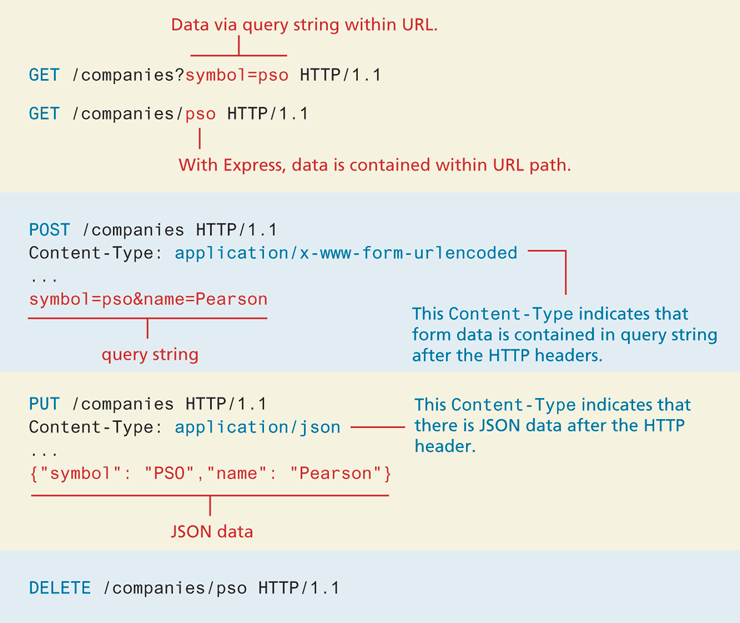
It is important to know that Express by default will not handle POST OR PUT data sent from the browser. We can tell it to do so easily enough, however, by adding one of the following two middleware calls to our server before any of the handlers (e.g., in Listing 13.7, it would appear before the app.use() invocation for handling static requests):
// for parsing application/json data
app.use(express.json());
// for parsing application/x-www-form-urlencoded data
app.use(express.urlencoded({extended: true}));
13.4.2 API Testing Tools
When you have created an API that makes use of the POST, PUT, and DELETE HTTP verbs, you will likely make use of JavaScript fetch() to make those requests (see section 10.3.1). Often, however, a Node API is created independently of the front-end with an entirely different development team. In such case, how does the API development team go about testing their API? They can no longer simply use the browser to test the API, in the way that they could with HTTP GET requests, since the browser can’t make PUT or DELETE requests without JavaScript coding. And while a simple HTML form can make a POST request, without any JavaScript coding, it always makes use of application/x-www-form-urlencoded, and thus can’t be used to test the sending of JSON data.
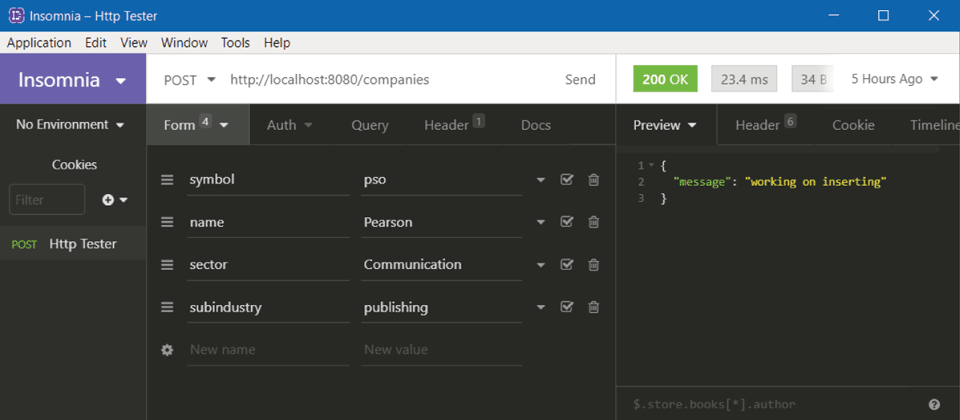
For this reason, API developers often make use of some type of third-party API testing tool such as Postman or Insomnia, one of which is shown in Figure 13.9. As can be seen in the screen captures in Figure 13.9, you specify the URL endpoint to request, and have full control over which HTTP verbs to use, which Content-Type header to use, and can easily input the data to send.
Figure 13.9 API testing tools