12.8 Working with the HTTP Header
So far in this chapter, PHP has been used to modify the response sent back to the browser. In PHP, echo statements adds content after the HTTP response header. It is possible in PHP to modify the response header using the header() function. A key limitation to using the header() function in PHP is that it must be called before any markup is sent back to the browser.
12.8.1 Redirecting Using Location Header
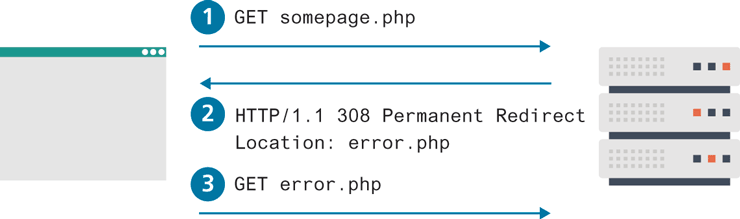
What are some examples of its usage? One of the most common uses of this function in PHP is to redirect from one page to another. For instance, what should a PHP page do when an expected querystring parameter is missing? One possibility is to redirect to an error page using the Location header, as shown in the following.
<?php
if (! isset($_GET['id']) {
   header("Location: error.php");
}
...
?>
What does this Location header actually do? Figure 12.28 illustrates that it forces another roundtrip between the client and the server.
Figure 12.28 PHP Redirect using the Location header
12.8.2 Setting the Content-Type Header
The Content-Type HTTP header is used to tell the browser what type of content (using a MIME type) it is receiving in the response. Normally, the PHP environment automatically sets this header to text/html. However, there are times when you might want to change this header value. One of the more common reasons for doing so is because your PHP page is returning JSON data or a customized image.
Returning JSON Data
PHP can convert an associative array into a JSON string using the json_encode() function. This string can then simply be echoed to the response stream, but not before first setting the Content-Type header, as shown in Listing 12.36. The JSON_NUMERIC_CHECK parameter tells json_encode to encode numeric values without quotes (e.g., "pages":760, instead of "pages":"760" in the resulting JSON).
Listing 12.36 Outputting JSON data
<?php
$books = array();
$books[] = ["title"=>"Basics of Web Design","year"=>2014,"pages"=>400];
$books[] = ["title"=>"Database Processing","year"=> 2012,"pages"=>630];
$books[] = ["title"=>"Development Economics","year"=>2014,"pages" => 760];

header('Content-Type: application/json');
echo json_encode($books, JSON_NUMERIC_CHECK);
?>
Outputting Custom Images
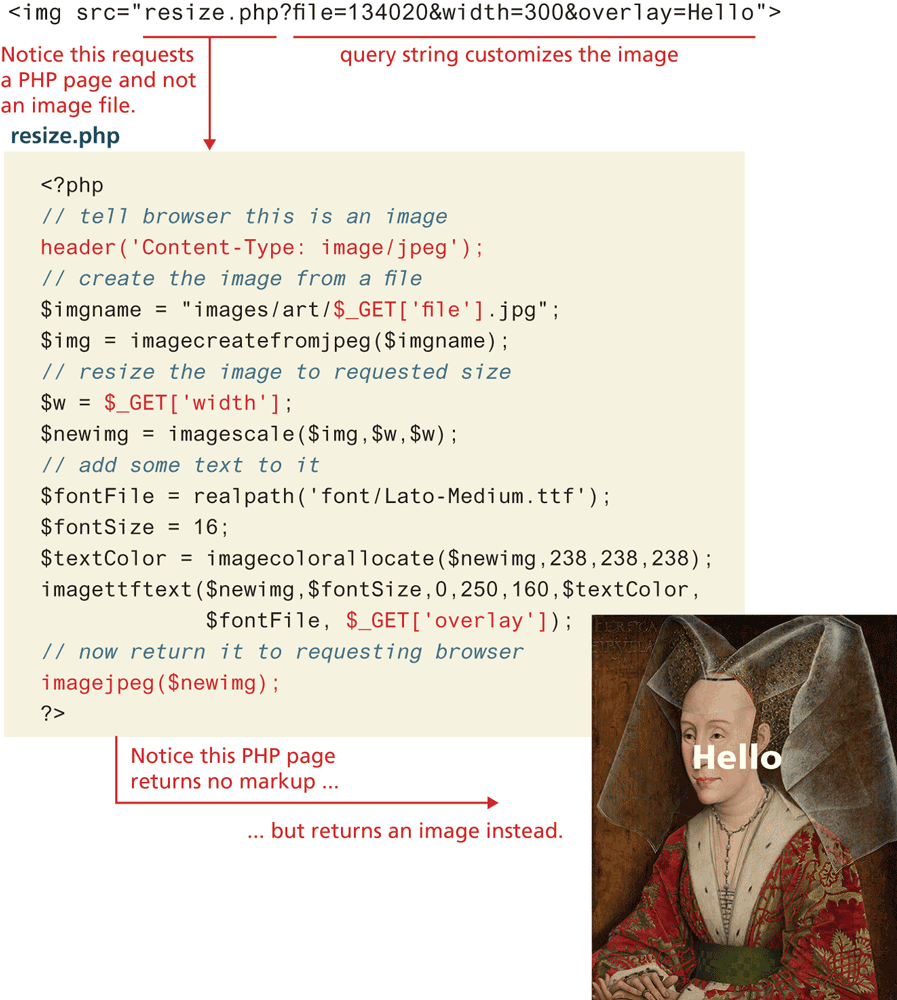
Images are of course requested via the <img> HTML element or via the background-image CSS property. Normally, what will be requested is an image file, with one of file formats (JPG, GIF, PNG, or SVG) encountered in Chapter 6. There are times, however, when one doesn’t have an image file on the server to return; instead, a custom file must be generated first on the server, which is then returned. Why would one do this? Perhaps because you want to customize the dimensions of the returned file or add in a watermark or some other custom feature at run-time, as shown in Figure 12.29.
Figure 12.29 PHP creating a custom image
 Note
Note
Remember that all calls to header() must occur before any markup in your PHP file and before any echo statements.