12.7 $_GET and $_POST Superglobal Arrays
12.7.1 Superglobal Arrays
PHP uses special predefined associative arrays called superglobal arrays that allow the programmer to easily access HTTP headers, query string parameters, and other commonly needed information (see Table 12.4). They are called superglobal because these arrays are always in scope and always exist, ready for the programmer to access or modify them without having to use the global keyword.
Table 12.4 Superglobal Variables
| Name | Description |
|---|---|
$GLOBALS |
Array for storing data that needs superglobal scope |
$_COOKIES |
Array of cookie data passed to page via HTTP request |
$_ENV |
Array of server environment data |
$_FILES |
Array of file items uploaded to the server |
$_GET |
Array of query string data passed to the server via the URL |
$_POST |
Array of query string data passed to the server via the HTTP header |
$_REQUEST |
Array containing the contents of $_GET, $_POST, and $_COOKIES |
$_SESSION |
Array that contains session data |
$_SERVER |
Array containing information about the request and the server |
The following sections examine the $_GET, $_POST, $_SERVER, and the $_FILE superglobals. Chapter 15 on State Management uses $_COOKIES and $_SESSION.
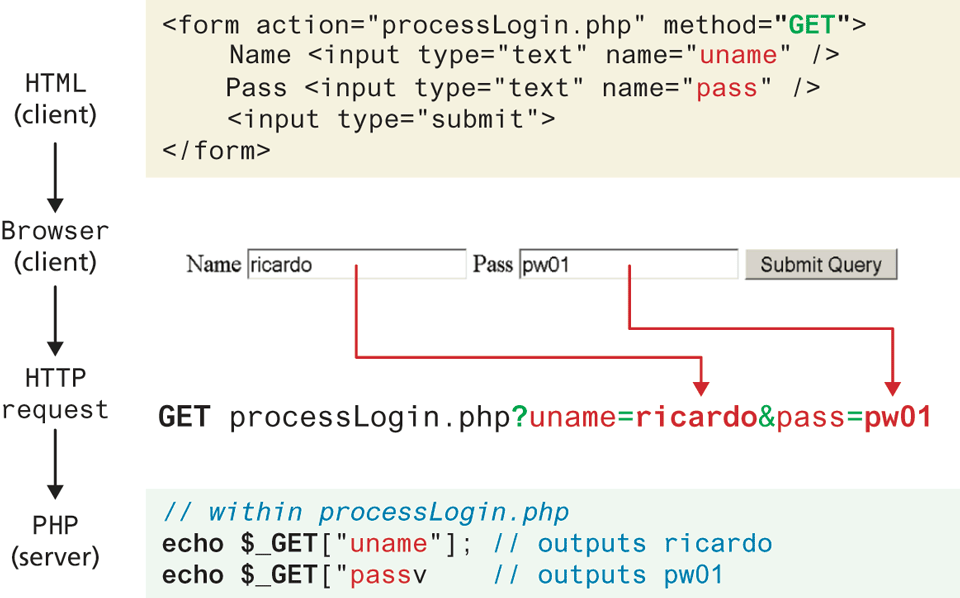
The $_GET and $_POST arrays are the most important superglobal variables in PHP since they allow the programmer to access data sent by the client. As you will recall from Chapter 5, an HTML form (or an HTML link) allows a client to send data to the server. That data is formatted such that each value is associated with a name defined in the form. If the form was submitted using an HTTP GET request, then the resulting URL will contain the data in the query string. PHP will populate the superglobal $_GET array using the contents of this query string in the URL. Figure 12.22 illustrates the relationship between an HTML form, the GET request, and the values in the $_GET array.
Figure 12.22 Illustration of flow from HTML, to request, to PHP’s $_GET array
 Note
Note
Although in our examples we are transmitting login data, including a password, we are only doing so to illustrate how information must at some point be transmitted from the browser to the server. You should always use POST to transmit login credentials, on a secured SSL site, and moreover, you should hide the password using a password form field.
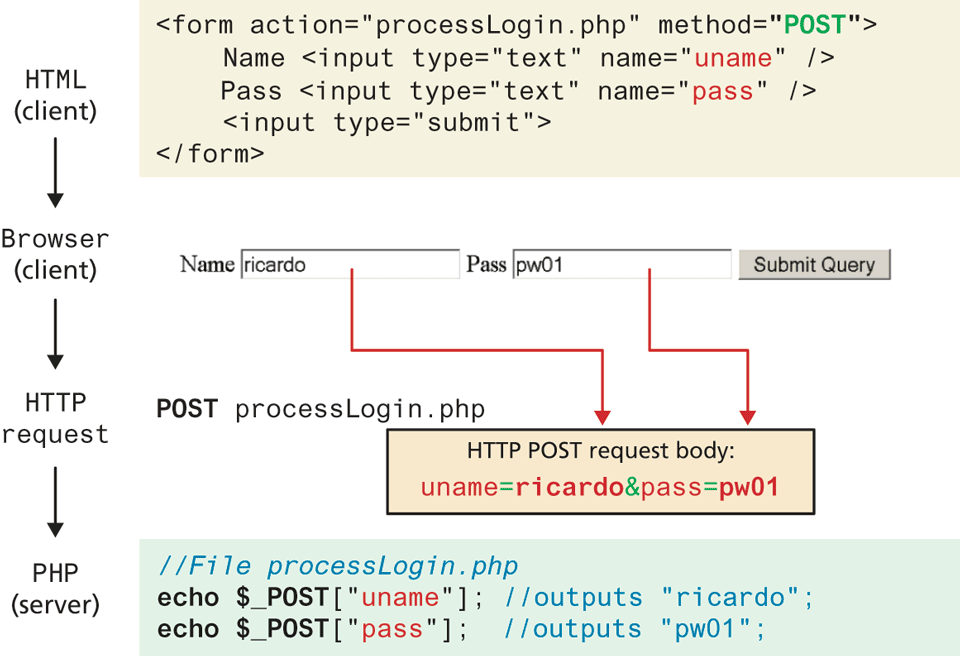
If the form was sent using HTTP POST, then the values will not be visible in the URL, but will be sent through HTTP POST request body. From the PHP programmer’s perspective, almost nothing changes from a GET data request except that those values and keys are now stored in the $_POST array. This mechanism greatly simplifies accessing the data posted by the user, since you need not parse the query string or the POST request headers. Figure 12.23 illustrates how data from a HTML form using POST populates the $_POST array in PHP.
Figure 12.23 Data flow from HTML form through HTTP request to PHP’s $_POST array
Note
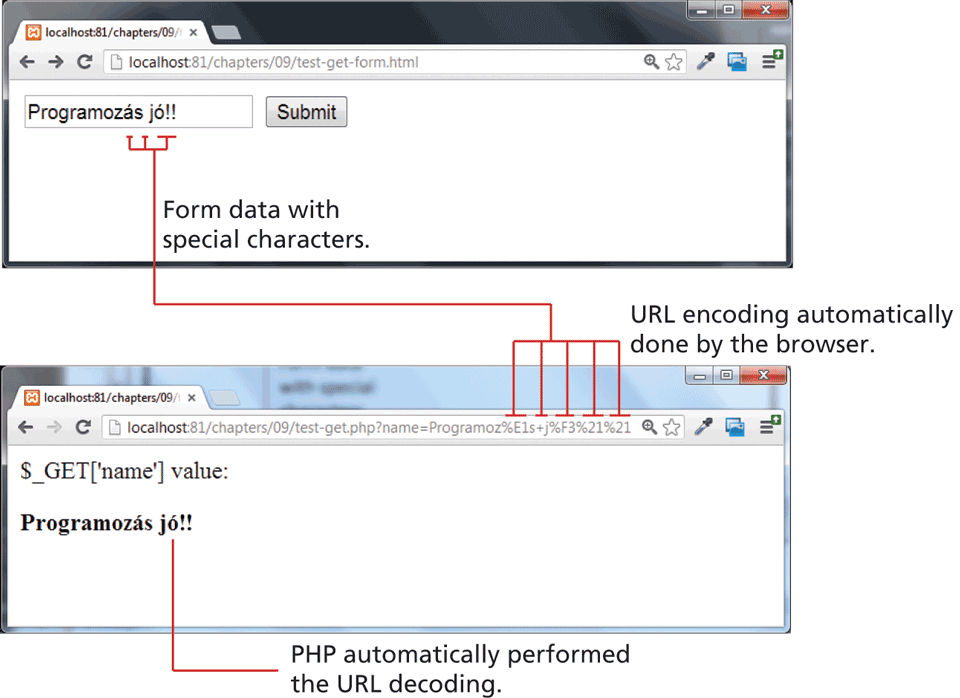
Recall from Chapter 5 that within query strings, characters such as spaces, punctuation, symbols, and accented characters cannot be part of a query string and are instead URL encoded.
One of the nice features of the $_GET and $_POST arrays is that the query string values are already URL decoded, as shown in Figure 12.24.
If you do need to manually perform URL encoding/decoding (say, for database storage), you can use the urlencode() and urldecode() functions. This should not be confused with HTML entities (symbols like >, <) for which there exists the htmlentities() function.
Figure 12.24 URL encoding and decoding
12.7.2 Determining If Any Data Sent
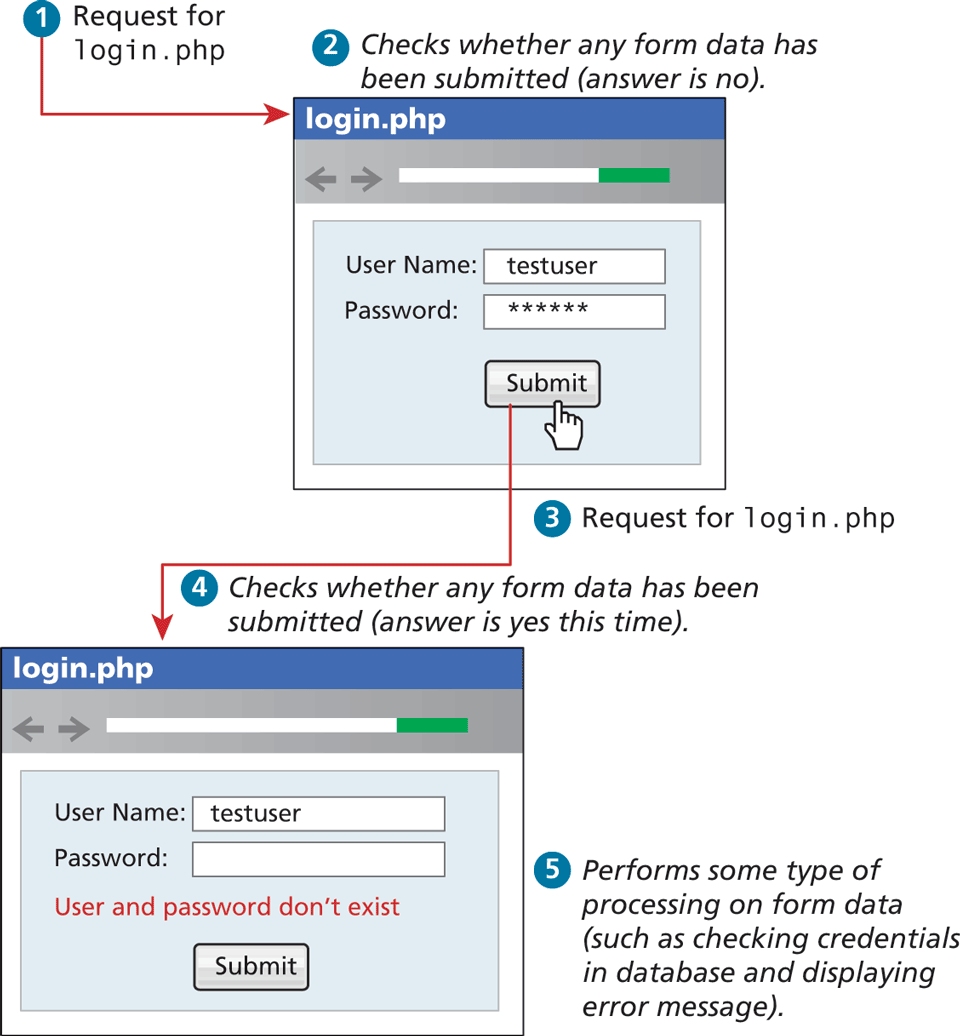
There will be times as you develop in PHP that you will use the same file to handle both the display of a form as well as handling the form input. For example, a single file is often used to display a login form to the user, and that same file also handles the processing of the submitted form data, as shown in Figure 12.25. In such cases you may want to know whether any form data was submitted at all using either POST or GET.
Figure 12.25 Form display and processing by the same PHP page
In PHP, there are several techniques to accomplish this task. First, you can determine if you are responding to a POST or GET by checking the $_SERVER['REQUEST_METHOD'] variable. It contains (as a string) the type of HTTP request this script is responding to (GET, POST, HEAD, etc.). Even though you may know that, for instance, a POST request was performed, you may want to check if any of the fields are set. To do this you can use the isset() function in PHP to see if there is any value set for a particular expected key, as shown in Listing 12.32.
Listing 12.32 Using isset() to check query string data
<!DOCTYPE html>
<html>
<body>
<?php
if ($_SERVER["REQUEST_METHOD"] == "POST") {
   if ( isset($_POST["uname"]) && isset($_POST["pass"]) ) {
      // handle the posted data.
      echo "handling user login now ...";
      echo "... here we could redirect or authenticate ";
      echo " and hide login form or something else";
   }
}
?>
<h1>Some page that has a login form</h1>
<form action="samplePage.php" method="POST">
   Name <input type="text" name="uname"><br>
   Pass <input type="password" name="pass"><br>
   <input type="submit">
</form>
</body>
</html>
Note
The PHP function isset() only returns false if a parameter name is missing altogether from the sent data. It still returns true if the parameter name exists and is associated with a blank value. For instance, let us imagine that the query string looks like the following:
uname=&pass=In such a case the condition if(isset($_GET ['uname']) && isset($_GET ['pass'])) will evaluate to true because something was sent for those keys, albeit a blank value. Thus, more coding will be necessary to further test the values of the parameters. Alternately, these two checks can be combined using the empty() function.
 Pro Tip
In PHP 7.0 the null coalescing operator provides a new syntactic operation that combines checking a value for being non NULL with assignment. It returns the first operand if non null and the second if the first is null.
To see this in practice, consider the good practice of defining default values when user input is missing. The following line of code checks for a user posted value in the $_GET superglobal array, and if nothing was sent assigns a default value of nobody
$username = isset($_GET['uname']) ? $_GET['uname']: 'nobody';Using the new null coalescing operator the same line can be written as:
$username = $_GET['uname'] ?? 'nobody';It’s worth noting that the ?? operator can be chained so that the first non-NULL operand is assigned, unless the last one is reached. To demonstrate a chain of length three, we could use ?? to check multiple fields in the $_GET array, using the provided last value in the chain if none of the fields are set, as follows:
$username = $_GET['uname'] ?? $_GET['username'] ?? 'nobody';12.7.3 Accessing Form Array Data
Sometimes in HTML forms, you might have multiple values associated with a single name; back in Chapter 5, there was an example in Section 5.4.2 on checkboxes. Listing 12.33 provides another example. Notice that each checkbox has the same name value (name="day").
Listing 12.33 HTML that enables multiple values for one name
<form method="get">
   Please select days of the week you are free.<br>
   Monday <input type="checkbox" name="day" value="Monday"> <br>
   Tuesday <input type="checkbox" name="day" value="Tuesday"> <br>
   Wednesday <input type="checkbox" name="day" value="Wednesday"> <br>
   Thursday <input type="checkbox" name="day" value="Thursday"> <br>
   Friday <input type="checkbox" name="day" value="Friday"> <br>
   <input type="submit" value="Submit">
</form>
Unfortunately, if the user selects more than one day and submits the form, the $_GET['day'] value in the superglobal array will only contain the last value from the list that was selected.
To overcome this limitation, you must change the HTML in the form. In particular, you will have to change the name attribute for each checkbox from day to day[].
Monday <input type="checkbox" name="day[]" value="Monday">
Tuesday <input type="checkbox" name="day[]" value="Tuesday">
...
After making this change in the HTML, the corresponding variable $_GET['day'] will now have a value that is of type array. Knowing how to use arrays, you can process the output as shown in Listing 12.34 to echo the number of days selected and their values.
Listing 12.34 PHP code to display an array of checkbox variables
echo "You submitted " . count($_GET['day']) . "values";
foreach  ($_GET['day']  as  $d) {
   echo $d . " <br>";
}
12.7.4 Using Query Strings in Hyperlinks
As mentioned several times now, form information (packaged in a query string) is transported to the server in one of two locations depending on whether the form method attribute is GET or POST. It is important to also realize that making use of query strings is not limited to only data entry forms.
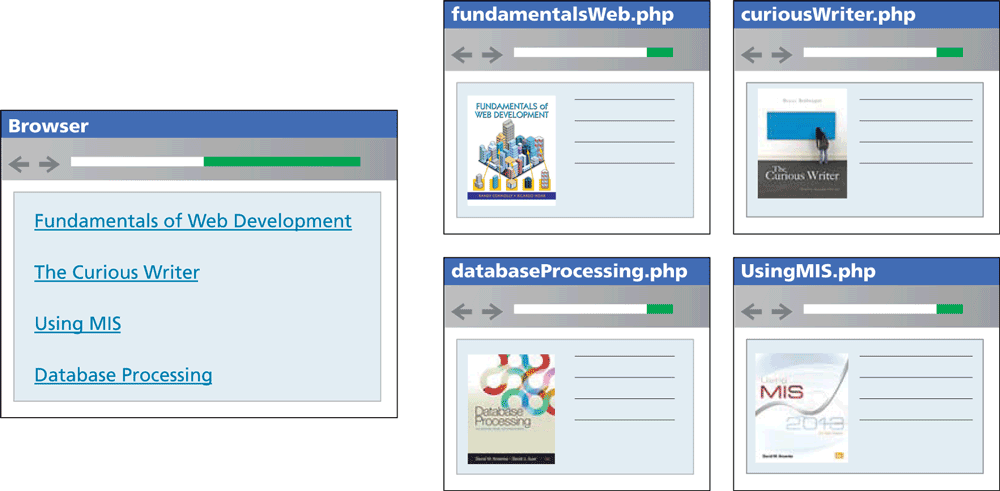
You may wonder if it is possible to combine query strings with anchor tags . . . the answer is YES! Anchor tags (i.e., hyperlinks) also use the HTTP GET method. Indeed it is extraordinarily common in web development to programmatically construct the URLs for a series of links from, for instance, database data. Imagine a web page in which we are displaying a list of book links. One approach would be to have a separate page for each book (as shown in Figure 12.26). This is not a very sensible approach. Our database may have hundreds or thousands of books in it: surely it would be too much work to create a separate page for each book!
Figure 12.26 Inefficient approach to displaying individual items
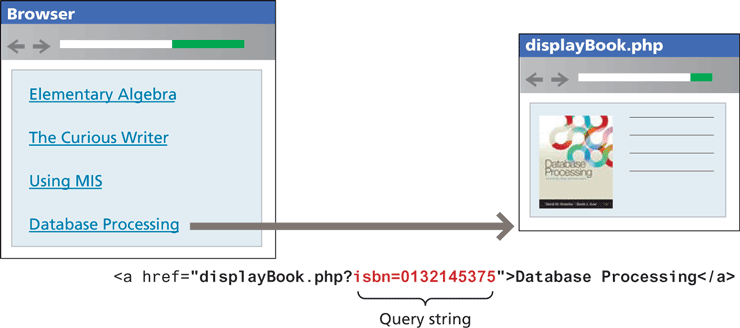
It would make a lot more sense to have a single Display Book page that receives as input a query string that specifies which book to display, as shown in Figure 12.27. Notice that we typically pass some type of unique identifier in the query string (in this case, the book’s ISBN).
Figure 12.27 Sensible approach to displaying individual items using query strings
We will learn more about how to implement such pages making use of database information in Chapter 14.
12.7.5 Sanitizing Query Strings
One of the most important things to remember about web development is that you should actively distrust all user input. That is, just because you are expecting a proper query string, it doesn’t mean that you are going to get a properly constructed query string. What will happen if the user edits the value of the query string parameter? Depending on whether the user removes the parameter or changes its type, either an empty screen or even an error page will be displayed. More worrisome is the threat of SQL injection, where the user actively tries to gain access to the underlying database server (we will examine SQL injection attacks in detail in Chapter 16).
Clearly this is an unacceptable result! At the very least, your program must be able to handle the following cases for every query string or form value (and, after we learn about them in Chapter 15, every cookie value as well):
If query string parameter doesn’t exist.
If query string parameter doesn’t contain a value.
If query string parameter value isn’t the correct type or is out of acceptable range.
If value is required for a database lookup, but provided value doesn’t exist in the database table.
The process of checking user input for incorrect or missing information is sometimes referred to as the process of sanitizing user inputs. How can we do these types of validation checks? It will require programming similar to that shown in Listing 12.35.
Listing 12.35 Simple sanitization of query string values
// This uses a database API ... we will learn about it in Chapter 14
$pid = mysqli_real_escape_string($link, $_GET['id']);

if ( is_int($pid) ) {
     // Continue processing as normal
}
else {
     // Error detected. Possibly a malicious user
}
What should we do when an error occurs in Listing 12.35? There are a variety of possibilities; for now, we might simply redirect to a generic error handling page using the header directive, for instance:
header("Location: error.php"); exit(); Pro Tip
In some situations, a more secure approach to query strings is needed, one that detects any user tampering of query string parameter values. One of the most common ways of implementing this detection is to encode the query string value with a one-way hash, which is a mathematical algorithm that takes a variable-length input string and turns it into fixed-length binary sequence. It is called one-way because it is designed to be difficult to reverse the process (i.e., go from the binary sequence to the input string) without knowing the secret text (or salt in encryption lingo) used to generate the original hash. In such a case, our query string might change from id=16 to id=53e5e07397f7f01c2b276af813901c29.