12.6 Classes and Objects
Unlike JavaScript, PHP is a full-fledged object-oriented language with many of the syntactic constructs popularized in languages like Java and C++. Although earlier versions of PHP did not support all of these object-oriented features, PHP versions after 5.0 do.
12.6.1 Terminology
The notion of programming with objects allows the developer to think about an item with particular properties (also called attributes or data members) and methods (functions). The structure of these objects is defined by classes, which outline the properties and methods like a blueprint. Each variable created from a class is called an object or instance, and each object maintains its own set of variables, and behaves (largely) independently from the class once created.
Figure 12.17 illustrates the differences between a class, which defines an object’s properties and methods, and the objects or instances of that class.
Figure 12.17 Relationship between a class and its objects

In order to utilize objects, one must understand the classes that define them. Although a few classes are built into PHP, you will likely be working primarily with your own classes.
Classes should be defined in their own files so they can be imported into multiple scripts. In this book we denote a class file by using the naming convention classname.class.php. Any PHP script can make use of an external class by using include, include_once, require, or require_once. Once a class has been defined, you can create as many instances of that object as memory will allow using the new keyword.
12.6.2 Defining Classes
The PHP syntax for defining a class uses the class keyword followed by the class name and { } braces.1 The properties and methods of the class are defined within the braces. A sample Artist class defined using PHP is illustrated in Listing 12.6.
Listing 12.27 A simple Artist class
class Artist {
public $firstName;
public $lastName;
public $birthDate;
public $birthCity;
public $deathDate;
} Note
Note
Prior to version 5 of PHP, the keyword var was used to declare a property. From PHP 5.0 to 5.1.3, the use of var was considered deprecated and would issue a warning. Since version 5.1.3, it is no longer deprecated and does not issue the warning. If you declare a property using var, then PHP 5 will treat the property as if it had been declared as public.
Each property in the class is declared using one of the keywords public, protected, or private followed by the property or variable name. The differences between these keywords will be covered in Section 12.6.7.
12.6.3 Instantiating Objects
It’s important to note that defining a class is not the same as using it. To make use of a class, one must instantiate (create) objects from its definition using the new keyword. To create two new instances of the Artist class called $picasso and $dali, you instantiate two new objects using the new keyword as follows:
$picasso = new Artist();
$dali = new Artist();
Notice that assignment is right to left as with all other assignments in PHP. Shortly you will see how to enhance the initialization of objects through the use of custom constructors.
12.6.4 Properties
Once you have instances of an object, you can access and modify the properties of each one separately using the object’s variable name and an arrow (->), which is constructed from the dash and greater than symbols. Listing 12.28 shows code that defines the two Artist objects and then sets all the properties for the $picasso object.
Listing 12.28 Instantiating and using objects
$picasso = new Artist();
$dali = new Artist();
$picasso->firstName = "Pablo";
$picasso->lastName = "Picasso";
$picasso->birthCity = "Malaga";
$picasso->birthDate = "October 25 1881";
$picasso->deathDate = "April 8 1973";
12.6.5 Constructors
While the code in Listing 12.28 works, it takes multiple lines and every line of code introduces potential maintainability problems, especially when we define more artists. Inside of a class definition, you should therefore define constructors, which lets you specify parameters during instantiation to initialize the properties within a class right away.
In PHP, constructors are defined as functions (as you shall see, all methods use the function keyword) with the name construct(). (Note: there are two underscores _ before the word construct.) Listing 12.29 shows an updated Artist class definition that now includes a constructor. Notice that in the constructor each parameter is assigned to an internal class variable using the $this-> syntax. Inside of a class, you must always use the $this syntax to reference all properties and methods associated with this particular instance of a class.
Listing 12.29 A constructor added to the class definition
class Artist {
   // variables from previous listing still go here
   ...

   function  __construct($firstName, $lastName, $city, $birth,
                      $death=null) {
      $this->firstName = $firstName;
      $this->lastName = $lastName;
      $this->birthCity = $city;
      $this->birthDate = $birth;
      $this->deathDate = $death;
   }
}
Notice as well that the $death parameter in the constructor is initialized to null; the rationale for this is that this parameter might be omitted in situations where the specified artist is still alive.
This new constructor can then be used when instantiating so that the long code in Listing 12.28 becomes the simpler:
$picasso = new Artist("Pablo","Picasso","Malaga","Oct 25,1881",
                    "Apr 8,1973");
$dali = new Artist("Salvador","Dali","Figures","May 11 1904",
                 "Jan 23 1989");
12.6.6 Method
Objects only really become useful when you define behavior or operations that they can perform. In object-oriented lingo these operations are called methods and are just functions, except they are associated with a class. They define the tasks each instance of a class can perform and are useful since they associate behavior with objects. For our artist example, one could write a method to convert the artist’s details into a string of formatted HTML. Such a method is defined in Listing 12.30.
Listing 12.30 Method definition
class Artist {
...
public function outputAsTable() {
$table = "<table>";
$table .= "<tr><th colspan='2'>";
$table .= $this->firstName . " " . $this->lastName;
$table .= "</th></tr>";
$table .= "<tr><td>Birth:</td>";
$table .= "<td>" . $this->birthDate;
$table .= "(" . $this->birthCity . ")</td></tr>";
$table .= "<tr><td>Death:</td>";
$table .= "<td>" . $this->deathDate . "</td></tr>";
$table .= "</table>";
return $table;
}
} Pro Tip
The special function construct() is one of several magic methods or magic functions in PHP. This term refers to a variety of reserved method names that begin with two underscores.
These are functions whose interface (but not implementation) is always defined in a class, even if you don’t implement them yourself. That is, PHP does not provide the definitions of these magic methods; you the programmer must write the code that defines what the magic function will do. They are called by the PHP engine at run time.
The magic methods are: construct(), destruct(), call(), callStatic(), get(), set(), isset(), unset(), sleep(), wakeup(), toString(), invoke(), set_state(), clone(), and autoload().
To output the artist, you can use the reference and method name as follows:
$picasso = new Artist(. . .)
echo $picasso->outputAsTable();
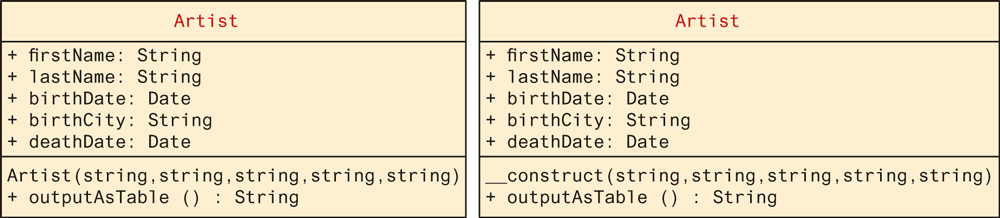
It is common to illustrate the structure of a class using a UML class diagram, as shown in Figure 12.18. UML (Unified Modeling Language) is a succinct set of graphical techniques to describe software designs. While there are several types of UML diagrams, class diagrams are the most common. Notice that the two versions of the class shown in Figure 12.18 differ in terms of how the constructor is notated.
Figure 12.18 Sample ways to diagram a class using UML
Note
If a class implements the toString() magic method so that it returns a string, then wherever the object is echoed, it will automatically call toString(). If you renamed your outputAsTable() method to toString(), then you could print the HTML table simply by calling:
echo $picasso; Note
Many languages support the concept of overloading a method so that two methods can share the same name, but have different parameters. While PHP has the ability to define default parameters, no method, including the constructor, can be overloaded!
12.6.7 Visibility
The visibility of a property or method determines the accessibility of a class member (i.e., a property or method) and can be set to public, private, or protected. Figure 12.19 illustrates how visibility works in PHP.
Figure 12.19 Visibility of class members
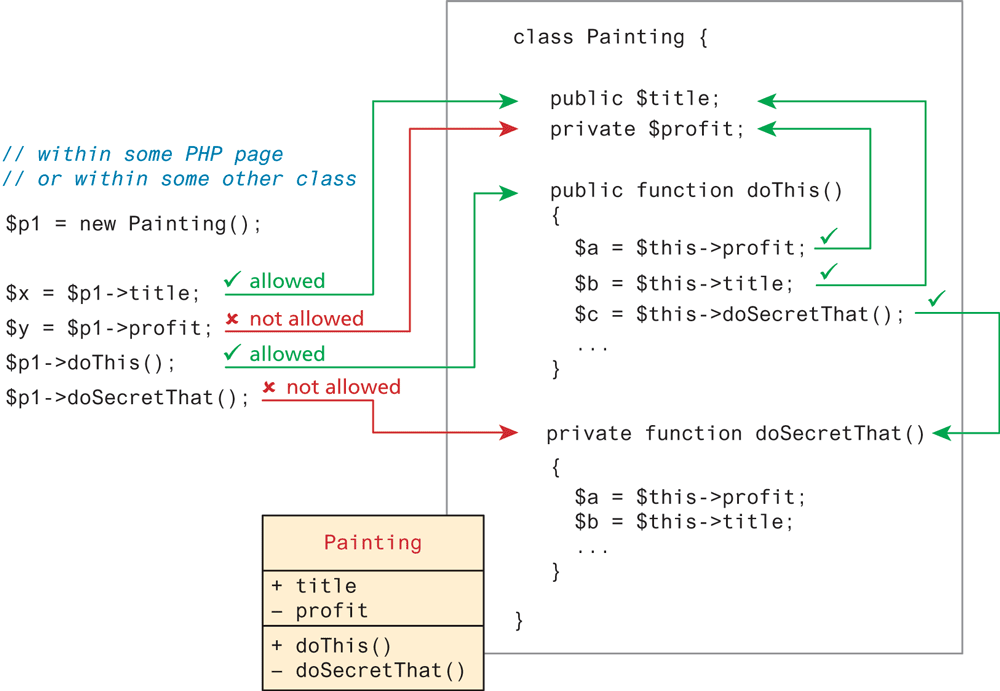
As can be seen in Figure 12.19, the public keyword means that the property or method is accessible to any code that has a reference to the object. The private keyword sets a method or variable to only be accessible from within the class. This means that we cannot access or modify the property from outside of the class, even if we have a reference to it as shown in Figure 12.19. The protected keyword will be discussed later after we cover inheritance. For now consider a protected property or method to be private. In UML, the "+" symbol is used to denote public properties and methods, the "–" symbol for private ones, and the "#" symbol for protected ones.
12.6.8 Static Members
A static member is a property or method that all instances of a class share. Unlike an instance property, where each object gets its own value for that property, there is only one value for a class’s static property.
To illustrate how a static member is shared between instances of a class, we will add the static property artistCount to our Artist class, and use it to keep a count of how many Artist objects are currently instantiated. This variable is declared static by including the static keyword in the declaration:
public static $artistCount = 0;For illustrative purposes we will also modify our constructor, so that it increments this value, as shown in Listing 12.31.
Listing 12.31 Class definition modified with static members
class Artist {
   public static $artistCount = 0;
   public   $firstName;
   public   $lastName;
   public   $birthDate;
   public   $birthCity;
   public   $deathDate;

   function   construct($firstName, $lastName, $city, $birth,
                        $death=null) {
        $this->firstName = $firstName;
        $this->lastName = $lastName;
        $this->birthCity = $city;
        $this->birthDate = $birth;
        $this->deathDate = $death;
        self::$artistCount++;
   }
}
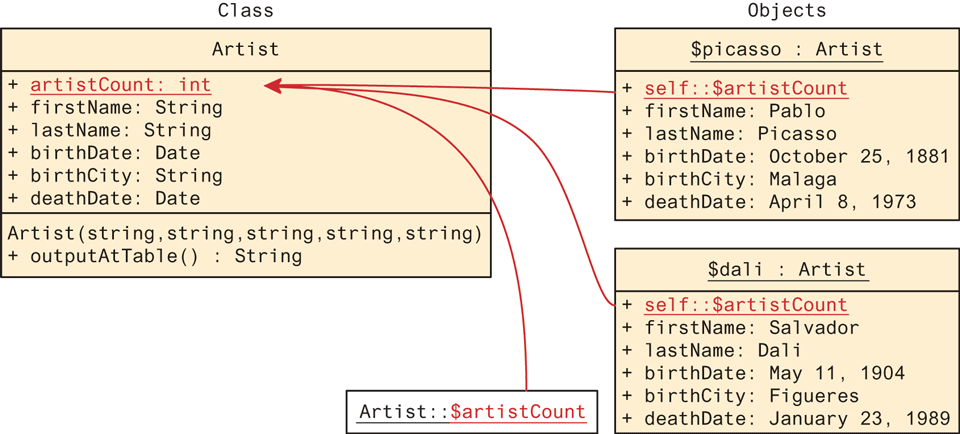
Notice that you do not reference a static property using the $this-> syntax, but rather it has its own self:: syntax. The rationale behind this change is to force the programmer to understand that the variable is static and not associated with an instance ($this). This static variable can also be accessed without any instance of an Artist object by using the class name, that is, via Artist::$artistCount.
To illustrate the impact of these changes, look at Figure 12.20, where the shared property is underlined (UML notation) to indicate its static nature and the shared reference between multiple instances is illustrated with arrows, including one reference without any instance.
Figure 12.20 A static property
Static methods are similar to static properties in that they are globally accessible (if public) and are not associated with particular objects. It should be noted that static methods cannot access instance members. Static methods are called using the same double colon syntax as static properties.
Why would you need a static member? Static members tend to be used relatively infrequently. However, classes sometimes have data or operations that are independent of the instances of the class. We will find them helpful when we create a class-based solution to accessing databases in Chapter 14.
Note
Naming conventions can help make your code more understandable to other programmers. They typically involve a set of rules for naming variables, functions, classes, and so on. So far, we have followed the naming convention of beginning PHP variables with a lowercase letter, and using the so-called “camelCase” (i.e., begin lowercase, and any new words start with uppercase letter) for functions. You might wonder what conventions to follow with classes.
PHP is an open-source project without an authority providing strong coding convention recommendations as with Microsoft and ASP.NET or Oracle and Java. Nonetheless, if we look at examples within the PHP documentation, and examples in large PHP projects such as PEAR and Zend, we will see four main conventions.
Class names begin with an uppercase letter and use underscores to separate words (e.g.,
Painting_Controller).Public and protected members (properties and methods) use camelCase (e.g.,
getSize(),$firstName).Constants are all capitals (e.g.,
DBNAME).Names should be as descriptive as possible.
In the PEAR documentation and the older Zend documentation, there is an additional convention: namely, that private members begin with an underscore (e.g., _calculateProfit(), $_firstName). The rationale for doing so is to make it clear when looking for the member name whether the reference is to a public or private member. With the spread of more sophisticated IDE, this practice may seem less necessary. Nonetheless, it is a common practice and you may encounter it when working with existing code or examining code examples online.
12.6.9 Inheritance
Along with encapsulation, inheritance is one of the three key concepts in object-oriented design and programming (we will cover the third, polymorphism, next). Inheritance enables you to create new PHP classes that reuse, extend, and modify the behavior that is defined in another PHP class. Although some languages allow it, PHP only allows you to inherit from one class at a time.
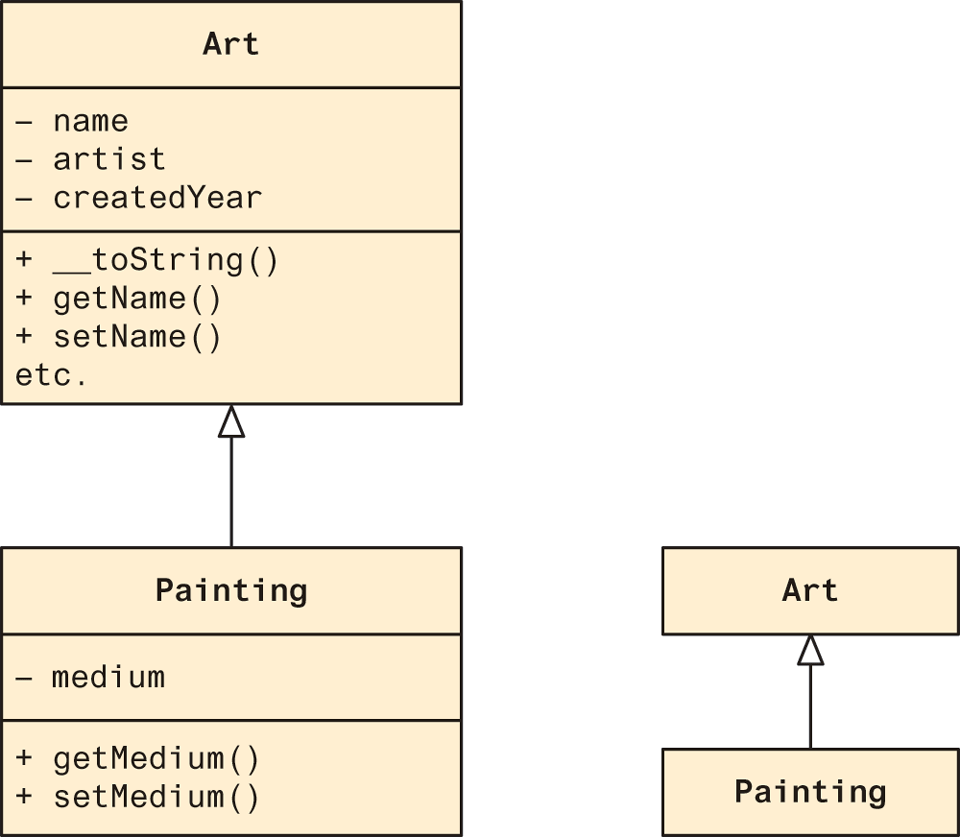
A class that is inheriting from another class is said to be a subclass or a derived class. The class that is being inherited from is typically called a superclass or a base class. When a class inherits from another class, it inherits all of its public and protected methods and properties. Figure 12.21 illustrates how inheritance is shown in a UML class diagram.
Figure 12.21 UML class diagrams showing inheritance
Just as in Java, a PHP class is defined as a subclass by using the extends keyword.
class Painting extends Art { . . . }Referencing Base Class Members
As mentioned above, a subclass inherits the public and protected members of the base class. Thus in the following code based on Figure 12.21, both of the references will work because it is as if the base class public members are defined within the subclass.
$p = new Painting();
. . .
// these references are ok
echo $p->getName();      // defined in base class
echo $p->getMedium();    // defined in subclass
In PHP any reference to a member in the base class requires the addition of the parent:: prefix instead of the $this-> prefix. So within the Painting class, a reference to the getName() method would be:
parent::getName()It is important to note that private members in the base class are not available to its subclasses. Thus, within the Painting class, a reference like the following would not work.
$abc = parent::name; // would not work within the Painting classIf you want a member to be available to subclasses but not anywhere else, you can use the protected access modifier.