12.5 Arrays
Like most other programming languages, PHP supports arrays. As you may recall from arrays in JavaScript back in Chapter 8, an array is a data structure that allows the programmer to collect a number of related elements together in a single variable. Unlike most other programming languages (including JavaScript), in PHP an array is actually an ordered map, which associates each value in the array with a key. The description of the map data structure is beyond the scope of this chapter, but if you are familiar with other programming languages and their collection classes, a PHP array is not only like other languages’ arrays, but it is also like their vector, hash table, dictionary, and list collections. This flexibility allows you to use arrays in PHP in a manner similar to other languages’ arrays, but you can also use them like other languages’ collection classes.
For some PHP developers, arrays are easy to understand, but for others they are a challenge. To help visualize what is happening, one should become familiar with the concept of keys and associated values. Figure 12.12 illustrates a PHP array with five strings containing day abbreviations.
Figure 12.12 Visualization of a key-value array
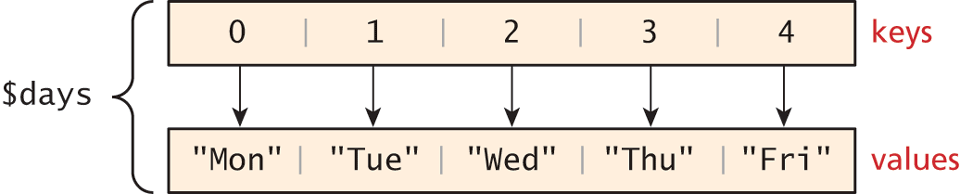
Array keys in most programming languages are limited to integers, start at 0, and go up by 1. You may recall from Chapter 8 that this is the case with arrays in JavaScript. In PHP, keys must be either integers or strings and need not be sequential. This means you cannot use an array or object as a key (doing so will generate an error).
Array values, unlike keys, are not restricted to integers and strings. They can be any object, type, or primitive supported in PHP. You can even have objects of your own types, so long as the keys in the array are integers or strings.
12.5.1 Defining and Accessing an Array
Let us begin by considering the simplest array, which associates each value inside of it with an integer index (starting at 0). The following declares an empty array named days:
$days = array();To define the contents of an array as strings for the days of the week as shown in Figure 12.12, you declare it with a comma-delimited list of values inside the ( ) braces using either of two following syntaxes:
$days = array("Mon","Tue","Wed","Thu","Fri");
$days = ["Mon","Tue","Wed","Thu","Fri"];     // alternate syntax
In these examples, because no keys are explicitly defined for the array, the default key values are 0, 1, 2, . . . , n–1. Notice that you do not have to provide a size for the array: arrays are dynamically sized as elements are added to them.
Elements within a PHP array are accessed in a manner similar to other programming languages, that is, using the familiar square bracket notation. The code example below echoes the value of our $days array for the key=1, which results in output of Tue.
echo "Value at index 1 is ". $days[1]; // index starts at zeroYou could also define the array elements individually using this same square bracket notation:
$days = array();
$days[0] = "Mon";
$days[1] = "Tue";
$days[2] = "Wed";

// alternate approach
$days = [];
$days[] = "Mon";
$days[] = "Tue";
$days[] = "Wed";
In PHP, you are also able to explicitly define the keys in addition to the values. This allows you to use keys other than the classic 0, 1, 2, . . . , n to define the indexes of an array. For clarity, the exact same array defined above and shown in Figure 12.12 can also be defined more explicitly by specifying the keys and values as shown in Figure 12.13.
Figure 12.13 Explicitly assigning keys to array elements

One should be especially careful about mixing the types of the keys for an array since PHP performs cast operations on the keys that are not integers or strings. You cannot have key “1” distinct from key 1 or 1.5, since all three will be cast to the integer key 1.
Explicit control of the keys and values opens the door to keys that do not start at 0, are not sequential, and that are not even integers (but rather strings). This is why you can also consider an array to be a dictionary or hash map. All arrays in PHP are generally referred to as associative arrays. You can see in Figure 12.14 an example of an associative array and its visual representation. In the example in Figure 12.14, the keys are strings (for the weekdays) and the values are temperature forecasts for the specified day in integer degrees.
Figure 12.14 Array with strings as keys and integers as values
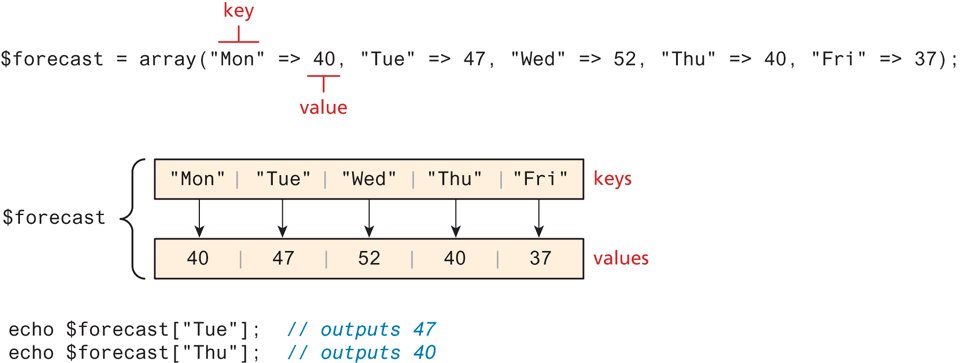
As can be seen in Figure 12.14, to access an element in an associative array, you simply use the key value rather than an index:
echo $forecast["Wed"]; // this will output 5212.5.2 Multidimensional Arrays
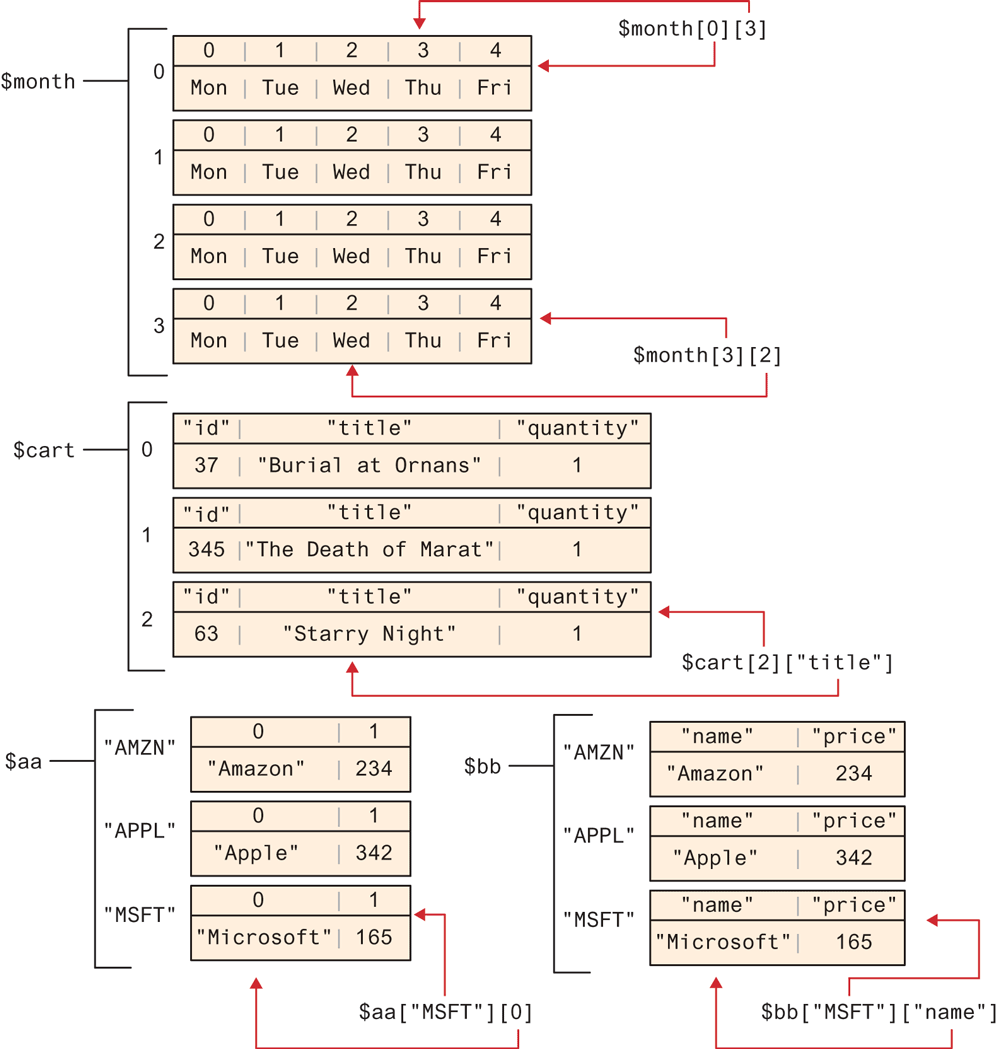
PHP also supports multidimensional arrays. Recall that the values for an array can be any PHP object, which includes other arrays. Listing 12.22 illustrates the creation of several different multidimensional arrays (each one contains two dimensions).
Figure 12.15 illustrates the structure of three of these multidimensional arrays. You will normally encounter the syntax shown in the last three example arrays in Listing 12.1. Notice that individual array elements can have keys, but so can the arrays as a whole.
Figure 12.15 Visualizing multidimensional arrays
Listing 12.22 Multidimensional arrays
$month = array(
array("Mon","Tue","Wed","Thu","Fri"),
array("Mon","Tue","Wed","Thu","Fri"),
array("Mon","Tue","Wed","Thu","Fri"),
array("Mon","Tue","Wed","Thu","Fri")
);
echo $month[0][3];    // outputs Thu

$cart = [];
$cart[] = array("id" => 37, "title" => "Burial at Ornans",
                "quantity" => 1);
$cart[] = array("id" => 345, "title" => "The Death of Marat",
                "quantity" => 1);
$cart[] = array("id" => 63, "title" => "Starry Night", "quantity" => 1);
echo $cart[2]["title"];   // outputs Starry Night

$stocks = [
  ["AMZN", "Amazon"],
  ["APPL", "Apple"],
  ["MSFT", "Microsoft"]
];
echo $stocks[2][1];    // outputs Microsoft

$aa = [
  "AMZN" => ["Amazon", 234],
  "APPL" => ["Apple", 342],
  "MSFT" => ["Microsoft", 165]
];
echo $aa["APPL"][0];   // outputs Apple

$bb = [
  "AMZN" => ["name" =>"Amazon", "price" => 234],
  "APPL" => ["name" => "Apple", "price" => 342],
  "MSFT" => ["name" => "Microsoft", "price" => 165]
];
echo $bb["MSFT"]["price"];  // outputs 165
12.5.3 Iterating through an Array
One of the most common programming tasks that you will perform with an array is to iterate through its contents. Listing 12.23 illustrates how to iterate and output the content of the $days array three different ways: using while, do while, and for loops. Each example uses the built-in function count(), which return the number of elements in a given array.
Listing 12.23 Iterating through an array using while, do while, and for loops
// while loop
$i=0;
while  ($i < count($days)) {
   echo $days[$i] . "<br>";
   $i++;
}

// do while loop
$i=0;
do  {
   echo $days[$i] . "<br>";
   $i++;
}  while  ($i < count($days));

// for loop
for  ($i=0; $i<count($days); $i++) {
   echo $days[$i] . "<br>";
}
The challenge of using the classic loop structures is that when you have nonsequential integer keys (i.e., an associative array), you can’t write a simple loop that uses the $i++ construct. To address the dynamic nature of such arrays, you have to use iterators to move through such an array. This iterator concept has been woven into the foreach loop and its use is illustrated in Listing 12.24.
Listing 12.24 Iterating through an associative array using a foreach loop
// foreach: iterating through the values
foreach  ($forecast  as $value) {
   echo $value . "<br>";
}

// foreach: iterating through the values AND the keys
foreach  ($forecast  as $key => $value) {
   echo "day[" . $key . "]=" . $value;
}
 Pro Tip
In practice, arrays are echoed in web apps using a loop as shown in Listings 12.22 and 12.23. However, for debugging purposes, you can quickly output the content of an array using the print_r() function, which prints out the array and shows you the keys and values stored within. For example,
print_r($days);will output the following:
Array ( [0] => Mon [1] => Tue [2] => Wed [3] => Thu [4] => Fri )12.5.4 Adding and Deleting Elements
In PHP, arrays are dynamic, that is, they can grow or shrink in size. An element can be added to an array simply by using a key/index that hasn’t been used, as shown below:
$days[5] = "Sat";Since there is no current value for key 5, the array grows by one, with the new key/value pair added to the end of our array. If the key had a value already, the same style of assignment replaces the value at that key. As an alternative to specifying the index, a new element can be added to the end of any array using empty square brackets after the array name, as follows:
$days[] = "Sun";The advantage to this approach is that we don’t have to worry about skipping an index key. PHP is more than happy to let you “skip” an index, as shown in the following example:
$days = array("Mon","Tue","Wed","Thu","Fri");
$days[7] = "Sat";
print_r($days);
What will be the output of the print_r()? It will show that our array now contains the following:
Array ([0] => Mon [1] => Tue [2] => Wed [3] => Thu [4] => Fri [7] => Sat)That is, there is now a “gap” in our array indexes that will cause problems if we try iterating through it using the techniques shown in Listing 12.23. If we try referencing $days[6], for instance, an error message will be issued and it will return a null value, which is a special PHP value that represents a variable with no value.
You can also create “gaps” by explicitly deleting array elements using the unset() function, as shown in Listing 12.25.
Listing 12.25 Deleting elements
$days = array("Mon","Tue","Wed","Thu","Fri");

unset($days[2]);
unset($days[3]);
print_r($days); // outputs: Array ( [0] => Mon [1] => Tue [4] => Fri )

$days = array_values($days);
print_r($days);  // outputs: Array ( [0] => Mon [1] => Tue [2] => Fri )
Listing 12.25 also demonstrates that you can remove “gaps” in arrays (which really are just gaps in the index keys) using the array_values() function, which returns a copy of the array passed in using the numerical indexes of 0, 1, 2, . . . .
Checking if a Value Exists
Since array keys need not be sequential, and need not be integers, you may run into a scenario where you want to check if a value has been set for a particular key. As with null variables, values for keys that do not exist are also considered to be undefined. To check if a value exists for a key, you can therefore use the isset() function, which returns true if a value has been set, and false otherwise. Listing 12.26 defines an array with noninteger indexes, and shows the result of asking isset() on several indexes.
Listing 12.26 Illustrating nonsequential keys and usage of isset( )
$oddKeys = array(1 => "hello", 3 => "world", 5 => "!");
if (isset($oddKeys[0])) {
   // The code below will never be reached since $oddKeys[0] is not set!
   echo "there is something set for key 0";
}
if (isset($oddKeys[1])) {
   // This code will run since a key/value pair was defined for key 1
   echo "there is something set for key 1, namely ". $oddKeys[1];
}
Test Your Knowledge #3
Examine lab12b-test01.php and view in browser. You are going to replace the hard-coded markup using the provided array with a function and loops.
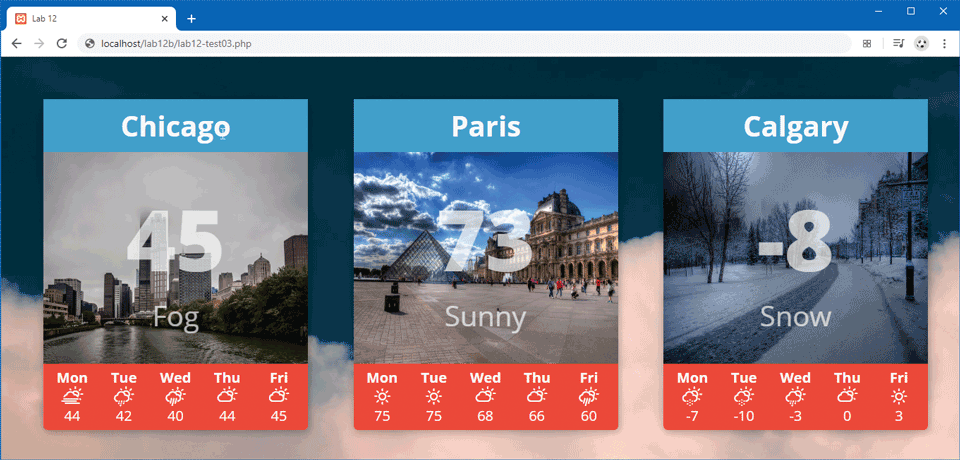
Examine the file includes/lab12b-test01.inc.php. This file contains the populated array that contains all the relevant data needed to generate the page shown in Figure 12.16.
Figure 12.16 Completed Test Your Knowledge #3
Replace the
<article>markup with a loop that iterates through the$weatherDataarray and outputs an individual city box for each element. To make this task more manageable, you should create some type of function for outputting a single city box and a function for outputting a single day forecast (e.g., Mon/Cloudy/44). Your function for outputting a single city box will need to loop through the five-day forecast array.