12.4 Functions
When you are first learning PHP, you will likely be writing small snippets of code scattered throughout your markup (as in the nearby Extended Example). While such an approach is fine when first learning PHP, doing so typically makes it hard to reuse, maintain, and understand. As an alternative, PHP allows you to define functions. Just like with JavaScript, a function in PHP contains a small bit of code that accomplishes one thing. These functions can be made to behave differently based on the values of their parameters.
Functions can exist all on their own, and can then be called from anywhere that needs to make use of them, so long as they are in scope. Later you will write functions inside of classes, which we will call methods.
In PHP there are two types of function: user-defined functions and built-in functions. A user-defined function is one that you, the programmer, define. A built-in function is one of the functions that come with the PHP environment (or with one of its extensions). One of the real strengths of PHP is its rich library of built-in functions that you can use.
12.4.1 Function Syntax
To create a new function you must think of a name for it and consider what it will do. Functions can return values to the caller, or not return a value. They can be set up to take or not take parameters. To illustrate function syntax, let us examine a function called getNiceTime(), which will return a formatted string containing the current server time, and is shown in Listing 12.13. You will notice that the definition requires the use of the function keyword followed by the function’s name, round ( ) brackets for parameters, and then the body of the function inside curly { } brackets.
Listing 12.13 The definition of a function to return the current time as a string
/**
* This function returns a nicely formatted string using the current
* system time.
*/
function getNiceTime(){
   return date("H:i:s");
}
While the example function in Listing 12.13 returns a value, there is no requirement for this to be the case. Listing 12.14 illustrates a function definition that doesn’t return a value but just performs a task.
Listing 12.14 The definition of a function without a return value
/**
* This function outputs a footer menu
*/
function outputFooterMenu() {
echo '<div id="footer">';
echo '<a href="#">Home</a> | <a href="#">Products</a> | ';
echo '<a href="#">About us</a> | <a href="#">Contact us</a>';
echo '</div>';
} Pro Tip
Recall that PHP is a mostly a dynamically typed language, meaning that the type of a variable (or function) is determined at run time. In PHP 7.0, the ability to explicitly define a return type for a function was added, allowing you to enforce that a function return a certain type of value.
A Return Type Declaration explicitly defines a function’s return type by adding a colon and the return type after the parameter list when defining a function. To illustrate this new syntax, consider Listing 12.15 where a function is defined that must return a string. If the code to return a string is removed or changed to return a nonstring, a TypeError exception will be thrown, so long as strict typing is on. The listing also illustrates another new feature of PHP 7: the ability to specify parameter types.
PHP continues to support dynamically typed functions, so existing code that does not define a return type will work just fine, since the use of return type declarations is optional.
Listing 12.15 Return type declaration in PHP 7.0
function mustReturnString(string $name) : string {
   return "hello ". $name;
}
12.4.2 Invoking a Function
Now that you have defined a function, you are able to use it whenever you want to. To invoke or call a function you must use its name with the () brackets. Since getNiceTime() returns a string, you can assign that return value to a variable, or echo that return value directly, as shown in the following example:
$output = getNiceTime();
echo getNiceTime();
If the function doesn’t return a value, you can just call the function:
outputFooterMenu();12.4.3 Parameters
It is common to define functions with parameters since functions are more powerful and reusable when their output depends on the input they get. Parameters (also called arguments) are the mechanism by which values are passed into functions, and there are some complexities that allow us to have multiple parameters, default values, and to pass objects by reference instead of value.
To define a function with parameters, you must decide how many parameters you want to pass in, and in what order they will be passed. Each parameter must be named. To illustrate, let us write another version of getNiceTime() that takes an integer as a parameter to control whether to show seconds. You will call the parameter showSeconds, and write our function as shown in Listing 12.16. Notice that parameters, being a type of variable, must be prefaced with a $ symbol like any other PHP variable.
Listing 12.16 A function with a parameter
/**
* This function returns a nicely formatted string using the current
* system time. The showSeconds parameter controls whether or not to
* include the seconds in the returned string.
*/
function getNiceTime($showSeconds) {
   if ($showSeconds==true)
       return date("H:i:s");
   else
       return date("H:i");
}
Thus to call our function, you can now do it in two ways:
echo getNiceTime(true);   // this will print seconds
echo getNiceTime(false);  // will not print seconds
In fact any nonzero number passed in to the function will be interpreted as true since the parameter is not type specific.
 Note
Note
Now you may be asking how you can that use the same function name that you used before. Well, to be honest, we are replacing the old function definition with this one. If you are familiar with other programming languages, you might wonder whether we couldn’t overload the function, that is, define a new version with a different set of input parameters.
In PHP, the signature of a function is based on its name, and not its parameters. Thus it is not possible to do the same function overloading as in other object-oriented languages. PHP does have class method overloading, but it means something quite different than in other object-oriented languages.
Parameter Default Values
You may wonder if you could not simply combine the two overloaded functions together into one so that if you call it with no parameter, it uses a default value. The answer is yes you can!
In PHP you can set parameter default values for any parameter in a function. However, once you start having default values, all subsequent parameters must also have defaults. Applying this principle, you can combine our two functions from Listing 12.13 and Listing 12.16 together by adding a default value in the parameter definition as shown in Listing 12.17.
Listing 12.17 A function with a parameter default
/**
* This function returns a nicely formatted string using the current
* system time. The showSeconds parameter controls whether or not
* to show the seconds.
*/
function getNiceTime($showSeconds=true) {
   if ($showSeconds==true)
       return date("H:i:s");
   else
       return date("H:i");
}
Now if you were to call the function with no values, the $showSeconds parameter would take on the default value, which we have set to 1, and return the string with seconds. If you do include a value in your function call, the default will be overridden by whatever that value was. Either way you now have a single function that can be called with or without values passed.
Passing Parameters by Reference
By default, arguments passed to functions are passed by value in PHP. This means that PHP passes a copy of the variable so if the parameter is modified within the function, it does not change the original. Listing 12.18 illustrates a simple example of passing by value. Notice that even though the function modifies the parameter value, the contents of the variable passed to the function remain unchanged after the function has been called.
Listing 12.18 Passing a parameter by value
function changeParameter($arg) {
   $arg += 285;
   echo "<br/>arg=" . $arg;
}

$initial = 15;
echo "<br/>initial=" . $initial;   // output: initial=15
changeParameter($initial);         // output: arg=300
echo "<br/>initial=" . $initial;   // output: initial=15
Like many other programming languages, PHP also allows arguments to functions to be passed by reference, which will allow a function to change the contents of a passed variable. A parameter passed by reference points the local variable to the same place as the original, so if the function changes it, the original variable is changed as well. The mechanism in PHP to specify that a parameter is passed by reference is to add an ampersand (&) symbol next to the parameter name in the function declaration. Listing 12.19 illustrates an example of passing by reference.
Listing 12.19 Passing a parameter by reference
function changeParameter(&$arg) {
  $arg += 300;
  echo "<br/>arg=". $arg;
}

$initial = 15;
echo "<br/>initial=" . $initial;   // output: initial=15
changeParameter($initial);         // output: arg=315
echo "<br/>initial=" . $initial;   // output: initial=315
Figure 12.10 illustrates visually the memory differences between pass-by-value and pass-by-reference.
Figure 12.10 Pass by value versus pass by reference
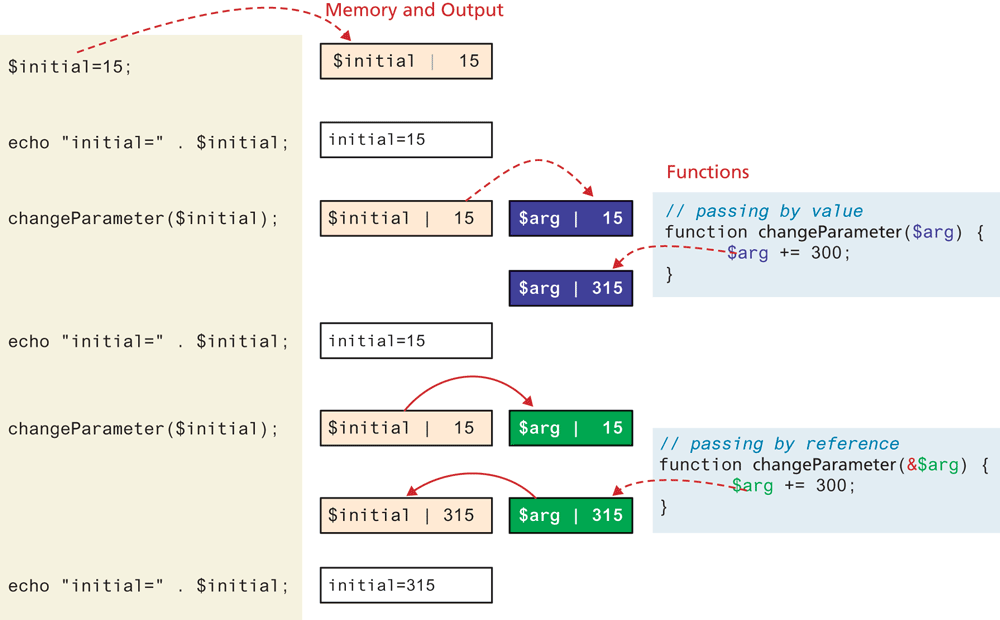
The possibilities opened up by the pass-by-reference mechanism are significant, since you can now decide whether to have your function use a local copy of a variable, or modify the original. By and large, most of the time you should keep your functions pure (see discussion on pure functions in Chapter 1) and use pass-by value in the majority of your functions.
Parameter-Type Declarations
As we have seen, PHP 7 now supports a more strictly typed syntax with return type declarations. Strict typing allows programmers to add checks to their code to ensure that variables contain the expected type of values. It is now possible to require that a particular parameter be of a particular type. To add a type to a parameter, add a type specification (int, float, string, bool, callable, or any class name you have defined) before the parameter name. Listing 12.20 demonstrates how a parameter-type declaration can be added to a function parameter.
Listing 12.20 Using a parameter-type declaration
function getNiceTime(bool  $showSeconds=1) {
   if ($showSeconds==true)
      return date("H:i:s");
   else
      return date("H:i");
}
Since PHP is good at forcing one type of value into another, it’s possible for a passed parameter to have a different type, which is then coerced into the current type by the dynamic PHP runtime engine (think transforming an integer into a string if a string is expected). To require that only variables of exact type are accepted you can enable strict mode on a per-file basis as follows:
declare(strict_types=1);12.4.4 Variable Scope within Functions
It will come as no surprise that all variables defined within a function (such as parameter variables) have function scope, meaning that they are only accessible within the function. It might be surprising though to learn that, unlike JavaScript, any variables created outside of the function in the main script are unavailable within a function. For instance, in the following example, the output of the echo within the function is 0 and not 56 since the reference to $count within the function is assumed to be a new variable named $count with function scope.
$count = 56;

function testScope() {
   echo $count;     // outputs 0 or generates run-time warning
}
testScope();
echo $count;        // outputs 56
Of course, in the aforementioned example, one could simply have passed $count to the function. However, there are times when such a strategy is unworkable. For instance, most web applications will have important data values such as connections, application constants, and logging/debugging switches that need to be available throughout the application, and passing them to every function that might need them is often impractical. PHP does allow variables with global scope to be accessed within a function using the global keyword, as shown in Listing 12.21, though generally speaking, its usage is discouraged.
Listing 12.21 Using the global keyword
$count = 56;

function testScope() {
   global  $count;
   echo $count;   // outputs 56
}

testScope();
echo $count;      // outputs 56
Test Your Knowledge #2
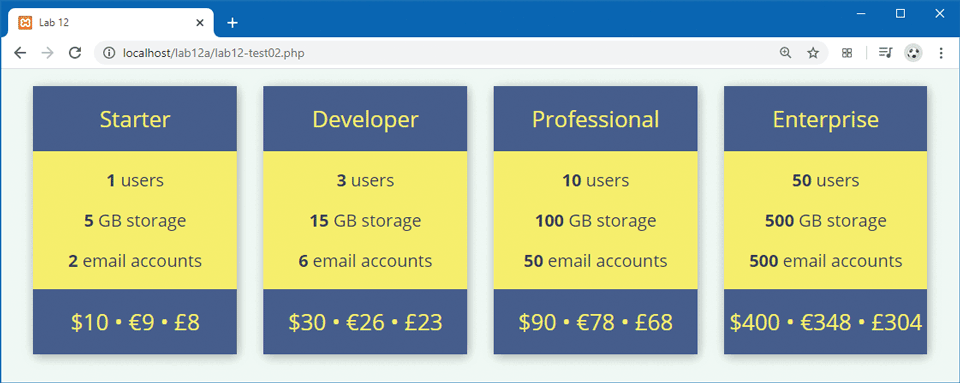
Open lab12a-test02.php in your editor and examine in browser.
Notice that this file already has the markup. You will have to replace markup with appropriate PHP codes.
Create two functions: one that converts a US dollar amount to a Euro amount; the other converts from US dollar to UK pound. Each of these should return a numeric value with no decimals and rounded up. Feel free to use the current conversion rate: for the numbers in the screen capture, the rates were $1= €0.87 and $1= £0.76. Be sure to first define PHP constants for these exchange rates (see http:/
/ php.net/ manual/ en/ language.constants.php). Create a function called
generateBox()that generates the markup for a single pricing box. It must only have the following parameters: name and number of users. The other data values can be calculated within this function from those parameters.Notice that the calculation for cost, storage, and number of emails is different for the professional and enterprise boxes, which will require the use of conditional logic. There is a 10% discount for 10 users, and a 20% discount for 50 users. Be sure to define these functions in an external file called lab12a-test02.inc.php.
Remove the markup for the boxes and replace them with invocations of your
generateBox()function. Be sure to include your function file. The page should look similar to that shown in Figure 12.11.Figure 12.11 Completed Test Your Knowledge #2