12.3 Program Control
Just as with most other programming languages there are a number of conditional and iteration constructs in PHP. There are if and switch, and while, do while, and for loops familiar to most languages as well as the foreach loop.
12.3.1 if . . . else
The syntax for conditionals in PHP is identical to that of JavaScript. In this syntax the condition to test is contained within () brackets with the body contained in {} blocks. Optional else if statements can follow, with an optional else ending the branch. Listing 12.7 uses a conditional to set a greeting variable, depending on the hour of the day.
Listing 12.7 Conditional snippet of code using if . . . else
// if statement
if ( $hourOfDay > 6 && $hourOfDay < 12) {
  $greeting = "Good Morning";
}
else if ($hourOfDay == 12) {  // optional else if
  $greeting = "Good Noon Time";
}
else {                        // optional else branch
  $greeting = "Good Afternoon or Evening";
}
It is also possible to place the body of an if or an else outside of PHP. For instance, in Listing 12.8, an alternate form of an if ... else is illustrated (along with its equivalent PHP-only form). This approach will sometimes be used when the body of a conditional contains nothing but markup with no logic, though because it mixes markup and logic, it may not be ideal from a design standpoint. As well, it can be difficult to match curly brackets up with this format, as perhaps can be seen in Listing 12.8. At the end of the current section an alternate syntax for program control statements is described (and shown in Listing 12.12), which makes the type of code in Listing 12.8 more readable.
Listing 12.8 Combining PHP and HTML in the same script
<?php if ($userStatus == "loggedin") { ?>
<a href="account.php">Account</a>
<a href="logout.php">Logout</a>
<?php } else { ?>
<a href="login.php">Login</a>
<a href="register.php">Register</a>
<?php } ?>
<?php
// equivalent to the above conditional
if ($userStatus == "loggedin") {
echo '<a href="account.php">Account</a> ';
echo '<a href="logout.php">Logout</a>';
}
else {
echo '<a href="login.php">Login</a> ';
echo '<a href="register.php">Register</a>';
}
?> Note
Note
Just like with JavaScript, Java, and C#, PHP expressions use the double equals (==) for comparison. If you use the single equals in an expression, then variable assignment will occur.
As well, like those other programming languages, it is up to the programmer to decide how she or he wishes to place the first curly bracket on the same line with the statement it is connected to or on its own line.
12.3.2 switch . . . case
The switch statement is similar to a series of if ... else statements. An example using switch is shown in Listing 12.9.
Listing 12.9 Conditional statement using switch and the equivalent if-else
switch ($artType) {
case "PT":
$output = "Painting";
break;
case "SC":
$output = "Sculpture";
break;
default:
$output = "Other";
}
// equivalent
if ($artType == "PT")
$output = "Painting";
else if ($artType == "SC")
$output = "Sculpture";
else
$output = "Other"; Pro Tip
Be careful with mixing types when using the switch statement: if the variable being compared has an integer value, but a case value is a string, then there will be type conversions that will create some unexpected results. For instance, the following example will output "Painting" because it first converts the "PT" to an integer (since $code currently contains an integer value), which is equal to the integer 0 (zero).
$code = 0;
switch($code) {
  case "PT":
    echo "Painting";
    break;
  case 1:
    echo "Sculpture";
    break;
  default:
    echo "Other";
}
12.3.3 while and do . . . while
The while loop and the do ... while loop are quite similar. Both will execute nested statements repeatedly as long as the while expression evaluates to true. In the while loop, the condition is tested at the beginning of the loop; in the do ... while loop the condition is tested at the end of each iteration of the loop. Listing 12.10 provides examples of each type of loop.
Listing 12.10 The while loops
$count = 0;
while  ($count < 10) {
   echo $count;
   $count++;
}

$count = 0;
do {
   echo $count;
   // this one increments the count by 2 each time
   $count = $count + 2;
} while ($count < 10);
12.3.4 for
The for loop in PHP has the same syntax as the for loop in JavaScript that we examined in Chapter 8. As can be seen in Listing 12.11, the for loop contains the same loop initialization, condition, and postloop operations as in JavaScript.
Listing 12.11 The for loops
// this one increments the value by 5 each time
for ($count=0; $count < 100; $count+=5) {
   echo $count;
}
// this one increments the count by 1 each time
for ($count=0; $count < 10; $count++) {
   echo $count;
}
There is another type of for loop: the foreach loop. This loop is especially useful for iterating through arrays and so this book will cover foreach loops in the array section later in the chapter.
12.3.5 Alternate Syntax for Control Structures
PHP has an alternative syntax for most of its control structures (namely, the if, while, for, foreach, and switch statements). In this alternate syntax (shown in Listing 12.12), the colon (:) replaces the opening curly bracket, while the closing brace is replaced with endif;, endwhile;, endfor;, endforeach;, or endswitch;. While this may seem strange and unnecessary, it can actually improve the readability of your PHP code when it intermixes PHP and markup within a control structure, as was seen in Listing 12.8.
Listing 12.12 Alternate syntax for control structures
<?php if ($userStatus == "loggedin") : ?>
   <a href="account.php">Account</a>
   <a href="logout.php">Logout</a>
<?php else : ?>
   <a href="login.php">Login</a>
   <a href="register.php">Register</a>
<?php endif; ?>
12.3.6 Include Files
PHP does have one important facility that is unlike most other nonweb programming languages, namely, the ability to include or insert content from one file into another. Almost every PHP page beyond simple practice exercises makes use of this include facility. Include files provide a mechanism for reusing both markup and PHP code, as shown in Figure 12.9.
Figure 12.9 The include files
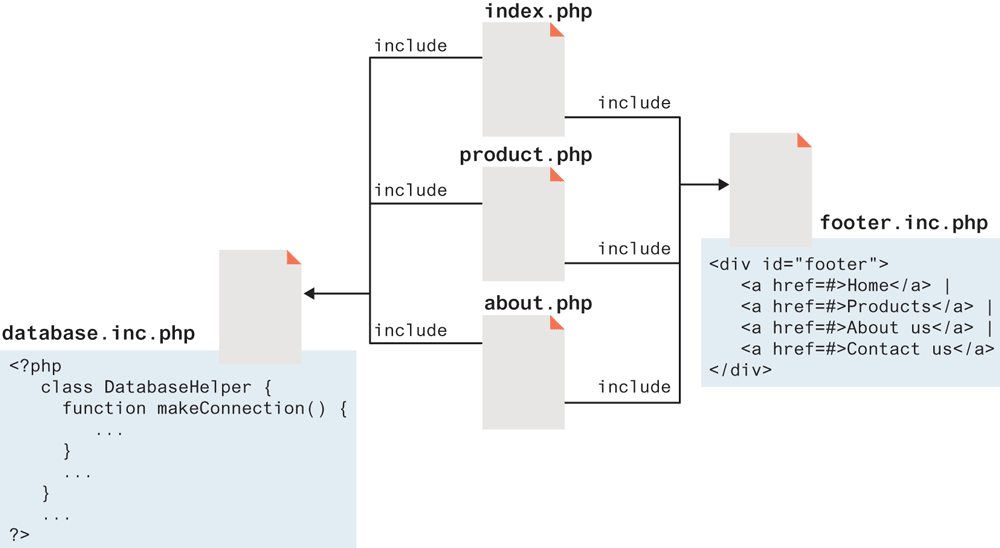
Older web development technologies also supported include files, and were typically called server-side includes (SSI). In a noncompiled environment such as PHP, include files are essentially the only way to achieve code and markup reuse.
PHP provides four different statements for including files, as shown in the following example:
include "somefile.php";
include_once "somefile.php";
require "somefile.php";
require_once "somefile.php";
The difference between include and require lies in what happens when the specified file cannot be included (generally because it doesn’t exist or the server doesn’t have permission to access it). With include, a warning is displayed and then execution continues. With require, an error is displayed and execution stops. The include_once and require_once statements work just like include and require but if the requested file has already been included once, then it will not be included again (preventing re-declarations, and increased memory demands on your scripts). This might seem an unnecessary addition, but in a complex PHP application written by a team of developers, it can be difficult to keep track of whether or not a given file has been included. It is not uncommon for a PHP page to include a file that includes other files that may include other files, and in such an environment the include_once and require_once statements are certainly recommended.
Scope within Include Files
Include files appear to provide a type of encapsulation, but it is important to realize that they are the equivalent of copying and pasting, though in this case it is performed by the server. This can be quite clearly seen by considering the scope of code within an include file. Variables defined within an include file will have the scope of the line on which the include occurs. Any variables available at that line in the calling file will be available within the called file. If the include occurs inside a function, then all of the code contained in the called file will behave as though it had been defined inside that function. Thus, for true encapsulation, you will have to use functions (covered next) and classes (covered in the next chapter).