12.2 PHP Language Fundamentals
PHP, like JavaScript, began as a dynamically typed language. Just like in JavaScript this means that a variable can be a number, and then later a string, then later an object. Departing from this dynamic typing PHP has introduced optional static typing for function return types and parameter types, which we will learn about later in this chapter.
PHP provides classes and functions in a way consistent with other object-oriented languages such as C++, C#, and Java. The syntax for loops, conditionals, and assignment is identical to JavaScript, only differing when you get to functions, classes, and in how you define variables. This section will cover the essential features of PHP; some of it will be quite cursory and will leave to the reader the responsibility of delving further into language specifics.
12.2.1 PHP Tags
The most important fact about PHP is that the programming code can be embedded directly within an HTML file. However, instead of having an .html extension, a PHP file will usually have the extension .php. As can be seen in Listing 12.1, PHP programming code must be contained within an opening <?php tag and a matching closing ?> tag in order to differentiate it from the HTML. The programming code within the <?php and the ?> tags is interpreted and executed, while any code outside the tags is echoed directly out to the client.
Listing 12.1 PHP tags
<?php
$user = "Randy";
?>
<!DOCTYPE html>
<html>
<body>
<h1>Welcome <?php echo $user; ?></h1>
<p>
The server time is
<?php
echo "<strong>";
echo date("H:i:s");
echo "</strong>";
?>
</p>
</body>
</html>
You may be wondering what the code in Listing 12.1 would look like when requested by a browser. Listing 12.2 illustrates the HTML output from the PHP script in Listing 12.1. Notice that no PHP is sent back to the browser.
Listing 12.2 Output (HTML) from PHP script in Listing 12.1
<!DOCTYPE html>
<html>
<body>
<h1>Welcome Randy</h1>
<p>
The server time is <strong>02:59:09</strong>
</p>
</body>
</html>
Listing 12.1 also illustrates the very common practice (especially when first learning PHP) for a PHP file to have HTML markup and PHP programming logic woven together. As your code becomes more complex, mixing HTML markup with programming logic will make your PHP scripts very difficult to understand and modify. Indeed, the authors have seen PHP files that are several thousands of lines long, which are a nightmare to maintain. For now, as we learn about the basics, mixing the two is perfectly reasonable.
PHP Comments
Just like with JavaScript, comments in PHP are ignored at runtime. PHP uses the same commenting mechanisms as JavaScript, namely multi-line block comments using /* */ or end-of-line comments using //.
12.2.2 Variables and Data Types
Variables in PHP are dynamically typed, which means that you as a programmer do not have to declare the data type of a variable. Instead the PHP engine makes a best guess as to the intended type based on what it is being assigned. Variables are also loosely typed in that a variable can be assigned different data types over time.
To declare a variable, you must preface the variable name with the dollar ($) symbol. Whenever you use that variable, you must also include the $ symbol with it. You can assign a value to a variable as in JavaScript’s right-to-left assignment, so creating a variable named count and assigning it the value of 42 would be done with:
$count = 42;You should note that in PHP the name of a variable is case sensitive, so $count and $Count are references to two different variables. In PHP, variable names can also contain the underscore character, which is useful for readability reasons.
While PHP is loosely typed, it still does have data types, which describe the type of content that a variable can contain. Table 12.1 lists the main data types within PHP. As mentioned earlier, however, you do not declare a data type. Instead the PHP engine determines the data type when the variable is assigned a value.
Table 12.1 PHP Data Types
| Data Type | Description |
|---|---|
Boolean |
A logical true or false value |
Integer |
Whole numbers |
Float |
Decimal numbers |
String |
Letters |
Array |
A collection of data of any type (covered in the next chapter) |
Object |
Instances of classes |
A constant is somewhat similar to a variable, except a constant’s value never changes . . . in other words it stays constant. A constant can be defined anywhere but is typically defined near the top of a PHP file via the define() function, as shown in Listing 12.3. The define() function generally takes two parameters: the name of the constant and its value. Notice that once it is defined, it can be referenced without using the $ symbol.
Listing 12.3 PHP constants
<?php
// uppercase for constants is a programming convention
define("DATABASE_LOCAL", "localhost");
define("DATABASE_NAME", "ArtStore");
define("DATABASE_USER", "Fred");
define("DATABASE_PASSWD", "F5^7%ad");
// ...
// notice that no $ prefaces constant names
$db = new mysqli(DATABASE_LOCAL, DATABASE_NAME, DATABASE_USER, DATABASE_PASSWD);
?> Pro Tip
If you do not assign a value to a variable and simply define its name, it will be undefined. You can check to see whether a variable has been set using the isset() function, but what’s important to realize is that there are no “useful” default values in PHP. Since PHP is loosely typed, you should always define your own default values by initializing the variable.
 Note
Note
String literals in PHP can be defined using either the single quote or the double quote character. Single quotes define everything exactly as is, and no escape sequences are expanded. If you use double quotes, then you can specify escape sequences using the backslash. For instance, the string "Good\nMorning" contains a newline character between the two words since it uses double quotes, but would actually output the slash n were it enclosed in single quotes. Table 12.2 lists some of the common string escape sequences.
Table 12.2 String Escape Sequences
| Sequence | Description |
|---|---|
\n |
Line feed |
\t |
Horizontal tab |
\\ |
Backslash |
\$ |
Dollar sign |
\” |
Double quote |
12.2.3 Writing to Output
Remember that PHP pages are programs that output HTML. To output something that will be seen by the browser, you can use the echo() function.
echo("hello");There is also an equivalent shortcut version that does not require the parentheses.
echo "hello"; Pro Tip
PHP allows variable names to also be specified at run time. This type of variable is sometimes referred to as a “variable variable” and can be convenient at times. For instance, imagine you have a set of variables named as follows:
$artist1 = "picasso";
$artist2 = "raphael";
$artist3 = "cezanne";
$artist4 = "rembrandt";
$artist5 = "giotto";
If you wanted to output each of these variables within a loop, you can do so by programmatically constructing the variable name within curly brackets, as shown in the following loop:
for ($i = 1; $i <= 5; $i++) {
  echo ${"artist". $i};
  echo "<br>";
}
Strings can easily be appended together using the concatenate operator, which is the period (.) symbol. Consider the following code:
$username = "Ricardo";
echo "Hello " . $username;
This code will output Hello Ricardo to the browser. While this no doubt appears rather straightforward and uncomplicated, it is quite common for PHP programs to have significantly more complicated uses of the concatenation operator.
Before we get to those more complicated examples, pay particular attention to the first example in Listing 12.4. It illustrates the fact that variable references can appear within string literals (but only if the literal is defined using double quotes), which is quite unlike traditional programming languages such as Java.
Listing 12.4 PHP quote usage and concatenation approaches
<?php
$firstName = "Pablo";
$lastName = "Picasso";
/*
  Example one:
  These two lines are equivalent. Notice that you can reference PHP variables within a string literal defined with double quotes.

  The resulting output for both lines is:

       <em>Pablo Picasso</em>
*/
echo "<em>" . $firstName . " ". $lastName. "</em>";
echo "<em> $firstName $lastName </em>";
/*
  Example two:
  These two lines are also equivalent. Notice that you can use either the single quote symbol or double quote symbol for string literals.
*/
echo "<h1>";
echo '<h1>';
/*
  Example three:
  These two lines are also equivalent. In the second example, the escape character (the backslash) is used to embed a double quote within a string literal defined within double quotes.
*/
echo '<img src="23.jpg" >';
echo "<img src=\"23.jpg\" >";
?>
As an alternative to using <?php echo $variable ?>, you can instead use the shorthand <?= $variable ?> syntax instead. This can be especially helpful when “injecting” PHP variable values into HTML elements, as shown in Listing 12.5.
Listing 12.5 Using <?= ?>
<?php
$url = "http://www.funwebdev.com";
$file = "images/logo.gif";
?>
...
<a href='<?= $url ?>'>
   <img src='<?= $file ?>' alt='logo'>
</a>
12.2.4 Concatenation
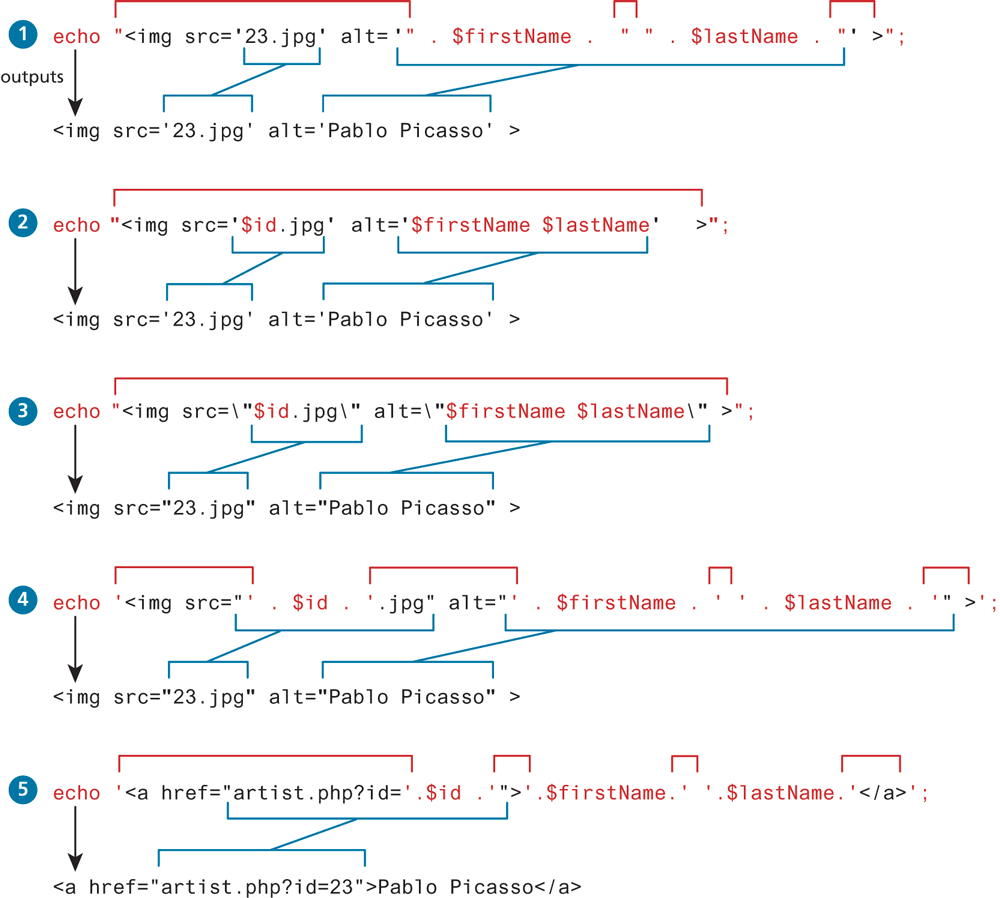
Concatenation is an important part of almost any PHP program, and, based on our experience as teachers, one of the main stumbling blocks for new PHP students. As such, it is important to take some time to experiment and evaluate some sample concatenation statements as shown in Listing 12.6.
Listing 12.6 More complicated concatenation examples
<?php
$id = 23;
$firstName = "Pablo";
$lastName = "Picasso";
echo "<img src='23.jpg' alt='". $firstName . " ". $lastName . "' >";
echo "<img src='$id.jpg' alt='$firstName $lastName' >";
echo "<img src=\"$id.jpg\" alt=\"$firstName $lastName\" >";
echo '<img src="' . $id . '.jpg" alt="' . $firstName . ' ' . $lastName . '" >';
echo '<a href="artist.php?id=' . $id .'">' . $firstName . ' ' . $lastName . '</a>';
?>
Try to figure out the output of each line without looking at the solutions in Figure 12.6. We cannot stress enough how important it is for the reader to be completely comfortable with these examples.
Figure 12.6 More complicated concatenation examples explained
printf
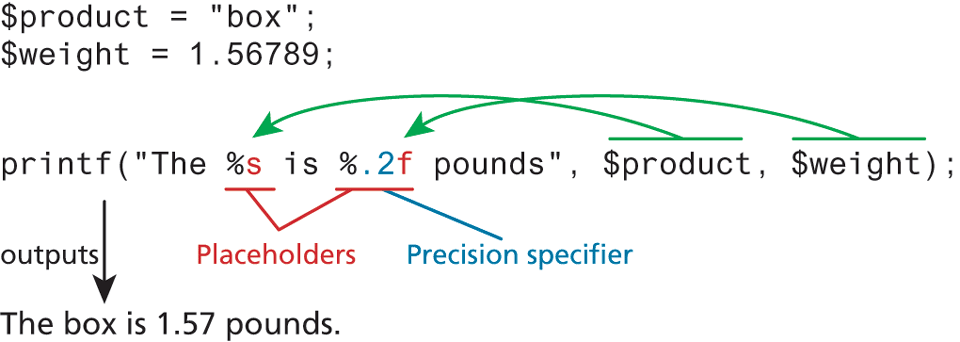
As the examples in Listing 12.6 illustrate, while echo is quite simple, more complex output can get confusing. As an alternative, you can use the printf() function. This function is derived from the same-named function in the C programming language and includes variations to print to string and files (sprintf, fprintf). The function takes at least one parameter, which is a string, and that string optionally references parameters, which are then integrated into the first string by placeholder substitution. The printf() function also allows a developer to apply special formatting, for instance, specific date/time formats or number of decimal places.
Figure 12.7 illustrates the relationship between the first parameter string, its placeholders and subsequent parameters, precision, and output.
Figure 12.7 Illustration of components in a printf statement and output
The printf() function (or something similar to it) is nearly ubiquitous in programming, appearing in many languages including Java, MATLAB, Perl, Ruby, and others. The advantage of using it is that you can take advantage of built-in output formatting that allows you to specify the type to interpret each parameter as, while also being able to succinctly specify the precision of floating-point numbers.
Each placeholder requires the percent (%) symbol in the first parameter string followed by a type specifier. Common type specifiers are b for binary, d for signed integer, f for float, o for octal, s for string, and x for hexadecimal. Precision is achieved in the string with a period (.) followed by a number specifying how many digits should be displayed for floating-point numbers.
For a complete listing of the printf() function, refer the function at php.net.1 When programming, you may prefer to use printf() for more complicated formatted output, and use echo for simpler output.
Test Your Knowledge #1
Open lab12a-test01.php in your editor.
Notice that this file already has defined within it several PHP variables already. As you progress through the book, such variables will later be populated from arrays, files, and then databases.
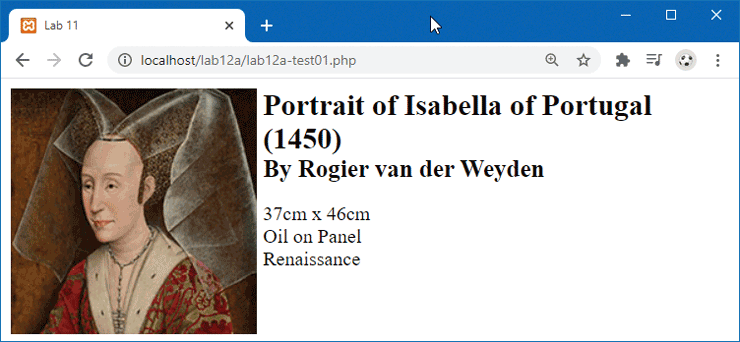
Use PHP
echostatements (or the<?= ?>shorthand) to output the relevant PHP variables so that your page looks similar to that shown in Figure 12.8. Note: the CSS styling has already been provided.Figure 12.8 Completed Test Your Knowledge #1