12.1 What Is Server-Side Development?
Chapters 1 and 8 introduced the basic client-server model at the heart of the web. So far, this book has been almost completely focused on the client-side of that model, that is, with the technologies of HTML, CSS, and JavaScript. While contemporary web development is heavily client-side focused, the server-side of the model is still essential.
12.1.1 Front End versus Back End
You may recall that the terms “front end” and “back end” are often used interchangeably with “client-side” and “server-side” when it comes to web development. HTML, CSS, and JavaScript are the technologies of the front-end and are focused on the presentation and control of the web application’s user interface.
What are the technologies of the back end and what are they used for? The answer to these questions has varied over time. Server-side technologies provide access to data sources, handled security, and allowed web sites to interact with external services such as payment systems. Traditionally, most sites made use programs running on the server-side to programmatically generate the HTML sent to the browser. Figure 12.1 illustrates this traditional division between the responsibilities of the front end and the back end.
Figure 12.1 Front-end versus back-end
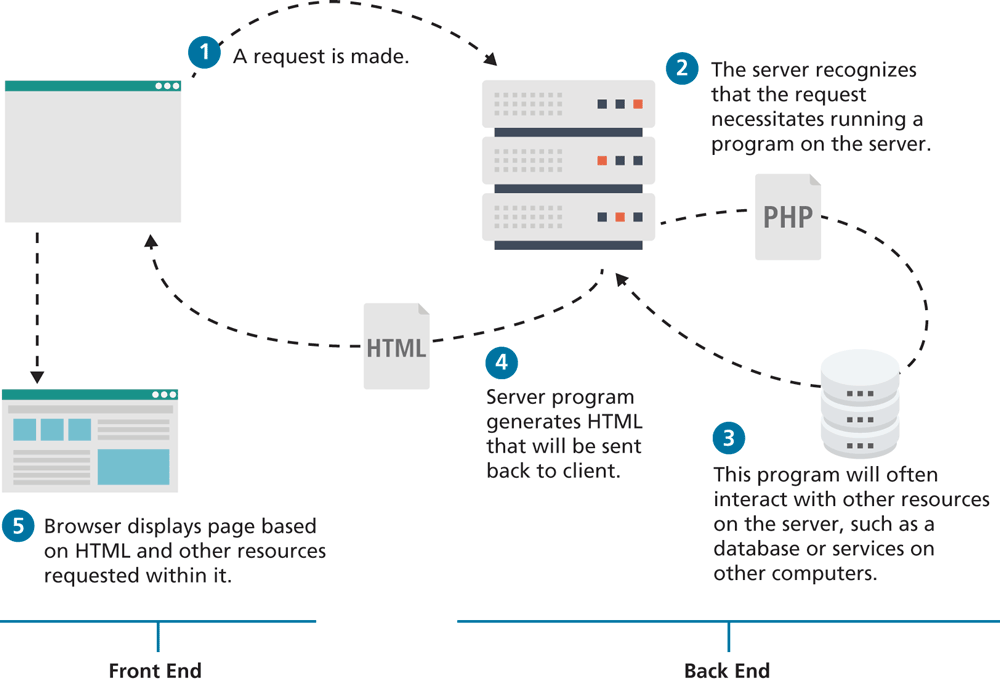
In contemporary web development, such traditional approaches are still being used, but no longer universally so. With the wide-spread adoption of JavaScript-focused web applications, back ends have become “thinner”. That is, today many web sites are principally front ends; back end processing is used only for implementing the external APIs that provide data to the front end, for handling security, and for interacting with external services that do not have any front-end API.
12.1.2 Common Server-Side Technologies
There are many different server-side technologies. The most common include the following:
ASP (Active Server Pages). This was Microsoft’s first server-side technology (also called ASP Classic). Like PHP, ASP code (using the VBScript programming language) can be embedded within the HTML; though it supported classes and some object-oriented features, most developers did not make use of these features. ASP programming code is interpreted at run time; hence, it can be slow in comparison to other technologies.
ASP.NET. This replaced Microsoft’s older ASP technology. ASP.NET is part of Microsoft’s .NET Framework and can use any .NET programming language (though C# is the most commonly used). ASP.NET uses an explicitly object-oriented approach that typically takes longer to learn than ASP or PHP, and is often used in larger corporate web application systems. It also uses special markup called web server controls that encapsulate common web functionality such as database-driven lists, form validation, and user registration wizards. ASP.NET pages are compiled into an intermediary file format called MSIL that is analogous to Java’s byte-code. ASP.NET then uses a JIT (Just-In-Time) compiler to compile the MSIL into machine executable code so its performance can be excellent. Originally a Windows-only technology, ASP.NET Core can now run on different platforms.
JSP (Java Server Pages). JSP uses Java as its programming language and like ASP.NET it uses an explicit object-oriented approach and is used in large enterprise web systems and is integrated into the J2EE environment. Since JSP uses the Java Runtime Engine, it also uses a JIT compiler for fast execution time and is cross-platform. While JSP’s usage in the web as a whole is small, it has a substantial market share in the intranet environment, and is still used on a number of very large sites.
Node.js (or just Node). Uses JavaScript on the server side, thus allowing developers already familiar with JavaScript to use just a single language for both client-side and server-side development. Because of its unique architecture, Node is especially well suited for busy sites and for sites requiring push interactions.
Perl. Until the development and popularization of ASP, PHP, and JSP, Perl was the language typically used for early server-side web development. As a language, it excels in the manipulation of text. It was commonly used in conjunction with the Common Gateway Interface (CGI), an early standard API for communication between applications and web server software.
PHP. Like ASP, PHP is a dynamically typed language that can be embedded directly within the HTML, and supports most common object-oriented features such as classes and inheritance. Originally, PHP stood for personal home pages, although it now is a recursive acronym that means PHP: Hypertext Processor.
Python. This terse, object-oriented programming language has many uses, including being used to create web applications. It is also used in a variety of web development frameworks such as Django and Pyramid.
Ruby on Rails. This is a web development framework that uses the Ruby programming language. Like ASP.NET and JSP, Ruby on Rails emphasizes the use of common software development approaches, in particular the MVC design pattern. It integrates features such as templates and engines that aim to reduce the amount of development work required in the creation of a new site.
Some of these technologies are only used for older legacy applications, while others have only a relatively small market share. Of these technologies, PHP, ASP.NET, Ruby on Rails, and Node.js are the most popular. This chapter will focus on PHP, while the next will examine Node.
 Pro Tip
Although PHP is designed for hosting web applications, it can also be used as a scripting language on your system, and called directly from the command line. To interpret a file and echo its output directly to the console, simply type php and the file name to run it.
php example1.phpRunning PHP in this way can be useful to developers since it allows one to run code without having to have a configured web server, and allows output to be captured and redirected. Used in combination with crontab (scheduling software), the command line use of PHP can facilitate scheduled tasks running on your web applications, for example, sending email each night to subscribers.
Since the output is displayed as plain text and not interpreted through a browser, and headers are not sent like in a regular web development environment, we discourage you developing in this manner while you are learning.
 Note
Note
The labs for this chapter have been split into two files: Lab12a and Lab12b.