10.1 Array Functions
In Chapter 8, you learned how to create and iterate through arrays. You learned that arrays are a special type of object in JavaScript and that they have a variety of useful properties and methods. This section’s focus is on several other powerful methods of the array object. They can be initially a little hard to learn because they take a function as their parameter, which is invoked for each element in the array.
10.1.1 forEach
You have already learned how to iterate through an array using a for loop. The forEach() method provides an alternate approach. Listing 10.1 illustrates three possible ways to iterate though an array, the last of which uses the forEach() method.
Listing 10.1 Three approaches for iterating though an array
const paintings = [
  {title: "Girl with a Pearl Earring", artist: "Vermeer", year: 1665},
  {title: "Artist Holding a Thistle", artist: "Durer", year: 1493},
  {title: "Wheatfield with Crows", artist: "Van Gogh", year: 1890},
  {title: "Burial at Ornans", artist: "Courbet", year: 1849},
  {title: "Sunflowers", artist: "Van Gogh", year: 1889}
];
// version 1
for (let i=0; i<paintings.length; i++) {
  console.log(paintings[i].title + ' by ' + paintings[i].artist);
}
// version 2
for (let p of paintings) {
  console.log(p.title + ' by ' + p.artist);
}
// version 3a
paintings.forEach(function (p) {
  console.log(p.title + ' by ' + p.artist)
});
// version 3b – same as version 3a, but uses arrow syntax
paintings.forEach( (p) => {
  console.log(p.title + ' by ' + p.artist)
});
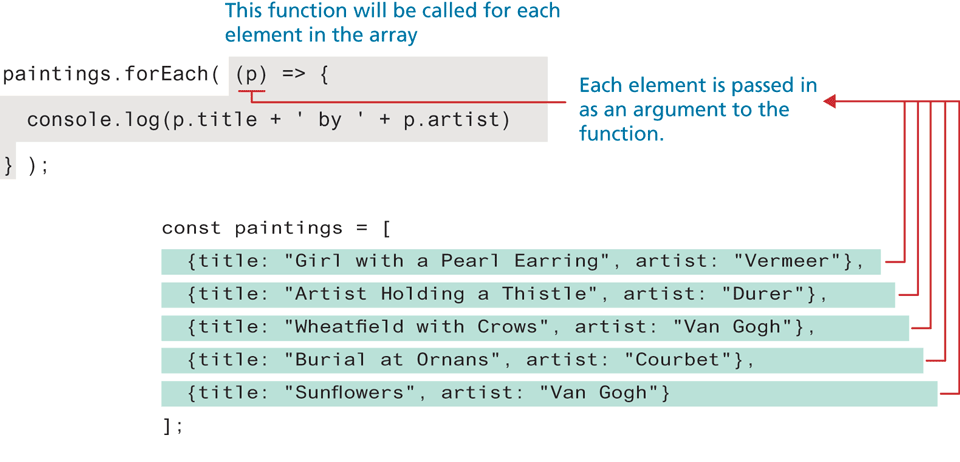
As you can see in Listing 10.1, the forEach() method is passed a function. This function is called for each element in the array and is passed the individual array element as an argument. Figure 10.1 illustrates this process.
Figure 10.1 How forEach() works
 Note
Note
Unlike a regular loop, it is not possible to break out of a forEach loop using the break keyword.
10.1.2 Find, Filter, Map, and Reduce
Perhaps the most useful of the array functions are find(), filter(), and map(). As with the forEach() function, each of these methods must be passed a function that is invoked for each element in the array.
Find
One of the more common coding scenarios with an array of objects is to find the first object whose property matches some condition. This can be achieved via the find() method of the array object, as shown below.
const courbet = paintings.find( p => p.artist === 'Courbet' );
console.log(courbet.title); // Burial at Ornans
Like the forEach() method, the find() method is passed a function; this function must return either true (if condition matches) or false (if condition does not match). In the example code above, it returns the results of the conditional check on the artist name.
Filter
What if you were interested in finding, not just the first match but all matches? In that case, you can use the filter() method, as shown in the following:
// vangoghs will be an array containing two painting objects
const vangoghs = paintings.filter(p => p.artist === 'Van Gogh');
Since the function passed to the filter simply needs to return a true/false value, you can make use of other functions that return true/false. For instance, you could perform a more sophisticated search if you made use of regular expressions. The following code uses regular expressions to create an array containing the painting objects whose title contains the word ‘with’ or ‘WITH’ (or any combination of upper and lower case).
const re = new RegExp('with', 'i'); // case insensitive
const withs = paintings.filter( p => p.title.match(re) );
Map
The map() function operates in a similar manner except it creates a new array of the same size but whose values have been transformed by the passed function. For instance, let’s imagine you need to generate an array of strings containing <li> elements with each one containing the painting title and its year of composition. You could do so via the following bit of “traditional” JavaScript code:
let options = [];
for (let p of paintings) {
   let opt = `<li>${p.title} (${p.artist})</li>`;
   options.push(opt);
}
You could achieve the same result using the map() function as shown in the following:
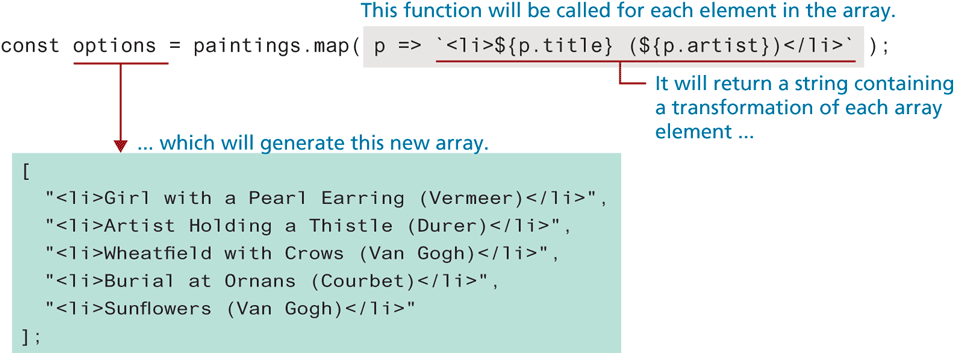
const options2 = paintings.map( p => `<li>${p.title} (${p.artist})</li>` );Figure 10.2 illustrates this process. In Listing 10.2, you see an alternate use of the map() function: instead of returning an array of strings (as in Figure 10.2), we could instead return an array of DOM element nodes.
Figure 10.2 Using the map() function
Listing 10.2 Using map to transform an array
// create array of DOM nodes
const nodes = paintings.map( p => {
   let item = document.createElement("li");
   item.textContent = `${p.title} (${p.artist})`;
   return item;
});
// now add them to document
nodes.forEach( (n) => {
  document.querySelector("#parent").appendChild(n);
});
Reduce
The reduce() function is used to reduce an array into a single value. Like the other array functions in this section, the reduce() function is passed a function that is invoked for each element in the array. This callback function takes up to four parameters, two of which are required: the previous accumulated value and the current element in the array.
For instance, the following example illustrates how this function can be used to sum the value property of each painting object in our sample paintings array:
let initial = 0;
const total = paintings.reduce( (prev, p) => prev + p.value, initial);
Notice that the reduce function here is not only passed a callback function, but also the initial value used to initialize the accumulated value. Most of our students find this function pretty confusing at first, so it may take some time and practice to fully comprehend its use.
10.1.3 Sort
You often need to sort arrays. For one-dimensional arrays of primitives, this is easily accomplished via the sort() function, which sorts in ascending order (after converting to strings if necessary):
const names = ['Bob', 'Sue', 'Ann', 'Tom', 'Jill'];
const sortedNames = names.sort();
// sortedNames contains ["Ann", "Bob", "Jill", "Sue", "Tom"]
But what if you need to sort an array of objects based on one of the object properties? In such a case, you will need to supply the sort() method with a compare function that returns either 0, 1, or −1, depending on whether two values are equal (0), the first value is greater than the second (1), or the first value is less than the second (−1). For instance, to sort the paintings array on the year property, you could use the code in Listing 10.3.
Listing 10.3 Sorting an array based on the properties of an object
const sortedPaintingsByYear = paintings.sort( function(a,b) {
    if (a.year < b.year)
        return -1;
    else if (a.year > b.year)
        return 1;
    else
        return 0;
} );
// more concise version using ternary operator and arrow syntax
const sorted2 = paintings.sort( (a,b) => a.year < b.year? -1: 1 );
Test Your Knowledge #1
Solve the following code problems two ways: first using both regular loops and second using the appropriate array function. Assume your data is the stocks array shown below (or you can use the provided lab10-test01.js file):
const stocks = [
  {symbol: "AMZN", name: "Amazon", price: 23.67, units: 59},
  {symbol: "AMT", name: "American Tower", price: 11.22, units: 10},
  {symbol: "CAT", name: "Caterpillar Inc", price: 9.00, units: 100},
  {symbol: "APPL", name: "Amazon", price: 234.00, units: 59},
  {symbol: "AWK", name: "American Water", price: 100.00, units: 10}
];
Add a new function property named
total()to each stock object that is equal toprice * unitsvia a regularforloop and then use theforEach()array function.Find the first element whose symbol name is "CAT" (using loop and then using
find()).Create a new array that contains stocks whose price is between $0 and $20 (using loop and then using
filter()).Create a new array of strings with
<li>elements containing the stocknameproperty (using loop and then usingmap()).Sort the array of stocks on
symbolusing thesort().