9.6 Regular Expressions
A regular expression is a set of special characters that define a pattern. They are intended for the matching and manipulation of text. In web development they are commonly used to test whether a user’s input matches a predictable sequence of characters, such as those in a phone number, postal or zip code, or email address. Their history predates the world of web development, as evidenced by the formal specification defined by the IEEE POSIX standard.3
Regular expressions are a concise way to eliminate the conditional logic that would be necessary to ensure that input data follows a specific format. Consider a postal code: in Canada a postal code is a letter, followed by a digit, followed by a letter, followed by an optional space or dash, followed by number, letter, and number. Using if statements, this would require many nested conditionals (or a single if with a very complex expression). But using regular expressions, this pattern check can be done using a single concise function call.
PHP, JavaScript, Java, the .NET environment, and most other modern languages support regular expressions. They do use different regular expression engines which operate in different ways, so not all regular expressions will work the same in all environments. This can be a source of frustration for those trying to find answers online since the subtle syntax differences can be hard to spot at a glance.
9.6.1 Regular Expression Syntax
A regular expression consists of two types of characters: literals and metacharacters. A literal is just a character you wish to match in the target (i.e., the text that you are searching within). A metacharacter is a special symbol that acts as a command to the regular expression parser. There are 14 common metacharacters (Table 9.11). To use a metacharacter as a literal, you will need to escape it by prefacing it with a backslash (\). Table 9.12 lists examples of typical metacharacter usage to create patterns; a typical regular expression is made up of several patterns.
Table 9.11 Regular Expression Metacharacters (i.e., Characters with Special Meaning)
| . | [ | ] | \ | ( | ) | ^ | $ | | | * | ? | { | } | + |
Table 9.12 Common Regular Expression Patterns
| Pattern | Description |
|---|---|
^ qwerty $ |
If used at the very start and end of the regular expression, it means that the entire string (and not just a substring) must match the rest of the regular expression contained between the ^ and the $ symbols. |
\t |
Matches a tab character. |
\n |
Matches a new-line character. |
. |
Matches any character other than \n. |
[qwerty] |
Matches any single character of the set contained within the brackets. |
[^qwerty] |
Matches any single character not contained within the brackets. |
[a-z] |
Matches any single character within range of characters. |
\w |
Matches any word character. Equivalent to [a-zA-Z0-9]. |
\W |
Matches any nonword character. |
\s |
Matches any white-space character. |
\s |
Matches any nonwhite-space character. |
\d |
Matches any digit. |
\D |
Matches any nondigit. |
* |
Indicates zero or more matches. |
+ |
Indicates one or more matches. |
? |
Indicates zero or one match. |
{n} |
Indicates exactly n matches. |
{n,} |
Indicates n or more matches. |
{n, m} |
Indicates at least n but no more than m matches. |
| |
Matches any one of the terms separated by the | character. Equivalent to Boolean OR. |
() |
Groups a subexpression. Grouping can make a regular expression easier to understand. |
In JavaScript, regular expressions are case sensitive and contained within forward slashes. So, for instance, to define a regular expression, you would use the following:
let pattern = /ran/;Regular expressions can be complicated to visually decode; to help, this section will use the convention of alternating between red and blue to indicate distinct sub-patterns in an expression and black text for literals.
This regular expression will find matches in all three of the following strings:
'randy connolly'
'Sue ran to the store'
'I would like a cranberry'
To perform the pattern check, you would write something similar to the following:
let pattern = /ran/;
let content = 'Sue ran to the store';
if (pattern.test(content))
  console.log("Match found");
9.6.2 Extended Example
Perhaps the best way to understand regular expressions is to work through the creation of one. For instance, if we wished to define a regular expression that would match a North American phone number without the area code, we would need one that matches any string that contains three numbers, followed by a dash, followed by four numbers without any other character. The regular expression for this would be:
^\d{3}–\d{4}$While this may look quite intimidating at first, it is in reality a fairly straight-forward regular expression. In this example, the dash is a literal character; the rest are all metacharacters. The ^ and $ symbol indicate the beginning and end of the string, respectively; they indicate that the entire string (and not a substring) can only contain that specified by the rest of the metacharacters. The metacharacter \d indicates a digit, while the metacharacters {3} and {4} indicate three and four repetitions of the previous match (i.e., a digit), respectively.
A more sophisticated regular expression for a phone number would not allow the first digit in the phone number to be a zero (“0”) or a one (“1”). The modified regular expression for this would be:
^[2-9]\d{2}–\d{4}$The [2-9] metacharacter indicates that the first character must be a digit within the range 2 through 9.
We can make our regular expression a bit more flexible by allowing either a single space (440 6061), a period (440.6061), or a dash (440-6061) between the two sets of numbers. We can do this via the [] metacharacter:
^[2-9]\d{2}[–\s\.]\d{4}$This expression indicates that the fourth character in the input must match one of the three characters contained within the square brackets (– matches a dash, \s matches a white space, and \. matches a period). We must use the escape character for the dash and period, since they have a metacharacter meaning when used within the square brackets.
If we want to allow multiple spaces (but only a single dash or period) in our phone, we can modify the regular expression as follows:
^[2-9]\d{2}[–\s\.]\s*\d{4}$The metacharacter sequence \s* matches zero or more white spaces. We can further extend the regular expression by adding an area code. This will be a bit more complicated, since we will also allow the area code to be surrounded by brackets (e.g., (403) 440-6061), or separated by spaces (e.g., 403 440 6061), a dash (e.g., 403-440-6061), or a period (e.g., 403.440.6061). The regular expression for this would be:
^\(?\s*\d{3}\s*[\)–\.]?\s*[2-9]\d{2}\s*[–\.]\s*\d{4}$The modified expression now matches zero or one “(” characters (\(?), followed by zero or more spaces (\s*), followed by three digits (\d{3}), followed by zero or more spaces (\s*), followed by either a “)” a “-”, or a “.” character ([\)-\.]?), finally followed by zero or more spaces (\s*).
Finally, we may want to make the area code optional. To do this, we will group the area code by surrounding the area code subexpression within grouping metacharacters—which are “(” and “)”—and then make the group optional using the ? metacharacter. The resulting regular expression would now be:
^(\(?\s*\d{3}\s*[\)–\.]?\s*)?[2-9]\d{2}\s*[–\.]\s*\d{4}$While this regular expression does look frightening, when you compare the efficiency of making this check via a single line of code in comparison to the many lines of code via conditionals, you quickly see the benefit of regular expressions. To illustrate, consider the lengthy JavaScript code in Listing 9.13, which validates a phone number using only conditional logic. Needless to say, the regular expression is far more succinct!
Listing 9.13 A phone number validation script without regular expressions
const  phone = document.querySelector("#phone").value;
const parts = phone.split(".");   // split on "."
if (parts.length !=3){
   parts = phone.split("-");      // split on "-"
}
if (parts.length == 3) {
   let valid=true; // use a flag to track validity
   for (let i=0; i < parts.length; i++) {
      // check that each component is a number
      if Number.IsInteger(parts[i])) {
         alert( "you have a non-numeric component");
         valid=false;
      }  else {
         // for some make sure it's in range
         if (i<2) {
            if (parts[i]<100 || parts[i]>999) {
                valid=false;
            }
          } else {
            if (parts[i]<1000 || parts[i]>9999) {
                valid=false;
            }
          }
       } // end if isNumeric
    } // end for loop
    if (valid) {
       alert(phone + "is a valid phone number");
    }
} else {
  alert ("not a valid phone number");
}
Hopefully by now you are able to see that many web applications could potentially benefit from regular expressions. Table 9.13 contains several common regular expressions that you might use within a web application. Many more common regular expressions can easily be found on the web.
Table 9.13 Some Common Web-Related Regular Expressions
| Regular expression | Description |
|---|---|
^\S{0,8}$ |
Matches 0 to 8 nonspace characters. |
^[a-zA-Z]\w{8,16}$ |
Simple password expression. The password must be at least 8 characters but no more than 16 characters long. |
^[a-zA-Z]+\w*\d+\w*$ |
Another password expression. This one requires at least one letter, followed by any number of characters, followed by at least one number, followed by any number of characters. |
^\d{5}(-\d{4})?$ |
American zip code. |
^((0[1-9])|(1[0-2]))\/(\d{4})$ |
Month and years in format mm/yyyy. |
^(.+)@([^\.].*)\.([a-z]{2,})$ |
Email validation based on current standard naming rules. |
^((http|https)://)?([\w-]+\.)+[\w]+(/[\w- ./?]*)?$ |
URL validation. After either http:// or https://, it matches word characters or hyphens, followed by a period followed by either a forward slash, word characters, or a period. |
^4\d{3}[\s\-]d{4}[\s\-] d{4} [\s\-]d{4}$ |
Visa credit card number (four sets of four digits beginning with the number 4), separated by a space or hyphen. |
^5[1-5]\d{2}[\s\-]d{4}[\s\-] d{4}[\s\-]d{4}$ |
MasterCard credit card number (four sets of four digits beginning with the numbers 51–55), separated by a space or hyphen. |
 Pro Tip
MySQL (covered in Chapter 14) also supports regular expressions through the REGEXP operator (or the alternative RLIKE operator, which has the identical functionality). This operator provides a more powerful alternative to the regular SQL LIKE operator (though it doesn’t support all the normal regular expression metacharacters). For instance, the following SQL statement matches all art works whose title contains one or more numeric digits:
SELECT * FROM ArtWorks WHERE Title REGEXP '[0-9]+'While MySQL regular expressions provide opportunities for powerful text-matching queries, it should be remembered that these queries do not make use of indices, so the use of regular expressions can be unacceptably slow when querying large tables.
Test Your Knowledge #4
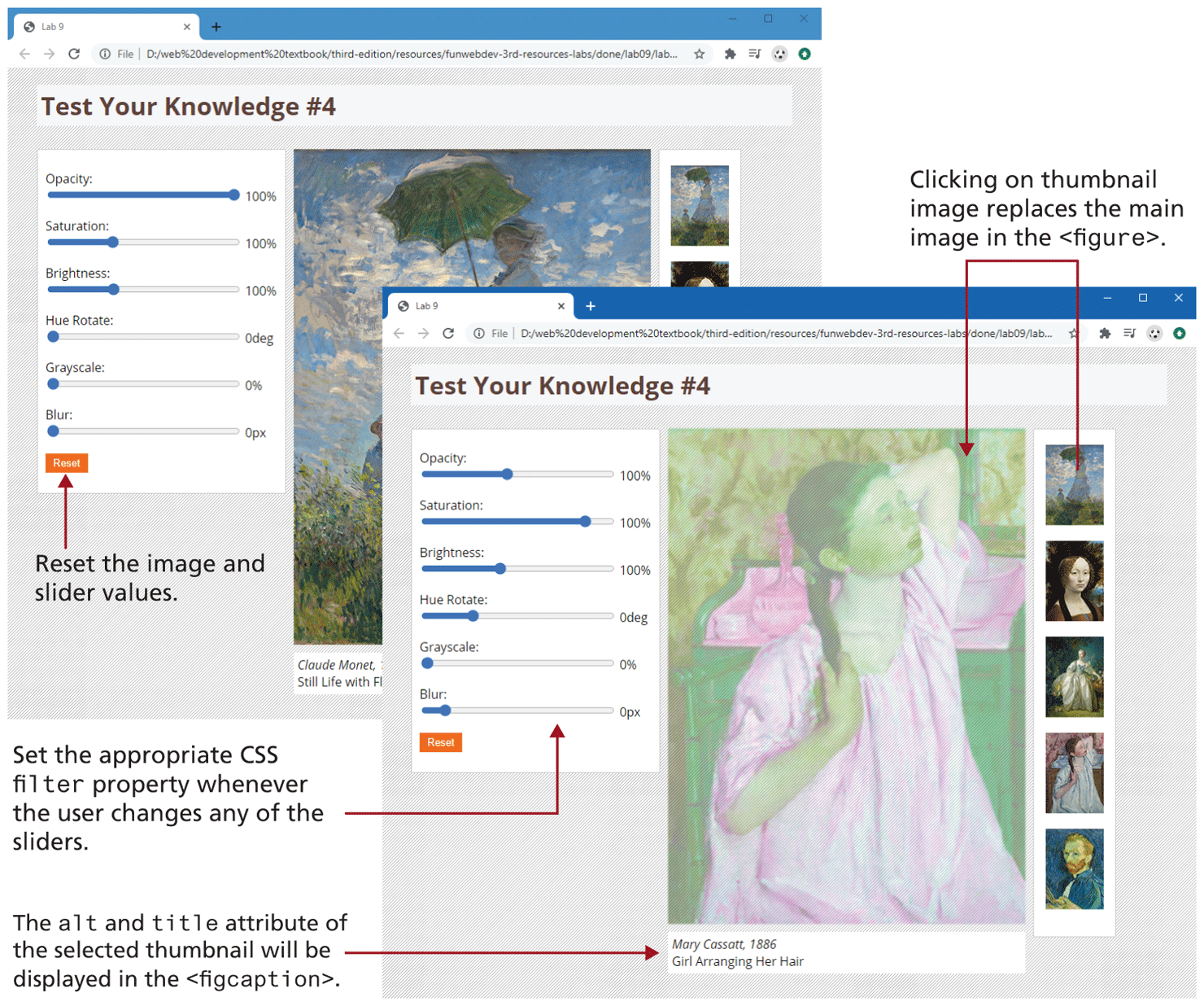
Examine lab09-test04.html, view in browser, and then open lab09-test04.js in your editor. Modify the JavaScript file to implement the following functionality (see also Figure 9.21).
You are going to need three event handlers. The first will be a click handler for each thumbnail image. In the handler, replace the
srcattribute of the<img>element in the<figure>so that it displays the clicked thumbnail. Hint: get the src attribute of the clicked element and then replace the small folder name with a medium folder name.Change the
<figcaption>so that it displays the newly clicked painting’s title and artist information. This information is contained within thealtandtitleattributes of each thumbnail.Set up an event listener for the input event of each of the range sliders. The code is going to set the filter properties on the image in the
<figure>. Recall from Chapter 7 that if you are setting multiple filters, they have to be included together separated by spaces. This listener must use event delegation.Add a listener for the click event of the reset button. This will simply remove the filters from the image by setting the filter property to none.
Figure 9.21 Finished Test Your Knowledge #4