8.10 Chapter Summary
This has been a long chapter. But this length was necessary in order to learn the role that JavaScript has in contemporary web development and, more importantly, to learn the fundamentals of the language. JavaScript may seem a peculiar language at first, but once you become more and more comfortable with objects and functions, you will find that it is a powerful and sophisticated programming language. The next chapter builds on our knowledge of the language and demonstrates how JavaScript is actually used in real-world websites.
8.10.1 Key Terms
8.10.2 Review Questions
What is JavaScript? What are its relative advantages and disadvantages?
How is a browser plug-in different from a browser extension?
What are some reasons a user might have JavaScript disabled?
What kind of variable typing is used in JavaScript? What benefits and dangers arise from this?
What do the terms truthy and falsy refer to in JavaScript? What does
undefinedmean in JavaScript?Create an array that contains the titles of four sample books. Write a loop that iterates through that array and outputs each title in the array to the console.
Define an object that represents a sample book, with two properties (
titleandauthor) using object literal notation. Theauthorproperty should also be an object consisting of two properties (firstNameandlastName).How are function declarations different from function expressions? Why are function expressions often the preferred programming approach in JavaScript?
What is a callback function?
What is an anonymous function? What is a nested function? What are some of the reasons for using these two types of function?
Identify and define three types of scope within JavaScript. Provide a short example that demonstrates these scope types.
Define an object that represents a car, with two properties (
nameandmodel) using a function constructor. Add a function to the object nameddrive()that displays its name and model to the console. Instantiate two car objects and call thedrive()function for each one.
8.10.3 Hands-On Practice
Project 1: Art Store
Difficulty Level: Beginner
Overview
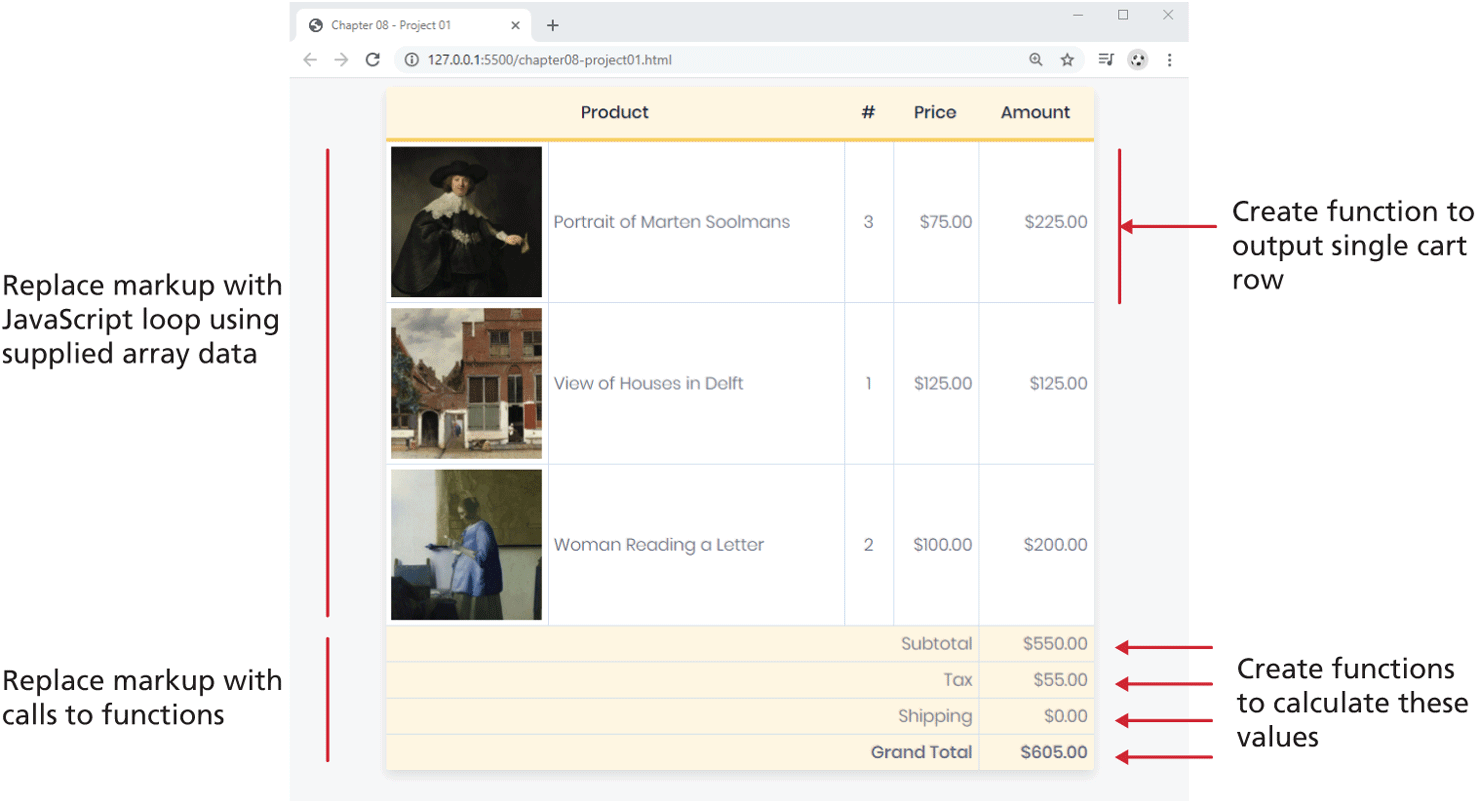
Demonstrate your proficiency with loops, conditionals, arrays, and functions in JavaScript. The final project will look similar to that shown in Figure 8.30.
Figure 8.30 Completed Project 1
Instructions
You have been provided with the HTML file (ch08-proj01.html) that includes the markup for the finished version. Preview the file in a browser.
Examine the data file data.js. It contains an array that we are going to use to programmatically generate the data rows (and replace the hard-coded markup supplied in the HTML file).
Open the JavaScript file functions.js and create a function called
calculateTotal()that is passed a quantity and price and returns their product (i.e., multiply the two parameter values and return the result).Within functions.js, create a function called
outputCartRow()that has the following signature:function outputCartRow(item, total) {}Implement the body of this function. It should use
document.write()calls to display a row of the table using the passed data. Use thetoFixed()method of the number variables to display two decimal places.Note: your browser may display a warning message in the console about avoiding
document.write. You can ignore this for now (in the next chapter and lab, you will learn the correct way to add content using DOM methods).Replace the three cart table rows in the original markup with a JavaScript loop that repeatedly calls this
outputCartRow()function. Put this loop within the ch08-proj01.js file. Add the appropriate<script>tag to reference this ch08-proj01.js file within the<tbody>element.Calculate the subtotal, tax, shipping, and grand total using JavaScript. Replace the hard-coded values in the markup with your JavaScript calculations. Notice that the tax and shipping threshold are input from the user, so that you can verify your calculations are working. The shipping amount should be $40 unless the subtotal is above the shipping threshold, in which case it will be $0.
Test
Test the page in the browser. Verify that the calculations work appropriately by changing the input values.
Project 2: Photo Sharing Site
Difficulty Level: Intermediate
Overview
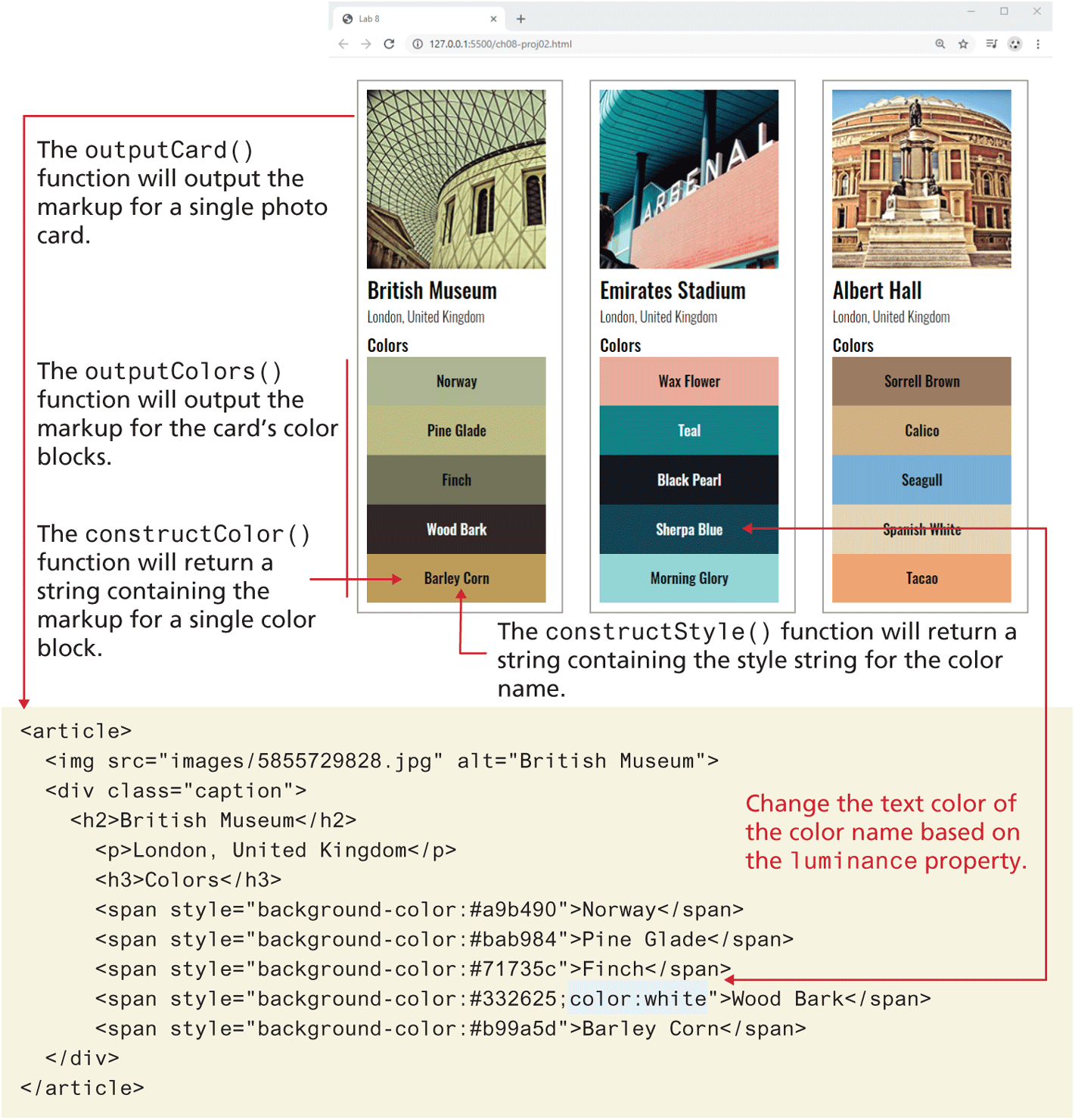
Demonstrate your ability to work with JSON data as well as functions. The final project will look similar to that shown in Figure 8.31.
Figure 8.31 Completed Project 2
Instructions
You have been provided with the HTML file (ch08-proj02.html) that includes the markup (as well as images and stylesheet) for the finished version. Preview the file in a browser. You will be replacing the markup for the three country boxes with two JavaScript loops (one contained within the other) and the
document.write()function to output the equivalent markup.The CSS styling has been provided. You only need to output the correct HTML. The three images are contained within
<article>elements. The color blocks are<span>elements whosebackground-colorstyle is set via inline CSS using thehexproperty from thecolorsarray in the JSON data. The image filename is contained within thefilenameproperty in the JSON data.In the file ch08-proj02.js, convert the JSON string in photo-data.js into a JavaScript array object using
JSON.parse(). Then write a loop that iterates through the photos array and callsoutputCard(), which you will create in the next step. Pass a single photo object tooutputCard().Create a function named
outputCard()that is passed a single photo object. This function is going to generate the markup (usingdocument.write) for a single photo card (a card is a term often used to describe a rectangle containing an image then text below it). This function will call two other functions (described below):outputColors()andconstructColor().Create a function named
outputColors()that is passed the colors array for a single photo. It will loop through the colors and callconstructColor()for each color. The string returned fromconstructColor()will be passed todocument.write().Create a function named
constructColor()that is passed a single color object. It will return a string containing the markup for a single color. It will also callconstructStyle()for the background and text color.Create a function named
constructStyle()that is passed a single color object. It will return a string containing the CSS for the background and text color. The text color will only need to be specified of theluminanceproperty value is less than 70. In that case, change the text color to white.
Test
Test the page in the browser. Verify the correct data is displayed.
Project 3: Stocks
Difficulty Level: Intermediate
Overview
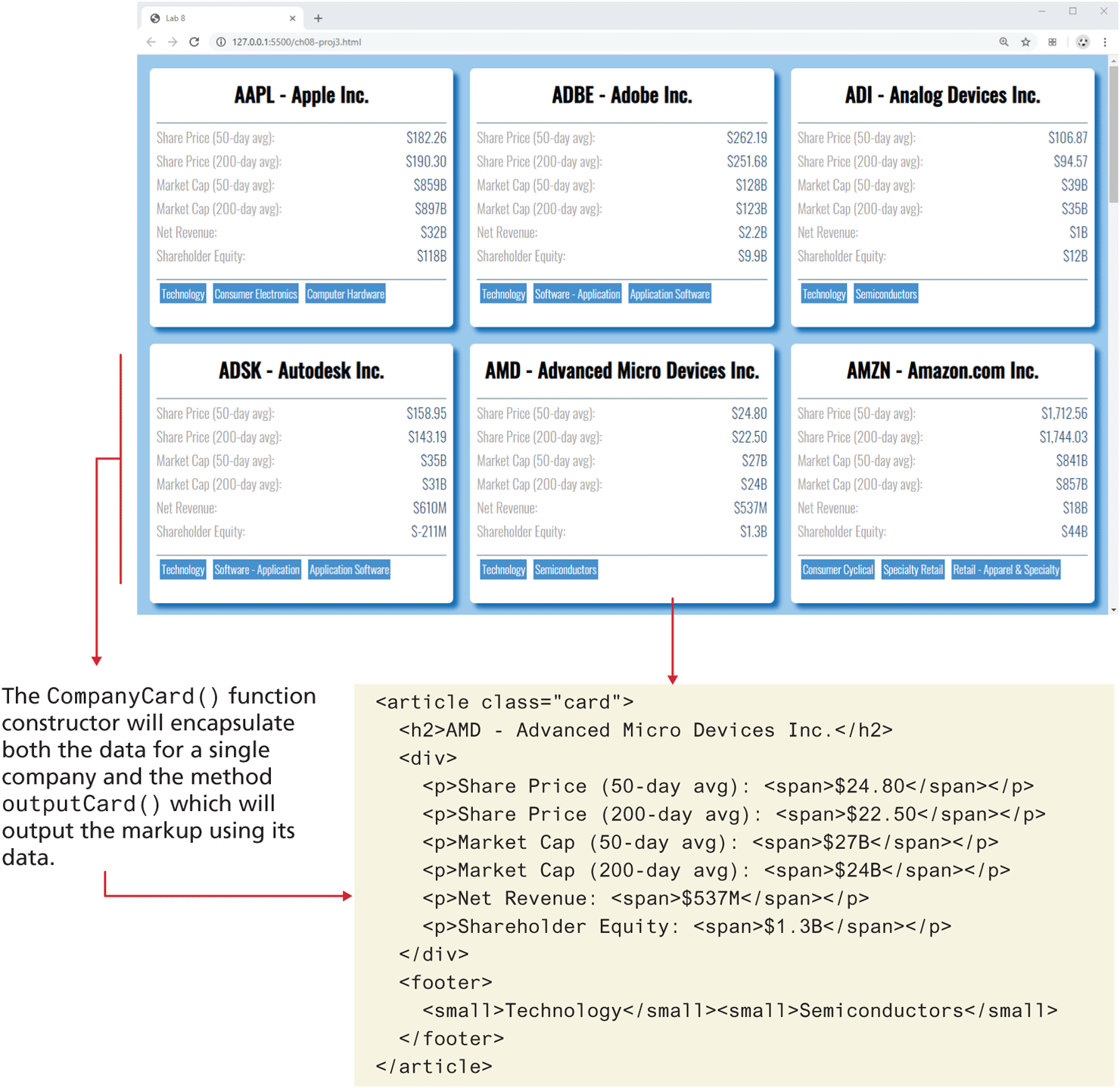
Demonstrate your proficiency with JavaScript arrow and constructor functions. The final project will look similar to that shown in Figure 8.32.
Figure 8.32 Completed Project 3
Instructions
Examine the supplied (ch08-proj03.html) file. It provides the markup for a sample company contained within a card (i.e., the rectangular box). You are going to eventually dynamically generate the card markup. If you follow the same structure as the sample, the supplied CSS will style it similar to that shown in Figure 8.32.
You have been supplied with a JSON file named companies.json. Convert this file into an array of company objects using
JSON.parse.Create a constructor function (see Section 8.8.6) named
CompanyCardwhich will be passed acompanyobject from the JSON data. Within the constuctor function, create properties namedsymbol,name,day50,day200,revenue,marketCap50,marketCap200,equity, andtags, whose values are extracted from the passedcompanyobject.Add a method to
CompanyCardnamedcurrency()using arrow syntax that is passed a number namednumand returns a currency formatted number using theIntl.NumberFormat()function (lookup the details online). Add another method toCompanyCardnamedbillions()using arrow syntax that is passed a number namednumand returns a currency using compact notation, also using theIntl.NumberFormat()function. This will display the large number in the data set as a short billions or millions value.Add a method to
CompanyCardnamedoutputCard()that uses the methods and properties created in the two previous steps to output the markup for a single company card.Create a function named
outputCompanyCardsthat loops through the company data, instantiate aCompanyCardobject using thenewkeyword, and then call theoutputCard()method of theCompanyCardobject.
Test
Test the page in the browser. Verify the correct data is displayed.
8.10.4 References
1. Mozilla Array Documentation. [Online]. https:/
/ developer.mozilla.org/ en-US/ docs/ Web/ JavaScript/ Reference/ Global_Objects/ Array. 2. https:/
/ developer.mozilla.org/ en/ docs/ Web/ JavaScript/ Closures/ 3. Kyle Simpson. Scope & Closures. O’Reilly Media. 2014. https:/
/ github.com/ getify/ You-Dont-Know-JS/ tree/ 2nd-ed/ scope-closures