8.9 Scope and Closures in JavaScript
8.9.1 Scope in JavaScript
Scope is one of the essential concepts one learns in a typical first-year programming class. In JavaScript, it is especially important. Scope generally refers to the context in which code is being executed. You might think of scope as a set of rules used by JavaScript for looking for variables by their names.
In class-based languages like Java, the words visibility or accessibility are often used instead of the word scope. Visibility is a helpful term because the scope determines the extent to which variables are “visible” or able to be referenced. A variable out of scope is not visible and therefore not available.
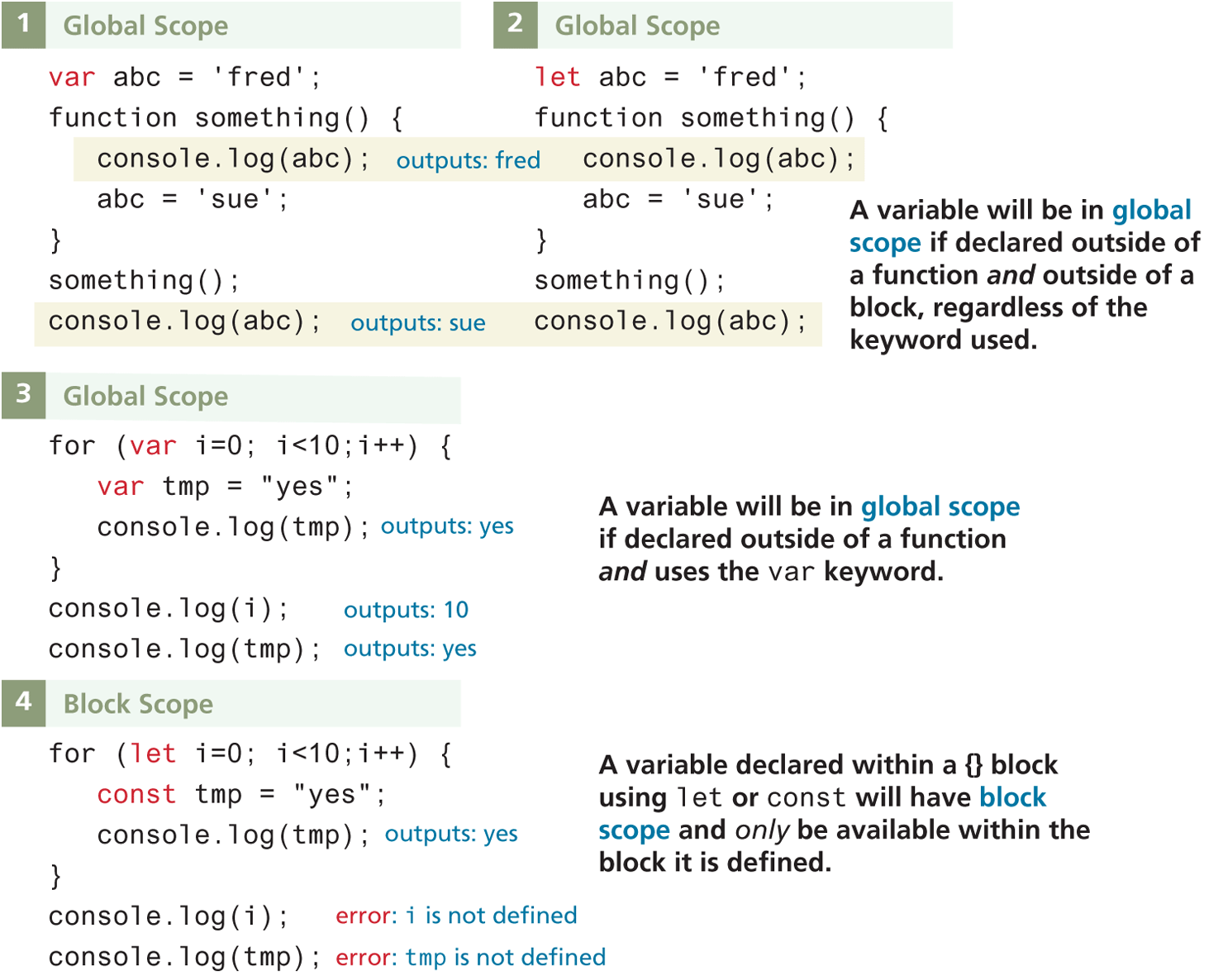
JavaScript has four scopes: function scope (also called local scope), block scope, module scope, and global scope. Module scope will be covered in Chapter 10. The relationship between the other three scopes and the different variable definition keywords is illustrated in Figure 8.23 and discussed below.
Figure 8.23 Global versus block scope
Block Scope
Since ES6, JavaScript has had block-level scope. That is, in JavaScript, variables defined within an if {} block or a for {} loop block using the let or const keywords are only available within the block in which they are defined. But if declared with var (or with no keywords) within a block, then it will be available outside the block.
Global Scope
As shown in Figure 8.23, identifiers created outside of a function or a block will have global scope. If an identifier has global scope, it is available everywhere. What is an identifier? Answer: any variable or function. In example 1 or 2 in Figure 8.23, how many global identifiers are there?
The correct answer is two: the variable abc and the function declaration something. The fact that identifiers with global scope are available everywhere sounds powerful (and it is). But such power can also cause problems. The nature of this problem is sometimes referred to as the namespace conflict problem. In class-based languages like Java or C#, the compiler will not allow you to have two classes (e.g., Image) with the same name. To prevent these name conflicts, you can group related classes in a namespace (using the package keyword in Java or the namespace keyword in C#). You can thus eliminate the namespace conflict (two classes with the same name) by giving the two classes different namespaces. This disambiguates classes with the same name, so the compiler is now able to tell the difference between System.Windows.Controls.Image and System.Drawing.Image.
JavaScript did not have namespaces or packages (though one can emulate them through functions within objects and additionally, ES6 now supports modules that provides something equivalent to packages). If the JavaScript compiler encounters another identifier with the same name at the same scope, you do not get an error. Instead, the new identifier replaces the old one!
When you are first learning JavaScript, this might not seem to be that much of a problem—after all, your early JavaScript efforts will likely only have a few dozen identifiers in them, and your (human) memory should easily be able to recall what names you have used. But contemporary real-world websites often make use of several, or even dozens, of different JavaScript libraries, plug-ins, and frameworks created by different programming teams, each with dozens if not hundreds of function and variable identifiers. Imagine if all of those 1000+ JavaScript identifiers were global. Adding a new JavaScript library would be a nightmare, since each one could potentially interfere with each one of your other JavaScript libraries. For this reason, it is very important to minimize the number of global variables in your JavaScript code. In Chapter 10, you will learn of the new module feature in ES6 that helps address this problem.
Function/Local Scope
Identifiers defined within a function have local scope, meaning that they are only visible within that function, or within other functions nested within it. Examine the code and output illustrated in Figure 8.24 and be sure you understand the scope rules shown. As can be seen in Figure 8.24, functions nested within other functions have access to the variables of the containing or outer function(s).
Figure 8.24 Function versus global scope
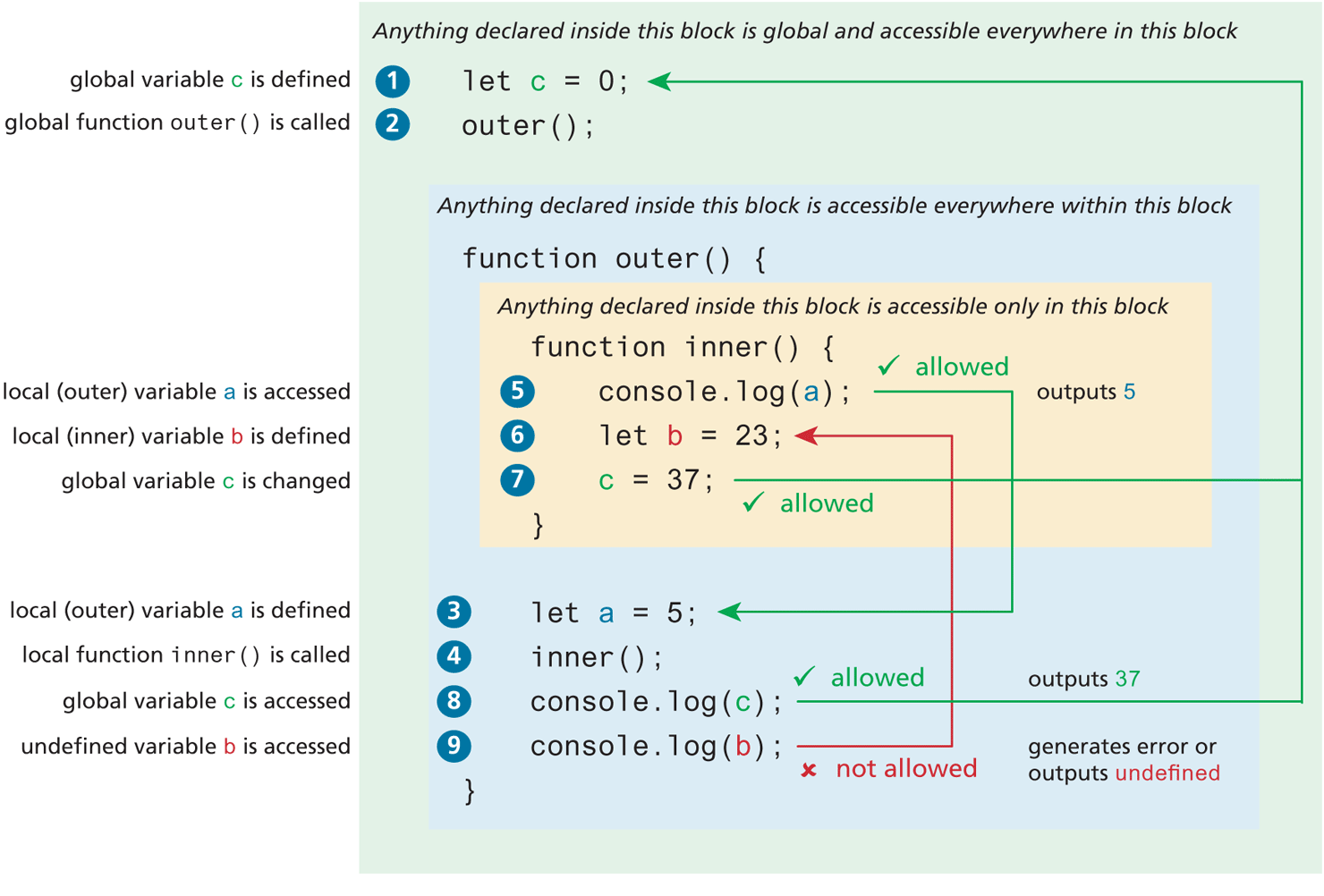
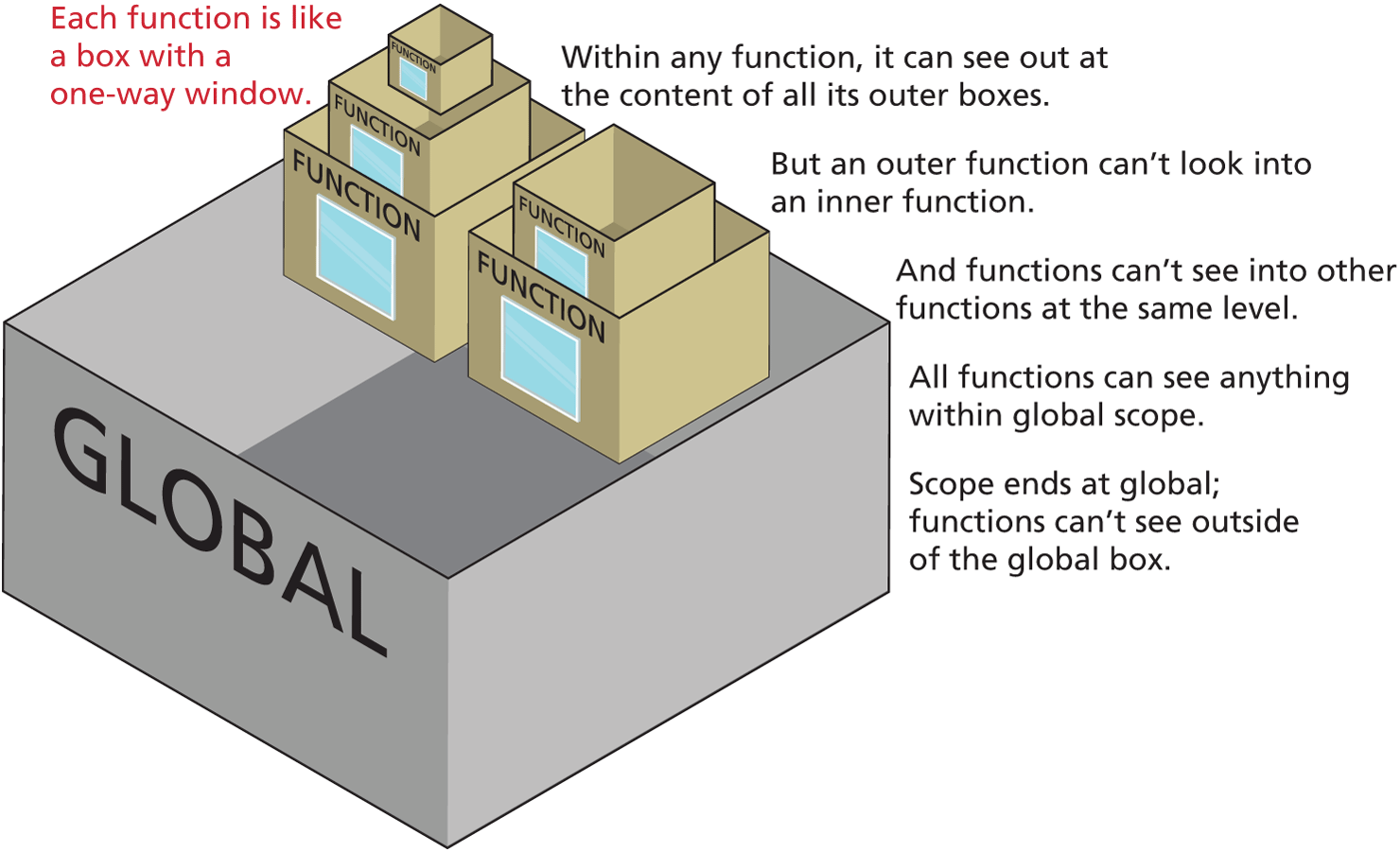
Figure 8.25 illustrates another way of visualizing scope in JavaScript. Imagine each function in a JavaScript page as a series of boxes, each with one-way windows that allow a child function/box to see out to its parent containers, but the parent containers cannot see into its child containers. While this seems like a teenager’s dream come true and a parent’s worst nightmare, this arrangement works well in the JavaScript context.
Figure 8.25 Visualizing scope
Globals by Mistake
One of the most easily created bugs (or, at the very least, a potential gotcha) in JavaScript can happen when you forget to preface a variable declaration with the var, let, or const keyword. Any variable defined without one of these keywords, no matter where it is defined, becomes a global variable. Take a look at Listing 8.15. We have a global array of book objects, each of which contains another array of author objects. We then have two straightforward functions that loop through these arrays outputting their information.
Listing 8.15 Unintentional global variables
const books = [
 { title: "Data Structures and Algorithm Analysis in C++",
   publisher: "Pearson",
   authors: [
       {firstName: "Mark", lastName: "Weiss" }]
 },
 { title: "Foundations of Finance",
   publisher: "Pearson",
   authors: [
       {firstName: "Arthur", lastName: "Keown" },
       {firstName: "John", lastName: "Martin" }]
 },
 { title: "Literature for Composition",
   publisher: "Longman",
   authors: [
       {firstName: "Sylvan", lastName: "Barnet" },
       {firstName: "William", lastName: "Cain" },
       {firstName: "William", lastName: "Burto" }]
 }
];
function outputBooks() {
   for (i=0; i<books.length;i++) {
       document.write("<h2>" + books[i].title + "</h2>");
       outputAuthors(books[i]);
   }
}
function outputAuthors(book) {
   for (i=0; i<book.authors.length;i++) {
       document.write(book.authors[i].lastName + "<br>");
   }
}
outputBooks();
We want the output to look like the first screen capture in Figure 8.26, but instead we get what shows up in the second screen capture. Can you figure out why?
Figure 8.26 Visualizing the problem
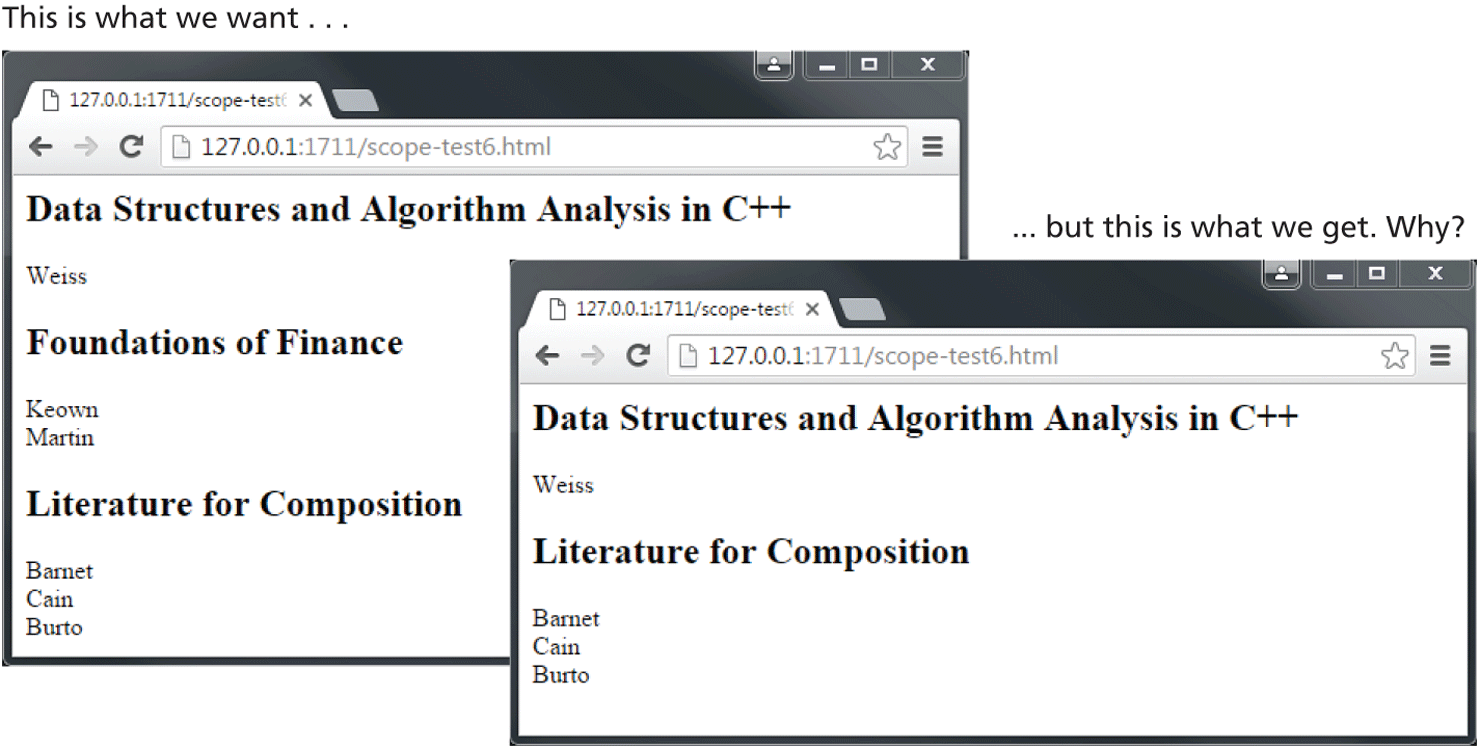
The problem resides in the use of the variable i within the two for loops. Because the loop initialization is i=0 instead of let i=0, the variable i here is made into a global variable. That is, the for loop within outputAuthors() is modifying the same i variable being used in outputBooks().
Remember also that function declarations create global identifiers as well. Thus, a forgotten let or const can also redefine or eliminate a function. In Listing 8.16, the forgotten let or const in the something() function overwrites the earlier result() function definition.
Listing 8.16 Destroying a function declaration
function result(a,b) {
   return a + b;
}
// outputs 12
alert(result(5,7));
function something(x,y) {
   // forgot the var and as a consequence, this line replaces the
   // function declaration with a primitive value
   result = x * y;
   return result;
}
// outputs 35
alert(something(5,7));
// this line will generate this console error: "result is not a function"
alert(result(5,7));
The moral of the story? Always declare your variables with the appropriate keyword!
You might also wonder what would have happened if we had added the let in Listing 8.16, that is, the function looking like the following:
function something(x,y) {
   let result = x * y;
   return result;
}
Our third alert() call would have worked as expected. What this example shows is that you can define a new locally scoped variable in a function with a name that exists already (whether globally or within some outer function). When looking for a variable, JavaScript will look first at the currently executing local scope, and move outwards; it will stop once it finds a match, as shown in Figure 8.27 (note, nothing in this figure would change if it had used var instead of let).
Figure 8.27 Visualizing scope again
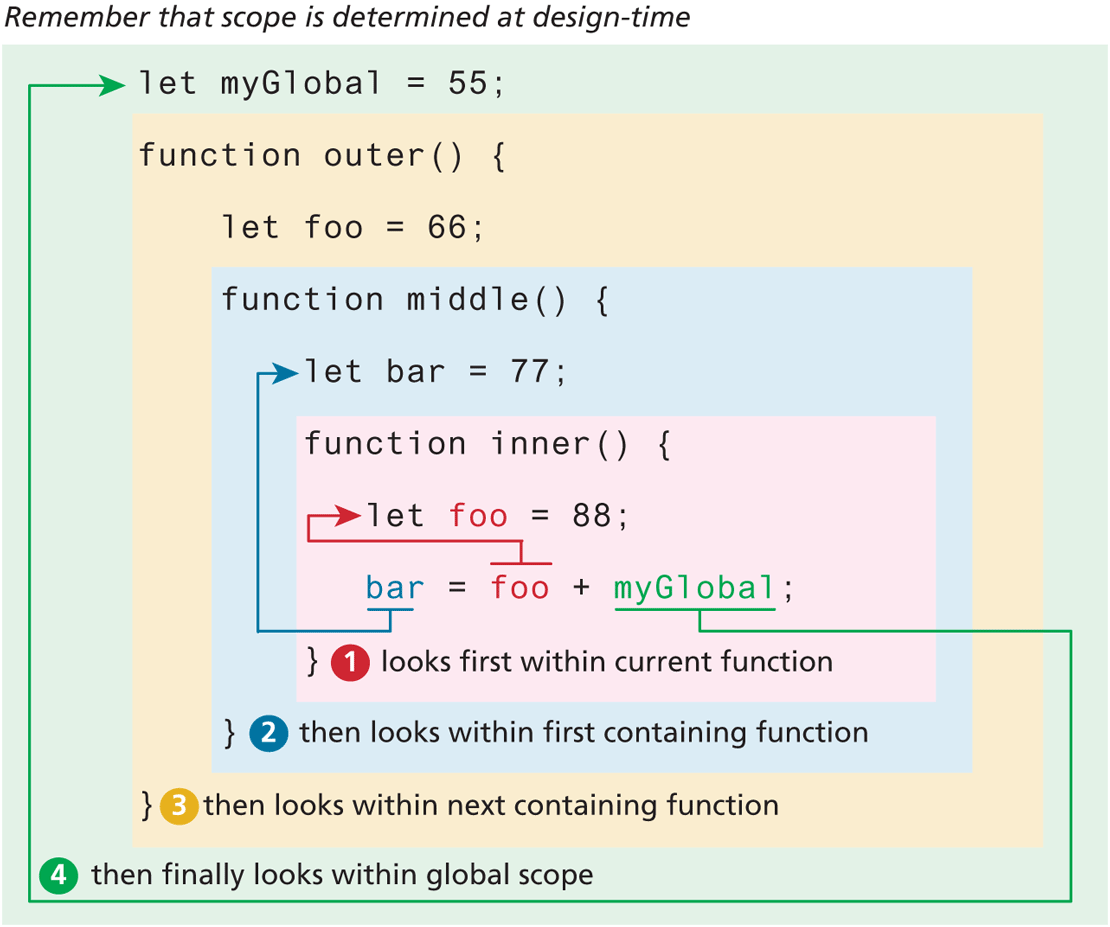
But, what, you might ask, if you wanted to access an outer-scoped identifier with the same name as a locally scoped variable? In such a case, you might be able to access it by using the this keyword, as shown in the following change to Listing 8.16:
function something(x,y) {
   let result = x * y;
   result +=  this.result(x,y);
   return result;
}
Recall that in our earlier discussion about the keyword this, we mentioned that the meaning of this in JavaScript is contextual and based upon the state of the call stack when this is invoked. In the example just described based on Listing 8.16, this is referencing the global context, so this.result() references the global result() function already defined.
8.9.2 Closures in JavaScript
Scope in JavaScript is sometimes referred to as lexical scope because the scope is defined by the placement of identifiers at design (and then compile) time, not at run-time. This lexical scoping forces JavaScript programmers to deal with one of the more confusing concepts in JavaScript, that of closure.
The ending bracket of a function is said to close the scope of that function. But closure refers to more than just this idea. A closure is actually an object consisting of the scope environment in which the function is created; that is, a closure is a function that has an implicitly permanent link between itself and its scope chain.
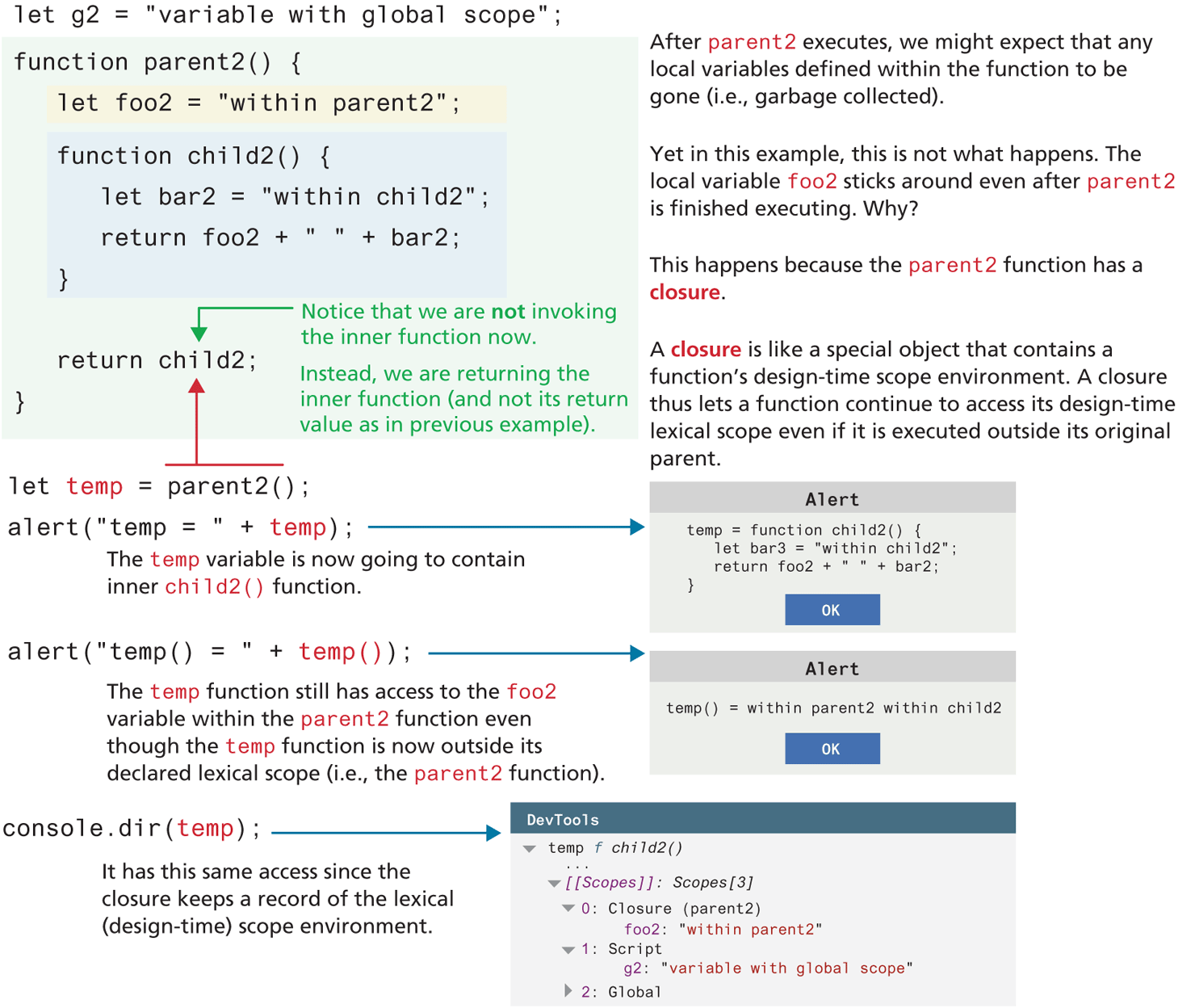
What does that actually mean? Here is another way of stating this idea: a function defined within a closure “remembers” or “preserves” the scope in place when it is created. If that still doesn’t help explain it, maybe looking at an example will help. Consider the two examples illustrated in Figures 8.28 and 8.29.
Figure 8.28 Scope illustrated in the debugger
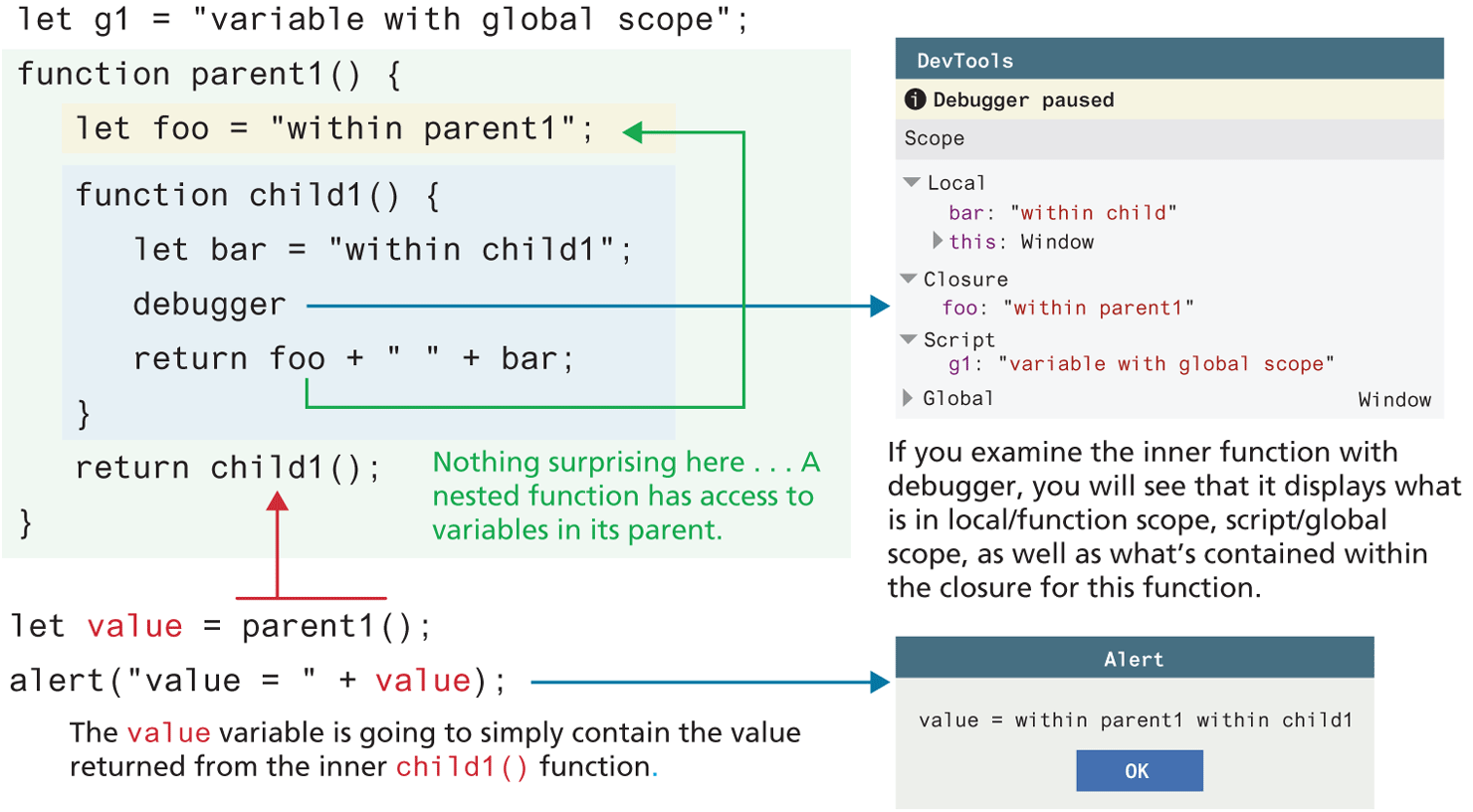
Figure 8.29 Closures maintain lexical (design-time) scope
In the first example (Figure 8.28), the debugger view lists what’s in scope when the function child1() is executing. As you can see, there are two variables in local/function scope (the local variable bar and this), one global variable defined within the script (the g1 variable), and one variable foo that is available to it because it is in lexical scope. Notice that the debugger labels this last one as a closure.
In the more complicated second example (Figure 8.29), the inner child2() function is executed outside of its parent. And yet, the inner function still works correctly away from its parent, even though it accesses a variable bar2 contained within its parent. How is this possible? As the DevTools indicate, it’s due to the information stored within child2’s closure.
Why is this important? Most of the practical JavaScript that you will end up writing will be event based. That is, you will be writing event-handling functions that will execute at some future point when the event is triggered. These callback functions, however, will still need to “remember” the scope chain that was in place when they were defined (i.e., their lexical scope), not when they execute.