8.8 Functions
Functions are the building blocks for modular code in JavaScript. They are defined by using the reserved word function and then the function name and (optional) parameters. Since JavaScript is dynamically typed, functions do not require a return type, nor do the parameters require type specifications.
8.8.1 Function Declarations vs. Function Expressions
Let us begin with a simple function to calculate a subtotal, which we will define here as the price of a product multiplied by the quantity purchased. Such a function might be defined as follows:
function subtotal(price,quantity) {
   return price * quantity;
}
The above is formally called a function declaration. Such a declared function can be called or invoked by using the () operator.
let result = subtotal(10,2);With new programmers there is often confusion between defining a function and invoking the function. Remember that when you use the keyword function, you are defining what the function does. Later, you can use or invoke that function by using its given name without the function keyword but with the brackets ().
While the function declaration above returns a value, your functions can simply perform actions and not return any value, as shown in Listing 8.10. What would happen if you invoked this function as if it had a return value? For instance, in the following code, what would be the value of the variable temp after the function call?
let temp = outputLink('http://www.mozilla.com', 'Mozilla');
Listing 8.10 Defining a function without a return value
// define a function with no return value
function outputLink(url, label) {
  document.write(`<a href="${url}">${label}</a>`);
}
// invoke the function
outputLink('http://www.mozilla.com', 'Mozilla');
The answer? It would have the value undefined.
Just as with arrays and objects, it is possible to create functions using the constructor of the Function object.
// defines a function
const sub = new Function('price,quantity', 'return price*quantity');
// invokes the function
let result = sub(10,2);
As you can imagine, it is much more common to define functions using a function declaration. However, the constructor version above has the merit of clearly showing one of the most important and unique features of JavaScript functions: that functions are objects. This means that functions can be stored in a variable or passed as a parameter to another function.
The object nature of functions can be further seen in the next example, which creates a function using a function expression.
// defines a function using a function expression
const sub = function subtotal(price,quantity) {
  return price * quantity;
};
// invokes the function
let result = sub(10,2);
We will find that using function expressions is very common in JavaScript. In the example, the function name is more or less irrelevant since we invoked the function via the object variable name. As a consequence, it is conventional to leave out the function name in function expressions, as shown in Listing 8.11. Such functions are called anonymous functions and, as we will discover, they are a typical part of real-world JavaScript programming.
Listing 8.11 Sample function expressions
// defines a function using an anonymous function expression
const calculateSubtotal = function (price,quantity) {
  return price * quantity;
};
// invokes the function
let result = calculateSubtotal(10,2);
// define another function
const warn = function(msg) { alert(msg); };
// now invoke that function
warn("This doesn't return anything");
The object nature of functions can also be seen in one of the more easy-to-make mistakes with using functions. What do you think the output will be in the last two lines of code?
// defines a function expression
const frenchHello = function () { return "bonjour"; };
// outputs bonjour
alert(frenchHello());
// what does this output? Notice the missing parentheses
alert(frenchHello);
The first alert will invoke the frenchHello function and thus display the returned “bonjour” string. But what about the second alert? It is missing the parentheses, so instead of invoking the function, JavaScript will simply display the content of the frenchHello object. That is, it will display: “function () { return "bonjour"; };”.
 Pro Tip
When one is first learning JavaScript, there is typically some resistance to the idea of using function expressions. The function declaration approach is certainly more familiar to Java or C++ developers. Yet despite this familiarity, the function expression approach is often the preferred one because it allows the developer to limit the scope of the function identifier. As we will discover in more detail in the section on scope, any function name declared using the declarative approach will become part of the global scope. In general, we want to minimize the number of objects that exist in global scope, so for that reason, experienced JavaScript developers often prefer using function expressions.
Default Parameters
More recent versions of JavaScript provide some flexibility when it comes to defining functions that either have a variable number of parameters or are missing parameters when they are invoked. For instance, in the following code, what will happen (i.e., what will bar be equal to)?
function foo(a,b) {
   return a+b;
}
let bar = foo(3);
The answer is NaN, since b is undefined within the function since the invocation only passes a single parameter. In languages such as Java or C#, the compiler will flag this as an error for us. But in JavaScript, (almost) anything goes! Thankfully, there is now a way to specify default parameters that will be used if a parameter is missing when the function is invoked, as shown in the following:
function foo(a=10,b=0) { return a+b; } Now bar in the above example will be equal to 3.
Rest Parameters
Another limitation with function parameters has also been addressed in recent versions of JavaScript. In this case the problem is how to write a function that can take a variable number of parameters. The solution in newer versions of JavaScript is to use the rest operator (...) as shown in the following example. The concatenate method takes an indeterminate number of string parameters separated by spaces.
function concatenate(...args) {
   let s = "";
   for (let a of args)
     s += a + " ";
   return s;
}
let girls = concatenate("fatima","hema","jane","alilah");
let boys = concatenate("jamal","nasir");
// outputs "fatima hema jane alilah"
console.log(girls);
// outputs "jamal nasir"
console.log(boys);
8.8.2 Nested Functions
Since functions are objects in JavaScript, it is possible to do things with them in JavaScript that are not possible in more traditional programming languages. One of these is the ability to nest function definitions within other functions. To see this in action, let us define a function that not only calculates a subtotal but also applies a tax rate. Such a function might look like the following example using function declarations (we could do the same thing with function expressions):
function calculateTotal(price,quantity) {
   let subtotal = price * quantity;
   let taxRate = 0.05;
   let tax = subtotal * taxRate;
   return subtotal + tax;
}
While such a function is fine, we might want to move some of the calculations into additional functions (for instance, because our tax calculation was more complicated). One approach would be to define another function declaration at the same “level” or scope as calculateTotal().
function calculateTotal(price,quantity) {
   let subtotal = price * quantity;
   return subtotal + calculateTax(subtotal);
}

function calculateTax(subtotal) {
   let taxRate = 0.05;
   return subtotal * taxRate;
}
Such an approach, however, might not be ideal, especially if calculateTax() is only used by calculateTotal(). Why? Because the code has added another identifier to the global scope. We will learn more about global scope shortly, but a better approach in this scenario would be to nest calculateTax() inside calculateTotal() as shown in Listing 8.12.
Listing 8.12 Nesting functions
function calculateTotal(price,quantity) {
   let subtotal = price * quantity;
   return subtotal + calculateTax(subtotal);

   // this function is nested
   function calculateTax(subtotal) {
      let taxRate = 0.05;
      return subtotal * taxRate;
   }
}
Nested functions are only visible to the function it is contained within. Thus, calculateTax() is only available within its parent function—that is, calculateTotal().
8.8.3 Hoisting in JavaScript
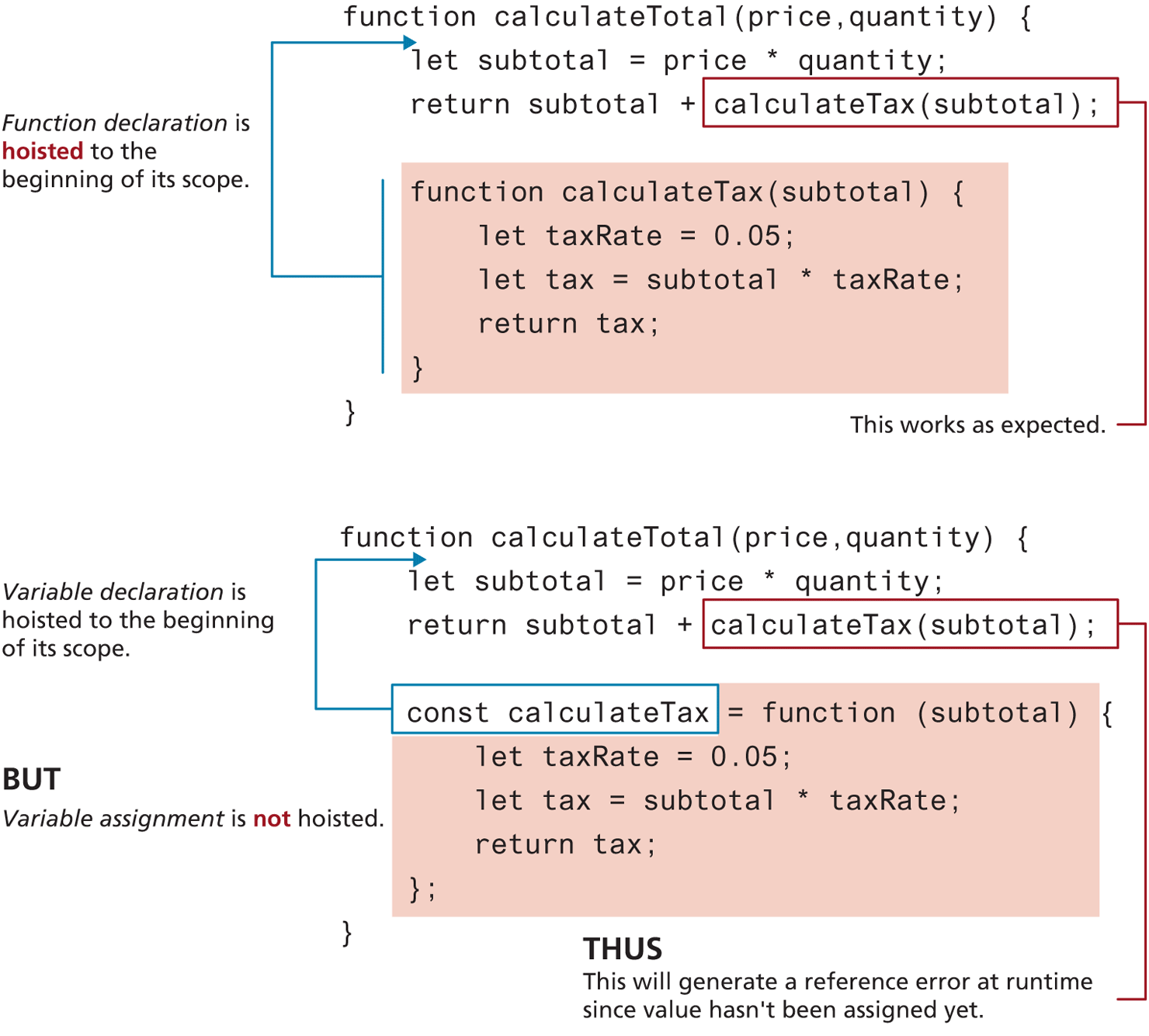
In Listing 8.12 it makes no difference where in calculateTotal() that calculateTax() appears. In that listing calculateTotal() appears at the end of the function, but JavaScript is able to find it without error because function declarations are hoisted to the beginning of their current level. As can be seen in Figure 8.16, declarations are hoisted, but not the assignments, an important point worth remembering when using function expressions!
Figure 8.16 Function hoisting in JavaScript
Test Your Knowledge #5
Modify your results from Test Your Knowledge #3 (or create a copy of previous version) and implement the following functionality:
Define a function named
calculateTipthat takes a single parameter named total that contains the individual bill total for which the tip is going to be calculated.In the function, calculate the tip using the same logic as the Test Your Knowledge #3. Your function should return the tip.
Change your previous code so that your loop uses this new function to calculate the tip for each number in the array.
8.8.4 Callback Functions
Since JavaScript functions are full-fledged objects, you can pass a function as an argument to another function. The function that receives the function argument is thus able to call the passed-in function. Such a passed-in function is said to be a callback function and is an essential part of real-world JavaScript programming. A callback function is thus simply a function that is passed to another function.
We will frequently make use of callback functions in the next chapter’s section on event handling in JavaScript. Until then, we can demonstrate how a callback function can be used by modifying the subtotal example, illustrated in Figure 8.17.
Figure 8.17 Using a callback function
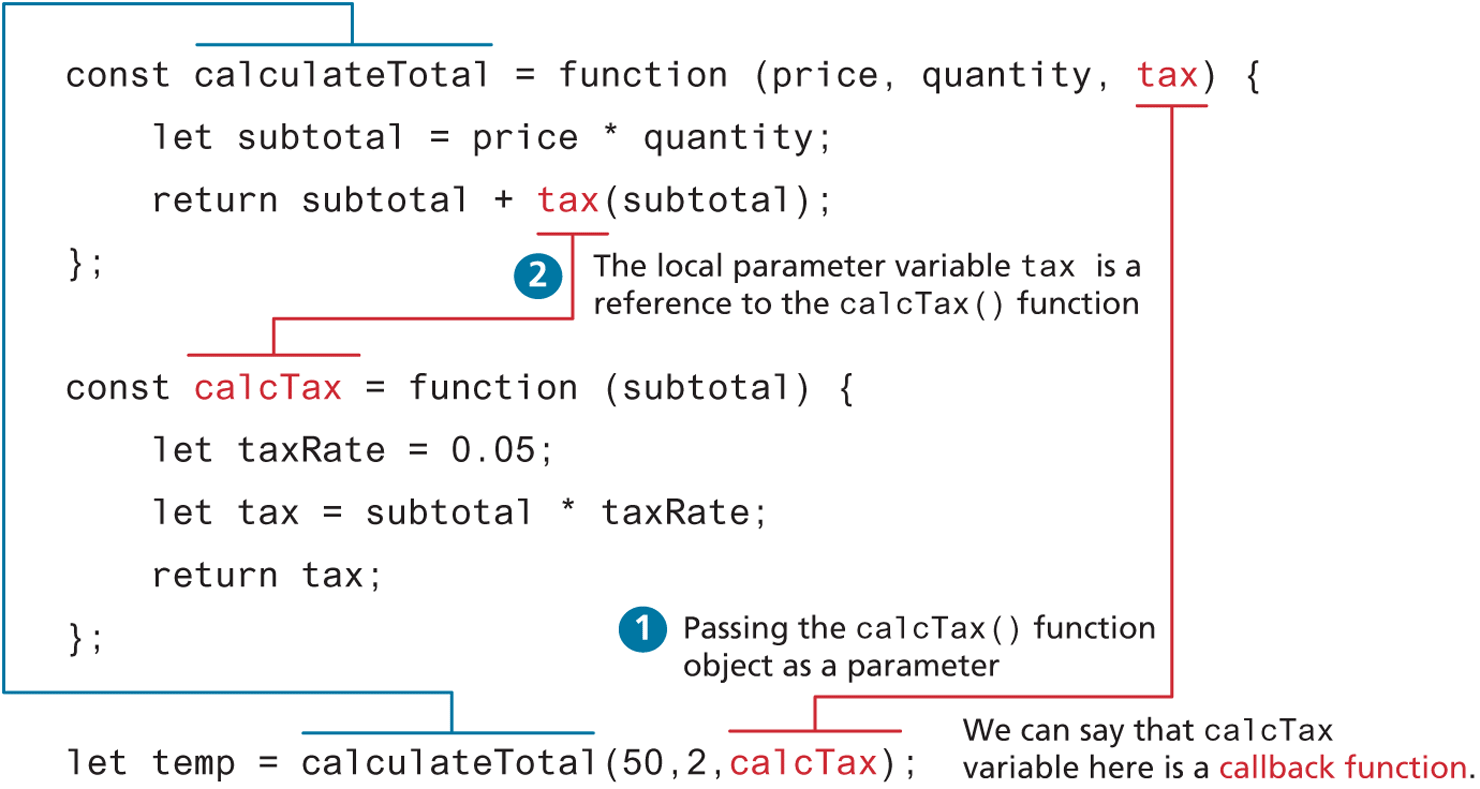
Notice how the calcTax() function is passed as a variable (i.e., without brackets) to the calculateTotal() function. In this example, calcTax() is a function expression, but it could have worked just the same if it was a function declaration instead.
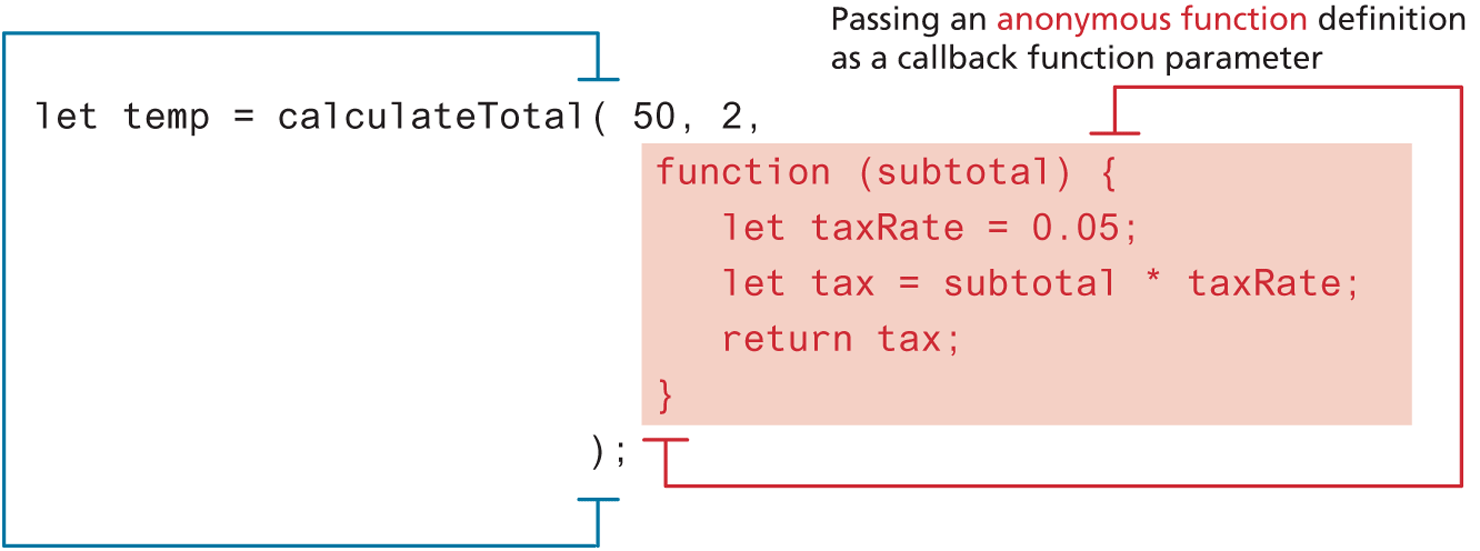
So how do callback functions work? In a sense, we are passing the function definition itself to another function. This means we can actually define the function definition directly within the invocation, as shown in Figure 8.18. As we will see throughout subsequent chapters on JavaScript, this is typical of real-world JavaScript programming.
Figure 8.18 Passing a function definition to another function
8.8.5 Objects and Functions Together
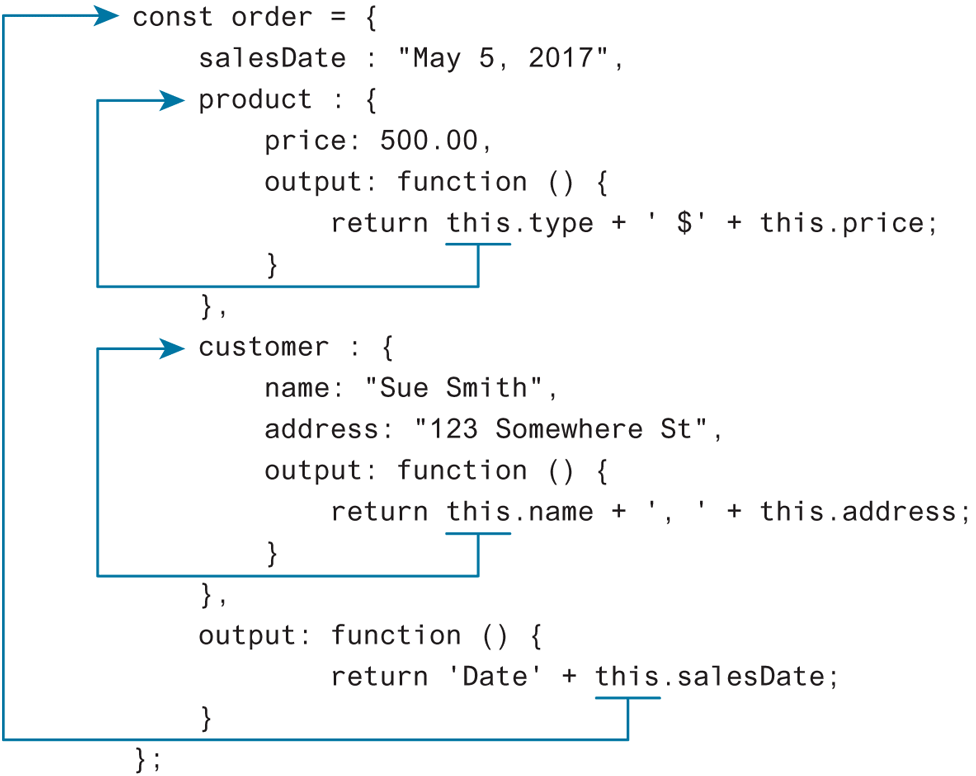
As we have already seen, functions are actually a type of object. Since an object can contain other objects, it is possible—indeed, it is extremely typical—for objects to contain functions. In a class-oriented programming language like Java or C#, we say that classes define behavior via methods. In a functional programming language like JavaScript, objects can have properties that are functions. These functions within an object are often referred to as methods, but strictly speaking JavaScript doesn’t have methods, only properties that contain function definitions. For instance, Listing 8.13 expands on an earlier example’s object literal by adding two function properties (methods).
Listing 8.13 Objects with functions
const order ={
    salesDate : "May 5, 2016",
    product : {
       price: 500.00,
       brand: "Acer",
       output: function () {
           return this.brand + ' $' + this.price;
       }
    },
    customer : {
       name: "Sue Smith",
       address: "123 Somewhere St",
       output: function () {
           return this.name + ', ' + this.address;
       }
    }
};
alert(order.product.output());
alert(order.customer.output());
Notice the use of the keyword this in the two functions. This particular keyword has a reputation for confusion and misunderstanding among JavaScript programmers. We will come back several times to this. The meaning of this in JavaScript is normally contextual and sometimes requires a full understanding of the current state of the call stack in order to know what this is referring to. Luckily for us right now, we don’t have to do anything so complex to understand the this in Listing 8.13, it simply refers to the parent object that contains the output() function. So in the output() function within the product property, the this refers to the object defined for that property. For the output() function within the customer property, the this refers to the object defined for that project. The contextual meaning of this is illustrated in Figure 8.19.
Figure 8.19 Contextual meaning of the this keyword
8.8.6 Function Constructors
Now that you better understand functions you are ready to learn the third way to create object instances. In Section 8.7, you learned how to create objects using the Object constructor (rare) and object literals (very common).
The main problem with the object literal approach lies in situations in which we want numerous instances with the same properties and methods. One common solution to this problem is to use function constructors, which looks similar to the approach used to create instances of objects in a class-based language like Java, as can be seen in Listing 8.14.
Listing 8.14 Defining and using a function constructor
// function constructor
function Customer(name,address,city) {
   this.name = name;
   this.address = address;
   this.city = city;
   this.output = function () {
      return this.name + " " + this.address + " " + this.city;
   };
}
// create instances of object using function constructor
const cust1 =  new Customer("Sue", "123 Somewhere", "Calgary");
alert(cust1.output());
const cust2 =  new Customer("Fred", "32 Nowhere St", "Seattle");
alert(cust2.output());
This comparison with constructors in class-based languages is a bit misleading. In reality, in JavaScript there are no constructor functions, only constructor calls of functions. What does this mean? If you look at Listing 8.14, the function constructor Customer() is just a function, but it is making use of the this keyword to set property values.
The key difference between using a function constructor and using a regular function resides in the use of the new keyword before the function name. Figure 8.20 illustrates just what happens when a function constructor is used to create a new object instance.
Figure 8.20 What happens with a constructor call of a function
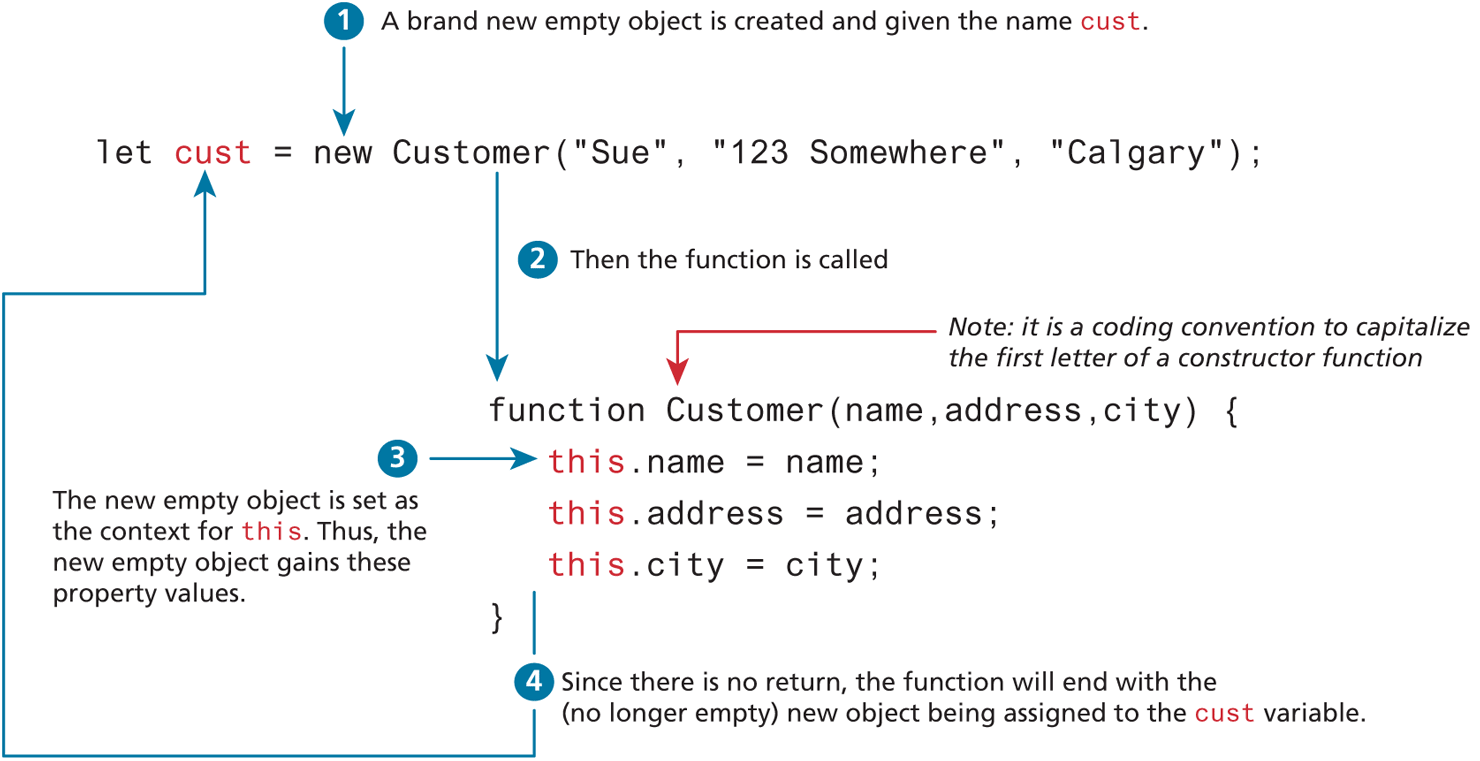
So what would happen if we forgot the new keyword in Figure 8.20 or Listing 8.14? In such a case, we would simply be calling a function called Customer(). The this references within the function would then reference the current execution context, which would no longer be a new object but the global context. That is, without the new, the statement this.address = address in the function would be setting a global variable named address. Similarly, the cust object would remain an undefined object without the name, address, or city properties.
8.8.7 Arrow Syntax
A large portion of this chapter has been devoted to all the intricacies of JavaScript functions. You may thus be surprised (or appalled) to learn that there is still more to learn about basic JavaScript functions! ES6 added a new syntax for declaring functions known as arrow syntax (or simply arrow functions). Arrow syntax provide a more concise syntax for the definition of anonymous functions. They also provide a solution to a potential scope problem encountered with the this keyword in callback functions.
To begin, let’s begin with an example of a simple function expression.
const taxRate = function () { return 0.05; };The arrow function version would look like the following:
const taxRate = () => 0.05;As you can see, this is a pretty concise (but perhaps confusing) way of writing code. Because the body of the anonymous function consists of only a single return statement and no parameters, the arrow version eliminates the need to type function, return, and the curly brackets. But what if we had a function with parameters and multiple lines in the body? For instance, let us begin with the following function defined using the traditional syntax:
const subtotal = function (price, quantity) {
   let subtotal = price * quantity;
   return subtotal + (subtotal * 0.05);
}
How would this function look using arrow syntax? It would look like the following:
const subtotal = (price, quantity) => {
   let subtotal = price * quantity;
   return subtotal + (subtotal * 0.05);
}
As you can see, the return statement has, well, returned. The implicit return of our first arrow function only worked because it was a single line and contained no curly brackets.
Arrow syntax varies slightly with functions that contain only a single parameter. For these functions, the parentheses are optional, as shown in the following function examples (both traditional and arrow versions):
function calculateTip(subtotal) {
   return subtotal * 0.15;
}
// arrow version
const calculateTip = subtotal => subtotal * 0.15;
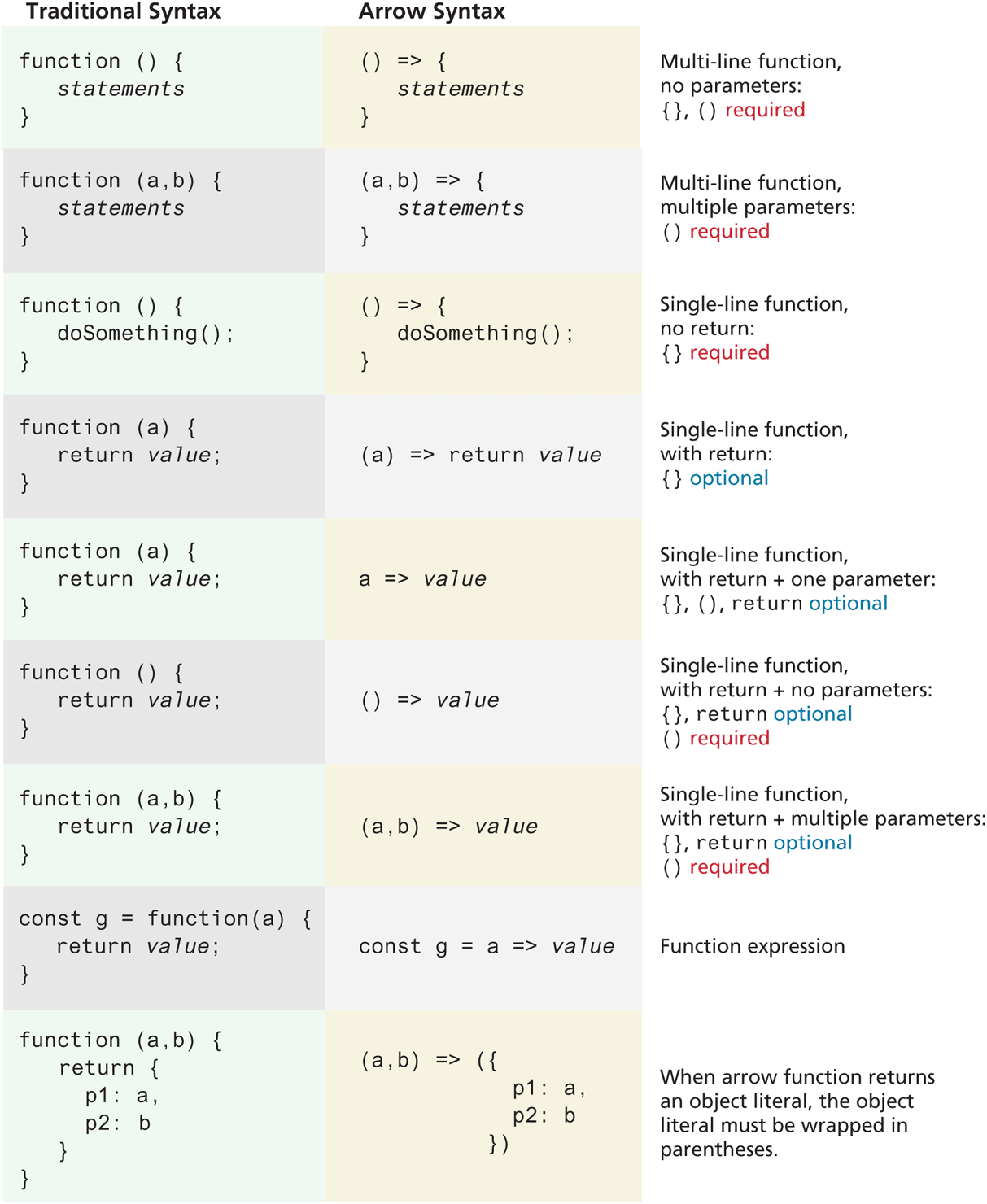
If a function does not return a value, then the function body must be wrapped in {} brackets. Figure 8.21 provides a quick summary of the different syntax possibilities with arrow function.
Figure 8.21 Array syntax overview
Should I Use Arrow Functions?
Is arrow syntax worth it? It is unfortunate that arrow syntax has so many special cases and variations. At its best, once you are comfortable reading this syntax, it can simplify your code and perhaps make it more understandable. If you find it confusing and makes your code less understandable, then you can certainly continue to use normal function syntax, as learned elsewhere in Chapter 8. However, you do need to be able to read and decode arrow functions, as many developers have embraced them; for instance, many online examples now make use of arrow functions.
 Note
Note
Arrow syntax cannot be used in conjunction with the new keyword (i.e., can’t be used as function constructors). Consider the following example of a traditional function constructor:
// traditional function constructor
function Customer(name,address) {
  this.name = name;
  this.address = address;
}
// this works
let cust1 = new Customer("Sue", "123 Somewhere");
We might be tempted to implement this function using arrow syntax as follows:
// arrow function constructor
const Customer2 = (name,address) => {
  this.name = name;
  this.address = address;
}
This seems okay until we try to invoke it with the new keyword, as shown below:
// this throws a runtime exception
let cust2 = new Customer2("Sue", "123 Somewhere");
As the comment indicates, this generates a runtime exception. Why? Because the meaning of the this keyword differs in arrow functions in comparison to traditional functions, you are simply not allowed to use arrow functions as function constructors. The next section will provide more details on this change to this within arrow functions.
But as the next section indicates, there is one essential reason for using (or avoiding) arrow syntax regardless of your feelings of its readability: the changed meaning of the this keyword within an arrow function.
Changes to “this” in Arrow Functions
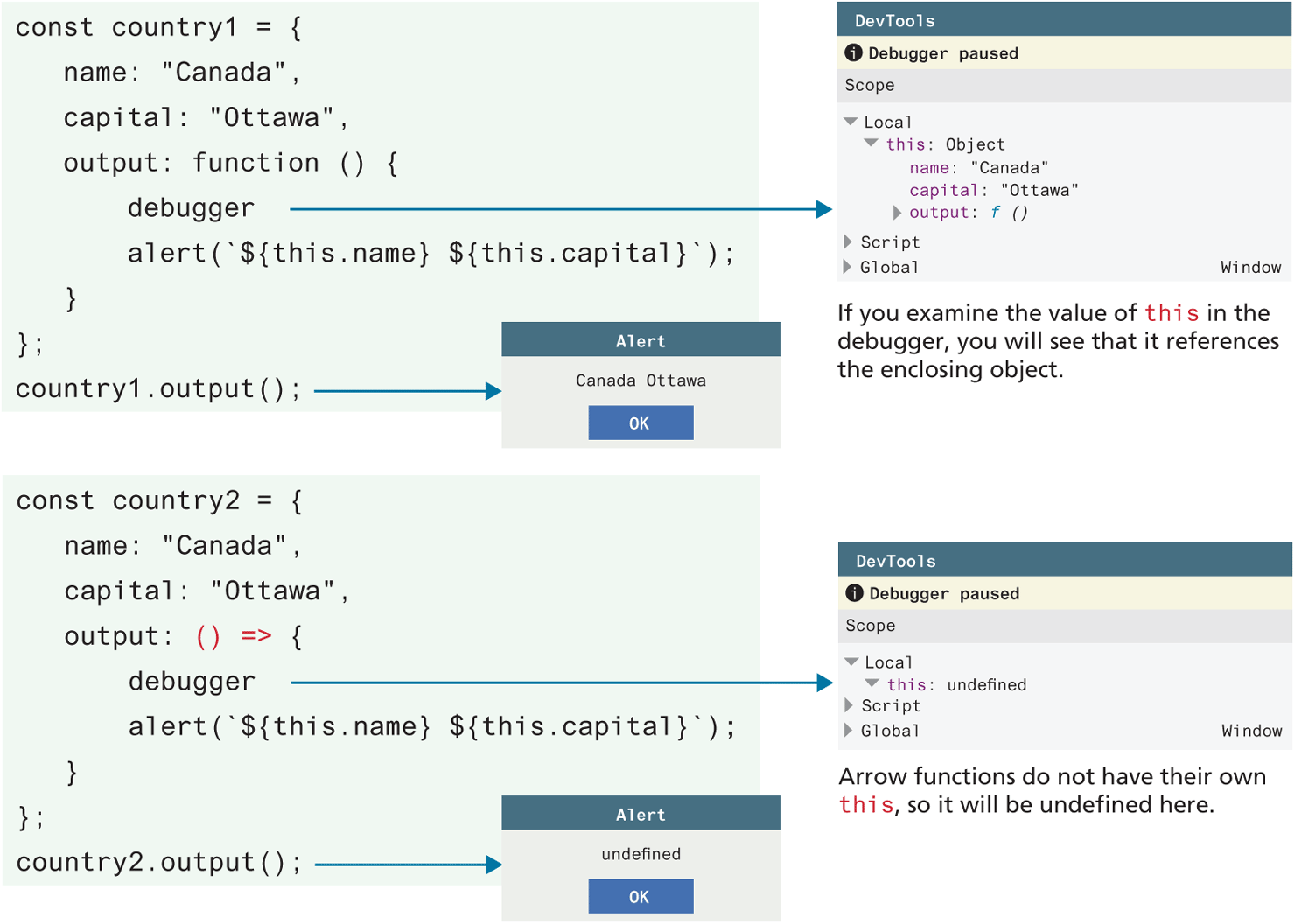
Arrow functions are more than just a concise syntax. They also provide a different meaning to the this keyword. Recall in Sections 8.8.5 and 8.8.6 that the value of this is contextually based on the runtime call stack. That is, the meaning of this is runtime dependent. In the case of a function constructor, it would refer to the object created with the new keyword; within a function declaration inside of an object literal, it would refer to the containing object; if used in a normal function, it would refer to the parental scope of its invoker.
Arrow functions, in contrast, do not have their own this value (see Figure 8.22). Instead, the value of this within an arrow function is that of the enclosing lexical context (i.e., its enclosing parental scope at design time). While this can occasionally be a limitation, it does allow the use of the this keyword in a way more familiar to object-oriented programming techniques in languages such as Java and C#. When we finally get to React development in Chapter 11, the use of arrow functions within ES6 classes will indeed make our code look a lot more like class code in a language like Java.
Figure 8.22 The "this" keyword in arrow and non-arrow functions