8.6 Arrays
When planning this chapter, one of the trickiest decisions to make was the order in which to cover arrays, objects, and functions. To help us with this decision, we looked at over a dozen books on JavaScript to see if we could benefit from the collective wisdom of these authors and experts. However, there was no consensus to this question. Since almost everything is an object in JavaScript, some books cover objects first. Because arrays are a data structure that is familiar to most programmers, some books cover arrays first. And because functions are so essential to most JavaScript programming practices, some books cover functions first. As you can see from the heading of this and the following two sections, we have decided to cover arrays first, then objects, and then functions, but feel free to examine any of the next three sections in a different order if that is your preference.
Arrays are one of the most commonly used data structures in programming. In general, an array is a data structure that allows the programmer to collect a number of related elements together in a single variable.
JavaScript provides two main ways to define an array. The most common way is to use array literal notation, which has the following syntax:
const name = [value1, value2, ... ];The second approach to creating arrays is to use the Array() constructor:
const name = new Array(value1, value2, ... );The literal notation approach is generally preferred since it involves less typing and is more readable. In both cases, the values of a new array can be of any type. Listing 8.6 illustrates several different arrays created using object literal notation.
Listing 8.6 Creating arrays using array literal notation
const years =  [1855, 1648, 1420];

// remember that JavaScript statements can be
// spread across multiple lines for readability
const countries = ["Canada", "France",
                 "Germany", "Nigeria",
                 "Thailand", "United States"];

// arrays can also be multi-dimensional ... notice the commas!
const twoWeeks = [
             ["Mon","Tue","Wed","Thu","Fri"],
             ["Mon","Tue","Wed","Thu","Fri"]
            ];

// JavaScript arrays can contain different data types
const mess =  [53, "Canada", true, 1420];
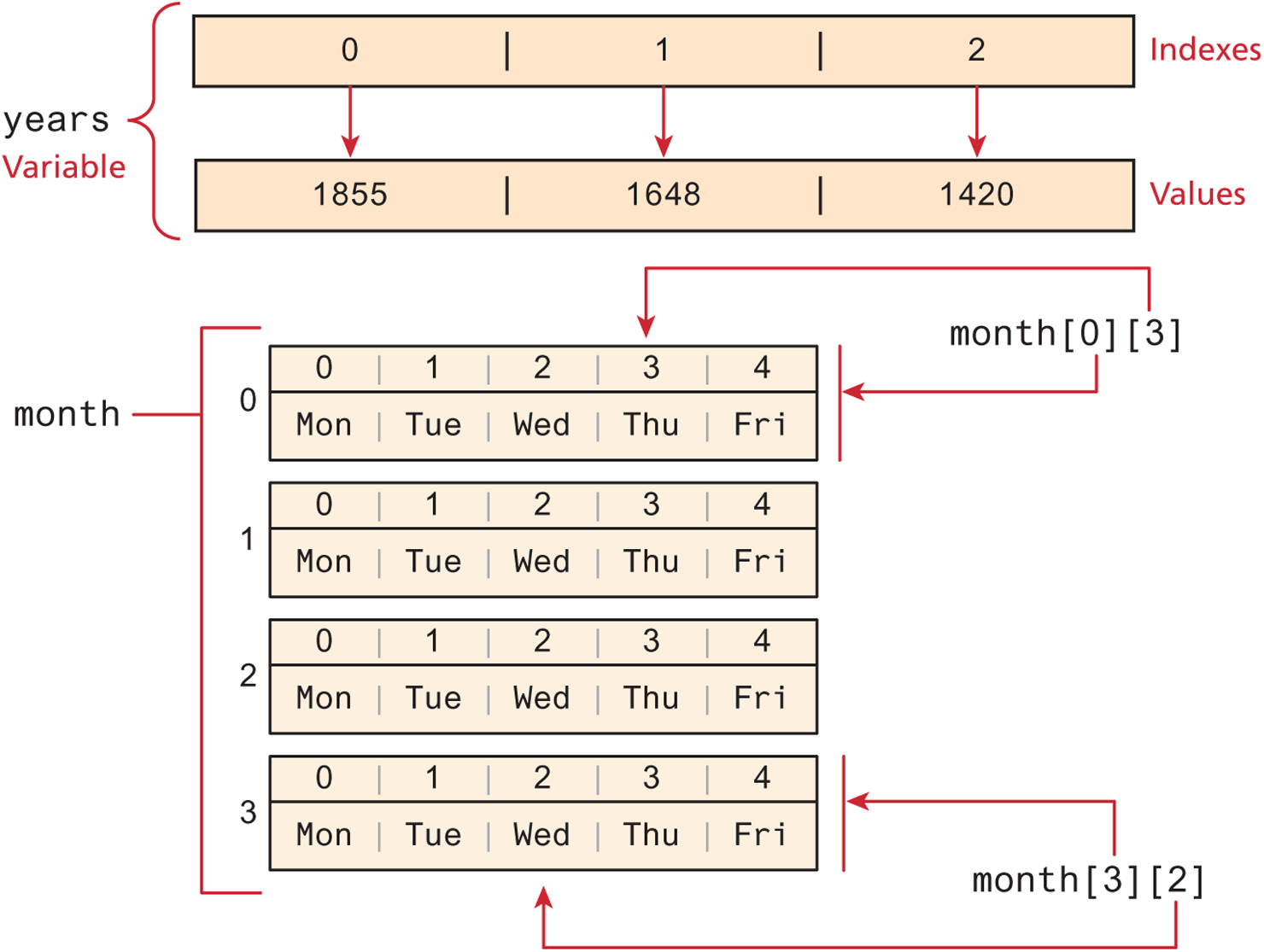
Like arrays in other languages, arrays in JavaScript are zero indexed, meaning that the first element of the array is accessed at index 0, and the last element at the value of the array’s length property minus 1. Listing 8.7 demonstrates how individual elements within an array are accessed via square bracket notation. Figure 8.12 illustrates the relationship between array indexes and values.
Listing 8.7 Accessing array elements
// continues from Listing 18.6: outputs 1855 and then 1420
console.log(years[0]);
console.log(years[2]);

// outputs Canada and then United States
console.log(countries[0]);
console.log(countries[5]);

// outputs Thu
console.log(month[0][3]);

// arrays are built-in objects and have a length property defined

// index will be set to 6
let index = countries.length;

// outputs United States again (remember array indexes start at 0)
console.log(countries[index-1]);

// iterating through an array
for (let i = 0; i < years.length; i++) {
      console.log(years[i]);
}
Figure 8.12 JavaScript array with indexes and values illustrated
As you can see in Listing 8.7, arrays are built-in objects in JavaScript. This means that all arrays inherit a variety of properties and methods that can be used to explore and manipulate an array. For instance, to add an item to the end of an existing array, you can use the push() method; to add an item at the beginning of an existing array, you would use the unshift() method:
countries.push("Zimbabwe");
countries.unshift("Austria");
The pop() method can be used to remove the last element from an array. Additional methods that modify arrays include concat(), slice(), join(), reverse(), shift(), and sort(). A full accounting of all these methods is beyond the scope of this chapter, but as you begin to use arrays, you should explore them further.
Back in Section 8.1.2, you learned that the sixth edition of JavaScript (usually referred to as ES6) introduced a variety of new features to the language. One of these is spread syntax, which provides a new way to create an array from one or more existing arrays.
Imagine we had the two following arrays:
const sports = ["Tennis","Hockey"];
const games = ["Monopoly","Chess"];
We could create a new array that contains the contents of these arrays using the spread syntax (indicated by three periods), as shown in the following:
const pastimes = ["Painting", ...sports, ...games, "Cooking"];The resulting array would contain the following:
["Painting","Tennis","Hockey","Monopoly","Chess","Cooking"];8.6.1 Iterating an array using for . . . of
ES6 introduced an alternate way to iterate through an array, known as the for...of loop, which looks as follows.
// iterating through an array
for (let yr of years) {
  console.log(yr);
}
Notice that JavaScript creates a temporary variable and assigns it to the value of an individual element in the array. The above code is thus functionally equivalent to the following:
for (let i = 0; i < years.length; i++) {
   let yr = years[i];
   console.log(yr);
}
8.6.2 Array Destructuring
Another new language feature introduced with ES6 is array destructuring, which provides a simplified syntax for extracting multiple scalar values from an array. For instance, let’s say you have the following array:
const league = ["Liverpool", "Man City", "Arsenal", "Chelsea"];Now imagine that we want to extract the first three elements into their own variables. The “old-fashioned” way to do this would look like the following:
let first = league[0];
let second = league[1];
let third = league[2];
By using array destructuring, we can create the equivalent code in just a single line:
let [first,second,third] = league;You can skip elements as well, as can be seen in the following:
let [first,,,fourth] = league;Another feature of array destructuring is that we can use spread syntax to copy array elements into a new array, as shown in the following:
let [first,...everyoneElse] = league;
// equivalent to:
// let first = league[0];
// const everyoneElse = [[league[1], league[2], league[3]];
Array destructuring syntax also provides a concise way to swap the values of two variables. Normally, doing so requires the use of a temporary variable:
let tmp = first;
first = second;
second = tmp;
With array destructuring we need only a single line of code:
[second,first] = [first,second];Test Your Knowledge #3
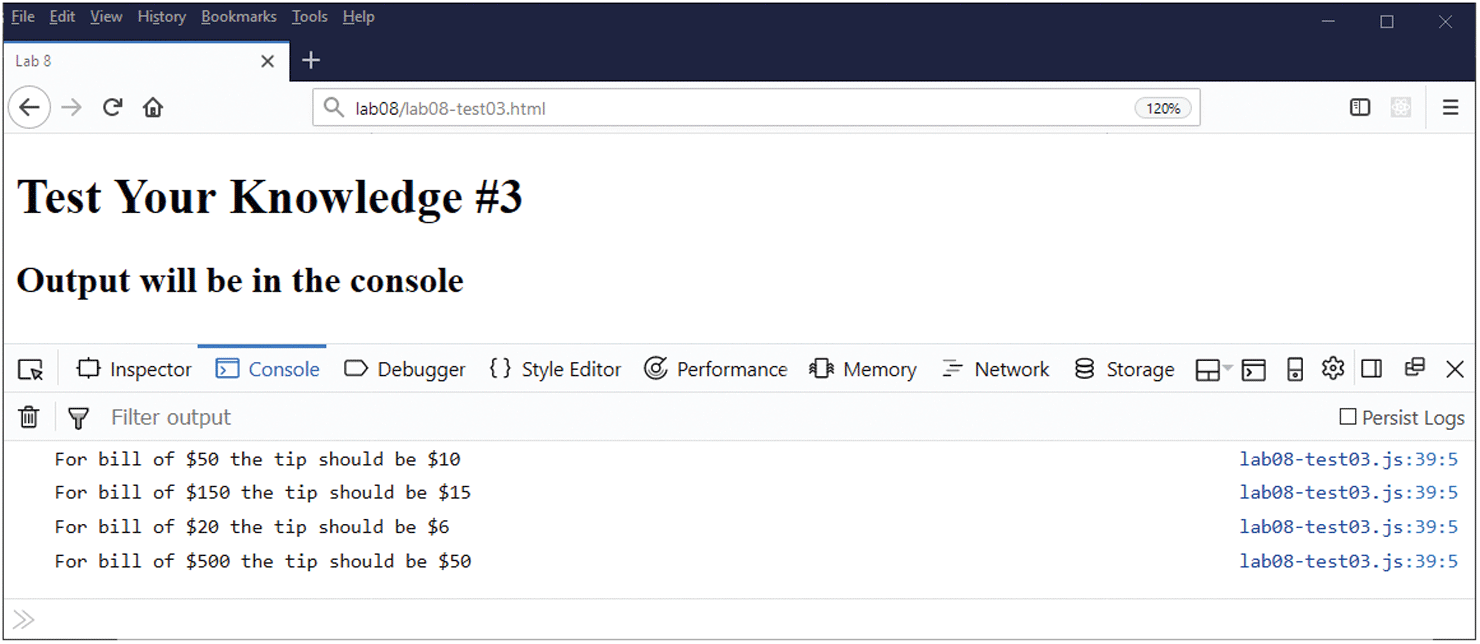
Modify your results from the previous Test Your Knowledge (or create a copy of the previous version) and implement the following functionality.
Comment out code retrieving and validating the bill total from the user (we are going to replace user input with data from an array).
Define an array called
billTotalsthat contains an array of numeric values—for example, values of 50, 150, 20, 500, etc.Define a new empty array called
tips.Loop through
billTotalsand first determine the tip percentage for each number in thebillTotalsarray using this logic: if total > 75 then tip% = 10%, if total between 30 and 75 then tip% = 20%, else if total < 30 then tip% = 30%.Calculate tip by multiplying individual
billAmountelement by the appropriate tip percentage.Add (push) this tip to the
tipsarray.Once all the tips are calculated, then output to the console each bill total and tip amount on a separate console line using the same format as you used in Test Your Knowledge #1 (see Figure 8.13). This will require another loop (a
forloop) that will iterate thebillTotalsarray but reference bothbillTotalsandtipsarrays.
Figure 8.13 Output from finished Test Your Knowledge #3