8.4 Conditionals
JavaScript’s syntax for conditional statements is almost identical to that of PHP, Java, or C++. In this syntax the condition to test is contained within () brackets with the body contained in {} blocks. Optional else if statements can follow, with an else ending the branch. Listing 8.3 uses a conditional to set a greeting variable, depending on the hour of the day.
Listing 8.3 Conditional statement setting a variable based on the hour of the day
let hourOfDay;  // variable to hold hour of day, set it later ...
let greeting;   // variable to hold the greeting message
if (hourOfDay > 4 && hourOfDay < 12)  {
  greeting = "Good Morning";
}
else if (hourOfDay >= 12 && hourOfDay < 18)  {
  greeting = "Good Afternoon";
}
else {
  greeting = "Good Evening";
}
The switch statement is similar to a series of if...else statements. An example using switch is shown in Listing 8.4. You will likely find that you tend to use the if...else construct much more frequently than the switch statement since it gives you more control over conditional tests and more easily allows for nested conditional logic. Speaking of conditional tests, JavaScript has all of the expected comparator operators, which are shown in Table 8.4.
Listing 8.4 Conditional statement using switch and an equivalent if-else
switch (artType) {
  case  "PT":
     output = "Painting";
     break;
  case  "SC":
     output = "Sculpture";
     break;
  default:
     output = "Other";
}
// equivalent
if (artType == "PT") {
     output = "Painting";
} else if (artType == "SC") {
     output = "Sculpture";
} else {
     output = "Other";
}
Table 8.4 Comparator Operations
| Operator | Description | Matches (assume x=9) |
|---|---|---|
== |
Equals | (x == 9) is true (x == "9") is true |
=== |
Strict equality, including type | (x === "9") is false (x === 9) is true |
< , > |
Less than, greater than | (x < 5) is false |
<= , >= |
Less than or equal, greater than or equal | (x <= 9) is true |
!= |
Not equal | (x != 4) is true |
!== |
Not equal in either value or type | (x !== "9") is true (x !== 9) is false |
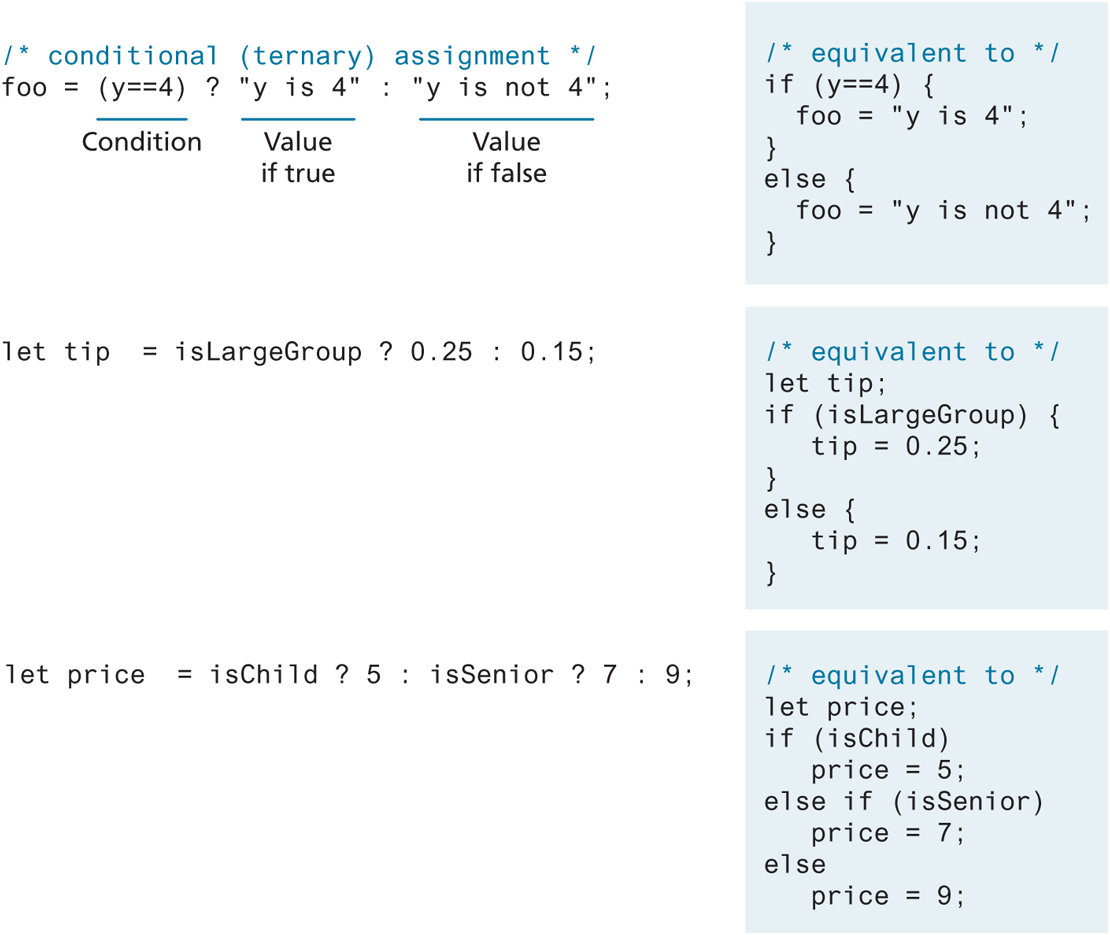
There is another way to make use of conditionals: the conditional operator (also called the ternary operator). As can be seen in Figure 8.10, the conditional operator is used to assign values based on a condition. Many programmers appreciate the conciseness of this operator, though some developers avoid it for the same reason.
Figure 8.10 The conditional (ternary) operator
8.4.1 Truthy and Falsy
 Pro Tip
In a conditional block with only one line of code within it, the { } are optional. For instance, the following conditional is syntactically legal.
if (someVariable > 50)
   console.log("greater than 50");
else
   console.log("not greater than 50");

console.log("this happens regardless of the conditionals");
While this is correct, the lack of curly brackets in this example provides an opportunity for a future bug. Imagine sometime later we need to add another element to one of the condition states (i.e., change it from a single line to a block). In such a case, we might not notice that the curly brackets are missing and get fooled by the indentation. For instance, can you find the bug in the following code?
if (someVariable > 50)
   console.log("greater than 50");
else
   console.log("not greater than 50");
   console.log("please enter a larger number");

console.log("this happens regardless of the conditionals");
The message “please enter a larger number” is displayed regardless of the value of someVariable because the condition block without the curly brackets can only be one line long.
Therefore, we would recommend that you get into the practice of always using curly brackets for conditional blocks, regardless of whether they are one line long.
Also, many JavaScript Lint tools (see Tools Insight section of Chapter 9 for more information) will insist that you place the first curly bracket on the same line as the if statement (or for, while, or function statement) as shown in Listing 8.3.
As we saw back in Table 8.3, there is an explicit Boolean primitive type that can be assigned to a true or false value. One of the interesting aspects of conditionals in JavaScript is the fact that everything in JavaScript has an inherent Boolean value. This inherent Boolean value will be used when a value is being evaluated in a Boolean context (for instance, in an if condition). In JavaScript, a value is said to be truthy if it translates to true, while a value is said to be falsy if it translates to false.
All values in JavaScript, with a few exceptions described shortly, are truthy. For instance, in the following example, the hello message will be written because 35 is a truthy value.
let abc = 35;
if (abc) {
   console.log("hello");
}
What values are falsy? In JavaScript, false, null, "", '', 0, NaN, and undefined are all falsy.