8.3 Variables and Data Types
When one learns a new programming language, it is conventional to begin with variables and data types. We will begin with these topics as well.
Variables in JavaScript are dynamically typed, meaning that you do not have to declare the type of a variable before you use it. This means that a variable can be a number, and then later a string, then later an object, if so desired. This simplifies variable declarations, since we do not require the familiar data-type identifiers (such as int, char, and String) of programming languages like Java or C#.
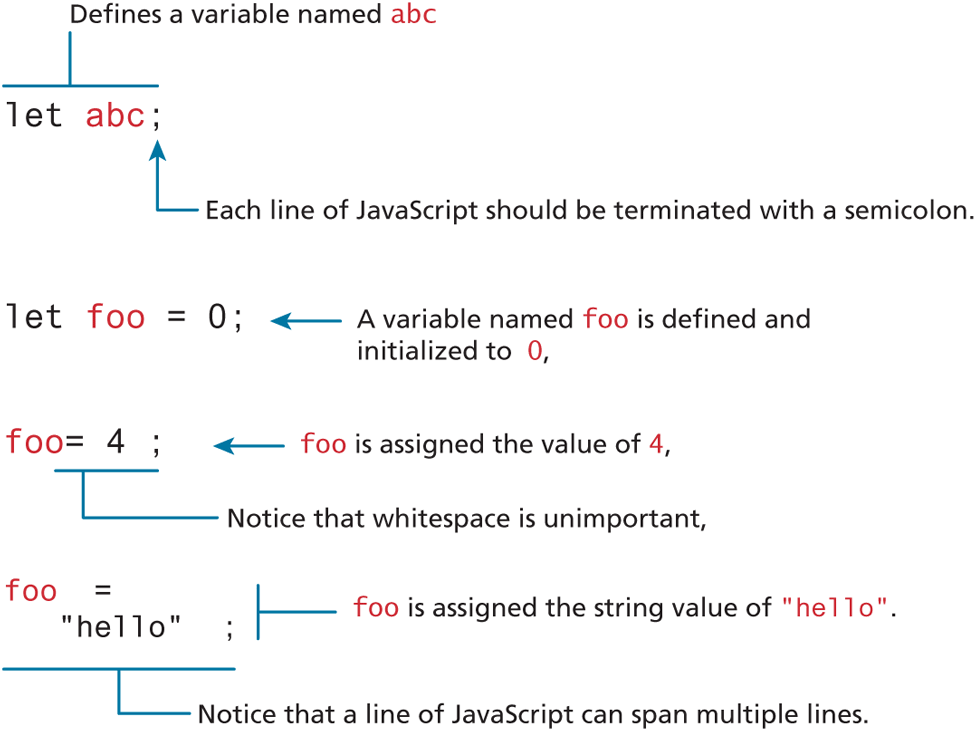
Figure 8.5 illustrates that to declare a variable in JavaScript, as discussed shortly, you can use either the var, const, or let keywords (a keyword is a reserved word with a special meaning within a programming language). If you do not specify an initial value its initial value will be undefined. For instance, in Figure 8.5, the variable abc has a value of undefined.
Figure 8.5 Variable declaration and assignment
 Note
Note
JavaScript is a case-sensitive language. Thus, these two lines declare and initialize two different variables:
let count = 5;
let Count = 9;
Variables should always be defined using either the var, const, or let keywords. While you can, in fact, define variables without using one of these keywords, doing so may give that variable global scope. As we will discover later, when we discuss functions and scope, this is almost always a mistake. For this reason, get in the practice of always declaring variables with one of these keywords.
You may wonder why there are three different keywords for declaring variables. The let and const keywords were added in ES6 and are now usually to be preferred over var. Table 8.1 provides overview of how these three keywords differ.
Table 8.1 Differences between var, let, and const
| Keyword | Description | Usage |
|---|---|---|
var |
Prior to ES6, the var keyword was the only way to declare a variable in JavaScript. It creates a variable that is either function scoped or global scoped. Also, variables defined with var are hoisted to the top of its block (you will learn more about these terms later in the chapter). |
Generally avoid using except for backwards-compatibility with older browsers. While not strictly necessary, some developers still use var for a global-scoped variable. |
let |
Creates a block-scoped variable that can be reassigned to a different value. | Use when you need to reassign the value of a variable. |
const |
Creates a block-scoped variable whose value cannot be reassigned. This doesn’t create an immutable variable (like the final keyword in Java). If assigned to an object or array, you can change property values or element values. |
Use when you won’t need to reassign the value of a variable and you want the browser to detect and prevent reassignments. |
Assignment can happen at declaration time by appending the value to the declaration, or at runtime with a simple right-to-left assignment, as illustrated in Figure 8.5. This syntax should be familiar to those who have programmed in languages like C and Java.
There are several additional things worth noting and expanding upon in Figure 8.5. First, notice that each line of JavaScript is terminated with a semicolon. If you forget to add the semicolons, the JavaScript engine will still automatically insert them. While opinions on this vary, we advise you to not rely on this feature and instead get in the habit of always terminating your JavaScript lines with a semicolon.
Second, notice that whitespace around variables, keywords, and other symbols has no meaning. Indeed, as can be seen in Figure 8.5, a single line of JavaScript can span multiple lines.
Note
There are two styles of comment in JavaScript, the single-line comment, which starts with two slashes //, and the block comment, which begins with /* and ends with */.
 Pro Tip
JavaScript accepts a very wide range of symbols within identifier (that is, variable or function) names. An identifier must begin with a $, _, or any character within one of several different Unicode categories (we need not list them all here). This means a JavaScript variable or function name can look quite unusual in comparison to a language like Java.
For instance, the following are all valid JavaScript variables.
// uses Greek character
let π = 3.1415;
// uses Kannada character
let  = "disapproval";
// uses Katakana characters
let
= "disapproval";
// uses Katakana characters
let  = 0;
let
= 0;
let  = ;
= ;
8.3.1 JavaScript Output
One of the first things one learns with a new programming language is how to output information. For JavaScript that is running within a browser, there are several options, as shown in Table 8.2.
Table 8.2 Output methods
| Method | Description |
|---|---|
alert() |
Displays content within a browser-controlled pop-up/modal window. |
console.log() |
Displays content in the browser’s JavaScript console. |
document.write() |
Outputs the content (as markup) directly to the HTML document. |
prompt() |
Displays a message and an input field within a modal window. |
confirm() |
Displays a question in a modal window with ok and cancel buttons. |
When first learning JavaScript, one often uses the alert() function. It instructs the browser to display a pop-up or modal dialog window (that is, the user cannot interact with the page until dismissing the dialog) displaying the string passed to the function. There are two other modal dialog options for outputting data, as can be seen in Figure 8.6.
Figure 8.6 JavaScript output options
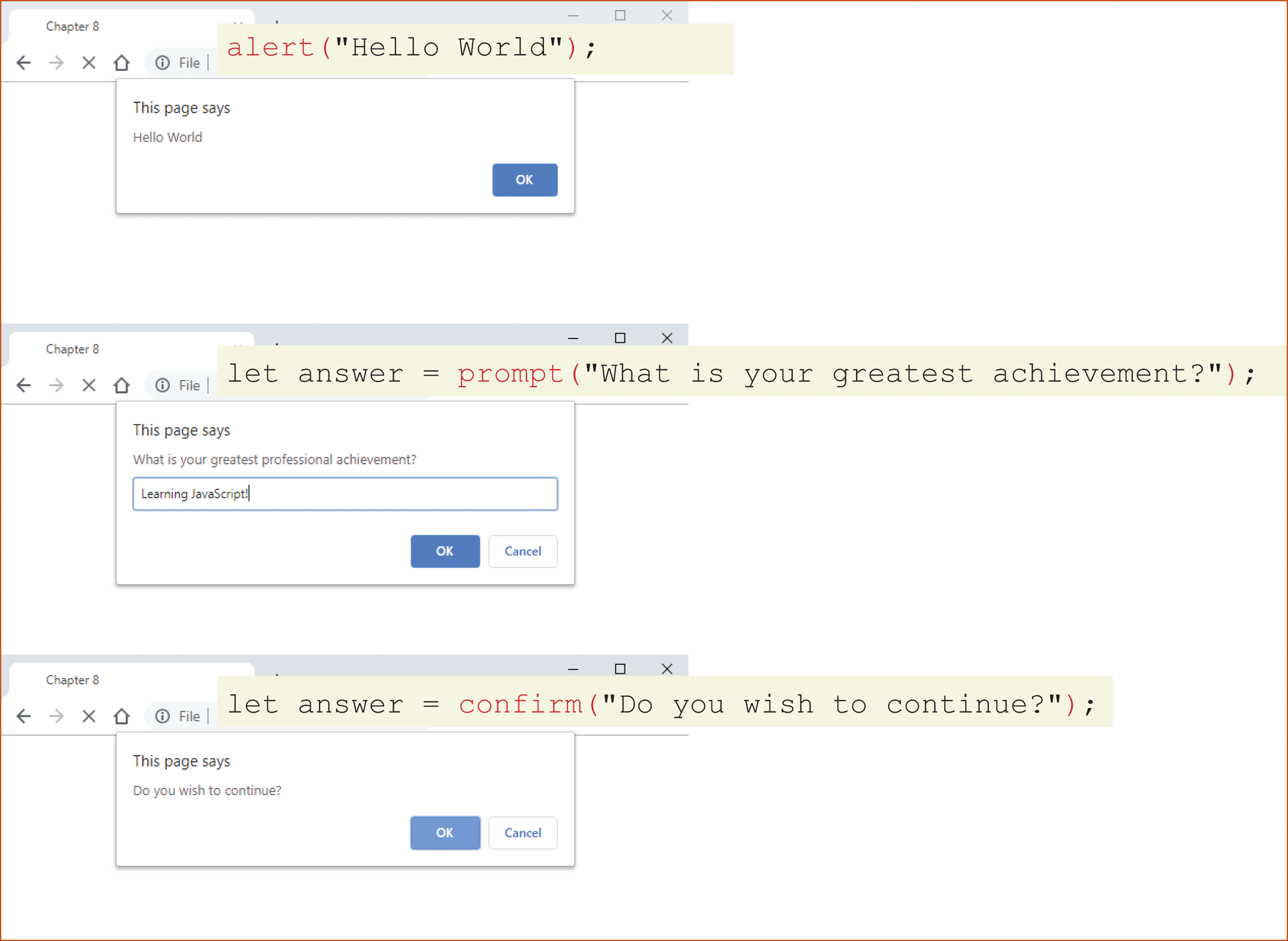
These pop-ups may appear different to each user depending on their browser configuration. What is universal is that the pop-up obscures the underlying web page, and no actions can be done until the pop-up is dismissed.
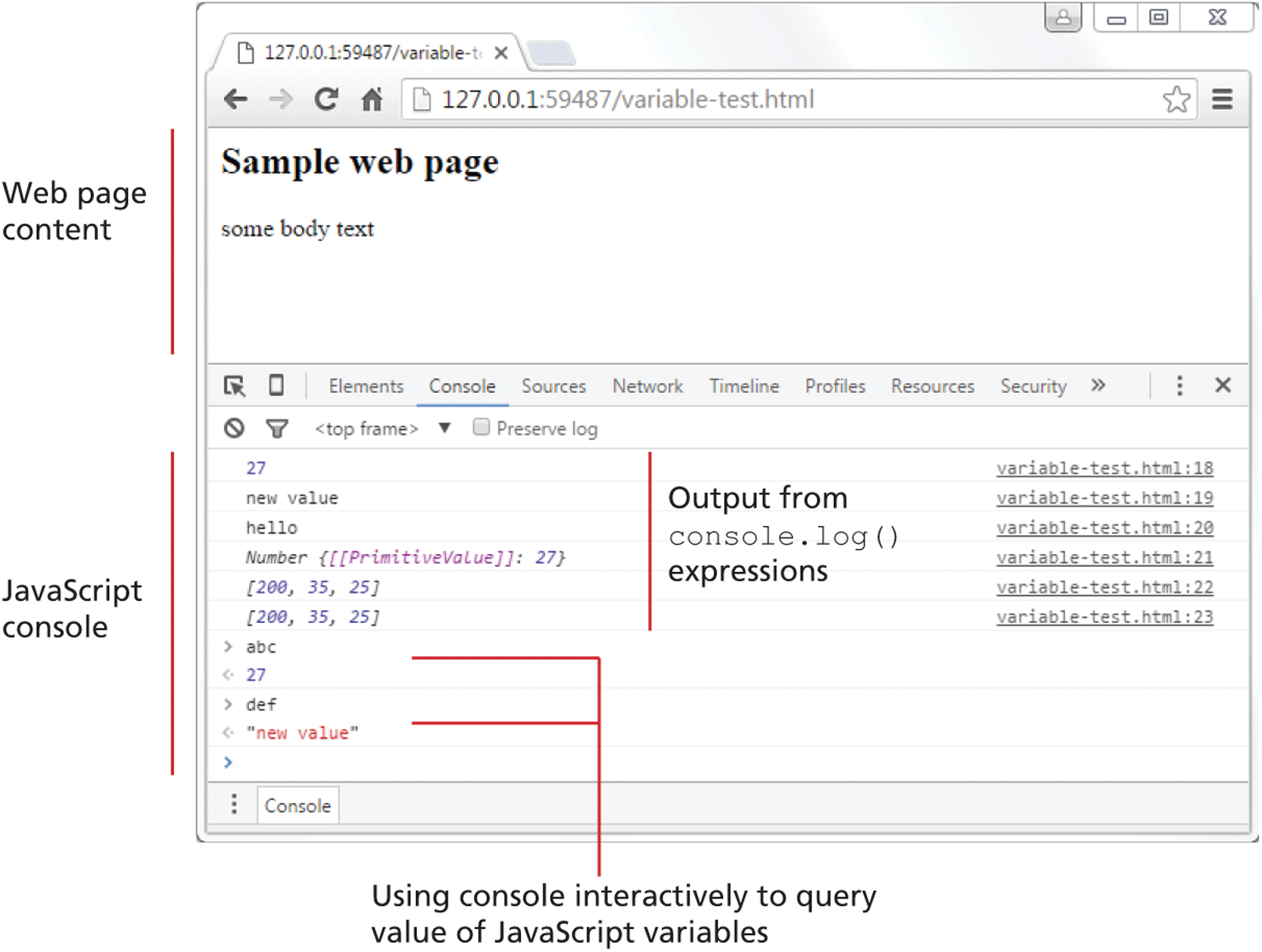
Alerts are generally not used in production code but provide a quick way to temporarily display or gather simple information. However, using pop-ups can get tedious quickly. The user has to click OK to dismiss the pop-up, and if you use it in a loop, you may spend more time clicking OK than doing meaningful debugging. As an alternative, the examples in this chapter will often use the console.log() method (or one of its related cousins, such as console.warn() or console.dir()) since console output doesn’t interfere with the display of HTML content (see Figure 8.7).
Figure 8.7 Chrome JavaScript console
Finally, the document.write() method can be a useful way to output markup content from within JavaScript. This method is often used to output markup or to combine markup with JavaScript variables, as shown in the following example:
let name = "Randy";
document.write("<h1>Title</h1>");
// this uses the concatenate operator (+)
document.write("Hello " + name + " and welcome");
At first glance, this method seems especially useful, since it appears comfortably close to PHP’s echo statement or Java’s System.out.println(). In this case, appearances can be deceiving.
The JavaScript document.write() method outputs a string of text to the document stream. Thus, it matters where in the document the method call resides. A call that injects text out of place may overwrite existing content or may get shifted to an inappropriate location. But the main problem with document.write() is that what it outputs doesn’t get added into the document tree and thus can’t be further manipulated by JavaScript.
Note
While several of the examples in this chapter make use of document.write(), the usual (and more trustworthy) way to generate content that you want to see in the browser window will be to use the appropriate JavaScript DOM (Document Model Object) method. You will learn how to do that in the next chapter.
8.3.2 Data Types
JavaScript has two basic data types: reference types (usually referred to as objects) and primitive types (i.e., nonobject, simple types). What makes things a bit confusing for new JavaScript developers is that the language lets you use primitive types as if they are objects. The reason for this slipperiness is that objects in JavaScript are absolutely crucial. Almost everything within the language is an object, so the language provides easy ways to use primitives as if they were objects.
Primitive types represent simple forms of data. ES2015 defines six primitives, which can be seen in Table 8.3. JavaScript also has object representations of these primitives, which can be confusing!
Table 8.3 Primitive Types
| Data type | Description |
|---|---|
| Boolean | True or false value. |
| Number | Represents some type of number. Its internal format is a double precision 64-bit floating point value. |
| String | Represents a sequence of characters delimited by either the single or double quote characters. |
| Null | Has only one value: null. |
| Undefined | Has only one value: undefined. This value is assigned to variables that are not initialized. Notice that undefined is different from null. |
| Symbol | New to ES2015, a symbol represents a unique value that can be used as a key value. |
Primitive variables contain the value of the primitive directly within memory. In contrast, object variables contain a reference or pointer to the block of memory associated with the content of the object. Figure 8.8 illustrates the difference in memory between primitive and reference variables.
Figure 8.8 Primitive types versus reference types
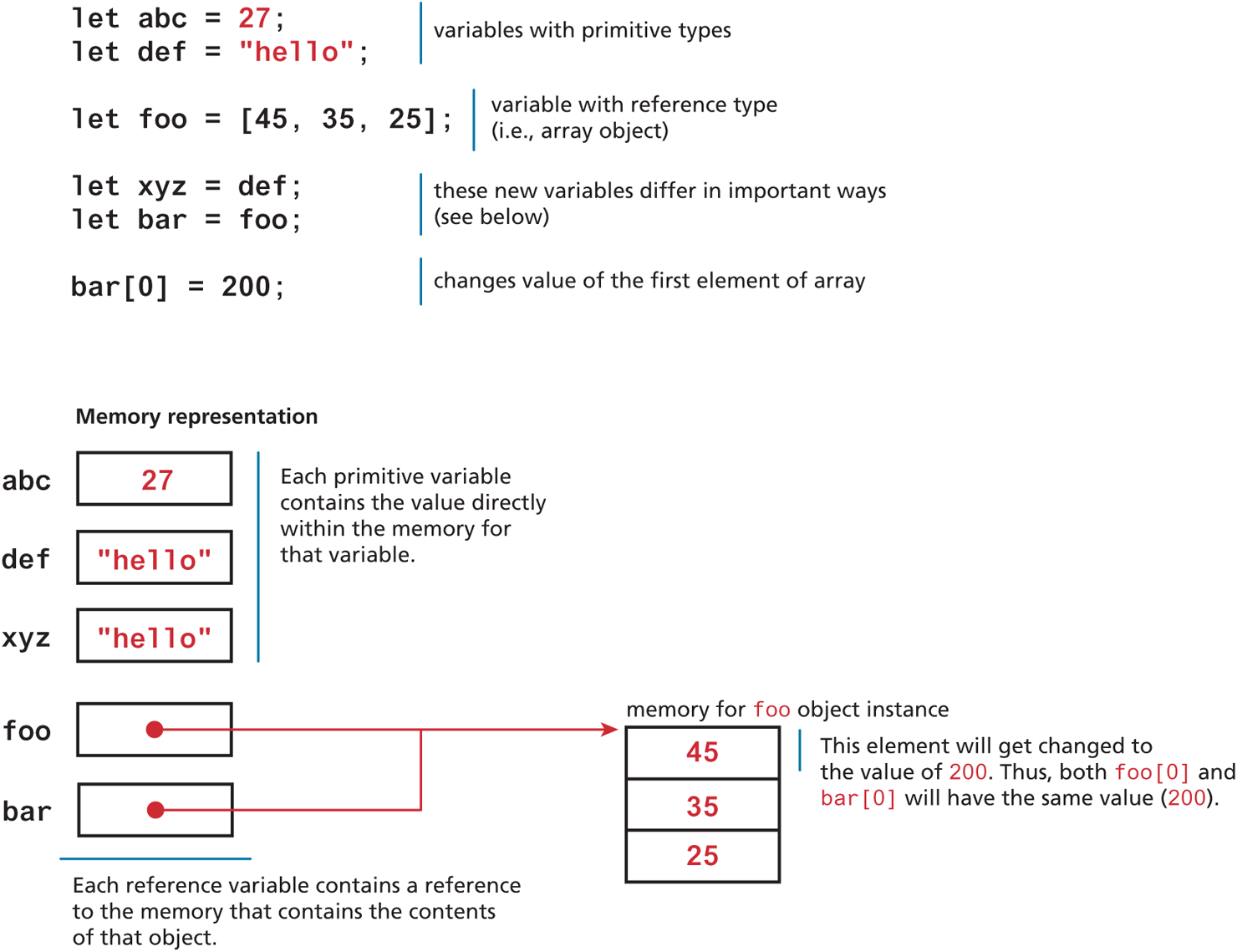
Even though the variables def and xyz in Figure 8.8 have the same content, because they are primitive types, they have separate memory locations. Thus, if we change the content of variable def, it will have no effect on variable xyz. But as you can see, since the variables foo and bar are reference types, they point to the memory of an object instance. Thus, changing the object they both point to (e.g., bar[0]=200) affects both instances (e.g., both bar[0] and foo[0] are equal to 200).
Now that you have been introduced to the differences between primitive and reference types, we should revisit the differences between let and const. As shown in Figure 8.9, you cannot reassign the value of a variable defined with a const. However, for a const variable that is assigned to a reference type (such as an object or array), its properties or elements can be changed.
Figure 8.9 let versus const
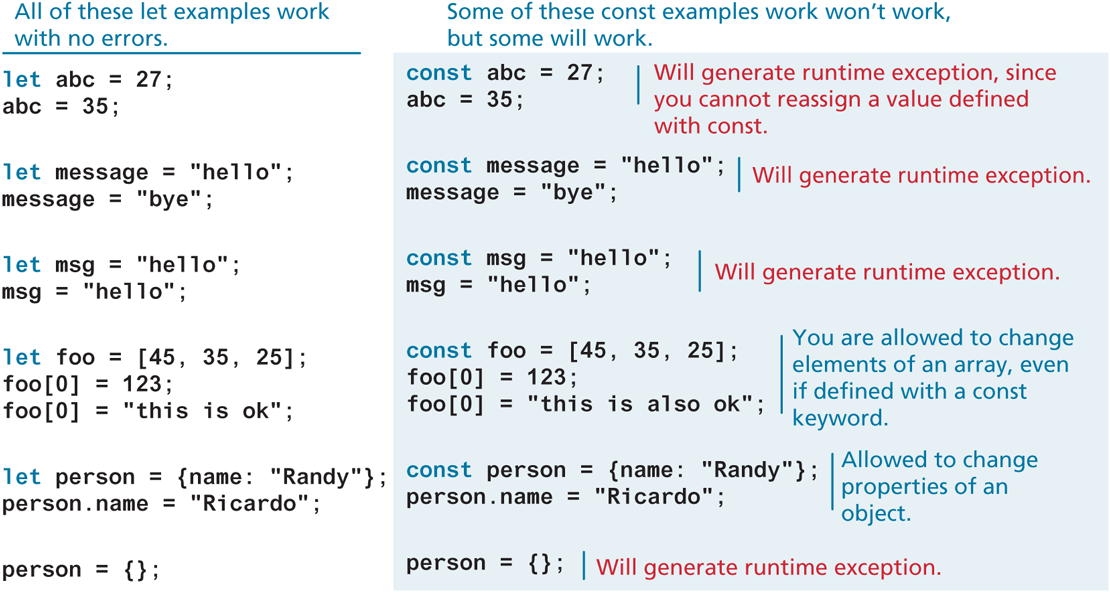
You might wonder, given the numerous possible runtime exceptions generated by the const examples in Figure 8.9, why should you ever use it? As you work with JavaScript, you will discover that you use objects and arrays more frequently than you use primitive data types, so the seeming limitations shown in Figure 8.9 are not as large as you might think. The most important reason for using const is that it tells the browser (and you, the developer) that a variable shouldn’t be changing. Sometimes (maybe even often) you don’t want a variable to be reassigned; using const can help catch subtle bugs that can occur when a variable is reassigned unexpectedly.
8.3.3 Built-In Objects
The example in Figure 8.8 illustrates the difference between primitive types and reference types. As mentioned earlier, reference types are more generally referred to as objects. Later in this chapter, we will spend quite a bit of time creating our own custom objects. But before we do that, we should mention that JavaScript has a variety of objects you can use at any time, such as arrays, functions, and the built-in objects. Some of the most commonly used built-in objects include Object, Function, Boolean, Error, Number, Math, Date, String, and Regexp.
Later we will also frequently make use of several vital objects that are not part of the language but are part of the browser environment. These include the document, console, and window objects.
All of these objects have properties and methods (see note) that you can use. For instance, the following example creates an object that uses one of these built-in functions (via the new keyword) and then invokes the toString() method.
let def = new Date();
// sets the value of abc to a string containing the current date
let abc = def.toString();
Note
In object-oriented languages, a property is a piece of data that “belongs” to an object; a method is an action that an object can perform.
In JavaScript, an object is an unordered list of properties. Each property consists of a name and a value. Since functions are also objects, a property value can contain a function. We will address this idea in more detail in the section on Objects later. In this book, we often use the term method to identify object properties that are functions.
To access the properties or methods/functions of an object, you generally will use dot notation. For instance, the following two lines access a property and then a method of the built-in Math object.
let pi = Math.PI;
let tmp = Math.random();
Test Your Knowledge #1
Examine ch08-test01.html and then open ch08-test01.js in your editor. Modify the JavaScript file to implement the following functionality.
Provide a prompt to the user to enter a bill total.
Convert this user input to a number (don’t worry about error handling for non-numbers).
Calculate the tip amount assuming 10% (simply multiply the user input by 0.1). Use a
constto define the 10% tip percentage.Display the bill total and tip amount on the same console output line, for example,
For bill of $20 the tip should be $28.3.4 Concatenation
One of the most basic programming tasks in JavaScript is to combine string literals together with other variables. This is accomplished using the concatenate operator (+). For instance, Listing 8.1 demonstrates several simple uses of the concatenate operator.
Listing 8.1 Using the concatenate operator
const country = "France";
const city = "Paris";
const population = 67;
const count = 2;

let msg = city + " is the capital of " + country;
msg += " Population of " + country + " is " + population;

let msg2 = population + count;

// what is displayed in the console?
console.log(msg);
console.log(msg2);
In JavaScript the meaning of the + operator will depend on whether the values on either side of the operator are both numbers or not. If the + operator is being used on numbers, then it will perform arithmetic addition; if being used on a non-number, then it will perform string concatenation instead.
In Listing 8.1, the first console.log will output Paris is the capital of France Population of France is 67, while the second console.log will output 69 (because both sides of the + operator are numbers).
Newer versions of JavaScript have added an alternative technique for concatenation, namely, template literals, which can be seen demonstrated in Listing 8.2.
Listing 8.2 Using a template literal
const country = "France";
const city = "Paris";

let msg = `${city} is the capital of ${country}`;
Notice that the literal character in this example is the back-tick (located to the left of the 1 key on most North American keyboards). The key benefit of template literals is that you can include variable references within the literal, thereby avoiding using the concatenate operator.