7.6 CSS Preprocessors
CSS preprocessors are tools that allow the developer to write CSS that takes advantage of programming ideas such as variables, inheritance, calculations, and functions. They take code written in some type of language and then converts that code into normal CSS.
If you are like most of the author’s students, you have probably spent some time thinking about aspects of CSS you don’t like. So far, your exposure to CSS has likely been pretty small in scale and scope: maybe lab exercises or end-of-chapter projects. With such small-scale exercises, you likely have not yet encountered some of CSS’s true limitations, which are as follows:
No variables (prior to 2018).
No encapsulation. That is, everything is global in scope within a CSS file. If you are a programmer, you are used to using scoping rules to encapsulate code to blocks so that code written in one location doesn’t affect another location.
No modularity. While CSS does provide a way to split functionality across multiple files, this incurs a time-cost for the user, since each CSS file necessitates another HTTP request.
Duplication. Duplication. Duplication. That is, you’ve probably noticed that you tend to set the same properties over and over again for multiple elements and classes. In a programming language, you would extract duplicate functionality into functions/methods, so that your code is more maintainable because it contains less duplication.
The advantage of a CSS preprocessor is that it can address these limitations. Like with a programming language, with a CSS preprocessor a developer can use variables, nesting, functions, or inheritance to handle duplication and avoid copy and pasting, and search and replacing. CSS preprocessors such as Less, Sass, and Stylus provide this type of functionality.
In Chapter 12, you will learn how to develop using the server-side environment of PHP. One way to think of PHP is that it is a type of preprocessor for HTML. In reality, many real-world sites are not created as static HTML pages, but use programs running on a server that output HTML. CSS preprocessors are analogous: they are programs that generate CSS. In the first edition of this book, we wrote in 2013 that “perhaps in a few years, it will be much more common for developers to use them.” Three years later in the second edition, we wrote that “CSS preprocessors have become an essential tool in the workflow of today’s (2016) front-end developers.” While CSS now finally has variables, preprocessors still bring a lot of additional abilities that make writing and maintaining CSS easier in 2020.
7.6.1 The Basics of Sass
In the remainder of this section, you will learn how to use Sass, which at the time of writing (spring 2020) is the most widely used CSS preprocessor. Sass has two syntaxes: the older Sass syntax and the newer SCSS syntax. Here we will use the SCSS syntax.
As shown in Figure 7.43, your interaction with Sass is typically via a CLI (command-line interface) tool. The tool is usually referred to as a Sass compiler, since it compiles (that is, converts) one or more Sass file(s) into a regular CSS file that can be referenced in the usual way via the <link> element. Since switching to a command/terminal window and running the compiler after every save is an extra step for the developer, you can instead tell Sass to “watch” a folder or file for any changes. When the source file(s) change, Sass will automatically compile and generate the CSS for you.
Figure 7.43 How Sass works
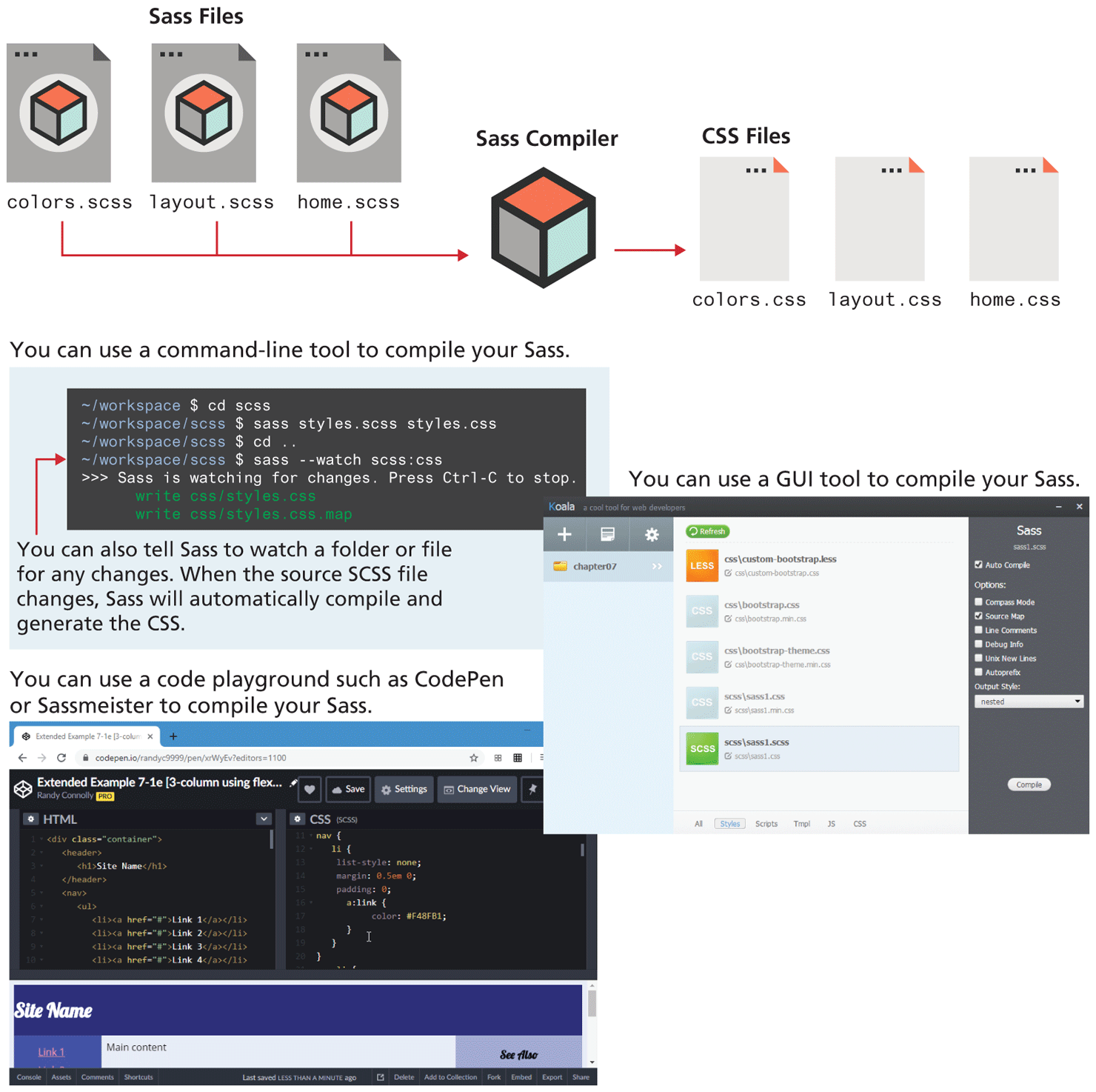
Figure 7.43 also shows two alternatives to using the command line approach: either using a GUI tool such as Koala, or using a code playground such as CodePen which can automatically convert your Sass into the appropriate CSS. For real-world projects, you will almost certainly make use of the CLI approach, but for learning Sass, the other two are perhaps a bit easier.
Variables and Types
In Sass, a variable declaration looks like a property declaration in CSS. For instance, the following code defines two Sass variables and then references (uses) them.
$primary-color: #647ACB;
$spacing: 20px;
.box {
  background-color: $primary-color;
  margin-top: $spacing;
}
Sass variables must begin with a $ and can use underscores and dashes in the name. They also have a scope context, in that variables defined in the top level of the Sass stylesheet are global (available everywhere). Declarations within a block (that is, within {}) are local to that block.
What kind of content can be contained within a Sass variable? If you are familiar with other programming languages, the question would be phrased instead, as, what data types are available in Sass? It has numbers, strings, Booleans, colors, and lists of values. In the previous example, the two data types used by the two variables are color and number. Notice that number values usually have a unit such as px or %, just like regular CSS properties.
Nesting
HTML pages are constructed as nested elements. In regular CSS, you frequently have made use of contextual selectors as a way of styling elements within elements. For instance, looking at the following CSS selectors, you should be able to deduce the structure of the HTML it is styling:
.container { ... }
.container .sidebar { ... }
.container .sidebar h2 { ... }
.container main { ... }
.container main header { ... }
.container main header h2 { ... }
.container main article { ... }
.container main article h2 {
Instead of having multiple contextual selectors, Sass provides a way to nest your styling. Listing 7.6 demonstrates how you can potentially simplify your styling using Sass nesting and variables whose scope is limited to a single block (and to its children).
Listing 7.6 Using Sass nesting
.container {
  .sidebar {
     $side-color : red;
     color: $side-color;
     h2 {
        color: $side-color; /* .sidebar h2 color is red */
        ...
     }
  }
  main {
     ...
     $main-color: black;
     header {
        h2 {
            color: $main-color; /* .sidebar main h2 color is black */
       }
       ...
     }
     article {
         h2 {
            color: $main-color;
            ...
         }
     }
  }
}
7.6.2 Mixins and Functions
One of the key limitations of CSS is that even though there is often a lot of repetitive styling, outside the recent CSS variables there is no language feature for eliminating it. Mixins in Sass provide that capability. They are like a function that returns a style.
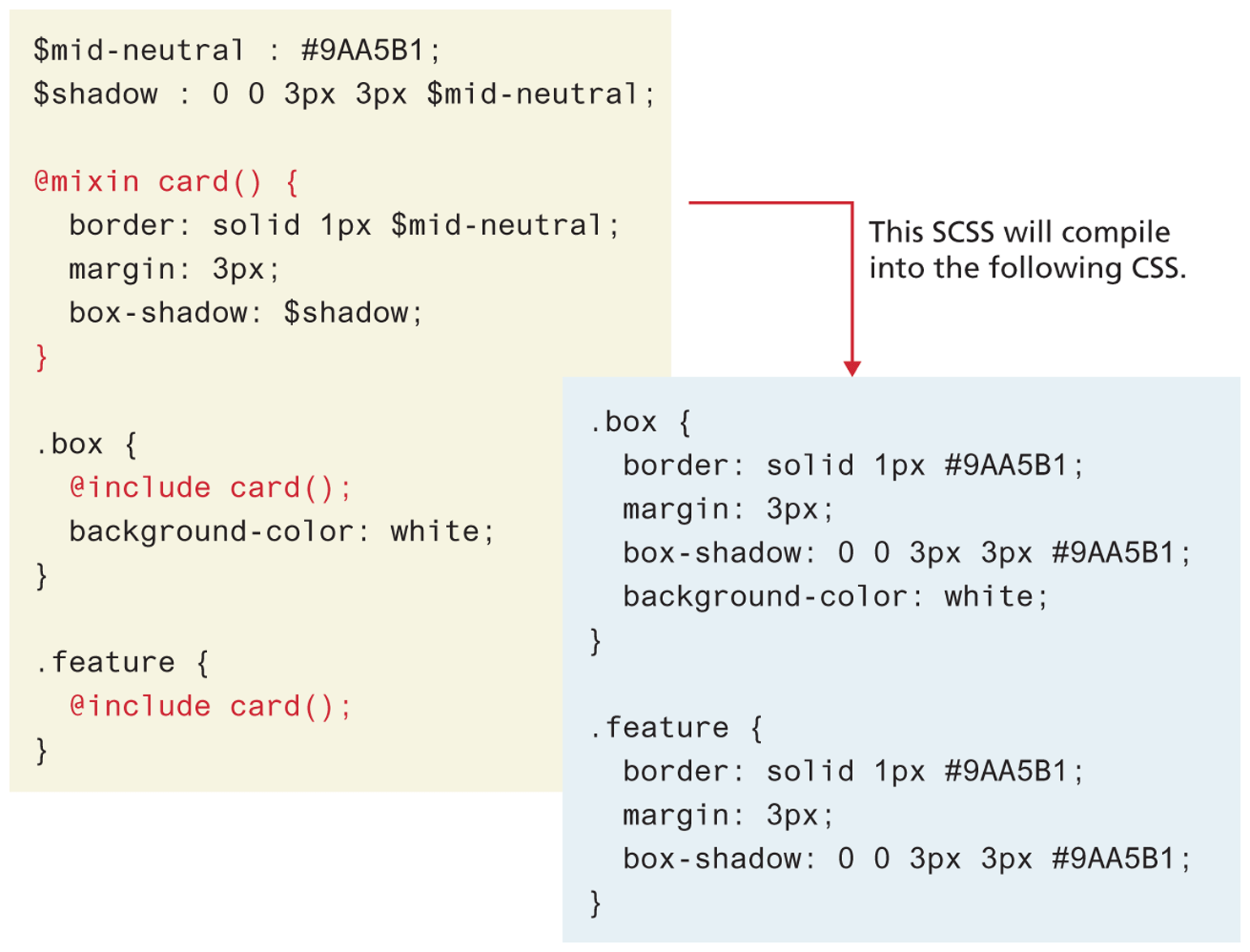
Throughout this chapter and its associated lab exercises, we have found ourselves creating and recreating the styling for boxes and cards. We could generalize out that styling into a mixin and then use it as shown in Figure 7.44.
Figure 7.44 Using mixins
Sass also provides a range of additional functions that expand the capabilities of CSS. Back in Chapter 6, you learned that a site design often needs five to nine variations of a single color, and that using the HSL model was a powerful way of determining these variations. You could use a specialized tool to get these HSL variations; alternately, you could simply make use of the Sass scale-color() function, as shown in the following.
$primary-base-color: #E12D39;
$primary-color-1: scale-color($primary-base-color, $lightness: 20%);
$primary-color-2: scale-color($primary-base-color, $lightness: 10%);
$primary-color-3: $primary-base-color;
$primary-color-4: scale-color($primary-base-color, $lightness: -10%);
$primary-color-5: scale-color($primary-base-color, $lightness: -20%);
7.6.3 Modules
We don’t have space in this already long chapter to fully explore Sass, which also includes features such as conditionals, iteration, and even inheritance. While you might not ever need these advanced features, one key functionality that should be mentioned is its ability to split up large CSS files into more manageable smaller files using the @import or @use rule. This a is a key functionality that is part of most real-world uses of Sass.
You could, for instance, put the Sass rules (i.e., variables, mixins, and style defintions) for global layout in a file named layout.scss, typographical rules in a file named types.scss, and rules for common components (e.g., menu, card, form elements) in a file named components.scss, and then any Sass page that need to use them can import them, as shown in the following.
/* this is at top of home.scss */
@import "layout";
@import "types";
@import "components";

/* this is at top of aboutus.scss */
@import "layout";
@import "types";
@import "components";
 Note
Note
One of the key tasks performed by pre-processors is minification. This refers to the process of removing unnecessary characters such as extra spaces and comments in order to reduce the size of the code and thus reduce the time it takes to download it. A minified CSS file is difficult to read and revise, so it is common for developers to have two versions of any given CSS file: the developer’s version which has white space and comments, and the minified version which is generated by a tool and then used in the production version of the site. Later in the JavaScript chapters, you will see that JavaScript developers follow the same approach. In both cases, .min. is used in the filename to differentiate the minified version.