4.5 The Cascade: How Styles Interact
In an earlier Pro Tip in this chapter, it was mentioned that in fact there are three different types of style sheets: author-created, user-defined, and the default browser style sheet. As well, it is possible within an author-created stylesheet to define multiple rules for the same HTML element. For these reasons, CSS has a system to help the browser determine how to display elements when different style rules conflict.
The “Cascade” in CSS refers to how conflicting rules are handled. The visual metaphor behind the term cascade is that of a mountain stream progressing downstream over rocks (and not that of a popular dishwashing detergent). The downward movement of water down a cascade is meant to be analogous to how a given style rule will continue to take precedence with child elements (i.e., elements “below” in a document outline as shown in Figure 4.3).
CSS uses the following cascade principles to help it deal with conflicts: inheritance, specificity, and location.
4.5.1 Inheritance
Inheritance is the first of these cascading principles. Many (but not all) CSS properties affect not only themselves but their descendants as well. Font, color, list, and text properties (from Table 4.1) are inheritable; layout, sizing, border, background, and spacing properties are not.
Figures 4.11 and 4.12 illustrate CSS inheritance. In the first example, only some of the property rules are inherited from the <body> element. That is, only the body element (thankfully!) will have a thick green border and the 100-px margin; however, all the text in the other elements in the document will be in the Arial font and colored red.
Figure 4.11 Inheritance
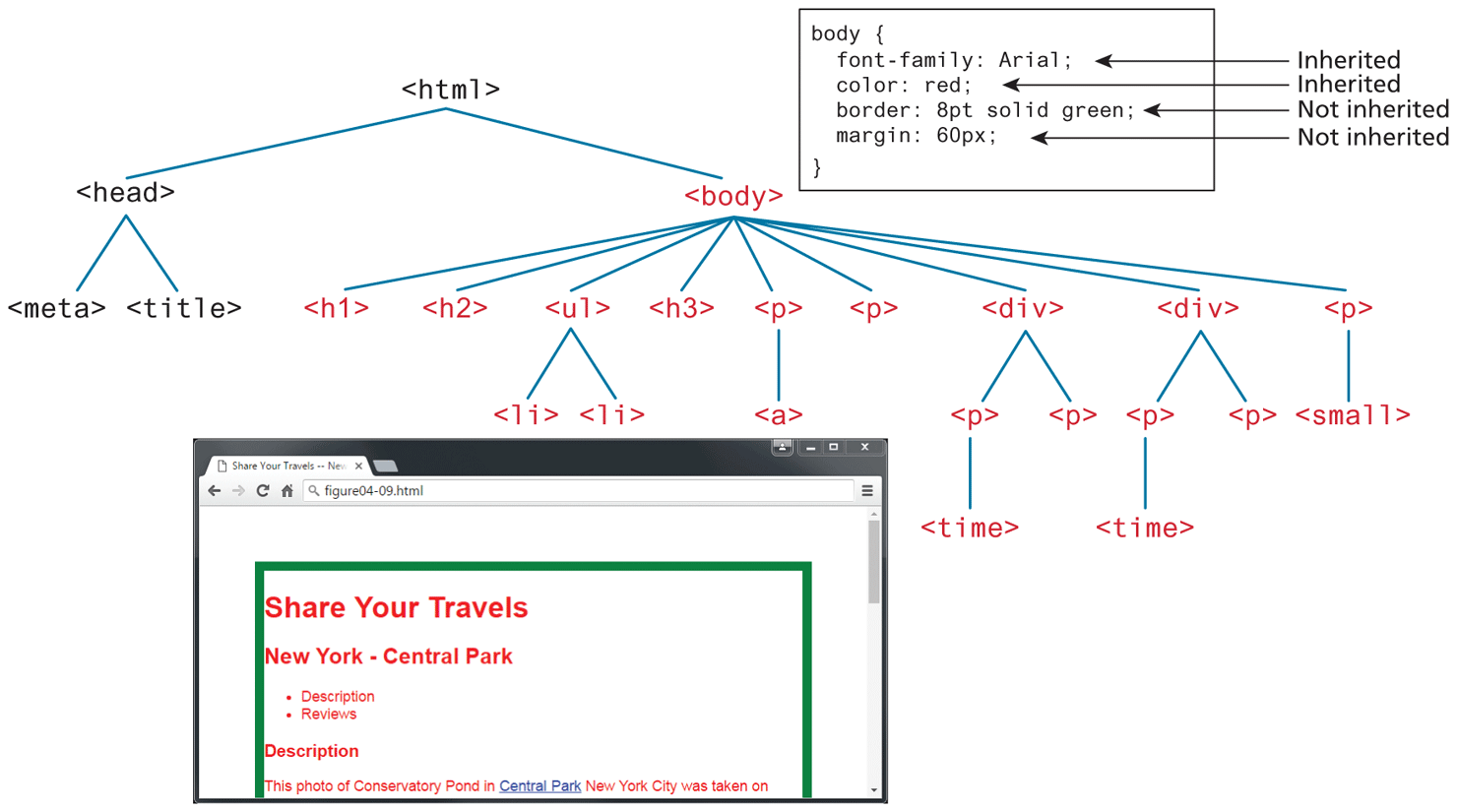
Figure 4.12 More inheritance
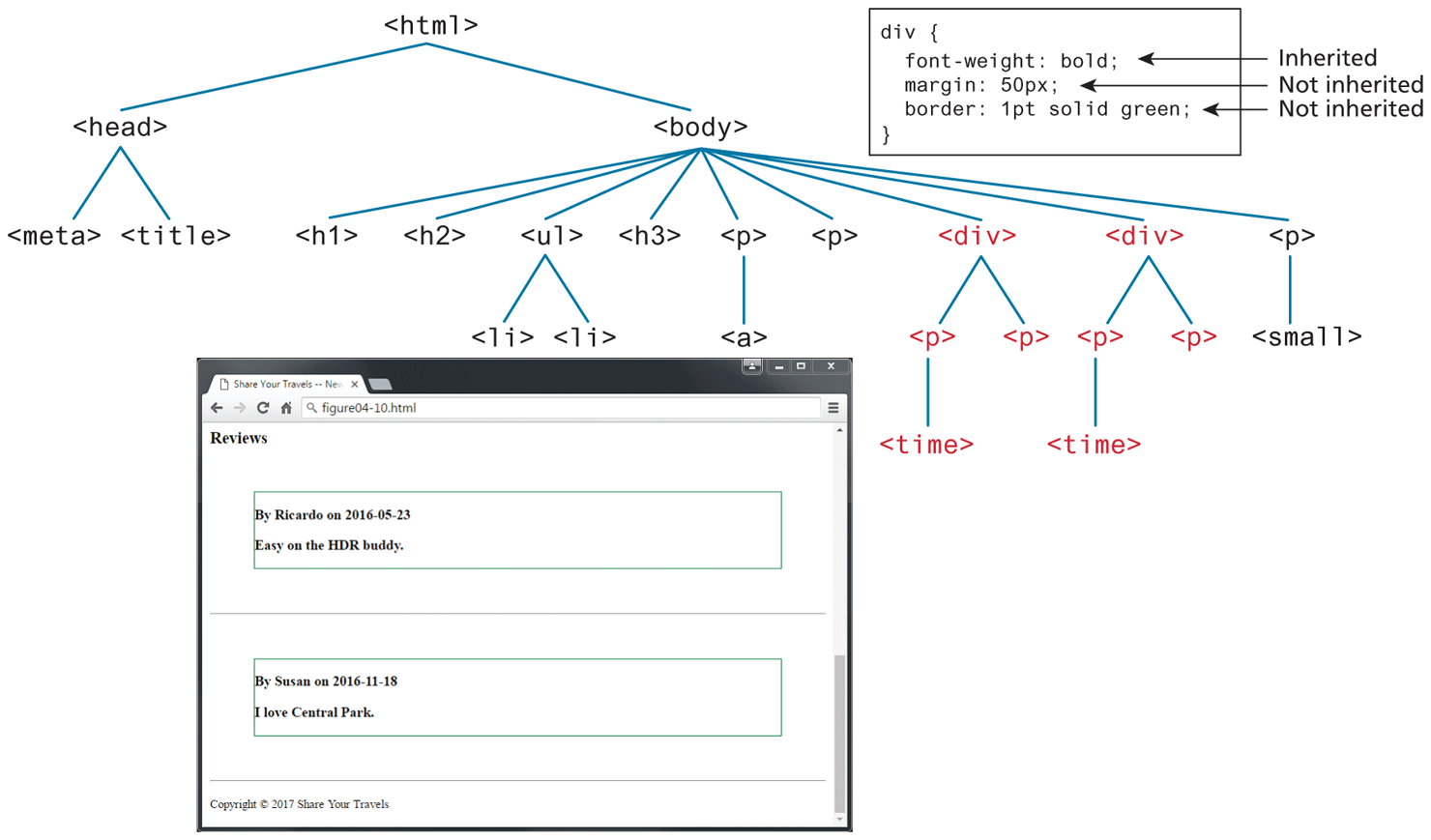
In the second example in Figure 4.12, you can assume there is no longer the body styling, but instead we have a single style rule that styles all the <div> elements. The <p> and <time> elements within the <div> inherit the bold font-weight property but not the margin or border styles.
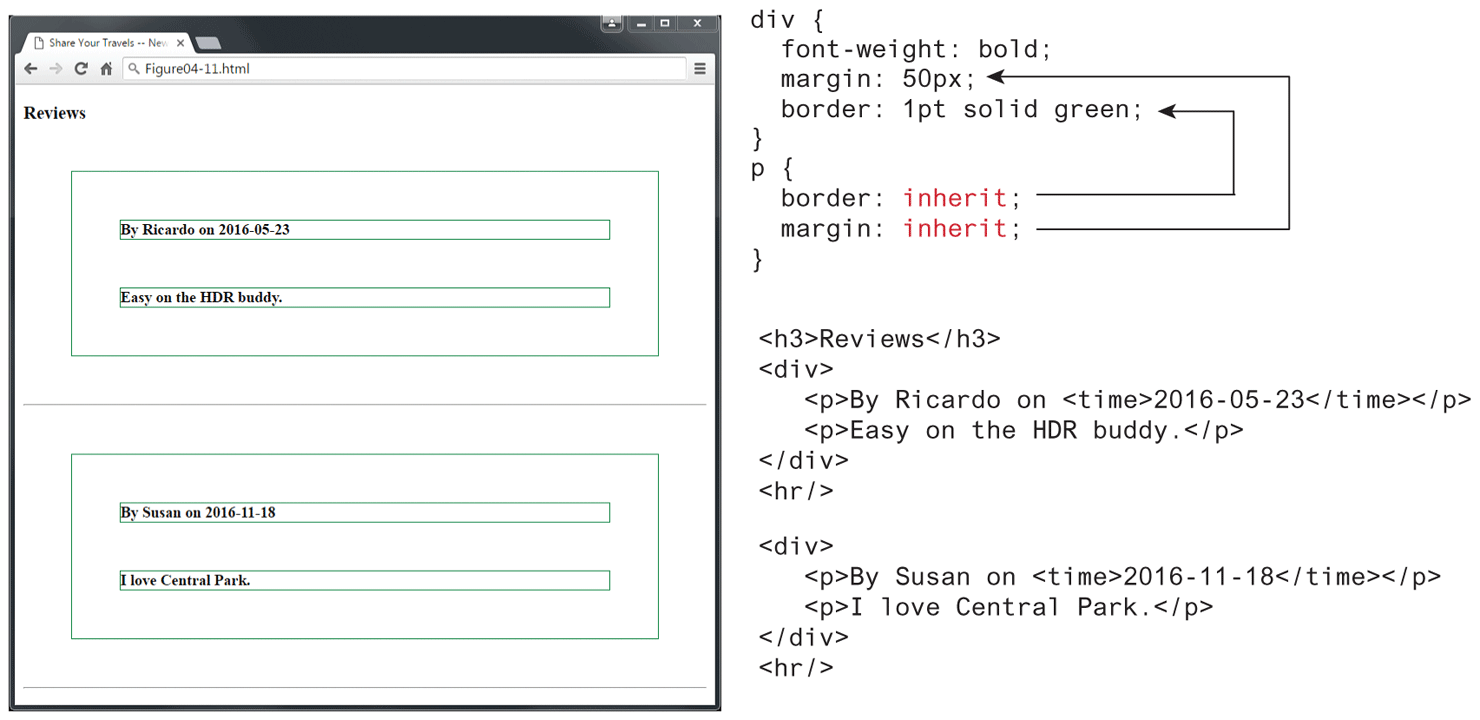
However, it is possible to tell elements to inherit properties that are normally not inheritable, as shown in Figure 4.13. In comparison to Figure 4.12, notice how the <p> elements nested within the <div> elements now inherit the border and margins of their parent.
Figure 4.13 Using the inherit value
4.5.2 Specificity
Specificity is how the browser determines which style rule takes precedence when more than one style rule could be applied to the same element. In CSS, the more specific the selector, the more it takes precedence (i.e., overrides the previous definition).
Another way to define specificity is by telling you how it works. The way that specificity works in the browser is that the browser assigns a weight to each style rule; when several rules apply, the one with the greatest weight takes precedence.
 Note
Note
Most CSS designers tend to avoid using the inherit property since it can usually be replaced with clear and obvious rules. For instance, in Figure 4.13, the use of inherit can be replaced with the more verbose, but clearer, set of rules:
div {
  font-weight: bold;
}
p, div {
  margin: 50px;
  border: 1pt solid green;
}
In the example shown in Figure 4.14, the color and font-weight properties defined in the <body> element are inheritable and thus potentially applicable to all the child elements contained within it. However, because the <div> and <p> elements also have the same properties set, they override the value defined for the <body> element because their selectors (<div> and <p>) are more specific. As a consequence, their font-weight is normal, and their text is colored either green or magenta.
Figure 4.14 Specificity
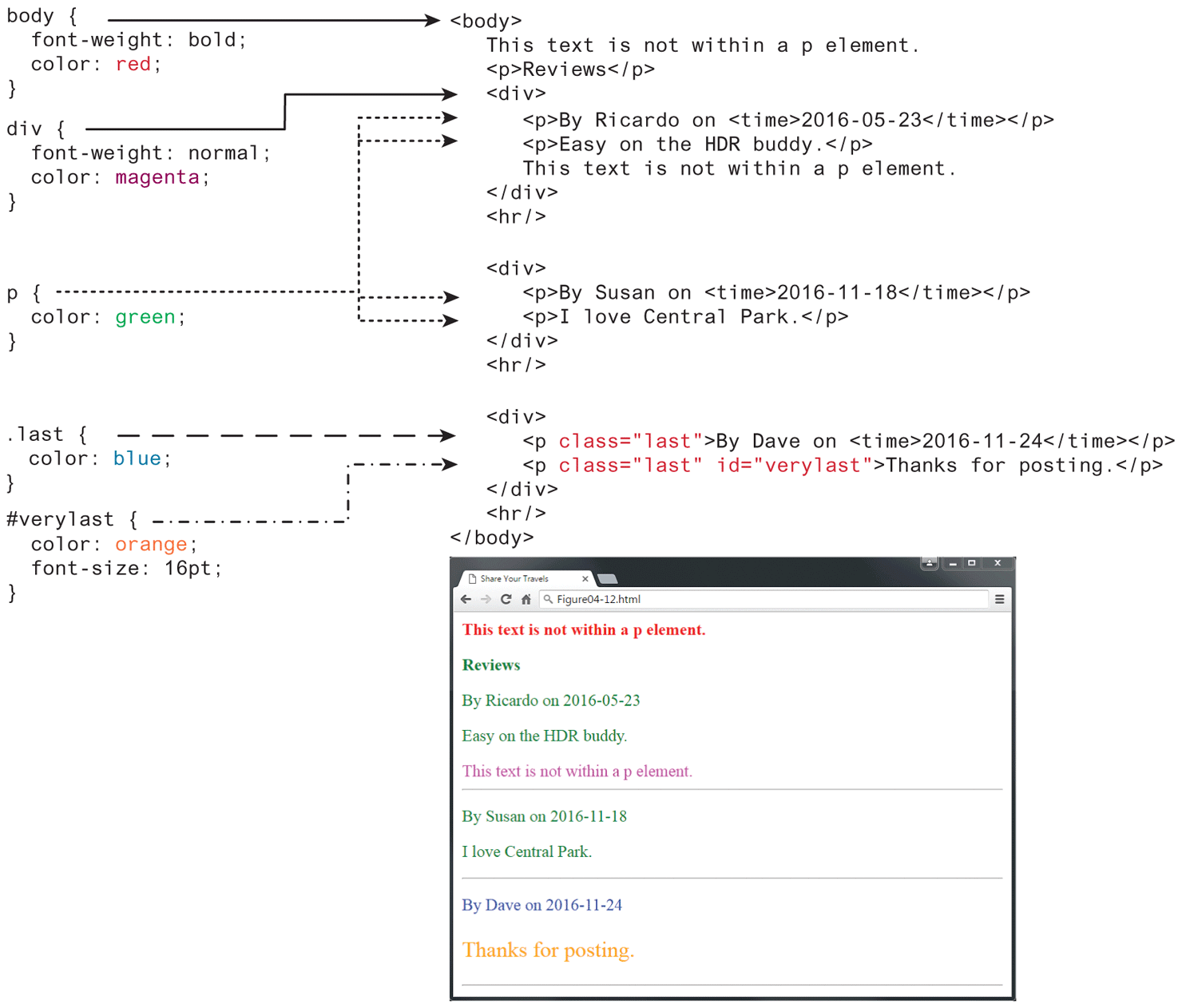
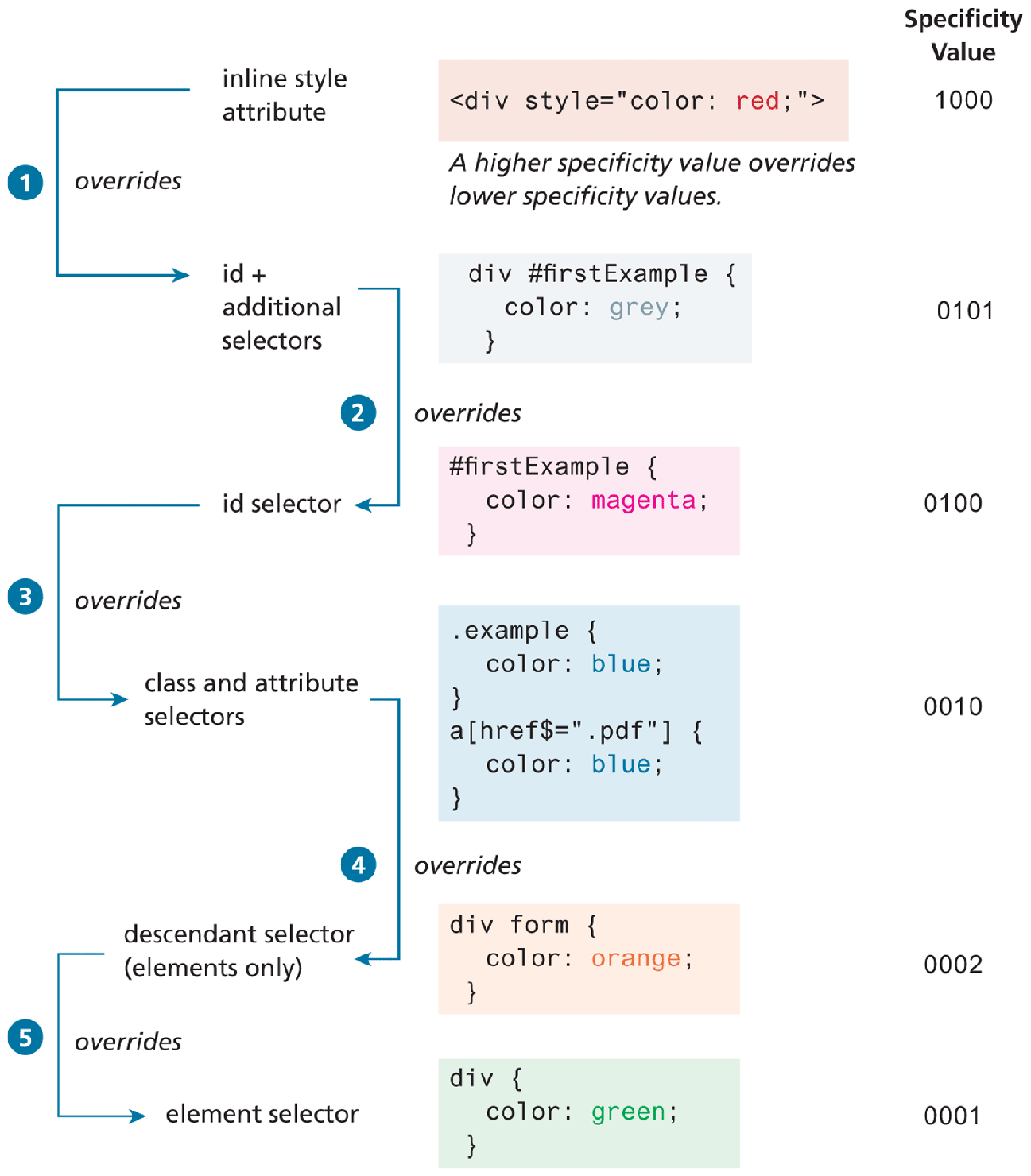
As you can see in Figure 4.14, class selectors take precedence over element selectors, and id selectors take precedence over class selectors. The precise algorithm the browser is supposed to use to determine specificity is quite complex.6 A simplified version is shown in Figure 4.15.
Figure 4.15 Specificity algorithm
4.5.3 Location
Finally, when inheritance and specificity cannot determine style precedence, the principle of location will be used. The principle of location is that when rules have the same specificity, then the latest are given more weight. For instance, an inline style will override one defined in an external author style sheet or an embedded style sheet. Similarly, an embedded style will override an equally specific rule defined in an external author style sheet if it appears after the external sheet’s <link> element. Styles defined in external author style sheet X will override styles in external author style sheet Y if X’s <link> element is after Y’s in the HTML document. Similarly, when the same style property is defined multiple times within a single declaration block, the last one will take precedence.
Figure 4.16 illustrates how location affects precedence. Can you guess what will be the color of the sample text in Figure 4.16?
Figure 4.16 Location
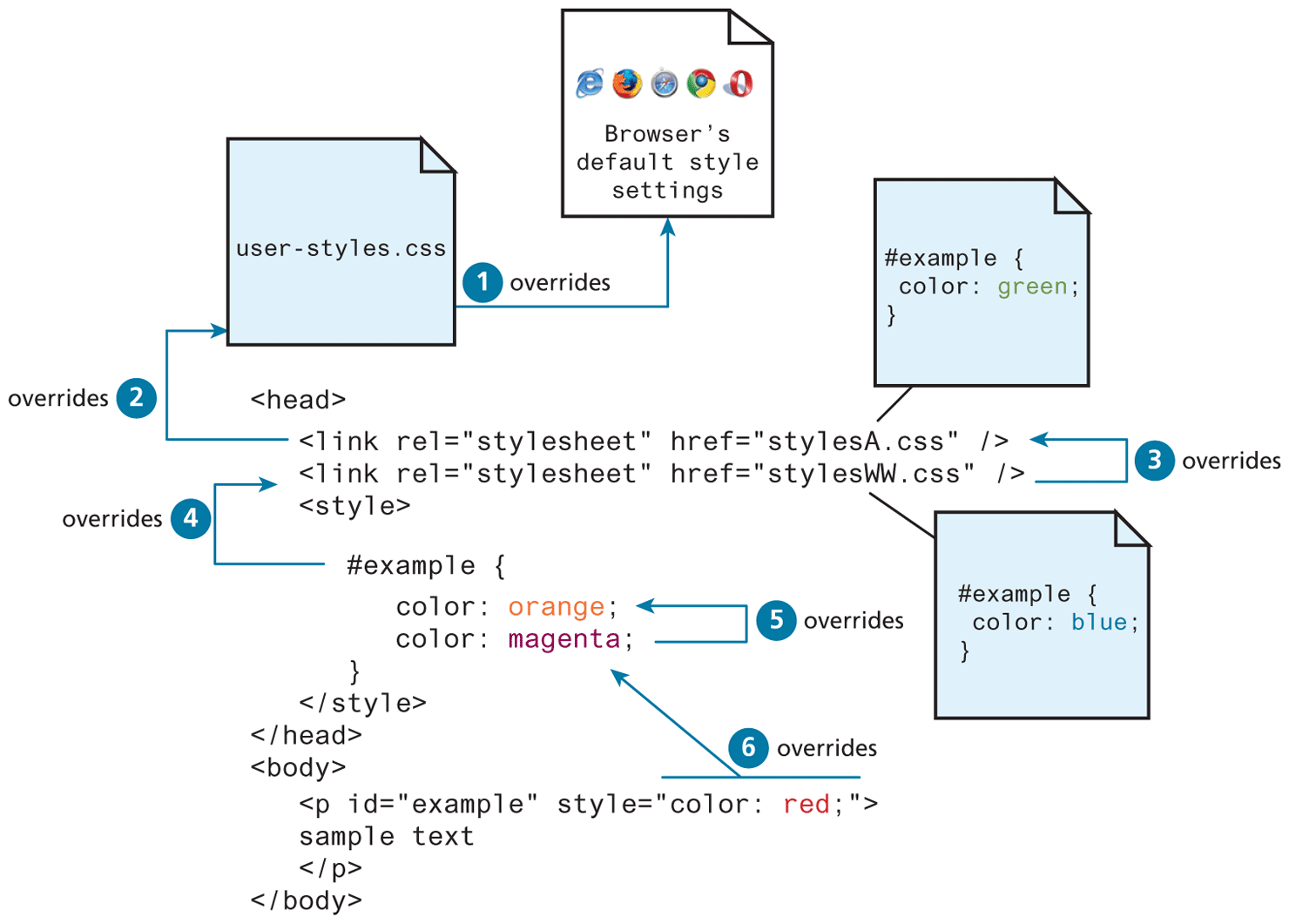
The color of the sample text in Figure 4.16 will be red. What would be the color of the sample text if there wasn’t an inline style definition?
It would be magenta.
 Pro Tip
The algorithm that is used to determine specificity of any given element is defined by the W3C as follows:
First count 1 if the declaration is from a “style” attribute in the HTML, 0 otherwise (let that value = a).
Count the number of ID attributes in the selector (let that value = b).
Count the number of class selectors, attribute selectors, and pseudo-classes in the selector (let that value = c).
Count the number of element names and pseudo-elements in the selector (let that value = d).
Finally, concatenate the four numbers a+b+c+d together to calculate the selector’s specificity.
The following sample selectors are given along with their specificity value:
<tag style="color: red"> |
1000 |
body .example |
0011 |
body .example strong |
0012 |
div#first |
0101 |
div#first .error |
0111 |
#footer .twitter a |
0111 |
#footer .twitter a:hover |
0121 |
body aside#left div#cart strong.price |
0214 |
It should be noted that in general you don’t really need to know the specificity algorithm in order to work with CSS. However, knowing it can be invaluable when one is trying to debug a CSS problem. During such a time, you might find yourself asking the question, “Why isn’t my CSS rule doing anything? Why is the browser ignoring it?” Quite often the answer to that question is that a rule with a higher specificity is taking precedence.
Pro Tip
There is one exception to the principle of location. If a property is marked with !important (which does not mean NOT important, but instead means VERY important) in an author-created style rule, then it will override any other author-created style regardless of its location. The only exception is a style marked with !important in a user style sheet; such a rule will override all others. Of course, very few users know how to do this, so it is a pretty uncommon scenario.