3.4 Structure of HTML Documents
Figure 3.8 illustrates one of the simplest valid HTML5 documents you can create. As can be seen in the corresponding capture of the document in a browser, such a simple document is hardly an especially exciting visual spectacle. Nonetheless, there is something to note about this example before we move on to a more complicated one.
Figure 3.8 One of the simplest possible HTML5 documents
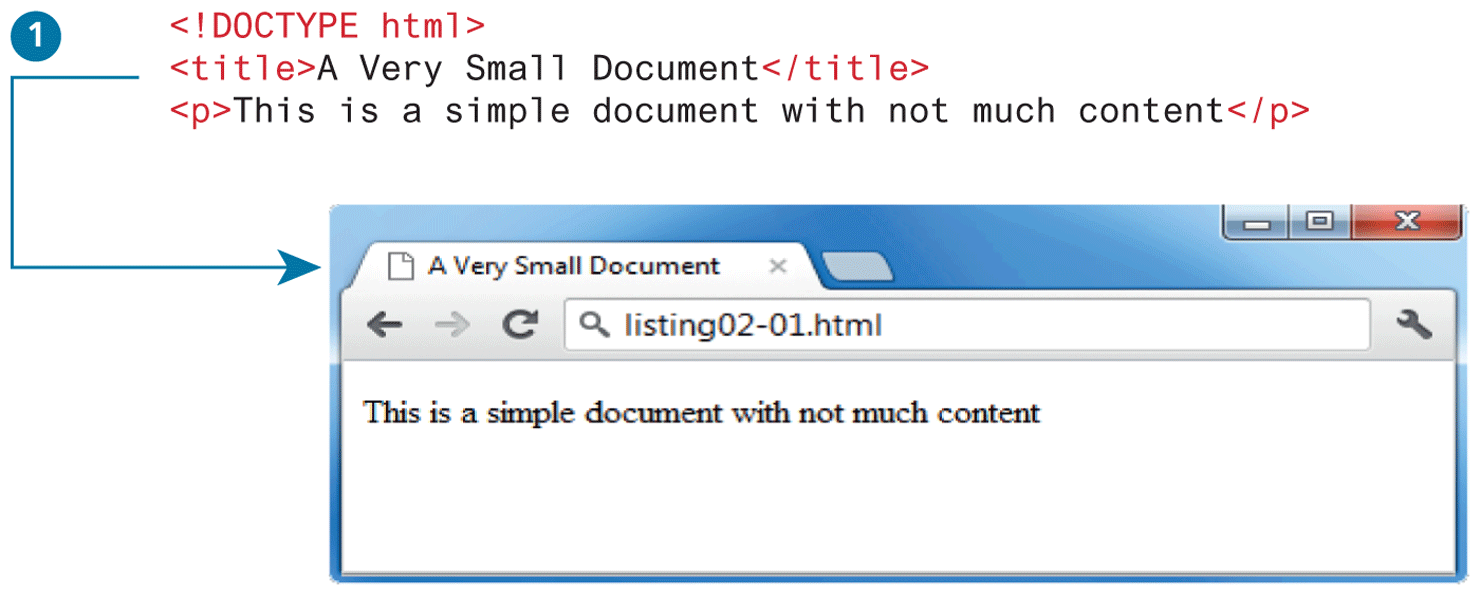
The <title> element (item  in Figure 3.8) is used to provide a broad description of the content. The title is not displayed within the browser window. Instead, the title is typically displayed by the browser in its window and/or tab, as shown in the example in Figure 3.8. The title has some additional uses that are also important to know. The title is used by the browser for its bookmarks and its browser history list. The operating system might also use the page’s title, for instance, in the Windows taskbar or in the Mac dock. Perhaps even more important than any of the aforementioned reasons, search engines will typically use the page’s title as the linked text in their search engine result pages.
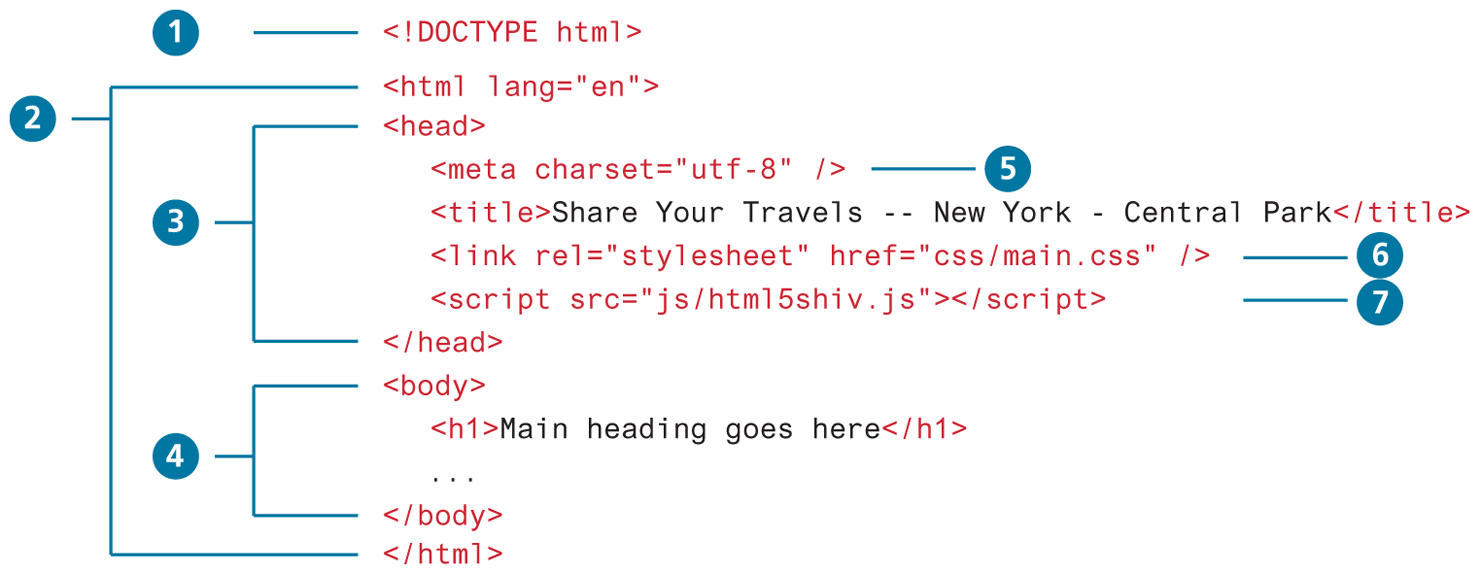
For readers with some familiarity with XHTML or HTML 4.01, this listing will appear to be missing some important elements. Indeed, in previous versions, a valid HTML document required additional structure. Figure 3.9 illustrates a more complete HTML5 document that includes these other structural elements as well as some other common HTML elements.
Figure 3.9 Structure elements of an HTML5 document
 Pro Tip
The <title> element plays an important role in search engine optimization (SEO), that is, in improving a page’s rank (its position in the results page after a search) in most search engines. While each search engine uses different algorithms for determining a page’s rank, the title (and the major headings) provides a key role in determining what a given page is about.
As a result, be sure that a page’s title text briefly summarizes the document’s content. As well, put the most important content first in the title. Most browsers limit the length of the title that is displayed in the tab or window title to about 60 characters. Chapter 18 goes into far greater detail on SEO.
In comparison to Figure 3.8, the markup in Figure 3.9 is somewhat more complicated. Let’s examine the various structural elements in more detail.
3.4.1 Doctype
Item in Figure 3.9 points to the DOCTYPE declaration, which tells the browser (or any other client software that is reading this HTML document) what type of document it is about to process. Notice that it does not indicate what version of HTML is contained within the document; it only specifies that it contains HTML. The HTML5 doctype is quite short in comparison to one of the older doctype specifications for XHTML:
<!DOCTYPE html PUBLIC "-//W3C//DTD XHTML 1.0 Transitional//EN""http://www.w3.org/TR/xhtml1/DTD/xhtml1-transitional.dtd">
The XHTML doctype instructed the browser to follow XHTML rules. In the early years of the 2000s, not every browser followed the W3C specifications for HTML and CSS; as support for standards developed in newer browsers, the doctype was used to tell the browser to render an HTML document using the so-called standards mode algorithm or render it with the particular browser’s older nonstandards algorithm, called quirks mode.
3.4.2 Head and Body
HTML5 does not require the use of the <html>, <head>, and <body> elements (items  ,
,  , and
, and  in Figure 3.9). However, in XHTML they were required, and most web authors continue to use them. The
 <html> element is sometimes called the root element as it contains all the other HTML elements in the document. Notice that it also has a lang attribute. This optional attribute tells the browser the natural language that is being used for textual content in the HTML document, which is English in this example. This doesn’t change how the document is rendered in the browser; rather, screen reader software can use this information to determine the correct language to use when speaking the content.
 Note
Note
In HTML5, the use of the <html>, <head>, and <body> elements is optional and even in an older, non-HTML5 browser your page will work fine without them (as the browser inserts them for you). However, for conformity with older standards, this text’s examples will continue to use them.
HTML pages are divided into two sections: the head and the body, which correspond to the <head> and <body> elements. The head contains descriptive elements about the document, such as its title, any style sheets or JavaScript files it uses, and other types of meta information used by search engines and other programs. The body contains content (both HTML elements and regular text) that will be displayed by the browser. The rest of this chapter and the next chapter will cover the HTML that will appear within the body.
You will notice that the <head> element in Figure 3.9 contains a variety of additional elements. The first of these is the <meta> element (item  ). The example in Figure 3.9 declares that the character encoding for the document is UTF-8. Character encoding refers to which character set standard is being used to encode the characters in the document. As you may know, every character in a standard text document is represented by a standardized bit pattern. The original ASCII standard of the 1950s defined English (or more properly Latin) upper and lowercase letters as well as a variety of common punctuation symbols using 8 bits for each character. UTF-8 is a more complete variable-width encoding system that can encode all 110,000 characters in the Unicode character set (which in itself supports over 100 different language scripts).
Item  in Figure 3.9 specifies an external CSS style sheet file that is used with this document. Virtually all real-world web pages make use of style sheets to define the visual look of the HTML elements in the document. Styles can also be defined within an HTML document (using the
 <style> element, which will be covered in Chapter 4); for consistency’s sake, most sites place most or all of their style definitions within one or more external style sheet files.
Notice that in this example, the file being referenced (main.css) resides within a subfolder called css. This is by no means a requirement. It is common practice, however, for web authors to place additional external CSS, JavaScript, and image files into their own subfolders.
Finally, item  in Figure 3.9 references an external JavaScript file. Most modern sites use at least some JavaScript. Like with style definitions, JavaScript code can be written directly within the HTML or contained within an external file. JavaScript will be covered in Chapters 8, 9, 10, and 20 (though JavaScript will be used as well in other chapters).