2.5 Web Browsers
The user experience for a website is unlike the user experience for traditional desktop software. Users do not download software; they visit a URL, which results in a web page being displayed. Although a typical web developer might not build a browser, or develop a plugin, they must understand the browser’s crucial role in web development.
2.5.1 Fetching a web page
Although we as web users might be tempted to think of an entire page being returned in a single HTTP response, this is not in fact what happens.
In reality, the experience of seeing a single web page is facilitated by the client’s browser, which requests the initial HTML page, then parses the returned HTML to find all the resources referenced from within it, like images, style sheets, and scripts. Only when all the files have been retrieved is the page fully loaded for the user, as shown in Figure 2.15. A single web page can reference dozens of files and requires many HTTP requests and responses.
Figure 2.15 Browser parsing HTML and making subsequent requests
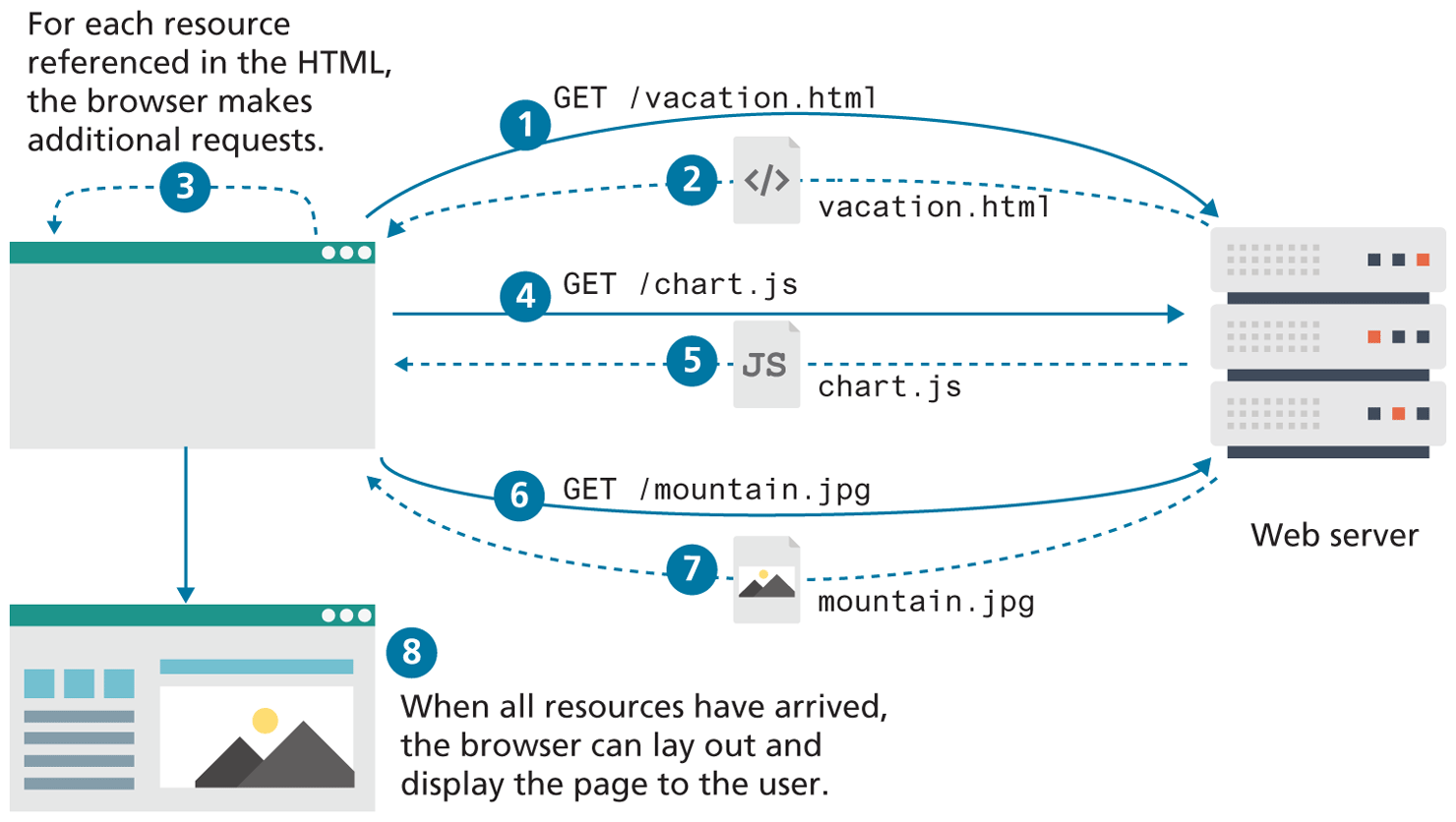
The fact that a single web page requires multiple resources, possibly from different domains, is the reality we must work with and be aware of. Modern browsers provide the developer with tools that can help us understand the HTTP traffic for a given page.
2.5.2 Browser Rendering
The algorithms within browsers to download, parse, layout, fetch assets, and create the final interactive page for the user are commonly referred to collectively as the rendering of the page and is a matter of great interest to web browser creators. This complex process is implemented differently for each browser and is one big reason that browsers format web pages differently, and load them with differing speeds.
While the mechanics and sequence of browser fetching, parsing, layout creation and Javascript parsing are interesting, we will focus on the browser-rendering process through a user-centric lens that provides a high-level framework to understand browser-rendering algorithms.
User-centric thinking measures how humans feel about things like delays and jumpy layouts, rather than measure precise things humans don’t care about like “how long until the DOM is loaded.” For this reason, human-centric measures are categorized around perceived loading performance, interactivity, and visual stability.
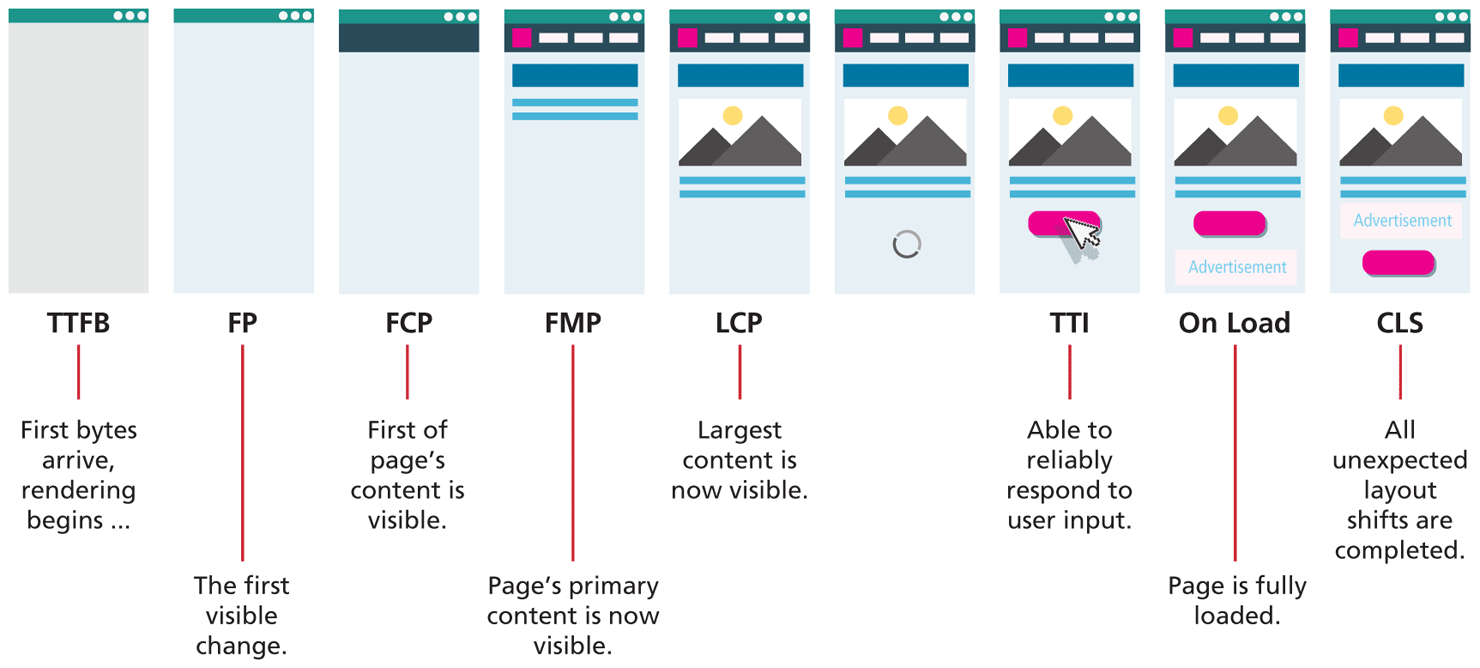
The perceived events that occur during the rendering process, depicted in Figure 2.16, are as follows:
Time to First Byte (TTFB): the time it takes for first byte for page to arrive at the browser. This metric is effectively measuring the latency (see Dive Deeper on CDNs in Chapter 1 for more detail) of the user’s connection.
First Paint (FP): the moment when a render (any change) is visible to the user in the previously blank browser screen. It tells the user that the site is working.
First Contentful Paint (FCP): measures the moment the first content is rendered. Ideally, the page’s primary navigation elements appear soon after FCP.
First Meaningful Paint (FMP): indicates when the browser has rendered the page’s primary content and the page now has some utility (it can be read). This metric was typically considered a key one in terms of performance evaluation, though Google now considers LCP to be more important.
Largest Contentful Paint (LCP): the moment in the loading process which denotes the time the largest element was drawn to the screen, be it a text block, image, or other content. This measure (at the time of writing) is considered one of the most important moments of the perceived loading process. According to Google’s Core Web Vitals metrics, to provide a good user experience, LCP should occur within 2.5 seconds after FP.8
Time to Interactive (TTI): the measure of when a page is fully ready and able to respond to user input. This measure is closest to the traditional “page ready” event. This metric is usually the other key one in terms of performance evaluation, since it determines when the user can actually use the page. As you will learn later in the book, the time it takes to parse and compile all the JavaScript on a page can dramatically lengthen the time it takes for a page to achieve TTI. According to Google’s Core Web Vitals metrics, a site should try to achieve a TTI of less than 5 seconds on average mobile hardware. This reference to average devices is important since there is a surprisingly large variance in the JavaScript parsing time with different devices. While the latest MacBook might be able to parse a single JavaScript library in under 100 ms, an older inexpensive cell phone might take 6000 ms to do that same parsing. Modern web browsers allow you to simulate a wide range of processer types and connection speeds in order to better evaluate the TTI for a wider range of users.
On Load: the event indicating everything is completely ready.
Cumulative Layout Shift (CLS): is not so much a measure of speed, but rather a measure of stability that explores how much a browser adjusts and moves content while preparing the final rendering. Have you ever tried to click on a link, but in the interval between moving your mouse and your actual click, the page has changed, for instance, added an advertisement above the content you are trying to click, and this has shifted the link lower and you ended up clicking the advertisement instead? If so, then you have experienced layout shift.
Figure 2.16 Visualizing the key events in the rendering timeline for a website
It should be noted that the rendering process does not completely stop when the page is loaded, since the page must be redrawn in response to user events, such as clicks, scrolls, CSS hovers, and JavaScript processing. This makes browser rendering an ongoing area of improvement in all browsers, and a big reason modern tools exist to profile how your webpage is using resources. These rendering implementations not only differentiate browsers, but they provide the framework that you can use to analyze and improve your websites, as you will see later in Chapter 18.
2.5.3 Browser Caching
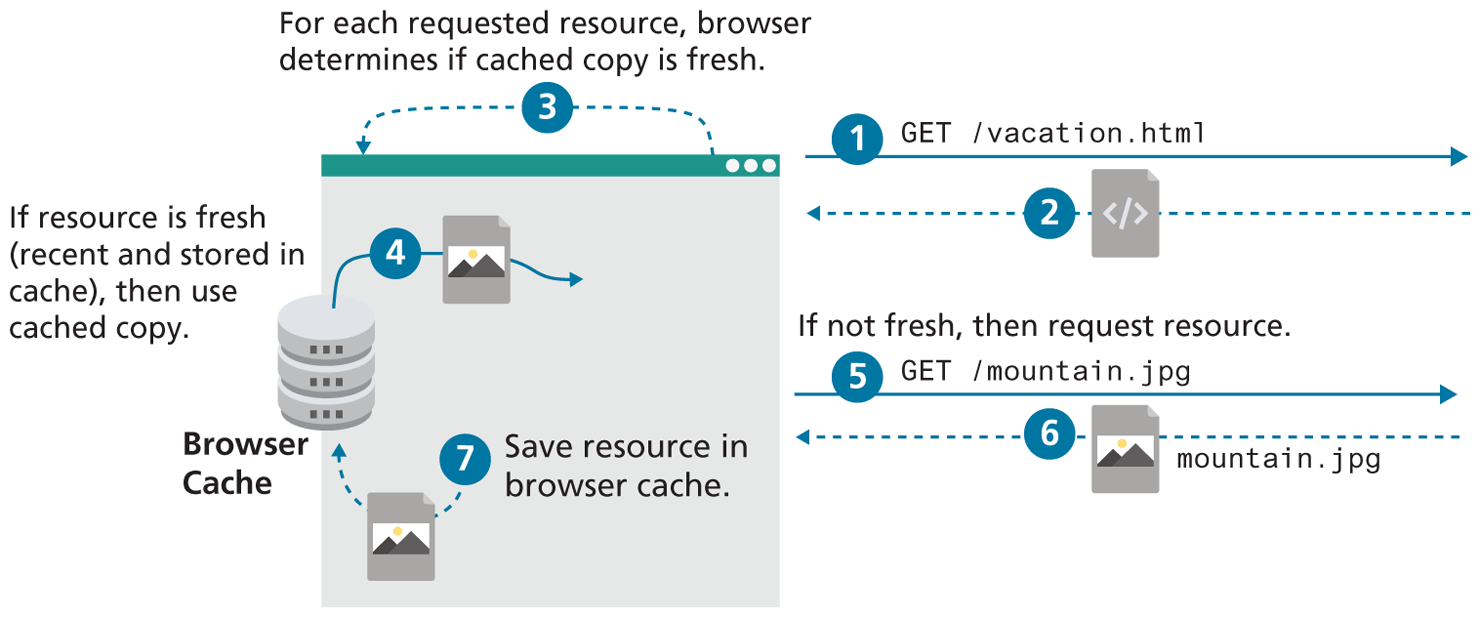
Once a webpage has been downloaded from the server, it’s possible that the user, a short time later, wants to see the same web page and refreshes the browser or re-requests the URL. Although some content might have changed (say a new blog post in the HTML), the majority of the referenced files are likely to be unchanged (i.e., “fresh” as illustrated in Figure 2.17), so they needn’t be redownloaded. Browser caching has a significant impact in reducing network traffic and will be come up again in greater detail throughout this book.
Figure 2.17 Illustration of browser caching, using cached resources
2.5.4 Browser features
Once upon a time, browsers had very few features aside from the minimum requirements of displaying web pages, and perhaps managing bookmarks. Over the decades, users have come to expect more from browsers, so now they include features, such as search engine integration, URL autocompletion, cloud caching of user history/bookmarks, phishing website detection, secure connection visualization, and much more.
These features enhance the browsing experience for users, and require that web developers test their webpages before deployment to ensure none of these features change the performance of their webpage.
2.5.5 Browser Extensions
Browser extensions extend the basic functionality of the browser. They are written in JavaScript and offer value to both developers and the general public, though they complicate matters somewhat since they can occasionally interfere with the presentation of web content.
For developers, extensions such as Firebug and YSlow offer valuable debugging and analysis tools at no cost. These tools let us find bugs or analyze the speed of our site, integrating with the browser to provide access to lots of valuable information.
For the general public, extensions can add functionality, such as auto-fill forms and passwords. Ad-blocking extensions, such as AdBlock have improved the web experience by removing intrusive ads for users but have reduced revenue and challenged current business models for webmasters relying on ad displays.