2.4 Hypertext Transfer Protocol
There are several layers of protocols in the TCP/IP model, each one building on the lower ones until we reach the highest level, the application layer, which allows for many different types of services, like Secure Shell (SSH), File Transfer Protocol (FTP), and the World Wide Web’s protocol, that is, the Hypertext Transfer Protocol (HTTP).
While the details of many of the application layer protocols are beyond the scope of this text, HTTP is an essential part of the web and hence successful developers require a deep understanding of it to build atop it successfully. We will come back to the HTTP protocol at various times in this book; each time we will focus on a different aspect of it. However, here we will just try to provide an overview of its main points.
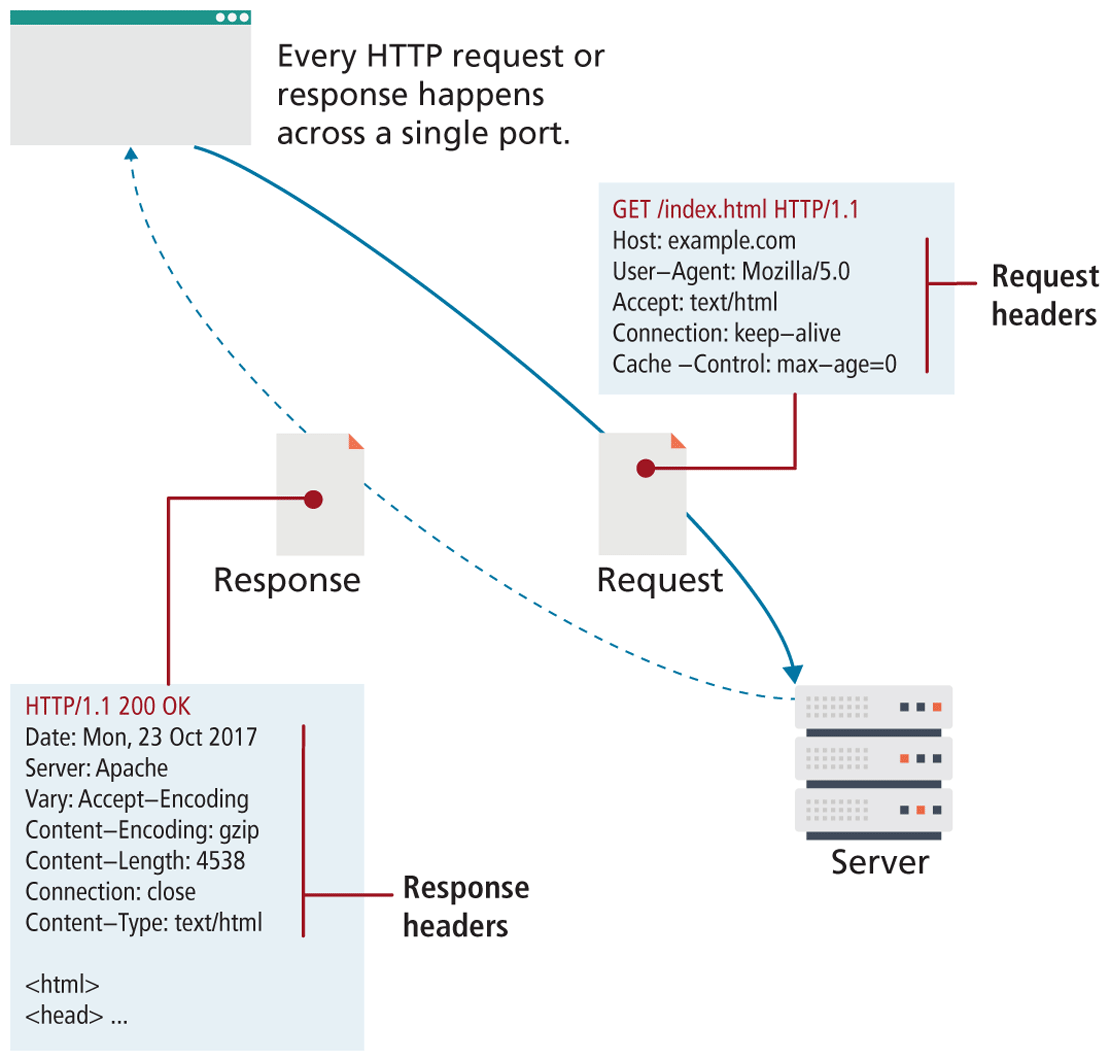
The HTTP establishes a TCP connection on port 80 (by default). The server waits for the request, and then responds with a response code, headers, and an optional message (which can include files) as shown in Figure 2.12.
Figure 2.12 HTTP illustrated
2.4.1 Headers
Headers are sent in the request from the client and received in the response from the server. These encode the parameters for the HTTP transaction, meaning they define what kind of response the server will send. Headers are one of the most powerful aspects of HTTP and unfortunately, few developers spend any time learning about them. Although there are dozens of headers,7 we will cover a few of the essential ones to give you a sense of what type of information is sent with each and every request.
Request headers include data about the client machine (as in your personal computer). Web developers can use this information for analytic reasons and for site customization. Some of these include the following:
Host. The host header was introduced in HTTP 1.1, and it allows multiple websites to be hosted from the same IP address. Since requests for different domains can arrive at the same IP, the host header tells the server which domain at this IP address we are interested in.
User-Agent. The
User-Agentstring is the most referenced header in modern web development. It tells us what kind of operating system and browser the user is running. Figure 2.13 shows a sample string and the components encoded within. These strings can be used to switch between different style sheets and to record statistical data about the site’s visitors.Figure 2.13 User-Agent components

Accept. The
Acceptheader tells the server what kind of media types the client can receive in the response. The server must adhere to these constraints and not transmit data types that are not acceptable to the client. A text browser, for example, may not accept attachment binaries, whereas a graphical browser can do so.Accept-Encoding. The
Accept-Encodingheaders specify what types of modifications can be done to the data before transmission. This is where a browser can specify that it can unzip or “deflate” files compressed with certain algorithms. Compressed transmission reduces bandwidth usage, but is only useful if the client can actually deflate and see the content.Connection. This header specifies whether the server should keep the connection open, or close it after response. Although the server can abide by the request, a response Connection header can terminate a session, even if the client requested it stay open.
Cache-Control. The
Cacheheader allows the client to control browser- caching mechanisms. This header can specify, for example, to only download the data if it is newer than a certain age, never redownload if cached, or always redownload. Proper use of theCache-Controlheader can greatly reduce bandwidth.
 Note
Note
The Server header can provide information to hackers about your infrastructure. If, for example, you are running a vulnerable version of a plugin, and your Server header declares that information to any client that asks, you could be scanned, and subsequently attacked based on that header alone. For this reason, many administrators limit this field to as little info as possible.
Response headers have information about the server answering the request and the data being sent. Some of these include the following:
Server. The
Serverheader tells the client about the server. It can include what type of operating system the server is running as well as the web server software that it is using.Last-Modified.
Last-Modifiedcontains information about when the requested resource last changed. A static file that does not change will always transmit the same last modified timestamp associated with the file. This allows cache mechanisms (like theCache-Controlrequest header) to decide whether to download a fresh copy of the file or use a locally cached copy.Content-Length.
Content-Lengthspecifies how large the response body (message) will be. The requesting browser can then allocate an appropriate amount of memory to receive the data. On dynamic websites where theLast-Modifiedheader changes with each request, this field can also be used to determine the “freshness” of a cached copy.Content-Type. To accompany the request header Accept, the response header
Content-Typetells the browser what type of data is attached in the body of the message. Some media-type values aretext/html,image/jpeg,image/png,application/xml, and others. Since the body data could be binary, specifying what type of file is attached is essential.Content-Encoding. Even though a client may be able to gzip decompress files and specified so in the
Accept-Encodingheader, the server may or may not choose to encode the file. In any case, the server must specify to the client how the content was encoded so that it can be decompressed if need be.
2.4.2 Request Methods
The HTTP protocol defines several different types of requests (also called HTTP methods or verbs), each with a different intent and characteristics. The most common requests are the GET and POST request, along with the HEAD request. In Chapter 13, you will make use of the PUT and DELETE requests when creating an API in Node. Other HTTP verbs such as CONNECT, TRACE, and OPTIONS are less commonly used and are not covered in the book.
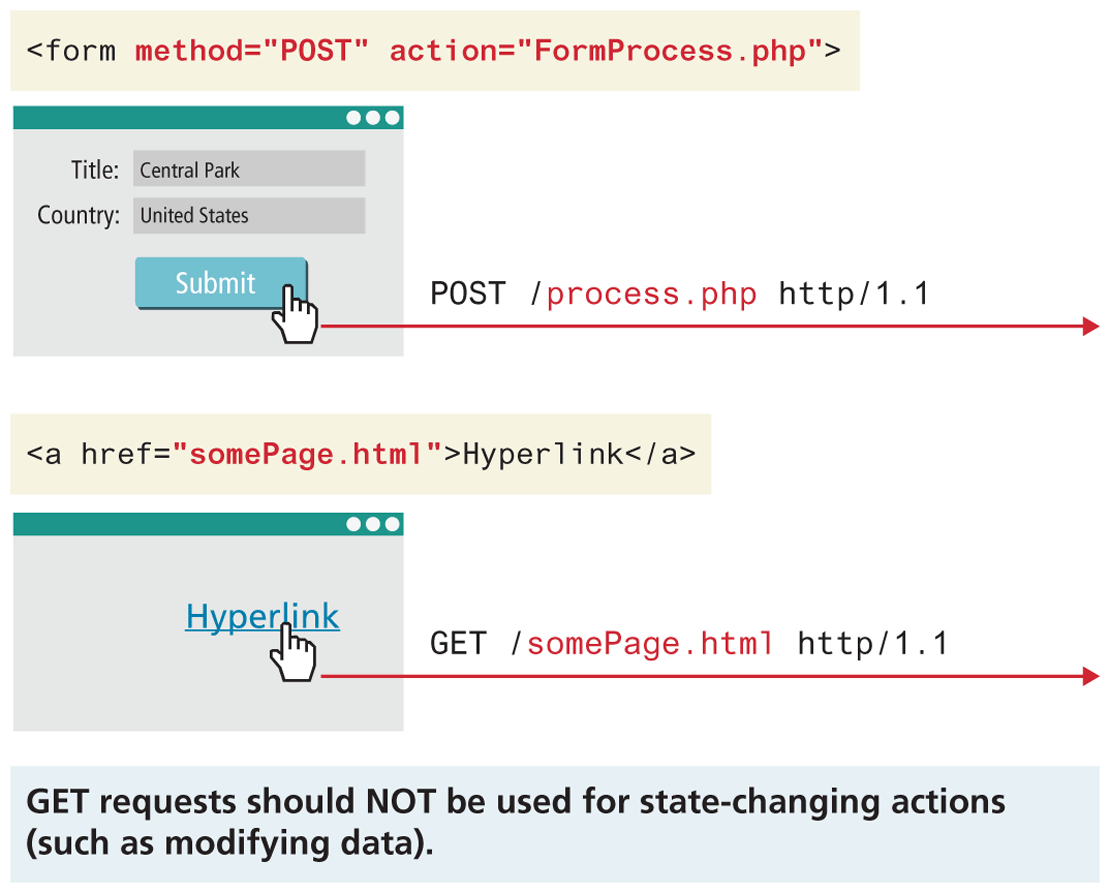
The most common type of HTTP request is the GET request. In this request, one is asking for a resource located at a specified URL to be retrieved. Whenever you click on a link, type in a URL in your browser, or click on a bookmark, you are usually making a GET request.
Data can also be transmitted through a GET request, through the URL as a query string, something you saw in back in Section 2.3.5, and will see again in Chapter 5.
The other common request method is the POST request. This method is normally used to transmit data to the server using an HTML form (though as we will learn in Chapter 5, a data entry form could use the GET method instead). In a POST request, data is transmitted through the header of the request, and as such is not subject to length limitations like with GET. As shown in Figure 2.13, one generally shouldn’t use GET when making any changes to data, but instead use POST (or PUT and DELETE for API-based requests). The rationale for this has to do with security and to reduce vulnerabilities around email-delivered CSRF attacks, which are covered in Chapter 16.
Figure 2.14 GET versus POST requests
A HEAD request is similar to a GET except that the response includes only the header information, and not the body that would be retrieved in a full GET. Search engines, for example, use this request to determine if a page needs to be reindexed without making unneeded requests for the body of the resource, saving bandwidth.
2.4.3 Response Codes
Response codes are integer values returned by the server as part of the response header. These codes describe the state of the request, including whether it was successful, had errors, requires permission, and more. For a complete listing, please refer to the HTTP specification. Some commonly encountered codes are listed in Table 2.1 to provide a taste of what kind of response codes exist.
Table 2.1 HTTP Response Codes
| Code | Description |
|---|---|
| 200: OK | The 200 response code means that the request was successful. |
| 301: Moved Permanently | Tells the client that the requested resource has permanently moved. Codes like this allow search engines to update their databases to reflect the new location of the resource. Normally the new location for that resource is returned in the response. |
| 304: Not Modified | If the client requested a resource with appropriate Cache-Control headers, the response might say that the resource on the server is no newer than the one in the client cache. A response like this is just a header, since we expect the client to use a cached copy of the resource. |
| 307: Temporary redirect | This code is similar to 301, except the redirection should be considered temporary. |
| 400: Bad Request | If something about the headers or HTTP request in general is not correctly adhering to HTTP protocol, the 400 response code will inform the client. |
| 401: Unauthorized | Some web resources are protected and require the user to provide credentials to access the resource. If the client gets a 401 code, the request will have to be resent, and the user will need to provide those credentials. |
| 404: Not found | 404 codes are one of the only ones known to web users. Many browsers will display an HTML page with the 404 code to them when the requested resource was not found. |
| 414: Request URI too long | URLs have a length limitation, which varies depending on the server software in place. A 414 response code likely means too much data is likely trying to be submitted via the URL. |
| 500: Internal server error | This error provides almost no information to the client except to say the server has encountered an error. |
The codes use the first digit to indicate the category of response. 2## codes are for successful responses, 3## are for redirection-related responses, 4## codes are client errors, while 5## codes are server errors.