2.3 Uniform Resource Locators
In order to allow clients to request particular resources (files) from the server, a naming mechanism is required so that the client knows how to ask the server for that file. For the web, that naming mechanism is the Uniform Resource Locator (URL). As illustrated in Figure 2.10, it consists of two required components: the protocol used to connect and the domain (or IP address) to connect to. Optional components of the URL are the path (which identifies a file or directory to access on that server), the port to connect to, a query string, and a fragment identifier.
Figure 2.10 URL components

2.3.1 Protocol
The first part of the URL is the protocol that we are using. Recall that in Section 2.1, we listed several application layer protocols on the TCP/IP stack. Many of those protocols can appear in a URL and define what application protocols to use. Requesting ftp://example.com/abc.txt sends out an FTP request on port 21, while http://example.com/abc.txt would transmit an HTTP request on port 80.
2.3.2 Domain
The domain identifies the server from which we are requesting resources. Since the DNS system is case insensitive, this part of the URL is case insensitive. Alternatively, an IP address can be used for the domain.
2.3.3 Port
The optional port attribute allows us to specify connections to ports other than the defaults defined by the IANA authority. A port is a type of software connection point used by the underlying TCP/IP protocol and the connecting computer. If the IP address is analogous to a building address, the port number is analogous to the door number for the building.
Although the port attribute is not commonly used in production sites, it can be used to route requests to a test server, to perform a stress test, or even to circumvent Internet filters. If no port is specified, the protocol component of a URL determines which port to use. For instance, port 80 is the default port for web-related HTTP requests; for FTP it is 21, for HTTPS it is 443, and for MySQL it is 3306.
If you wish to use a different port, the syntax for the port is to add a colon after the domain, then specify an integer port number. Thus, for instance, to connect to our server on port 8080, we would specify the URL as http://funwebdev.com:8080/.
2.3.4 Path
The path is a familiar concept to anyone who has ever used a computer file system. The root of a web server corresponds to a folder somewhere on that server. On many Linux servers that path is /var/www/html/ or something similar (for Windows IIS machines it is often /inetpub/wwwroot/).
The path is optional. However, when requesting a folder or the top-level page of a domain, the web server will decide which file to send you. On Apache servers, it is generally index.html or index.php. Windows servers sometimes use Default .html or Default.aspx. The default names can always be configured and changed.
 Note
Note
The path on a Windows server is case insensitive. However, on non-Windows servers (which is the majority of servers), the path is case sensitive. This is often a real gotcha for students when referencing files in HTML and CSS. If the student is using a Windows computer for her development work, the underlying Windows operating system doesn’t care about the case of folders and file names. But when the website is uploaded to a web server that is not using Windows, then case matters. For this reason, it is a common convention among web developers to stick with lowercase for all folders and files.
2.3.5 Query String
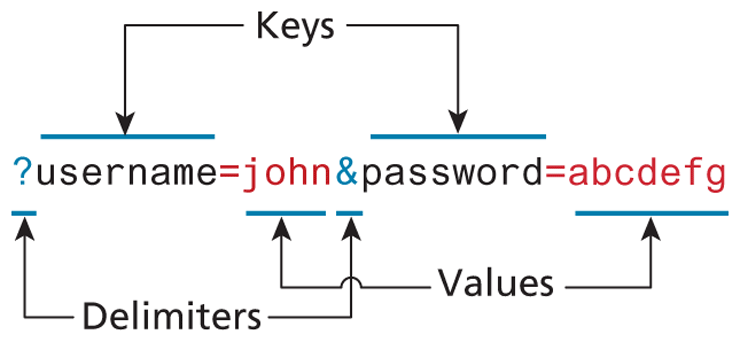
Query strings will be covered in depth when we learn more about HTML forms and server-side programming. They are a critical way of passing information, such as user form input from the client to the server. In URLs, they are encoded as key-value pairs delimited by & symbols and preceded by the? symbol. The components for a query string encoding a username and password are illustrated in Figure 2.11.
Figure 2.11 Query string components
2.3.6 Fragment
The last part of a URL is the optional fragment. This is used as a way of requesting a portion of a page. Browsers will see the fragment in the URL, seek out the fragment tag anchor in the HTML, and scroll the website down to it. Many early websites would have one page with links to content within that page using fragments and “back to top” links in each section.