2.2 Domain Name System
In the previous section, you learned about IP addresses and how they are an essential feature of how the Internet works. As elegant as IP addresses may be, human beings do not enjoy having to recall long strings of numbers. One can imagine how unpleasant the Internet would be if you had to remember IP addresses instead of names. Rather than google.com, you’d have to type 216.58.216.78. If you had to type in 173.252.90.36 to visit Facebook, it is quite likely that social networking would be a less popular pastime.
Even as far back as the days of ARPANET, researchers assigned domain names to IP addresses. In those early days, the number of Internet hosts was small, so a list of a few hundred domains and associated IP addresses could be downloaded as needed from the Stanford Research Institute as a hosts file (see Pro Tip). Those key-value pairs of domain names and IP addresses allowed people to use a domain name rather than an IP address.4
As the number of computers on the Internet grew, this hosts file had to be replaced with a better, more scalable, and distributed system. This system is called the Domain Name System (DNS) and is shown in its most simplified form in Figure 2.6 (a more complete representation is shown later in Figure 2.9).
Figure 2.6 DNS overview
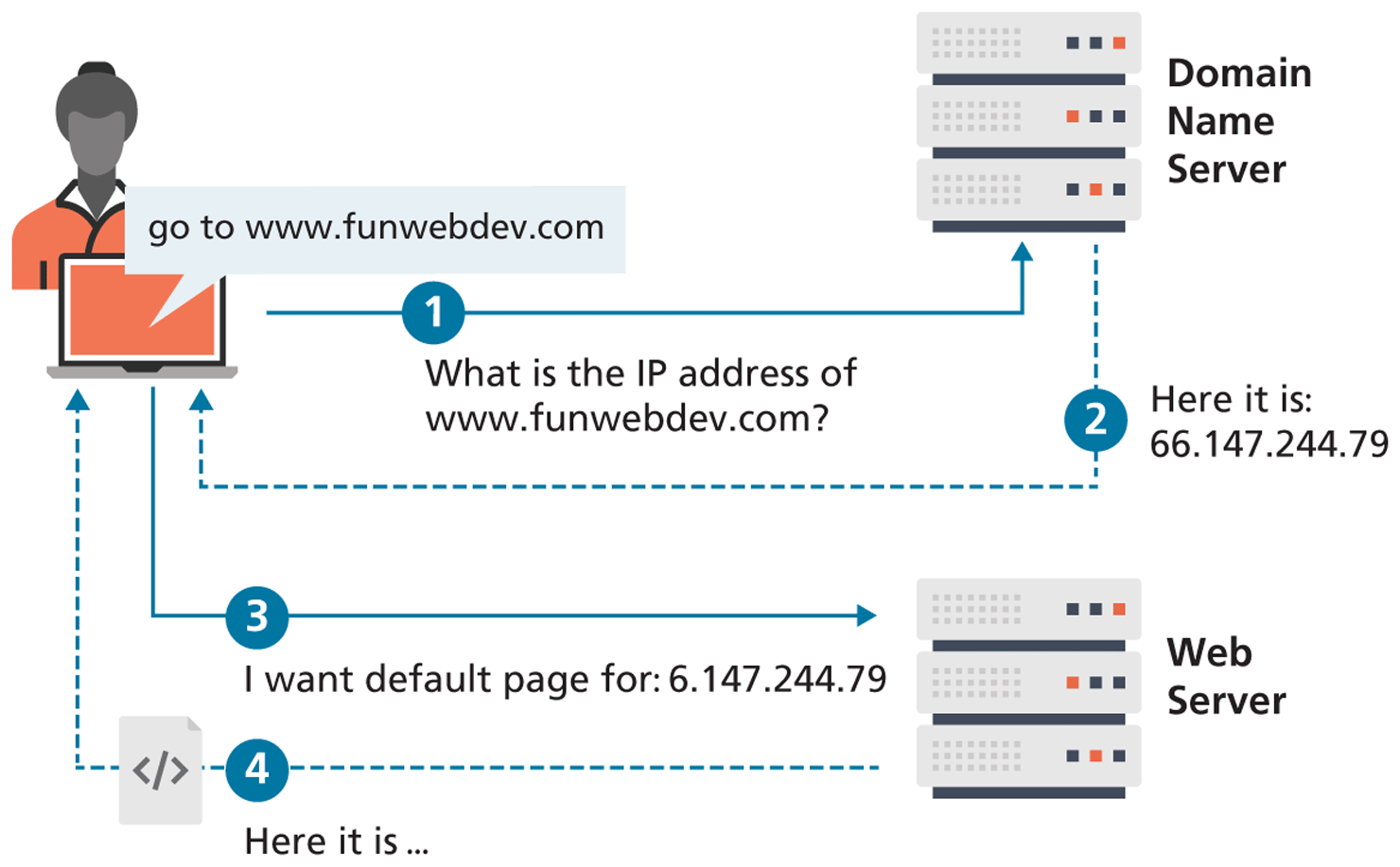
DNS is one of the core systems that make an easy-to-use Internet possible (DNS is used for email as well). The DNS system has another benefit besides ease of use. By separating the domain name of a server from its IP location, a site can move to a different location without changing its name. This means that sites and email systems can move to larger and more powerful facilities without disrupting service.
Since the entire request-response cycle can take less than a second, it is easy to forget that DNS requests are happening in all your web and email applications. Awareness and understanding of the DNS system is essential for success in developing, securing, deploying, troubleshooting, and maintaining web systems.
 Pro Tip
A remnant of those earliest days still exists on most modern computers, namely the hosts file. Inside that file (in Unix systems typically at /etc/hosts), you will see domain name mappings in the following format:
127.0.0.1 Localhost SomeLocalDomainName.comThis mechanism will be used in this book to help us develop websites on our own computers with real domain names in the address bar.
Unfortunately, this same hosts file mechanism could also allow a malicious user to reroute traffic destined for a particular domain. If a malicious user ran a server at 123.56.789.1 they could modify a user’s hosts to make facebook.com point to their malicious server. The end client would then type facebook.com into his browser and instead of routing that traffic to the legitimate facebook.com servers, it would be sent to the malicious site, where the programmer could phish, or steal data.
123.456.678.1 facebook.comFor this reason, many system administrators and most modern operating systems do not allow access to this file without an administrator password.
2.2.1 Name Levels
A domain name can be broken down into several parts, which describe a hierarchy. All domain names have at least a top-level domain (TLD) name and a second-level domain (SLD) name. Most websites also maintain a third-level WWW subdomain and perhaps others. Figure 2.7 illustrates a domain with four levels.
Figure 2.7 Domain levels
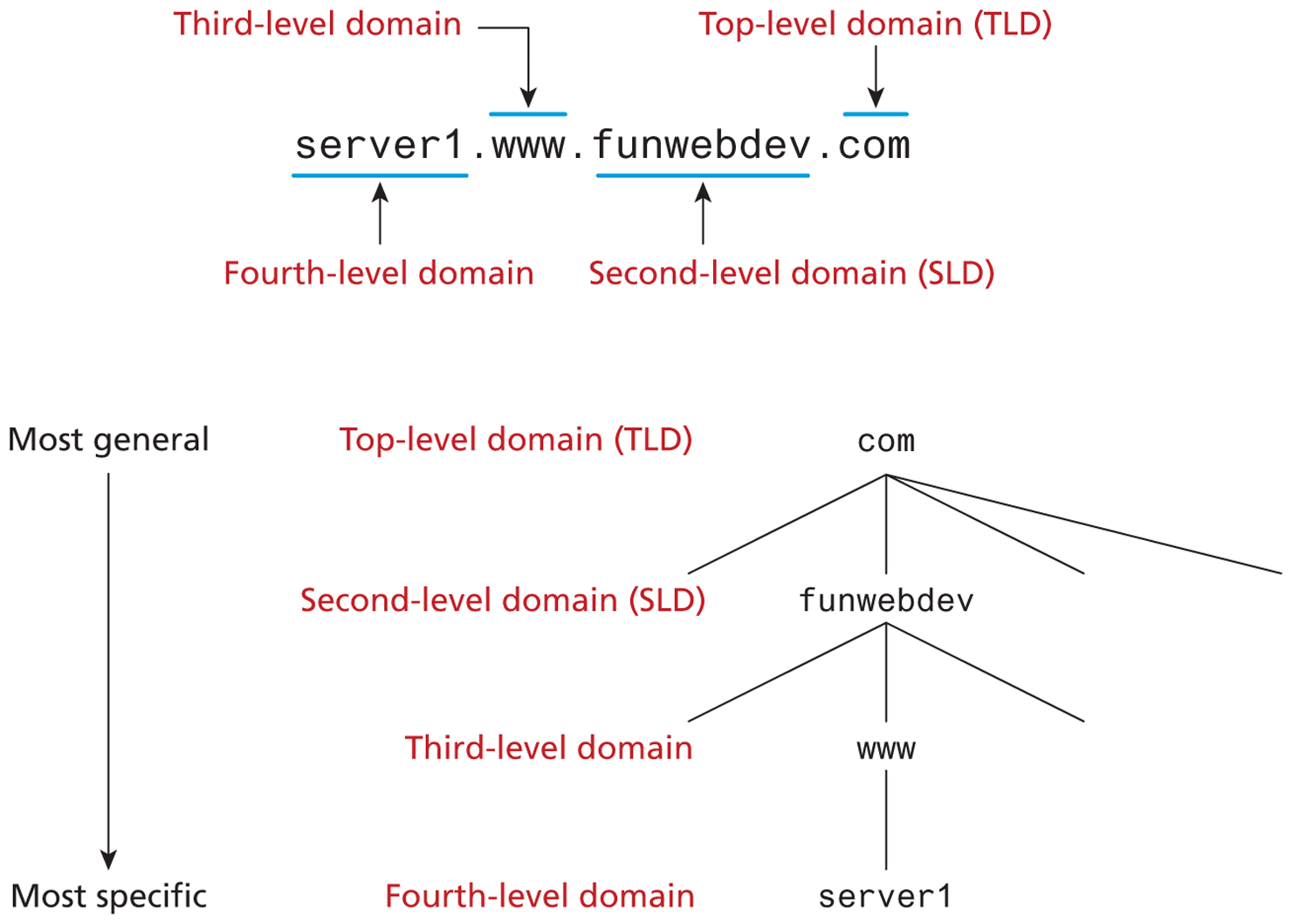
The rightmost portion of the domain name (to the right of the rightmost period) is called the top-level domain. For the top level of a domain, we are limited to two broad categories, plus a third reserved for other use. They are:
Generic top-level domain (gTLD)
Unrestricted. TLDs include .com, .net, .org, and .info.
Sponsored. TLDs including .gov, .mil, .edu, and others. These domains can have requirements for ownership and thus new second-level domains must have permission from the sponsor before acquiring a new address.
New. Starting in June 2012, ICANN invited companies to launch new TLDs in order to provide more choice than the handful of TLD that existed to date. Since then over 1000 new TLD have been created including .art, .cash, .cool, .jobs, .tax and so on. You can now purchase domain names under these new TLD at most registrars.
Country code top-level domain (ccTLD)
TLDs include .us, .ca, .uk, and .au. At the time of writing, there were 252 codes registered.5 These codes are under the control of the countries which they represent, which is why each is administered differently. In the United Kingdom, for example, commercial entities and businesses must register subdomains to co.uk rather than second-level domains directly. In Canada, .ca domains can be obtained by any person, company, or organization living or doing business in Canada. Other countries have peculiar extensions with commercial viability (such as .tv for Tuvalu) and have begun allowing unrestricted use to generate revenue.
Internationalized top-level domain name (IDN) allows domains to use non-ascii characters and has been deployed since 2009. There are over 9 million IDN domains.6
Interestingly, the mechanism to encode domain names in any language is called punycode, and it simply translates the characters from other languages into ascii encodable equivalents.
arpaThe domain .arpa was the first assigned top-level domain. It is still assigned and used for reverse DNS lookups (i.e., finding the domain name of an IP address).
In a domain like funwebdev.com, the “.com” is the top-level domain and funwebdev is called the second-level domain. Normally, it is the second-level domains that one registers.
There are few restrictions on second-level domains aside from those imposed by the registrar (defined in the next section). Except for internationalized domain names, we are restricted to the characters A–Z, 0–9, and the “–” character. Since domain names are case-insensitive, a–z can also be used interchangeably.
The owner of a second-level domain can elect to have subdomains if they so choose, in which case those subdomains are prepended to the base hostname. For example, we can create exam-answers.funwebdev.com as a domain name, where exam-answers is the subdomain (don’t bother checking—it doesn’t exist).
 Note
Note
We could go further creating sub-subdomains if we wanted to. Each further level of subdomain is prepended to the front of the hostname. This allows third level, fourth, and so on. This can be used to identify individual computers on a network all within a domain.
2.2.2 Name Registration
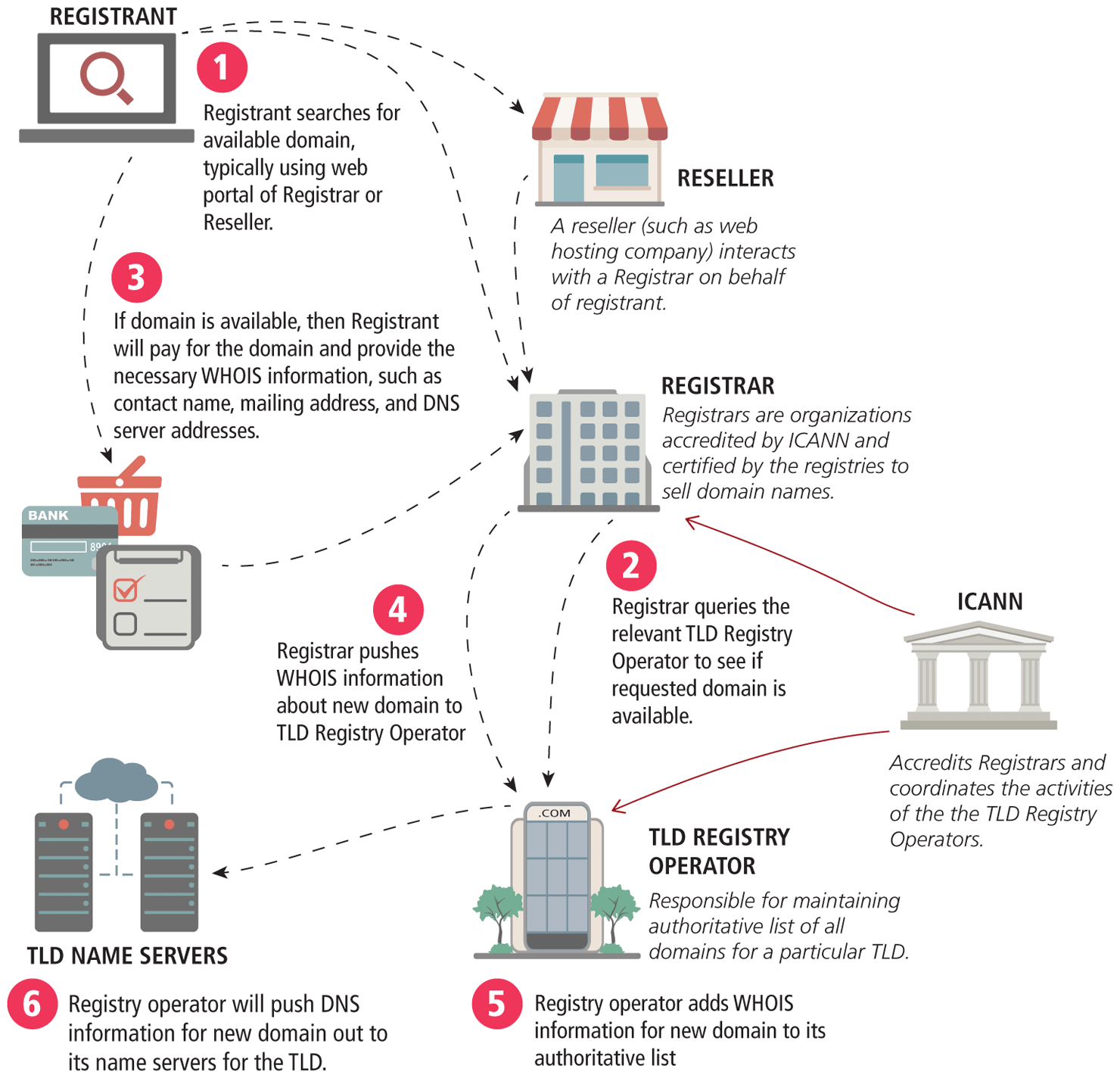
As we have seen, domain names provide a human-friendly way to identify computers on the Internet. How then are domain names assigned? Special organizations or companies called domain name registrars manage the registration of domain names. These domain name registrars are given permission to do so by the appropriate generic top-level domain (gTLD) registry and/or a country code top-level domain (ccTLD) registry.
In the 1990s, a single company (Network Solutions Inc.) handled the com, net, and org registries. By 1999, the name registration system changed to a market system in which multiple companies could compete in the domain name registration business. A single organization—the nonprofit Internet Corporation for Assigned Names and Numbers (ICANN)—still oversees the management of top-level domains, accredits registrars, and coordinates other aspects of DNS. At the time of writing this chapter, there are over 2000 different ICANN-accredited registrars worldwide. Figure 2.8 illustrates the process involved in registering a domain name.
Figure 2.8 Domain name registration process
Pro Tip
Increasingly, the practice of buying domain names and attempting to resell has gained notoriety. Although there are legitimate reasons why multiple people or companies could want the same domain name, many people attempt to make money by simply buying names that others might want, and sitting on them until someone buys the domain away to a actually use (hence the term domain squatting).
In practice, this means that when registering a domain name, you should consider other versions and variations of the name that might be worth registering at the same time. Owning a suite of domain names can help to prevent confusion, and mitigate the threat of squatters selling the domain back to you at an inflated price. It also means users should pay attention to how they enter domain names, since misspellings are a common way for malicious agents to exploit the WWW.
In Chapter 17 you will learn more about the details of domain registration.
2.2.3 Address Resolution
While domain names are certainly an easier way for users to reference a website, eventually your browser needs to know the IP address of the website in order to request any resources from it. DNS provides a mechanism for software to discover this numeric IP address. This process is referred to as address resolution.
As shown back in Figure 2.6, when you request a domain name, a computer called a domain name server will return the IP address for that domain. With that IP address, the browser can then make a request for a resource from the web server for that domain.
While Figure 2.6 provides a clear overview of the address resolution process, it is quite simplified. What actually happens during address resolution is more complicated, as can be seen in Figure 2.9.
Figure 2.9 Domain name address resolution process
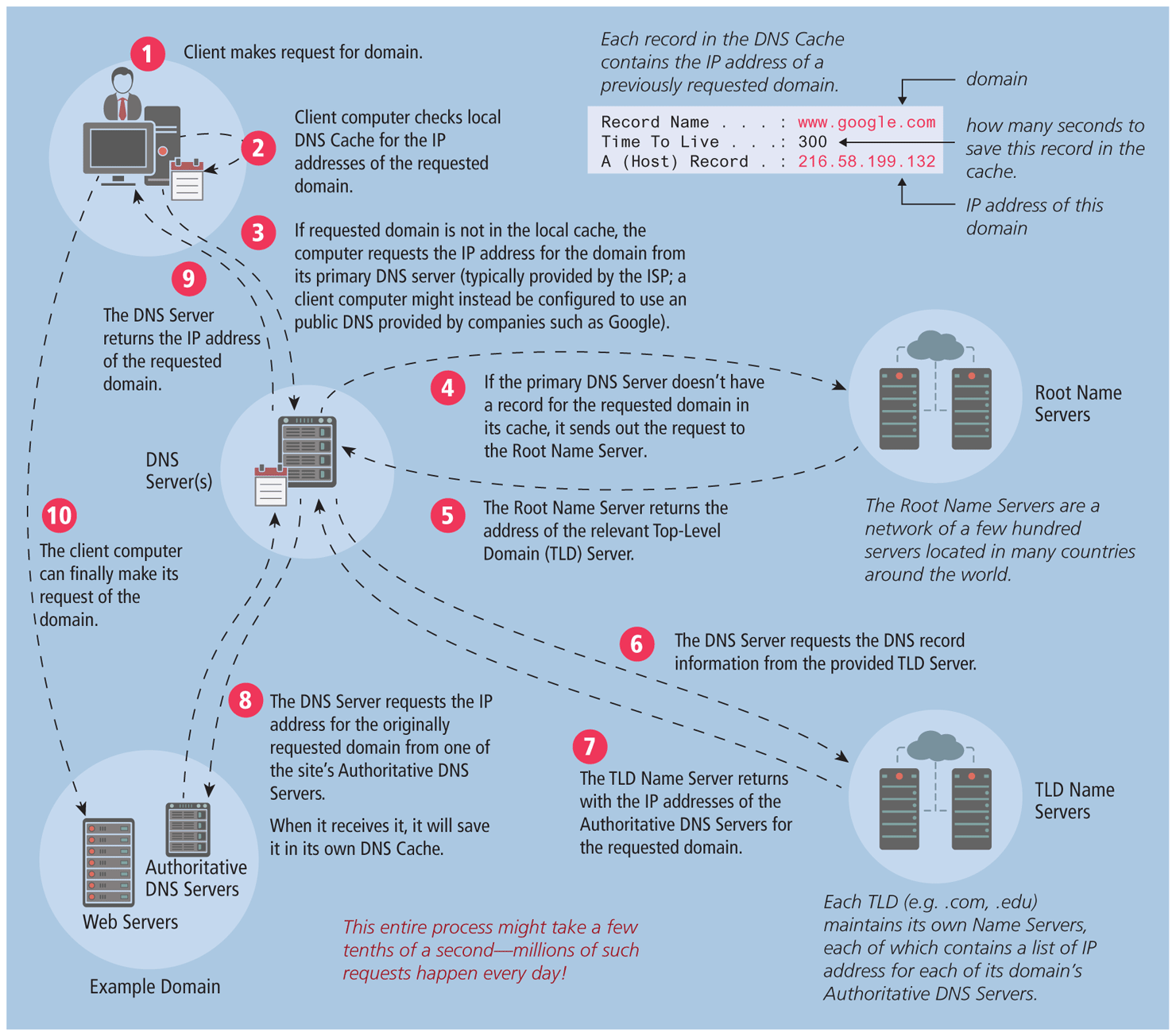
DNS is sometimes referred to as a distributed database system of name servers. Each server in this system can answer or look for the answer to questions about domains, caching results along the way. From a client’s perspective, this is like a phonebook, mapping a unique name to a number (sometimes multiple numbers).
Figure 2.9 is one of the more complicated ones in this text, so let’s examine the address resolution process in more detail.
The resolution process starts at the user’s computer. When the URL www.funwebdev.com is requested (perhaps by clicking a link or typing it in), the browser will begin by seeing if it already has the IP address for the domain in its cache. If it does, it can jump to step
 in the diagram.
If the browser doesn’t know the IP address for the requested site, it will delegate the task to the DNS resolver, a software agent that is part of the operating system. The DNS resolver also keeps a cache of frequently requested domains; if the requested domain is in its cache, then the process jumps to step
.Otherwise, it must ask for outside help, which in this case is a nearby DNS server, a special server that processes DNS requests. This might be a computer at your Internet service provider (ISP) or at your university or corporate IT department. The address of this local DNS server is usually stored in the network settings of your computer’s operating system, as can be seen in Figure 2.2. This server keeps a more substantial cache of domain name/IP address pairs. If the requested domain is in its cache, then the process jumps to step
 .
.If the local DNS server doesn’t have the IP address for the domain in its cache, then it must ask other DNS servers for the answer. Thankfully, the domain system has a great deal of redundancy built into it. This means that in general there are many servers that have the answers for any given DNS request. This redundancy exists not only at the local level (for instance, in Figure 2.9, the ISP has a primary DNS server and an alternative one as well) but at the global level as well.
If the local DNS server cannot find the answer to the request from an alternate DNS server, then it must get it from the appropriate top-level domain (TLD) name server. For funwebdev.com this is .com. Our local DNS server might already have a list of the addresses of the appropriate TLD name servers in its cache. In such a case, the process can jump to step
 .
.If the local DNS server does not already know the address of the requested TLD server (for instance, when the local DNS server is first starting up it won’t have this information), then it must ask a root name server for that information. The DNS root name servers store the addresses of TLD name servers. IANA (Internet Assigned Numbers Authority) authorizes 13 root servers, so all root requests will go to one of these 13 roots. In practice, these 13 machines are mirrored and distributed around the world (see http:/
/ www.root-servers.org/ for an interactive illustration of the current root servers); at the time of writing, there are over 500 root server machines. With the creation of new commercial top-level domains in 2012, approximately 2000 or so new TLDs has come online, creating a heavier load on these root name servers. After receiving the address of the TLD name server for the requested domain, the local DNS server can now ask the TLD name server for the address of the requested domain. As part of the domain registration process (see Figure 2.8), the address of the domain’s DNS servers are sent to the TLD name servers, so this is the information that is returned to the local DNS server in step
 .
.The user’s local DNS server can now ask the DNS server (also called a second-level name server) for the requested domain (www.funwebdev.com); it should receive the correct IP address of the web server for that domain. This address will be stored in its own cache so that future requests for this domain will be speedier. That IP address can finally be returned to the DNS resolver in the requesting computer, as shown in step
.The browser will eventually receive the correct IP address for the requested domain, as shown in step
. Note: If the local DNS server were unable to find the IP address, it would return a failed response, which in turn would cause the browser to display an error message.Now that it knows the desired IP address, the browser can finally send out the request to the web server, which should result in the web server responding with the requested resource (step
).
This process may seem overly complicated, but in practice, it happens within a few milliseconds. Moreover, once the server resolves funwebdev.com, subsequent requests for resources on funwebdev.com will be faster, since we can use the locally stored answer for the IP address rather than have to start over again at the root servers.
To facilitate system-wide caching, all DNS records contain a time to live (TTL) field, recommending how long to cache the result before requerying the name server. For more hands-on practice with the Domain Names System, please refer to Chapter 17.
Note
Every web developer should understand the practice of pointing the name servers to the web server hosting the site. Quite often, domain registrars can convince customers into purchasing hosting together with their domain. Since most users are unaware of the distinction, they do not realize that the company from which you buy web space does not need to be the same place you register the domain. Those name servers can then be updated at the registrar to point to any name servers you want. Within 48 hours, the IP-to-domain name mapping should have propagated throughout the DNS system so that anyone typing the newly registered domain gets directed to your name servers, which then resolves requests for your web server’s IP address.